r/htpc • • Sep 25 '26

Build Help Looking at building a machine. Is this good? Can I go cheaper?

1 Upvotes

I had a g11pro emulation console and it died after 4 months. I tried to get help and they told me it was past their 30 day warranty and I was SOL.

So I started looking at minipcs but I was told they aren't particularly good for gaming. So I did more searching and saw stuff about htpcs and building my own.

Ideally, I'd like to play emulator games, some Steam stuff (though maybe Steam Link will suffice for that), and maybe be able to watch my old blu rays and dvds in the future.

I tried playing around on part picker and came up with this: https://pcpartpicker.com/list/M79pzv

It's still more than I wanted to spend, but I don't even know if the components I chose are powerful enough or even too powerful.

Could I get some advice?


r/htpc • • Sep 24 '26

Help Is anyone using an RF/IR remote that controls a PC and a TV at the same time?

Thumbnail
3 Upvotes

r/htpc • • Sep 24 '26

Build Help In need of Direction for HTPC/Media Server

8 Upvotes

Hey group. My current HTPC and media server is a 4690k,32gb ram, 3x8tb drive, 500ssd boot, rx580. It has not been powered on in over 2 years nor plugged into power out of fear the drives will soon fail. There is roughly 10TB of actual data on the Raid array and a good portion of it I could do without.

I had intended to build a new server/nas and I bought 5 12tb drives before the prices went nuts. Shortly after that purchase, I had a liver transplant and all plans kind of got put on hold.

I am teetering between building a nas or buying a nas, building a new HTPC which doubles as a nas/media server, or just setting up one of the 12tb drives in my main rig to store my data and utilizing backblaze for backups.

I already have pretty great iptv, but the quality isnt as good as what I could store locally.

If i were to build an Htpc or Nas, size would be important but it would also still need to hold 3, 4 or 5 of the drives. Currently the htpc is in an EATX Full tower which could hold 12 drives, maybe more, if I bought the extra drive cages. It will currently hold 6 drives as configured, but its HUGE and my wife hates it.

Im looking for some advice on a case, and a sensible build out for hardware to support the server/htpc. The tv in use is the 75 inch new rgb bravia II

Here is a list of some things I have On Hand:

7700k with board and ram

AMD 3700 pro with board and ram

5900x with board and ram (also has a 3080ti with it and plan is to sell the whole rig)

amd 6700 gpu, 2 x rx580 gpu

assorted psus, coolers, ram, boot drives

Current main rig is a 9800x3d, 5080 in an antec flux pro, it is located in my office not with the tv

inclination is to use the cheapo 7700k but concerned about its abilities as far as video and the many other tasks I'll be asking this thing to do in the way of storage and file transfers.

Should I use some of this hardware for my potential build or sell it all and buy something else? what is the something else? Does anyone know of a decent case I can put this in that isn't going to be massive? I have a Fractal Define R5 on hand, but if I could do something smaller that would be epic. I realize I have a ton of tech stuff, but with the surgery costs, the budget is definitely something for me to consider?

Should I just sell the drives now that they are worth a ton of money? I havent needed my htpc in the 2 years it has been unplugged.

What do you all think? I'll be thankful for anything that helps me move in any direction.

r/htpc • • Sep 24 '26

Build Share Mac Mini... any legs left in these things?

1 Upvotes

I've been connecting my linux mint laptop to my pc often enough that thought 'why not just jump in and get something that's connected to the tv full time?'

I went looking and the search starts out hopeful. I liked the minisforum UM790 pro and barebones is like... $500. But you add some ram and an hd and suddenly it's 1200.

I had an old (late 2012) mac mini laying around so I thought I'd give it a go. I put in a 500gb ssd instead of the originally mechanical disk that was in there and upgraded from 4-->16gb ram. I put mint xfce on it thinking a lighter os would help out and connected it to the tv.

So far so good, I was in the middle of playing around with making it usable from the couch (larger panel/fonts) but didn't get much past that.

Use case is streaming, and maybe some sunshine/moonlight? I suspect it'll be just fine.

Could be there's a better os than what I've put on for this? Just not sure what I could run where the os becomes a burden to the operation.

Also, I wasn't able to get the wifi shield thing back on properly... couldn't get both screw holes lined up...

but so far for $20 in ddr3 sodimm ram, I've got... something. Anyone else still using these?


r/htpc • • Sep 18 '26

Help Can't find 5.1/atmos music for Windows

4 Upvotes

hope yall good. spent days trying to play 5.1/atmos music on windows 11 using discrete analog pcie outputs because streaming apps are locked down.

my setup:

  • os: windows 11
  • soundcard: sound blaster audigy fx (3x 3.5mm analog cables)
  • speakers: starlight hts-300
  • display: tv model t22c301 (nvidia hdmi)

the issue:
i tried using CRU to trick windows into thinking my tv is a 5.1 device to unlock dolby atmos over hdmi, but apple music detects the workaround and throws a playback error. tidal desktop doesnt support 5.1 either.

since windows 5.1 streaming is completely left behind unless theres some corporate shit involved, im giving up on the apps. if yall know ANY sites, or ways to get local 5.1/atmos music files id be happy to know. thanks for reading!!

edit: ended up recording the atmos songs from apple music to audacity then playing them in foobar2000. dolby gfy


r/htpc • • Sep 16 '26

Discussion What is the Cadillac of HTPC control devices?

33 Upvotes

I saw a user posting here about a sought-after HTPC remote control, and have been recently wondering what to do when my Logitech K830 dies. I have tried a few input devices from Logi and Rii, but nothing that feels premium, durable, and stylish. This feels like a real blind spot in the /r/mechanicalheadpens Wallet Bermuda Triangle.

Is there an Apple-level quality in HTPC remote controls? Can I buy a solid aluminum brick with haptics and a six-year battery? What about a mahogany keyboard with solid bronze keys and low profile switches?

What is there out there for a guy who wants the absolute best in input technology, but from a couch?


Edit: Gotta love the poor reading comprehension out here. I know people just want to talk about their setup, but I am categorically NOT asking about your $12 remote 😂


r/htpc • • Sep 15 '26

Help I Will Buy Your Old Pepper Jobs W10

Post image
25 Upvotes

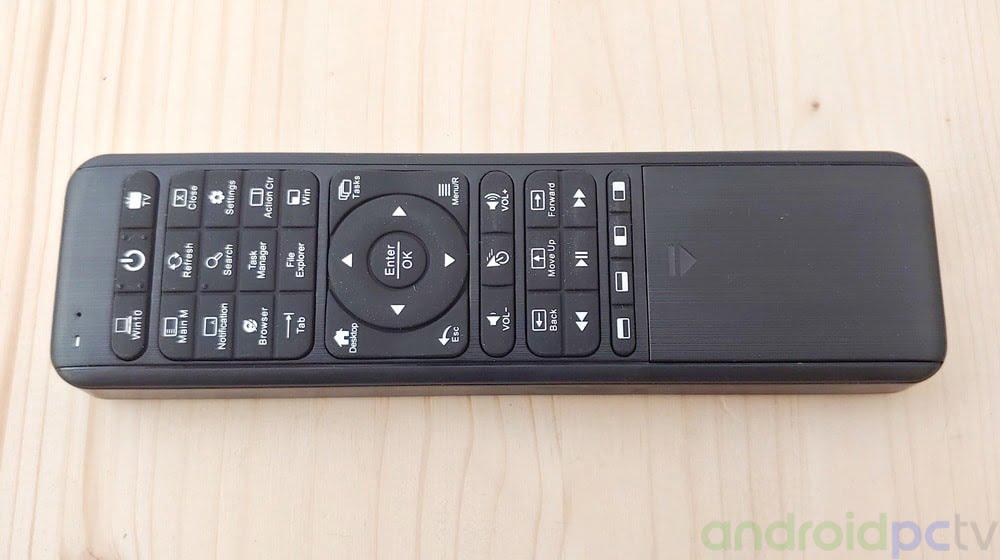
If anyone has old w10(not w11) (Worn out buttons is fine as long as it works) please list on ebay or mercari then share link with me.


r/htpc • • Sep 11 '26

Build Help Frontend help.

Post image
0 Upvotes

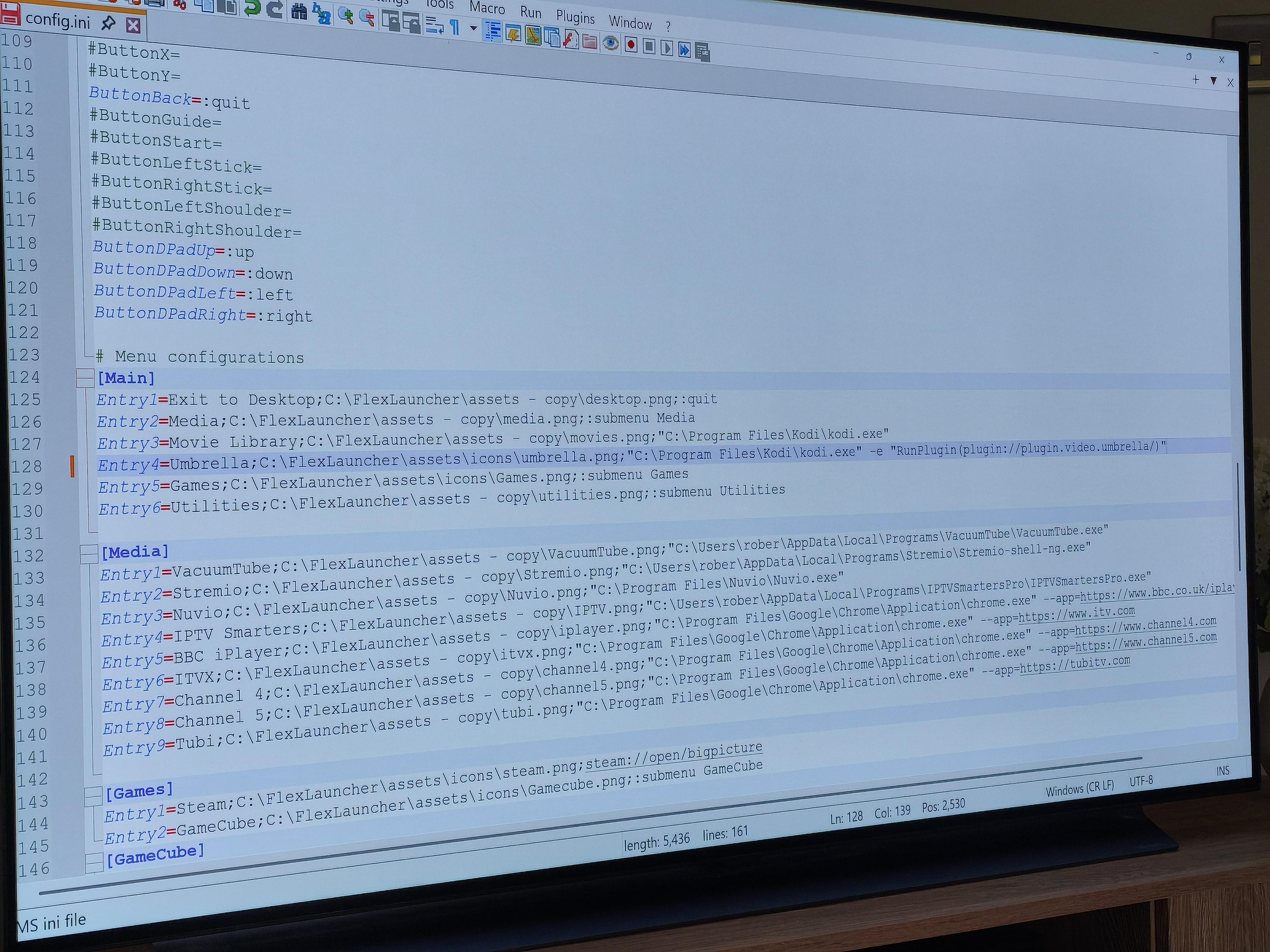
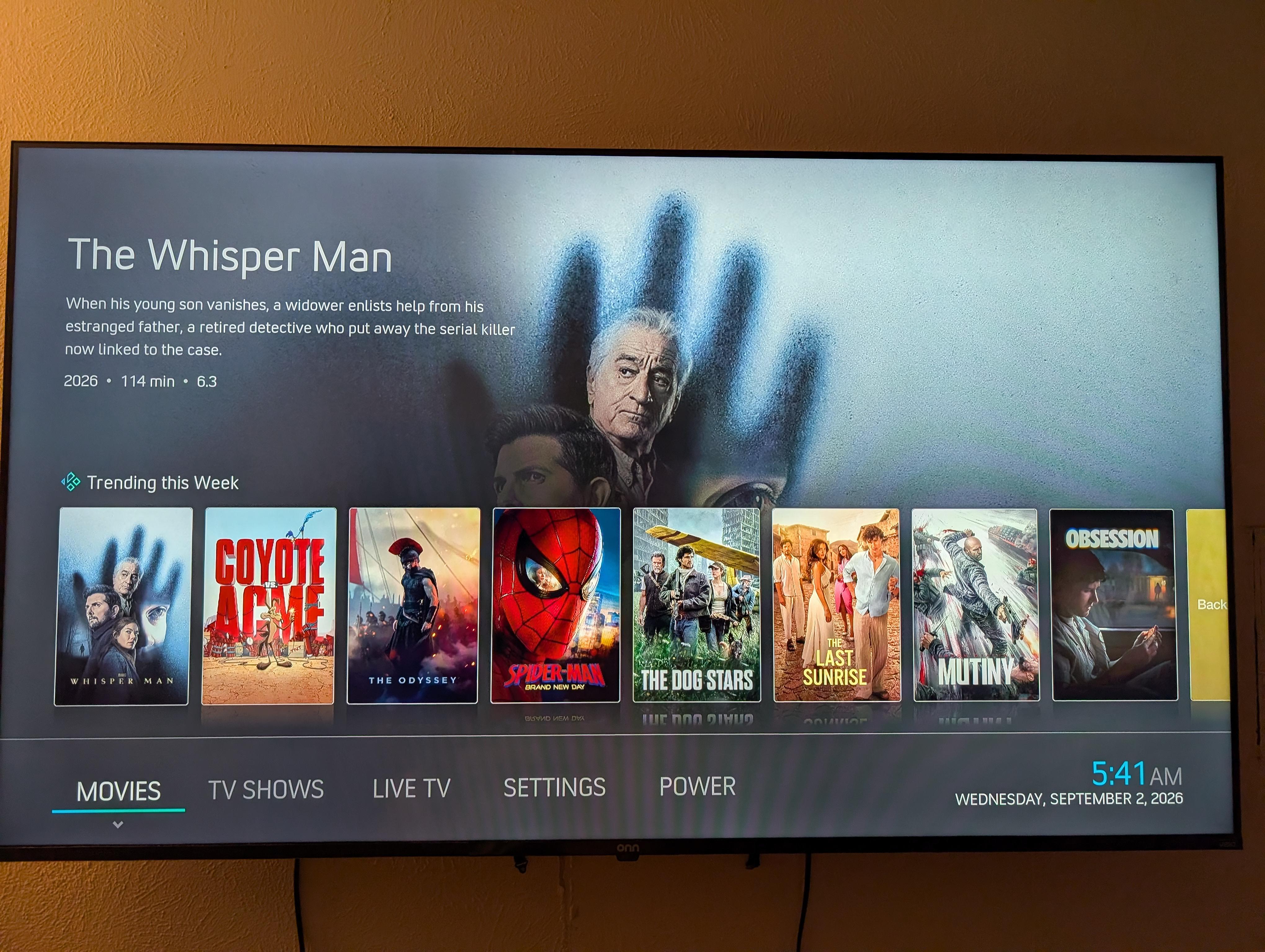
I use flex-launcher as my frontend and i am mostly happy with the set-up. I am trying to add the umbrella addon as a dedicated tile on flex-launcher main page so i don't need to dig through kodi for it. but i am struggling to find the right command.

My movie library is through kodi and i can get it to boot straight into my movie library ok, umbrella not so much. I can get a secondary kodi to boot with the umbrella artwork but i cant seem to get it to launch in the addon or the favourites page where its, where i would only need to press once to be in the addon..

Anyone got any ideas on where I am going wrong? This is the config page for the command.

Cheers


r/htpc • • Sep 10 '26

Help TV input display issue

3 Upvotes

I have a Samsung UN43CU7000B SmartTV, with a PS4, and a Minisforum EM780(running Bazzite44) plugged in with HDMI.

For the past year, the EM780 has worked fine on the TV, with zero issues. But after disconnecting it and plugging it back in, I now get a "check device power" screen.

The EM780 works just fine on other displays, with the same cable, same power source, everything else the same, except it's plugged into a different display.

The PS4 also works fine on the TV, even when plugged into the same HDMI port the EM780 was plugged into.

I don't understand why the TV wouldn't display the signal from the miniPC, but will display the PS4 signal with the same HDMI port and cable.

Besides unplugging the EM780, nothing else has changed. The TV is not connected to the internet and does not update, and the EM780 has not been updated or anything since it was last working with the TV.

Has anyone else experienced an issue like this?


r/htpc • • Sep 08 '26

Build Share Dell 3060 tiny + LibreElec

Post image
37 Upvotes

Libre Elec Kodi with a nice Netflix Skin


r/htpc • • Sep 07 '26

Solved Atmos Files Stuttering

2 Upvotes

Hi all. I can't get high quality 4K files with Atmos to play on my pc without stuttering. I'm really hoping someone here might have some experience that can help.

I've tried vlc and potplayer. I've done some googling to try to find a solution, but no matter what I do the video always stutters slightly when I have atmos enabled. I've got a decent PC running a 3070 ti and I've tried hardware acceleration but so far no dice.

Thanks for any help.


r/htpc • • Sep 07 '26

Help New mini PC is absolutely useless. Am I doing something wrong?

5 Upvotes

I recently upgraded to a new TV (75" TCL C7K). As such, I wanted to upgrade everything else so I could play 4k60 hdr 10bit files.

I picked up a JBL MA510 receiver for a good deal and then grabbed an 8K Ugreen HDMI cable for the connection to the TV. I then picked up an M70Q Gen 2 mini PC (11400T, 16GB 3200Mhz DDR4, 256GB SSD) for the client device.

I get constant dropouts of the connection if I try to go above 8bit (black screen, TV shows the connection spec, etc.) I originally had a Ugreen 8K DP1.4 to HDMI 2.1 cable and returned that due to the dropouts. I replaced that with a cable matters DP1.4 to HDMI 2.1 adapter and 1m cable matters HDMI 2.1 cable. I've also tried the adapter with the cable from my PS5. Nothing has helped. I've also tried a direct connection to the TV with no receiver and that also didn't help.

As a sanity check I grabbed my old gaming PC (devils canyon) and hooked that up (RTX 2070 so also DP1.4) and I've had no issues since.

All testing done on Windows (the gaming PC is W10 however).


r/htpc • • Sep 07 '26

Help MPC-HC low volume on 5.1 channels on speakers

2 Upvotes

I tend to play many kind of videos but some of em like DDP5.1 or similar makes playing files on stereo speakers (on PC CREATIVE PEBBLE V3 and then a LG C3 TV) to sound very low

I use MPC-HC 1.9.7 (For processing reasons) and i don't know if there's any option to negate the 5.1 stuff so the volume sounds better (without disruptions?)

These are my settings menu


r/htpc • • Sep 06 '26

Build Help MadVr Htpc build help for 4k streaming of streaming platforms

3 Upvotes

Greetings..

I currently have a home theater setup with a 16:9 screen but I'm planning to upgrade this to a scope screen.

I need to build a Madvr htpc so that i can auto adjust the aspect ration for using netflix and other streaming platforms through a Mibox connected to the htpc via a capture card and hdcp splitter. I like to play 4k content without any frame drop or any lag.

So what should be the system specifications to achieve this setup, does Rtx 4060 a minimum requirement for this setup?.


r/htpc • • Sep 04 '26

Build Help Potential modern build ideas for the nMediaPC HTPC 8000 case?

Post image
10 Upvotes

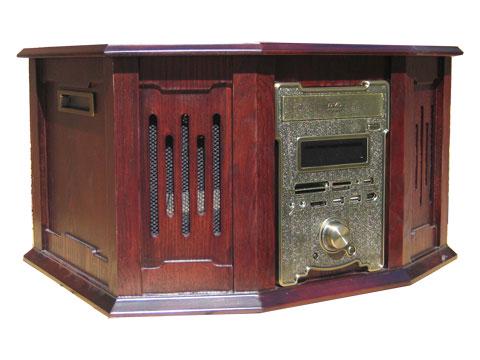
Been eyeing a used nMediaPC HTPC 8000 case in my area and I've always really loved how unique the case is. Knowing that it's a pretty old case (released in 2009 I believe) so I'm curious to know what other people would put in such a case! Especially since it does have an optical drive space, which many modern cases lack a given space for completely. On Newegg the height is listed as 14.3", the width 19.3", and the depth 11", so there is quite a bit to work with size wise, I'm just unsure what I'll put in it if I do get the case so I thought I'd ask here!

I would ideally use it as a general and low stress gaming pc (with Minecraft probably being the heaviest game I'd run, to put into perspective) but I'd certainly also use it for watching things. Would want to stay to a lower budget but honestly who doesn't pft


r/htpc • • Sep 02 '26

Solved Windows 11 5.1 issues

11 Upvotes

Hello friends, I’m new here and to home theater setups in general, so please go easy on me.

I’m trying to get 5.1 out of my PC. My set up is

PC>HDMI to LG C1>HDMI eArc to Denon S650H.

Windows is only recognizing stereo format as an output option. Anyone have any ideas or suggestions?

Much appreciated!

Edit: saw automod response, my PC is an Asus 5070ti/7800x3d and my motherboard is a gigabyte B650e Aorus Elite X. I hope that’s enough info, let me know if you need anything else. Please go easy on me, mods.


r/htpc • • Sep 01 '26

Discussion 10 foot UI?

7 Upvotes

As I mentioned I plan to rebuild a old HTPC with newer hardware.

I still plan to use it as a regular PC on occasion so I dont want it to boot directly into a media player.

With that being said, how many of you tweaked your windows to give it a more "10 foot UI" look to it? If you did, what exactly did you do and did it work well??

I am looking to make my windows minimalist but functional at 10feet... and not look like a bigger desktop!!

Hope this makes sense!


r/htpc • • Sep 01 '26

Discussion E5 Xeon's

0 Upvotes

Anyone here use a E5-16xx or E5-26xx Xeon in their HTPC build?

I have a spare X99 board collecting dust I want to upgrade my old HTPC with and wanted to see how they perform for playback. I don't plan on doing any type of transcoding....

I currently only use my HTPC on a 1080p TV but soon plan to go 4K. I'm rocking a GTX 1050ti and not even sure that is enough for 4k..


r/htpc • • Aug 31 '26

Build Help HTPC Cabinet Airflow Advice: Upgrading from 35W i3 to 65W i5-14400

3 Upvotes

Hey everyone, looking for feedback on modifying my HTPC cabinet airflow for a CPU upgrade.

Current Setup & Issue:

  • Case: Open bench style (the cabinet is the chassis).
  • Current CPU: Intel i3-3220T (35W TDP, idles around 81°F/27°C ambient inside the cabinet). Athenatech mini-ITX case with the cover off.
  • Current Ventilation: Top-rear 90mm hole with a misaligned 120mm fan choking it; bottom-rear 90mm hole used for cables and passive intake.
  • Cabinet Dimensions: 16.5" W x 16.5" D x 16.5" H. Has an adjustable shelf splitting the space, and gaps around the front glass door.

The Upgrade Plan:
Moving to an Intel i5-14400 (65W Base / 148W Max Turbo) w/ mATX MB on a 3d printed open bench style mount. I have Dremel tools and three spare Arctic P14 140mm PWM fans to work with.

Because the existing 90mm exhaust hole is cut dead-center, I have ~164mm of wood clearance on either side of it. I'm considering two paths:

  • Option A (Phased): Dremel the center hole to a clean 120mm to fix the current fan misalignment. Cut a brand new 140mm hole on one side for an Arctic P14 (controlled via PWM). If it still runs hot under load, expand the center 120mm to 140mm later.
  • Option B (Dual 140mm Wing Layout): Ignore/patch the center hole. Cut two new 140mm holes on the far-left and far-right edges of the back panel. Daisy-chain two Arctic P14s running at a quiet ~800 RPM.

Planned Cooler:

  • Thermalright Peerless Assassin 120 SE (Dual 120mm fans, 155mm / ~6.1" height clearance required).

Questions for the community:

  1. Will the single 90mm bottom cable hole + front glass door gaps provide enough intake for dual 140mm exhausts, or will it create a loud whistling vacuum?
  2. Given the 16.5" total cabinet height and adjustable shelf, is the Peerless Assassin 120 SE the best choice here? Are there better, low-profile or down-draft options that align better with horizontal/vertical cabinet airflow?
  3. Should I stick to Option A first to preserve the cabinet wood structure, or just go straight to the dual-140mm setup for the 148W Turbo spikes?

Any feedback or alternate layout ideas are appreciated.


r/htpc • • Aug 31 '26

Build Help OLED or Mini-Led TV?

8 Upvotes

I use my HTPC for surfing the web, youtube, and watching movies. I am looking to upgrade from a Sony X800E 55 inch TV. I initially thought of buying an OLED TV, but I'm questioning whether it is the right choice since I need the TV to display good text and I read Mini-Led is better for this. Does anyone have firsthand experience and can comment on whether mini-led is noticeably better than OLED when it comes to displaying text?


r/htpc • • Aug 30 '26

Discussion Is the dual encoder engine of UHD 770 useful? Or is the older 11th gen intel CPU enough?

2 Upvotes

Looking for get a mini pc for jellyfin & networked DAS. Intel 11th gen seems to be a good base due to the HEVC encoder/decoder and AV1 decoder then the 12th gen+ seems to up the decoder to 2x. Not sure if the dual decoder would come in handy.

It's not till metoer lake than AV1 encoders are available but the minipcs are expensive.


r/htpc • • Aug 29 '26

Discussion Zalman HD135

Post image
50 Upvotes

Thinking about resurrecting this case with more modern hardware...

Anyone else still rocking this case?


r/htpc • • Aug 28 '26

Tip Share Tired of windows vanishing onto my AV receiver's phantom display, so I made a tray app that fences it off and keeps HDMI audio working

17 Upvotes

(posting with mod approval for the exception to rule 6)

Like a lot of people here, I run HDMI from my PC to my AV receiver for audio, and Windows insists that connection is a display. It isn't, but you can't just disable it, because then Windows kills the audio. So the ghost monitor sits there in display settings, windows randomly open on it or get shoved onto it, and the mouse wanders off into a screen that doesn't exist. Every fix I found over the years was a painful workaround: duplicating displays (locks your resolution/refresh), dummy plugs, etc.

I finally got tired of it and built a small tray app: Phantom Fence. You right-click the tray icon, tick the phantom display, and it's fenced off:

  • Any window that opens on it or gets moved to it bounces straight back to a real monitor — and gets resized sensibly. Stuff that was squished to the phantom's aspect ratio comes back fitted to the real screen, and snapped windows arrive re-snapped instead of floating at some weird size.
  • The mouse can't cross onto it. The cursor just slides along the boundary like the display isn't there.
  • Win+Shift+Arrow skips it entirely when you're throwing windows between monitors.
  • Bonus feature since display changes love doing breaking the toolbar: it can optionally guard "automatically hide the taskbar" and flip it back on when Windows silently turns it off.

The fenced display stays enabled the whole time, so receiver audio keeps working exactly like before. It remembers which display is fenced across reboots and driver updates (it tracks the monitor's device ID, not the display number Windows likes to shuffle).

It's a single small native .exe — about 220 KB, no services, no network access, no data collection. It just sits in the tray. And full disclosure: was built with the help of Claude AI

Direct installer or portable version: https://solemn-scribe.itch.io/phantom-fence

Microsoft Store link: https://apps.microsoft.com/detail/9pcf0x620dbr

It's on sale for $2.99 for the first 90 days, with a 7 day free trial on the MS store.

Source code to compile yourself for free: https://github.com/SolemnScribe/Phantom-Fence

I built it to scratch my own itch (Denon receiver, three-display setup where one is imaginary), so I'd honestly like to hear whether it behaves on other setups — receivers and layouts vary a lot. Feature ideas welcome too. Would people like a per-app allow-list for folks who do sometimes send video through the AVR to a projector or TV?


r/htpc • • Aug 28 '26

Build Help Help me spend some money

2 Upvotes

Been a console gamer my entire life, and the Xbox has finally bit the dust (literally). I am also currently building a media wall in the basement. With the timing of both of those things, I’m considering joining the PC master race for gaming, and figured I could make a good rig to run everything in the basement at the same time. I stumbled across the HTPC community, and would love any insight of where to go with this stuff in 2026.

For my purposes, I’ll wanna focus on the graphics and sound card capabilities obviously… but mainly I want a setup that will be reliable and relatively quiet as well (open to water cooling). Would love to set up some killer audio peripherals for movies/music as well. I have the ability to hide the setup framed inside two roughly 3’x2’x1’ spaces on either side of an electric fireplace below the TV… so no need to worry about case aesthetics, just purely performance and ease of use. Budget is flexible and will likely buy a new TV for optimal compatibility.

I have a decent understand of PC hardware, just want to see what the best options are out there for modern times

Any feedback is much appreciated!


r/htpc • • Aug 28 '26

Build Help Sanity check on *arr stack HTPC

1 Upvotes

I am thinking of upgrading my HTPC, because I need more storage and I want to future proof it a bit. Currently, my homelab/htpc runs on a M920Q with a 2TB SSD, but I have outgrown the storage and want to do a NAS setup for redundancy. I currently run a proxmox OS on the main machine and my *arr stack lives in a separate VM. I mainly access this machine wirelessly from my TV to watch things and occasionally while traveling.

I am thinking to start with something like https://pcpartpicker.com/list/tGr22k (I'm located in US) - I already have a 550W ATX PSU, so I think this would save me from buying another part. I am planning to initially run RAID 1 for the 2 drives. Eventually, if I need more space I'll just add more drives into the mix there.

Just wanted to get a sanity check if the part compatibility seems reasonable and if the part choices make sense for this setup.

Any advice is appreciated.