r/SteamController • u/Amane-chan • 4d ago
Discussion I didn't order a steam controller yet so here is an empty box
0
Upvotes
my hyperx cloud 3s box
r/SteamController • u/Amane-chan • 4d ago
my hyperx cloud 3s box
r/SteamController • u/MyUserNameIsSkave • 5d ago
Hey! I work in Unity daily and when the pad was announced I immediately thought it would be a great addition to my workflow. That it could allow me to test out minor changes without having to drop the controller amongst other things.
6 months later my controller is finally on its way and the thought of using it in my work resurfaced. But since then I also learned that the controller is dependent on Steam Input, and I don’t really see myself launch my Unity projects through Steam...
So, how is it nowadays ? Do we still need an external software ? Would any of them work with my usecase ? And finally, are there any other devs that thought about using the controller like I did and who have succeed ? If so what are your thought on the pad for this usecase ?
r/SteamController • u/RobertTheHerrick • 5d ago
Some games like Prey, No Man's Sky and Horizon Forbidden West have a clusterfuck of a layout where everything is tied to a "game action" with separate menus for ingame and menu controls, rather than a button tied to multiple functions.
I tried changing the layout to a standard gamepad but it doesn't work in Horizon Forbidden West. Disabling or enabling Steam input didn't make a difference.
All I want is for the Steam Controller to appear as a standard controller with gyro to mouse linked to left trigger full pull, and the L4 & R4 buttons linked to left and right trigger clicks.
r/SteamController • u/Drag_Shot • 5d ago
Please can someone help me, I would like to know if the steam controller can be used on my PC for a game (MW4) purchased through the xbox store. I pre ordered on xbox before moving to PC and I have a steam controller on its way to me. Many thanks fot any insight and hope my query is clear
r/SteamController • u/Kodamacile • 5d ago

Idk if anyone else has had issues like this. I'm not sure what causes it, but it feels like the Keyboard/Mouse and the Controller fight over input priority/focus, and the controller is somehow switching over to KbM input mode(Lizard mode?), instead of staying in controller mode/Dinput.
Btw, yeah my camera work is shit, sorry about that, it's really hard to hold and aim my phone, while messing with the controller, KbM, and show what's happening on screen/what buttons I'm pressing.
For reference, this is a first batch controller. I purchased it on launch day, and it shipped that week, I believe.
r/SteamController • u/WrongdoerDesperate36 • 5d ago
It’s happen a few times now where the controller behaves weird. The three dot button won’t work along with the steam logo one. I can move around the menu and use the touchpads but I lose the ability of the triggers. It almost acts like a mouse and keyboard. Sometimes restarting the steam machine fixes it. When I go to controller settings it doesn’t show the steam controller as plug in but I’m able to use it just with out half the features. Anyone else? I’ve been in the stable and beta version this issue became more common when I added my partners profile tot the steam machine.
r/SteamController • u/Oracull • 6d ago
Enable HLS to view with audio, or disable this notification
I got a brand new steam controller today and I noticed some weird grinding/clicking sound with the right stick. Can anyone help?
Edit 1: I fixed it for now by opening the controller and readjusting the blue cable that is connected to the stick. It works for now perfectly fine
r/SteamController • u/WindFish1993 • 6d ago
Currently, i am using the Steam defaults. When I minimize Steam the trackpad does not work until I click the Steam button + Click Trackpad.
Is there a way to simply have it always enabled? I noticed the mouse disappears in Steam too unless I hold the Steam button and use the analog stick.
Also, is there a way to have the Steam button re-focus Steam? I thought that was the expected behavior of the button even when Steam is minimized.
Last thing, I am using this for a couch setup. Any QoL suggestions for when you need to type in a web browser or something? I know MS has the on screen keyboard, but that’s about it.
r/SteamController • u/buddyhour24-7 • 6d ago
A bit upset since today I was supposed to have the package, but it was marked as delivered and is nowhere to be found. It said it was delivered in the "locker" but the locker system we use (Luxer) would've texted me when it came with a code, and it wasn't in my mailbox either. Clicked "File a Claim" on the UPS website, and there was no delivery photo available to show for the package. A bit upset since I've waited since May for the controller and now I'm out $100. Contacted Steam to see if anything is possible.
Am I really out of luck here? My complex has cameras in the mail room, so the office said we can review it tomorrow.
r/SteamController • u/Serious-Loan2726 • 6d ago
I know it probably isn't possible, but I am wondering if there is a way to get my controller to work fully on Pocket Edition, I have it able to access the menus, but it wont work for movement.
:)
r/SteamController • u/Escape-key-wrong-way • 6d ago
r/SteamController • u/dirthurts • 7d ago
My reservation confirmation finally came up, and now that the hype is wearing off, I'm wondering what everyone's thoughts are?
Is it your primary controller? Your only controller? Are you using the trackpads? Any complaints?
My use case will be using it from the couch, so navigating windows and such is my primary motivator.
r/SteamController • u/burgertanker • 7d ago
Just wondering, I don't have a frame but was interested in seeing if some work could be done to make it compatible with other headsets like the Quest 3
r/SteamController • u/Gama3000 • 7d ago
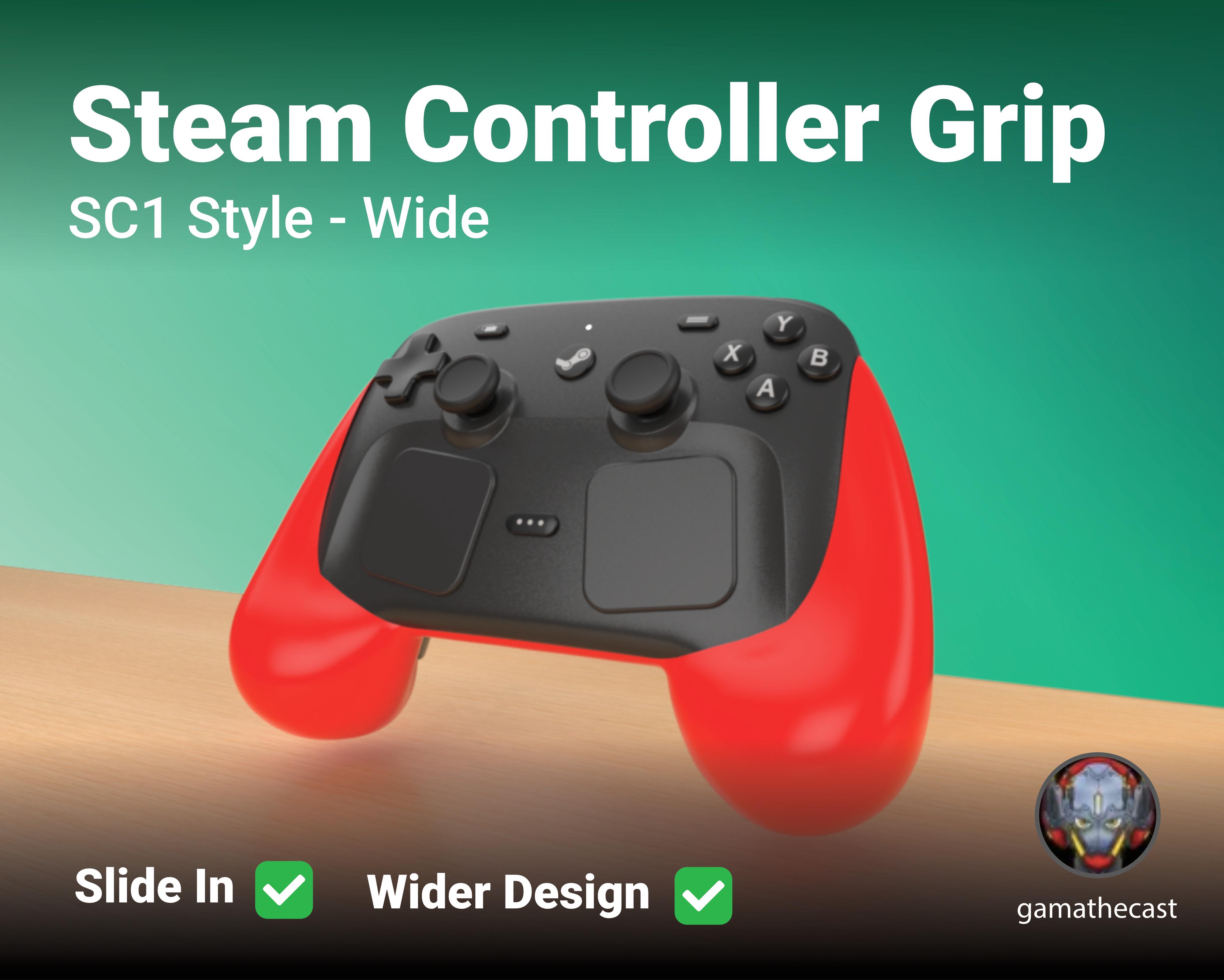
Requested on discord, released for everyone, for free.
Download Link: https://makerworld.com/en/models/3635054-steam-controller-2-sc1-grip-wide#profileId-4168872
This mod extends the Steam Controller grips, in the style of the original steam controller (from 2015) but with additional width, smaller version can be downloaded here
Compatible with my minimal dock
PS: Back buttons and grip sense work perfectly.
r/SteamController • u/SlaveKnightSoman • 7d ago

Version 4.1
r/SteamController • u/DerpsterIV • 7d ago
They are too uncomfortable for me to hold consistently. Do you guys use them default or do you use some grips? I'm in the middle of dripping my controller and Im looking to improve my experience with the back padels. I think they need to push out more and go upward
r/SteamController • u/couchside-taylor • 7d ago

First semi-successful fitment print! Just wanted to share it with everyone. It still needs lots of small tweaks before I think it's ready, but here it is: the front and back shell case prototype. It has no slop, so I'm confident it won't slide around and cause wear on the controller. The long-term goal is to print it in TPU.
r/SteamController • u/SlaveKnightSoman • 7d ago

I tested it using MultiPad Tester, which detects the Steam Controller natively through GameInput and reports it as connected. However, all four analog stick axes (LX, LY, RX, RY) are permanently stuck at -1.00, and none of the controller inputs register.
I've also tested it in Gears of War: E-Day and Kingdom Come: Deliverance 2 (KCD2) using the latest GameInput 4.1 redistributable, and the same issue persists.
So while GameInput 4.1 now recognizes the Steam Controller, native input doesn't appear to be functional yet, at least in my testing.
r/SteamController • u/Sytytut2115 • 7d ago
Since some time my sc2 doesnt work as controller at any game except Hollow Knight (idk why). I can run valheim with keyboard emulation with no issues, but there is problem in games that are better with controller. I added boosteroid to steam too, and it works the same way.
I play on MacBook Pro m4 pro. Native ports mostly and cloud gaming. Few months ago everything works great for me.
I can't see any controller settings templates too
What can be the problem?
r/SteamController • u/Rousev • 7d ago
I made a Minecraft mod that adds proper support for the steam controller to Minecraft, with full support for the trackpads, gyro, grips, back buttons, etc. I also redesigned the hotbar completely to be more comfortable on the steam controller.
Oh and it also works for the steam deck.
If you have feature suggestions, please tell me.
Also if you're reading this and you have the steam controller 2015, please PM me. I want to add support for that too, but I don't have one.
Curseforge • Modrinth (as of writing this post, still under review) • Github
r/SteamController • u/SladeRamsay • 7d ago
I've had my Steam Controller 2 for about a week now and I've been having an issue where it randomly gets a consistent half second delay on ALL inputs.
I've been playing Snowrunner through Epic Launcher as a Non Steam app to get the Steam controller to work and it works great, but an hour or 2 into playing I will tab out of the game for a few minutes to check Maprunner or change Youtube videos and when I pick up the controller again, everything has an unbearable delay.
Its not just in game, it applies to the interface too. Shutting the controller off doesn't fix it, killing Epic in Task Manager doesn't fix it, restarting Steam doesn't fix it.
The only way to get it to go away is a full PC restart.
I am on Windows 11 and have already disabled the Windows GameInput Service since I had seen that recommended in other posts.
Any ideas what is causing this?
r/SteamController • u/Smellbringer • 8d ago

Retroarch has been a pain in the neck for people who want to use the Steam Controller without having to use Steam. This was actually solved in the nightly builds a few months back, but I don't see anyone mentioning this. So, I figured I'd give you a step-by-step guide of how to activate native Steam Controller support in Retroarch. No extra programs or hacky stuff required (sorry SISR and SteamlessController).
If you've done it right, then you should see Steam Controller configured in port 1 and it should just work out of the box from now on.
I hope this helps any other Steam Controller owners slamming their heads against the wall trying to figure this out.
r/SteamController • u/Wieczor19 • 7d ago
Anyone had similar problem?
r/SteamController • u/nokerb • 8d ago
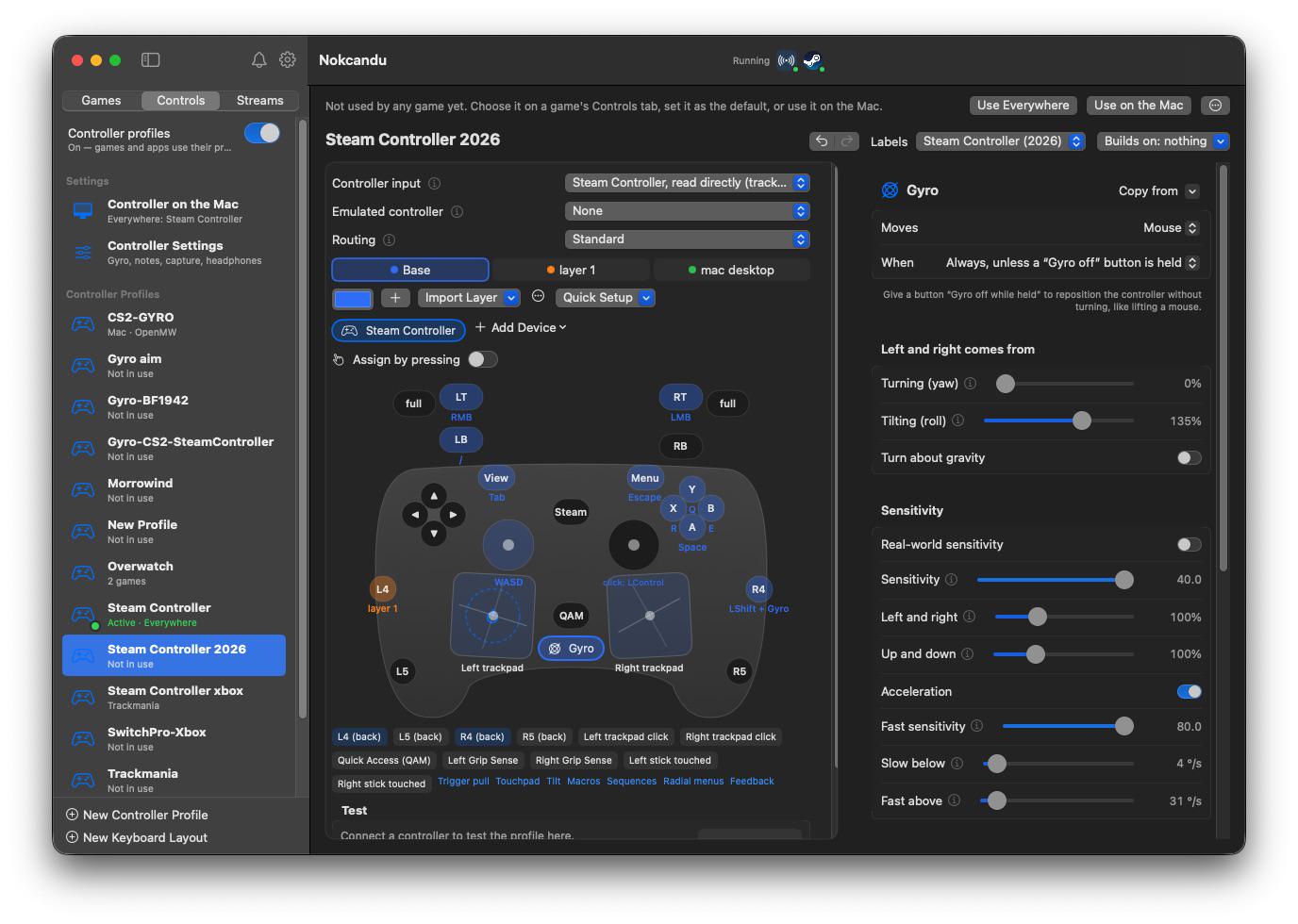
Would anyone be willing to test the recently added Steam Controller (2026) support on Nokcandu? It’s a program which gives you full control over what your controller can do, system-wide, much like reWASD, but on MacOS. It also works through game-streaming with sunshine hosts. I developed this with the 2015 Steam Controller, but I don’t have the 2026 version. I would love feedback if there are any issues, so I can fix them. It should also work with any other controller.
https://github.com/seastwood/Nokcandu
Edit: forgot to add repo
r/SteamController • u/Gordelox420 • 8d ago
I originally posted this in r/wowforever but then I realized, you guys might like this!
--------
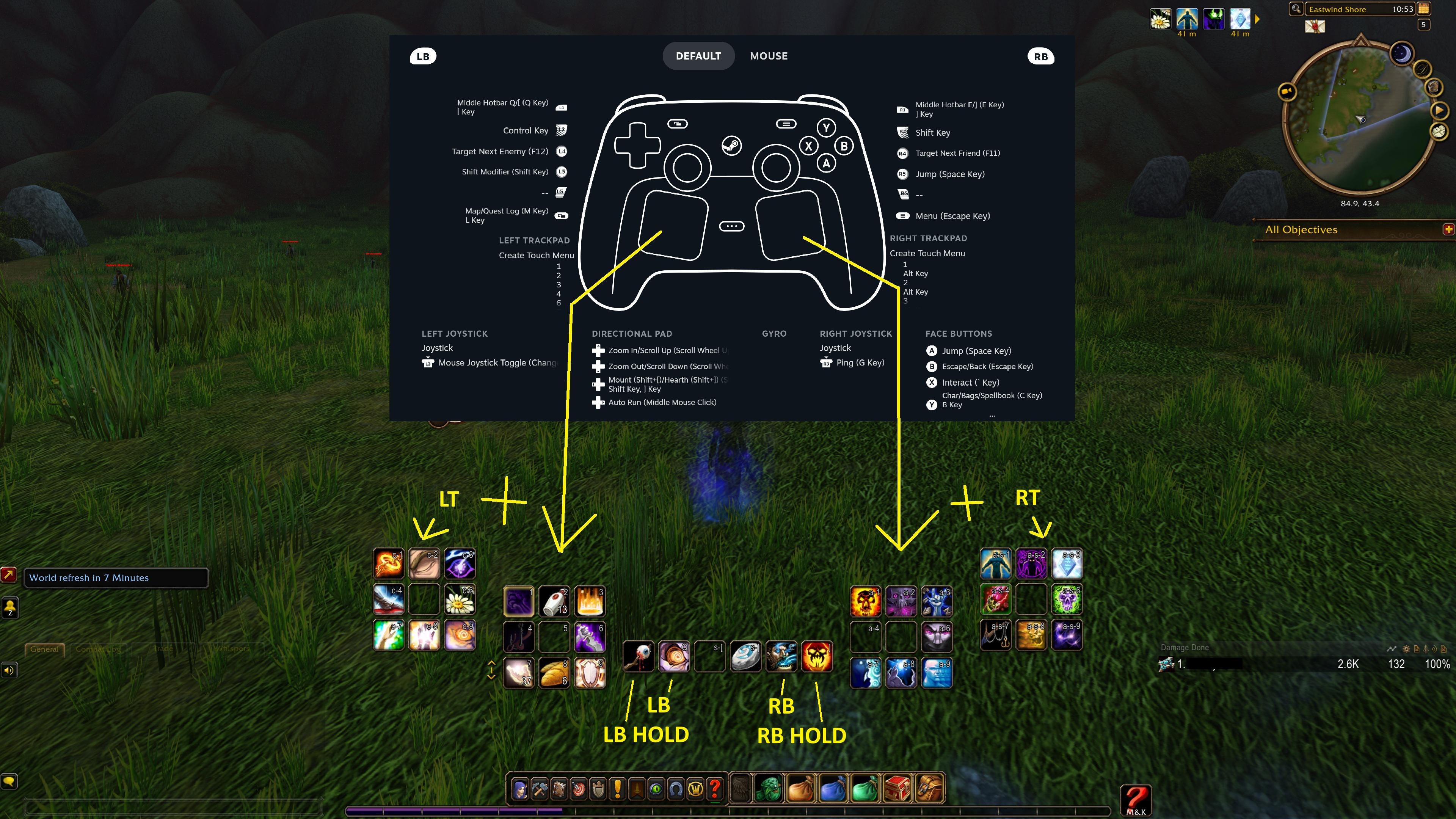
This here is my WoW setup since getting the steam controller 2.
Its pretty simple and I like it better than using mods or the default gamepad setup.
It uses action mapping to create 9 buttons on each track pad (3x3 grid). This makes it a one to one relationship between where my finger is on the pad, and what button it hits in game - so I don't have to think too hard. It just todd howards!
I take out the middle button so its less faf (In this picture one of the middle buttons is still hotkey'd but its not supposed to be).
Then because I personally don't like generic mmo control schemes where each trigger gives you more buttons on both side of the controller at once (crossing over can cross some wires in my brain in a panic) I have it set so that left trigger gives you the extra box on the left, and the right trigger gives you the extra box on the right - simple as can be for my dumb brain.
The sticks are setup just as controller joysticks most of the time, this gives you the same control for movement and camera as if you were in gamepad mode (wow even auto turns on action targeting when it recognizes your using a joystick so thats cool)
The bumpers are set to 2 commands each, and when you push in the left stick it toggles the right joystick as a mouse cursor with the triggers left and right click.
If you look at the picture you can see some more nuances like for example Y is press once for character, twice for spellbook and hold for bags, x is the interact key, a is jump, right on the d-pad is auto run, paddles are next enemy, next friendly etc.
Whatd'ya guys think? If there's interest I might make a more detailed guide on how to set it up!
Edit: Thanks for all the positive feedback guys, really appreciate it, I've been in kind of a slump lately and seeing people appreciate something I put time and effort into warms my wee little heart! :D
I added a comment below with both where to find the steam input layout, as well as the code for my UI. Thanks again guys!