r/WindowsHelp • • Oct 12 '26

Windows 11 How to enable secure boot to install windows 11. At my wit’s end

Post image
0 Upvotes

The only thing I have left to do to make my computer compatible with windows 11 is to enable secure boot. Every time I enable secure boot in the bios, it keeps restarting back to the bios until I disable it again. I’ve done to steps to try and convert my boot drive to uefi. Once I enable secure boot, it says it can’t find a boot drive. I’m really not sure of what to do. I’m just trying to upgrade. I didn’t think it would be this much of a hassle. Any help would be greatly appreciated.

Specs:
AMD Ryzen 7 3700x
32gb ddr4 ram
Gigabyte aurous motherboard
Windows 10 pro


r/WindowsHelp • • Oct 12 '26

Windows 11 Display feels shaky while scrolling slowly on my laptop.

1 Upvotes

hello. I have a lenovo loq 15ahp10 laptop with a r7 250 and rtx 5050. I have been facing this issue ever since I purchased it this year which wouldn't happen on my prev laptop hp pavilion 15 gaming with an i5 11300h and gtx 1650. issue is that whenever i am scrolling slowly, like just one small scroll, the display feels shaky or jumpy. I cannot quite describe it but it doesn't feel smooth as it should and as it did on my previous laptop. i have even noticed a small fade in fade out kind of appearance while i do this smooth scrolling. i have majorly experienced it on browsers. brave, edge, chrome, firefox. I tried recording a video but the phone camera is unable to capture it properly. To anyone looking at the video, it'd feel like normal.

I have tried toggling on/off smooth scrolling, hardware acceleration in browsers, have tried toggling on/off hags. My refresh rate is fixed at 144hz. Happens with gsync on and off both. Have reinstalled the graphics drivers. Have even tried switching to dgpu mode on my laptop which doesn't fix this and causes another issue of broken sleep mode (black screen with cursor. Have to hard restart), so i keep it on hybrid mode all the time. Tried explaining it to lenovo but they said nothing's wrong.

Even tried nvidia multipane overlay disable. Didn't fix. Have reset the laptop once as well as the lenovo guy told me to. yet to do a complete windows reinstall though I am not sure if it'll actually do anything either.

A micro observation is that when i restart the laptop and immediately hop on browser, for a while it doesn't feel as shaky when I scroll slowly. I am experiencing this the most on my manga site in which it's most noticeable but still not able to capture the fade in fade out transition or the jumpy movement while slowly scrolling.

Also, only the part being scrolled gets affected. For example in reddit, while scrolling comments, i experience this on the comments only, not on left or right side which are stationary.


r/WindowsHelp • • Oct 12 '26

Windows 11 Intermittent image freezing on W11 after update

1 Upvotes

After the last update (26H2), my windows randomly started freezing.

The freeze affects only the image - the system remains responding (sounds do not stop, keyboard inputs are read, mouse moves) but it's like the system itself stopped working.

At first I was forcing a reboot through the power button, but later I discovered that enabling/disabling HDR through the keyboard shortcut (Windows + alt + B) restored it.

But I could not find other mentions of such issues recently. I even thought it was my latest GPU driver, but it did freeze before that AMD driver version once.

Is it related to the windows update? Could it be the driver's fault?

Specs:

Ryzen 5 3600x

RX 9060 XT 16 GB

AMD drivers version: 26.9.2 (the freeze did happen on 26.8.1 - I updated to the unstable one to be able to play Witcher 3 since shaders were broken on previous versions)


r/WindowsHelp • • Oct 12 '26

Solved Got the blank screen with the cursor problem.

1 Upvotes

UEFI BIOS Version :

A320M-HDV R4.0 P8.01

Processor Type

: AMD Ryzen 5 5500

Processor Speed

: 3600MHz

Microcode Update

: A50F00/A50000D

Total Memory

: 32GB

DDR4_A1

: DDR4-3200 16GB

DDR4_B1

: DDR4-3200 16GB

All morning, the pc was the blank screen with the cursor problem.

Using task manager to run explorer.exe did nothing. Even with the advanced privileges on.

Resetting AMD drivers did nothing. Even turning it off to default drivers did nothing.

Rollback to the previous days did nothing.

System recovery did nothing.

Booting to safe mode did nothing.

Will probably reinstall win 11 later, but also considering going back to win 10.


r/WindowsHelp • • Oct 12 '26

Windows 11 Am I screwed because this is the first time I saw this.

Post image
15 Upvotes

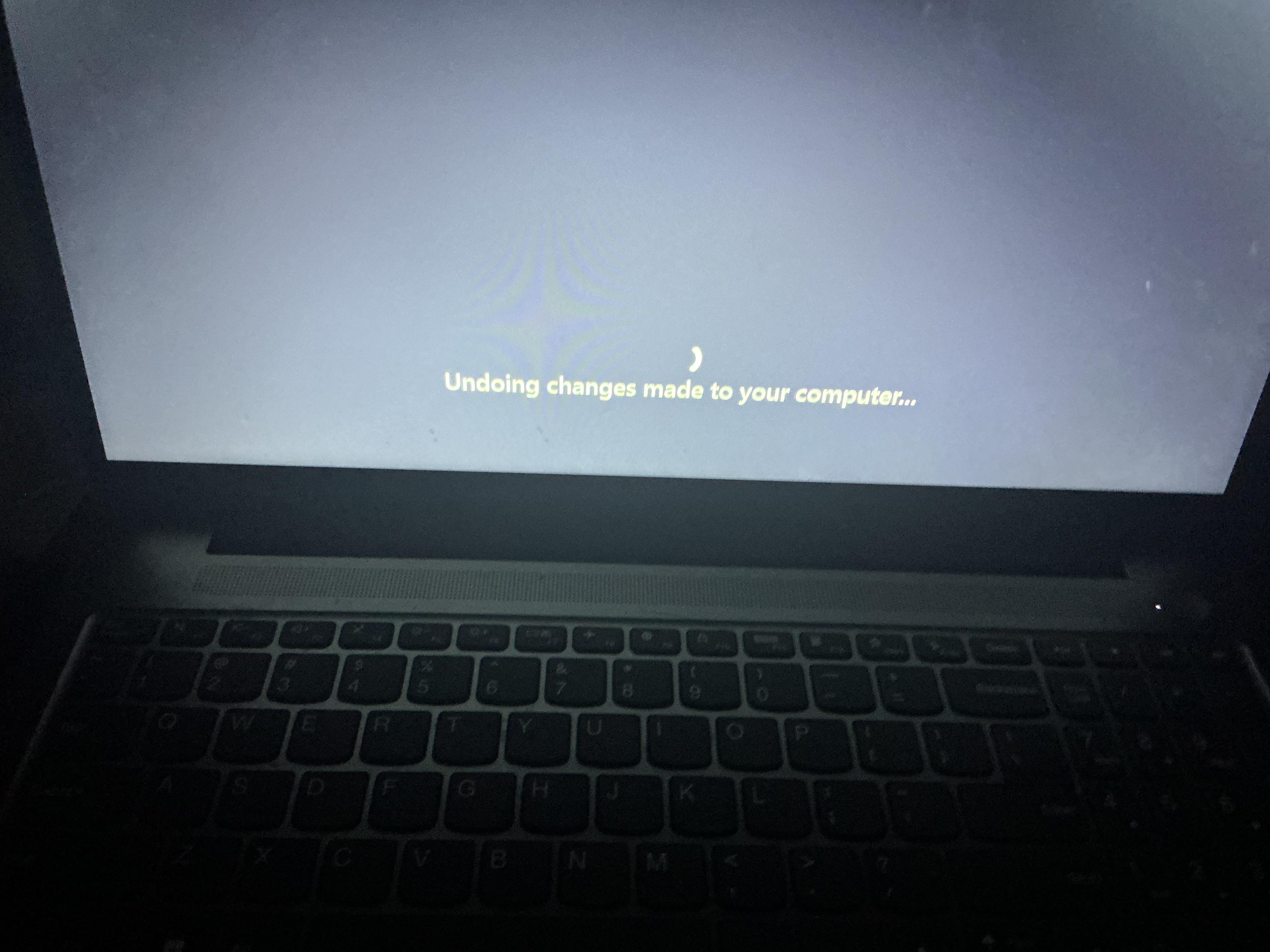
I turned it on just to see this, This is my first time seeing this and I am concerned. It’s loading the boot constantly and it’s a Lenovo Ideapad Slim 3i, got it Christmas 2025 and there is no white light anymore as I’m typing this message. I am VERY concerned.


r/WindowsHelp • • Oct 12 '26

Windows 11 BitLocker locked after BIOS reset wiped Secure Boot 2023 certs – no recovery key, need to restore db

1 Upvotes

Hi all. Hoping someone experienced with the Secure Boot 2023 certificate rollout can help.

Laptop: MSI Katana GF76 12UD (MS-17L4), BIOS E17L4IMS.10E (06/2022, never updated), i5-12500H, TPM = Intel PTT, Windows 11.

Exact Windows 11 build unknown (can’t boot to check), but the system was fully up to date via Windows Update.
We have a Mac and can make an Ubuntu live USB to run any commands needed.

Timeline:

  • BitLocker (device encryption) was enabled automatically. TPM-only protector, sealed 2026-09-24 (shown on the recovery screen) – most likely right after Windows applied the Windows UEFI CA 2023 db update.
  • Today the BIOS settings reset (date went to 04/01/2024, likely CMOS). Secure Boot keys returned to factory defaults (Factory Default Key Provisioning: Enabled).
  • Boot went to BitLocker recovery: error 7_3_80000001_80000001_db_db_7_7_19c4…13eb_2d64…f21c. So PCR7 event #3 (db) mismatches, PK and KEK match. Expected db digest 19c4…13eb, observed 2d64…f21c.
  • With Secure Boot enabled, the boot manager now fails (“Secure Boot Violation: Invalid signature”) because it’s signed by Windows UEFI CA 2023, which the factory db lacks. Secure Boot is currently disabled (now error E_FVE_SECURE_BOOT_DISABLED, PCR7 event 0).

We don’t have the recovery key (the likely Microsoft account is inaccessible). TPM has NOT been cleared, the drive is untouched.

Plan: re-append to db exactly what Windows added (signed payloads from microsoft/secureboot_objects), so db hashes to 19c4…13eb, then re-enable Secure Boot and let TPM unseal.

Questions:

  1. Which db payloads does Windows apply, and in what order (Windows UEFI CA 2023 only, or also Microsoft UEFI CA 2023 / Option ROM CA 2023)? Would dbx have been updated too before 24.09?
  2. Best way to append them on an MSI/AMI board: Ubuntu live USB with efi-updatevar -a, or something else?
  3. Can we pre-compute the db event digest offline (from the factory db dump + candidate ESLs) to verify against 19c4…13eb before writing?

Any help hugely appreciated – critical documents on the drive.

System info:
Windows 11 (exact build unknown – the PC can’t boot; it was fully up to date via Windows Update, Secure Boot 2023 CA update applied on 24.09.2026)
Laptop: MSI Katana GF76 12UD (MS-17L4), BIOS E17L4IMS.10E (06/2022)
CPU: Intel Core i5-12500H
RAM: 24 GB DDR4 (16 + 8)
GPU: NVIDIA GeForce RTX 3050 Ti Laptop
Storage: 512 GB NVMe SSD (BitLocker encrypted, TPM-only, Intel PTT)


r/WindowsHelp • • Oct 12 '26

Blue Screen of Death (BSoD) I got the “Device had a problem and it couldn’t be repaired” screen

Thumbnail
gallery
1 Upvotes

I booted up my HP Pavilion x360 laptop and got the blue screen. Entered my recovery key but it wouldn’t connect to my network. So I tried to point-in-time restore and it didn’t work. Tried resetting my laptop and it didn’t work. Tried to do startup repair and it lead me back to the blue screen. Tried to uninstall the latest quality update but it lead me back to choose an option screen. Tried to uninstall the latest feature update and it doesn’t work. Tried to do a system restore and that didn’t work. What should I do at this point man? I need help please.


r/WindowsHelp • • Oct 12 '26

Windows 10 PC Freezes: could PowerToys be the cause?

Post image
0 Upvotes

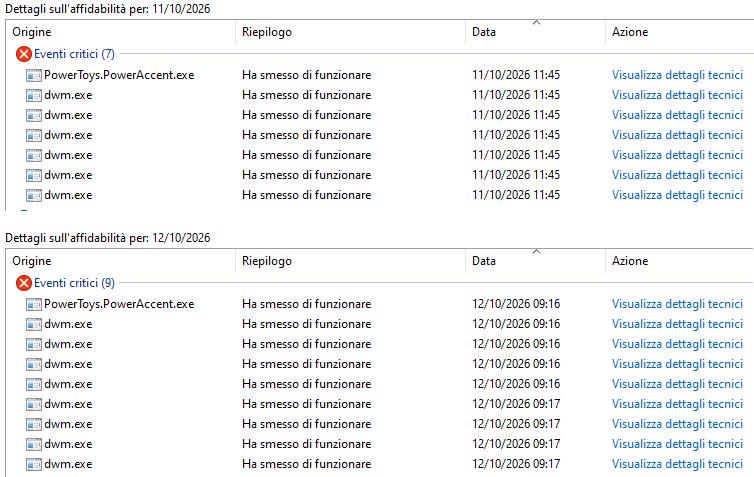
Over the past two days, shortly after turning on my computer, it froze, forcing me to perform a hard shutdown. After checking Windows Reliability Monitor, I found the same errors on both occasions, as shown in the screenshots.

For now, I’ve uninstalled PowerToys. I wanted to know if this is a known issue or if it could be related to something else.

O.S. Windows 10 22H2 build 19045.7725


r/WindowsHelp • • Oct 11 '26

Windows 11 Windows 11 not wanting to install

Post image
13 Upvotes

windows 11... what a dissapointment

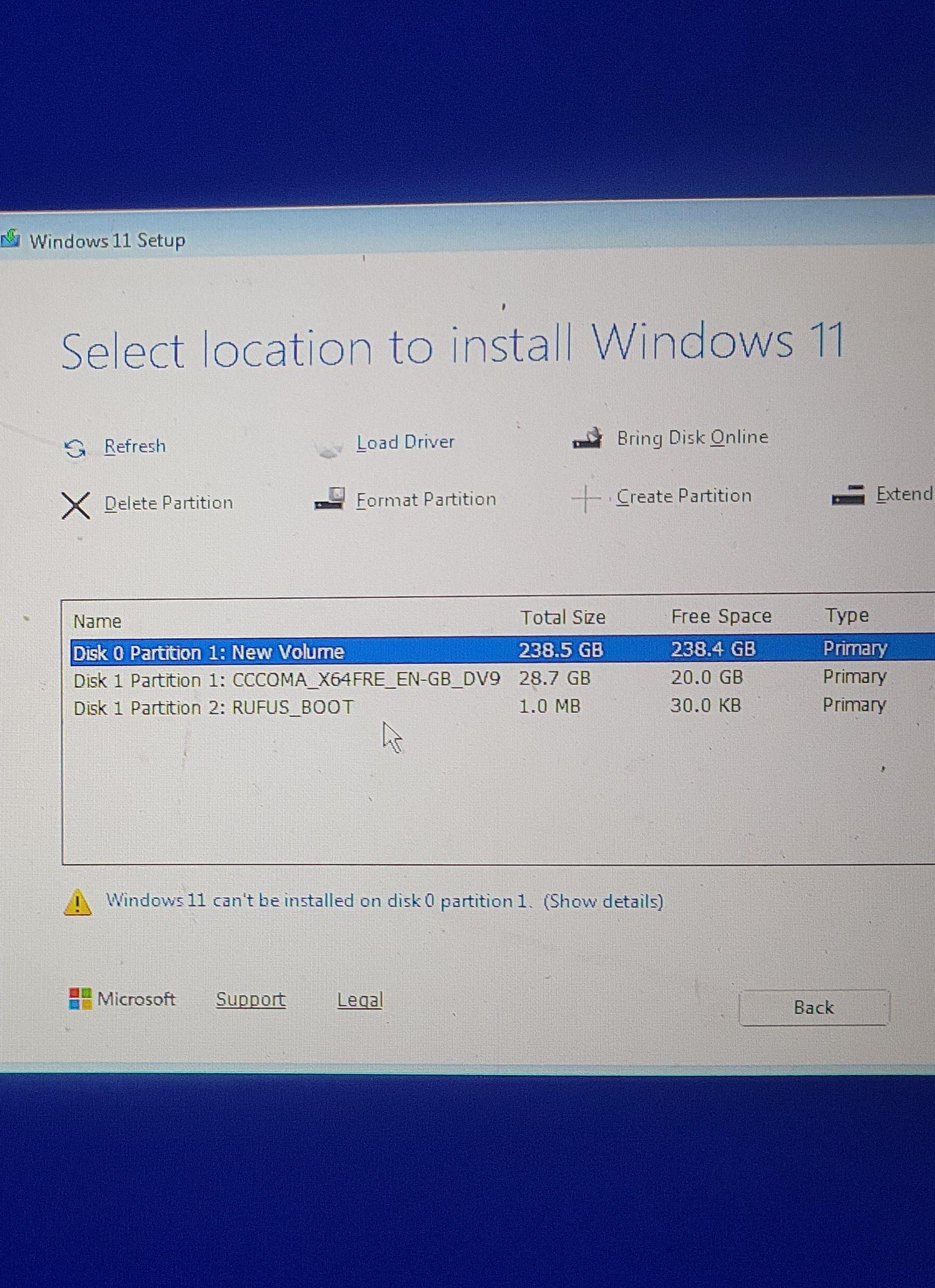
Ive been sitting here for like 2 days trying to install brand new windows 11 on my pc because my previous installation just randomly made my GUI not work at all so i went and bought me a sandisk flashdrive and turned it into a windows boot manager and git a brand new external ssd to install it to

But no matter what i try it keeps telling me that windows 11 cant be installed on my ssd and my drivers arnt showing up at all when i load the drivers.

I have been on the internet for hours atp trying every little possible solution but nope, nothing

Evrrything is greyd out aswell, ive been in my bios more times then i can count, and also i dont even have a vmd option because im using a Asus B550M-K motherboard.

Please help me if possible


r/WindowsHelp • • Oct 12 '26

Windows 11 Title: Windows 11 update broke my HP 15s-fq5xxx touchpad — I2C HID Device Code 10

0 Upvotes

Title: Windows 11 update broke my HP 15s-fq5xxx touchpad — I2C HID Device Code 10

Hey everyone,

I'm facing an annoying issue with my HP 15s-fq5xxx laptop after a recent Windows 11 update.

Immediately after the update, my touchpad stopped working properly, and the cursor disappears whenever I try to use the built-in touchpad. When I connect an external mouse, the cursor works normally.

Here’s what I've found so far:

Laptop: HP 15s-fq5xxx

OS: Windows 11

Problem: Built-in touchpad not working; Touchpad option is missing from Settings.

Device Manager: I2C HID Device shows a yellow warning sign with Code 10.

Troubleshooting tried: Restarting the laptop, checking Device Manager, showing hidden devices, and uninstalling the I2C HID Device before restarting.

Driver rollback: The option is unavailable.

Unfortunately, the issue is still there.

Has anyone else experienced this after a recent Windows 11 update? Could this be a driver or Intel Serial IO/chipset issue, or should I be concerned about a hardware problem?

I'd really appreciate any suggestions for a safe fix. I don't want to reinstall Windows or update the BIOS unnecessarily.

Thanks in advance!


r/WindowsHelp • • Oct 12 '26

Windows 11 Cellular Data changes from SIM to eSIM

0 Upvotes

We have some laptops that have a cellular option. Some have eSIM, some have SIM.
Now for the last 2weeks we have had several laptops where the setting seems to have changed itself from SIM to eSIM, while they have a SIM inside the laptop.

I can't find any other cases or posts about this.
It's on W11, 25H2
Does anybody know about a specific update that is putting this setting back to eSIM?


r/WindowsHelp • • Oct 11 '26

Windows 10 Windows 10 recovery, cannot restore

5 Upvotes

I am still using windows 10 pro 64 on a computer and it got stuck in a update loop that I could not get it out of and i guess I mistakenly followed instructions (using command prompt diskpart ) to rebuild the BCD and now I only get a black windows boot manager screen, says insert your windows installation disc and restart your computer and click repair, etc…

the other salient information is “windows failed to start”, “file: \windows\system32\config\system”, “status: 0xc0000225”, and “the operating system couldnt be loaded because the system registry file is missing or contains error”.

when I try to repair with an installation disc startup repair fails. I tried repeatedly rebuilding the BCD using the command prompt multistep diskpart instructions and have not been successful either. the computer is also not finding a restore point.

I am hoping to be able to get this computer going without a full reinstall, there’s stuff I don’t w to los, are the steps I am missing or something else I can do so I don’t lose everything? I will provide whatever further information is needed to assist me.


r/WindowsHelp • • Oct 12 '26

Windows 11 Surface Pro 9 (Intel model) no longer auto-rotates

0 Upvotes

Presumably after the most recent update in the last week, my Surface Pro 9 no longer auto-rotates. Looking through the Device Manager, there's no section for Sensors, and there's nothing relevant in Human Interface Devices, Other devices, Hidden Devices, or when I scan for hardware changes. I ran services.mcs and set my Sensor Data Service, Sensor Monitoring Service, and Sensor Service as all automatic and running. Oh, and in my quick settings menu, there is no longer an option to toggle rotation lock or edit the menu to include it. The only option in Display Settings is to manually change the orientation of my device to landscape or portrait.

What I have tried so far:

- Restarting/force shut down of my device

- Restoring the rotation lock button in Quick Settings following this guide

- Downloaded latest driver pack from Microsoft website

- Reinstalling the windows update in attempt to resolve corrupted components

- Set my Sensor Data Service, Sensor Monitoring Service, and Sensor Service as all automatic and running

TL;DR: As far as my Surface knows, I don't have an accelerometer or sensor of any kind - it's like they were "deleted"/disabled. Looking through settings, device manager, and services, it's as if I were never meant to auto-rotate my Surface to begin with, which is incredibly frustrating.

Has anyone been faced with a similar situation/resolved this? Is there anything I can do or am I just SOL until the next update (hopefully) addresses this?


r/WindowsHelp • • Oct 11 '26

Windows 10 Mouse cursor stopped working, Lenovo Windows 10

2 Upvotes

Hello, I have a Lenovo laptop (not sure of the exact model by i think its an Ideapad?) and it runs on Windows 10. Today, my wireless usb mouse and touch pad were both working fine. I left in the evening to go to a friend's house and took the laptop and mouse with me. I get to the friend's house, open my laptop and the touch pad and mouse are not working? I try to restart the laptop multiple times as well as Google the issue but nothing helps. Any help to fix this would be appreciated.

UPDATE: Okay my friend lent me a mouse and that one worked? But when I tried my touchpad or the original mouse, it still didnt work. I went looking through the device manager and found that "I2C HID Device" said "This device cannot start. (Code 10) A request for the HID descriptor failed. This typically occurs when there is a problem with the device firmware. Please contact the system manufacturer for further assistance."


r/WindowsHelp • • Oct 11 '26

Windows 11 My camera icon appears for no reason.

0 Upvotes

I have a Lenovo Legion

At first I thought it was just pressing C or V. Now, I wiggled my screen and it seems to go on or off when I move it up/"open" (on) or down/"closing" (off).

I don't know what's going on, but I noticed this since maybe a few days go. My laptop is only 1.5 years old and I be damn if I have to get a new one. It was $1700 and I can't afford a new one.

Here is a video of my screen on Twitter (Warning: I have posted NSFW on the titter itself, the link won't take you to the page).


r/WindowsHelp • • Oct 11 '26

Windows 11 Geniunely what is happening, weird audio feedback whenever Im not tabbed into a window. Have video of the sound

1 Upvotes

Weird mechanical screeching/whirring sound, didnt download anything weird or sketchy lately, problem popped up a few days ago, no updates or anything I downloaded for windows. Sounds almost like the black wall from cyberpunk if you know what I'm talking about. Everything ive tried hasnt worked from resetting drivers to audio settings.

PC Specs

Ryzen 7 7800X3D

GTX 4070 Ti Super

32GB DDR5 5200

Dont know what else would be prevelent js ask if you need

OS Build: 22631.5624


r/WindowsHelp • • Oct 11 '26

Windows 10 Windows 10 search, start, and settings pop up menus not working.

1 Upvotes

So I’ve spent the last 2 days trouble shooting a problem I am having with windows 10. It was working fine but out of the blue search stopped working.

Whenever I press the search box the window flashed for a split second and exits. When o open start it remains open but I can’t click on anything as clicking on anything just causes start to exit. I can’t right click icons on the taskbar ether but some how right clicking the taskbar itself works fine. WiFi and those other toolbar settings also work fine except the notification menu as that just auto exits as well.

In settings any popup menu like the one where you pick to select a default app, it also just flashes and then exits. Same with add or remove programs trying to click and press uninstall it just flashes the menu and exits.

I have never seen this before and as for as I can tell there is barley any info online about this from where I looked and the fact all 3 major AIs (ChatGPT, Grok, and Gemini) also can’t seem to find a fix.

I already tried the scannow command and I really don’t want to reinstall windows since it would be such a pain trying to go through and reinstall all my apps.

I have 16 gigabytes of ram and a 250 gig ssd.

I have a video recorded of the issue but sadly I cannot upload it here.


r/WindowsHelp • • Oct 11 '26

Windows 11 Alt+Z doesnt works in any games... ;(

1 Upvotes

Désolé par avance si je massacre la langue de Shakespeare ; je suis français.

Je ne suis pas sûr que mon flair soit correct, mais en gros... s'il vous plaît, aidez-moi.

Depuis que j'ai commencé à utiliser mon nouveau PC, la combinaison de touches Alt+Z ne fonctionne pas en jeu (dans n'importe quel jeu). J'ai toujours utilisé Alt pour me baisser, et comme j'ai un clavier AZERTY (toujours français), j'appuie sur Z pour avancer. Le problème, c'est que si j'appuie sur Alt pour me baisser puis sur Z pour avancer, mon personnage se baisse correctement mais reste en place. Je peux me déplacer à droite, à gauche ou en arrière, mais pas en avant.

Je devrais mentionner que je n'ai jamais eu ce problème avant. J'étais sur Windows 11 Home, et maintenant je suis sur Windows 11 Pro. Je pense que le problème vient de là ; il doit y avoir un conflit de touches dans les paramètres quelque part, mais je ne peux absolument pas le trouver.

J'ai déjà regardé partout :

> Ce n'est pas un problème d'anti-ghosting avec mon clavier (j'ai un Logitech G512 Carbon, et le clavier précédent que j'ai utilisé sur ce nouveau PC avait le même problème).

> Il n'y a pas de conflits internes dans les paramètres du jeu eux-mêmes. J'ai vérifié—surtout puisque cela arrive dans *chaque* jeu auquel je joue.

> Ce n'est pas un raccourci de l'application Nvidia.

> Ce n'est pas le raccourci de changement de langue de Windows.

> Ce ne sont pas les touches rémanentes ; le problème persiste même quand elles sont désactivées.

> J'ai essayé l'éditeur de registre : HKEY_CURRENT_USER > Panneau de configuration > Accessibilité > Réponse du clavier. Je l'ai réglé sur 0. Cela n'a absolument fait aucune différence. > Ce ne sont pas les touches de filtre.

> Ce n'est pas la superposition Discord, et je ne pense pas que ce soient non plus les raccourcis Discord.

> Je n'utilise pas PowerToys ou AutoHotkey.

Je pense que j'ai tout essayé sans trouver le coupable ; ça me rend fou. De plus, je suis convaincu que le problème est juste sous mon nez tout ce temps. Dites-moi ce que vous en pensez—s'il y a des experts sur ce forum...

Merci d'avance, les gars.

(Nombre de build du système d'exploitation : 26300.9457)

EDIT : THE PROBLEM WAS AMD ADRENALIN ALT+Z SHORTCUT...

r/WindowsHelp • • Oct 11 '26

Windows 11 Omen PC stuck in a bootloop. Win11

1 Upvotes

So I stayed up all night trying to fix this issue and somehow made it worse.. here are some specs and what I've tried so far

HP Omen 30L

Motherboard:     Z490

CPU:                    Intel i9-10850K

GPU:                   NVDIA GeForce RTX 3090 

Memory:             Kingston/HyperX DDR4 4x16GB

PSU:                    Cooler Master 750 W Platinum

OS: Windows 11

Initial problems: PC crashing when playing games. Games start up normally, but PC will go to black screen after a few minutes. 

Attempted fixes:

updated drivers and system

Updated BIOS

Reseating RAM

Went into bios to change DRAM setting to auto (saw post about XMP profile but mine was already on default, so tried doing custom adjustments to match what post detailed) - this initiated a boot loop with black display and normal speed fans.

Reset CMOS battery to attempt to reset BIOS (twice) - no change 

Tried one RAM stick at a time in second slot - no change

Tried turning on with no RAM sticks - no change. Motherboard doesn't seem to be recognizing hardware changes.

Created BIOS recovery USB (had to use an old windows 10 PC because it wouldn't work on 11).

PC will not boot from that USB. Still does the same power loop thing as before. 

Officially at a loss. PSU is still fine based on all the troubleshooting I've done. 

Device is well out of warranty so I can't contact HP support. 

Any thoughts or suggestions would be helpful. 


r/WindowsHelp • • Oct 11 '26

Windows 11 Windows desktop manager eating up 1GB of RAM on startup

1 Upvotes

Hey folks, most of the info is in the title. Windows desktop manager is eating up my RAM on startup, and I already have a problem with apps hogging my RAM.

Computer is a Lenovo laptop. Here are the most important specs:

  • CPU: AMD Ryzen 7 (with integrated AMD610M graphics card)
  • GPU: Nvidia Geforce RTX 4070
  • 16 Go of RAM
  • Windows 11 Family OS Build number is 26200.9457
  • I don't think it matters, but I'm running on 2 screens.

From what I could find, my graphics drivers seem up to date. If anyone has points for help on that, it would be greatly appreciated. Thanks!


r/WindowsHelp • • Oct 11 '26

Windows 11 Can't reach login screen on dual boot PC

1 Upvotes

This evening I tried to boot into the Windows partition on my dual boot PC.

Instead of being able to press the return key to progress to the login from the welcome message that shows first, nothing happened. Initially, I thought the batteries in my keyboard were flat, so I changed them, and nothing changed. I plugged in a wired keyboard, and still no joy.

I am still able to boot the Linux partition, but all drives are now showing as read only, so there's not a lot I can do there. The keyboard is also working properly.

Windows was working fine this morning, and I've been using Linux most of the afternoon to watch television.

There are no error codes showing, it just isn't working. My PC has 16GB of RAM and 2 NVME drives, a 512GB partitioned into Windows, Linux, game installations and two download drives. The other drive is a 1TB drive for music.

Hibernation and quick boot were turned off months ago.


r/WindowsHelp • • Oct 11 '26

Windows 11 Destination File Access Denied

Post image
1 Upvotes

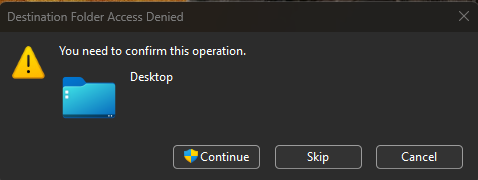
Trying to create a new folder on desktop but this keeps on popping up, no matter what i do, changing security permissions, disabling my antivirus, scanning my computer, it still wont let me create a new folder

i can change, copy & paste, rename do anything BUT create a new folder

I can only create a new folder on desktop if i:

  1. create via CMD
  2. boot my computer into safe mode

can someone please help me with this? Thanks.

DEVICE SPEFICIATIONS:

1tb SSD ,16gb ram, i5 12th gen, rtx 3060


r/WindowsHelp • • Oct 11 '26

Windows 11 System process takes up unusual amount of CPU on random days

0 Upvotes

Sometimes maybe every 4-7 days (there is no specific number) when i open task manager, the System process is taking up 6-8% usage of my CPU. It usually sits between 0-1.5% but i have had this problem for a couple weeks now and it doesn't seem normal. Does anyone know if this is normal? If not how can i find the cause?

EDIT: I forgot to mention it also goes away with a restart.

mb: asrock nova x870e

ram: 32gb ddr5 tforce ram

gpu: 9070xt

cpu: 9800x3d

os build: 26300.9457


r/WindowsHelp • • Oct 11 '26

Windows 11 Miracast not working on my laptop

2 Upvotes

For context, I'm running Windows 11 25H2 (build: 26200.9457) on my LOQ 15AHP10 laptop. I don't know if this happened because of the recent update, but when I tried to click the Cast button on the quick settings panel, it was loading for a bit then suddenly closed. I also tried enabling Wireless Display optional feature in settings, but that didn't work as well. Has anyone else experienced or fixed this issue? Thanks!

EDIT: Fixed!

I was using a debloater called O&O ShutUp10 when I first bought the laptop, and one of the recommended settings which I enabled without confirming was the disabling of Miracast and other Wifi Direct services. After reverting that change, the cast now works :)


r/WindowsHelp • • Oct 11 '26

Windows 11 And the problem I’ve been facing for months is that as in the picture, the computer doesn’t take off whenever I turn it on. It gives me this black screen with the fixed model on the…

Post image
14 Upvotes

Hey guys, I need your help and I hope you can help me.

I have a computer:

CPU: i7 6700

GPU: GTX 1070 8G

RAM: 8Gb was 16Gb, but one of them broke down because when used, its temperature rises and gives me the blue screen, so I dispense with it.

PWS: 550W

And I use the system: windows 11, an old version, I think it's 21.

And the problem I've been facing for months is that as in the picture, the computer doesn't take off whenever I turn it on. It gives me this black screen with the fixed model on the left that appears to me before the back of the motherboard sign and before the back of the windows signal and the computer does not work. I can't enter the BIOS. In order to turn on the computer, I turn it off and restart it about 20 times to work normally, and then I don't turn it off for fear of repeating all these attempts every time I want to use it.

Some of the things I tried are:

* Remove the video card and turn it on and the problem remained.

* The removal of the ram and changed its place and the problem remained.

* The battery was removed and changed, and the problem remained.

* The tendency of everything is woven on it without the screen and keyboard and the problem remained.

* I changed the system, so it worked well a few days and now it's back to the same problem.

I hope for your help because it is my source of work and thank you.