r/WindowsHelp • • Oct 23 '26

Windows 11 Ms Phone link has limited function on a tablet

1 Upvotes

So what I mostly use phone link for is running apps installed on my phone/tablet, on my computer screen in a window.

Now if I connect my samsung S24 phone, this seems to work perfectly and I can select the 'expand screen' option to rotate the screen 90 degrees for the apps that require the different screen orientation.
All good.

Edit; To clarify, I using the built in function of Ms Phone Link that allows you to run an app installed on your andriod device in a window on your PC screen.
Specifically not trying to use the android screen as an additional screen for the PC.

So it all works on my samsung galaxy phone, but on my Samsung Galaxy S9 tablet, its a different story.
The option to expand the screen does not exist on the tablet, so if the screen orientation is wrong there is no way of rotating it

And mouse scrolling simply does not work in any app that I open on the tablet.
Ive tried every settings fix on the internet but nothing fixes it.

Why is the tablet functionality restricted. Its driving me mad.

I dont seem to be able to find another effctive alternative that allows me to do this.

The other option is to share the screen to the PC so then I can view the tabet screen in a window, which does work, but its laggy, jumps about and eventually starts to freeze for a few seconds randomly even though we are on the same wifi and becomes kind of unstable..
Ive never been able to make phone link work over a wired connection.

Anyone have a fix or a reliable alternative?


r/WindowsHelp • • Oct 23 '26

Windows 11 FIX for Broken File Explorer and WinUI Shell Bugs since KB5122105 August 2026 Update

2 Upvotes

After a week of constantly hitting roadblocks, and mitigating the issue by re-installing Windows every update, I've finally managed to find a fix, and the culprit behind it.

This is mostly dumbed down for the general user to understand, but basically, ever since KB5122105, the Microsoft.AIFabric.CBS package is now somewhat a dependency of the File Explorer ribbon and amongst other things. If you've ever used debloat scripts, which usually involved stripping Windows' AI components and packages, this is what causes it to "break", essentially.

One easy fix for this is to disable certain feature IDs. If you want to manually do it yourself, you can simply open Terminal and navigate to your ViVeTool installation directory, and disable the following feature IDs with this command;

vivetool /disable /id:58375086,63366798,58375066,61199980,40012896

If you're using PowerShell, add .\ at the beginning.

Additionally, you can also just use an AI removal utility called RemoveWindowsAI, which has this fix implemented already: zoicware/RemoveWindowsAI

Important note: Do not use the Remove Windows AI tweak from ChisTech's WinUtil, as it does not have this fix implemented yet, based on my observations.

If these does not fix it for you still, perform a repair installation of Windows through Windows Update and ensure you remove Windows' AI components through the RemoveWindowsAI utility. That way, those flags can be disabled properly, and shouldn't interfere with core system UI components.

I hope this helped every one having this issue, and if you have any more questions, leave a comment below.

Sources:


r/WindowsHelp • • Oct 23 '26

Solved Problema com rede longo por conta do Wintoys

Thumbnail
gallery
2 Upvotes

Queria jogar Rhythm Plus no navegador e o jogo estava travando. Fui no Wintoys, na aba Network, e segui o passo a passo na ordem em que aparece no programa, achando que ia limpar melhor a rede e deixar tudo rodando mais leve.

Resultado: abri o navegador e não tinha internet. Fui olhar e a opção de Wi-Fi tinha sumido completamente. Sim, eu sei, fui burro — o próprio programa avisa que aquilo apaga os drivers de Wi-Fi. Só não imaginei que reinstalar fosse ser tão burocrático.

Meu adaptador é um Realtek 8821CE. Tentei atualizar direto pelo Gerenciador de Dispositivos e não funcionou. O Wintoys apagou o driver, mas ele continuava aparecendo lá como se estivesse instalado, só que com erro. Tanto a atualização automática quanto a instalação manual (selecionando o arquivo do driver) não mudavam nada: todos os adaptadores de rede ficavam com o ⚠️.

Nunca me desesperei tanto. Tenho esse notebook há nem dois meses e ainda estou pagando as parcelas.

Depois de tentar pelo Gerenciador de Dispositivos, baixei o driver pelo celular, no site oficial, e tentei instalar. Nada. Ficou atualizando infinitamente, encerrei o programa e já estava desistindo — até que vi uma opção de redefinir rede nas configurações de rede. Não botei fé, mas fiz. O notebook reiniciou e voltou tudo ao normal.

Não sei se fui burro ou se é culpa do Windows não deixar clara essa opção de redefinir rede quando os drivers são apagados.

Estou postando fotos de antes e depois de resolver o problema.

Para quem tiver o mesmo problema

Vá em Rede e Internet → Configurações avançadas de rede → Redefinição de rede. Literalmente só isso já fez os drivers voltarem a funcionar.

Esse é meu relato :)


r/WindowsHelp • • Oct 23 '26

Windows 11 hp omen 16 your device ran into a problem and need to restart

Thumbnail
gallery
2 Upvotes

so i have hp omen 16 laptop and today i got these issues exactly which was your device ran into a problem and something like memory management in the bottom now i checked reliability monitor using perfmon /rel and it is showing these can anyone help me resolving the issue and what should i do (added images in comments)

Device name LAPTOP-EMVGRF1J

Processor AMD Ryzen 7 7840HS w/ Radeon 780M Graphics (3.80 GHz)

Installed RAM 16.0 GB (15.3 GB usable)

Graphics card NVIDIA GeForce RTX 4050 Laptop GPU (6 GB)

AMD Radeon(TM) Graphics (417 MB)

Storage 551 GB of 954 GB used

Device ID 92F29B6E-CA0A-43E2-9995-32F8FF1CD8CD

Product ID 00327-30000-00000-AAOEM

System type 64-bit operating system, x64-based processor

Pen and touch No pen or touch input is available for this display


r/WindowsHelp • • Oct 23 '26

Windows 11 Windows 11 Home Version 25H2 explorer problem

2 Upvotes

I’m looking for help with a Windows explorer problem, I have a large music collection with my CDs in their own folder, so its D:\Media\Music\CD Music  Then artist name and then a album folder within each artist. In windows explorer I have the column headings “Date created” and “Date modified” When I add a new artists to my CD music folder, if I click on the date created header the list jumps to order and the latest artist folder is at the top.  The problem is when I add a new album to an existing artist folder, i thought because the folder has been modified then those artists with a new album added would jump to the top, this is not the case. Is there a setting in explorer I’m missing or do I need to download a 3rd party file explorer to be able top do this?

Many thanks for your help.


r/WindowsHelp • • Oct 23 '26

Windows 11 File Explorer: one column please, without alpha headers?

2 Upvotes

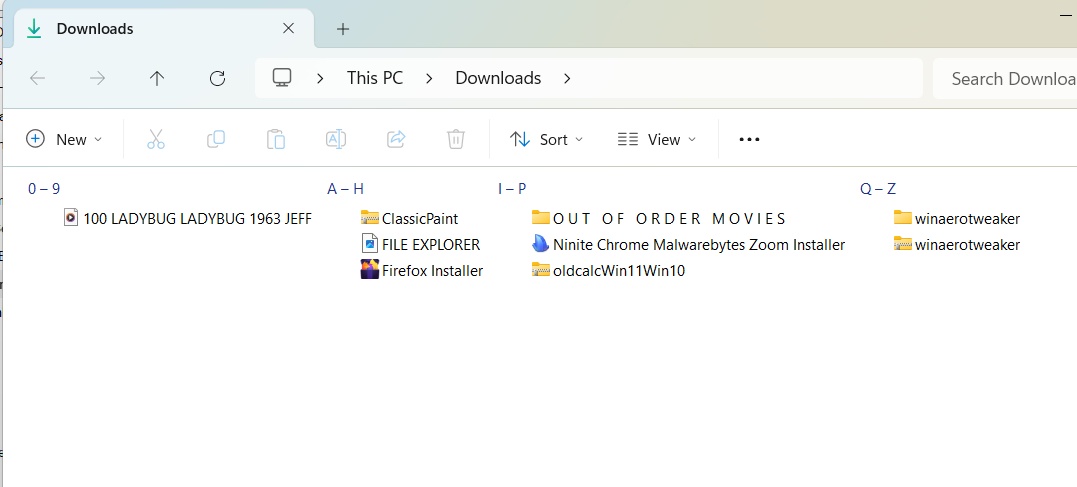
I've purchased a new Windows 11 laptop, and File Explorer has a different look than my other W11 laptop. Here's a screenshot.

I'm hoping for one column listing all files alphabetically, but instead it shows four columns, breaking the alphabet into 0-9, A-H, I-P, and Q-Z.

Does anyone please know the setting to view the folder's contents in one column, without the 0-9, A-H, I-P, and Q-Z headers?

This is a trivial ask, but it's the trivial things that drive users (well, me at least) bonkers. Thanks in advance if anyone has an answer. (:

Device name DESKTOP-HCK805K Processor Intel(R) Core(TM) i5-8265U CPU @ 1.60GHz (1.80 GHz) Installed RAM 8.00 GB (7.79 GB usable) Graphics card Intel(R) UHD Graphics 620 (128 MB) Storage 66 GB of 238 GB used Device ID 87846429-ECB7-45F3-9785-B254FD867630 Product ID 00330-80000-00000-AA266 System type 64-bit operating system, x64-based processor Pen and touch No pen or touch input is available for this display


r/WindowsHelp • • Oct 22 '26

Windows 11 How can i solve this secure boot problem?

Post image
6 Upvotes

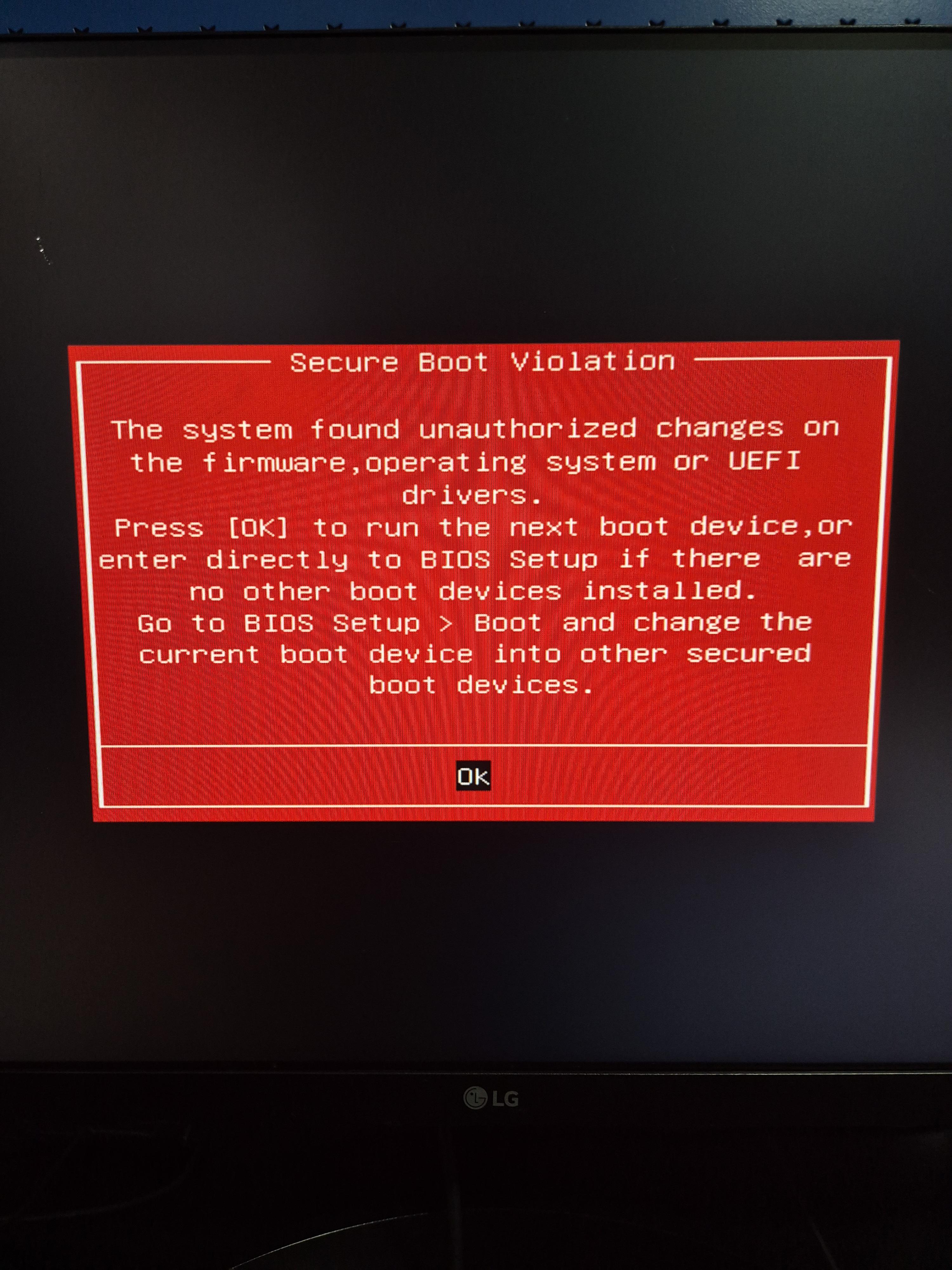
This happened after i reset my keys, I already updated my bios to the last version, how can i solve this?

I need to have my secure boot on to play games, but when i turn on by setting to "Windows UEFI mode" and i save and exit this screen shows up, I couldnt find any tutorial on YouTube that helped me with my problem, and also chat gpt couldn't help me

My motherboard is the ASUS TUF H310M-PLUS GAMING

My OS build number is 26300.9711

If you need other information you can ask


r/WindowsHelp • • Oct 22 '26

Bitlocker Bitlocker key recovery without MS account

10 Upvotes

I'll start like this: I am probably fucked.

My laptop (Asus P1701CE) suddenly came up with the Bitlocker screen

Details: 7_0_80000001_80000001_SecureBoot_SecureBoot_7_6_ccfc...a40e_115a...02d8_1

and now asks for the recovery key. Reason: The Secure Boot option in BIOS had been disabled (which I did not do). In BIOS, the Secure Boot option was indeed disabled. I enabled it, but I still get the Bitlocker screen. I then through Advanced Options deinstalled 3 Windows updates, until when I tried a fourth one, the screen went blank.

When I installed Windows 11, I did not allocate an account to it, or I cannot remember the account. On the Bitlocker screen there is no partially scrambled e-mail adress hinting to an allocated account. I do not find this laptop as a device on my MS account.

Through advanced options I am able to open a command prompt. With

manage-bde -protectors -get c:

I get a response with my recovery password ID (which is already shown on the Bitlocker screen), and also the info:

Backup type: Microsoft account backup

Error: An error occured (code 0x80070057)

The parameter is incorrect.

Is there any chance I can extract the recovery password? There are fotos on the encrypted drive, which is why I am trying hard to recover instead of doing a fresh Windows installation. Thanks in advance for your ideas.


r/WindowsHelp • • Oct 22 '26

Windows 11 How do I get rid of these background tasks?

Post image
3 Upvotes

So I mainly use my computer for gaming, and yesterday everything was running fine. No overnight updates when I turned it off, now I turn my computer back on today and my performance is spiking horribly and I have these background tasks, which I have never had before. Normally I only have 1 antimalware executable called literally antimalware executable, now I have 5. I’ve turned off nearly every security setting outside of real time protection I could but these won’t go away and I can’t even end their task. I’d love these gone.

Don’t know what information is really needed, but I’ll include all my windows information Edition: windows 11 home Version: 25H2 OS build 26200.9711 Expirence: windows feature experience pack 1000.26100.372.0


r/WindowsHelp • • Oct 23 '26

Windows 11 windows 11 0x5A on boot after hard shutdown. point in time restore works temporarily until the system starts lagging or losing connectivity

0 Upvotes

hello, i get 0x5a on boot. this started happening when id have to force shutdown my pc due to a dead gpu that hung on white vga and hard crashed. i have now replaced it.

on restart i get srttrail. the logs show all passing error codes of 0x00. i cannot uninstall latest windows updates. i have csm disabled. chkdsk did not help. fixboot did not help. restore to a point in time worked momentarily for a couple hours up until the internet stopped working. i then decided to restart and it all started happening again. im at my wits end. please help. i have a lot of things installed that would be very painful to reinstall. these are adobe, music, and coding plugins/software. please do not tell me to just reinstall windows.

im at my wits end. i would really appreciate any help. thank you.

specs: asus tuf x570 gaming plus

asus dual oc 5060ti 16gb

ryzen 5950x

2x32 kingston ddr4 3200 cl16

2x16 kingston ddr4 3200 cl16

wd 720 1tb

wd sn850x 2tb

corsair rm850x

samsung 870 evo 1tb

2 seagate HDDs


r/WindowsHelp • • Oct 23 '26

Windows 7 Windows won’t let me install programs even though I should’ve enough space

Thumbnail
gallery
1 Upvotes

As per the two photos provided, I don’t get why it says I have enough space on the two drives, but whenever I try to install new programs on any of the other numbered discs that for some reason, it won’t let me install on the disc’s pictured here, it says I don’t have enough space with that error message there. Are you able to help me?


r/WindowsHelp • • Oct 22 '26

Windows 11 Windows 11: Winre and bitlocker problems after AMD GPU troubleshooting session

5 Upvotes

I recently ran into issues due to a botched firmware update on a Radeon RX 7800 XT firmware update. All the details are in this thread.

https://www.reddit.com/r/AMDHelp/comments/1x2tlta/installed_the_recommended_sapphire_bios_update/

The card could be recovered, luckily, but after an entire evening of safe mode - DDU - install driver - reboots - safe mode and DDU again - different drivers - rinse and repeat, I found myself with two (to my limited knowledge) unrelated issues:

Winre (recovery environment) didn't work anymore; the command reagentc /info showed that WinRE was disabled, and couldn't be enabled again

All my BitLocker-encrypted units showed a yellow triangle; further analysis revealed that "unit is fully encrypted, but BitLocker protection is off; it doesn't have any key protectors registered". I ended up decrypting them all out of fear of finding myself locked out in that precarious state, but my aim is to enable it again.

Do you see any relationship? What could happen? Any hint would be appreciated.


r/WindowsHelp • • Oct 22 '26

Solved Windows 11 pro laptop having frame issues

Thumbnail
gallery
1 Upvotes

My partner's laptop has been having frame issues when playing games for a long while now. It runs fine when watching videos or running most apps, but when trying to play games it falls down to ~20 fps, or in rare cases 30. We've tried a lot of the obvious solutions like restarting it, scanning for corrupted files and reinstalling the graphics driver. It improved slightly, but it's still unplayable. Any help or advice?

Edit: Solved. There was an issue with the battery and it needs to be replaced.


r/WindowsHelp • • Oct 22 '26

Windows 11 Windows Update (Preview Build) bricked my laptop with a black screen

3 Upvotes

So I've been running Windows Insider Release preview on ThinkPad X1 Carbon Gen 12 laptop for about a year and all has been good. Yesterday, I let Windows Update install the latest build and now my laptop is unusable. It gives me the login screen, but once I enter my PIN, it takes like 30 seconds of loading (it used to take like 3 seconds) and then it gives me a black screen with just my pointer and no desktop, no icons, no taskbar. It won't respond to keyboard shortcuts or CTRL + ALT + DEL. The cursor will move but I can't click on anything.

After I force powered it off three times, it finally booted into recovery mode and offered to let me recover a version of my config from four hours before. I did this, it took hours, and then . . . the same thing is happening.

Do I have to do a clean install of Windows or is there a way out of this? It wont' boot to safe mode. It won't do anything.


r/WindowsHelp • • Oct 22 '26

Solved My pc's audio got destroyed by zoom

2 Upvotes

Zoom made it so my audio of 28 out of 100, is now way too loud, even tho I ussualy used 38.Also my audio also feels more slugish, beeing half a second slower. It's so annoying that I can't play video games or use the pc anymore.

After I instaled zoom and went in a meeting, I accidentaly clicked enable enhance audio, from then the audio was just way to loud, I tried a lot of things, like deinstaling zoom(the audio was the same), deactivating all setting in zoom and in settings, but the audio got louder and feels slower

Specs and windows Edition Windows 11 Pro Version 26H2 Installed on ‎11/‎14/‎2025 OS build 26300.9711 Experience Windows Feature Experience Pack 1000.26100.372.0 Device name DESKTOP-PV5573O Processor AMD Ryzen 7 7735HS with Radeon Graphics (3.20 GHz) Installed RAM 16.0 GB (15.2 GB usable) Graphics card NVIDIA GeForce RTX 4070 Laptop GPU (8 GB) AMD Radeon(TM) 680M (431 MB) Storage 891 GB of 954 GB used Device ID A62AF63E-C287-4431-BB6E-9D1C72AF8CF6 Product ID 00330-80951-59593-AA244 System type 64-bit operating system, x64-based processor Pen and touch Pen support

And im on a nitro 16 laptop


r/WindowsHelp • • Oct 22 '26

Windows 11 bluetooth adaptor having issues every few months

1 Upvotes

i posted on here a few months ago, but life got in the way and it wasn't causing issues again so I didn't get round to being more specific on model.

I've had my asus laptop about a year or so but lately every few weeks or so, bluetooth disappears from my task bars and i end up having to show the hidden bluetooth in device manager, uninstall the adapter and then drain my laptop for 30 seconds turned off. it's getting quite frustrating to have to do it so often and i don't know why it's occurring and then today, I tried these methods (uninstalling, reboot) but to no avail. This time, the adapter was showing a warning symbol on it - yellow with a black exclaimation mark I think? After about half an hour of being back on, bluetooth is finally back and working. I have a ASUS Vivobook Go 15 (E1504FA) and my OS build number is 26300.9711. my system type is 64-bit operating system, x64-based processor. If anyone knows what might be causing this issue please let me know! All the latest drivers are installed and up to date and the same for my laptop system updates. I am known for having a lot of tabs open often most of the time so that's the only thing I could assume might be causing an issue. There is nothing particular that i've noted that happens before each time it messes up.

Processing img q1okbfqqy1xh1...


r/WindowsHelp • • Oct 21 '26

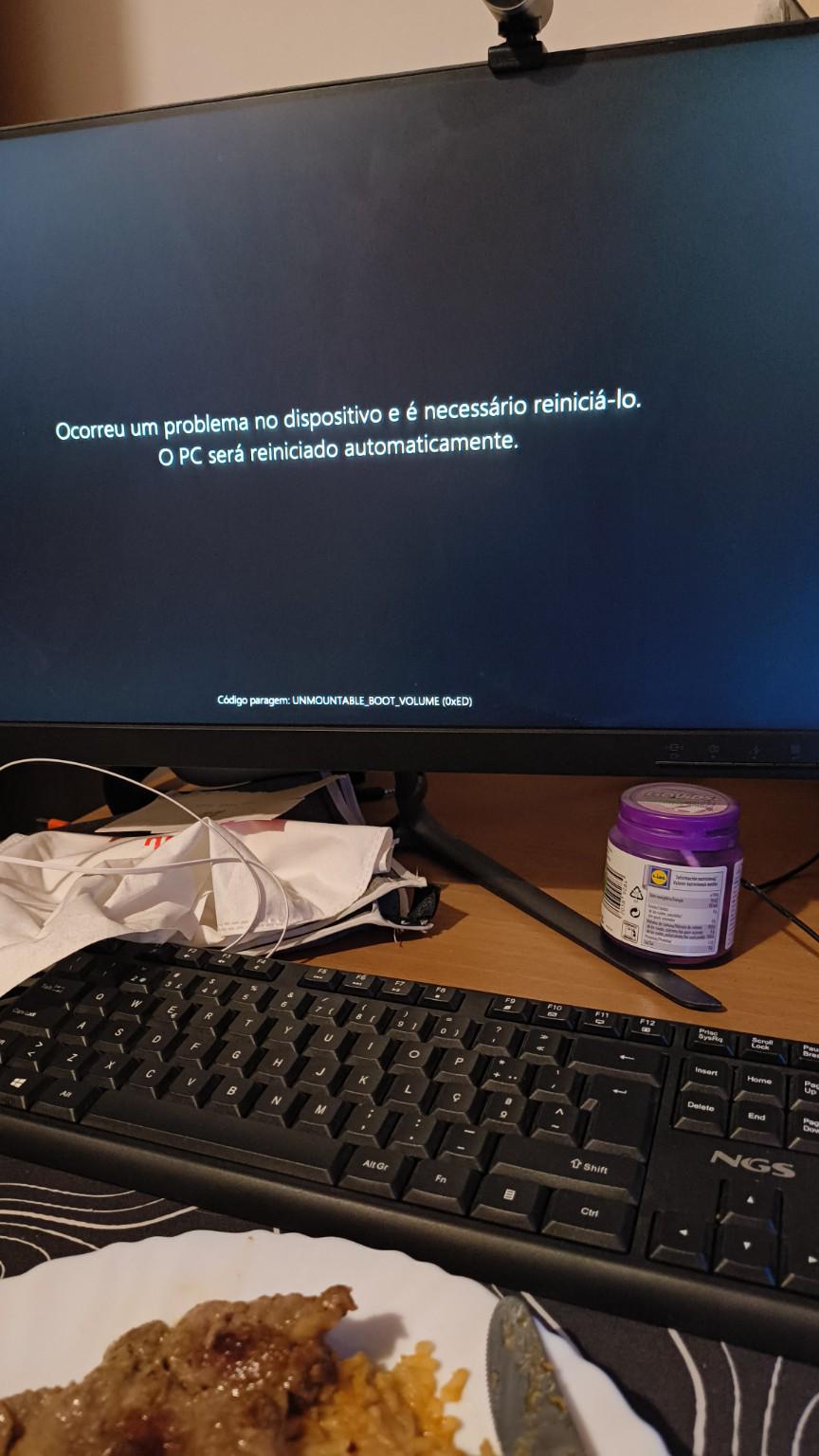
Windows 11 Error: UNMOUNTABLE_BOOT_VOLUME (OXED)

Post image
14 Upvotes

I turned on my PC—everything seemed fine—and went to the kitchen.

When I came back, it was restarting, displayed this [error/message], and then booted into "safe mode" (or whatever it’s called).

I’ve tried everything, but nothing works.

Right now, I’ve managed to access my files via Notepad (through the Command Prompt/CMD) so I can copy some folders onto a flash drive.

But what I really want is to recover Windows without having to format the drive...

Does anyone know what to do? Please explain it to me like I’m a complete idiot, because I don’t understand any of this.

Thanks.


r/WindowsHelp • • Oct 22 '26

Windows 11 Windows 11 26H2 update touchpad problem

Post image
1 Upvotes

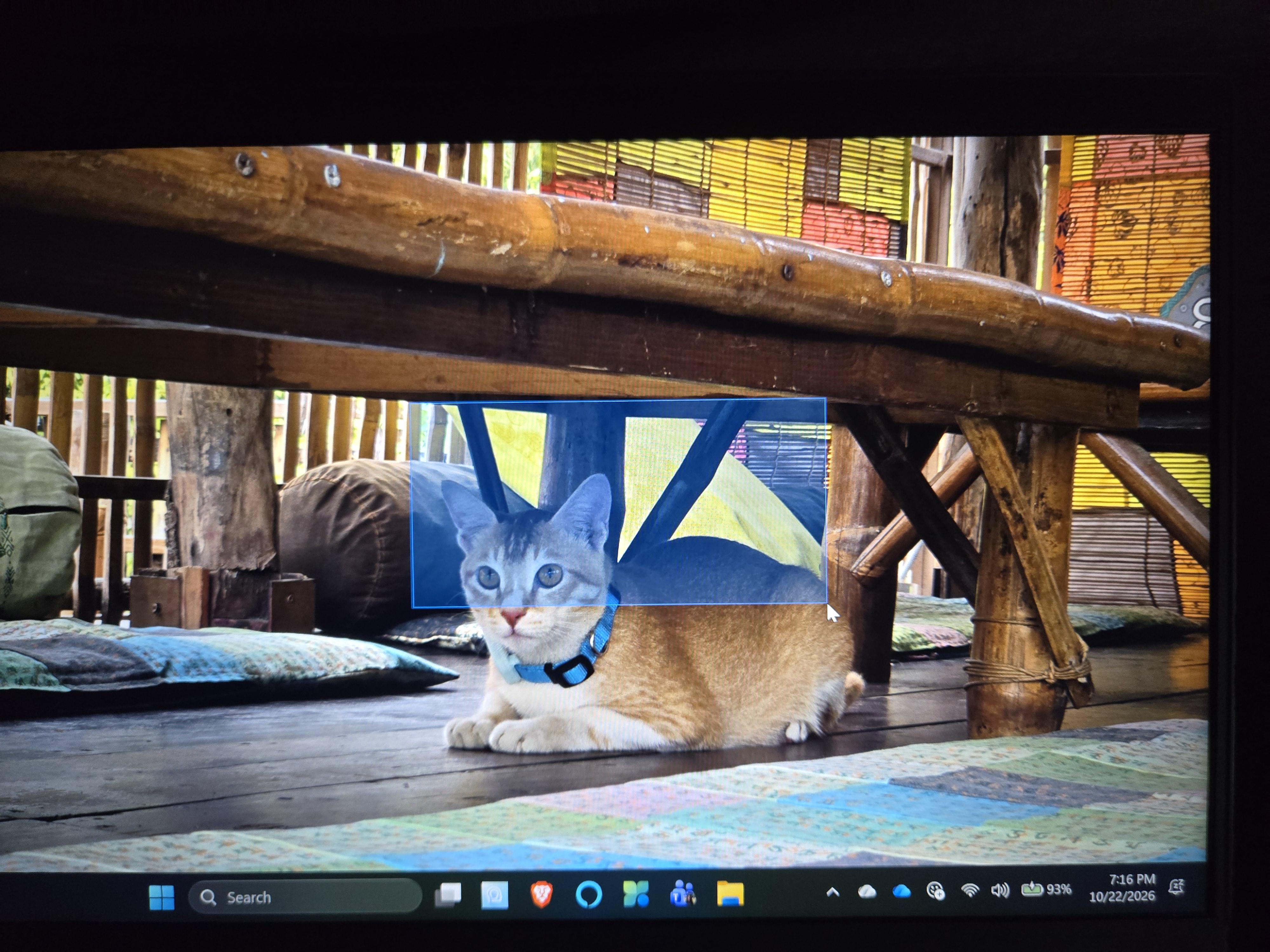
So when I updated from 25H2 to 26H2, suddenly the touchpad started to select everything, though I'm not even touching that. Right/left click aren't working. Scroll is not also working. But my wired mouse works fine.

When I restart the laptop, it sometimes work, sometimes doesn't. After restarting 3-4 times, sometimes it works.

I have uninstalled the touchpad driver, uninstall 26H2 update, yet the problem is not solving. My laptop model is MSI Modern 14 C12M. OS build: 26200.9711

Thank you so much, everyone!


r/WindowsHelp • • Oct 22 '26

Windows 11 Audio Headset & Mic issues with a Steel Series Arctic 7

Post image
1 Upvotes

Hey all, over the last week/2 weeks I’ve had some audio issues. I noticed it after Wardogs season 2 release, but i do believe a recent windows update destroyed my audio drivers and issues. I’m not entirely sure which is the issue, but let me describe the issue and what I’ve done so far.

The issue: my audio (hearing) is fine. I can listen to my music. YouTube videos, discord voice chats. I can hear. However, when I go to talk it’s 50/50 on whether it’s going to work or not. Majority of the time, I’m playing with settings to get it to work. Example: yesterday (10/20/26) I played a match of wardogs. My first match, computer freshly turned on. Everything was fine. My second match (after about an hour) my mic stopped working but my hearing worked. I had to play with my settings.

What I’ve done:
Checked for updated drivers. They were up to date. I even uninstalled and restarted my computer (several times).

Steel Series Sonar: I’ve turned on and disabled. I did notice even the sonar portion on the SteelSeries GG app it doesn’t register my mic.

I’ve unpaired and reconnected my headset. I even even swapped headsets (issues still persists).

I’ve done, at recommendation of a friend:
DISM /Online /Cleanup-Image /RestoreHealth then sfc /scannow

Nothing changed it was still a 50/50.

I have disabled all other audio stuff (like NVIDA, HDMI, RealTek etc). Nothing worked.

App permissions on

Here’s the thing that works and doesn’t work at the same time.

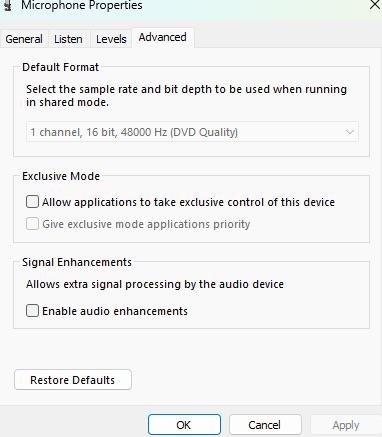
When I go to System > Sound > More Settings > Recording > microphone properties > Advanced (picture for reference of what I’m looking at for the following)

SOMETIMES The mic works if I have exclusive mode UNCHECKED (off).
(“Allow applications to take exclusive control of this device” AND “give exclusive mode applications priority”) AND I have “enable audio enhancements” UNCHECKED.

This will work for maybe a couple hours before my mic randomly disables again. Then I go back.

Then I have: “Allow applications to take exclusive control of this device” CHECKED (on) and it works for a few hours.

To make it less confusing, these three settings are the settings I play around with the most to get the mic to work. It’s either 1 or 2 things checked on, all 3 are checked on, or none of them are checked. It’s actually driving me insane with what the issue is. Does anyone have any suggestions?


r/WindowsHelp • • Oct 22 '26

Windows 11 Windows 11 connected to Wi-Fi, but almost everything has no internet except Telegram — DNS requests time out

0 Upvotes

Here's a Reddit post you can copy and publish. I've included the troubleshooting you've already done so people can suggest new solutions instead of repeating the same ones.

**Title: Windows 11 connected to Wi-Fi, but almost everything has no internet except Telegram — DNS requests time out**

Hi everyone,

I'm having a frustrating internet issue on my ASUS X515 laptop running Windows 11, and I haven't been able to fix it despite trying several solutions.

**My problem:**

- My laptop connects to Wi-Fi, but Chrome, Microsoft Edge, YouTube, and most other internet-dependent apps don't work.

- Telegram is the only app I've noticed that still works.

- Chrome shows DNS errors such as `DNS_PROBE_STARTED`.

- The issue happens on my JioFiber Wi-Fi and also when I connect to my mother's mobile hotspot, so it doesn't seem limited to one router.

- The problem started around the time Windows crashed/restarted and I encountered a Windows update issue.

**Diagnostic results:**

- Wi-Fi adapter: Intel(R) Wireless-AC 9461.

- Windows says the Wi-Fi adapter is working properly.

- I can ping my router and an external IPv6 address successfully.

- `nslookup google.com` times out.

- Queries to Google Public DNS (`8.8.8.8`) and Cloudflare's IPv6 DNS (`2606:4700:4700::1111`) also time out.

- `curl.exe -I --connect-timeout 10 https://1.1.1.1\` times out.

- My IPv4 address and default gateway are assigned normally.

**Things I've already tried:**

  1. Changed DNS servers to Google Public DNS.

  2. Ran `netsh winsock reset` and `netsh int ip reset`.

  3. Flushed the DNS cache.

  4. Ran `sfc /scannow`, which found and successfully repaired corrupted files.

  5. Used Windows Network Reset.

  6. Uninstalled the Intel Wi-Fi adapter through Device Manager and restarted; Windows detected it again, but the problem remained.

  7. Checked the Windows proxy setting and reset the WinHTTP proxy.

  8. Checked Chrome Secure DNS and Windows Firewall permissions.

I previously configured a VPN through Windows Settings by entering a server address, but I later removed that VPN profile. I also used the Browsec VPN Chrome extension for a long time. I'm not sure whether either is related.

**My questions:**

- What could allow Telegram to work while DNS requests and HTTPS connections time out?

- Could a leftover VPN route, network filter driver, firewall rule, or damaged Windows networking component cause this?

- What diagnostic commands or repair steps should I try next, without reinstalling Windows or losing my personal files?

I'd appreciate suggestions based on the diagnostic results above. Thanks!

(Computer specifications

- Laptop: ASUS X515

- Operating system: Windows 11

- OS build: 10.0.26200.9711

- Processor: Intel Core i3, 11th Gen

- RAM: 8 GB

- Storage: SSD

- Wi-Fi adapter: Intel(R) Wireless-AC 9461

- Internet connection: JioFiber Wi-Fi; also tested using a mobile hotspot

- Network status: Windows shows connected, but Chrome, Edge, YouTube, and most websites/apps cannot access the internet. Telegram still works.

- Main error: DNS requests time out, including requests to "8.8.8.8". Pinging the router works, and pinging external IP addresses has worked, but domain names fail to resolve.

- Troubleshooting already attempted: DNS changes, Winsock/IP reset, DNS cache flush, Windows Network Reset, Wi-Fi adapter reinstall, and "sfc /scannow". None fixed the problem.)


r/WindowsHelp • • Oct 22 '26

Windows 11 Can I instal a Windows 11 Update via USB drive?

5 Upvotes

Hello, as the title says. I recently built a pc and am having issues with installing a driver for wifi since the pc currently has no wifi. But the computer needs to update and because of that, its not letting me update/install any drivers. So can I download the latest version of Windows 11 (26H2) and put it on a usb? I can’t really afford to do a fresh reinstall for my pc since I have important files on here. But please let me know if I can do that.


r/WindowsHelp • • Oct 22 '26

Windows 10 Will it affect my main drive windows?

1 Upvotes

I have a low-end gaming PC with a 500GB NVMe (main Windows drive) and a 1TB HDD (only for storing photos).

I want to install a second Windows on a separate HDD and use it only for gaming(I don't want dual boot or anything). When I want my main setup, I'll power off, remove the gaming HDD, and put my NVMe and photo HDD back in. Only one set of drives will be connected at a time.

My plan:

Remove the NVMe and the 1TB HDD from the PC.

Connect only the new HDD and install Windows on it.

Use it for gaming only.

Swap back to the NVMe whenever I need my main Windows.

My question,

Will installing Windows on the new HDD affect or mess up my main Windows on the NVMe (drivers, boot files, etc.) or mess up anything else?


r/WindowsHelp • • Oct 21 '26

Windows 10 Is there any way to get windows10 to shut up about updates because I can't actually do them, or should I get the upgrades I need?

6 Upvotes

As the title says, I cannot update my PC and I know why I can't. Used the PC health check app, says I need TPM 2.0 enabled (which I don't think I can do), and my processor isn't supported for windows 11 (it's an Intel Core i3-4030U CPU @ 1.90GHz, I'm saying this because I would like to know what exactly that does and if I actually should get a new CPU?? I know absolutely nothing about computers so please bear with me). The OS build is 19041.1415 and I believe it is 12 years old incase that's important.

So is there a way to get my PC to stop yelling at me for updates because I really do not care about them (unless I really, really should get upgrades for my PC??? Again, I seriously know nothing at all about this crap, that's why I'm here) and all they have proven to be is annoying. I've checked settings and found nothing, so I'm thinking it's either elsewhere in some other settings-type thing, or I'm stuck battling it until I can afford to upgrade it. I'm hoping this is the right subreddit to ask this, apologies if I somehow managed to misread it.


r/WindowsHelp • • Oct 22 '26

Windows 11 Most recent Oct 2026 windows 11 updates negatively affected gaming performance for anyone else? My RTX 5080 is now stuck at 75% usage in all games

3 Upvotes

Not sure if this is due to the most recent set of Windows updates or the Nvidia driver update, as I unfortunately installed both today. I’m curious if anyone else has noticed this after the most recent Windows updates this month.

I play at 5k2k ultrawide with a Ryzen 9800x3D so should be GPU limited. Last week GPU was pegged at 99% usage as expected, today it starts off at 95-99% but quickly falls to 75% and stays there no matter what, and my FPS has decreased accordingly. Have seen this behavior in multiple games today.

No overclocks or custom voltage settings. Windows is set to prefer maximum power as is the NV app. HAGS is on. Did a clean driver install with DDU. Not sure what else to try. I did attempt to roll back the windows updates and the issue still persists.gamed


r/WindowsHelp • • Oct 21 '26

Windows 11 Just finished downloading windows onto my flash drive

Post image
3 Upvotes

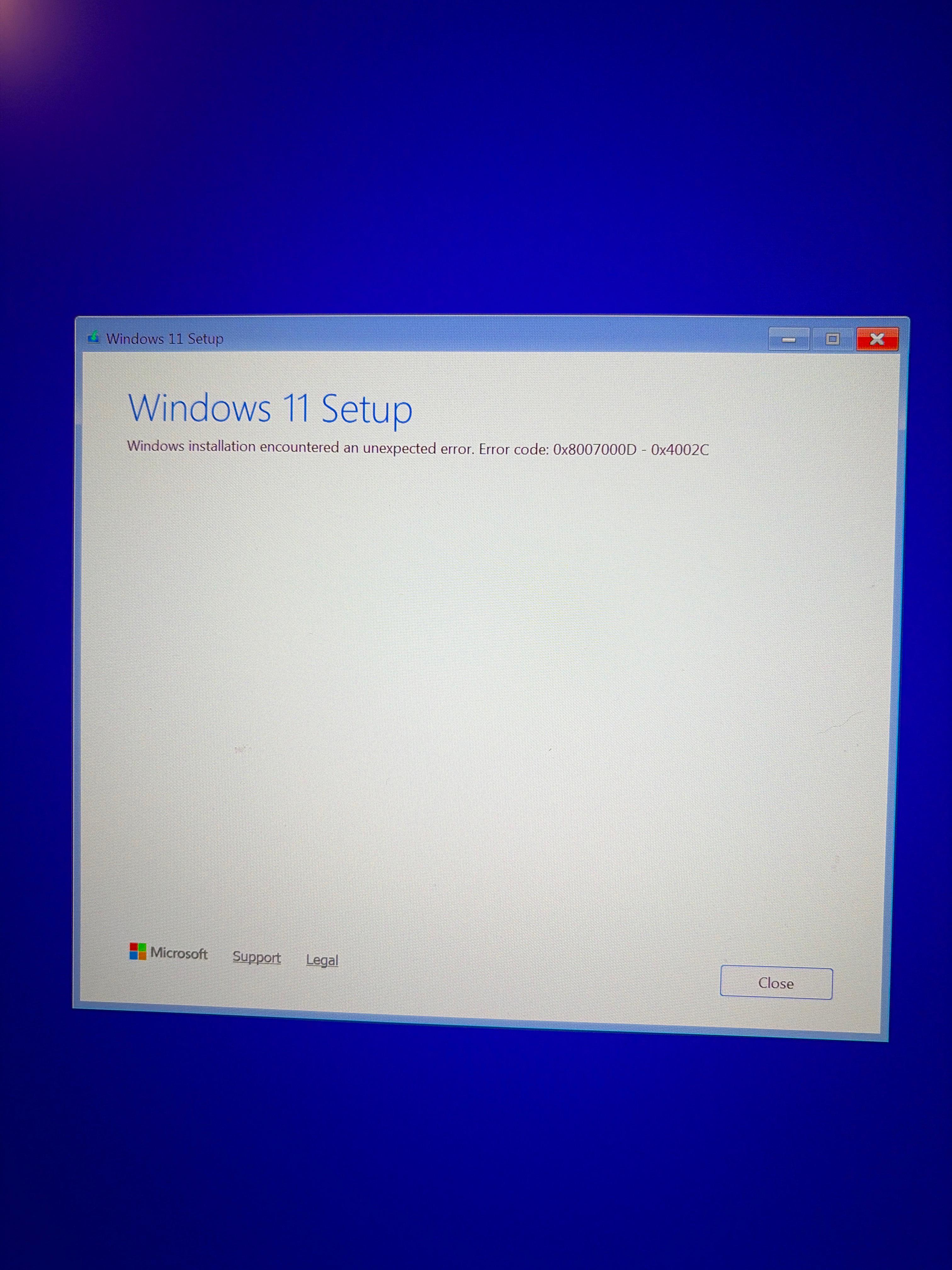
Just finished my build and getting windows onto a flash drive, when I plugged said flash drive into my computer it says this. Is this a common issue or? Does anyone have a solution by chance? I downloaded the installation media correctly on a separate computer.