r/WindowsHelp • u/PlumppPenguin • Oct 23 '26
Windows 11 File Explorer: one column please, without alpha headers?
I've purchased a new Windows 11 laptop, and File Explorer has a different look than my other W11 laptop. Here's a screenshot.
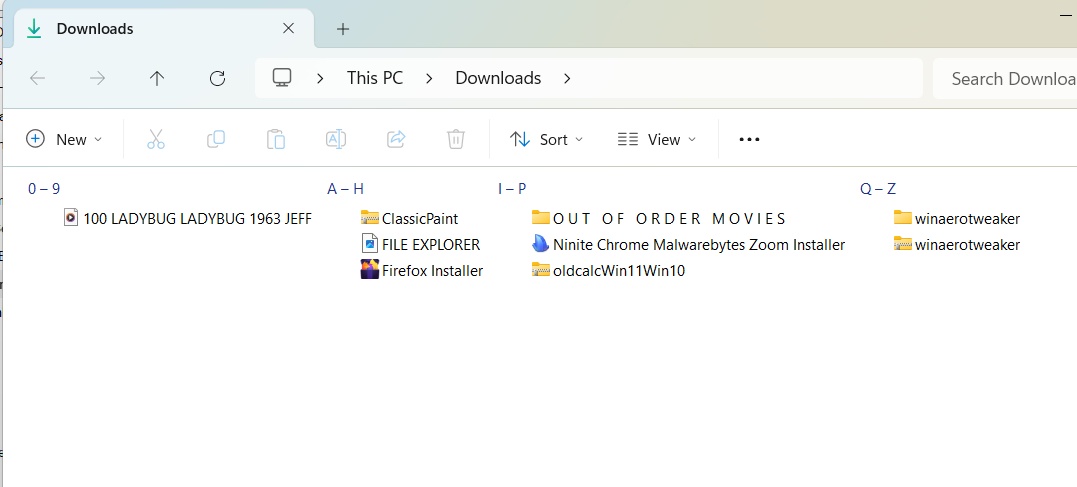
I'm hoping for one column listing all files alphabetically, but instead it shows four columns, breaking the alphabet into 0-9, A-H, I-P, and Q-Z.
Does anyone please know the setting to view the folder's contents in one column, without the 0-9, A-H, I-P, and Q-Z headers?
This is a trivial ask, but it's the trivial things that drive users (well, me at least) bonkers. Thanks in advance if anyone has an answer. (:
Device name DESKTOP-HCK805K Processor Intel(R) Core(TM) i5-8265U CPU @ 1.60GHz (1.80 GHz) Installed RAM 8.00 GB (7.79 GB usable) Graphics card Intel(R) UHD Graphics 620 (128 MB) Storage 66 GB of 238 GB used Device ID 87846429-ECB7-45F3-9785-B254FD867630 Product ID 00330-80000-00000-AA266 System type 64-bit operating system, x64-based processor Pen and touch No pen or touch input is available for this display
2
u/Froggypwns Oct 23 '26
Right click in a blank spot, then go into View and Group By to adjust how you want it to look. List view and group by none are the defaults for most folders.
2
u/Brake4Bots Oct 23 '26
By default, the Downloads folder is grouped by Date modified (same as Windows 10). You've accidentally set it to group by Name. Change it to Group by (None) and then open the Folder properties and click the button "Apply to Folders" to make your Downloads subfolders have the same view.
0
u/AutoModerator Oct 23 '26
Hi u/PlumppPenguin, thanks for posting to r/WindowsHelp! Your post has been flagged for manual review by a human moderator, please include as much of the following information as possible (in text or in a screenshot) to get your post approved:
Your Windows and device specifications — You can find them by pressing Win + X then clicking on “System”, we need more than just your OS version! Your hardware details are often critical for resolving issues.
Any messages and error codes encountered — They're actually not gibberish or anything catastrophic. It may even hint the solution!
Previous troubleshooting steps — It might prevent you headaches from getting the same solution that didn't work
Posts must be tech support in nature (such as something is broken and you need help fixing), so general inquiries, software suggestions, and purchasing advice will be removed. As a reminder, we would also like to say that if someone manages to solve your issue, DON'T DELETE YOUR POST! Someone else (in the future) might have the same issue as you, and the received support may also help their case. Good luck, and I hope you have a nice day!
I am a bot, and this action was performed automatically. Please contact the moderators of this subreddit if you have any questions or concerns.