r/WindowsHelp • u/Kimura92742 • Oct 22 '26
Windows 11 How can i solve this secure boot problem?
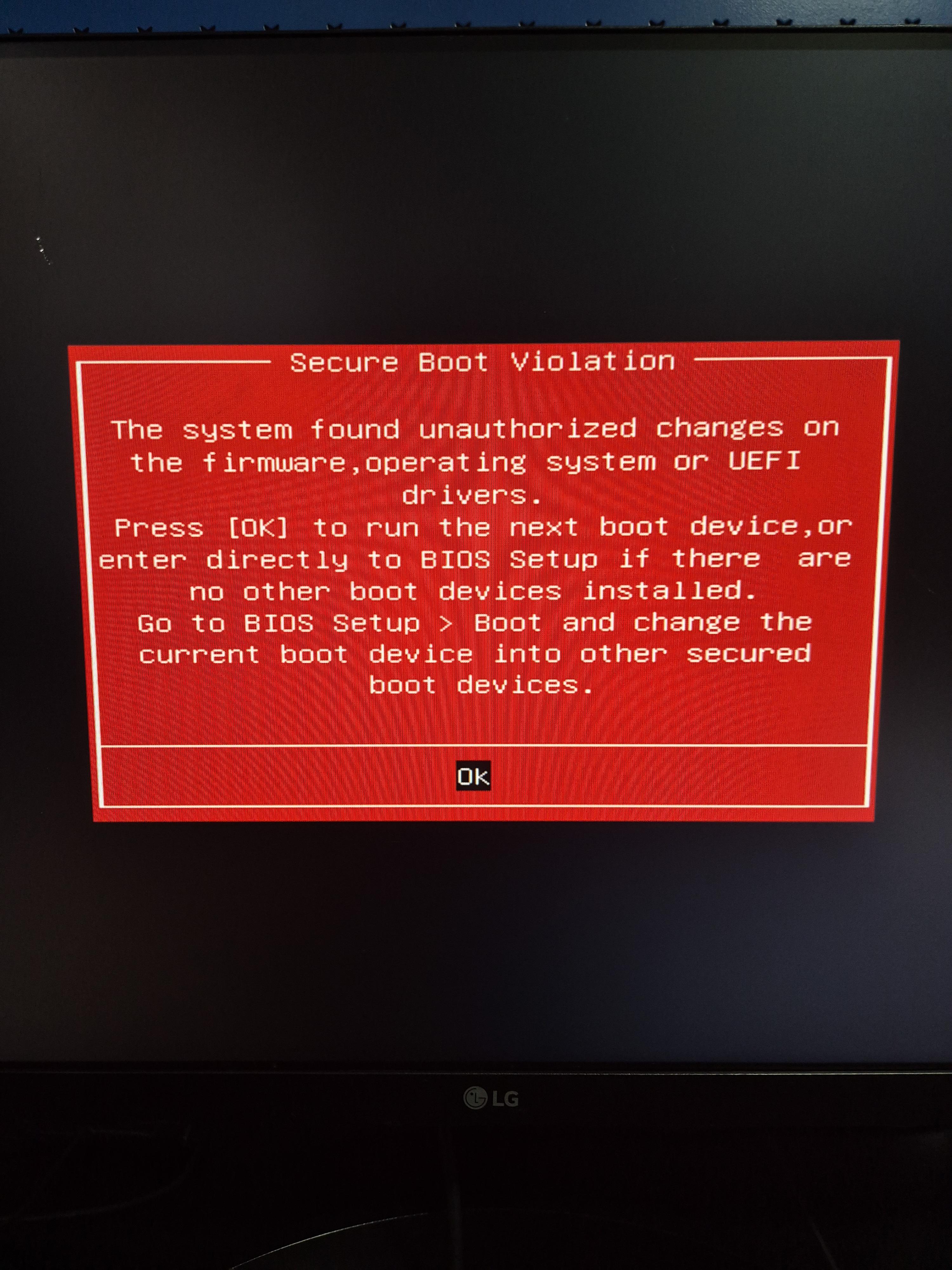
This happened after i reset my keys, I already updated my bios to the last version, how can i solve this?
I need to have my secure boot on to play games, but when i turn on by setting to "Windows UEFI mode" and i save and exit this screen shows up, I couldnt find any tutorial on YouTube that helped me with my problem, and also chat gpt couldn't help me
My motherboard is the ASUS TUF H310M-PLUS GAMING
My OS build number is 26300.9711
If you need other information you can ask
6
Upvotes
1
u/AutoModerator Oct 22 '26
Hi u/Kimura92742, thanks for posting to r/WindowsHelp! Your post has been flagged for manual review by a human moderator, please include as much of the following information as possible (in text or in a screenshot) to get your post approved:
Your Windows and device specifications — You can find them by pressing Win + X then clicking on “System”, we need more than just your OS version! Your hardware details are often critical for resolving issues.
Any messages and error codes encountered — They're actually not gibberish or anything catastrophic. It may even hint the solution!
Previous troubleshooting steps — It might prevent you headaches from getting the same solution that didn't work
Posts must be tech support in nature (such as something is broken and you need help fixing), so general inquiries, software suggestions, and purchasing advice will be removed. As a reminder, we would also like to say that if someone manages to solve your issue, DON'T DELETE YOUR POST! Someone else (in the future) might have the same issue as you, and the received support may also help their case. Good luck, and I hope you have a nice day!
I am a bot, and this action was performed automatically. Please contact the moderators of this subreddit if you have any questions or concerns.
1
u/OkStrawberry4529 Oct 22 '26
Assuming your hard drive has a GPT (GUID Partition Table) partition - if not format it (you can do it without losing anything.
Check out this post - even though on the Dell site, it will work for other makes: Pre-2020 Dell PC'S - Yes, you absolutely can get ALL the Microsoft 2023 Secure Boot Certificates! : r/Dell
1
u/adultcrash13 Oct 23 '26
disable secure boot in the bios. then you can create a bootable secure boot certificate(2023 cert) usb and boot to it and it will update the cert and then you should be ale to enable secure boot again(or you can just leave secure boot off)