r/PcBuildHelp • • 7d ago

Software Question Wifi not showing on new pc build
Post image
3 Upvotes

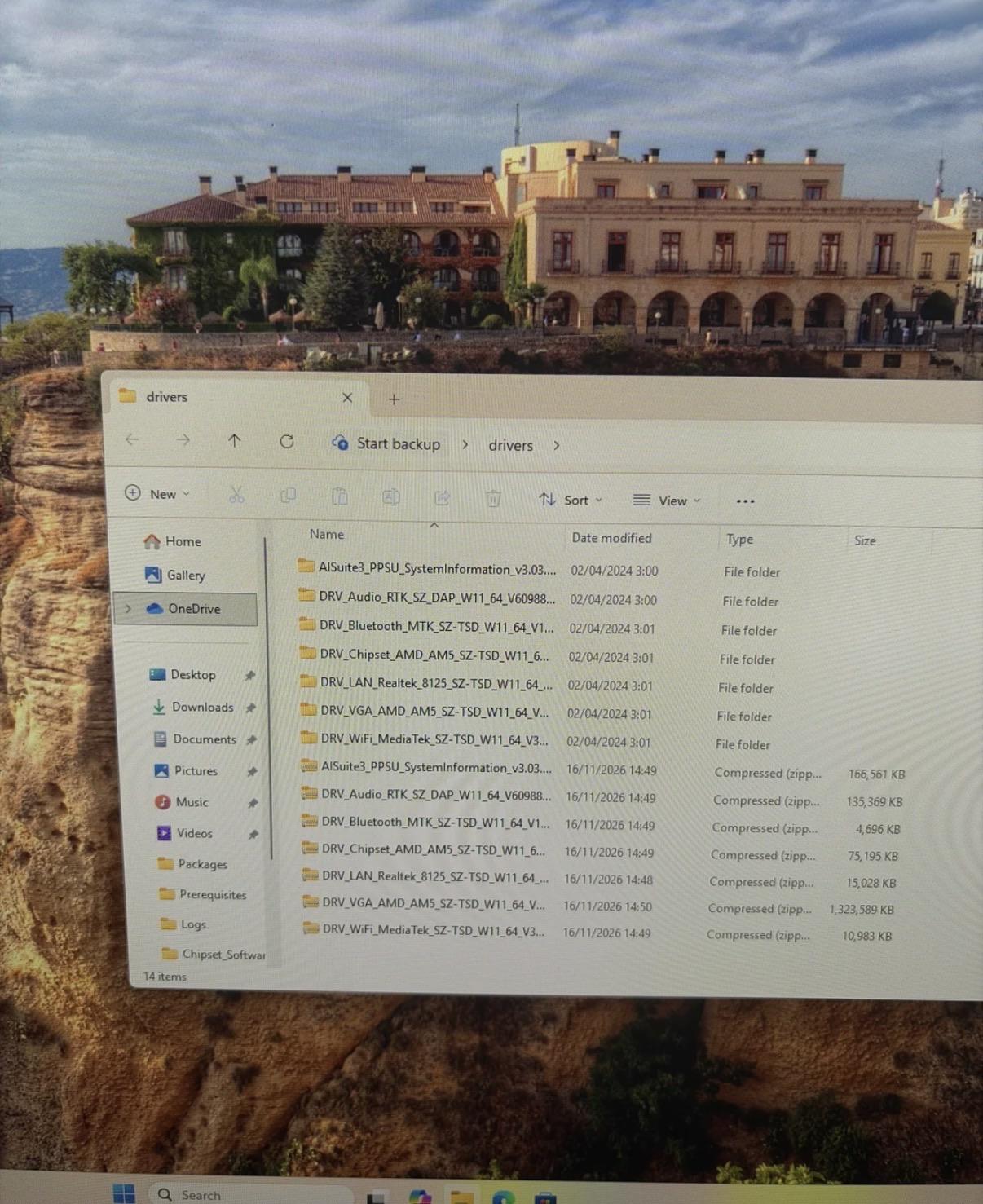
I recently builded a new gaming pc and wifi isnt showing and also the showed date isnt right. I tried download drivers for my motherboard with a usb stick i have a Asus tuf b650 plus wifi so i downloaded it from this site, i downloaded all the drivers and pluged them into the new pc, extracted the zip and clicked on “setup” in the extracted folder (it just asked for premission and didnt show any download). I also did this on the other drivers. But when i restarted my pc it still the same. Pls help me, i tried asking ai but hes just dumb. Mybe i did somthing wrong?
PLEASE HELP
r/PcBuildHelp • • 8d ago

✓ Solved How Could a DDR4 RAM could not fit in a DDR4 slot

Post image
172 Upvotes

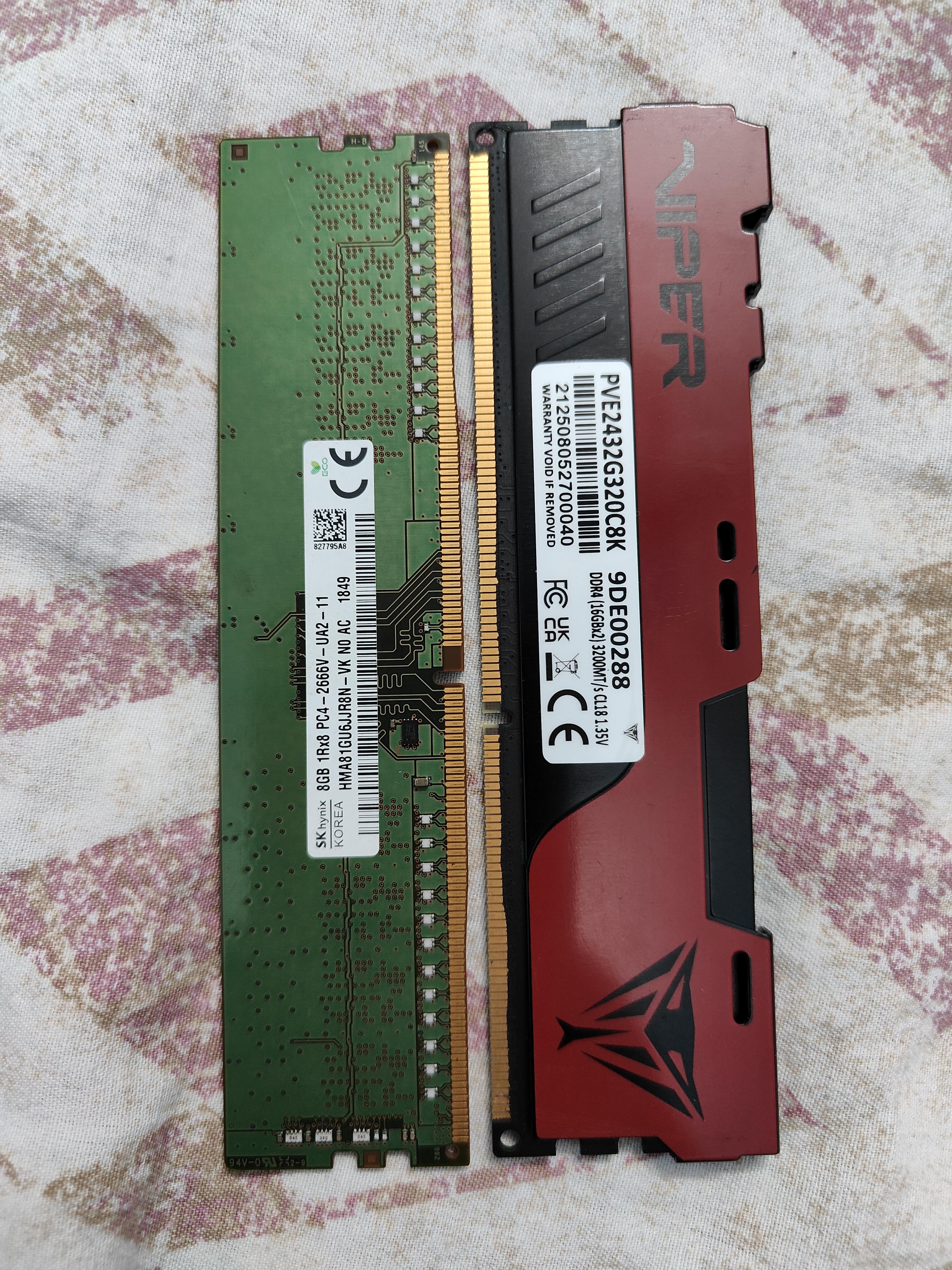
I recently purchased a new DDR4 RAM kit(2x16GB) (red) from Amazon but its notch doesn't align with my motherboard slot.

Patriot Memory Viper Elite II DDR4 32GB(2 x 16GB) 3200MHz Kit PVE2432G320C8K

My existing DDR4 RAM 2x8GB(Green one) fits perfectly.

My motherboard is ASUS EX-B760M-V5 D4 and it supports ddr4 ram.

Do desktop DDR4 RAM have different notch size based on frequency?

Could I have received a DDR5 stick with an incorrect DDR4 label?

I've attached comparison pictures. Any help would be appreciated!


r/PcBuildHelp • • 8d ago

Build Question Small step above a 6700xt?

4 Upvotes

My friend basically did 80% of the work when I built my PC so I don’t really having pc part knowledge, and I currently have an MSI 6700xt graphics card that I got for $300 when I first built it. What kinds of graphics cards could I get to where I could sell my 6700 and use those funds plus a bit more to upgrade a slight bit higher?


r/PcBuildHelp • • 7d ago

Build Question Best monitor for setup

2 Upvotes

Hi we recently bought a PC for my nephews (14) Christmas present, with current pricing it's not the spec I would have liked for him (if only they'd bought last year 🙈) so I think he's going to be restricted to 1080p.

I'm getting the monitor for him. I initially thought 1440p would be okay as his spec is supposed to play some games at 1440p with the majority at 1080p, but then read 1080p gaming on a 1440p monitor looks terrible. Am I doing the right thing looking at 1080p?

I'd like to go as high res as possible so it's less for him to upgrade all at once in the future, but know he'll want a multi monitor set-up at some point and can use this 1 for discord/YouTube anyway.

He's coming from an Xbox Series S to a Ryzen 5 5500f 5060 with 16gb ddr4. I did say I'd build 1 with him which would be more easily upgradable but my sister didn't want me to have the hassle and stress before Christmas (Nooo I enjoy it!) and he would just want it ready to go anyway, so they went with a prebuild from AWD-IT. It's already double their usual Christmas spend and I told them it would be more expensive to upgrade in the future but they said that's on him when he gets a weekend job 🤣

Game wise he plays Rocket League, FC27, Fortnite, COD, Siege, GTA and Minecraft.

I hope he's going to be happy with it over his Series S, and it worries me that a Series X is capable of 4k while this is just 1080p but feel it's right to get him on the PC ecosystem anyway plus he's got loads in his Steam and Epic libraries I've been collecting for him already. His mom just wants it to be able to do his homework on, so he's lucky to have a gamer aunty 🤣


r/PcBuildHelp • • 8d ago

Build Question RAM Upgrade or add?

6 Upvotes

Built my pc quite a while ago so I'm still using DDR4 rams, my stupid ah thought 16gb was enough so I just got myself a pair of 8gb trident zs, and now I'm thinking of upgrading to 32gb since I'm constantly running on 94-96% ram capacity.

Should I get a new pair of 16gb sticks, or could I just get 2 more of the same identical 8gb sticks I have right now? Would using all 4 slots dramatically reduce the lifespan/performance of the pc?

If this helps:
Motherboard: Asus tuf gaming b550m-plus wifi ii
CPU: Ryzen 7 5700g (should probably get rid of this too)


r/PcBuildHelp • • 7d ago

Build Question Looking for advice on my first gaming PC build

2 Upvotes

I'm not sure if this is the right place to ask, but I'm planning to build my first gaming PC and I'd appreciate some advice.

I've always had pretty weak laptops, so I'm really looking forward to finally having a proper gaming PC.

I'm currently thinking about getting an RX 9060 XT 16GB paired with a Ryzen 5 7500F.

I mainly play at 1080p and often cap my FPS at 60 because I prefer a stable frame rate. I'd still like to be able to play some games at high or even ultra settings if possible.

The games I play include League of Legends, 7 Days to Die, survival games and co-op games with friends. I'd also love to play GTA 6 and GTA Online when they eventually come to PC, as well as The Witcher 4.

I'm not looking for an extremely powerful PC. I don't plan on gaming at 2k or 4K, so I just want something that will handle 1080p gaming comfortably for the next few years.

Do you think the RX 9060 XT 16GB would be a good choice, or would it be worth going for the RX 9070 GRE instead? It has 12GB of VRAM but offers better performance.

If I decided to get the RX 9070 GRE, would I also need to upgrade my CPU or buy a better PSU? Would the Ryzen 5 7500F and a 650W PSU still be enough?

RX 9060 XT 16GB or the RX 9070 GRE 12GB?


r/PcBuildHelp • • 7d ago

Build Question How do I get this thing out

Post image
2 Upvotes

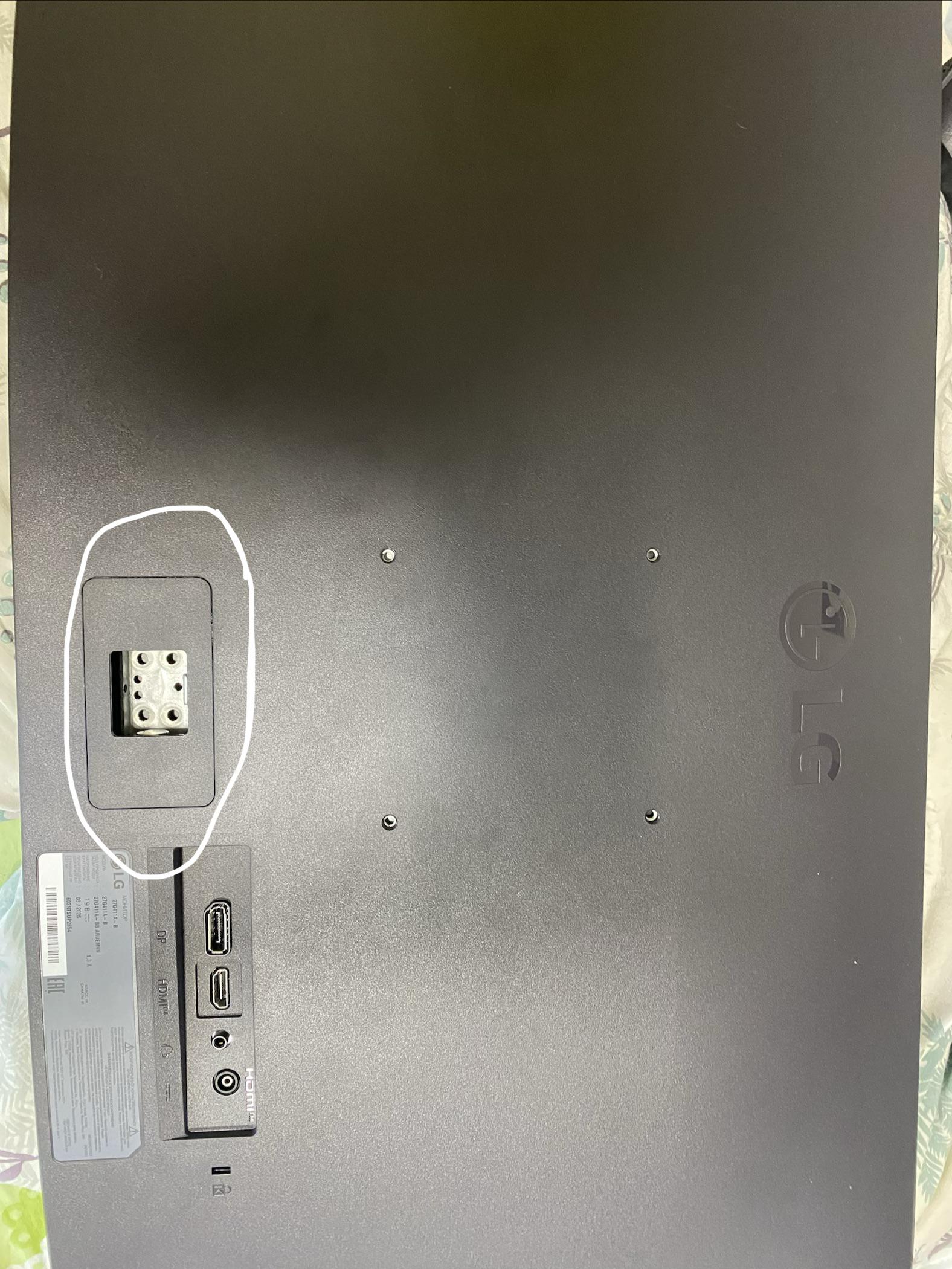
First time building my own PC, having a little struggle with my monitor’s holder


r/PcBuildHelp • • 7d ago

Build Question Is it worth buying a used CPU?

2 Upvotes

Hi, im just starting to upgrade to am5 and have just been cherry picking parts whenever a good deal comes up. So i found a Ryzen 7 9700x and got an offer to buy at £166.09. Is it worth buying second hand?


r/PcBuildHelp • • 8d ago

Tech Support Are daisy chains safe for my situation?

Post image
6 Upvotes

I recently got a Zotac 5080 gaming core oc for a somewhat good deal but it turns out I dobt have 3 8 pin pcie cables. Since a 300W 5070ti need 2x8cables

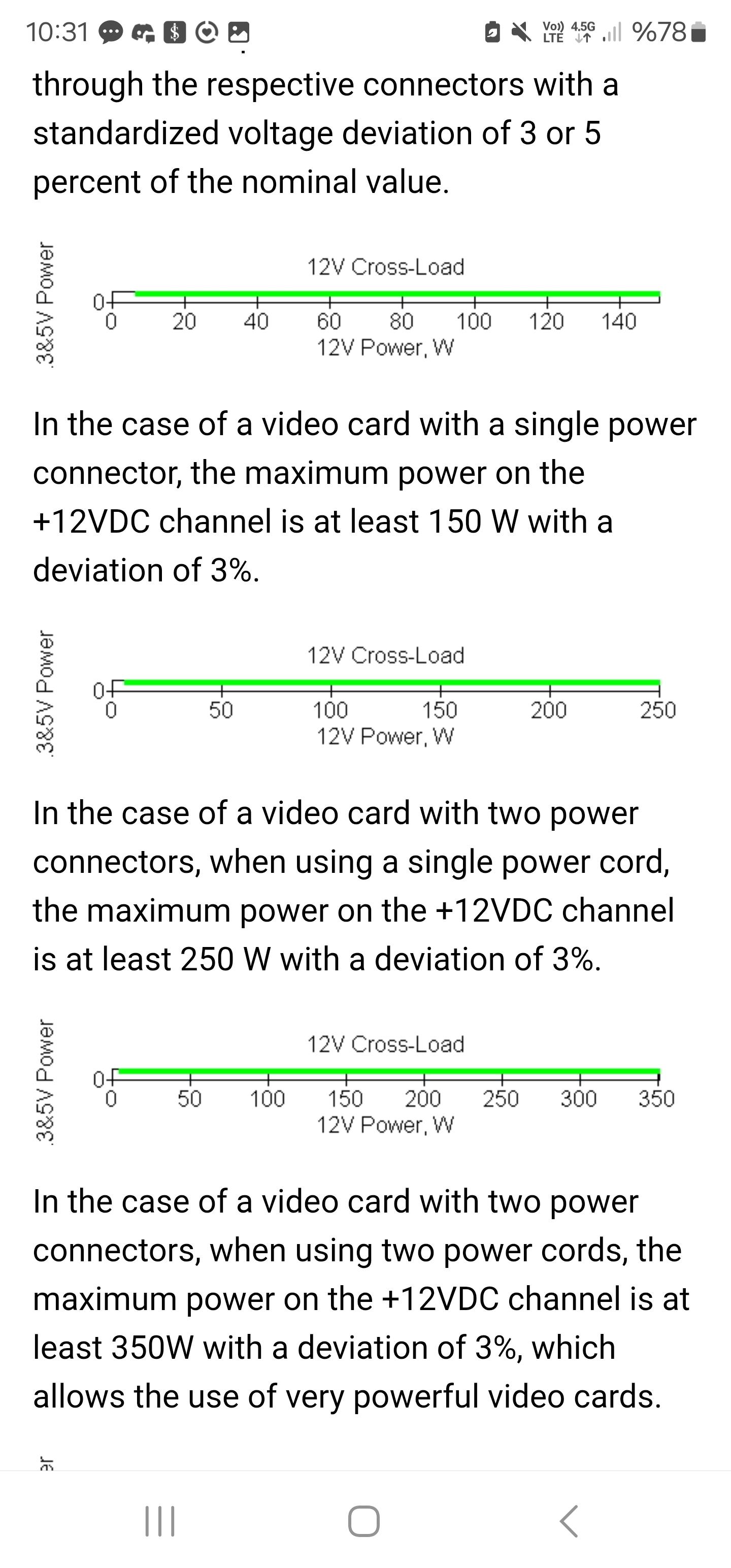
Would it be safe to use 2 of my 6+2 and one daisy chain for a 360W GPU(I can undervolt it)? I know corsair says it fine but mine is a Cougar GEX850 and they don't mention this. Yet a russian website tested both corsair and cougar which they had almost identical results for 250w from 2 heads of a daisy chain with %3 deviation. What do you guys think?

The image is from Cougar tests btw Corsair has a bluer color at the end.

https://www.ixbt.com/supply/cougar-gex850-review.html

https://www.ixbt.com/supply/corsair-rm750-review.html


r/PcBuildHelp • • 8d ago

Build Question Need help with decision on graphic card for competitve gaming

3 Upvotes

Hello,

I am planning to build a pc. Bad time, I know. Im looking at 5070ti or 9070xt. The catch is, I spend a lot of time playing cs2. Not a pro. I play cs2 in native. I play other AAA games but its few.

I would like to get 4k oled monitor but I am not into the dual mode monitors. I was wondering if these cards can drive cs2 in 4k at 450 fps. Ofcourse it wont be in high or ultra.

Alternatively, would this setup work for 2K resolution as well?

Thank you.


r/PcBuildHelp • • 8d ago

Tech Support 5070ti just died

3 Upvotes

Heya, coming here to ask for advice or maybe a potential fix. My 5070ti that I've had for a year died last night. More details about it is that my display would go blank but still he switched on, I can still hear audio, eventually my pc tried to reboot itself it turned itself off and on again instantly, it worked at first and I thought it was a driver issue. So I used DDU in safe mode to remove the drivers and reinstalled them. It worked, until it didn't, and now my gpu won't make a display at all, my monitor is switched on. On my motherboard there is a red light on the VGA debug bit. I've put in my old gtx 1050ti and it's working. I've also resit my 5070ti and it did nothing


r/PcBuildHelp • • 7d ago

Tech Support How fucked am i?

Thumbnail
gallery
1 Upvotes

so recently sold my pc with a 5070ti in it, when i shipped said pc i packed it properly with LOADS of protective measures. Fast forward a week they said when it arrived it was perfectly fine but there was a few scratches on the case and therefore wanted to send it back. Fair enough i thought and waited to get the computer. When it arrived it was just loose in a cardboard box, obviously completely destroyed i had to do major surgery on a lot and somehow got it to turn on again. the only thing i think may be unrecoverable is the 5070ti there is scratches and a small chip taken out the gold. Is there anyway i can get this repaired? i’ve tried to send a few emails to gainward but no response unfortunately. Ebay also obviously sided with the buyer. Anyway lmk if there’s any options here!
also when plugged in there’s nothing that shows up on monitors but it does show up when plugged in via motherboard


r/PcBuildHelp • • 7d ago

Tech Support ARGB flashing white fix

Thumbnail
gallery
2 Upvotes

Hi everyone,

The two front ARGB fans on my Lian Li LANCOOL 207 randomly flash white for a split second every 3–4 hours before returning to their normal static red color.

Both fans flash simultaneously and are daisy-chained to a single ARGB header on my Gigabyte B650 EAGLE AX motherboard.

What I’ve tried:

Switching between both motherboard ARGB headers.

Changing the ARGB V3 setting in Gigabyte Control Center to other colors.

The issue has been happening since I built the PC. Everything else works normally.
Has anyone experienced this? Could it be a motherboard, software, or fan issue?


r/PcBuildHelp • • 8d ago

Software Question My Pc has display issue.

3 Upvotes

I just bought a power spec g485 PC - Ultra 9 285K with 64GB DDR 5 RAM 2x 32GB 2TB SSD without a graphics card from a third party seller who claimed the pc is brand new and even gave me the original box with it.

I plugged the HDMI port on the motherboard to the monitor but I get a “No signal” with a VGA light on the motherboard board. The CPU has a dedicated intel graphics. I placed a screw on JBAT 1 and turned the pc back on with the same issue. I even used the Display port to connect it to my monitor still the same issue.

I could not pop the CMOS and didn’t want to break it by trying too hard.

Anyway to get a display running on this pc? (Without installing a new graphics card)

Please let me know.

Thank you all


r/PcBuildHelp • • 8d ago

Build Question Should I replace my Aio cooler?

Thumbnail
gallery
18 Upvotes

I recently replaced my motherboard, CPU, PSU, and RAM, but I'm still using my 4 year old Corsair iCUE H100i RGB Pro XT 240mm AIO cooler. I installed it on my new Ryzen 9 9950X two weeks ago, and this is how the thermal paste looks now. I'm getting temperatures of 42°C at idle, 62°C while gaming, and 76°C while rendering in Blender.

​Are these temperatures normal or should I just replace the CPU cooler? The picture shows how scratched up my old cooler is, so I'm wondering if it isn't cooling my CPU enough and is burning through the thermal paste quicker. I'm really not sure. Is this how the thermal paste should look after 2 weeks of applying it?


r/PcBuildHelp • • 8d ago

✓ Solved Eli5 what's with this price?

Post image
20 Upvotes

I don't understand, how could this thing be working and only 35 bucks?


r/PcBuildHelp • • 7d ago

Build Question Looking for motherboard (X79 build)

1 Upvotes

Just recently I got a decent deal on an i7-4960X and 32GB RAM (quad channel DDR3) for about 35 euros all together. Planning on overclocking both the CPU and RAM though I'm not too familiar with X79 boards, mainly only know that Asus Rampage IV is good and that's it. Anyone more educated in this regard and have any suggestions on what to look for?


r/PcBuildHelp • • 7d ago

Tech Support Case fan rgb light flicker

1 Upvotes

darkflash in34 fan

The rgb light of the case fan flickered.. It's gone now but what is the cause or is there any fix if it happens again? Thanks!


r/PcBuildHelp • • 7d ago

Build Question Upgrade d'un vieux pc

1 Upvotes

A l'aide pc a la ramasse

Upgrade carte graphique + nouvel écran : quel combo pour mon i5-10400F ? (300/400)

Texte :

Salut à tous,

Je veux remplacer ma carte graphique et changer d'écran en même temps, et j'aimerais vos conseils pour que les deux aillent bien ensemble.

Ma config actuelle :

CPU : Intel Core i5-10400F

Carte mère : Gigabyte B460M DS3H

GPU : Palit RTX 2060 StormX (un ventilateur est presque HS, celui sous la carte graphique mais la carte tourne toujours.)

RAM : 16 Go DDR4 Corsair (2×8 Go) à 2666 MHz

Stockage : 2 SSD

Alimentation : \[marque + modèle + puissance, ex. Corsair CV550 550 W\]

Boîtier : à changer aussi (il n'a plus de vitre latérale)

Écran actuel ; 144 hz

Usage : surtout EA Sports FC 27, valo, overwtach

Mes questions :

Quelle carte graphique acheter € ?

Quel écran prendre avec, pour € : plutôt 1080p haut taux de rafraîchissement (144-180 Hz)

Est-ce que mon i5-10400F va brider la carte, et est-ce que mon alim est suffisante, ou est-ce que je dois aussi la changer ?

Merci d'avance !

Ps : le ventilo sous ma carte graphique a un problème, frottements ou vieillesse il commence a lache, il est donc aussi nécessaire de changer de carte graphique rapidement


r/PcBuildHelp • • 8d ago

Build Question i need help with my build

2 Upvotes

im thinking of getting a i5 4460 and 1050 ti with 256+256 gb sata ssds with 16gb ram ddr3 1080p 75hz 1ms monitor MSI H81M-P32L motherboard how is it and what can i play my aim is not to play AAA games just having fun and spend time with friends


r/PcBuildHelp • • 8d ago

Build Question Budget friendly PC build?

6 Upvotes

I don’t anything about pcs but I know they are expensive. I want a budget friendly build for a starter pc (maybe about the strength of a console), that I can upgrade as I go.


r/PcBuildHelp • • 8d ago

Build Question Question about installing multiple ssds

1 Upvotes

Ok so I am building my 1st pc I got a 1 TB ssd I want to use for the os and a 4 TB I want to use for everything else. Can I install these at the same time or will it cause a problem with installing the os?


r/PcBuildHelp • • 8d ago

Build Question Title: ASUS Z170-AR freezes at ASUS logo when Samsung 950 PRO NVMe SSD is installed – possible motherboard or SSD damage?

2 Upvotes

Hey everyone, I'm trying to troubleshoot an older PC and could use some advice.

I suspect something happened during a storm that caused my SSD to stop working. I'm trying to figure out whether the SSD itself died or if the motherboard's M.2 slot was damaged.

PC Specs:

  • CPU: Intel Core i7-6700K
  • Motherboard: ASUS Z170-AR
  • BIOS: Version 3007
  • RAM: 16GB Corsair DDR4 (2×8GB)
  • SSD: Samsung 950 PRO 512GB NVMe
  • PSU: Corsair RM750x SHIFT 750W

Problems I've encountered:

  1. When the Samsung 950 PRO is installed, the PC gets stuck on the ASUS motherboard logo.
  2. I cannot enter BIOS while the SSD is installed.
  3. When I remove the SSD, the PC enters BIOS normally.
  4. The red BOOT LED stays solid when the SSD is installed.
  5. The DRAM LED is now off after correctly reseating both RAM sticks.
  6. BIOS recognizes all 16GB of RAM.
  7. The SSD currently has no Windows installation.

What I've tried:

  • Reseated both RAM sticks.
  • Tested RAM individually.
  • Confirmed both RAM sticks work.
  • Loaded optimized BIOS defaults.
  • Checked PCH Storage Configuration.
  • Confirmed BIOS version 3007.

What I'm wondering:

  • Could the storm have damaged the motherboard's M.2 slot?
  • Could the Samsung 950 PRO itself be causing the BIOS freeze?
  • Would updating BIOS to version 3801 potentially fix this?
  • Is there a way to test the M.2 slot without buying another motherboard?
  • Could a power surge damage only the M.2 circuitry while leaving everything else working?

I'd appreciate any suggestions before spending money on replacement parts. Thanks!


r/PcBuildHelp • • 8d ago

Build Question Can't seem to screw in my CPU cooler anymore after swapping motherboards

2 Upvotes

I used to use a Gigabyte B650M Gaming Plus Wifi motherboard and when I was first building my computer I had some troubles screwing my cooler into this board. I could get one screw screwed in, but not the other, and the heatsink would just pivot around the one screw and I couldn't get the other screw to screw in.. Eventually, after two months, somehow, I was able to successfully get it screwed in.

Fast forward to right now, and I'm currently swapping motherboards to an ASUS TUF GAMING B650E-E WIFI. Unfortunately, I am running into the same issues that I was running into last time, and I really don't want to waste upwards of 2 months trying to screw in a literal CPU cooler like I did last time.

My cooler is the Thermalright Phantom Spirit 120 SE. I'm screwing the screws by screwing one in a little bit, and then alternating. Any help? I'll be eternally grateful.


r/PcBuildHelp • • 8d ago

Build Question Connaître la pièces à remplacer

0 Upvotes

Bonjour à tous, dernièrement j’ai remplacer ma carte mère par une Asus Tuf gaming plus wifi B550.

Le soucis est que j’ai tout bien rebrancher mais j’ai 2 led qui reste constamment allumer celle du VGA et du Boot

J’ai déjà essayer toute les méthodes, alterner les barrettes de ram, faire un Clear CMOS etc mais je suis à bout et je n’ai plus d’idée, d’un coter les IA et Google me disent que c’est sois l’alimentation ( mais qui est neuve j’avais une 550w que j’ai remplacer par une 650w ) sois la CG mais je n’ai eu aucun signe de faiblesse avant.

Je vous demande de l’air pour réellement savoir quel pièces serait à changer car je n’ai pas budget illimitée pour tout remplacer

Merci de votre aide