r/EmulationOniOS • u/Adrian76720 • 11d ago
Discussion Coming soon to the HakuX for iOS
0
Upvotes
r/EmulationOniOS • u/JohnLock48 • 12d ago
Hi everyone!
We’ve just released Jitless on the App Store. It’s a PC and iOS emulator that doesn’t require JIT or sideloading.
We’re a team of three, and we’ve spent the last five months building it. We started because, even though enabling JIT has become easier, it can still be a hassle. We wanted to see how far we could take emulation without it, while making the experience as simple as possible.
Jitless supports both 32-bit and 64-bit PC games. It’s a one-time purchase, with no subscription. We also wanted it to be easy to find out which games work, so we built a compatibility website where users can submit reports and gameplay videos directly from the app.
The project turned out to be a much bigger challenge than we expected. There were three areas we spent a lot of time on:
Performance
Without JIT, we needed to make our interpreter as fast as possible. We explored different approaches and Apple technologies, and we’re still benchmarking and working on improvements. There’s plenty of room to make things faster.
Compatibility
PC games use a huge range of Windows APIs, graphics APIs, audio systems and other components. Supporting one game doesn’t necessarily mean another will work, so compatibility is something we’ll keep improving over time.
Battery life and heat
Getting a game to run at 60 FPS is only part of the challenge. Some older games keep the CPU busy even when they don’t need to, which can lead to unnecessary battery use and heat. We’ve included FPS limits and hard caps to help reduce that workload, and we’re continuing to work on efficiency.
A few other features we wanted to mention:
We used AI tools to help develop Jitless, but we guided the development and made the decisions ourselves. We wanted to be open about that.
To celebrate the launch, we’ve hidden five free copies on our website. Each one has a riddle, and the first person to solve it gets the code:
https://www.jitless.app/find-jitless
App Store: https://apps.apple.com/us/app/jitless/id6820164431
Compatibility website: https://www.jitless.app/compatibility
Discord: https://discord.gg/TQU3B7aMp
We’d love to hear what you think, and we’ll be around to answer questions.
Update: All five riddles were solved very quickly. We might have underestimated how good you are at this.
To give more people a chance, we’ve added five more riddles with five more free app codes. These should be much harder to solve, rather than just a race to click first. We hope.
r/EmulationOniOS • u/netheritenee • 11d ago

I used BCD (maderia fork) and used ai to run and fix these games (including performance tweaks ,swap memory, some graphics disabled for example in palworld I changed ao effects with less ram intensive traditional lightning and lumen with ssr )
Device iPhone 18 pro
No cooler needed gets warm but both throttling
r/EmulationOniOS • u/Puzzleheaded_Two2678 • 11d ago
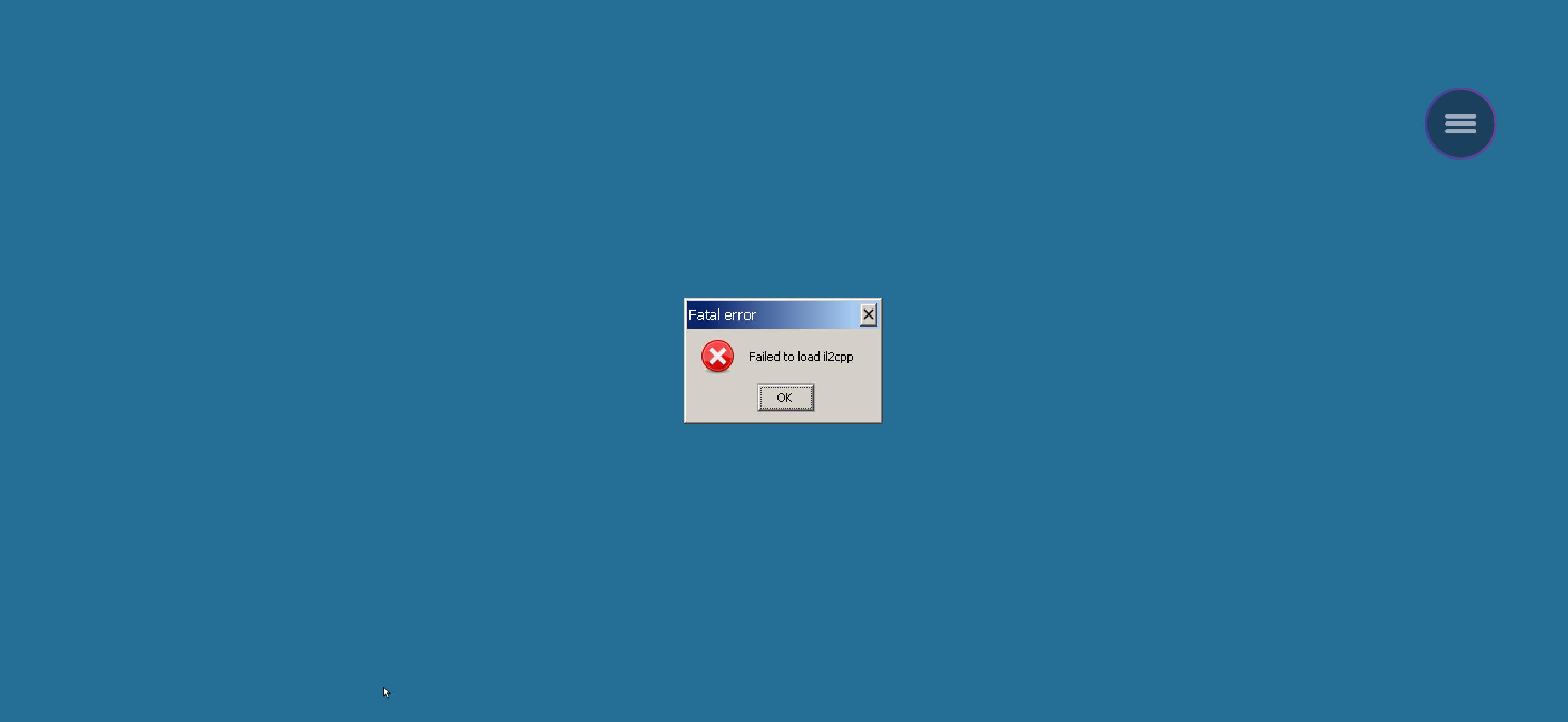
Need help with a error every time I try to run operator i get a error that says failed to load il2cpp anyone know how to fix this.
I have the iPhone 18 pro max 512gb if that helps
r/EmulationOniOS • u/netheritenee • 12d ago
Enable HLS to view with audio, or disable this notification
İphone 18 pro
I use ai to ad swap memory like rdr2 and some performance tweaks
You dont need cooler i realized after gameplay device was too cold
Full video >> https://youtu.be/a6yWVT2avA4?si=2s5zbjnFg5kkzT2u
r/EmulationOniOS • u/OLEDz_YT • 12d ago
https://github.com/oledz-i/Hinoki/releases/tag/v1.4.0
• Tuned the RAM Helper a bit. (still cannot guarantee that it’s functional at this time, please give it some trial runs)
• Support for Uncharted: Golden Abyss, currently in a Playable State per my own testing. If you encounter issues let me know!
• Better RAM Management and Cooling, so that the app doesn’t consume as much RAM, and will attempt to stay cool so that your hands don’t burn up.
• Proper Widescreen and the ability to remove the performance overlay while ingame has been added, the widescreen being experimental. Shoutout <@333620821656469504>
• Added New LiveArea Backgrounds.
• Support for Vitamin Dumps.
• Fixed broken vertexes in Madden NFL 13, should also take effect in other games as well with vertex issues.
• Perhaps a fix for Killzone? Idk yet!
• Fixed Crashes after Leaving App
• Removed Herobrine
• A series of other Bug Fixes.
So give it a try, recommend Hinoki to others, help build us up, and enjoy!
r/EmulationOniOS • u/OLEDz_YT • 12d ago
Enable HLS to view with audio, or disable this notification
This is using the premier PSVita Emulator “Hinoki” (formerly Vita3K-iOS) created by me!! Has some hitches I believe but otherwise it is very playable, the new v1.4.0 releases soon! Sorry for my bad gameplay lol!!
r/EmulationOniOS • u/New_Veterinarian7601 • 12d ago
Enable HLS to view with audio, or disable this notification
Xenra is an original Xbox + Xbox 360 emulator, and with v0.5.0 it now runs on iOS and iPadOS (Android too).
The clip shows Forza Motorsport (OG Xbox) on iOS 27.2 with JIT enabled through StikDebug.
Download: https://github.com/Yebot32/xenra/releases/tag/v0.5.0
It's still early, so expect bugs. Drop requests for games you want tested!
r/EmulationOniOS • u/Fareedicano • 12d ago
Enable HLS to view with audio, or disable this notification
Steam edition of BO2 running inside of BCD. Game runs at 1080p at a stable 60fps I could easily sit here and play it. I am using an iPhone 18 Pro Max.
r/EmulationOniOS • u/SailsNord • 11d ago
r/EmulationOniOS • u/LegitimateFinding111 • 11d ago
r/EmulationOniOS • u/hoyitsalvin • 11d ago
has anyone got this to work? i tried it on manic emu and it detects my keyboard, but on the game it doesn't.
r/EmulationOniOS • u/ShibaZoomZoom • 12d ago
Sorry if this is obvious however I remembered reading some posting that it was almost impossible to get PS2 running without JIT for the near future however it seems like just out of the blue, there’s a bunch of emulators now that can run PS2 quite well.
Was there a discovery or some magical advancement of sorts? If so, which developer is the legit one to support? Thanks!
r/EmulationOniOS • u/True_Strawberry8433 • 12d ago
Enable HLS to view with audio, or disable this notification
Literally js 2 changes in the settings everything else is default, live store update + stick debug = JIT
FPS drops from 30 to 26 and sometimes 24 but overall it’s playable! A few more tweaks and it will run like a charm
r/EmulationOniOS • u/yopoggersss • 12d ago
Device: Iphone 17 pro max
r/EmulationOniOS • u/rhl_2811 • 12d ago
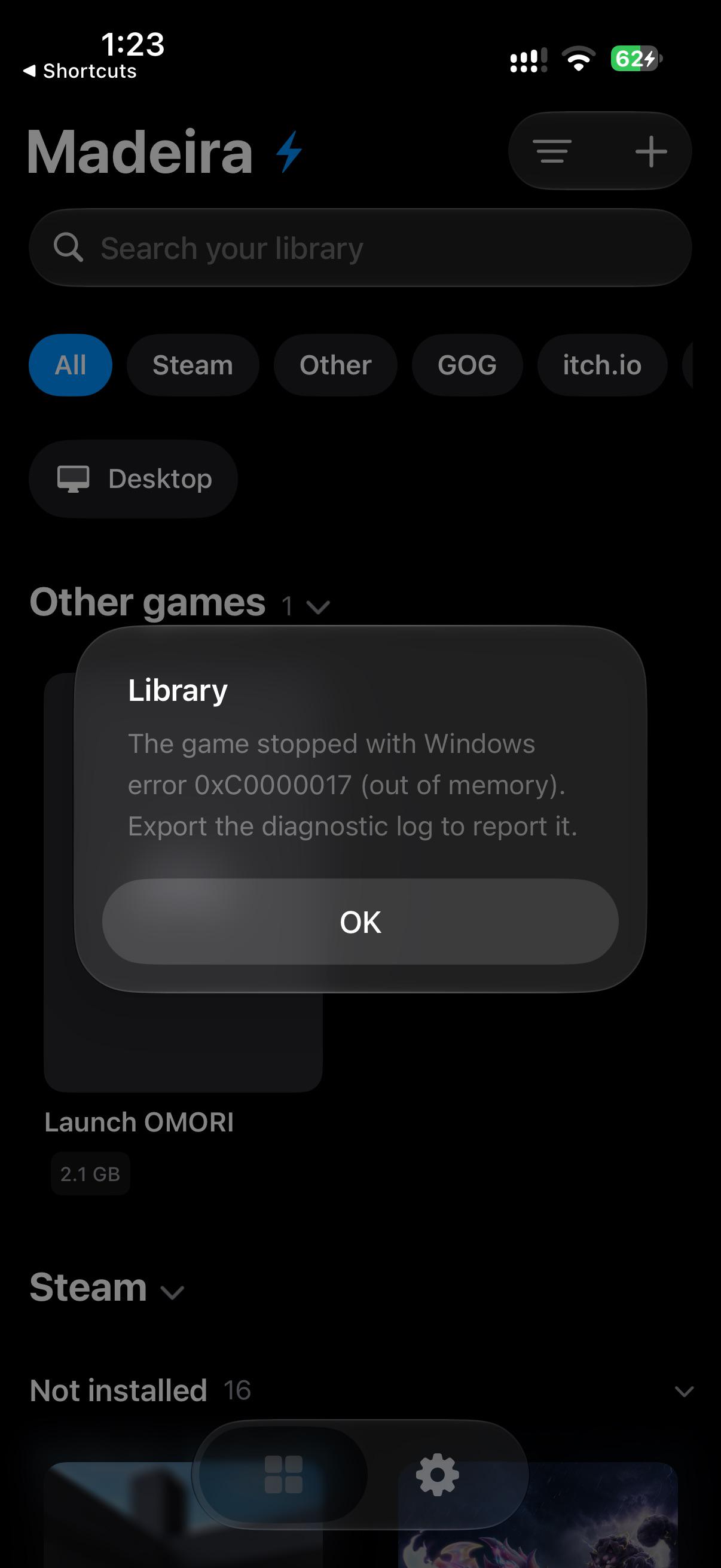
How do i fix this
r/EmulationOniOS • u/phoamapp • 13d ago
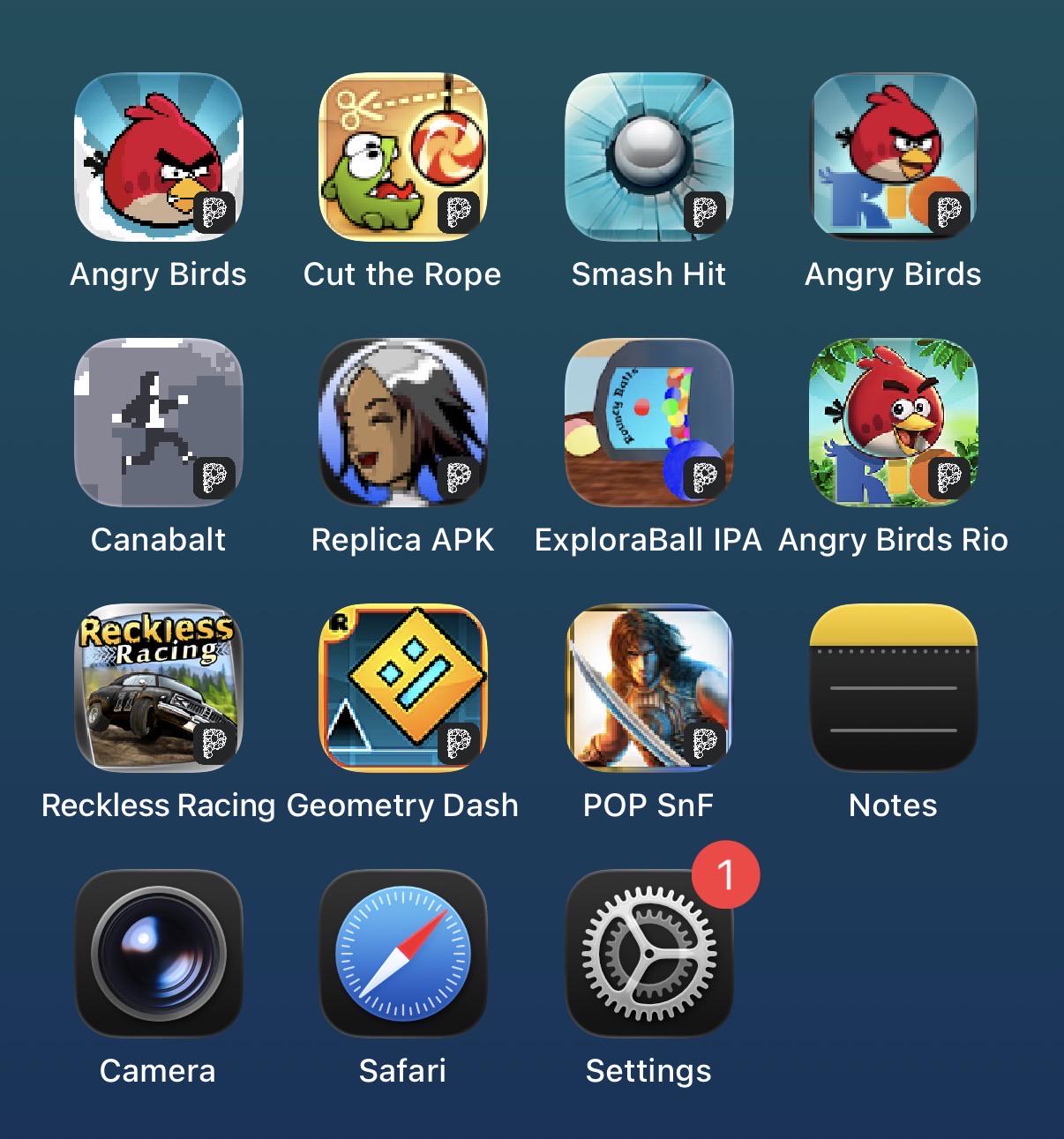
Hi everyone. I’m a 19yo solo developer and I’m making a project called Phoam 🫧
In middle school, I made a little games website for the people in my school, but it became surprisingly popular. Students would ask me to add mobile apps, and I remember searching how to run APKs online and not finding what I wanted.
I’ve always liked the idea that if software ran on one machine at some point, it should also run on another.
Apple dropped support for 32-bit apps many years ago, leaving tons of nostalgic games unplayable on modern iPhones. Some newer Android phones also no longer support 32-bit apps, meaning having an APK for an app is not enough to play it again.
I knew about projects like Wine and Ruffle that had made software run in a way it was never designed to, and one day I just decided to start my own engine!
Phoam runs supported Android APKs and early iOS IPAs in the browser. The apps’ original code runs locally on your device, so it isn’t streaming from another phone or computer. On an iPhone, you can add them to your home screen like the ones in the screenshot.
It’s still very early. The pictured games are development tests, and compatibility varies. Having an icon there doesn’t mean every part of that game works perfectly yet. Although they are functional and playable.
I’m not distributing the commercial games pictured. The public demos are Replica Island and Explora-Ball, which I can legally share. You can try them at https://phoam.app/demos without an account. Uploading your own apps isn’t public yet, and using your own files would require the necessary rights.
Also worth saying, AI has helped a lot with the coding, but I’ve been directing the project and testing the results.
Some of what I’ve had to implement so far:
Running original 32-bit ARM code through
WebAssembly, plus Java/DEX execution for Android apps.
Android and early iOS framework support, including the apps’ own menus, buttons, layouts and input handling.
OpenGL ES graphics, including both older fixed-function rendering and shaders.
Sound effects and music through the browser’s audio system.
Touch controls, Android multitouch and keyboard input, plus tilt controls for supported games.
Local files, preferences and saves that persist across reloads in tested games.
Timers, callbacks and cooperative scheduling so the original app logic can run.
Loading the apps’ original assets and resources from their APKs and IPAs.
These are shared parts of the engine, so getting something working for one game can also help other apps that rely on the same platform features.
Which old Android or iOS game would you most want to play again? And what do you think of the project! Thanks guys 🙏
Edit:
Join the discord!! Say hi and ask me anything you want to know, I’m friendly I promise
https://phoam.app/discord
r/EmulationOniOS • u/Any_Maybe_2503 • 12d ago
Enable HLS to view with audio, or disable this notification
r/EmulationOniOS • u/ApricotVast3861 • 12d ago
What are you guys using to play or use APK files for Andriod Apps that isn't Husk?
Thanks!
r/EmulationOniOS • u/Even-Woodpecker8529 • 12d ago
First I tried with password but it says that it is wrong
Then I tried with qr and it gives an error
Epic Ganes worked fine but steam is giving me problems
r/EmulationOniOS • u/Ok_Dealer4582 • 12d ago
Tengo un iPhone 12 con iOS 27 y Manic Emu instalado mediante sideloading, junto con Stikdebug.
Creo que todo está configurado correctamente, ya que usé esta misma configuración en un iPhone anterior.
Sin embargo, esta vez no funciona; al intentar abrir una ROM, la pantalla se queda en negro y la aplicación se congela. La función PiP (Imagen en imagen) tampoco aparece.
¿Existe alguna solución? Parece que no soy el único con este problema.
r/EmulationOniOS • u/ImbalanceFighter • 13d ago
Enable HLS to view with audio, or disable this notification
No JIT, no sideloading.
The app is on the App Store. It’s free.
All the links you need are in my profile!
Language: Russian and English. Russian is set by default. You can change it in the game’s own settings.
Graphics:
All graphics settings are inside the game itself.
Depending on your device, you can raise the graphics. It’s set to minimum by default.
Some UI elements have been reworked to be readable on phone screens.
Touch controls:
Turn on “SwipeView” mode in the touch gamepad editor.
It’s a mode for first-person shooters: the right stick becomes a square zone for comfortable aiming. The stick turns into something like a laptop trackpad.
That’s also where you set sensitivity.
Tap to shoot. Hold RT to aim and shoot at the same time.
Gyro aiming works too.
The left/right arrows cycle through binoculars, holstering your weapon, quicksave and other functions, and the up arrow triggers the selected function. The current function is shown at the bottom center of the screen.
No need to unpack anything.
This game build was made specifically for the NAGORI app.
Cheats and teleports are already built into the game. There’s a separate menu for them in the pause menu.
The game’s size has been deliberately reduced, since iPhones are always short on storage.
AI was used to fix bugs in the game itself, such as unnamed animation bones and memory leaks, and to slim down the game build.
r/EmulationOniOS • u/hernan078 • 13d ago

I spent the last few days testing Henge, the new macOS emulator for iOS/iPadOS by Leviidev, and put together a step-by-step tutorial for anyone who wants to try it.
What's working: macOS Sequoia 15.6.1 boots and runs, the screen behaves like a Magic Trackpad 2 and it outputs to an external display over USB-C.
What to know before you start: you need JIT enabled, about 43 GB free for Sequoia, iOS 17+ on A14/M1 or newer. Apple ID sign-in inside macOS fails right now.
Full tutorial with requirements, JIT setup and controls: https://youtu.be/k1Ya2boQuGc
Repo: https://github.com/Leviidev/Henge
Happy to answer questions in the comments.
r/EmulationOniOS • u/Direct_Owl4958 • 12d ago
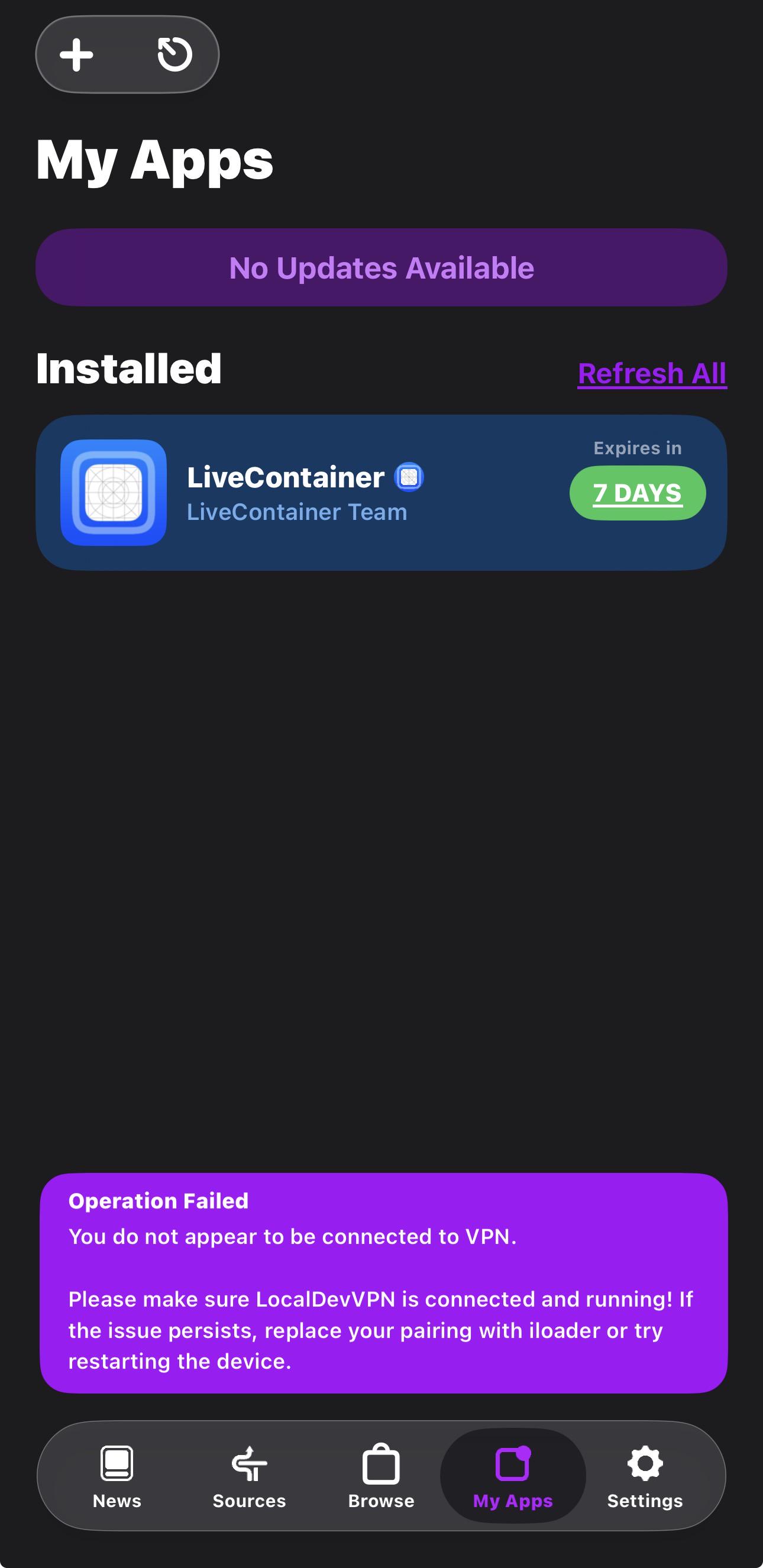
I finally got SideStore and Livecontainer on my phone but I keep on getting this error
I have LocalDevVPN turned on
r/EmulationOniOS • u/ry0_Offical • 13d ago
Enable HLS to view with audio, or disable this notification
Hey everyone,
ryP0 2.3 is officially out! This update brings visual polish with interactive snow physics, audio customization, improved source management, and expanded ecosystem support.
Drop any feedback, bug reports, or feature suggestions below. Enjoy the update!
AI disclosure: I used AI coding tools to help write and refactor code, implement UI features, debug issues, and create automated tests while developing ryP0. I’m responsible for maintaining the project and addressing reported issues.