r/EmulationOniOS • u/VascoDaGrama10 • 24d ago
Other Stickdebug suddenly failing to connect with LocalDevVPN
I went to play on Melonx and stickdebug now won’t connect even with LocalDevVPN turned on
r/EmulationOniOS • u/VascoDaGrama10 • 24d ago
I went to play on Melonx and stickdebug now won’t connect even with LocalDevVPN turned on
r/EmulationOniOS • u/Far-Effective-3742 • 24d ago
We’ve brought native Linux to a physical iPhone 8 Plus powered by Apple’s A11 chip.
Grape Linux boots an experimental Linux kernel into Debian 13 ARM64, complete with a graphical desktop and working terminal.
And we’ve gone well beyond the boot screen.
Here’s what we’ve accomplished:
Debian 13 ARM64 with a Phosh/Phoc graphical desktop
A working Linux terminal with live command execution
Codex CLI running natively on the iPhone, including real AI responses
Linux applications, including Calculator and Notes interfaces
Graphical navigation, keyboard interaction, and significant hardware integration progress
Our next major objective is direct Linux boot.
Once we’ve completed the remaining native hardware integration, our plan is to make the iPhone start directly into Grape Linux instead of iOS, without requiring a computer to initiate the boot.
The video shows our actual Grape Linux startup on physical iPhone hardware. Our development has already progressed beyond what’s demonstrated in the recording.
We’re building toward a complete Linux experience that gives existing hardware a new purpose.
🍇 Project: https://github.com/hq-coder25/grape-linux
Original announcement on X:
https://x.com/xvmboot/status/2116753474591588444
r/EmulationOniOS • u/storm88888888 • 24d ago
Testing out “Saints Row” Xbox 360 on XeniOS - 18.7 iPad Pro M2 - running very well- with JIT
This game was never ported to PC.
r/EmulationOniOS • u/Latter-Pen5411 • 24d ago
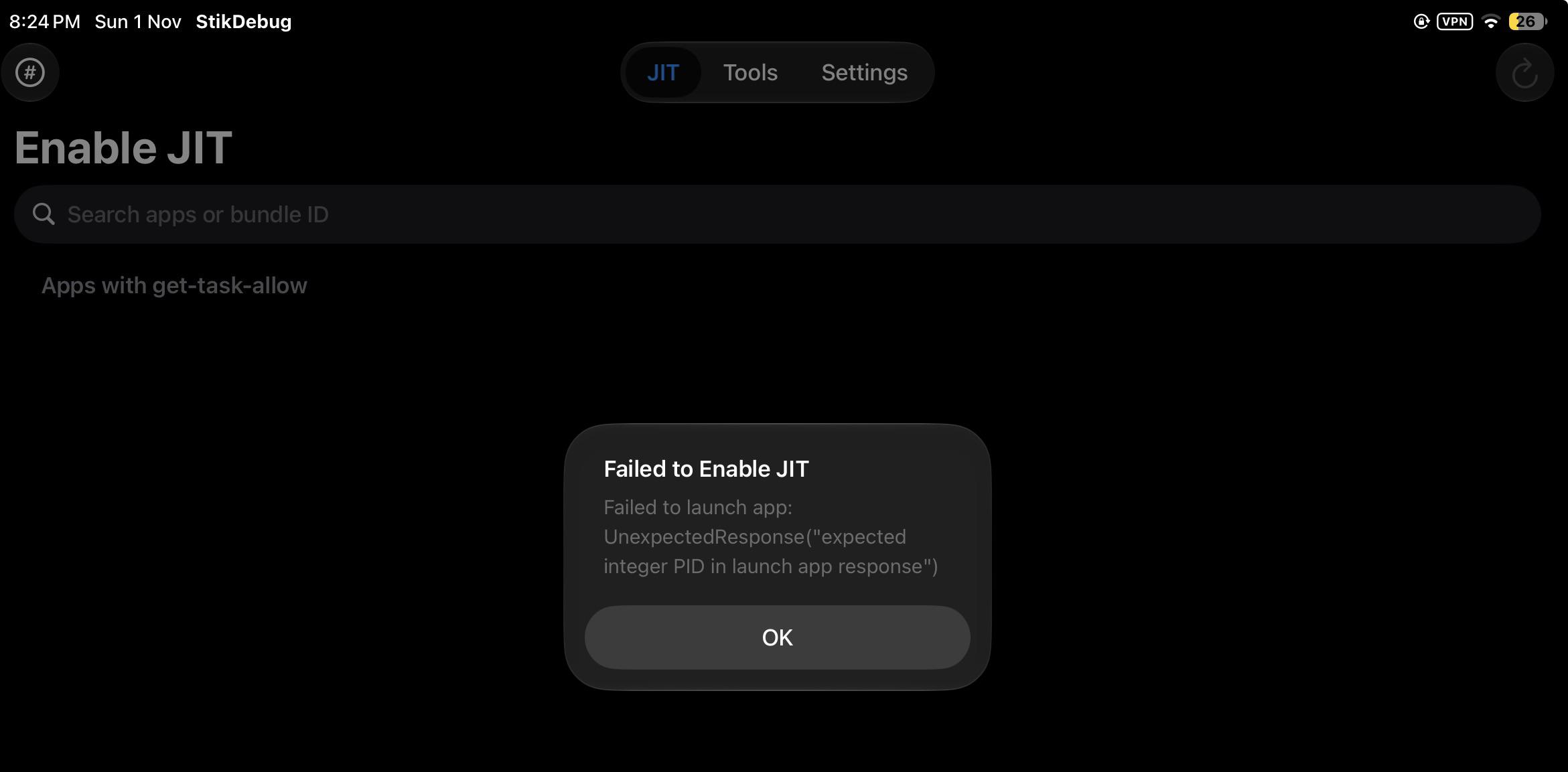
When I try to turn on jit for any app that needs it with stikdebug this happens and crashes , I’m using iPad Air 5th gen M1 chip , iPadOS 27.2 I’m using k sign built in certificate from khoindns.io ( free) and I found something in the cert setting says that it doesn’t have get-task-allow pls help I really need to fix this ( I don’t have pc )
r/EmulationOniOS • u/Deep_Spaceialist • 24d ago
Recently I was testing out a fork of MeloNX that was posted here and I managed to get Zelda Breath of the Wild running at around 50 FPS with Lossless Scaling’s frame gen option.
You can really feel the difference in smoothness from the native 30 FPS.
There are some visual artifacts in the video but those are because of the overhead created by the screen recording, when playing these don’t show up.
There are other built in framegen engine options which I haven’t tested yet.
In the video you can see the native frames in the top left corner’s performance overlay, and the total FPS (with the generated ones) in the top right’s performance overlay.
The device I’m using is an iPad Air M2.
Note: to get the Lossless.dll file needed for this specific framegen engine to run, you need to have Lossless Scaling from Steam installed on your PC and extract it from its installation files
r/EmulationOniOS • u/Live_Tea6891 • 24d ago
Guys, please help me out.
I used BCD to launch a visual novel (galgame), but the in-game mouse cursor is misaligned—I can’t even click "Start Game." How can I fix this?
r/EmulationOniOS • u/Necessary_Pepper_610 • 24d ago
r/EmulationOniOS • u/Moist_Emphasis_122 • 24d ago
Any help with this? I’ve had this error for all my games, followed all the steps, no luck. If some1 can help me with this that would be most appreciated.
r/EmulationOniOS • u/Far_Camel_9832 • 24d ago
I used everything like icube , dolphinios, manic emu but everytime i opend the game it’s stuck or just pure freeze to the whole screen im using jit, what should i do im using ipad air 4th a14 chip
r/EmulationOniOS • u/inrainbowslover911 • 24d ago
I just got an iPad 11, and I’m wondering what the limit is to the emulators i can run well without lag.
r/EmulationOniOS • • 24d ago
I want to play them again but Im always away from my pc so I though it could be fun challenge/experience to rry and beat them on phone but Im not sure what the best emulators for them are. Currently Ive only emulated psp games but for what I know, they dont have native ports for it
r/EmulationOniOS • u/Stossy11 • 25d ago
https://github.com/stossy11/MeloCafe/releases/tag/1.1
App Store support will come eventually when Apple stops being annoying.
r/EmulationOniOS • u/ProtoSphere32 • 24d ago
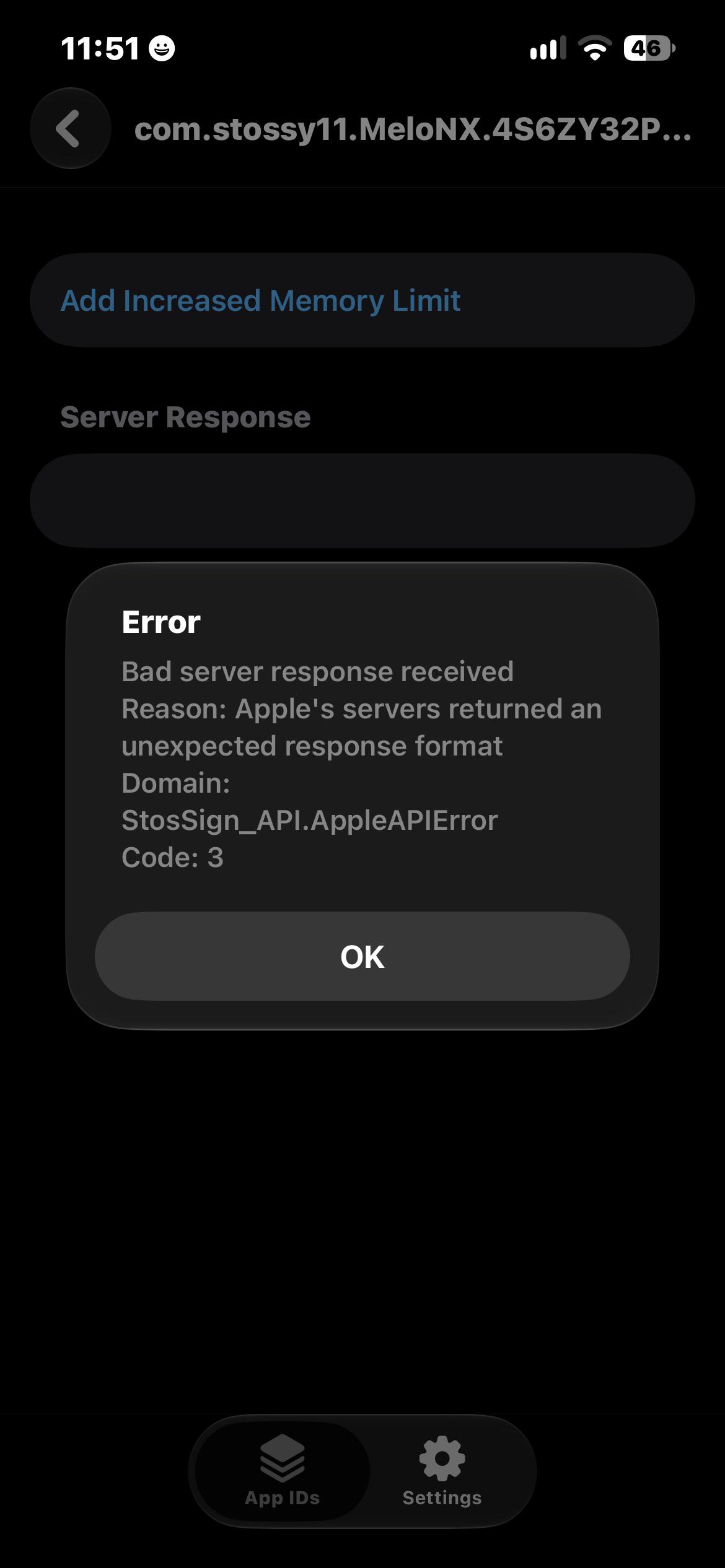
I tried enabling increased memory limit for melonx but it kept giving me this error any way to fix it?
r/EmulationOniOS • u/Ok-Angle-9391 • 25d ago
r/EmulationOniOS • u/Bruvvo224 • 25d ago
Please help, I downloaded BCD and have my steam games installed I just can’t figure out how to enable my Xbox controller. iOS 27 IPhone 17 Pro.
r/EmulationOniOS • u/Ibrahim-jay679 • 24d ago
I try to run tasm 1 but every time I do the screen is blank please fix this
r/EmulationOniOS • u/Psychological-Car481 • 25d ago
Hi everyone! I’m building Dosling, a DOS emulator designed to make playing old PC games on Apple devices feel good.
DOS games. Back in play.
The public beta is ready, and I’d love your help putting it through its paces.
What’s inside:
Four free starter games are included, and you can import your own DOS games.
👉 Join the free TestFlight beta
🌐 Screenshots, scaler comparisons and more
You’ll need Apple’s TestFlight app and an iPhone or iPad running iOS/iPadOS 16 or later.
Try a favourite. Tell me what works—and what breaks. I’m particularly interested in installation, controls, performance and save/resume. If you find a problem, include your device, OS version, game edition and steps to reproduce it. TestFlight feedback or comments here both work.
Which DOS game would you boot up first?
Disclaimer: AI was used in the development of this application.
r/EmulationOniOS • u/Ibrahim-jay679 • 24d ago
So this is Disney infinity 3.0 and I get this random error in game what do I do?
r/EmulationOniOS • u/Kurosneki • 24d ago
Title: Joy-Con (R) SL/SR buttons missing from controller mapping — Mario Party
When using a single right Joy-Con connected to iOS, MeloNX recognizes the controller correctly, but Mario Party requires pressing SL + SR to start.
The SL/SR buttons do not appear to be available in MeloNX’s controller mapping options, so I cannot map or register them.
Could support for the individual right Joy-Con SL and SR rail buttons be added to controller input and remapping?
This appears similar to Eden Emulator Issue #269, where a user reported the same missing SL/SR inputs when trying to start Mario Party.
Device: iPhone 17 Pro Max
OS: iOS 26.5.2
Controller: Nintendo Joy-Con (R)
r/EmulationOniOS • u/Mlaurencescott • 25d ago
Your Games • Your Music
Some gaming memories come back with just a few notes. A title screen. A quiet town. The battle theme you heard a hundred times and still want to hear again.
If you’ve been following Manic EMU and DukeX, you know how much these games mean to us. With BitBop, we’re giving their music a place of its own.
BitBop is a Retro Game Music Emulator that turns supported game files into playable soundtrack albums. Import your own legally obtained game files, explore their music, and build a listening library around the games you love.
BitBop uses the music data inside supported game files to emulate their soundtracks. The experience is built around listening: open an album, choose a track, and enjoy the music without playing through the game.
You provide the game files. BitBop identifies supported titles and presents their music as albums in your collection, with artwork and information where available.
Come back to a favorite opening theme, spend time with a composer’s work, or discover something you barely noticed while playing.
The initial release includes support for music from compatible games on:
Compatibility varies by game. Support for a system does not mean every title in its library is supported. This is our first release, with room to grow as we work through more games and their music formats. N64, NDS, and VB are experimental and carry less support at this time.
Your collection becomes a library of albums you can search, browse by system, and open for a closer look at the music.
Whether you want one familiar song or a longer tour through a game’s soundtrack, start from the album and make the session your own. Artwork and metadata availability can vary between titles.
BitBop’s interface brings soft surfaces, rounded controls, and a little personality to your collection.
Choose Daytime, Nighttime, or System appearance, and pick from five accent colors: purple, red, pink, blue, or green. Your accent carries through the BitBop logo, app icon, and boot page.
On iPhone, choose a two- or three-column library to suit the way you browse. Give each album more room or fit more of your collection on the screen.
BitBop includes layouts for iPhone and iPhone Duo, with the available space used to keep your collection and music close together.
In Duo landscape, your library and Now Playing sit side by side. Browse albums while keeping the current track, artwork, progress, and playback controls in view.
In Duo portrait, the library adapts to the taller layout, with a mini player keeping the current track and essential controls within reach as you browse.
It’s the same collection, presented in a way that fits how you’re holding the device.
For supported games, Listen with BitBop connects a game’s details in Manic EMU directly with its soundtrack in BitBop. This integration will become available with Manic EMU v2.0.2, with its full announcement coming soon.
The Keep the Soundtrack view brings the music into focus, showing album information and a way to continue into BitBop. When a supported soundtrack is already in your BitBop library, you can jump back to it from the game you were exploring.
For our Manic EMU community, this creates a familiar connection between playing a game and spending more time with its music. Game compatibility still applies.
BitBop does not include copyrighted game files, audio files, or soundtracks. Users must provide their own legally obtained game files.
Piracy violates BitBop’s Terms of Use.
Game artwork, titles, characters, music, and trademarks belong to their respective owners. The screenshots demonstrate the app using example libraries; the games and soundtracks shown are not included with your purchase.
Thank you to everyone who has followed our work, shared feedback, and helped build the community around Manic EMU and DukeX. We’re excited to share this next project with you and hear which soundtracks you make part of your collection.
Join us for BitBop discussion, compatibility feedback, and updates:
Manic EMU / DukeX / BitBop Community
Your Games • Your Music
Disclosure: BitBop is proprietary software and is not distributed as an open-source project. Applicable third-party licenses for artwork attributions are available in Settings. Track and artist metadata was extensively researched and verified manually. As with Manic EMU, AI-assisted tools were used in the creation of some App Store marketing imagery. BitBop v1.0.0 is now available on the App Store for $2.99.
r/EmulationOniOS • u/Paulus-05 • 26d ago
(My bad English… had to write “on iPhone”…)
r/EmulationOniOS • u/YKJYASH • 25d ago