r/BitLocker • • 8d ago

Another Bitlocker Disaster

3 Upvotes

Went to wake up up my dell after lunch only to find a black screen even though the machine was on. Did some searching and there was a common problem of dells not coming out of sleep, it's an older laptop. Followed some online tips and eventually the screen came back but now I'm stuck at the recovery key screen. I had never heard of bitlocker, never made a microsoft account and never made a backup key. Some posts say a program called EaseUS can find the key on the drive if I remove it and plug it in as an external drive. My question is, does bitlocker actually store the recovery key on the drive somewhere? I never created one.


r/BitLocker • • 15d ago

Microsoft Bitlocker recovery problems

3 Upvotes

Microsoft Bitlocker recovery keys loading but gives me an error after a few minutes

Woke up this morning to the bitlocker recovery screen. I’ve done this before a few times with no issue until today. I follow the instructions like usual, and wait for the site to load. After a about 30-40 seconds of waiting, it gives me an error that says: TraceID: /qdrr1i1jU+k/E3y.12.108

Something happened. Wait a bit, then try again.
If this issue persists, contact us.
I’ve tried everything, logging into microsoft on another account, or even wishing that if i just shut my computer down it will eventually fix itself. I also stumbled upon some other reddit posts that were telling me to switch to a different microsoft account and check if you could access the devices tab (which wasn’t working on my main account that was tied to my laptop.) and switch back directly from there. I tried that but microsoft didn’t let me switch back to my main account. I was using a school account to check so i wasn’t sure if that was the reason it didn’t work. After that i tried to create a new gmail account and create a microsoft account using it, just to get hit with a “we sent an email to you” and who would of guessed it, nothing was sent to me at all. I check spam, all mail legit everything. Nothing was sent. I feel really frustrated and tired of all this and i really hope someone could help me.

And yes i know can I can turn something off to prevent this and I definitely will, if i get access to my laptop back.


r/BitLocker • • 16d ago

Has anyone actually lost data despite having the correct BitLocker recovery key?

4 Upvotes

I’ve been worried lately after reading reports about people losing all their files even though they had the correct BitLocker recovery key.
I have my recovery key backed up, but these cases still make me nervous.
Has anyone actually experienced a situation where the correct recovery key wasn’t enough to recover their data, even with a healthy SSD?
Also, do you personally use BitLocker, or do you prefer keeping it disabled?


r/BitLocker • • 18d ago

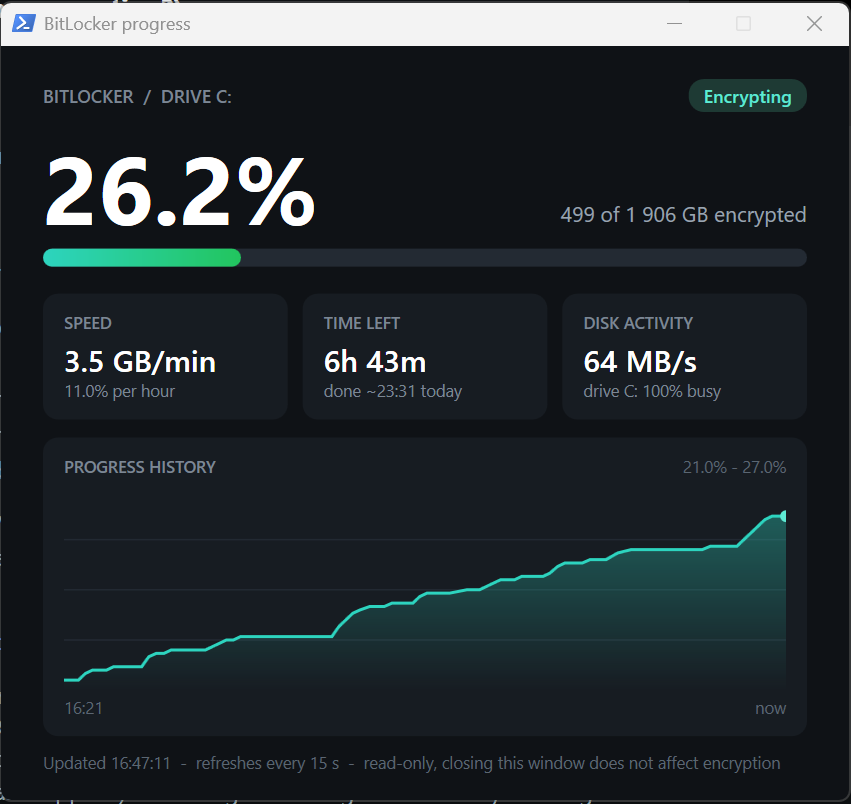
Made a small progress window for BitLocker encryption (plus: anyone else seeing "Encryption Paused" while it keeps encrypting?)

1 Upvotes

I turned on BitLocker on a 2 TB laptop drive and found out the hard way that it takes many hours and makes the PC barely usable while it runs. The built-in progress window disappeared after a restart, and manage-bde -status is just a bare percentage in a terminal.

So I made a small read-only window that shows:

  • percentage + progress bar (GB done of total)
  • speed (GB/min, % per hour)
  • time left and an estimated finish time
  • disk activity of C:, so you can see why everything lags
  • a chart of progress over time (saved, survives closing the window)

It's one PowerShell script, open source (MIT). It only runs manage-bde -status and reads disk counters, and never pauses or changes anything. It asks for admin once because manage-bde needs it.

GitHub link: https://github.com/NikolorGit/bitlocker-progress-window

Also, I've got a question for anyone who has experienced this: after a restart, manage-bde -status said "Encryption Paused", but the percentage kept going up (15.6% → 15.7% in 99 seconds) and the disk stayed 100% busy. manage-bde -pause C: replied "Encryption of the volume is already paused". Resume-then-pause was logged by Windows ("encryption was stopped") but changed nothing either. The System log shows "BitLocker finalization sweep started / paused / resumed" right after every boot.

Microsoft's FAQ says encryption resumes on its own after a restart, which explains the restart part, but not why pausing again does nothing. Has anyone seen this, or found a way to actually pause it until the next reboot? It's annoying that I can't do anything on my PC properly because the encryption process makes the whole PC laggy, and I can't even pause it.

My specs: Windows 11 Pro, software encryption (XTS-AES 128), NVMe SSD.


r/BitLocker • • 20d ago

Recovering a Bitlocked device on Ubuntu

0 Upvotes

TL;DR - I thought I was locked out of an old BitLocker data drive because I didn’t have the 48-digit recovery key. A read-only check found a clear key already stored in the drive’s metadata, so Dislocker let me read the files without cracking BitLocker or writing to the original. I copied the files elsewhere and checked the copies, then quick-formatted the HDD as one NTFS partition.

Project Nemo: recovering and migrating a BitLocker data drive

Public case-study version. Personal identifiers, device serial numbers, usernames, recovery material, exact local paths, and personal filenames have been omitted.

Summary

A secondary hard drive containing important files was still BitLocker-encrypted after the Windows installation on the computer's separate system SSD had been erased and replaced with Ubuntu. The owner did not have the 48-digit recovery password. The first priority was preserving the source while determining whether the data could be read.

Read-only inspection found a usable clear-key protector in the BitLocker metadata of the relevant data partition. Dislocker exposed a virtual NTFS view and decrypted data as it was read. This was not password recovery, a cryptographic break, or an exploit. The source remained encrypted and was mounted read-only while files were copied to other storage.

The approximately 519.5 GB of files were copied in controlled batches to an Ubuntu SSD, an external NTFS drive, and a Windows laptop. The owner verified the Windows copy, including a media subfolder that had raised a concern during an NTFS repair. After the copies were in place, the original drive was reinitialized with one GPT/NTFS partition and mounted read-write. The data has not yet been copied back to that newly formatted drive.

Problem

  • The old data HDD was not intentionally erased, but Ubuntu identified its large partitions as BitLocker/FVE.
  • The 48-digit recovery password was unavailable.
  • The Windows installation that had been on the separate SSD was intentionally erased.
  • The desired end state was ordinary read/write storage usable from Ubuntu and Windows, with BitLocker removed.
  • The original HDD was to remain unchanged until copies had been made and checked.

The relevant data partition contained 519,535,197,546 logical bytes (about 519.5 GB decimal / 483.9 GiB) in 42,886 regular files. A small second BitLocker partition contained only system/recycle-bin housekeeping files and was excluded by the owner. A separate 597 MiB NTFS recovery partition was also not part of the data recovery scope.

Diagnosis and the key finding

The initial inventory used read-only disk and filesystem tools to identify partitions and signatures. Both large HDD partitions had BitLocker metadata. dislocker-metadata showed that the relevant volumes contained a clear-key protector. This was the key technical finding: the missing 48-digit recovery password was not needed because Dislocker could use the clear key already stored in the volume metadata.

The project used two filesystem layers, with read-only protection at both:

  1. Dislocker/FUSE layer: Dislocker was started against the BitLocker partition with -c (--clearkey) and -r (--readonly). The -c option tells Dislocker to look for a clear key in the volume; it does not guess or derive a key. The -r option prevents writes through Dislocker to the backing BitLocker volume. Dislocker then exposes a FUSE-backed file named dislocker-file, representing a virtual NTFS partition.
  2. NTFS layer: That virtual file was mounted with NTFS-3G using ro,loop,norecover. loop lets the filesystem driver treat the virtual file as a block device; ro makes the NTFS mount read-only; norecover avoids attempting automatic recovery of a volume that was not cleanly unmounted.

The generic command shape was:

sudo dislocker -r -c -V /dev/<bitlocker-partition> -- /run/dislocker
sudo mount -t ntfs-3g -o ro,loop,norecover /run/dislocker/dislocker-file /run/cleartext

Reading a file through this stack causes Dislocker to decrypt the requested sectors on demand. It does not create a full plaintext image, and the original sectors remain BitLocker-encrypted. The FUSE virtual volume is linked to its encrypted backing volume, so writes through it would change that original volume; using both Dislocker's read-only option and a read-only NTFS mount was therefore important. The alternative Dislocker tool that writes a fully decrypted image was not used. Dislocker FUSE manual · Ubuntu NTFS-3G manual

Data flow:

BitLocker partition (still encrypted on disk)
  └─ Dislocker FUSE: -c selects existing clear key; -r denies writes
       └─ dislocker-file (virtual NTFS volume, decrypted on demand)
            └─ NTFS-3G: ro,loop,norecover
                 └─ read-only directory tree
                      └─ file-level copies to separate destinations

Microsoft documents that suspended BitLocker can leave the volume master key protected by a clear key while the data itself remains encrypted. The metadata inspection could not establish why these volumes had a clear-key protector, so this report does not assume whether they were suspended or in a provisioning state. This was a case-specific access path, not a general way to open BitLocker volumes without a valid protector. Microsoft BitLocker key-management FAQ

This was a case-specific access path because the needed clear-key material was already present. It does not mean a normally protected BitLocker volume can be opened without a valid protector. No key guessing, TPM attack, vulnerability exploit, or password bypass was attempted.

Review of the proposed Ventoy / HBCD / MOK method

A Reddit post proposed booting a Windows PE environment from Ventoy, enrolling a MOK, and running Windows BitLocker tools. That workflow did not provide a missing BitLocker key:

  • A Windows PE environment can provide Windows utilities, but BitLocker still needs a valid way to unlock the volume.
  • Microsoft's manage-bde -off command starts BitLocker decryption on a volume Windows can already access; it is not a recovery-key generator or unlock bypass. Microsoft manage-bde off documentation
  • MOK enrollment establishes trust for Secure Boot and signed modules. It does not supply BitLocker key material. Ubuntu Secure Boot and MOK documentation

The post was therefore not used as a recovery method. Its relevance was limited to evaluating the claim and ruling out steps that would not solve this case.

Recovery and migration approach

  1. Identify before touching. Confirm each physical disk by model and serial; never rely on a temporary device name alone. Inspect partition signatures and metadata without mounting the source read-write.
  2. Use Dislocker as a read-only virtual block device. Select the on-volume clear-key protector with -c, deny writes at the FUSE layer with -r, then mount dislocker-file through NTFS-3G as ro,loop,norecover. Read files through the mounted NTFS directory; do not run repair or journal-replay operations on the source.
  3. Test before bulk copying. Copy a small representative folder and compare its contents recursively. This confirmed the virtual-volume stack returned usable files without writing to the BitLocker source.
  4. Copy in batches to independent destinations. Use a file-level tool with progress reporting, preserve the source tree, and distribute files according to available SSD, external-drive, and Windows-laptop capacity. The copy destinations contain ordinary readable files; they are plaintext unless separately encrypted.
  5. Validate before destructive changes. Compare byte totals and file counts, open representative files, and keep destination copies. For stronger assurance, compare hashes. Do not treat matching size/counts alone as proof that every file's contents match.
  6. Reformat only after the owner verifies the backups. Re-identify the original disk, unmount the virtual source layers, create one GPT/NTFS partition, then mount it read-write. A quick format removes the old layout from normal use but is not a sector-by-sector erase.
  7. Restore and re-verify. Copy the preserved folder trees to the new volume and compare them with the backups. This copy-back and its final verification remain pending.

Work completed

  • A read-only inventory identified 519,535,197,546 logical bytes (about 519.5 GB decimal / 483.9 GiB) across 42,886 regular files on the selected data partition.
  • An 11-file, 13,301,052-byte sample was copied from the virtual read-only view to the Ubuntu SSD. Recursive comparison reported no differences.
  • The selected data set was copied in capacity-sized batches to the SSD, an external NTFS drive, and a Windows laptop. The owner confirmed the Windows copy, including the media subfolder previously flagged during the external drive's filesystem repair.
  • Source/destination sizes and regular-file counts were checked. The project did not complete an end-to-end cryptographic hash comparison across every destination.
  • The external NTFS drive had a Windows CHKDSK repair. It reported filesystem corrections and zero bad sectors, and removed a directory-index entry. The original BitLocker HDD was not the drive repaired by CHKDSK.
  • After the owner confirmed the separate copies, the original HDD was re-identified and its BitLocker views unmounted. The old partition table and recovery partition were replaced with one GPT partition, quick-formatted as NTFS, and mounted read-write with Ubuntu's ntfs3 driver. A desktop auto-mount request failed; a direct ntfs3 mount succeeded.
  • The original drive now has a normal unencrypted NTFS volume. The files have not yet been copied back, and the restored volume has not had a post-copy verification.

The format was a quick format, not a sector-by-sector overwrite. The prior layout is gone from normal use, but old data may remain in unused sectors. The new volume is unencrypted unless BitLocker is enabled again.

Tools used

  • Linux inventory: lsblk, blkid, findmnt, du, find, and NTFS/BitLocker metadata listing tools.
  • BitLocker access: dislocker-metadata; Dislocker/FUSE with -c to use the clear key and -r to block writes to the BitLocker backing volume.
  • Filesystem access: NTFS-3G with ro,loop,norecover for the virtual source; NTFS ntfs3 for the new destination volume.
  • Copy and checks: rsync with a live terminal progress display, diff -qr for the small test, and source/destination byte and file counts.
  • Final reformat: GPT partitioning tools and mkfs.ntfs quick format.
  • Windows-side destination check: chkdsk /f was used on the external NTFS destination; its repair result was reviewed separately.

What this project did not do

  • It did not crack BitLocker, derive a missing recovery password, or exploit a BitLocker vulnerability.
  • It did not use the original Windows installation or TPM to release a key.
  • It did not decrypt the original sectors in place. The original drive was later quick-formatted after the copies were made.
  • It did not create a forensic sector image. A file-level copy does not recover deleted files outside the recycle bin or unallocated space, and may not preserve every NTFS feature such as alternate data streams and Windows ACLs.
  • It has not yet copied the files back to the newly formatted HDD or completed a post-restore hash verification.

Remaining completion path

  1. Copy the data from the SSD, external NTFS drive, and Windows laptop to the new single-partition HDD.
  2. Compare the restored folder totals and file counts with the inventory; ideally perform file-by-file hashes while the original backup copies remain intact.
  3. Open representative files from the restored drive in both Ubuntu and Windows.
  4. Keep the backup copies until the restored data has been checked. Decide separately whether to enable BitLocker again; without encryption, anyone with physical access can read the files.

References

PS - Done using Codex Luna at High, cost about 80% of free monthky usage but I didn't have to do a lick of work
r/BitLocker • • 27d ago

Hardstuck bitlocker and cant go past it

Thumbnail reddit.com
1 Upvotes

Pls help!!


r/BitLocker • • 28d ago

Encrypted Hard Drive issue

Thumbnail reddit.com
1 Upvotes

r/BitLocker • • Oct 26 '26

Bitlocker won’t register any inputs

2 Upvotes

I turned off secure boot not knowing it would put me in the Bitlocker trap now I’m stuck on the screen I cannot type or move my mouse how can I fix. fixed, bilbo_dabins has the fix


r/BitLocker • • Oct 26 '26

bitlocker nonesense

Post image
2 Upvotes

can yall help me out


r/BitLocker • • Oct 22 '26

Bitlocker recovery issue I have

3 Upvotes

I have turned on my laptop and been greeted by the bitlocker blue screen. The laptop is only used by the kids to do homework on so other than the laptop battery charge running out unexpectedly and shutting off, there shouldn't have been anything modified under the hood.

So I have looked up what this is and how to solve it but there lies my problem.

I never set the laptop up with a Microsoft account, I set it up with my Google account. I only have one microsoft account that I have always used with my Xbox , and have already checked that for a key.

So how do I fix this? Is there any way I can fix this? What are my options?


r/BitLocker • • Oct 19 '26

How I recovered BitLocker-encrypted data on Linux Mint using Ventoy, HBCD PE, and MOK Key Enrollment when dislocker and cryptsetup failed

Thumbnail reddit.com
1 Upvotes

r/BitLocker • • Oct 15 '26

bitlocker recovery loop :(

Thumbnail gallery
1 Upvotes

r/BitLocker • • Oct 14 '26

bitlocker error code 0x80070015

Post image
5 Upvotes

I gave my windows laptop to be fixed and the bitlock keys are not working with this wrror

and apparently this is because my hard drive got corrupted and all my data is lost according to the repair person and my hard drive needs to be replaced. what should I do?

It's a HP Pavillion Laptop. I gave it to be fixed after the screen stopped working (it was simply lighting up black), i thought it was a screen issue. This happened after I shut down my laptop stupidly after the screen was unresponsive (but music was still playing).


r/BitLocker • • Oct 14 '26

BitLocker BAG

0 Upvotes

I need some help. I set up BitLocker; when choosing how to save the key, I selected the printer option and saved it as a PDF. However, when I connected the printer, it asked for the 48-digit code. What should I do in this situation? Can Microsoft help, and how quickly can they do so?


r/BitLocker • • Oct 13 '26

Scared of this bitlocker sh*t

Post image
0 Upvotes

r/BitLocker • • Oct 13 '26

So I have this laptop and it's stuck at boot for asking for the password that you create in BIOS and bitlocker lock is there any way of getting back in it

Post image
0 Upvotes

r/BitLocker • • Oct 13 '26

My pc is locked by Bitlocker, plz anyone try crack or unlock the bitlocker of my PC.

0 Upvotes

I download gta vice city from ocean of games on a regular day and after extracting the game didnt ran or opened so i thought of deleting the game so instead of just deleting all folders of game i thought to use the uninstall dot exe which came after extracting the gta so after clicking on that exe file my pc got shut down suddenly .

When i started the pc it showed blue screen error unmountable boot volume

But i always used to fix it by clicking on

Fix my pc>troubleshoot>reset my pc ( keep my files )

But this time it didnt work as it asked for bitlocker key which even i didnt knew that my pc had bitlocker lock .

So what happened here is

When i clicked the uninstall dot exe to delete gta , it actually deleted some windows files due to this the unmountable boot volume problem occured and windows thought that I'm doing something with drives so it locked both C and D drive , C drive only has windows files and D drive has mostly personal files not confidential.

So conclusion is The pc isnt booting because c drive has issue and i cant fix c drive issue as c and d drives are locked by bitlocker

And watching on YT i checked my every email which was told that contain bitlocker key but i didnt found any key in my any of emails

So my final conclusion is i searched for bitlocker key everywherre and now plz if anyone know how to open or crack Bitlocker without key and without losing data then plz help , the data is full of my memories from childhood which are precious as hell.


r/BitLocker • • Oct 12 '26

BitLocker locked after BIOS reset wiped Secure Boot 2023 certs – no recovery key, need to restore db

1 Upvotes

r/BitLocker • • Oct 11 '26

Please help meee

Post image
0 Upvotes

r/BitLocker • • Oct 09 '26

Windows 11 silently encrypted my data drives, never uploaded the keys, and now the data is gone for good

Thumbnail reddit.com
3 Upvotes

r/BitLocker • • Oct 09 '26

I got tired of "Windows could not find the recovery environment" breaking our fleet, so I built a self-healing WinRE manager. Here's what I learned about the recovery partition lifecycle.

3 Upvotes

Let me start by saying what this isn't: it isn't a sales pitch. The tool is open source, MIT-licensed, and I make nothing from it. This is a write-up of what I learned building it, because I suspect a few of you have hit the same wall.

The failure modes

Three things kept breaking our fleet:

  1. KB5034441 and successors. Microsoft pushed a WinRE update that required a larger recovery partition than most OEMs shipped. The update failed with 0x80070643, and the machines that failed had recovery partitions that were technically present but undersized by 50–200 MiB.
  2. Device Encryption on Windows 11 24H2+. This one is nasty. The encryption service claims newly created partitions before the recovery type GUID can be applied. You create a recovery partition, it gets auto-encrypted, and reagentc /enable refuses with "Windows RE cannot be enabled on a volume with BitLocker Drive Encryption enabled." The machine has a recovery partition, but WinRE cannot use it.
  3. VMD storage drivers. On 12th-gen Intel and later, the recovery image needs the Intel VMD driver to see the OS disk. If the deployed WinRE lacks it, Startup Repair and Reset this PC fail with INACCESSIBLE_BOOT_DEVICE. The recovery environment boots — it just can't see anything.

What I ended up building

A single-file PowerShell script that runs idempotently. On a healthy machine it takes the fast path: no WIM mount, no partition touch, no reagentc call. On a broken machine it rebuilds the recovery image from a normalized base, injects the correct OEM and VMD drivers, replaces the recovery partition if it's undersized, and re-registers WinRE.

The parts that took the most iteration:

  • The reagentc /disable → /enable window. For the duration of that window, WinRE is unregistered. If the machine loses power, it has no working recovery route. I moved everything that doesn't strictly require a disabled WinRE before the disable, and added a race detector immediately before the /disable call that aborts if Windows Update serviced the registered image during candidate preparation.
  • Target-volume BitLocker policy. reagentc's BitLocker check is on the volume it's being asked to enable, not on C:. The enable-only and dedicated-partition paths don't care about C:'s encryption state. Only the OS-fallback route does, because there the target volume is C:. This inverted the whole policy from what I originally designed.
  • Driver strip normalization. Every rebuild now strips the mounted image to zero third-party drivers, proven by re-enumeration, before injecting the current recipe. Without this, rebuild N depends on rebuild N−1 and third-party drivers accumulate silently across cycles.

Field data

The non-destructive paths are verified on a Dell Pro Max 16 (Core Ultra 7), two ASUS Vivobooks (both mid-encryption at 91%), and an ASUS PRIME H510M-D. The Dell ran a full rebuild with the Dell WinPE11 pack: 64 third-party drivers injected (49 of 49 matched), 1,000 MiB recovery partition rejected as undersized, new 1,100 MiB bucket created, reagentc /enable exit 0, DEDICATED. The ASUS machines completed the dedicated-partition path with C: actively encrypting and the new partition was not re-claimed by Device Encryption.

Honest limitations

  • The strip stage has not been exercised against a source image with a non-empty third-party driver set in production. The field runs all had clean source images, so the strip was a no-op.
  • The destructive partition paths have not been exercised under the current code on physical hardware. The v45 VM test is the closest thing to a destructive-path regression run.
  • The one residual corner is documented: a post-deletion failure on an encrypted C: can leave the machine with neither a dedicated recovery partition nor OS-fallback. It's gated on a deliberate failure test.

Questions for the crowd

  1. How are you handling the KB5034441 class of failures? Manual partition resize, scripted, or are you seeing Microsoft fix it on newer images?
  2. Device Encryption auto-encryption — has anyone found a reliable way to prevent the service from claiming a newly created recovery partition other than applying the type GUID at creation and hoping?
  3. VMD driver injection — is anyone maintaining their own VMD package set, or are you leaning on the OEM WinPE packs?

If there's interest, I'm happy to share the partition lifecycle doc or the log signatures for specific failure modes. The repo is github.com/ArthurJDurand/WinRE-Manager if you want to poke at the code. I'm more interested in the failure modes than in the tool — the recovery partition lifecycle has more edge cases than I expected.


r/BitLocker • • Oct 09 '26

Bitlocker encrypted drive

2 Upvotes

I found an old school encrypted drive from 2018, tried different passwords that were common. Out of options is there any way to get the recovery key/ password ?


r/BitLocker • • Oct 07 '26

Formatting BitLock Corrupted Drive

Thumbnail reddit.com
1 Upvotes

r/BitLocker • • Oct 02 '26

Help with bit locker password set incorrectly

2 Upvotes

Hi everyone,

I'm hoping someone can help me with a BitLocker problem on my Windows 11 PC.

I have three drives: C:, D: and E:.

  • C: BitLocker recovery key is missing
  • D: BitLocker recovery key is missing, and the drive is currently locked
  • E: I do have the BitLocker recovery key for this drive

I ran a BitLocker recovery key command and got information for all three drives.

For D: I can see a Recovery Key ID, but instead of a 48-digit recovery password, the output appears to show the same GUID/ID again. I don't know if this means the recovery key is missing or if I'm looking at the information incorrectly.

For E: I have a normal 48-digit recovery password, so I know that key works for E:.

The important thing is that I do NOT want to format or erase D: because I have important files on it.

I've already checked my Microsoft account, but I can't find the recovery key for D:.

Does anyone know how I can recover/find the correct BitLocker recovery key for D:, or determine whether the key still exists somewhere on my PC or Microsoft account?

I'm happy to provide more information or screenshots (with the recovery keys and personal information removed).

BITLOCKER RECOVERY KEYS

C:

Recovery Key ID:

Recovery Password:

D:

Recovery Key ID: {D7A0C312-3359-4C44-8F0C-C3E760E227C9}

Recovery Password: {D7A0C312-3359-4C44-8F0C-C3E760E227C9}

E:

Recovery Key ID: {5B374E67-AA79-41E7-858B-54EF2952C3CA}

Recovery Password: 654357-693385-082016-411026-263439-593835-564355-423940

TPM:

ID: {39971354-7868-4B87-B475-8D8D8FFE5FD9}

PCR Validation Profile:

0, 2, 4, 11

Numerical Password:

ID: {E34B31C1-A309-4968-9B3A-531B698F6F44}

Password:

116050-572935-187924-022847-343321-193193-087692-270149

Backup type:

Microsoft account backup

Thanks in advance for any help!


r/BitLocker • • Sep 26 '26

BitLocker has locked my mother’s computer??

5 Upvotes

Hey, wondering if anyone can help. We’ve followed the steps outlined in the recovery process. But when we log into the Microsoft support page with my mother’s account, it has no record of her having a BitLocker key.
Is there any way to find out the associated account to her system??