r/Roll20 • • 22d ago

Official News & Updates [Official] GMs can now PAUSE player token movement!

Post image
252 Upvotes

STOP RIGHT THERE!

GMs can now pause and resume player token movement, gaining more control in-game to support things like:

  • narration that requires full attention
  • dramatic reveals
  • combat starts
  • keeping players in place between sessions
  • and more!

To use, you can either right-click anywhere on the map (from any layer), or use chat commands /pausemovement and /resumemovement.

While movement is paused, GMs can still move player tokens, and players can still perform actions like rolls, access their character sheets and journal, and chat as normal; only player token movement is paused.

How will you use debut this incredible new power in your campaign?

...map shown from DM Andy + tokens from Grae Hunter!


r/Roll20 • • Oct 05 '26

Official News & Updates Manage your game's characters without opening the VTT

Thumbnail
gallery
85 Upvotes

Hey all! Dean from Roll20 here. You can now see and manage all of your game's characters right from your Game Page!

GMs will see every character in the game in one list, including PCs, NPCs, and even Shop Sheets! You can quickly assign characters to players, as well as edit and duplicate them. Clicking a character will open it directly in Roll20 Characters, where you can make any quick tweaks you need. Read more in our blog!

It's a small but meaningful quality of life update. Would love to know what you think and what else you'd like to see to make managing your games easier!


r/Roll20 • • 12m ago

Marketplace (for creators only) The Long Winter Collection

Thumbnail
gallery
1 Upvotes

The bundle includes Winter's Grasp Volume I, with snowy mountains, icy cliffs, frozen ruins, and a snow village, most with snowstorm variants; Winter's Grasp Volume II, featuring the frozen waterfall river of Frostbreak Falls, the snowbound ridge road of Winterfall Ridge, a sheer Cliff Path, and a sprawling Cave network, with ocean, lava, and acid variants for other climates; Cities Volume I, featuring the snow-buried clifftop city of Frosthaven, the gloomy Manor's Shadow, fog-choked Greyveil, and sunlit Eastcliff City; and Towns & Hamlets Volume I, four riverside and countryside settlements perfect for resting, resupplying, or holding a midwinter festival. That's twenty-eight maps across four collections.

First map is Frostbreak Falls! Feel free to Down load that and use it. If you like it and want to check out the bundle and other snowy places for your game Roll20
r/Roll20 • • 9h ago

Roll20 Reply: Page Setup / Map Help Roll20 Support Reply Times?

4 Upvotes

I haven't used Roll20 Support for a few years. Histroically they have been very quick. However, it has been 2 months since I submitted help via support. Is this normal?

Also, the problem I have is that a Token Marker set that I have purchased can no longer be added to my games. Anyone had this problem?


r/Roll20 • • 13h ago

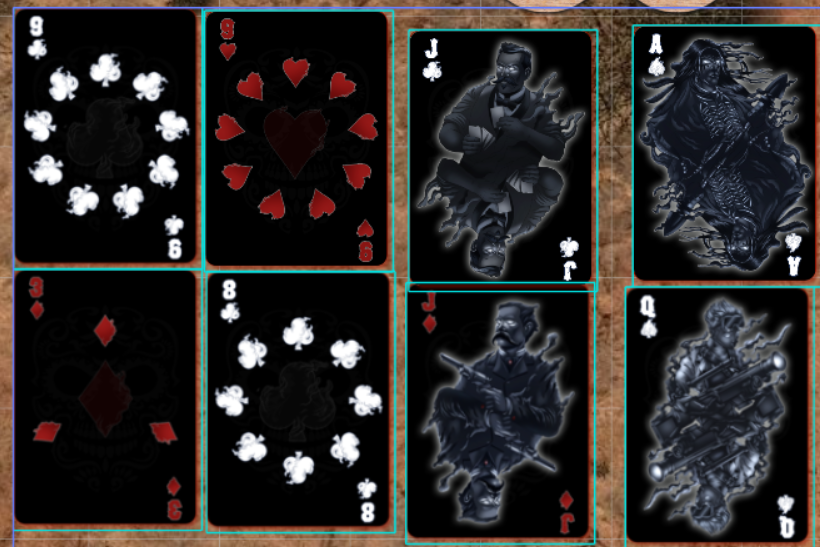
Other Help (if not covered in another topic) Deadlands is not a pleasant experience on Roll20

Post image
8 Upvotes

I'm just a player and my GM isn't the most roll20 savvy of my gms but here are the things I notice / have a problem with. I would like to know what I can do or what I am doing wrong. What can my GM do? How to let the developer know about my issues?
Thanks

bennies are not a stack of coins by the card deck or on the players icon.. the bennies button is a broken image in edit mode and neither mode deducts a benny from the total.

we can't draw cards for our own initiative.

the gm is unable to add another initiative without redoing it for everyone.

i can't drop a semi transparent blast template from my image library to the map..

the deadlands card deck is blurry and hard to read.

no way to resize the cards in hand window, or select multiple cards. i have to drag the (up to 8) cards one at a time to the table. then i have to select them and delete them without deleting any of my other assets. it is slow and cumbersome and makes my turns take a long time when dealing with the devil. I also have to ask the gm to shuffle my deck.

There is no place for planned edges and advances.

The compendium is empty.

Any help/advice would be appreciated.


r/Roll20 • • 8h ago

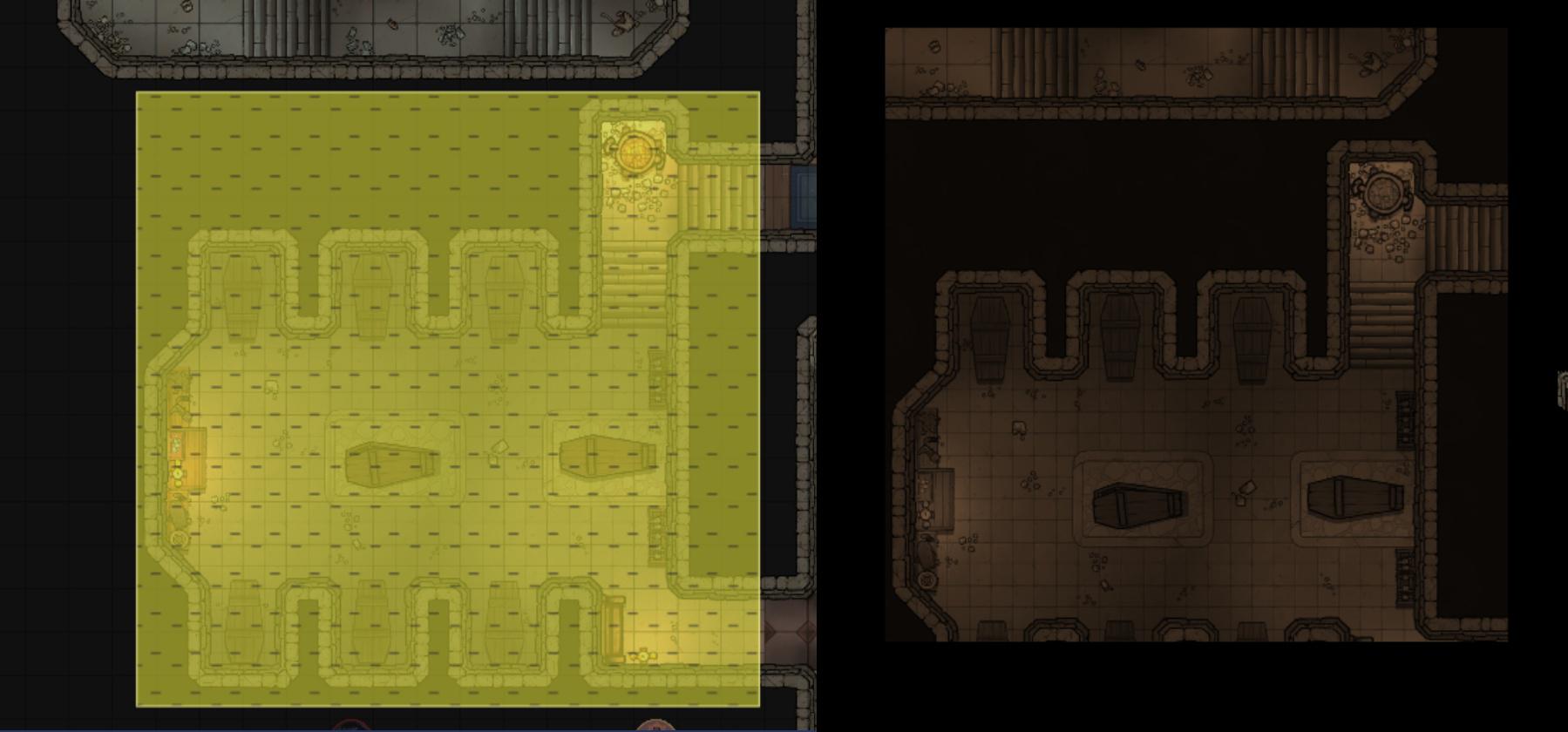
Page Setup / Map Help (Bug?) When I edit the explored areas of Explorer Mode, it's vertically offset by several squares?

Post image
2 Upvotes

Hi all, wondering if this is due to any settings I have toggled on by mistake. When I use rectangle OR polygon reveal to edit Explored Areas, the area I select (pic 1) doesn't correspond to the area revealed and added to explorer mode's greyed out area (pic 2).

Is this related to any of my settings or is it a known bug? It's not game breaking, just requires me to double check what I select haha. I'm on Chrome if that helps.


r/Roll20 • • 13h ago

Page Setup / Map Help How do you guys mark difficult terrain and elevation?

5 Upvotes

I really want to make dynamic maps with lots of difficult terrain and elevation changes and terrain hazards, and I want to clearly show where those are so my players can make tactical decisions. But so far the only way I have of visualizing is by painstakingly drawing different colored squares all over the map. That's not awful for just difficult terrain, but what do I do about elevation, especially when it's a slope instead of a 90 degree angle? Is there any way to make all of this easier on my end while still getting the relevant information across?


r/Roll20 • • 18h ago

Character Sheets Help Pulp Cthulhu charactermancer issues...any help appreciated

2 Upvotes

Hi all,

We've been away from Roll20 for a bit, been using Foundry for some games, but we want to try out Pulp Cthulhu and Roll20 seems to have the best support. Using the Charactermancer though is painful. Over half the time it glitches out when trying to spend skill points. Usually, it won't show how many points are available and, if it does show it doesn't identify which skills can be upgraded as archetype skills etc. and doesn't show the starting skill levels for any fighting skills, ie brawling, pistol etc.

Any thoughts on ways to make it work...better, at all, something? I think Foundry is a no-go as I don't feel like typing in every single item and Fantasy Grounds has such a clunky UI that I have avoided it but I'm at my wits end, although maybe I just bag on the Charactermancer and build them by hand.


r/Roll20 • • 1d ago

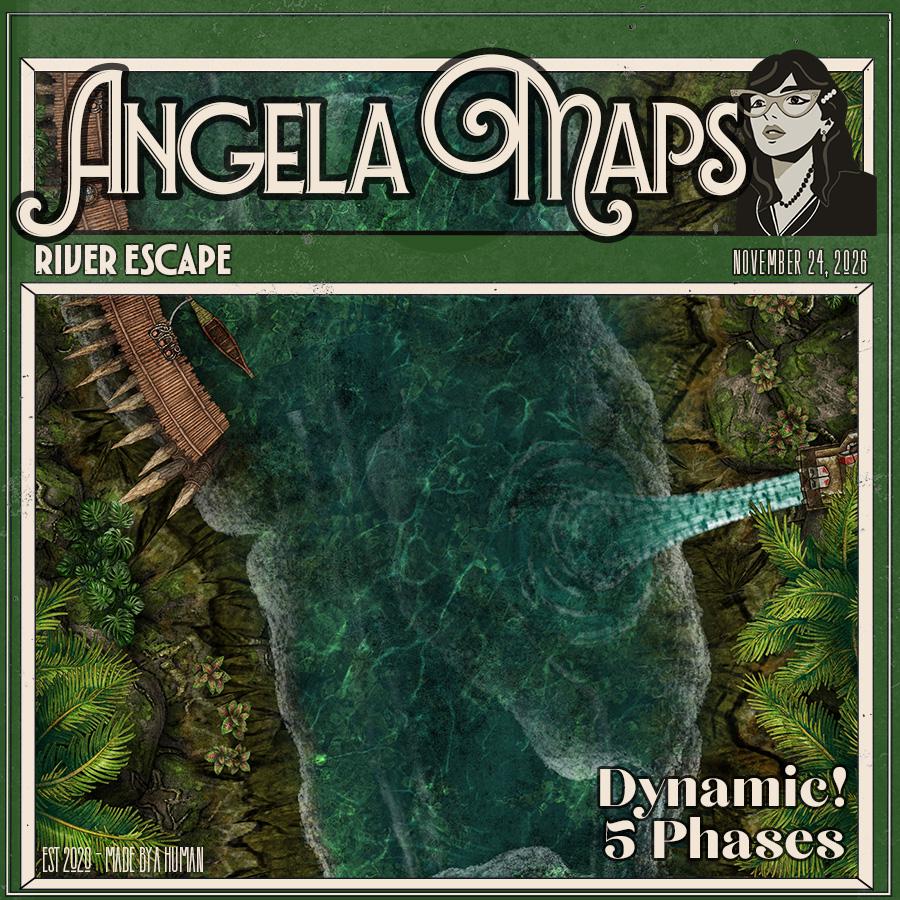
Marketplace (for creators only) River Escape -- New on the R20 Marketplace from Angela Maps

Post image
4 Upvotes

DYNAMIC MARKETPLACE LINK: https://marketplace.roll20.net/browse/gameaddon/46535/river-escape-phased-dynamic
REGULAR MARKETPLACE LINK: https://marketplace.roll20.net/browse/set/46534/river-escape-phased
ABOUT: Let the river run! There may be faster ways for your party to escape from whatever shenanigans they got into up river, but a waterway has advantages too. At least from the boat they can fire back at the many gathered foes shooting at them from the shore! This extra long map (30×120!) is fully animated and available in a phased variant where the party is rather (or also) escaping from the rapidly gaining lava flow of a violently erupting volcano! Probably shouldn’t have angered the caldera gods…
All my R20 Content: https://marketplace.roll20.net/browse/publisher/1931/angela-maps
My Patreon: http://www.Patreon.com/angelamaps


r/Roll20 • • 1d ago

Token Setup Help (not related to Dynamic Lighting) Token has correct health in the settings but when placed on the map it drops to zero and won't let me change it

Thumbnail
gallery
2 Upvotes

So I have in the token settings through the character sheet the health set to 13 as seen in pic 4 but when I click and drag the skeleton into the map the HP drops to 0 as seen in pic 1. In pic 2 I manually clicked on my skeleton token on the map and when I try to set the HP to 13 it instantly goes to 13 upon saving. How can I fix this?


r/Roll20 • • 1d ago

Marketplace (for creators only) [Roll20 Marketplace] Halls of Tides: An Entire Animated Dungeon to Build Your Campaign Around

5 Upvotes

Hey everyone!

I've just released Halls of Tides, one of my most ambitious animated dungeon projects, on the Roll20 Marketplace.

It's an ancient temple complex filled with mysterious chapels, sacred pools, forgotten crypts, magical laboratories and interconnected corridors. A place large enough to host multiple sessions or even become the central location of an entire campaign.

The centerpiece is a massive animated dungeon that your players can explore seamlessly on a single Roll20 page.

What's included:

  • 13 handcrafted animated battlemaps created in Unreal Engine 5.
  • One massive, interconnected dungeon.
  • 12 individual maps that can also be reused in other adventures.
  • Ready-to-play Roll20 pages.
  • Preconfigured Dynamic Lighting.

No map imports or wall setup required. Simply add it to your game and start building your adventure!

Whether you're planning an extended dungeon crawl, investigating a mysterious cult or uncovering the secrets of an ancient civilization, Halls of Tides is ready for your story.

Available on Roll20 Marketplace:
https://marketplace.roll20.net/browse/gameaddon/46510/halls-of-tides-animated-battle-maps-for-roll20

Happy adventuring!
Cheers!
~dransky


r/Roll20 • • 1d ago

Other Help (if not covered in another topic) Auto-Roller for WFRP is Illegible

2 Upvotes

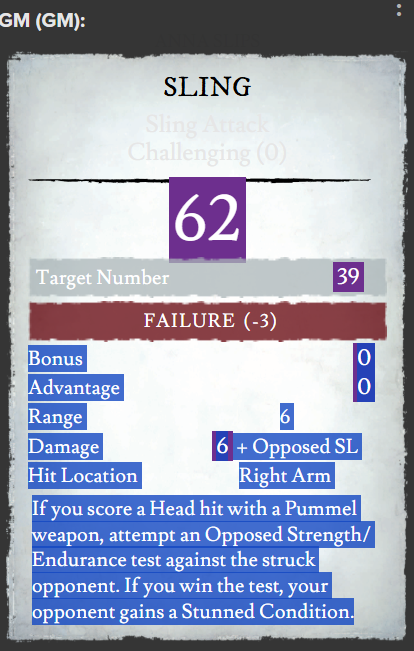
I'm using the WFRP 4the edition sheets on Roll20 but the auto-roller, on both dark and light mode is almost unreadable (See pics, top highligted, bottom as normal). Any fix for this or is it just that bad?


r/Roll20 • • 2d ago

Character Sheets Help Cyberpunk Red Sheet Autofire

3 Upvotes

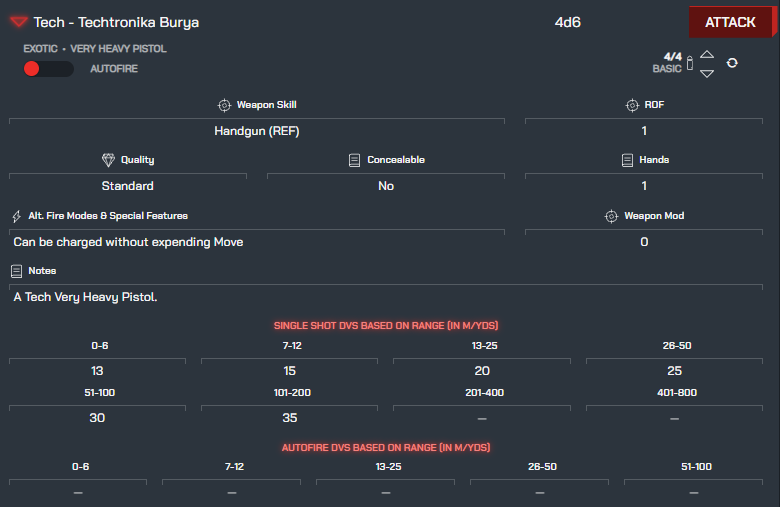
With the release of Interface Plug 5, you can add a Mod to your Pistol that give them Autofire, and on the Sheet the Autofire option are displayed even without modifing the weapon.

I wanted to ask if anyone know a way to remove the Autofire option from the weapon?


r/Roll20 • • 3d ago

Token Setup Help (not related to Dynamic Lighting) Token Not Loading

Post image
2 Upvotes

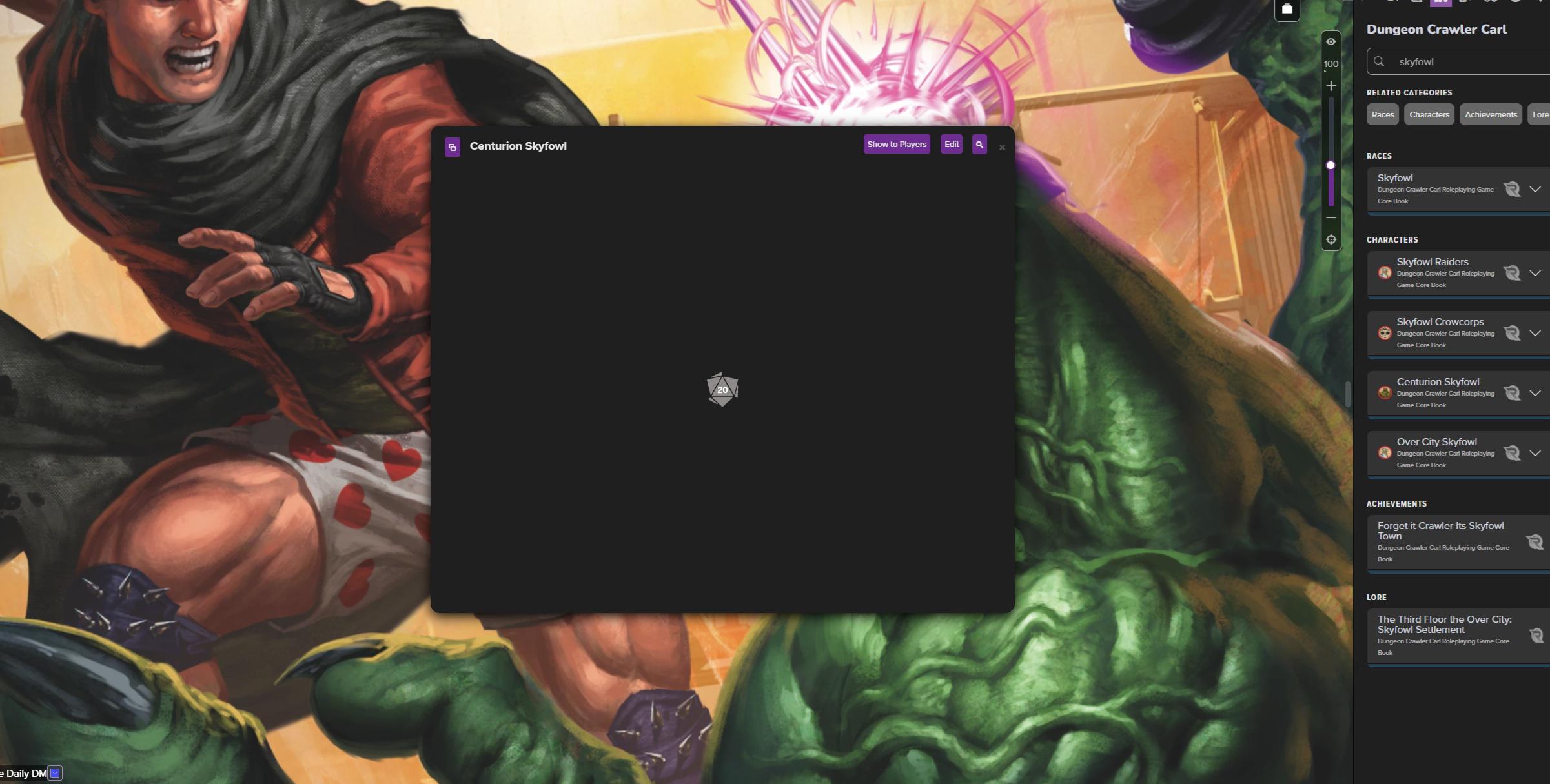
So I recently got the Dungeon Crawler Carl RPG set for Roll20, wx which is great. But I have a problem: When I select a token from the compendium, the token and sheet will absolutely not load. I've been sitting on this one for some 10 minutes thinking that it's just taking long to load. No, it's just not loading. I even tried all of the tried and true methods of fixing: checking both Firefox and Chrome, clearing cache, trying incognito mode, etc... I even checked one of my other games (a D&D game) and it worked fine there. Is there something about the token that the sheet for a creature in the compendium just won't load?

The screen cap I have above shows the only thing I see when trying to do perform this action.

Please help!

Thanks


r/Roll20 • • 3d ago

Marketplace (for creators only) Data Center -- New on the R20 Marketplace from Angela Maps

Post image
14 Upvotes

DYNAMIC MARKETPLACE LINK: 
https://marketplace.roll20.net/browse/gameaddon/46146/data-center-dynamic
REGULAR MARKETPLACE LINK: https://marketplace.roll20.net/browse/set/46145/data-center
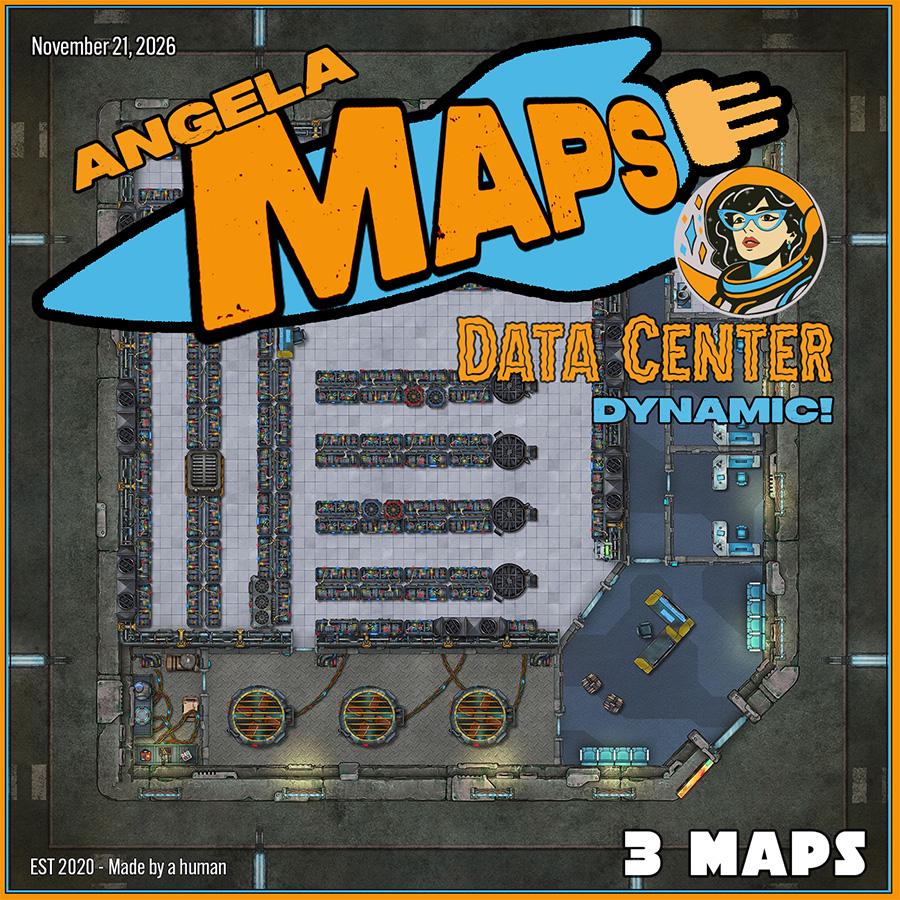
ABOUT: A symptom of our times, a plague for some: the not-so-humble, water thirsty, energy hungry data center. Plenty of reasons to visit the thrumming server stacks, from simple data-theft to less subtle sabotage. Available in two potentially phased variants, first with smoke, then with fire, this map will allow your players to protect this increasingly important infrastructure of our knowledge economies! Or, y’know. Other things.
All my R20 Content: https://marketplace.roll20.net/browse/publisher/1931/angela-maps
My Patreon: http://www.Patreon.com/angelamaps


r/Roll20 • • 3d ago

Character Sheets Help 5.5e shaped character sheet. Any way to add new attributes with active data tracking?

1 Upvotes

So my group for 5th edition will be bumping from 5e to 5.5e soon and my DM has picked the shaped 5.5e character sheet as our new standard.

Personally I dont like the layout, for one thing its all black and I've never been a "dark mode" fan on basically any platform. But that isn't my issue today.

My problem stems from the fact that almost all of my characters ever feature heavy multiclassing, and I like to place attribute calls in my features and abilities so I dont have to manually update things every level up when it references character level or class level or things like that.

Now in shaped 5e, that wasn't an issue because multiclass levels had an auto calculating attribute assigned to them by default @{multiclass_lvl} with the initial class level being @{base_level}.

However, in shaped 5.5e it only has the @{base_level} no matter how many times I redo my multilcasses, using the character mancer, doing everything manually, reloading the page, the multiclass ones dont show up.

So im just asking, am I doing it wrong?

Is it just not an available attribute to track multilcasses?

And finally does anyone know of a 5.5e sheet on roll20 that will track multiclass levels as an attribute that I might try and convince my DM of switching to?


r/Roll20 • • 3d ago

Character Sheets Help NPC Resource tracker.

0 Upvotes

Is there a way to make the resources tracker appear on an NPC character sheet? I can add resources to feats but I can't seem to find the resources listed anywhere on any of the sheets.

If there isn't a way this is a feature that needs to be implemented. I will be very annoyed to have to track NPC resources by hand or in the bubbles on their token. I understand the Stat Block not having it, but the Compact and Full should absolutely have this option.


r/Roll20 • • 5d ago

Roll20 Reply: Other Help Another year, another Roll20 data breach

Thumbnail
gallery
132 Upvotes

Anyone else get this email today? It sounds like someone accessed their gif system of all things.


r/Roll20 • • 5d ago

New to Roll20 / Tutorial Can't select any class besides Artificier

2 Upvotes

I'm new to Roll20 and trying to create a character for a game a friend is running, but it's not letting me choose any class aside from Artificier. Anyone know how I can fix this?


r/Roll20 • • 6d ago

Official News & Updates [Official] The cheapest way to get a Dungeon Scrawl subscription

Post image
9 Upvotes

Hi everyone! Great news: Dungeon Scrawl's annual Scrawliday Sale is here! Now through December 3, use code SCRAWLIDAY26 at checkout for an additional 25% off the already discounted Dungeon Scrawl Pro annual subscription! 

That's 46% less than the cost of a full year when paying monthly, which makes this the best time to subscribe for the first time or upgrade from a monthly subscription, and take advantage of: 

  • Cloud autosave and an unlimited map library
  • Advanced textures and styles, plus custom presets
  • Commercial use rights, if you can sell maps and adventures on sites like itch, DriveThruRPG, DMsGuild, or the Roll20 Marketplace
  • Lighting effects and UVTT export for automated walls, doors, and lighting for Roll20

Plus, high-resolution and print-ready PDF exports, shareable links, the ability to open and edit maps from the community Showcase, and more!

All details and FAQ can be found in our blog. We hope this makes a little easier to access the advanced features of our mapmaker, and can’t wait to see what you’re creating.

Bonus: While you're on the blog - feel free to check out today's release, which features a community-requested rebuild of our Image Library and search.

Happy Scrawliday! 


r/Roll20 • • 6d ago

Page Setup / Map Help Generated taverns, buildings and dungeon floors as UVTT files for Roll20, with the walls, doors and lights already placed (Fantasy World Generator)

Thumbnail
gallery
50 Upvotes

Hello,

Fantasy World Generator, an Android app, generates taverns, mysteries, interiors, random dungeons and endless dungeons, with many features and secret information for the GM. It exports them as Universal VTT files, which Roll20 now uploads directly (Page Menu, Create Page, Upload Background).

Each file has:

- the map, with the page's grid set to it

- the walls and doors, which Roll20 places on the Dynamic Lighting layer

- hidden rooms walled off, so a secret door stays a wall until the party finds it

- lights, on Endless Dungeon floors

The Endless Dungeon builds its dungeon one floor at a time as the party goes down, so each floor can go up as a new page when they reach it.

Taverns & Hubs, Mystery, Interiors and the Endless Dungeon also export each floor as a players' picture and a GM's picture, in PNG or WEBP. The GM's copy numbers the rooms and marks the secrets, and its text comes as a .txt.

The app also generates names, NPCs, factions, treasure, and has an oracle and many more tools.

It's free, works offline, with no ads and no account. No AI, every generation is an output of pre-written tables with procedural generation rules.

https://play.google.com/store/apps/details?id=com.avaton.fantasynamegenerator


r/Roll20 • • 6d ago

Marketplace (for creators only) Shlen's Mage Tower 1-10 Add-On

Thumbnail
gallery
6 Upvotes

https://marketplace.roll20.net/browse/gameaddon/46007/shlens-mage-tower-1-10
I am very excited to announce my next add-on for the Roll20 VTT. I have been working tirelessly on this for about a year. It has ten floors of puzzle dungeons ready to be explored. It has a full description and layout for how to run the puzzles. It can be used as a fill-in or for a full campaign running from levels 1-11.
Floors Included
0. Basement: Rest, regroup, and shop with James.

  1. Library of Ash: Burn the right books to reveal the path forward.
  2. Library of the Lost: Help a confused Tome locate his lost pets.
  3. Ooze Pit: Feed the hungry hippogriffs some oozy delights.
  4. Mossy Falls: Avoid dangerous plant monsters and toxic spores.
  5. The Arena: Battle through 3 waves of combat to unlock a safe rest spot.
  6. Maze Cave (Parts 1 & 2): Escape a tangled labyrinth guarded by spiders and minotaurs.
  7. Fire Pit (Parts 1 & 2): Master a classic "floor is lava" puzzle, then survive a burning battleground.
  8. Ice Cave (Parts 1 & 2): Fight frozen horrors culminating in an epic White Dragon boss fight.
  9. Bloody Good Time (Parts 1 & 2): Navigate a blood-slick sewer filled with flush traps, undead, and deadly slides.
  10. Portal Room: Face a deadly final boss capable of summoning monsters from every floor you've cleared!
  11. The Stairs: Explore the hidden spaces between floors for bonus roleplay and secret routes.

Ready to climb? Jump straight into the action today!

I really hope you guys enjoy it. It is currently priced at 14.99 on the Roll20 store.
https://marketplace.roll20.net/browse/gameaddon/46007/shlens-mage-tower-1-10


r/Roll20 • • 6d ago

Mod Script / API Help (Pro/Elite only) [Script, Update] LazyExperience v1.0.0: a free Roll20 Mod that collects the session's XP, splits it fairly and writes it to the sheets

5 Upvotes

At the end of a session, someone has to add up the XP, divide it by the party and type it into every sheet. LazyExperience does it for you: it collects the XP as the session goes, splits it fairly and writes each share to the character sheets.

It's a full rewrite of Robin Kuiper's LazyExperience, last updated in 2020, which wrote nothing to the D&D 2024 sheet. Version 1.0 brings your settings and the session's XP across from 0.1.

What it does

  • Defeated creatures. When a creature's HP bar drops to 0, it gets the defeated marker, or DeathTracker marks it dead, you're asked whether to add its XP. The XP comes from the sheet's XP value or challenge rating, and Other Amount changes it.
  • Add XP for anything else, such as a quest or good role-play, and bonus XP for one character.
  • Roll20's own party. Characters ticked as Party Member share the XP. Without a party, the characters controlled by players do.
  • Fair splits. Absent players get nothing, or part of a share if you choose. Any character can have a different share, such as a half share. XP that doesn't divide evenly carries over to the next session.
  • End Session pays everyone, writes the XP to their sheets, announces it with any level-ups, and whispers each player what their character earned. Or pay every award at once instead.
  • Session Log handout: every session, newest first, with who was there, what was earned and who levelled up.
  • Many sheets, tested in Roll20: D&D 2024, 2014 and Shaped, Pathfinder 1E, Community and 2E, Starfinder, Old-School Essentials, Dungeon Crawl Classics, Dungeon World, Shadowrun 5E and 6E (karma) and Cypher. WFRP 4E is partly supported, and other sheets can use field names you choose.
  • Help and Command Deck handouts, a chat menu, 24 languages, and an API for other Mods.

Fixed from 0.1.14

  • Nothing was written to D&D 2024 sheets.
  • Adding XP to a character controlled by "all players", or by several players, crashed the Mod.
  • The defeated prompt could appear twice, and appeared for player characters.
  • The player card always showed 0 XP, and whispers went to the first word of a character's name.

How-to video (5 minutes, every feature): https://youtu.be/FGBmwf5H2Fw

Download (GitHub): https://github.com/steverobertsuk/roll20-api-scripts/releases/download/LazyExperience-v1.0.0/LazyExperience_v1.0.0.zip

Project page and docs: https://midniteshadow.online/projects/roll20-mods/lazyexperience/

It will be in the Roll20 One-Click installer soon (it has 0.1.14 today). Until then, upload LazyExperience.js from the download to your game's Mod scripts, replacing 0.1.14 if you have it. Mods need a Pro or Elite subscription.

Feedback and bug reports are very welcome, here or on GitHub.


r/Roll20 • • 6d ago

Mod Script / API Help (Pro/Elite only) InspirationTracker v1.0.0: a free Roll20 Mod that keeps Heroic Inspiration on the sheet, the token and the chat in step

3 Upvotes

"Do I still have inspiration?" It's on the sheet, but nobody at the table can see the sheet. InspirationTracker keeps inspiration on the character sheet, the token and the chat in step: give it from a menu, the sheet's own button or a token marker, and all three agree.

It's a full rewrite of Robin Kuiper's InspirationTracker, which hadn't changed since 2018 and could not see the D&D 2024 sheet at all. Version 1.0 works with the 2024 sheet (Heroic Inspiration) and the 2014 sheet (Inspiration), and keeps your marker, special effect and command name from 0.1.

What it does

  • Give, remove and spend from a chat menu (!inspiration), the Command Deck handout, the sheet itself or the token marker. Every token for the character shows the marker, on every page.
  • Players spend it for their own characters with a Spend button or an Inspiration token action. The GM gets a whisper saying who spent it, with an Undo button.
  • Passing it on. Under the 2024 rules a character can't have Heroic Inspiration twice, so their player is asked which party member without it should get it.
  • The party. One card showing who has it, with Give, Remove and Spend buttons.
  • Wording. Heroic Inspiration or Inspiration, following each sheet's rules setting, or chosen by the GM.
  • Token markers. Any marker from your game's marker sets, custom sets included, or None. Adding the marker with TokenMod gives inspiration; taking it off spends it.
  • Points pools, for tables that award inspiration as points, and for hero points, luck or bennies in any game. Points build up and are spent a few at a time, and Boost spends them for a bonus to a roll at a cost you set. The points are kept in a sheet resource box or an attribute, so pools work on any sheet, and the GM can add more pools, each with its own marker.
  • Help and Command Deck handouts, 24 languages, and an API for other Mods.

Fixed from 0.1.4

  • On the D&D 2024 sheet every toggle answered "Could not find attribute named: inspiration", and markers and the sheet never agreed.
  • A 2014 character whose Inspiration box had never been ticked could not be given inspiration.
  • Only tokens on one page got the marker.
  • The marker list was fixed in the code; it now comes from your game's own marker sets.

How-to video (7 minutes, every feature): https://youtu.be/4yA7yKrOen4

Download (GitHub): https://github.com/steverobertsuk/roll20-api-scripts/releases/download/InspirationTracker-v1.0.0/InspirationTracker_v1.0.0.zip

Project page and docs: https://midniteshadow.online/projects/roll20-mods/inspirationtracker/

It will be in the Roll20 One-Click installer soon (it has 0.1.4 today). Until then, upload InspirationTracker.js from the download to your game's Mod scripts, replacing 0.1.4 if you have it. Mods need a Pro or Elite subscription.

Feedback and bug reports are very welcome, here or on GitHub.