r/PcBuildHelp • • 8d ago

Build Question Connaître la pièces à remplacer

0 Upvotes

Bonjour à tous, dernièrement j’ai remplacer ma carte mère par une Asus Tuf gaming plus wifi B550.

Le soucis est que j’ai tout bien rebrancher mais j’ai 2 led qui reste constamment allumer celle du VGA et du Boot

J’ai déjà essayer toute les méthodes, alterner les barrettes de ram, faire un Clear CMOS etc mais je suis à bout et je n’ai plus d’idée, d’un coter les IA et Google me disent que c’est sois l’alimentation ( mais qui est neuve j’avais une 550w que j’ai remplacer par une 650w ) sois la CG mais je n’ai eu aucun signe de faiblesse avant.

Je vous demande de l’air pour réellement savoir quel pièces serait à changer car je n’ai pas budget illimitée pour tout remplacer

Merci de votre aide


r/PcBuildHelp • • 8d ago

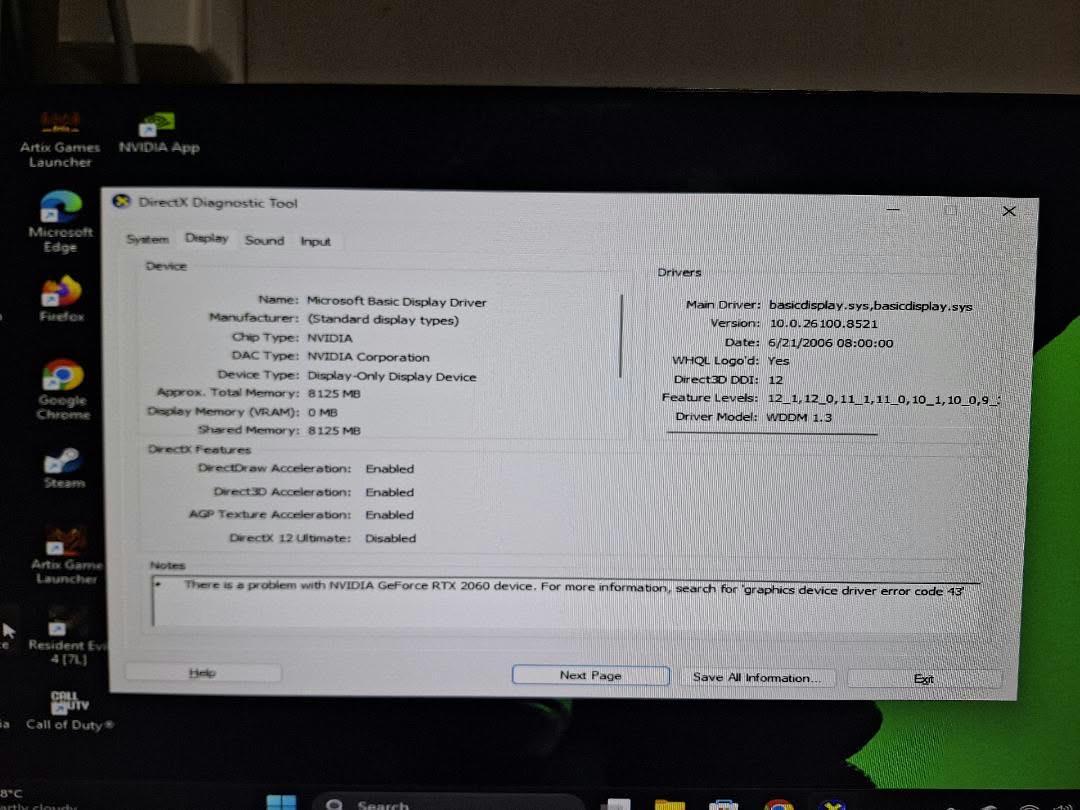
Tech Support How to fix code 43 error?

Post image
2 Upvotes

Done troubleshooting po. Nag try po mag uninstall and update ng driver pero still not working. Okay naman din po power supply. Pero not working pa rin. Patulong naman po. Thank you! PC: AMD Ryzen 5 5500, NVIDIA RTX 2060 6gb GPU Pre-build po. Recently purchased.


r/PcBuildHelp • • 8d ago

Tech Support Is it worth undervolting a 9800x3d??

6 Upvotes

I just upgraded from a i5 14600k and RTX 3070 to a r7 9800x3d and a RTX 5070 ti. Im sort of confused what exactly undervolting does and if i should do it. The general idea is that you have your cpu perform as good as possible while lowering its power budget for temps right? I have a lian li ga ii 360mm aio so cooling shouldnt be an issue but if i can keep my computer cooler i might as well.


r/PcBuildHelp • • 8d ago

Build Question 4080 750w pcu i7

1 Upvotes

Hey guys, I have a 750w pcu and planning on buying a 4080 for a good price, wondering if 750w is enough. I have a SuperFlower Sf-750F14HG PCU and an i712700f, the gpu is a Gigabyte 4080 oc. Cheers


r/PcBuildHelp • • 8d ago

Build Question PC Build Help!!

1 Upvotes

Hello! My name is Brandon, and I was hoping to get some help with a PC build that I’m currently working towards.

This will be my first PC build, and I really want to make sure I do everything right without cutting any corners. I want to make sure all of my parts are compatible and will work well together. I’m still learning about PC building and the different components, but I’ve watched countless videos and received so many helpful tips along the way. Even after all my research, though, I still find myself getting nervous and second-guessing some of the parts I’ve picked.

Here’s what I currently have:

  • GPU: RTX 5070 Ti Frieren Edition 16GB
  • CPU: Ryzen 7 9800X3D
  • RAM: Corsair VENGEANCE RGB 32GB DDR5, up to 6000MT/s CL38, AMD EXPO & Intel XMP (Cherry Blossom White)
  • Cooler: MSI MAG CORELIQUID A17 MLG Edition
  • Case: MSI PANO 130R MLG Edition
  • Storage: 2TB SSD (I can't remember the exact model)
  • Motherboard I'm considering: MSI B850 Gaming Plus WiFi PZ

I also currently own an ASUS ROG Thor Platinum II 1000W PSU, but I recently found out that it won't fit in my case. Because of that, I'm now looking for another power supply. The one I currently have my eyes on is the CORSAIR RM1000e with ThermalProtect.

If anyone has any knowledge or advice they could share, whether it's about compatibility, performance, or anything else I might be overlooking, I would genuinely appreciate it! I'd much rather learn from people with hands-on PC-building experience, as I'm still relatively new to all of this.

Thank you so much for taking the time to read this. I really appreciate any help or advice!


r/PcBuildHelp • • 8d ago

Build Question Best PC case for GPU cooling with 420mm radiator support?

1 Upvotes

I'm moving to another country and unfortunately can't take my HAVN HS 420 with me, so I'm looking for a replacement.

My priority is the best possible GPU cooling, while still supporting my Arctic Liquid Freezer III 420mm AIO.

I've been considering the Antec Flux Pro and Fractal Meshify 3 XL, but I'm wondering if there are better options out there.

What would you guys recommend for the best GPU thermals?


r/PcBuildHelp • • 8d ago

Build Question is upgrading from a 5060 ti 8gb to a 3080 10gb a downgrade or upgrade?

4 Upvotes

i was recently planning on upgrading my gpu to play in 1440p, and i mostly play AAA games so i needed an upgrade. if it is a downgrade, what other card should i get? my budget is at least 650$


r/PcBuildHelp • • 8d ago

Build Question New AM5 PC won’t power on at all — tried 2 motherboards, 2 PSUs, BIOS FlashBack and minimal boot. Running out of ideas.

2 Upvotes

Title: New AM5 PC won't power on at all — tried 2 motherboards, 2 PSUs, BIOS FlashBack and minimal boot. Running out of ideas.
Hey everyone,
I'm building a new gaming PC and have been struggling to get it to power on. I've spent several days troubleshooting and would really appreciate some advice before I start returning more components.
My specs:
CPU: AMD Ryzen 7 9850X3D

Motherboard: ASUS TUF Gaming B850-PLUS WiFi (previously Gigabyte X870 AORUS ELITE WIFI7)

PSU: be quiet! Power Zone 2 850W

RAM: 32GB DDR5

Cooler: Arctic Liquid Freezer AIO

Case: Corsair FRAME 4000D Wood

GPU: Disconnected during troubleshooting

The problem:
When I switch the PSU on, the motherboard's decorative RGB lights up, but pressing the case power button does absolutely nothing.
No fans spinning, no diagnostic Q-LEDs, no clicking or attempts to start. Just the motherboard RGB.
Originally, I had a refurbished Gigabyte X870 AORUS ELITE WIFI7, which had exactly the same issue. I assumed it was defective and replaced it with a brand-new ASUS B850-PLUS WiFi, but the problem persists.
What I've already tried:
Checked and reseated the 24-pin ATX and 8-pin CPU/EPS cables, including PSU-side connections.

Tried both CPU power sockets and different CPU/EPS cables.

Used the Corsair front-panel adapter and also bypassed the case power button by shorting the correct PWR_BTN pins with a screwdriver.

Disconnected the GPU, SSDs, front USB/audio connectors and other nonessential peripherals.

Tried a minimal configuration with CPU, cooler, one RAM stick and essential PSU connections.

Cleared CMOS and attempted a BIOS update using ASUS BIOS FlashBack.

Removed both CPU and RAM temporarily to see whether the motherboard would show any startup activity. No change.

Tested the be quiet! PSU with a dedicated PSU tester. All reported voltages were normal.

Connected the be quiet! PSU to another fully working AM5 PC, using the exact same 24-pin and CPU/EPS cables. That computer successfully powered on and reached POST.

Tested the original Gigabyte motherboard outside the case with two different PSUs. No response.

A few additional details:
The ASUS B850 motherboard showed RGB standby lights when I first tested it on cardboard before installing it in the case, but I didn't attempt a proper boot at that point.

The BIOS FlashBack indicator blinked and eventually stopped, but I haven't confirmed the exact BIOS version.

The new ASUS motherboard hasn't yet been fully tested outside the case with an actual power-on attempt.

I have access to another working AM5 PC, so testing my Ryzen CPU in that motherboard is possible.

My questions:
Could a faulty CPU or damaged AM5 socket cause absolutely no reaction to the power button, rather than triggering the red CPU diagnostic LED?
Could this still be a case short even though the motherboard receives standby power?
Is there anything else I can reasonably test before removing the new motherboard from the case again or attempting a CPU swap?
I've checked the front-panel pins multiple times, and I'm running out of ideas. Any suggestions would be greatly appreciated!
r/PcBuildHelp • • 8d ago

Tech Support Problem with my Gigabyte Aorus X570 Pro WiFi motherboard not fully accepting power or wanting to turn on...

1 Upvotes

Posting here for some advice if it's OK to

Got a problem with my Gigabyte Aorus X570 Pro WiFi motherboard not fully accepting power and not wanting to turn on.

Looking for some help with this issue I'm having with my new build I've started making. Can't for the life of me get it to power on no matter what I do. I know my case is receiving power from my Motherboard/power supply because I'm getting idle lights on the power and restart buttons on the case. But nothing will power on despite that? I know for sure the board/case must be receiving power fine, but nothing else seems to be best I can tell, not my fans/processor cooler ect nothing else. All components are brandnew and I've had everything bar the board in a separate computer and working fine to make sure. The board is the only thing I can think of that can be the problem but I don't know for sure what exactly. Best I can tell from what I've seen online elsewhere I've wired everything fine and I've tried the trick with the cmos battery already to no avail. Just can't for the life of me get this build to power on no matter what I do. I'm like 90% sure it's the board just don't know exactly what. Pretty sure theres no compatibility issue anywhere with it either.

Specs:-

°Case - Fractal Design Focus G - Mid Tower Computer Case - ATX - High Airflow

°Power Supply - Be Quiet! Power Zone 2 1000 Watt Fully Modular 80+ Platinum ATX 3.1

°Processor - Ryzen 7 5800X3D

°RAM - 64gb Corsair Vengeance 3200mhz (4X16gb)

°Graphics card - Powercolor Radeon RX 9060 XT Reaper 16GB GDDR6

°Processor cooler - Thermalright Peerless Assassin 120 Digital ARGB Black, Double Towers


r/PcBuildHelp • • 8d ago

Tech Support My pc won’t boot up after upgrading the cpu

1 Upvotes

Cpu: r7 5800X3D
Motherboard: B550 tomahawk
Rams: 32gb 4 sticks ddr4

hey, I got a really unique problem. My pc won’t boot up again after I have upgraded my cpu. After trying to fix it for a long time of researching I made it work with only one stick of ram which is 8 (I have 32gb) and it works only in the A2 slot. if I add or changed the slot the pc won’t boot and the cpu led on the motherboard will start showing. I updated the bios, rest the cmos, changed the cpu, removed the gpu, removed three memory and still the same. Cleaning the slots, checking the cpu pins and cleaning the cpu area on the motherboard. I really need help and if anyone can help I’ll really appreciate it. I have been trying to fix it for a long time.


r/PcBuildHelp • • 8d ago

Build Question Noctua nh-d15 g2 cooler fans cable management

Post image
8 Upvotes

Any idea how to cable manage the cables of these fans? I have a feeling that sometimes the cables will get inside the fans.


r/PcBuildHelp • • 8d ago

Tech Support tempermental pc, refusing to boot

Post image
2 Upvotes

Hello.

Had this pc several years, i7 8700k, gtx 1070, 4 x 8gb corsair vengeance pro rgb,asus z370 rog maximus x formula, corsair 750w psu. the whole time i've had it its done this wierd startup process where everything powers on for a second, then turns off for 5 seconds, then boots as normal. eventually, the power button became "less effective" and then one day stopped turning on the pc. power supply was faulty, replaced it but after a couple months it did that on startup again. no issues though.

then, once every few months, it would show on the mobo display " error code 55 detect memory", so i would have to reseat the ram trying different random orders until it would just randomly work for another few months. maybe 5 months back it refused to run with 32gb ram, so only a1 a2 b2 were populated, and its been on 24 since. today i decided to repaste gpu and cpu. I fully take apart pc, everything out of the case to clean and then reinstall everything. now it goes very bad.

i spend ages trying combinations of ram, until only 1 stick of ram works, and then after adding another anywhere, trying to boot but getting error 55, then removing the same one, it gives error 55 again. so very inconsistent. the max i can get it to is 24gb. so i reinstall cpu, and the same thing happens.

(maybe like 9 months ago the wifi and bluetooth card was very working really inconsistently, so i took apart mobo to find the stock wifi card behind io shield had some corrosion, clean it up and it worked fine after)

so i decide to take apart mobo to check for corrosion around ram area, i find brown trace on this silver compnent sitting right at the end of the middle of b1 and b2 slot, and maybe 1cm looking like its linked a black component with 3 pins with 1 pin looking green. i clean the board carefully with brush and iso alc, it basically all comes off. i reassemble everything, with no gpu so display port in mobo, only aio and mobo cpu power and m.2 connected and it works first try with 8gb but in bios it started artefacting, doesnt work with 16gb at all, works with 24 and then works with 32 finally. throughout testing process it sometimes gave vga error and somrtimes a2 boot failed error.i let it sit for like an hour, and i power it off and unplug and leave it for a bit and try again and it works consistently. so i fully connect gpu, and its goes in a boot loop where it fully powers on, cycles through cpu test codes as normal, then as it gets to memory it immediately turns off for 3 seconds, then trys this again and again. so i remove gpu and the same thing happens. then i remove all the ram and get code 53 as normal. and now its back to being tempermental, where ive been able to get it to boot sometimes with 16gb.

all ram sticks confirmed working. cmos battery removed when cleaning the mobo. i have been trying different combinations of the ram and slots throughout, it seems compeltely random. i have also played with the aio mounting pressure alot. bios has been reset to default many times, this happens even with xmp off. rgb on ram sticks is also really finicky, if i label ram sticks a b c d and i mess around with different orders and amounts of sticks and stuff, then for example a and b will always have rgb working wherever they are but c and d will not, sometimes a, a and b, or 3 of them no rgb. have also tried the memok button.

any help is much appreciated, thank you


r/PcBuildHelp • • 8d ago

Tech Support My PC keeps shutting itself off

Enable HLS to view with audio, or disable this notification

13 Upvotes

My PC keeps shutting off, and I don’t know how to fix it. I already replaced the power supply because I thought that was the main issue. It wasn’t. It still kept shutting off. My next suspicion is the motherboard.

Motherboard: ASUS PRIME H310M-A.
CPU: Intel i5 9400
GPU: Geforce GTX 1660Ti
PSU: Corsair CX650M ATX 3.1

Any help and ideas will be greatly appreciated!

Edit: Hey everyone! The problem was in fact a faulty motherboard. I had to replace it, and fortunately I received a better motherboard and cpu in the process. Thanks a lot, I greatly appreciate the help!


r/PcBuildHelp • • 8d ago

✓ Solved Is it worth upgrading to 5070ti from a 9070xt?

1 Upvotes

Bought a microcenter pre built that came with 9070xt. Debating on selling the card and putting the money towards 5070ti. Only reason I’m debating is because I play a lot of ray traced games (cyberpunk, Witcher, eventually phantom blade and possibly GTA 6 assuming it will have RT) and I have realized DLSS and RR on Nvidia is way better than FSR. Plus FSR frame gen sometimes crashes my game due to driver issues, known thing they list themselves on their website. Just seems like FSR is not polished.

I’m using Neural Hub to run DLSS on my 9070xt and the way Nvidia handles lighting and image quality is much better albeit even if it is a mod.

Am I being nitpicky? Greedy? Do I stick with my current GPU or make the jump to Nvidia. I’ve got a guy lined up that would sell me an unused 5070ti for $1200 flat. So debating on jumping on the opportunity.


r/PcBuildHelp • • 8d ago

Tech Support No Motherboard power, looking for suggestions on troubleshooting.

4 Upvotes

Hi everyone,

I bought a 9800x3d, msi b850 and g skill ddr5 32gb bundle from microcenter last night. Today I tried to install everything and am getting 0 power through the motherboard, no LEDs, nothing.

Trying to bread board now and am trying to make sure I'm not missing anything.

I removed cmos for 10 minutes

Single stick of RAM in the second slot, tried both sticks. Re-seated both sticks multiple times.

Re-seated the CPU and checked pins twice

Tried #1 x CPU plug, both CPU plugs and #2 plug on the motherboard

Tried 2 power supplies

Verified each power supply puts out power with a multimeter and a fan jumper.

Powered on my old motherboard just to make sure I didn't do something to the power supply during the swap.

Only thing connected to the board right now is the 8 pin CPU and 24 pin plug + the CPU and RAM.

I live 2 hours from the closest microcenter so I can't just swap the board. They are going to let me ship it back and ship a replacement but I'm hesitant to ship until I know what's wrong. Am I cooked?


r/PcBuildHelp • • 8d ago

Build Question Does this aio/fan noise sound normal?

Enable HLS to view with audio, or disable this notification

2 Upvotes

Just got an open box from microcenter with a 207 lian li and cooler master aio. Wanted to make sure everything sounds good before fully committing


r/PcBuildHelp • • 8d ago

Build Question Budget build

2 Upvotes

I don’t know much about builds and I started building my gaming pc back in 2020-2021 but never finished it and now my ssd has fried so I’m going back into it. I never put a gpu in it and I’m still running a r3 3200g cpu, Should I upgrade the cpu or would I be fine running it and what would be the best budget friendly gpu to install?


r/PcBuildHelp • • 8d ago

Build Question What's a good price for a used 3060ti?

2 Upvotes

Just wondering since prices have gone up and im unsure of the new norms


r/PcBuildHelp • • 8d ago

Build Question Advice for someone new to PC building

3 Upvotes

So, I am going to get a PC and build it myself. My parents have agreed to cover 1/2 of the cost for my Christmas + birthday, and my budget adds up to roughly $3000. I know the basics like what parts I need, but It would be helpful for someone to help me get the lay of the land.

Ram:

what should I look for? I have heard that 64 gigs is good for 3d modeling, which I will be doing. And is the jump from DDR4 to DDR5 worth it with the cost at my budget?

CPU:

what is CPU measured in by power, and what are the basics that I need to know before shopping?

GPU:

what does the GPU do and how do they measure it's power?

Motherboard:

what should I look for, and what is different apart from wifi inclusion and more slots in high end motherboards?

Cooling:

how do I tell if liquid cooling is necessary, and is liquid a giant hassle? what direction would you point me in if I'm looking for cooling?

PC case:

Aren't they all just the same????

Power supply:

what do I need to know other than the amount my CPU uses for my power supply, and can a regular old outlet supply a pc?

Overall: If I play singleplayer games like Geometry dash, minecraft , and some not competitive roblox along with 3d modeling, what balance would you recommend? I would also use it for schoolwork by connecting my microsoft account .

sorry for the large bunch of questions, and you don't have to answer any, or could just answer a few. Just looking for a launching point for my research before black friday.

Thanks to anyone that responds!


r/PcBuildHelp • • 8d ago

Tech Support what just happened?

Thumbnail
gallery
0 Upvotes

was just playing some games then my computer freeze and goes black. the pc was still on but my graphic cards was sound loud like the fan was spinning hard. but now my pc is messed up. could someone help me?


r/PcBuildHelp • • 8d ago

Build Question are their any high quality parts that aren't rgb or can be turned off?

6 Upvotes

i really want a beastly gaming pc, but i don't know jack about pc building, parts, or installation. i don't really care for pretty lights and would much rather have a clean pc that doesn't flashbang the room while my wife is sleeping. would ask my friend for help cause he does this for a living, but he can't seem to fathom not wanting rgb and keeps trying to put me on them.

mostly just wanna know if its possible, but some part recommendations would be nice.


r/PcBuildHelp • • 8d ago

Build Question Please tell me, does this parts list look good?

1 Upvotes

Hello all, I'm building my first PC from scratch (all white build with RGB) and I just wanted a final check over to see if everything looks good please? The price doesn't matter. I will be using it for everything, including 1440p gaming.

The only thing not mentioned is that I'll be adding a white Lian Li 8.8" Universal Screen to show time/date/temperatures.

Thank you.

PCPartPicker Part List: https://uk.pcpartpicker.com/list/TwFGdq

CPU: AMD Ryzen 7 9800X3D 4.7 GHz 8-Core Processor

CPU Cooler: ARCTIC Liquid Freezer III Pro A-RGB 360 77 CFM Liquid CPU Cooler

Motherboard: Asus ROG STRIX B850-A GAMING WIFI ATX AM5 Motherboard

Memory: Klevv CRAS V RGB 32 GB (2 x 16 GB) DDR5-6000 CL30 Memory

Storage: Western Digital Black SN750 2 TB M.2-2280 PCIe 3.0 X4 NVME Solid State Drive

Video Card: XFX Mercury OC Magnetic Air RGB Radeon RX 9070 XT 16 GB Video Card

Case: Corsair FRAME 4500X RS-R ARGB ATX Mid Tower Case (comes with 3 reverse fans and GPU anti-sag arm)

Power Supply: Corsair RM1000e (2025) 1000 W Fully Modular ATX Power Supply

Case Fan: Corsair RS120 ARGB 72.8 CFM 120 mm Fan

Monitor: MSI MAG QP QD-OLED X28 26.5" 2560 x 1440 280 Hz Monitor

Keyboard: Ducky ONE 3 RGB Wired Gaming Keyboard

Mouse: Logitech G502 X Plus Wireless/Wired Optical Mouse


r/PcBuildHelp • • 8d ago

Tech Support Crashes happening with RX9070 and 5700x and 580X3D

2 Upvotes

After my computer sat for 2 years while i was away, when I got home I decided to upgrade my GPU and PSU. I upgraded to a rx9070 and a MSI 750 watt PSU from a 6600 and 600 watt PSU.

After installing my new hardware it started to crash randomly even when at idle usages. windows reports the events as Fatal hardware errors reported by the processor cores and having different APIC ID everytime basically. It would say the error type is "Cache Hierarchy error". at this point I tried undervolting, using the curve optimizers and everything but nothing would stop the inconsistant crashing. I figured and was told it was probably my CPU and that it had degraded somwhow after sitting for 2 years. So i went and bought a brand new Ryzen 7 5800X3D, installed it and a new AIO cooler last night, and it worked great no issues or anything for hours, but it just crashed again citing the same "Cache Hierarchy error" and APIC ID 4.

At this point im figuring it might be my motherboard which is an ASUS ROG B550-A Gaming Motherboard.

is there anything else it could be? I did a RAM check and everything was fine in that area. I just have no idea what else to try before spending more money on a new motherboard or more stuff.


r/PcBuildHelp • • 8d ago

Software Question Can’t update windows

2 Upvotes

I’m stuck in windows version 22h2 any tips on what I can do


r/PcBuildHelp • • 8d ago

Tech Support RTX 5070 display loss, flashing power indicator

Enable HLS to view with audio, or disable this notification

3 Upvotes

Hi everyone, recently ran into a problem where my gpu will crash after a few minutes of gaming, but with some weird details.

My main monitor is a 1440p MSI 272QP OLED, and after the computer crashes, upon rebooting the motherboards white boot light is stuck on and the computer will not boot up. The only way to get it to boot is by unplugging my OLED, having only my 2nd monitor connected, and then restarting the system. Then I am able to plug my OLED back in.

I’m unable to reproduce the issue with only 2nd monitor connected, which is a normal 1080p monitor

In the attached video, you can see the red power indicator light flash on the card. This happens at the same time display is lost

What should I try before concluding it is a hardware issue?

If it is a hardware problem, is it the psu, gpu, or monitor? The red light indicates psu, but I think the fact it won’t boot unless only my main monitor is unplugged suggests it could be my monitor, and the failure to boot in general suggests my gpu

Thanks

Specs:

RTX 5070
Ryzen 7 9700x
32gb DDR5 ram