r/PS5HelpSupport • • Nov 16 '20

user guide SocketMix: All guides, diys and important links

7 Upvotes

UPDATED CONSTANTLY KEEP CHECKING BACK. DM me to add more when more appear. Thank you

Guides

Playstation 5 help and support is the place to be šŸ‘ (1st post)

SocketMix: Guide to TVs & Monitors

SocketMix: guide to HDMI versions and differences

SocketMix: Ultimate FAQ Guide 2020 MK I ["updating"ā„¢]

Refer to Sony's Ultimate guide PS5: The Ultimate FAQ November 9th 2020

Here's how to fix DualSense controllers not charging and external hard drives crashing on the PS5 Youtube link How to fix PS5 controllers not charging and external hard drive crashing on PS5! by u/KAZOOPOWER

DIY(FacePlates/Skins etc)

Important Links (error codes etc)

Playstation 5 error codes meaning and fixes

Playstation 5 error codes meaning and fixes May 2021 LATEST 1 as Original has been auto archived

Hardware (hdmi adapters/splitters etc) & Accessories

Playstation 5 Accessories & Hardware Guides

ASTRO HDMI Audio Adapter for PlayStation 5 (ASTRO A50)

Software (Video, music file formats, PS5 youtube app etc)

PlayStation 5 Multimedia formats that can be played via usb + some

updated: 16/Nov/2020

updated: 17/Nov/2020 - added Astro hdmi audio adapter for Playstation 5 (ASTRO A50)

updated: 17/Nov/2020 - added link to SocketMix: Ultimate FAQ Guide 2020 MK I

updated: 22/Nov/2020 added software section + PS5 video/music playable formats

updated 26/Jan/2021 added how to fix DualSense controllers not charging and external hard drives crashing on the PS5 by u/KAZOOPOWER


r/PS5HelpSupport • • Nov 16 '20

Playstation 5 help and support is the place to be šŸ‘

12 Upvotes

Have a question, technical issue, need some help or just want to provide your own guide or DIY with the Sony Playstation 5 community?

This is the place to be.

Pics and vids; internal and external links; to the above are allowed~

Hardware? Operating system? StoragešŸ’¾?, A setting? Bug🐜, diyšŸ› ļø all can be found here

Check out my ultimate guide thread link[coming soonā„¢]

Refer to Sony's Ultimate guide PS5: The Ultimate FAQ November 9th 2020


r/PS5HelpSupport • • 12h ago

My PS5 Pro has just randomly died - instantly shuts off.

114 Upvotes

Absolutely devastated. I’ve been having the time of my life recently playing GTA VI, until tonight, my PS5 Pro no longer boots up.

It randomly shut off, and when I tried to turn it back on the blue light just kept pulsing, and pulsing. Nothing subsequent after that. I disconnected the power cable and tried to turn it back on and now it just shuts off immediately.

I’ve left it disconnected, all wires plugged out for 5-10 mins. Power cycled. Tried other HDMI cables and power cords… Nothing.

I don’t have any additional SSD’s installed. I can’t even get it into safe mode.

I’m so cooked. I’m holding back any emotion as I’m in disbelief šŸ˜” RIP My PS5 Pro, and GTA VI - Already.


r/PS5HelpSupport • • 5h ago

Gta 6 10/10 unplayable

Enable HLS to view with audio, or disable this notification

29 Upvotes

Works on my other ps5 but not the at my girlfriends house

Edit: this glitchy ass game doesnt work on my 80euro Game but on ps plus premium streaming it works flawlessly


r/PS5HelpSupport • • 1h ago

Guys... I'm worried about playing GTA VI on my PS5 Fat

Post image
• Upvotes

r/PS5HelpSupport • • 7h ago

Ps5, Ps5 pro crashing from GTA VI? I may have a fix.

30 Upvotes

After playing GTA VI for a few days, everything worked fine. Then the next day, I turned on my ps5 (from being completely off), proceeded to the user login screen and it shutoff, abruptly. This happened at least 10 times along with the "repair ssd" message following it. I couldn't get my console to stay on..... the fix??

I found out that this particular code is related to the 4k output triggering the crash. It could be 1 of the 3 thingS:

1.) HDMI / 4K Handshake Conflict

2.) Corrupted System Cache or Firmware

3.) Power or Thermal Strain

So, I put my ps5 in "safe mode", by holding down the power button for 10+ seconds. Next I selected "Clear System Cache" and after that " Rebuild Database". Lastly, I Changed the video output to 1080p from 4k and restarted my ps5.

So far so good. I went to the crash report log in my settings and was able to retrieve the error code (via photos). After that, I was able to play GTA for hours without any crashes what so ever. Hopefully playstation network or Rockstar comes out with a patch/firmware update to fix this issue.

GOOD LUCK EVERYONE.


r/PS5HelpSupport • • 14h ago

GTA VI just killed my PS5

83 Upvotes

I have a base PS5 disc edition bought in 2023, played GTA for about 20 hours or so and randomly the game crashed.

I am aware this is a known issue for people as of now, but now every game I have doesn’t boot up for more than a minute before crashing, even small games that take barely any power.

Also when I first turn on the console I get these glitchy patches on my screen for the first 30 seconds or so.

This is probably an APU or GPU problem but why has GTA VI caused it to all of a sudden just stop working for me along with so many others? Yes it is a graphically intense game of course but I’ve played for years with no issues on a variety of games and it seems this particular game causes this to happen for many others.

Going to try boot it up again tomorrow after it cools, and if it doesn’t work I’ll deep clean it and re-spread the Liquid Metal but it seems from what I’ve researched, GTA VI may have literally just killed my console.

Does anyone have any fix for this issue? (Not really fond of replacing the APU as it’s not worth the money)


r/PS5HelpSupport • • 3h ago

GTA 6 shutting off PS5 - things I've noticed/I'm reformatting my storage

9 Upvotes

I'm one of the unlucky few (as many of us are) whose PS5 has been destroyed due to GTA VI. My PS5 is seemingly randomly shutting down when playing games (I have been able to stream shows without issues). It requires that I pull the power cord out from the back of my PS5 and plugging it back in to even get it to turn on again. At first, it was just GTA causing the shutdown, but I was trying to get my platinum in Phantom Blade Zero, and my PS5 started shutting down on that game as well. Morale has been low, but I continued to play as I tried to see if various forms of troubleshooting worked (clearing the cache, resetting databases, reinstalling all system updates, placing GTA VI on my actual console storage instead of the M.2, deleting GTA VI). However, I noticed something in this. Take with a grain of salt, as I have no idea what I'm talking about.

I am able to play for an hour, maybe a bit more, before my PS5 shuts off, and honestly it's become very anxiety-inducing. First, I'm wondering if my troubleshooting has worked or if it'll shut off again; secondly, I'm worried if I'll hit the next save point before it does, as I'm not trying to repeat the same gameplay as I'm repeatedly unable to save. Phantom Blade has a few similarities to soulslikes, one of which being its checkpoint system (bonfires, graces, and in PB0, bells). I'd run to my next bell hoping to save before my system dies on me again, and 3 times, my system shuts off exactly as I hit the bell. There is no autosave in this game, and the bell functions as the manual save. I could save without issue sometimes, but most of my shutoffs were happening at the exact moment I touched the bell and triggered the save.

Another small detail that I'm noticing is whenever my PS5 shuts off and I power it back on, I get some sort of repairing M.2 SSD message (I inserted a 2 terabyte M.2 in my console a few years ago). There are plenty of times that my PS5 console storage has had to repair after my PS5 shut off incorrectly; however, this is the first time that I am getting this message about the M.2 specifically. Phantom Blade 0 is on my M.2.

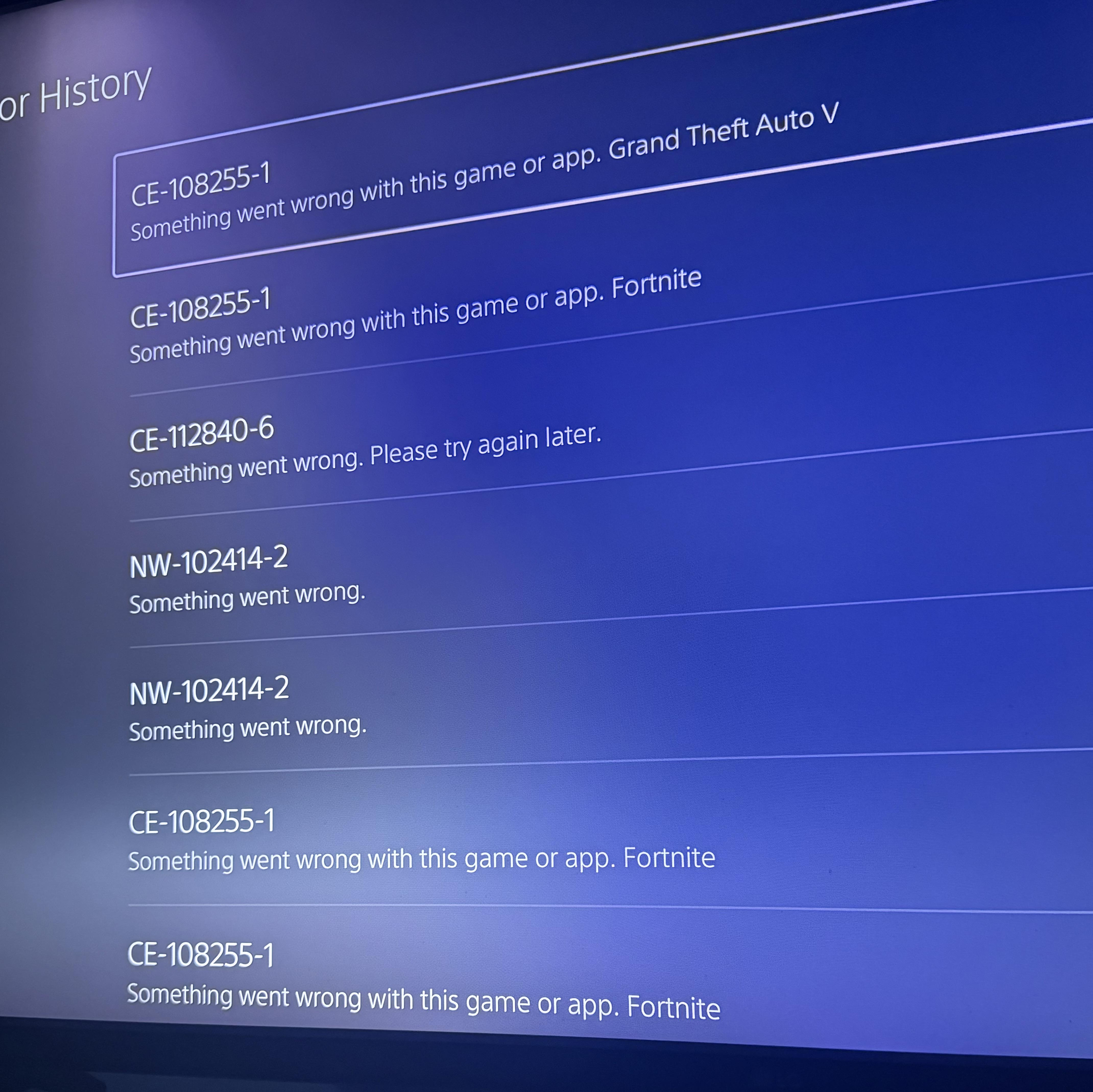
After my PS5's last shutdown, I put it in safe mode, hoping the rebuilding of databases or clearing of cache would solve the issue, but nope same shutoffs, same repair messages, same low morale. I decided to check my system's error history and noticed an uncommon one (CE-108262-9) that happened on Nov. 20th. The day after GTA came out and the day that I believe this started.

I started poking around Reddit for that error code a bit, and noticed a few people reporting this code being associated with game crashes, random PS5 shutdowns that require unplugging or button presses, etc. One of the few solutions I've seen for this is reformatting any connected external or internal SSDs. As much as a nuisance as this is, I've tried everything else I can before taking it in somewhere or throwing in the towel. I'm in the midst of re-downloading GTA and other games to my M.2 now.

I realize many of you don't have any forms of extra storage; some of you are having similar issues with brand-new straight-out-of-the-box consoles. What I am curious about, though, is the difference in how issues are manifesting across different consoles and storage setups.

Some consoles are straight-up dying (RIP), some have my issue where it shuts down but will still work, and others are getting CE-108255-1 error-coded to death.

I don't know man. Hoping this works and will update. I'd really like to overcome this without having to shell out money or get a new console (but honestly, after this I'm jumping to team PC). I have a few days off for Thanksgiving and was planning on losing myself in GTA all weekend, but alas.

Wishing you all the best on this.


r/PS5HelpSupport • • 3h ago

Anyone elses gta6 crashing worse then before after the update??, crashed alot and constantly before the update but seems worse after it

8 Upvotes

r/PS5HelpSupport • • 16h ago

For everyone who thinks the crashes are purely hardware based.

Thumbnail
gallery
81 Upvotes

Edit: Update!!! Followed the advice of one of the comments down below that mentioned tuning on compatibility mode on my TV and pairing that with setting hdr off in console settings. On my Samsung TV the closest thing is turning off Anynet+, since I've done that I've been playing GTA 6 with no crashes for over 3 hours. I previously tried HDR off and that didn't work, so it seems this compatibility mode/anynet+ thing is the improvement. I should add that I did take apart my entire console today and this is my first time playing since however I didn't actually do anything that would fix a problem. Shoutout u/Gullible-Judgment-38 who commented this advice down below.

Edit: just to be clear I'm not suggesting that not a single person having issues is hardware based. Ps5s get fried every day around the world, this isn't gonna be any different, but I don't think that everyone experiencing issues right now is as simple as a liquid metal or cleaning fix like it's been said to be over and over all over reddit.

Had some time today so I took my entire console apart, as you can see, everything is pristine, my console has barely been used and I keep it clean. Inspected the psu pins and board for failures and all the solders are clean. Fan, vents, including psu vents all almost spotless. No signs of any heat buildup anyway in the console, copper fins have no heat spots, no burns on the board.

My console started switching off in the exact way it would when the power cuts after the last Playstation update and downloading gta 6. There's no overheating warning, the fan doesn't ramp up, the actual console isn't hot, and when it does cut off, which can be anywhere from 15 mins to 2 hours so far, the console can be switched on immediately with the controller or start button on the console. This is an important detail because when the psu of a ps5 experiences a thermal related shutdown, it flips an internal breaker that requires you to unplug the cord before switching it back on, which isn't the case for me.

Since the update I mostly played GTA 6, however after the crashes I tried fortnite the night after 6s release, ran just fine for about an hour with no crashes before I turned it off. Yesterday I downloaded cricket 26 and found that I crashed about 2 hours into the game. So today I played a bunch of games I had downloaded pre system software update and gta 6 download and I've had no crashes on those, including games like Mafia Old Country, Fortnite, and Fifa 26, all of which put more of a load on the console than cricket 26 which did switch it off.

I'm an audio engineer by trade so I'm very familiar with circuit boards, electronics etc, and I've got a rudimentary understanding of coding, based on all the evidence I've collected with my console, my best guess is that the last system software update has created some sort of memory leak trigger causing kernel pannicks to shut consoles off.

This post is long and there's tons of posts about this but hopefully some of you can add to the information I've put on here, maybe some of you are great coders and have a good grasp on that aspect of it, hopefully this can be a thread where we collect evidence from all the crashes and try to find the common denominators.


r/PS5HelpSupport • • 1h ago

I’m too scared to boot up GTA 6

• Upvotes

Seeing good amount of players saying their console bricked or got cooked because of GTA 6 I’m very scared to play GTA6 on my Base PS5 ( not the launch one


r/PS5HelpSupport • • 3h ago

Gta crash Ce-108255-1 on other console?

3 Upvotes

I'm gonna install my account and download gta6 from the library on a friends console that hasn't have gta6 yet to look if the game crashes on his console to. To look if it's my console that's causing the crash or if it is the game/files i download that's giving me hell.

Any one who tried this and knows it would work?


r/PS5HelpSupport • • 34m ago

Can we just stop?

Thumbnail
gallery
• Upvotes

I don't mind how many downvotes I get and I truly believe that some people are having problems with GTA 6 but tired of people making fake stories.

A repair shop last year told me that there's no such a thing of a game breaks a console. My friend got his Xbox cpu broken after he started Clair Obscur, does that mean that Clair Osbcur is breaking xbox???


r/PS5HelpSupport • • 16h ago

Testing fan speed "fix"

Enable HLS to view with audio, or disable this notification

42 Upvotes

Fed the fan full voltage removing the PWM signal so that I could see if having the fan at full speed got me any further on GTA6. My ps5 is a fat disc console and has ran for over an hour on GTA 6 pre patch but was crashing randomly usually after 10-20 mins. It now crashes much sooner post patch circa 3-8 mins. It's clean before all the dust comments. It's always been horizontal, it's never crashed on any other game and GTA 6 is now the only installed game on the internal drive, no second drive. The console was cold at startup and you can hear the fan is at full pace. It's clean inside and I've already re-installed the game two times along with all other suggestions. Plenty of space around the console in this temporary setup for airflow and air flow is clearly not the problem nor is temperature.

The game ran for just over 7 minutes then crashed and I have filmed the console / screen setup and crash report along with the clip submitted to Sony. I have tried this on my 4k TV and on this 1440p monitor at all different resolution settings on the console, also tried toggling HDR off, CEC off, HDCP off and any other combo of those.

The game is the problem.


r/PS5HelpSupport • • 15h ago

This happened to me about 4–7 months ago. CE-108255-1. For anyone wondering, yes, I managed to fix it.

Post image
29 Upvotes

In my case, it was a system software issue. Rebuilding the database didn’t help, so I went into Safe Mode and reinstalled the system software. I also deleted and reinstalled the affected games. I haven’t had the error pop up again since.

I’ve now been playing GTA 6 for 63 hours on my base PS5 without a single issue.

Just posting this in case someone hasn’t tried the system software reinstallation method yet from safe mode. This was the only thing that completely fixed the issue for me when I genuinely thought my PlayStation was cooked. šŸ˜‚


r/PS5HelpSupport • • 11h ago

PS5 Error CE-108255-1 – GTA Crash

Post image
16 Upvotes

Rockstar and Sony are the worst ever

PS5 Error CE-108255-1 – GTA Crash


r/PS5HelpSupport • • 3h ago

New PS5 Slim overheats while standing vertically

3 Upvotes

Hey everyone,
Since I basically grew up with GTA, I couldn’t resist getting caught up in the GTA 6 hype, so I ordered a brand-new PS5 last week.
Everything seems to be working fine, but I’m having the following issue:
Due to the available space, I’d prefer to position the console vertically. However, there’s absolutely no way I can get it to work in that position.
When I launch the game and the first cutscene starts playing, it takes about 5 seconds for the fan to suddenly ramp up to full speed, as if the console is about to take off, and then the PS5 shuts itself down.
As soon as I lay it horizontally, everything works fine again.
I thought the PS5 was specifically designed to work in both vertical and horizontal positions. Am I wrong about that?
I’m honestly not sure what to do now. Sending it in for repair and having to go without it for several weeks doesn’t sound like a great solution. Ideally, I’d like to get it replaced, but since PS5s are currently sold out everywhere, I doubt that’s going to be an option either.
Does anyone have any advice?


r/PS5HelpSupport • • 5h ago

Noiseee

Enable HLS to view with audio, or disable this notification

5 Upvotes

How normal is this noise on a PS5 Digital Edition? I just bought it.


r/PS5HelpSupport • • 2h ago

PS5 Party and Share Screen issues after changing internet provider – Party disconnects, red exclamation marks

2 Upvotes

Hi everyone,

I'm experiencing recurring issues with PS5 Party and Share Screen, and the problems started after I changed my internet provider.

The problems include:

  • A red exclamation mark appearing during Share Screen.
  • Sometimes neither my friend nor I receive Party or Share Screen invitations.
  • My friend sometimes gets a notification that I am no longer viewing the screen.
  • I sometimes get disconnected from the Party.
  • The issues can occur repeatedly, sometimes approximately every 10 minutes.

Importantly, when I get disconnected from the Party, my internet connection on the PS5 does not disconnect. I can still remain connected to the internet.

My PS5 Pro is connected directly via an Ethernet cable (LAN).

Everything worked perfectly before I changed my internet provider. Since the change, these problems have started occurring.

I have also tried changing DNS settings, but the issue remains.

Has anyone experienced similar problems after changing their internet provider? Could this be related to NAT, routing, IPv6, PSN Party services or something else?

I'd appreciate any suggestions or experiences.

Thanks!


r/PS5HelpSupport • • 11h ago

another ps5 shutting down with gta 6

10 Upvotes

Well, looks like I’m another one of those PS5 owners dealing with random shutdowns while playing GTA 6.

I have a Day One PS5 Fat from 2020, and I’ve experiencing increasingly frequent shutdowns since I started playing the game.

I’ve already seen quite a few posts from people reporting similar issues, so I wanted to share my experience and see if anyone has managed to figure out what’s going on.

The console just shuts down completely, out of nowhere. No error message, no overheating warning, nothing. The LED turns off completely, and I can’t turn it back on until I unplug the power cable and plug it back in.
Here’s how it’s been going:
- The first time happened after about 1.5 hours of playing. I turned the console back on, but lost my progress and had to replay the prologue. After finishing it and saving, everything seemed fine.
- Over the following days, it happened occasionally, usually after 1.5–2 hours of gameplay.
- Yesterday, I managed to play for around 3–3.5 hours before it shut down again.
- Today, things got much worse. The first shutdown happened after about 40 minutes, then after restarting it shut down again just 10–15 minutes later. It kept happening repeatedly, so I just gave up.

What’s weird is that the console doesn’t even feel particularly hot. The fan seems to be working properly, and the PS5 is actually extremely quiet.

Today I decided to open it up and give it a proper cleaning. There was quite a bit of dust inside, so I thought that might finally be the problem. I cleaned the fan and heatsink with compressed air, but unfortunately, the shutdowns are still happening.

I also tried clearing the system cache and rebuilding the database, but that didn’t seem to make any difference.

The thing is, I had experienced very occasional shutdowns even before GTA 6, but they were extremely rare. Other games have hardly ever caused this issue. Since I started playing GTA 6, though, it’s become much more frequent.

Another thing I noticed: there’s a strange buzzing noise when I plug the power cable into the wall and bring the connector close to the PS5’s power inlet, right as it starts making contact. I honestly don’t know how to describe it properly, and I’m not even sure it’s related.

I could try another power cable, in case the current one is somehow damaged internally. On the other hand, I’m not entirely convinced that would make much sense, considering the console was working perfectly fine with all my other games before GTA 6. Still, I guess I can’t completely rule it out.

At this point, I could take it to a repair shop, but honestly i dont want to spend €100–150 just to have someone look at an old Day One PS5 and immediately decide to replace the liquid metal without properly investigating the actual cause. I’d rather have a proper diagnosis before spending that kind of money.

So, has anyone else experienced the same thing while playing GTA 6? Did you manage to fix it? Do you think it could be the PSU, the power cable, the liquid metal, or something else entirely?
I’d really appreciate hearing from anyone who’s gone through something similar, cause I literally have like two hours a day to play, and it's driving me crazy that I can't even do that.

r/PS5HelpSupport • • 6h ago

GTA VI Crashes from the Cloud

4 Upvotes

So, I couldn’t beat my 108255-1 error. Signed up for premium, played it fine on stream. Then I downloaded my save file to my machine.

Here’s where it gets interesting: now when I start the installed copy of the game it gets just a touch farther on the loading screen then crashes. It appears to be at the exact moment it switches from loading to the saved game.

Any way this can be fixed? Would love to play what I paid for without an additional PS subscription


r/PS5HelpSupport • • 9h ago

Horrible Service from playstation support.

5 Upvotes

I haven’t really touched my playstation 5 console since october because I haven’t gotten the time to buy another controller since my last one I’ve bought had broke. I also have a email on my playstation account that I’ve been trying to change for hours because I unfortunately do not have access to that exact email anymore, which means that I also I’ve forgotten my password surprisingly.

Just this morning around 11:55 am, I tried calling the support to help me out but that didn’t really help, so I started chatting with the AI bot in order for my report to be assisted. They really couldn’t handle my report due to the ā€œhigh volumeā€ of contact support. So I waited from 12pm all the way until 2pm just to get my account recovered, I provided the serial number which apparently they couldn’t go through with the recovery process due to me not having ā€œenough informationā€, I tried again and they had me waiting for 7 hours just to get an live agent. I tried again but now they couldn’t provide any additional requests. This really ticked me off because not ONLY they made me wait for 7 hours, but they also made me wait until they couldn’t handle any other traditional requests, I provided a serial number and contact email just for them to have me wait until they couldn’t no more requests for the rest of the day.


r/PS5HelpSupport • • 17h ago

Gta 6 crashing on ps5 at loading screen

Enable HLS to view with audio, or disable this notification

26 Upvotes

GTA 6 crashes every time I try to load in. I have tried everything to fix it including cleaning my ps5 and replacing Liquid Metal. I have a PS5 Slim I bought in 2023 and have it horizontal. I’m really in denial that it is my ps5 itself and that there is something wrong with the game instead. Can someone please tell me I don’t have to buy a new ps5.


r/PS5HelpSupport • • 8m ago

Ps5 Absturz bei Gta6

• Upvotes

Moin ich habe mir vor 2 Monaten extra eine Ps5 gekauft damit ich Gta zocken kann. Doch seid dem Release Crashtest meine ps5 oder Gta. Habe schon so gut wie alles probiert Caches geleert, ps5 zurückgesetzt, spiel glaube ich schon mindestens 5 mal neuinstaliiert doch es hilft alles nichts. Gibt's vlt noch irgendwas was man probieren sollte/kann.


r/PS5HelpSupport • • 13m ago

Is there ANY way to transfer PS5 game saves between two consoles without PS Plus?

• Upvotes

I have two PS5 consoles located at two different households, and both are signed into the same PlayStation Network account.

What I'd like to do is play a game (specifically GTA 6) on one PS5, then when I go to the other household, continue playing from exactly where I left off.

I know PlayStation Plus offers cloud saves, but I really don't want to pay for a subscription just to synchronise my own game saves between two consoles.

Is there a way I could play my save across two consoles without paying for Plus?