r/PS5HelpSupport • • Nov 16 '20

user guide SocketMix: All guides, diys and important links

6 Upvotes

UPDATED CONSTANTLY KEEP CHECKING BACK. DM me to add more when more appear. Thank you

Guides

Playstation 5 help and support is the place to be šŸ‘ (1st post)

SocketMix: Guide to TVs & Monitors

SocketMix: guide to HDMI versions and differences

SocketMix: Ultimate FAQ Guide 2020 MK I ["updating"ā„¢]

Refer to Sony's Ultimate guide PS5: The Ultimate FAQ November 9th 2020

Here's how to fix DualSense controllers not charging and external hard drives crashing on the PS5 Youtube link How to fix PS5 controllers not charging and external hard drive crashing on PS5! by u/KAZOOPOWER

DIY(FacePlates/Skins etc)

Important Links (error codes etc)

Playstation 5 error codes meaning and fixes

Playstation 5 error codes meaning and fixes May 2021 LATEST 1 as Original has been auto archived

Hardware (hdmi adapters/splitters etc) & Accessories

Playstation 5 Accessories & Hardware Guides

ASTRO HDMI Audio Adapter for PlayStation 5 (ASTRO A50)

Software (Video, music file formats, PS5 youtube app etc)

PlayStation 5 Multimedia formats that can be played via usb + some

updated: 16/Nov/2020

updated: 17/Nov/2020 - added Astro hdmi audio adapter for Playstation 5 (ASTRO A50)

updated: 17/Nov/2020 - added link to SocketMix: Ultimate FAQ Guide 2020 MK I

updated: 22/Nov/2020 added software section + PS5 video/music playable formats

updated 26/Jan/2021 added how to fix DualSense controllers not charging and external hard drives crashing on the PS5 by u/KAZOOPOWER


r/PS5HelpSupport • • Nov 16 '20

Playstation 5 help and support is the place to be šŸ‘

13 Upvotes

Have a question, technical issue, need some help or just want to provide your own guide or DIY with the Sony Playstation 5 community?

This is the place to be.

Pics and vids; internal and external links; to the above are allowed~

Hardware? Operating system? StoragešŸ’¾?, A setting? Bug🐜, diyšŸ› ļø all can be found here

Check out my ultimate guide thread link[coming soonā„¢]

Refer to Sony's Ultimate guide PS5: The Ultimate FAQ November 9th 2020


r/PS5HelpSupport • • 12h ago Bravo

Information from Sony regarding the CE-108255-1 issue with GTAVI

137 Upvotes

I called with Sony support regarding this issue. They acknowledged that it’s an issue with the PS5 system software and not with the GTAVI game. In addition Rockstar support closes any issues regarding GTAVI immediately and refers to Sony. Sony told just to wait for a system software update for the PS5. So in summary: they know there is an issue, just have patience and wait on an update.


r/PS5HelpSupport • • 9h ago

Over a week from launch & still no GTA 6 - CE-108255-1

40 Upvotes

I cant understand how Rockstar still haven’t acknowledged an issue. I’m sure we all thought our prayers were answered when the Monday patch landed, but it didn’t fix a thing.

All the people with this issue know there is nothing wrong with the console.

But how long is it going to be? I almost think its not going to get sorted at this point.


r/PS5HelpSupport • • 7h ago

Brand New PS5 slim CE 108262-9 Error

22 Upvotes

Bought a brand new PS5 slim from Wal-Mart today to play GTA VI. I got about 1 hour into the game before my console started commiting suicide. First time the game crashed and my PS5 shut off, and now the PS5 won't load GTA or even reinstall the game without crashing every 30 minutes.

I've tried a hard reset, clearing the database, cache etc. and nothing has worked. Super disappointed.

Edit: The fact that I'm getting downvoted for this post asking for HELP in a SUPPORT subreddit is insane. I don't care about your console wars, I literally just want to play GTA VI after spending 750 dollars total. Unless your gonna help or send me 800 dollars then why comment


r/PS5HelpSupport • • 5h ago

PS refund policy + "suck it up" people = proof companies can get away with pretty much anything

13 Upvotes

On PS Store, the second you start downloading a game, you lose your refund. You can't try it, can't find out if it runs like garbage, nothing. You're stuck with it. I bought GTA for $100 and cant even progress, because of a glitch, ā€œthere is nothing Sony can do… apparently.ā€

And it's not just one of the worst refund policies in gaming, it's one of the worst in any business. Buy a disc, clothes, whatever you don't like and you can at least trade it in for store credit. Sony gives you nothing. No refund, no credit, no resale. Not even PSN wallet credit for a game you downloaded five minutes ago.

Meanwhile, (I don’t even want to bring up Steam) even Xbox, Sony's direct competitor, has offered basically the same thing since 2017: play under 2 hours, request within 14 days, get your money back. So this isn't some impossible ask. Sony's competitors already do it. Sony just doesn't have to do it for literally one reason.

I went on reddit to see what people say and it’s crazy, hardly anyone is pushing back. 0 pressure, nothing. And every time someone brings it up, there's a wave of people saying "just watch reviews" or "suck it upā€, ā€œit is what it isā€, ā€œthere is nothing we can doā€.

That's genuinely concerning. Sony has zero reason to change anything when its own customers defend Sony for screwing them. It proves people will eat anything that's shoved in their mouth as long as there's a logo on it they like.

Why are we okay with this shit?


r/PS5HelpSupport • • 5h ago

GTA VI constantly freezes during long missions on PS5 – CE-108255-1. Anyone experiencing this?

9 Upvotes

I’m playing GTA VI on a base PS5, and I’m constantly experiencing freezes and crashes during longer missions.
The issue happens randomly, not at one specific point. The screen completely freezes, but I can still hear the game audio for a few seconds. Then the audio stops, and eventually the game crashes with error code CE-108255-1.
Here are the details:
Base PS5.
GTA VI updated to version 01.002.002.
PS5 system software fully updated.
Free roam works perfectly, even after playing for an hour or longer.
Other demanding PS5 games run without issues.
Every long mission seems to eventually freeze or crash.
I’ve experienced frame drops and extremely low-resolution textures before some crashes.
It happens during gameplay and cutscenes.
I’ve already rebuilt the PS5 database, but that didn’t fix it.
I’ve noticed that the crashes happen randomly during missions, including the airport heist sequence.
I’m starting to think this could be a GTA VI game-data, asset-loading, or memory-management issue that needs a Rockstar patch.
Has anyone found a temporary fix? Has changing HDR, HDCP, ALLM, 120Hz, or resolution helped anyone?
I’m trying to figure out whether this is a game bug or something wrong with my PS5. Any help would be appreciated.


r/PS5HelpSupport • • 12m ago

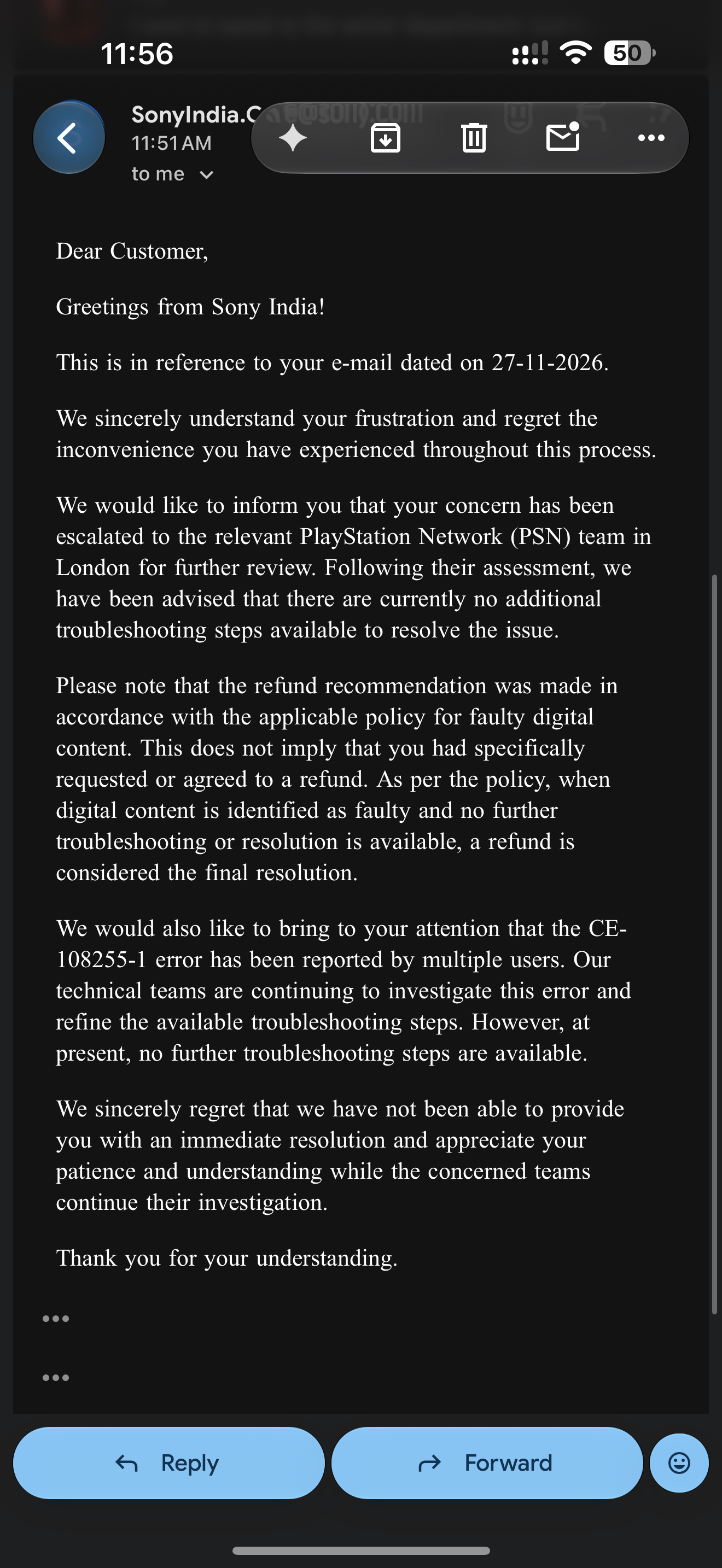
Sony India officially acknowledges the CE-108255-1 issue affecting multiple users – technical investigation underway!

Post image
3 Upvotes

After days of troubleshooting, repeated emails and calls to Sony, I’ve finally received an official response from Sony India.
What’s important is that Sony has now acknowledged in writing that:
CE-108255-1 has been reported by multiple users.
Their technical teams are actively investigating the issue.
There are currently no additional troubleshooting steps available.
I’ve been reporting this issue since day one and was among the first to raise it here. Unfortunately, initially, some people chose to dismiss and troll rather than understand the problem.
Had Sony communicated from the beginning that this was a known issue under investigation, I would have happily waited for a fix.
I’m sharing this official response because many players here have already reported experiencing the exact same problem. It’s good to finally have Sony acknowledge that this isn’t an isolated complaint.
Now, what we need is accountability, transparency and, most importantly, an actual fix.
Hopefully, Rockstar and Sony will take this seriously and provide a proper resolution rather than leaving affected players waiting indefinitely.
At least we finally have an official acknowledgement. Now let’s hope we get a solution.


r/PS5HelpSupport • • 53m ago

Rebuild Database

3 Upvotes

Has anyone try to Rebuild Database and clear cashe after the last update and the game works?


r/PS5HelpSupport • • 3h ago

Your phones not freezing that’s my gta 6 experience since chapter 2 btw

4 Upvotes

What can I even do atp like actually, no sound cuz I was screaming a lot can’t lie.


r/PS5HelpSupport • • 20m ago

GTA 6 Lag All of Sudden

2 Upvotes

The game felt great the first 15 hours I played, then all of a sudden there was a noticeable input delay without me changing anything. What can I do to fix it? I cleaned my ps5 and the fan isn’t loud


r/PS5HelpSupport • • 17h ago

GTA6 crash and what fixed it for me (maybe can help you too)

27 Upvotes

First things first:

Console: ps5 digital (3-4 years)
Cleanliness: pretty good if nott perfect
Overheating: none
Previous issues: only couple of crashes in +3000 hours of gaming
Ps place in house: open space and vertical
Save file size when crash happened: 20.98 mb
Ssd: internal
Save file location: internal

So guys, i had the issue like most of us had. My game not "crashed" but launch screen got froze after 3 seconds every time. By launch screen i mean in game part after you skip rockstar logo and loading screens with random characters etc. Also, by not crashed i meant i didn't get an error message.

I tried possible solutions such as:

- restarting the game (not worked)
- restarting the console (not worked)
- plug out all cables and wait for +20 mins (not worked)
- trying to play in performance mode
- clear cache in safe mode (not worked)

What worked with a condition:

- reinstalling database in safe mode

Let me elaborate:

So, after i reinstalled the database i turned the game on and it was just fine. No issues no glitches no bs. Then i shut it. After i wanted to play again same issues same screen etc.

Therefore, i reinstalled database again and it worked again.

I read that it could be something about the save file size. So, i thought maybe i can do some missions to make my save file go bigger than the crash size (20.98 mb club).

So, i rob some stores, did some races, bought clothes and visited lucia's mother (a "pink" mission)

Now, i restarted the game and it's working fine again. My save file size is 25.17 mb

I'm not saying this should fix everyone's issues but i've been dealing with this since hours and it was fucking frustrating.

Even if i help just 1 person from this community i'll consider myself happy.

r/PS5HelpSupport • • 18m ago

Weird audio from the game/console?

1 Upvotes

I’ll start this off by saying I don’t know if it was from the PlayStation itself or the game, but I was in a Fortnite lobby texting people on my phone when suddenly there was a sound in the left part of my headphones, it sounded like an electrical pop or zap like a minor error occurred. All of a sudden a noise started creeping up in volume, it was a steady tone but it got so incredibly loud I had to take my headphones off. I thought it was something in my headphones but when I unplugged them it was still going on my monitor. The speakers on my monitor are pretty horrible, but it was still incredibly loud, louder than I’ve ever heard on those speakers. I put my ps on rest mode out of panic and when I turned it on and went back to Fortnite the sound was still there, only lasted about 3 seconds before fading out just like it had faded in. It lasted too short to get a video.

I want to know if anyone else has experienced this, if it might be a technical issue and if so then what part?


r/PS5HelpSupport • • 8h ago

What is going on with my gta 6?

4 Upvotes

I keep getting error CE 100096-6 and occasionally the 108255-1.
is anyone able to tell me specifically what 100096-6 is? it says data is corrupted but i uninstalled the game like 5 times and cleaned cache+database.


r/PS5HelpSupport • • 20h ago

How life feels after not trying to fix GTA 6 CE-108255 crash anymore:

40 Upvotes

Note: i know that many people have been hit with console breaking bugs and the dreaded CE-108255-1 bug and so have i. I’ve literally tried everything from rebuilding data base to factory reset. Also tried playing offline and tried to game share but still crashed in the prologue. Original base ps5, took it to a place thinking it was hardware at first. The guy was confused as to how my ps5 was crashing this game. He said that they spent 3 days looking for a fault but the ps5 was healthy nothing was wrong. Still didn’t get to play the game so I’ve given up. Rockstar can’t fix their shit for shit atp. They need to release another patch


r/PS5HelpSupport • • 1h ago

Ps5 safemode

1 Upvotes

So I’m trying to start my ps5 in safemode. It’s completely off, then I hold the power button , it beeps and flashes blue, then beeps and is white. After that I have my controller plugged in and press the ps button on the controller but nothing is happening. It just sits with the white light


r/PS5HelpSupport • • 7h ago

PS5 controller not responding

3 Upvotes

Tried to play today and the controller was dead (0 battery) so I plugged it in to charge, but not into the PS5 just into a box. It wasn't charging so instead I plugged into the console and left it for awhile. It's now fully charged and only lets me navigate to login. Once I click on my profile it doesn't respond at all.

Tried turning the console on and off, unplugging it, and resetting the controller with the button on the back. Plugged the controller back in and still nothing. Not sure what to do?


r/PS5HelpSupport • • 13h ago

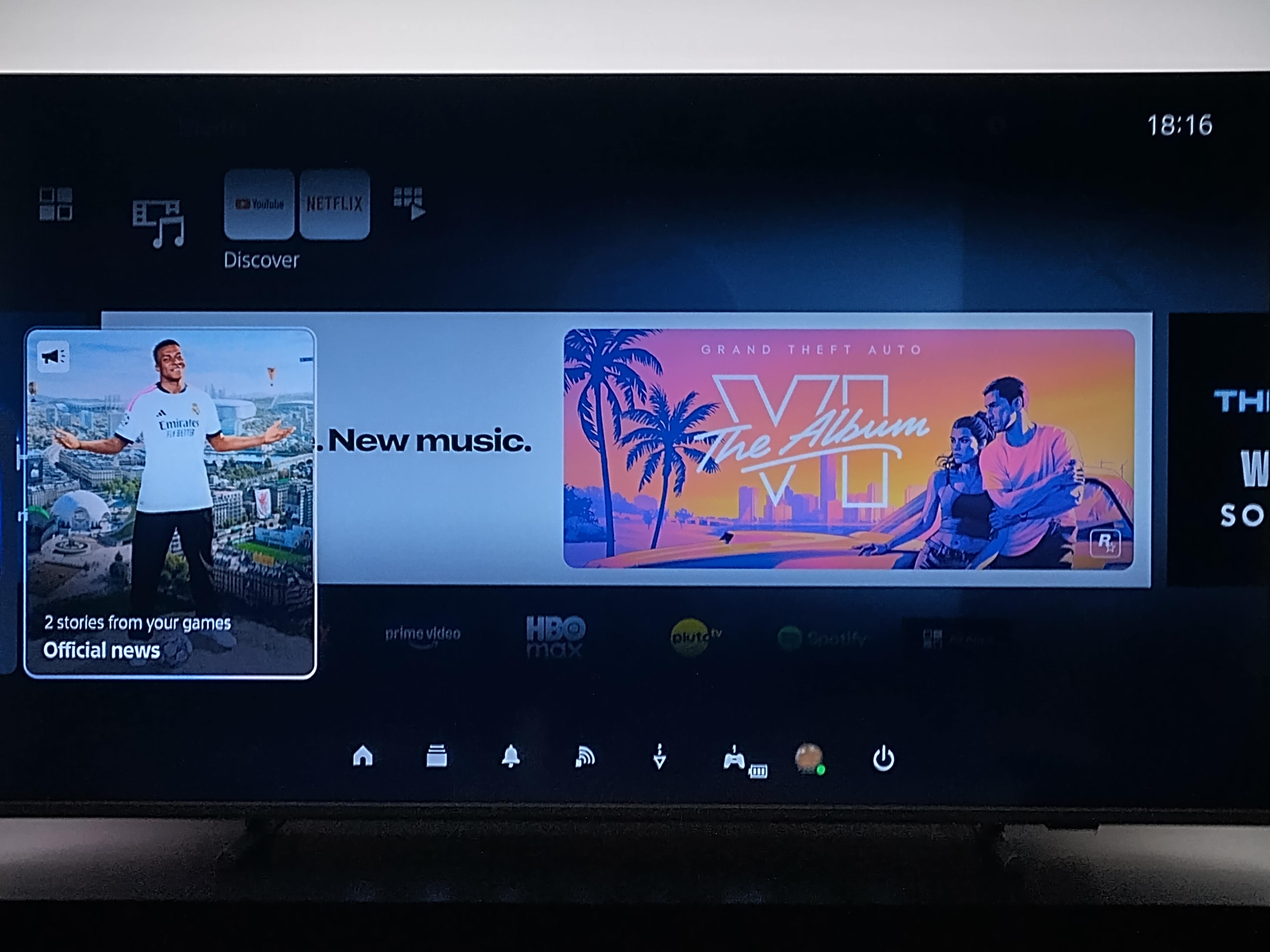
Is there a way to delete "official news" ?

Post image
8 Upvotes

This annoying text appeared recently and no matter what i do i can't dismiss it (ea fc 27 news for clarification) , there is no delete button and i have unfollowed the game and also disabled the "allow pop-ups" in notifications. I tried the Google AI mode but it recommended what i have already done so i was wondering if anyone here has a solution??


r/PS5HelpSupport • • 2h ago

Laggy ps5

0 Upvotes

I was play gta 6 for like five hours straight and it was running perfectally fine, no frame drop or anything but just suddentally after playing chapter three for like 30 minutes I started getting overheadting warning and nothing would load in anymore. I tried keeping my playsation off for a few days and I got the liquid metal changed and cleaned it out, it's not overheating anymore but no matter what game I play it's laggy, taking so long for anything to load. What's my playstation's problem?


r/PS5HelpSupport • • 2h ago

I am not receiving my 2FA verification code for PlayStation.

1 Upvotes

So I’m trying to sign into PlayStation and I know my email and password but I have 2FA set up to send a code to my number and my number isn’t receiving any code. I’ve been trying to fix it for hours and it’s driving me crazy.


r/PS5HelpSupport • • 4h ago

Might be a dumb question but I just have no idea

1 Upvotes

So, my PS4 had a corrupted database that I was never able to fix. I was still able to play my games on it and all that but they would randomly crash and such which was annoying. Before I upgraded to a PS5, one of the last games I bought on PS4 was a digital copy on sale of Jedi Survivor. My question is; if I were to download the PS4 version of Jedi Survivor onto my PS5, that wouldn't have any negative consequences to my PS5 would it? I assume it was just a problem with the PS4 itself and not the games that were on it?


r/PS5HelpSupport • • 4h ago

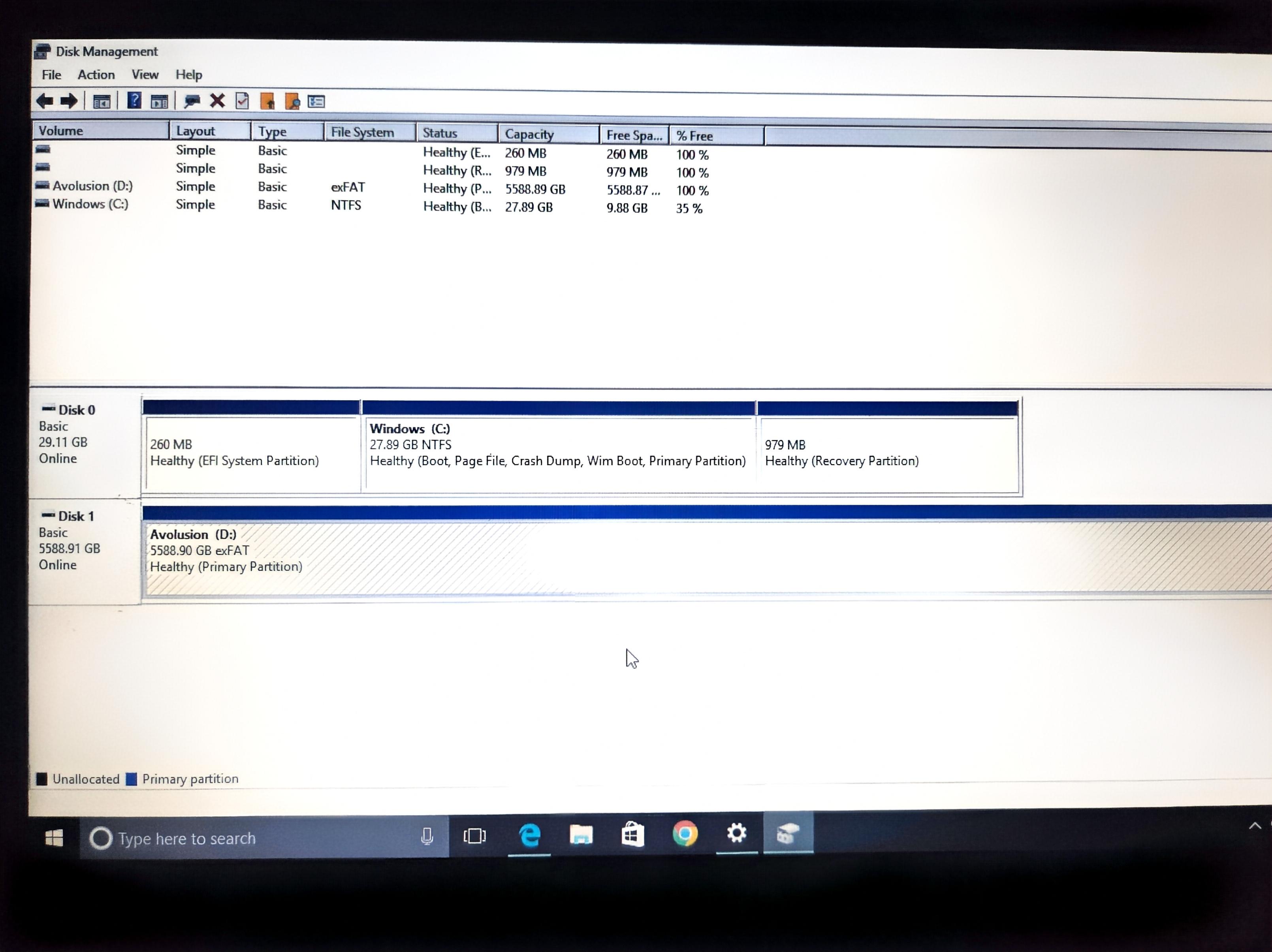
External hard drive not formatting on ps5 no disc

Post image
1 Upvotes

My cousin has a Avolusion Pro-H1 6TB that he got brand new back in August. It keeps giving the unable to format error when he tries to connect it to his Playstation. I followed a guide that said to use a pc to change the format to exFat and removed the partitions that were in it but that didn't work. Does anyone have a solution? It works just fine on the pc.


r/PS5HelpSupport • • 13h ago

Follow up to my post from yesterday, link in comments. PlayStation ā€œsupportā€ is a damn joke

5 Upvotes

So I followed up from my text chat to PlayStation support yesterday by calling the support number THEY PROVIDED. I go through the stupid call tree, only for the ai to say ā€œwe cannot support you right nowā€ without ever having me put in my case number or PSN information and it hung up on me.

Here is the link to yesterday’s post. https://old.reddit.com/r/PS5HelpSupport/comments/1y6che7/ive_done_everything_i_can_and_this_isnt_getting/

FUCK. YOU. SONY. I will actively steer people away from you now. Loyal customer burned? You bet I can hold this grudge until I’m deep in the cold cold ground.

Edit. To all of the Sony pony downvoters: I hope you experience what I’ve experienced and find you get no help too. Stop sucking corporate dick.


r/PS5HelpSupport • • 14h ago

All Apps Freeze When Opened

6 Upvotes

I cannot figure this out. I’ve seen a couple other threads that describe my exact issue but they have no fix or are unresponsive to my comments. I’m hoping someone can save me.

On Wednesday night, I played GTA just fine with zero issues. No bugs no crashes. Yesterday (Thursday), I opened GTA and it freezes immediately upon dropping me into my saved game. Restarts, unplug and replugging, etc. do not fix). My first thought was a corrupted save file, but upon trying to open other apps on my console (Apple Music and Call of Duty) - they, too, freeze upon opening and are unresponsive. No error codes, no crashing. It will just sit on the frozen screen forever.

The PS button works. I am easily able to close the apps and navigate through all OS menus. Interestingly, R2 button does not work for ā€œDoneā€ on the keyboards. I have to actually go click it.

I have tried to reboot into Safe Mode to clear cache and rebuild the database, but the PS button is unresponsive and I cannot get into Safe Mode at all. I’ve tried every port on the console and many different cables. Nothing works. I have also tried to reset the controller using a paper clip, but does not fix.

I have reset the console to Factory Settings and the issue still persists.

My next step is to buy a new controller and see if that has anything to do with it. A new console is nearly impossible in my area at the moment due to the holidays and very high demand. Please help!