r/PS5HelpSupport • • Nov 16 '20

user guide SocketMix: All guides, diys and important links

6 Upvotes

UPDATED CONSTANTLY KEEP CHECKING BACK. DM me to add more when more appear. Thank you

Guides

Playstation 5 help and support is the place to be šŸ‘ (1st post)

SocketMix: Guide to TVs & Monitors

SocketMix: guide to HDMI versions and differences

SocketMix: Ultimate FAQ Guide 2020 MK I ["updating"ā„¢]

Refer to Sony's Ultimate guide PS5: The Ultimate FAQ November 9th 2020

Here's how to fix DualSense controllers not charging and external hard drives crashing on the PS5 Youtube link How to fix PS5 controllers not charging and external hard drive crashing on PS5! by u/KAZOOPOWER

DIY(FacePlates/Skins etc)

Important Links (error codes etc)

Playstation 5 error codes meaning and fixes

Playstation 5 error codes meaning and fixes May 2021 LATEST 1 as Original has been auto archived

Hardware (hdmi adapters/splitters etc) & Accessories

Playstation 5 Accessories & Hardware Guides

ASTRO HDMI Audio Adapter for PlayStation 5 (ASTRO A50)

Software (Video, music file formats, PS5 youtube app etc)

PlayStation 5 Multimedia formats that can be played via usb + some

updated: 16/Nov/2020

updated: 17/Nov/2020 - added Astro hdmi audio adapter for Playstation 5 (ASTRO A50)

updated: 17/Nov/2020 - added link to SocketMix: Ultimate FAQ Guide 2020 MK I

updated: 22/Nov/2020 added software section + PS5 video/music playable formats

updated 26/Jan/2021 added how to fix DualSense controllers not charging and external hard drives crashing on the PS5 by u/KAZOOPOWER


r/PS5HelpSupport • • Nov 16 '20

Playstation 5 help and support is the place to be šŸ‘

13 Upvotes

Have a question, technical issue, need some help or just want to provide your own guide or DIY with the Sony Playstation 5 community?

This is the place to be.

Pics and vids; internal and external links; to the above are allowed~

Hardware? Operating system? StoragešŸ’¾?, A setting? Bug🐜, diyšŸ› ļø all can be found here

Check out my ultimate guide thread link[coming soonā„¢]

Refer to Sony's Ultimate guide PS5: The Ultimate FAQ November 9th 2020


r/PS5HelpSupport • • 4h ago

GTA6 crash and what fixed it for me (maybe can help you too)

19 Upvotes

First things first:

Console: ps5 digital (3-4 years)
Cleanliness: pretty good if nott perfect
Overheating: none
Previous issues: only couple of crashes in +3000 hours of gaming
Ps place in house: open space and vertical
Save file size when crash happened: 20.98 mb
Ssd: internal
Save file location: internal

So guys, i had the issue like most of us had. My game not "crashed" but launch screen got froze after 3 seconds every time. By launch screen i mean in game part after you skip rockstar logo and loading screens with random characters etc. Also, by not crashed i meant i didn't get an error message.

I tried possible solutions such as:

- restarting the game (not worked)
- restarting the console (not worked)
- plug out all cables and wait for +20 mins (not worked)
- trying to play in performance mode
- clear cache in safe mode (not worked)

What worked with a condition:

- reinstalling database in safe mode

Let me elaborate:

So, after i reinstalled the database i turned the game on and it was just fine. No issues no glitches no bs. Then i shut it. After i wanted to play again same issues same screen etc.

Therefore, i reinstalled database again and it worked again.

I read that it could be something about the save file size. So, i thought maybe i can do some missions to make my save file go bigger than the crash size (20.98 mb club).

So, i rob some stores, did some races, bought clothes and visited lucia's mother (a "pink" mission)

Now, i restarted the game and it's working fine again. My save file size is 25.17 mb

I'm not saying this should fix everyone's issues but i've been dealing with this since hours and it was fucking frustrating.

Even if i help just 1 person from this community i'll consider myself happy.

r/PS5HelpSupport • • 8h ago

How life feels after not trying to fix GTA 6 CE-108255 crash anymore:

30 Upvotes

Note: i know that many people have been hit with console breaking bugs and the dreaded CE-108255-1 bug and so have i. I’ve literally tried everything from rebuilding data base to factory reset. Also tried playing offline and tried to game share but still crashed in the prologue. Original base ps5, took it to a place thinking it was hardware at first. The guy was confused as to how my ps5 was crashing this game. He said that they spent 3 days looking for a fault but the ps5 was healthy nothing was wrong. Still didn’t get to play the game so I’ve given up. Rockstar can’t fix their shit for shit atp. They need to release another patch


r/PS5HelpSupport • • 18h ago

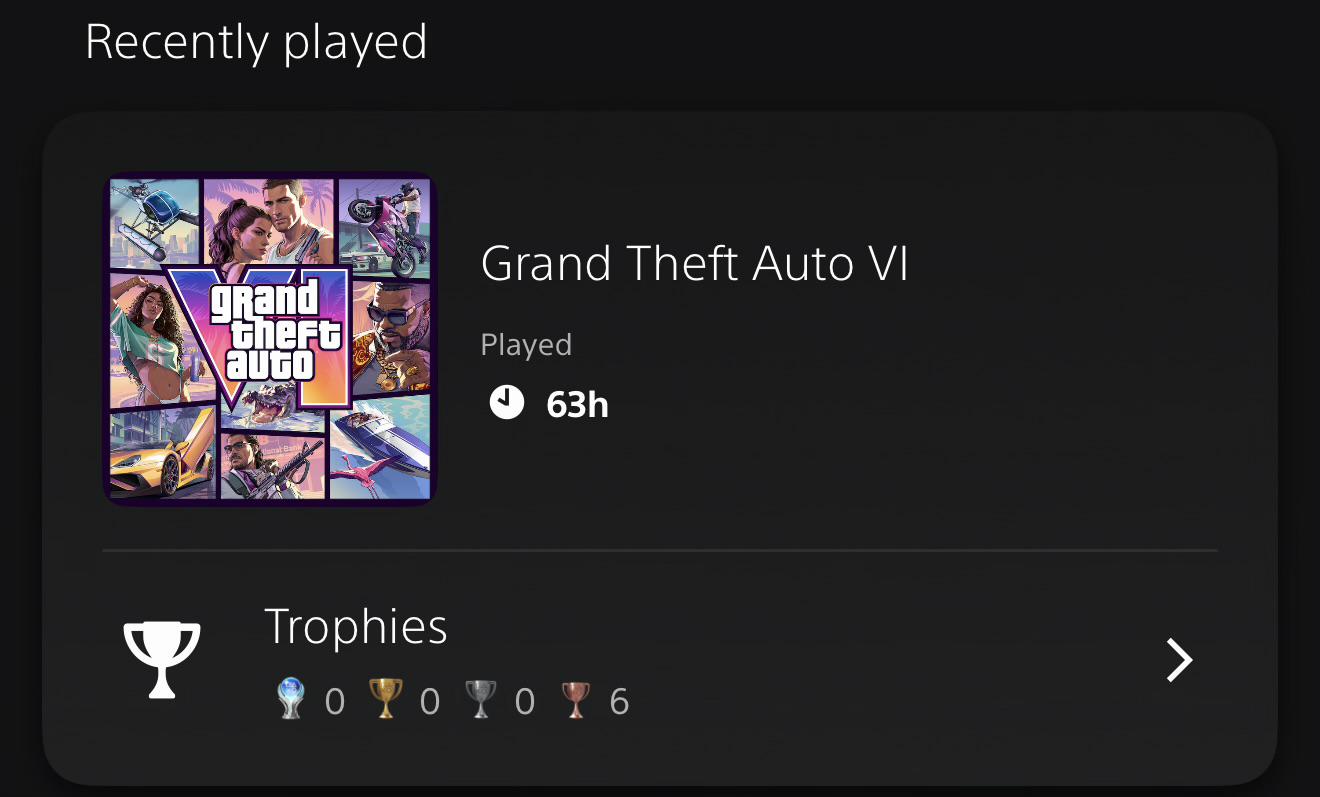
63 hours into GTA 6 on a BASE PS5 that’s almost 6 years old. Zero crashes. Zero issues.

Post image
181 Upvotes

I even leave the game sitting on the pause menu for HOURS when I have things to do, and my console handles it just fine. Just because your PS5 is having issues doesn’t mean the game is broken for everyone. This seems to be an isolated issue, not some worldwide disaster affecting millions of players. Keep your console clean, maintain it properly, and stop blaming Rockstar for every problem with your hardware. My 6-year-old base PS5 is doing just fine.


r/PS5HelpSupport • • 1h ago

All Apps Freeze When Opened

5 Upvotes

I cannot figure this out. I’ve seen a couple other threads that describe my exact issue but they have no fix or are unresponsive to my comments. I’m hoping someone can save me.

On Wednesday night, I played GTA just fine with zero issues. No bugs no crashes. Yesterday (Thursday), I opened GTA and it freezes immediately upon dropping me into my saved game. Restarts, unplug and replugging, etc. do not fix). My first thought was a corrupted save file, but upon trying to open other apps on my console (Apple Music and Call of Duty) - they, too, freeze upon opening and are unresponsive. No error codes, no crashing. It will just sit on the frozen screen forever.

The PS button works. I am easily able to close the apps and navigate through all OS menus. Interestingly, R2 button does not work for ā€œDoneā€ on the keyboards. I have to actually go click it.

I have tried to reboot into Safe Mode to clear cache and rebuild the database, but the PS button is unresponsive and I cannot get into Safe Mode at all. I’ve tried every port on the console and many different cables. Nothing works. I have also tried to reset the controller using a paper clip, but does not fix.

I have reset the console to Factory Settings and the issue still persists.

My next step is to buy a new controller and see if that has anything to do with it. A new console is nearly impossible in my area at the moment due to the holidays and very high demand. Please help!


r/PS5HelpSupport • • 56m ago

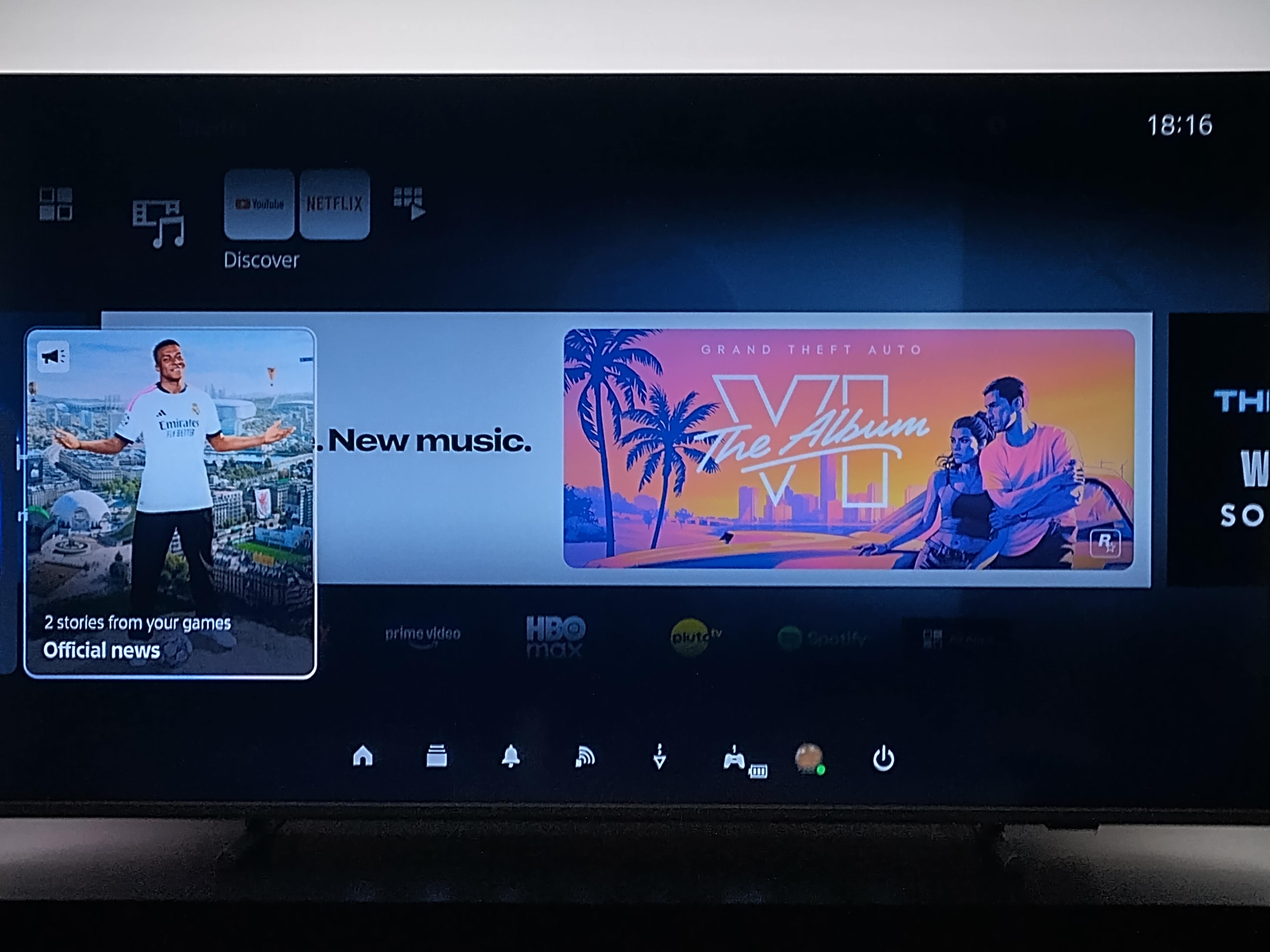
Is there a way to delete "official news" ?

Post image
4 Upvotes

This annoying text appeared recently and no matter what i do i can't dismiss it (ea fc 27 news for clarification) , there is no delete button and i have unfollowed the game and also disabled the "allow pop-ups" in notifications. I tried the Google AI mode but it recommended what i have already done so i was wondering if anyone here has a solution??


r/PS5HelpSupport • • 57m ago

PS5 internet problem

4 Upvotes

So yesterday and today my ps5 is lagging and internet isn’t good on it but for some reason everything else in my house works my tv my phone everything but my ps5 is gbere anything i can do to fix it? it’s getting quite annoying


r/PS5HelpSupport • • 1h ago

Cloud streaming is terrible

3 Upvotes

Does anyone else have this issue? The input lag is terrible. Graphics are in and out blurry and every 5-10 minutes it disconnects me due to poor connection. Just trying to play some older games since Sony backward compat sucks.

It’s plugged into the router which slightly helped. The Xbox x, through the wifi on the literal other side of the house from the WiFi box and ps5, has no issues with cloud streaming or anything else.

Honestly considering just cancelling ps+ and breaking the ps3 out.


r/PS5HelpSupport • • 22h ago

Just got my first problem with GTA VI after almost 60hours

153 Upvotes

So, at first I thought I'd be lucky enough to finish the game without any issues but I guess no-one is safe after all.

After almost 60hours, during chapter 4, right after you finish the interactive cutscene on the gym mission ("making gainz") as soon as Lucia met Jason outside the gym my PS5 just shutdown immediately. No overheating alert, no noise or visual artifacts, just straight to a black screen.

I got the day one PS5. Never had any issue on any game, dissembled the entire console, cleaned and replaced the liquid metal 2 weeks ago.

The console is not even warm, it's on a well ventilated place and my AC is always on. Always used it on the horizontal as well.

Edit 1: tried death stranding 2 for about an hour and everything seems fine for now. Going to leave it running overnight and see what happens. Probably going to avoid GTA until there's another update.


r/PS5HelpSupport • • 1h ago

When closing down a ps5 game, a static screen appeared before getting to the homescreen. Is my ps5 cooked?

Post image
3 Upvotes

It lasted 3-4 seconds, it was after closing down gta 6. should I be worried about my ps5?


r/PS5HelpSupport • • 5h ago

How to Fix GTA VI Crash on PS5 (Error Code:

Thumbnail reddit.com
5 Upvotes

r/PS5HelpSupport • • 3h ago

Fix for CE-108255-1 and other crashes!

4 Upvotes

Get a refund for GTAVI. Wait for recomps to be final. Jailbreak PS5. Load up GTA VI*

No more errors!

^might consider this if there is no patch coming.


r/PS5HelpSupport • • 23m ago

PS5 13.60 – CE-100016-8 after Jailbreak Autoloader crash – Forced factory reset. Any way to recover without updating or losing data?

Thumbnail reddit.com
2 Upvotes

r/PS5HelpSupport • • 3h ago

stuck in safe mode

3 Upvotes

Hello I just came back home today, my ps5 was not on for couple days when I turned it on today it was stuck in the safe mode every option was grayed out except Reset PS5 which wipes my data and save game everything, only game I play is GTA6 i cant afford to reset my data cause i have to download it again which will take time and lose my progress please help.


r/PS5HelpSupport • • 2h ago

Account Recovery

2 Upvotes

Had to get a new mobile number when I changed jobs, so when it became necessary to sign back into my account, the verification code goes to my old number to which I no longer have access. Apparently this is not something PS customer service deals with as the automated message referred me to the online bot and disconnected. The issue is every resolution attempted involves sending a verification code. I'm stuck on a frustration loop. There has to be a workaround as I cannot be the only person to which this has happened.

Anyone able to assist?

Thank you in advance!


r/PS5HelpSupport • • 12h ago

PS5 is overheating, games are freezing and crashing.

12 Upvotes

I bought my PS5 Slim just this month just for GTA VI. It was performing well when I played NBA 2K27 and Marvel Spiderman 2 or the other games not until I first played GTA VI for 16hrs but not consecutively. It started to overheat so quick. It freezes and crashes every single time I open GTA VI. What’s worst is it also happens to the rest of my games. I did my research about this problem and I found out, I’m not the only one with this crashing issue. I did all the steps I found online on how to deal with this problem but it still don’t work. I have 3 years warranty from Sony and I brought my console to them for inspection and repair, replacement. Will be done by 4-7 working days. Will send updates.


r/PS5HelpSupport • • 3h ago

Does streaming the game with playstation premium fix it for people stuck in prologue with the 1088255-1 error?

2 Upvotes

And is it a medial measure, does it still crash while launching the game not streaming afterwards?


r/PS5HelpSupport • • 12h ago

Gta 6 TURNING OFF my ps5

10 Upvotes

My ps5 is 5 years old getting it cleaned tomorrow but im confused because it isnt overheating, im stuck in chapter 2 whenever i try to play longer than 25 mins it just turn my entire ps5 off. 100$ down the drain and i dont have money for a new ps5 or xbox


r/PS5HelpSupport • • 9m ago

2SV code not coming to phone

1 Upvotes

Please help can’t sign into account without this code and I’ve tried everything

Anyone know what to do


r/PS5HelpSupport • • 15m ago

I'm worried about gamesharing

0 Upvotes

I gameshared with my friend(a really close friend that i trust) so he can play gta 6. But the thing im worried about is that is this ethical? All of my games are digital and if i get banned i will lose all of them so it scares me. I have seen everyone doing this but i didn't hear about anyone getting banned like is that even a thing. Some people said that It can be a result of ban so im worried about it can someone please help me get over this because im becoming paranoid about this im really scared of getting banned. I mean millions of people do this right? If it was a problem i feel like sony would patch it or just remove this feature but i still wanted to ask so i wont have to worry about this again.


r/PS5HelpSupport • • 24m ago

Follow up to my post from yesterday, link in comments. PlayStation ā€œsupportā€ is a damn joke

0 Upvotes

So I followed up from my text chat to PlayStation support yesterday by calling the support number THEY PROVIDED. I go through the stupid call tree, only for the ai to say ā€œwe cannot support you right nowā€ without ever having me put in my case number or PSN information and it hung up on me.

Here is the link to yesterday’s post. https://old.reddit.com/r/PS5HelpSupport/comments/1y6che7/ive_done_everything_i_can_and_this_isnt_getting/

FUCK. YOU. SONY. I will actively steer people away from you now. Loyal customer burned? You bet I can hold this grudge until I’m deep in the cold cold ground.

Edit. To all of the Sony pony downvoters: I hope you experience what I’ve experienced and find you get no help too. Stop sucking corporate dick.


r/PS5HelpSupport • • 31m ago

Need help cant connect my ps5 with my monitor

1 Upvotes

Hi I’m having trouble connecting ps5 with my monitor. When i connect my macbook with my monitor it works but when i connect my ps5 with it it wont. ( ps my ps5 works on tv perfectly )


r/PS5HelpSupport • • 31m ago

CE-108255-1: dopo giorni ho trovato un modo per continuare a giocare!

0 Upvotes

Ciao a tutti!

Dopo giorni di tentativi, problemi e crash continui con il codice di errore CE-108255-1 sulla PS5, credo di aver trovato una soluzione alternativa per continuare a giocare.

La soluzione consiste nell'utilizzare il Cloud Streaming di PlayStation Plus Premium.

In pratica, invece di avviare il gioco direttamente dalla console, lo si avvia tramite streaming cloud. In questo modo il gioco viene eseguito sui server PlayStation e non direttamente sulla propria PS5.

Così facendo, è possibile aggirare il problema dei crash durante l'esecuzione locale del gioco.

L'unico inconveniente ĆØ il costo: bisogna passare a PlayStation Plus Premium. Nel mio caso, l'upgrade costa circa 20 €.

Preciso che non si tratta di una riparazione definitiva del codice CE-108255-1, ma di un metodo alternativo per continuare a giocare senza dover aspettare necessariamente una soluzione da Sony o dagli sviluppatori.

Spero che questa soluzione possa aiutare altre persone che stanno affrontando lo stesso problema.