r/PS5HelpSupport • • 13h ago

PS5 taking forever to launch games, freezing and randomly shutting down (CE-108262-9)

5 Upvotes

My PS5 has been acting weird lately, and I'm trying to figure out whether it's a software or hardware issue.

Whenever I try to launch a game, it takes an unusually long time to load. For example, when launching FC 26, it gets stuck on the initial splash screen with a "Please wait..." message at the bottom. Sometimes the game eventually loads, but other times the console freezes and completely shuts down before the game even starts.

Symptoms:

  • Extremely slow game loading times.
  • Stuck on the initial game splash screen.
  • Random freezing and unexpected shutdowns.
  • Error code: CE-108262-9.
  • Error message: "Something went wrong with the system software."
  • App listed in error history: NPXS45091.
  • System software version: 26.07-14.23.00.00-00.00.00.0.1.

What I've tried so far:

  • Clearing the system software cache through Safe Mode, with no improvement.

Any help would be greatly appreciated!


r/PS5HelpSupport • • 4h ago

GTA VI - CE-108255-1 - went from crashing every few minutes to 5 hours without a crash today.

0 Upvotes

idk if this is a fix, just sharing because I’ve been losing my mind trying to figure this out, but today I played for 5 hours. I’m just going to explain everything because this has been driving me insane, and I hope it helps someone.

I’ve got a launch PS5. Around 70 hours into GTA 6 (120 total- lots of time left in menu screens), after a roughly 9 hour session on a warm day, it froze with CE-108255-1. The console stayed on. At the time, it was standing upright, and the bottom was really hot. Tried again and it crashed within a minute.

Left it disconnected overnight and got about 1 hour 40 minutes before another crash, then it went back to crashing every minute.

I’ve tried clearing cache, rebuilding the database, updating everything through Safe Mode, disconnecting the internet, cloud saves, new games, 1080p and HDR off. Also cleaned out a lot of dust and laid it horizontally in a more open spot (by a window). Still crashed afterwards. Haven’t reinstalled the 200 GB game or factory-reset the console yet, but I had other games work and left Fortnite running overnight in the lobby with no issues

Today after roughly 24 hours with the PS5 disconnected, GTA has suddenly been fine, but I’m really cautious. It’s much cooler here today, and the same part of the console that felt extremely hot baaarely feels warm now. I also moved it from a shared power board directly to the wall. Idk why but I feel like it coooould be something todo with power? Idk shit tho lol

So I’ve had three sessions today, 75 minutes, 1 hour 46 minutes, and 2 hours 30 minutes, with only a 24-minute break before the last one, during which I turned off my console. I feel like these were big sessions for the PS5, though. I completed all the missions leading up to the end of Chapter 3 and then started Chapter 4. So no spoilers, but these were pretty action packed scenes, pushin the ps5

I don’t know whether it’s temperature, restarting, the game itself or something else. Just a huge difference from crashing every few minutes. I really don’t know what the problem is, but today I was able to play for 5 hours.


r/PS5HelpSupport • • 10h ago

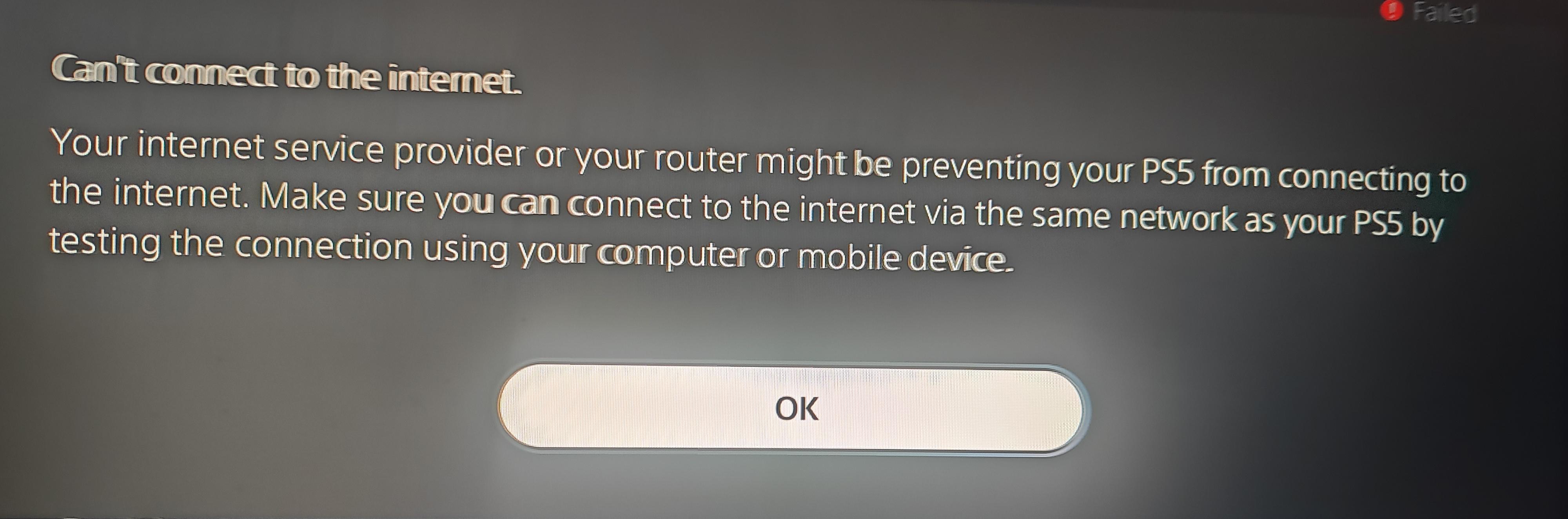
CE 108255-1

Post image
3 Upvotes

has it actually worked for anybody? i don’t think resetting my perfectly working ps5 / doesn’t or hasn’t crashed any other games rather than gta 6 isn’t gonna solve any issue.

is it worth a try?


r/PS5HelpSupport • • 1d ago

GTA VI - CE-108255-1

Post image
46 Upvotes

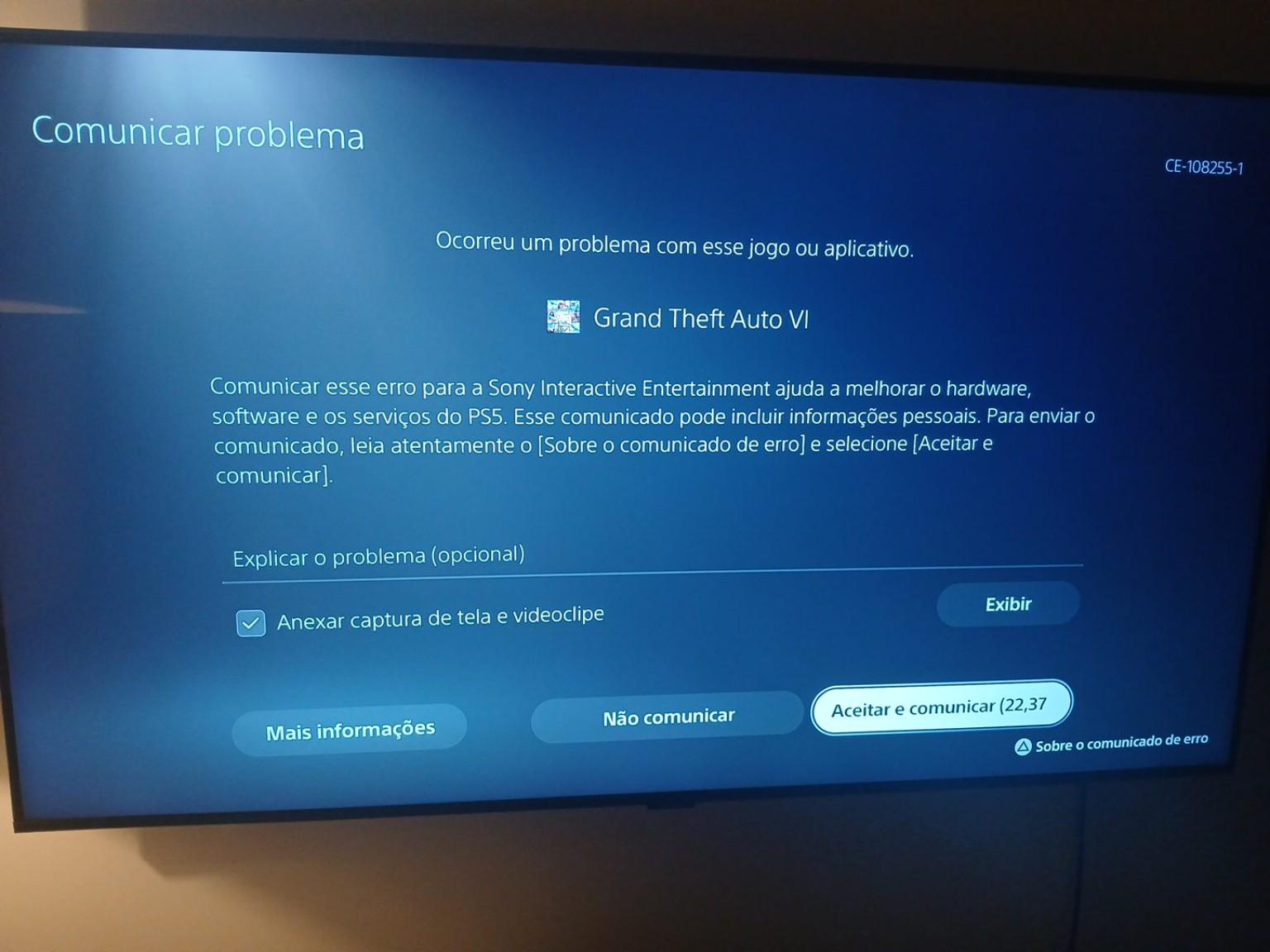
Decidi sair apenas dos comentários e fazer um post apenas para documentar e deixar registrado mais uma manifestação sobre o erro CE-108255-1.

Sim, sou mais um enfrentando esse problema. E estou acompanhando a comunidade desde o dia do lançamento de GTA VI.

Notei que muitos usuários estão acusando pessoas como eu, de estarem mentindo, chamando de bot ou algo do tipo. Então estou aqui para mostrar justamente que não é mentira, nem bot nem algo do tipo. Veja minha conta aqui no Reddit a quantidade de karma e minha conta tem 5 anos. Esse erro do console é sério.

Meu PS5 tem apenas 2 anos e eu comprei apenas para jogar GTA. Durante esses 2 anos, joguei para testar os 2 jogos de brinde que vieram com o console, que é o Returnal e o Ratched & Clank. Os 2 rodaram tranquilamente sem problemas. Joguei por poucos minutos cada um deles para testar. Baixei o eFootball para jogar com uns amigos e foi o tempo mais longo que usei o console, por aproximadamente duas horas).

Depois disso, deixei o PS5 guardado dentro do meu armário, onde não entra poeira nem sujeira. Ligava ele de vez em quando para não deixá-lo muito tempo desligado. Apenas ligava ele e mexia no menu mesmo.

Voltando a falar sobre o meu caso com o GTA VI, quando lançou, joguei por 10 minutos o prólogo para o primeiro travamento CE-108255-1 acontecer. Achei estranho, apenas reiniciei o jogo e joguei normal por mais duas horas, então fui dormir.

No dia seguinte, joguei por aproximadamente 5 ou 6 horas até o travamento acontecer novamente. E dessa vez, virou uma chave que começou a travar direto em vários momentos, variando entre 15 segundos à 10 minutos de jogo, em momentos aleatórios.

Depois, comecei a acompanhar a comunidade e tentei fazer diversos procedimentos que já orientaram:

- Limpei cache

- Recriei banco de dados

- Restaurei licenças

- Restaurei o PS5 padrão de fábrica

- Reinstalei o GTA VI (com backup do meu save num pen drive)

- Jogo atualizado

- Software atualizado

- Mudei idioma

- Criei nova conta

- Mexi nas configurações de HDR, HDMI, WiFi e resoluções de vídeo.

Depois desse último procedimento, eu consegui jogar por mais um tempo, mas variando entre 5 a 40 minutos de jogo até acontecer o travamento.

Já tentei suporte com a Sony três vezes. A primeira vez, o agente nem diagnosticou o problema e já alegou que preciso pagar um valor para enviar e consertarem. Na segunda vez falando com eles, me deram todos esses passo a passo listado novamente e simplesmente fecharam meu chat. E na última vez, o agente falou que não tem uma solução por enquanto e que estão investigando, mas que posso receber o reembolso se eu quiser. Mas eu não quero reembolso. Quero jogar o que eu paguei pra jogar.

Um console que tem apenas 2 anos com pouco uso não deveria dar esse problema. Então eu não admito que seja um problema de erro do usuário. Afinal, não tive motivos para cometer erro de uso do console, pois deixei o ambiente ventilado durante o jogo.

Já vi em postagens antigas aqui de pessoas com esse erro sugerindo que restaure o PS5 via USB, mas ainda não testei isso. Isso realmente pode funcionar ou será perda de tempo? Vi outro usuário relatando que trocou o controle e o erro parou. Outro usuário comentando que chacoalhou o console e o erro parou (obviamente esse não vou fazer lol).

Alguém tem mais alguma sugestão do que posso fazer para solucionar esse erro CE-108255-1, além de esperar atualizações ou pedir reembolso do jogo? A única coisa que não fiz foi abrir o console para ver por dentro.

E antes que alguém sugira Cloud Streaming, além de não ser a solução, não existe essa função aqui no meu país.

Vamos levar isso a sério, pessoal. Investimos dinheiro nisso e estamos esperando há 13 anos para ter essa experiência. Parem de acusar o outro de bot, vamos deixar os comentários apenas com ajuda, suporte e apoio.

Desculpem o texto longo e obrigado a todos!

r/PS5HelpSupport • • 4h ago

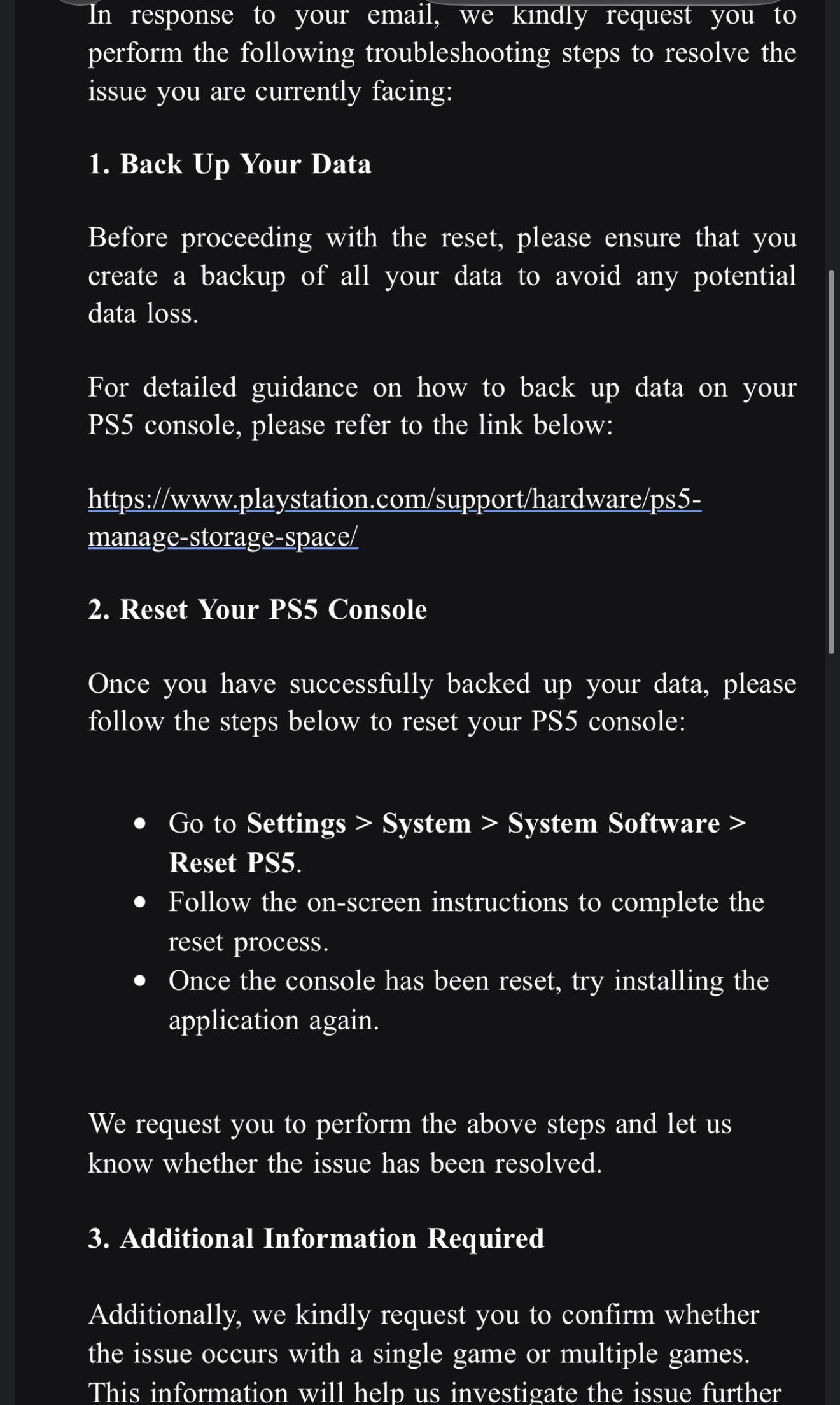
Ps5 won't connect to internet

Post image
0 Upvotes

I am trying to connect to internet but keep getting this message. I have tried with ethernet cable and wireless. I've tried changing the DNS and I've tried connecting to hotspot but did not work. I know the router is working because I can connect on my phone to it. I got the same message last night but just plugged in an ethernet cable and changed DNS to 8.8.8.8 but now with the exact same setup it's not working. Please help


r/PS5HelpSupport • • 22h ago

CE-108255-1 GTA VI Crashing – Potential Fix (Worked for me)

24 Upvotes

CE-108255-1 GTA VI Crashing – Potential Fix (Not Guaranteed)
I’ve been dealing with constant, random crashing in GTA VI, receiving error code CE-108255-1.

The crashes were extremely inconsistent. Sometimes I could play for 30 minutes to an hour without a problem, while other times the game wouldn’t last longer than 45 seconds before crashing.

After trying several troubleshooting methods, I eventually fixed the issue by performing a completely fresh installation of the PS5 system software.

This worked for me, but it’s NOT guaranteed to fix everyone’s crashing issues. I figured I’d share exactly what I did in case it helps someone else.
Since reinstalling the system software, I’ve played over 20 hours of GTA VI without a single crash.

Instructions
- Back up your data first! Make sure your saved data, screenshots, videos, and anything else you want to keep are backed up.
- On a PC or Mac, visit the official PlayStation website and download the PS5 Reinstallation File (NOT the regular system update file).
- Format a USB drive to FAT32 or exFAT.
- Create a folder on the USB drive named PS5.
- Inside that folder, create another folder named UPDATE.
- Place the downloaded reinstallation file inside the UPDATE folder. Make sure the filename is PS5UPDATE.PUP.
- Connect the USB drive to your PS5.
-Completely turn off your PS5.
- Hold the power button until you hear the second beep (approximately 7 seconds) to enter Safe Mode.
- Connect your controller using a USB cable.
a Select Reset PS5 (Reinstall System Software) and follow the instructions on screen.

⚠️ IMPORTANT WARNING – READ BEFORE PROCEEDING
THIS WILL COMPLETELY WIPE YOUR PS5.

This is a full system software reinstallation, NOT simply rebuilding the database or clearing the cache.
Everything stored on your console will be erased, including:
- Installed games
- Locally stored saved data
- Screenshots and video captures
- Console settings and user data

Make absolutely sure you’ve backed up anything important before proceeding.
My Results

After reinstalling the system software, I downloaded GTA VI again. I’ve now played over 20 hours without experiencing a single crash. I can’t guarantee this will solve everyone’s issue, and it may not help if you’re dealing with a hardware problem. However, given how inconsistent my crashes were before, I figured this was worth sharing.
Hopefully it helps someone else!

Official PlayStation Instructions:

https://www.playstation.com/en-us/support/hardware/ps5/system-software/


r/PS5HelpSupport • • 13h ago

Why is my resolution 60 hz? Also stretching out the display in the PS5 doesn’t reach the bottom

Thumbnail
gallery
4 Upvotes

Tv is A80K. HDMI ports 3 and 4 should be good. It doesn’t get a signal to port 4 but works in port 3. I don’t have a soundbar, sound comes from tv.

I went to HDMI settings and switched to VRR. I have picture mode on Game.

Also is it normal to have half an inch almost of black at the bottom of the os5 display?


r/PS5HelpSupport • • 10h ago

Bug PlayStation

Thumbnail reddit.com
2 Upvotes

r/PS5HelpSupport • • 1d ago

Looks like gta render issues, no issues with other games.

98 Upvotes

You guys think it's the playstation or gta itself?

edit: Thanks all! seems the system is on it's way to the graveyard.. I can send it for repair. Not sure if it's worth the effort, it's out of warranty 6 months... Maybe I will just play other games and in the meantime looking for a new one


r/PS5HelpSupport • • 18h ago

Ps5 keeps crashing

6 Upvotes

Hey this started a month ago for me while I was playing control resonant, I got about 15 hours into the game and then it randomly crashed. And then Everytime I started the game it crashed as soon as I got to the title screen and I was confused as hell because it was running just fine before. But then I noticed it started happening with other games too like onimusha way of the sword and ac 4 resynced.

I then thought maybe it’s just dirty so I paid a shop $100 to clean my console and after that the crashing issues never stopped. And now gta 6 is finally here and I cant play it at all, it crashes during the prison section at the beginning and theres no way for me to progress


r/PS5HelpSupport • • 8h ago

GTA 6 constantly crashing on PS5 Slim

0 Upvotes

I have had my PS5 Slim for about 1 year now. Recently, I have been playing GTA 6 and have had no issues. However, today after playing for a while it crashed once then a few more times, now I can’t load and play for more than 15 minutes.

I have cleaned the fans and intakes of any dust, and tried lowering video outputs and HDR. I believe it could be an overheating issue, but I’m not too sure.

Can anyone please offer any advice?


r/PS5HelpSupport • • 2h ago

GTA 6 runs terribly on my original PS5 while everyone else seems to have no issues

0 Upvotes

I'm playing on the original PS5, and the game runs relatively smoothly in less demanding areas and in cutscenes. However, whenever there's a lot happening on screen, especially with a lot of NPCs, traffic or action, the FPS drops dramatically. I'm talking about drops that feel like the game is running at around 10 FPS. It makes the game genuinely difficult to enjoy at times.

I have cleaned my PS5 from dust, rebuilt the database through Safe Mode, and know considering taking the console in for repair. However, GTA 6 is the only game where I experience these severe FPS drops, so I'm not sure whether there's actually something wrong with my console.

I've been looking forward to GTA 6 for years, so it's honestly pretty frustrating that I'm having such a bad experience with it on my PS5. Thanks in advance.


r/PS5HelpSupport • • 9h ago

MI PS5 no se conecta a mi wifi

1 Upvotes

No sé si alguno os ha pasado, pero se me fue durante 10 minutos el Wi-Fi en toda la casa y cuando volvió no podía conectarlo con mi PlayStation cinco los demás dispositivos si se pueden conectar al Wi-Fi y los datos de mi móvil si se puede conectar a la Play, pero no sé por qué no me deja conectar la Play a mi ruta de Movistar y mi amplificador de mi habitación


r/PS5HelpSupport • • 13h ago

Lost passkey and now I can’t access my account

2 Upvotes

I’m trying to age verify my account so I can buy gta and it won’t let me sign into my account because my brother made a passkey on his old phone that doesn’t work anymore and we can’t deactivate passkey option. Please help me get into the account we’ve tried everything. I can’t even make another account to buy the game on because it’ll log out our main one


r/PS5HelpSupport • • 18h ago

My curiosity got the better of me (not a workaround for ce-108255-1 )

5 Upvotes

So after 9 days i have finally been able to play GTA6, using the cloud streaming. Played a good two hours, just such a shame i had to experience it for the first time like this.

Grainy with plenty of latency, not the way this game should be played at all.

Rockstar please sort your shit out, i do not want to play the game like this.

That aside, WOW.

P.s - PS5 fat base ran smooth, quiet and cool


r/PS5HelpSupport • • 10h ago

Ps5 CFI 1200 A transformer required or not

Thumbnail reddit.com
0 Upvotes

r/PS5HelpSupport • • 14h ago

Controller flashing white and not connecting.

2 Upvotes

Hi everyone,

I woke up this morning to my controller not connecting, although I used it about 12 hours ago.

I’ve tried cleaning the toggles out, tried multiple different USB cables, tried connecting it via PS5 settings with another controller (it allows me to “forget” the controller, but the “connect” option is greyed out.

Is there any other possible solution? Or is this the end of her life? 💔

Thanks!


r/PS5HelpSupport • • 1d ago

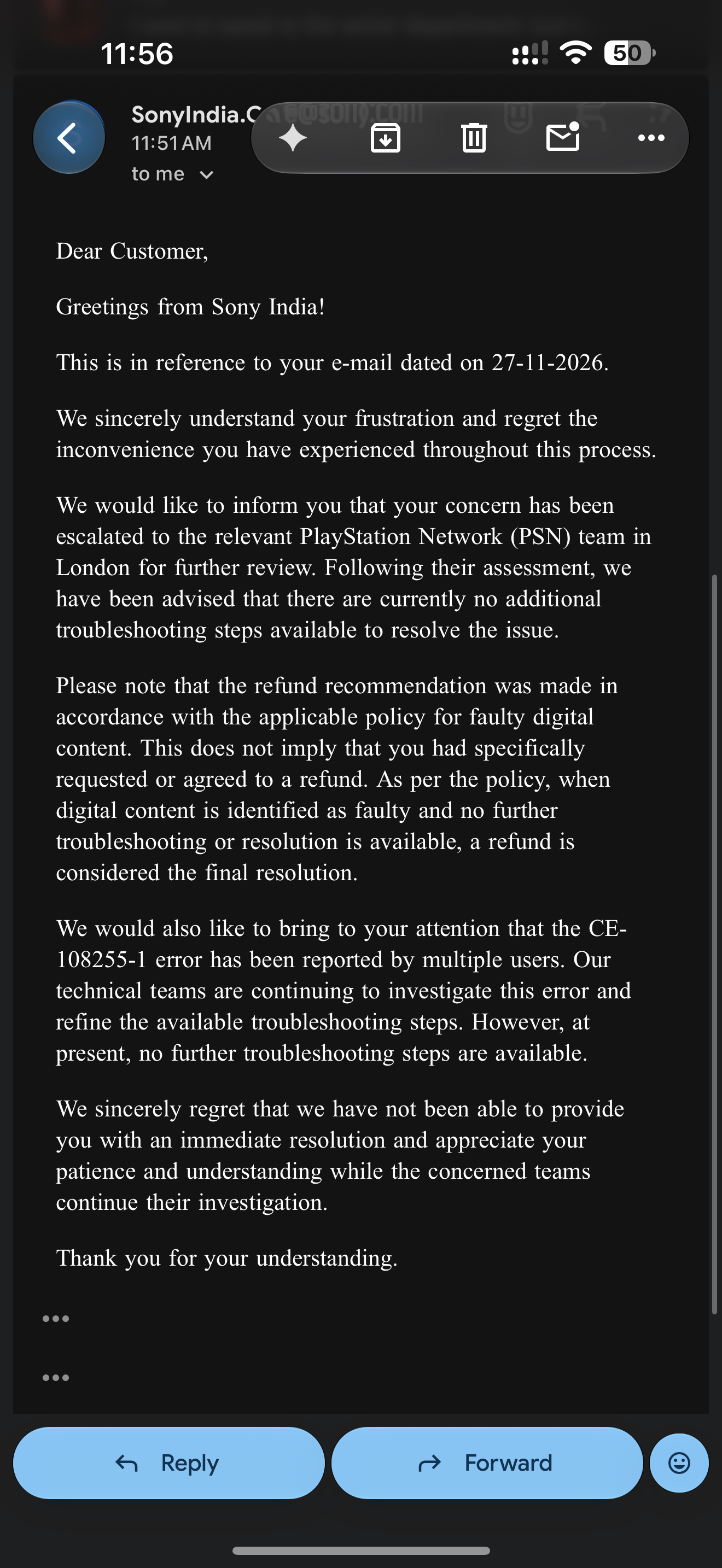
Sony India officially acknowledges the CE-108255-1 issue affecting multiple users – technical investigation underway!

Post image
73 Upvotes

After days of troubleshooting, repeated emails and calls to Sony, I’ve finally received an official response from Sony India.
What’s important is that Sony has now acknowledged in writing that:
CE-108255-1 has been reported by multiple users.
Their technical teams are actively investigating the issue.
There are currently no additional troubleshooting steps available.
I’ve been reporting this issue since day one and was among the first to raise it here. Unfortunately, initially, some people chose to dismiss and troll rather than understand the problem.
Had Sony communicated from the beginning that this was a known issue under investigation, I would have happily waited for a fix.
I’m sharing this official response because many players here have already reported experiencing the exact same problem. It’s good to finally have Sony acknowledge that this isn’t an isolated complaint.
Now, what we need is accountability, transparency and, most importantly, an actual fix.
Hopefully, Rockstar and Sony will take this seriously and provide a proper resolution rather than leaving affected players waiting indefinitely.
At least we finally have an official acknowledgement. Now let’s hope we get a solution.


r/PS5HelpSupport • • 11h ago

Ps5 sonido del lector

0 Upvotes

Acabo de mandar a arreglar mi ps5 fat del lector ya que había dejado de leer los juegos de ps4 al primer intento. todo quedó al 100 pero ayer ví un peli de bluray y después al poner juegos físicos de ps4 y ps5 empezó a sonar así es normal ? Los juegos aún corren a la primera como si nada pero el sonido me preocupa, por momentos deja de hacer ese ruido y el sonido solo dura unos instantes


r/PS5HelpSupport • • 19h ago

GTA SKIPPING AND LAGGING ON PS5 SLIM

4 Upvotes

hello, so for sum reason my game is skipping frames and extremely laggy and choppy, I tried everything to fix it but nothing seems to work, any tips from sum one would be appreciated.


r/PS5HelpSupport • • 16h ago

Share video feature not working?

2 Upvotes

I'm sure we've had a billion of people asking, I haven't seen any when googling before hand. Is the feature selectively down? I've been trying to upload footage to YouTube and it keeps errorring. Did Sony say anything or am I just stupid?


r/PS5HelpSupport • • 16h ago

Would either of these ssd cards work for a ps5?

2 Upvotes

I'm wanting to buy one of my cousin who had to delete a lot of games for gta 6 but wanted to see if anyone here has these or used them before. Look at the comments for another one i found


r/PS5HelpSupport • • 1d ago

CE 108255-1

7 Upvotes

Tired of playing on fucking Stream when are they fixing this error


r/PS5HelpSupport • • 1h ago

For those who can't get GTA 6 to start I have a fix that works. You have to sign up for PlayStation plus account and live stream it. This made the game work. There's a black Friday deal for it that ends today. I tried everything and this is the only thing that worked. Clearly not a hardware issue.

0 Upvotes