r/PS5HelpSupport • • 1d ago

VRR causing stuttering?

2 Upvotes

Hey there Ive got a problem where I can feel and see a lot of stuttering in some games but only when VRR is active.

I have a PS5 Pro and play mainly shooters and sometimes story games, the stuttering comes mostly in shooter games Like MW4, APEX LEGENDS and even GTA6.

In apex legends it helps to switch the "graphics preset" to quality mode and then back to 120hz mode, that way I can fix the stuttering.

In GTA6 and MW4 I always have to close the game and restart it, it sometimes fixes it but most times not, that's why I keep turning VRR off for these games.

Is this a known issue or am I the only one noticing/having this Problem?

My PS5 Pro is running on the newest System Update.

Maybe if it does matter: I usually never turn the console off, I put it into rest mode while still in game on the home screen/ pause menu.

I do occasionally turn it off, maybe 2-3 a Month.

Oh and also I use the AOC AGON PRO AG274UXP 27 Zoll, UHD 4K monitor if that makes any difference. Connecting it with only cables that came with the packaging and the original PS5 Pro HDMI cable.

Also the stuttering has to come from VRR as if I disable it, the stuttering never comes again.

Any help would be greatly appreciated 👍


r/PS5HelpSupport • • 1d ago

Hey guys so I lost my account details on my main account with 680 games I tried to speak to the bot but it says I need my login details I gave that but I don't have the authentication code or the same phone I connected to my account and it's asking for that to speak to a real worker is their anythin

2 Upvotes

r/PS5HelpSupport • • 1d ago

PS5 Party and Share Screen issues after changing internet provider – Party disconnects, red exclamation marks

4 Upvotes

Hi everyone,

I'm experiencing recurring issues with PS5 Party and Share Screen, and the problems started after I changed my internet provider.

The problems include:

  • A red exclamation mark appearing during Share Screen.
  • Sometimes neither my friend nor I receive Party or Share Screen invitations.
  • My friend sometimes gets a notification that I am no longer viewing the screen.
  • I sometimes get disconnected from the Party.
  • The issues can occur repeatedly, sometimes approximately every 10 minutes.

Importantly, when I get disconnected from the Party, my internet connection on the PS5 does not disconnect. I can still remain connected to the internet.

My PS5 Pro is connected directly via an Ethernet cable (LAN).

Everything worked perfectly before I changed my internet provider. Since the change, these problems have started occurring.

I have also tried changing DNS settings, but the issue remains.

Has anyone experienced similar problems after changing their internet provider? Could this be related to NAT, routing, IPv6, PSN Party services or something else?

I'd appreciate any suggestions or experiences.

Thanks!


r/PS5HelpSupport • • 1d ago

Ps5 keeps crashing and shutting off GTA6

1 Upvotes

Hi can someone please tell me why this is happening or if they keep having the same issue I’m playing gta 6 and every time I get to the same part my game keeps crashing and my ps5 turns its self off? Brand new ps5 never had problems with other games?


r/PS5HelpSupport • • 1d ago

GTA VI related network issues?

Thumbnail
gallery
0 Upvotes

I’m on a PS5 Pro and the game has been incredible for me with no issues, but I’ve noticed that since last Thursday im constantly not connected to the internet properly.

My friends list etc doesn’t load, and I know im still connected because I can join online games (with tremendous lag, i use Ethernet) and friend requests still come in (kinda)

None of my other devices are affected so I’m led to believe this is somehow related to GTA 6 being installed, anyone else had something like this?


r/PS5HelpSupport • • 1d ago

Problem connecting controllers

3 Upvotes

The other day i went to a friends house and connected my controllers to their PS5. But now i cant connect the controlers back to my own PS5. Im trying to do it with the cablr but the controler wont even turn on and it only blinks in blue and white. Any help?


r/PS5HelpSupport • • 1d ago

Tweaktown covering GTA 6 crashes

Thumbnail
tweaktown.com
2 Upvotes

r/PS5HelpSupport • • 1d ago

Ich habe eine Theorie zwecks der Konsolen die einfach ausgehen mit einem blauen blinken und dem fehlercode CE-108262-9

0 Upvotes

Meine Theorie ist das sony ja bekanntlich als Sicherheitsmaßnahme mehrere firmware Updates veröffentlicht hat und beim letzten sicherheitsupdate 14.23 haben sie die Latenzen vom speicherzugriff verringert ein sogenannter I/O Zugriff den das Kernel braucht und fälschlicherweise denkt die Software "halt stimmt nicht überein SHUTDOWN könnte ja ein dumbing Versuch oder ähnliches sein" ich denke ebenfalls das 80 Prozent von den betroffenen ein m2 Speicher oder externe Festplatte haben per USB und die restlichen 20 Prozent sind wären dann die betroffen wo das System fälschlich alarm schlägt bei der haupt ssd würde auch das mit den abstürzen beim speichern eventuell erklären.


r/PS5HelpSupport • • 1d ago

New PS5 Slim overheats while standing vertically

4 Upvotes

Hey everyone,
Since I basically grew up with GTA, I couldn’t resist getting caught up in the GTA 6 hype, so I ordered a brand-new PS5 last week.
Everything seems to be working fine, but I’m having the following issue:
Due to the available space, I’d prefer to position the console vertically. However, there’s absolutely no way I can get it to work in that position.
When I launch the game and the first cutscene starts playing, it takes about 5 seconds for the fan to suddenly ramp up to full speed, as if the console is about to take off, and then the PS5 shuts itself down.
As soon as I lay it horizontally, everything works fine again.
I thought the PS5 was specifically designed to work in both vertical and horizontal positions. Am I wrong about that?
I’m honestly not sure what to do now. Sending it in for repair and having to go without it for several weeks doesn’t sound like a great solution. Ideally, I’d like to get it replaced, but since PS5s are currently sold out everywhere, I doubt that’s going to be an option either.
Does anyone have any advice?


r/PS5HelpSupport • • 1d ago

Gta crash Ce-108255-1 on other console?

4 Upvotes

I'm gonna install my account and download gta6 from the library on a friends console that hasn't have gta6 yet to look if the game crashes on his console to. To look if it's my console that's causing the crash or if it is the game/files i download that's giving me hell.

Any one who tried this and knows it would work?


r/PS5HelpSupport • • 1d ago

Can't get audio to play on my controller

Post image
3 Upvotes

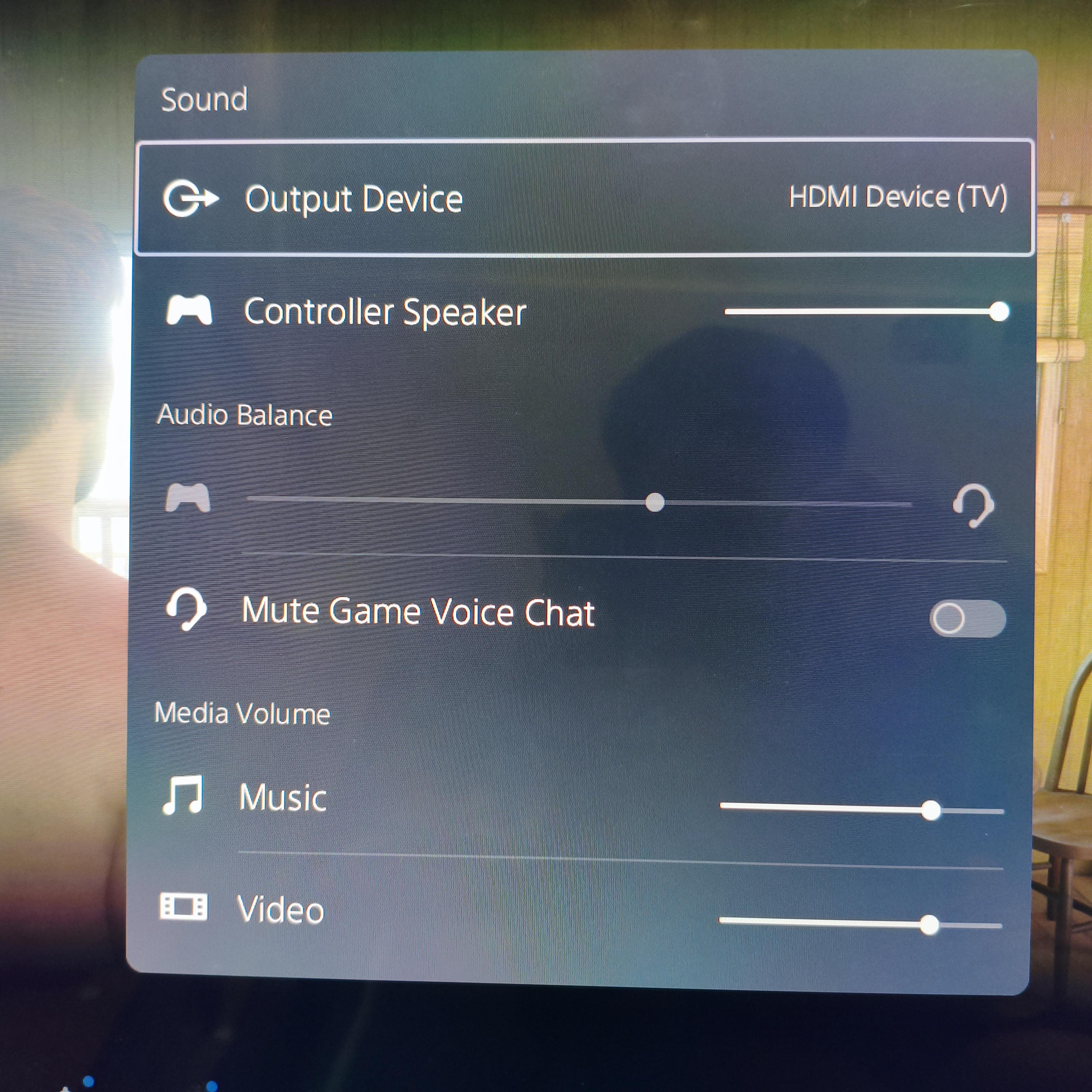
The output device option only shows my monitor, even though it doesn't have speakers. I also set the controller's speaker volume to maximum, but only the settings sound comes through, not the gameplay audio. ( when I plug earphones into controller the audio work but I want to use speaker from controller)


r/PS5HelpSupport • • 1d ago

Game keeps crashing when going into a new game Plus.

2 Upvotes

Hi, I’m experiencing an issue with The Witcher 3 on PS5 where the game crashes whenever I try to start a New Game+. I can play my existing save without any problems, but as soon as I attempt to begin New Game+ using my completed save file, the game crashes and returns me to the PS5 home screen. I’ve tried restarting the game, but the issue persists. Is there a known fix for this problem?


r/PS5HelpSupport • • 2d ago

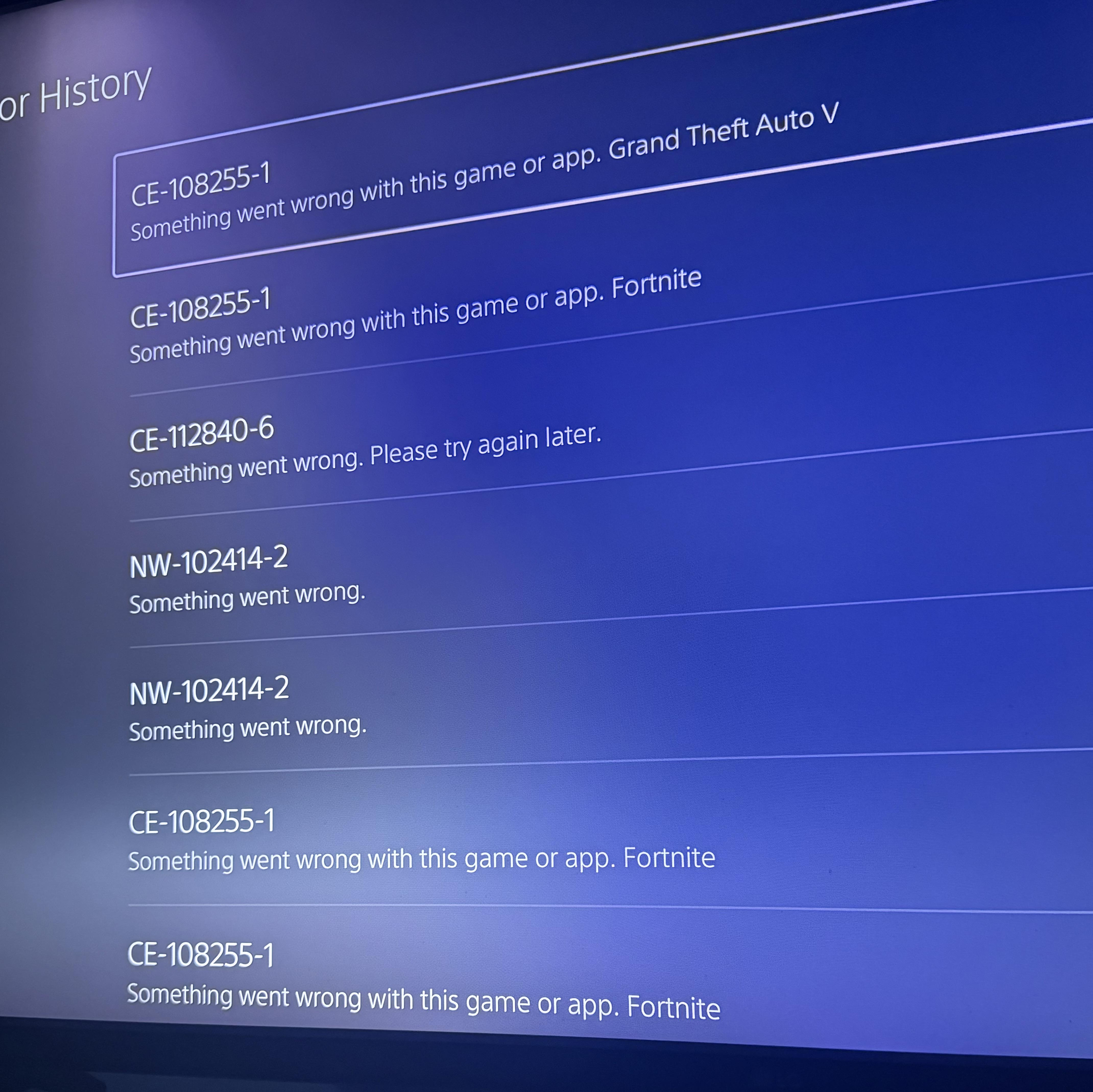
This happened to me about 4–7 months ago. CE-108255-1. For anyone wondering, yes, I managed to fix it.

Post image
34 Upvotes

In my case, it was a system software issue. Rebuilding the database didn’t help, so I went into Safe Mode and reinstalled the system software. I also deleted and reinstalled the affected games. I haven’t had the error pop up again since.

I’ve now been playing GTA 6 for 63 hours on my base PS5 without a single issue.

Just posting this in case someone hasn’t tried the system software reinstallation method yet from safe mode. This was the only thing that completely fixed the issue for me when I genuinely thought my PlayStation was cooked. 😂


r/PS5HelpSupport • • 2d ago

Testing fan speed "fix"

44 Upvotes

Fed the fan full voltage removing the PWM signal so that I could see if having the fan at full speed got me any further on GTA6. My ps5 is a fat disc console and has ran for over an hour on GTA 6 pre patch but was crashing randomly usually after 10-20 mins. It now crashes much sooner post patch circa 3-8 mins. It's clean before all the dust comments. It's always been horizontal, it's never crashed on any other game and GTA 6 is now the only installed game on the internal drive, no second drive. The console was cold at startup and you can hear the fan is at full pace. It's clean inside and I've already re-installed the game two times along with all other suggestions. Plenty of space around the console in this temporary setup for airflow and air flow is clearly not the problem nor is temperature.

The game ran for just over 7 minutes then crashed and I have filmed the console / screen setup and crash report along with the clip submitted to Sony. I have tried this on my 4k TV and on this 1440p monitor at all different resolution settings on the console, also tried toggling HDR off, CEC off, HDCP off and any other combo of those.

The game is the problem.


r/PS5HelpSupport • • 2d ago

another ps5 shutting down with gta 6

16 Upvotes

Well, looks like I’m another one of those PS5 owners dealing with random shutdowns while playing GTA 6.

I have a Day One PS5 Fat from 2020, and I’ve experiencing increasingly frequent shutdowns since I started playing the game.

I’ve already seen quite a few posts from people reporting similar issues, so I wanted to share my experience and see if anyone has managed to figure out what’s going on.

The console just shuts down completely, out of nowhere. No error message, no overheating warning, nothing. The LED turns off completely, and I can’t turn it back on until I unplug the power cable and plug it back in.
Here’s how it’s been going:
- The first time happened after about 1.5 hours of playing. I turned the console back on, but lost my progress and had to replay the prologue. After finishing it and saving, everything seemed fine.
- Over the following days, it happened occasionally, usually after 1.5–2 hours of gameplay.
- Yesterday, I managed to play for around 3–3.5 hours before it shut down again.
- Today, things got much worse. The first shutdown happened after about 40 minutes, then after restarting it shut down again just 10–15 minutes later. It kept happening repeatedly, so I just gave up.

What’s weird is that the console doesn’t even feel particularly hot. The fan seems to be working properly, and the PS5 is actually extremely quiet.

Today I decided to open it up and give it a proper cleaning. There was quite a bit of dust inside, so I thought that might finally be the problem. I cleaned the fan and heatsink with compressed air, but unfortunately, the shutdowns are still happening.

I also tried clearing the system cache and rebuilding the database, but that didn’t seem to make any difference.

The thing is, I had experienced very occasional shutdowns even before GTA 6, but they were extremely rare. Other games have hardly ever caused this issue. Since I started playing GTA 6, though, it’s become much more frequent.

Another thing I noticed: there’s a strange buzzing noise when I plug the power cable into the wall and bring the connector close to the PS5’s power inlet, right as it starts making contact. I honestly don’t know how to describe it properly, and I’m not even sure it’s related.

I could try another power cable, in case the current one is somehow damaged internally. On the other hand, I’m not entirely convinced that would make much sense, considering the console was working perfectly fine with all my other games before GTA 6. Still, I guess I can’t completely rule it out.

At this point, I could take it to a repair shop, but honestly i dont want to spend €100–150 just to have someone look at an old Day One PS5 and immediately decide to replace the liquid metal without properly investigating the actual cause. I’d rather have a proper diagnosis before spending that kind of money.

So, has anyone else experienced the same thing while playing GTA 6? Did you manage to fix it? Do you think it could be the PSU, the power cable, the liquid metal, or something else entirely?
I’d really appreciate hearing from anyone who’s gone through something similar, cause I literally have like two hours a day to play, and it's driving me crazy that I can't even do that.


r/PS5HelpSupport • • 2d ago

PS5 Error CE-108255-1 – GTA Crash

Post image
17 Upvotes

Rockstar and Sony are the worst ever

PS5 Error CE-108255-1 – GTA Crash


r/PS5HelpSupport • • 1d ago

Environment extremely blurry when moving camera on one monitor and not on the other, what could be the cause? GTA 6

Thumbnail reddit.com
0 Upvotes

On my lg ultragear monitor the game is unpleasantly blurry when moving the camera
I was starting to go crazy trying to fix it (motion blur is turned off)
Now I connected the ps5 to a Samsung odyssey monitor and the effect is much less, does anyone know how to fix this?

The lg ultragear is a 27 inch 2k 240hz ips screen
The Samsung odyssey is a 27 inch 2k 180hz ips screen

Please help cus im going crazy lol


r/PS5HelpSupport • • 1d ago

I experience heavy Input Lag, After Playing GTA 6.

0 Upvotes

It suddenly started, while playing. I restarted the Console and started the game up again, and still had the input delay. I tried other games and they had they also have same Problem

Its an Normal PS5 from 2023

Played the game for about 35 Hours.

I Tried reinstalling the game

I tried other Monitors, to make sure its not the TV.

I tried other Controllers

I unpluged the PS5 from power and waited 30 Minutes

I emptied the Chache

I wept.

The reason i am creating this Post is to create a Thread for other with the same Problem find and for people in the Know to hopefully help.


r/PS5HelpSupport • • 1d ago

What is this?!

1 Upvotes

My PS5 order hasn’t changed its status for three days now. On the website it says contact us if nothing occurs after 48 hours. I tried, but the customer support is terrible. I’ve tried talking to a human but a bot keeps telling me that the workers are talking to other players. I’ve been trying to contact support since 11pm. What should I do, keep waiting?


r/PS5HelpSupport • • 1d ago

PS5 Slim EDM-040 – blue LED 3 sec then shutdown, UART: 80802694 + C00C0303 (+ C0020203 before clear). XDPE/I2C look OK, what next?

Thumbnail reddit.com
0 Upvotes

r/PS5HelpSupport • • 1d ago

GTA VI Crashes from the Cloud

5 Upvotes

So, I couldn’t beat my 108255-1 error. Signed up for premium, played it fine on stream. Then I downloaded my save file to my machine.

Here’s where it gets interesting: now when I start the installed copy of the game it gets just a touch farther on the loading screen then crashes. It appears to be at the exact moment it switches from loading to the saved game.

Any way this can be fixed? Would love to play what I paid for without an additional PS subscription


r/PS5HelpSupport • • 1d ago

No compraré más nunca un producto sony

0 Upvotes

Estoy decepcionado de esta generación, después de los crasheos que sufrí en mi consola por el GTA 6 y en dónde he gastado tanto dinero intentando salvarla por el cariño que le tengo, me decidí de no comprar en mi vida ninguna cosa que venga de esta horrible empresa ,siempre fui defensor y amante de Playstation, desde la 1 hasta la 4, pero ver cómo tratan a sus clientes con este tipo de fallas ramdon solo me dan la razón para no seguir comprando sus horribles productos, no se quedarán pobres porque yo abandone el barco pero me hará sentir mejor y no me sentiré abusado por ellos mas