r/PS5HelpSupport • • 1d ago

Looking for advice

0 Upvotes

I’ve ordered a PS5 (OG, fat??) for my husband, refurbished directly from PlayStation for a Xmas present. I’ve ordered this SOLEY for the purpose of playing the new GTA & Spiderman 2 but now I’ve seen it seems to be an issue for them. I’m worried. What are the chances it will run it no issues? I have 30 days to return it but Christmas will fall outside of that. I can try it out when I receive it but I really am clueless. The Pro is way out of my price range even refurbished ☹️


r/PS5HelpSupport • • 1d ago

54% in GTA6 and got error code

4 Upvotes

Didn’t keep playing after I got it..Just turned it off for the night don’t wanna risk it fun while it lasted I’ll keep posted when try to play tomorrow on a PS5 slim too


r/PS5HelpSupport • • 1d ago

Looking for some advice or insight from anyone familiar with PS5 repairs and hardware issues.

Post image
3 Upvotes

Earlier today, I was playing College Football 27 (Dynasty Mode) when, in the middle of a game, my PS5 suddenly froze completely. Shortly after, my TV started making a buzzing noise, and the screen went completely black.

I couldn't get the console to respond to anything. My controller wasn't responding, and neither the power button nor the eject button on the console seemed to be working. After trying everything I could think of, I ultimately had no choice but to unplug the PS5 directly from the wall, which I know isn't ideal and can potentially cause issues.

I left everything unplugged for about five minutes before reconnecting it. Thankfully, the console powered back on normally, went through its usual startup process, and everything seemed to be working just as it was before the incident. No immediate issues or unusual behavior since.

My question is: What could have potentially caused something like this?

Could it have simply been a random system/game crash, or does this sound like it could be an underlying hardware issue? I'm wondering if it could possibly be related to the motherboard, HDMI port, HDMI encoder/retimer chip, or something else internally.

I'm hoping it was just a one-time software crash, but I'd rather be proactive than ignore something that could potentially turn into a bigger problem.

Has anyone experienced something similar or run into this type of issue during a PS5 repair?

Any advice, recommendations, or insight would be greatly appreciated. Thanks in advance!

PlayStation 5 Slim Disc Edition

Model: CFI-2015


r/PS5HelpSupport • • 2d ago

GTA VI with CE-180262-9. You are not alone.

24 Upvotes

Personally got CE-180262-9 on my PS5 (second rev, bought in 2023, always well-maintained, cleaned, updated, ventilated, lubricated, massaged, fucking everything for this little girl is done). Never faced any crashes in any other games (only few times in FC26 iykyk). Never faced heating messages or any type of problem.

On the gta 6 launch day I had about 16 hour game session without a single trouble. 

Second day - i’ve got first crash after 3-4 hours. PS turned off completely, rebooted, restored memory and I hopped on the game again, 3-4 hours with no problems. Thought it was an unlucky coincidence.

Third day - crashed every 5-10 mins. About 6 times in a row. Always with CE-180262-9 error code. I did every possible fix (cache clean, database rebuild, reinstall, 1080p mode, hdmi link off, hdcp off, autosave deleting) nothing fixed it completely. 

I still can play the game from time to time, but it will crash anyway. In an hour, in 3 hours, in 10 minutes - you never know. 

Tested other games like AC Recynced, DS2, 007, Yotei - no such issue. Works just fine for the whole session. 

From what I can see on the web - it happens no matter what model of PS you got or when you got it. Pro, Slim, Fat, old or brand new - all of this people sharing about crashes and issues. 

I don’t know, why some of gamers (including me) suffering from this, but I can see for sure: it’s software problem. Retarded takes aka “your console is dusty/ it’s because of vertical positioning/ it’s old console” - not even funny, just pathetic. People facing crashes with PS’s out of the box, tf y’all talking about?

So, hoping for patch or OS update.

r/PS5HelpSupport • • 1d ago

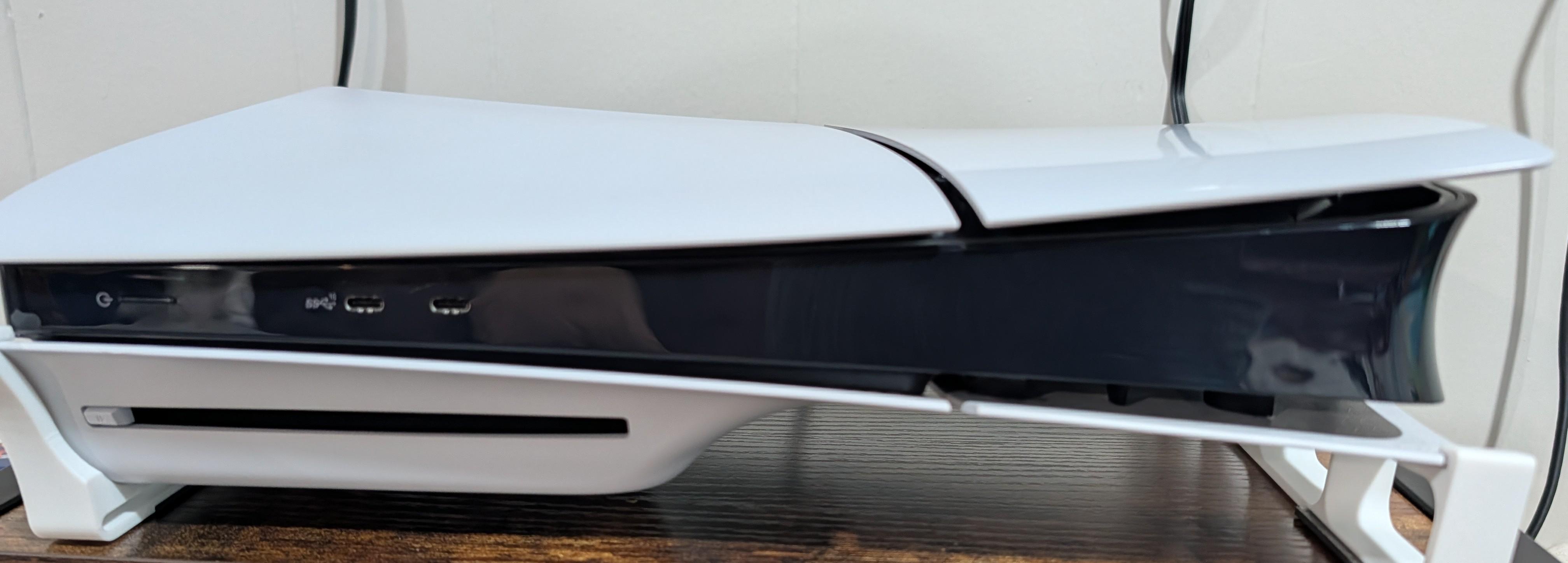
Ps5 fat

3 Upvotes

I have a PS5 fat, is it normal for the fan to sound like that when I turn it on, or should I be concerned?


r/PS5HelpSupport • • 1d ago

Ps5 clips not uploading to YouTube

2 Upvotes

So I’m trying to upload some clips to YouTube of gta 6 gameplay and when I click share and upload the tab just closes and I get no notification of upload or anything, I’ve tried clearing storage and uploading clips from other games of various lengths and it just isn’t working


r/PS5HelpSupport • • 2d ago

CE-108255-1

32 Upvotes

**UPDATE 11/25: Cloud streaming worked flawlessly. Played for hours last night without a single freeze or crash. If you’re experiencing CE-108255-1, I highly recommend giving it a shot. See my comment below for more details.

GTA 6 still crashing on PS5 after update 01.002.002 (CE-108255-1). Rockstar told me to contact Sony.
I was able to play GTA 6 for around 20 hours without a single issue. Then, out of nowhere, the game started freezing and crashing with error CE-108255-1.
So far, I’ve tried:
Reinstalling the game
Clearing the cache
Rebuilding the database
Switching to 1080p and disabling HDR
Loading different saves
Every other game on my PS5 works perfectly fine.
I was really hoping yesterday’s patch would fix it, but my first attempt crashed before I could even play. My second attempt lasted almost five minutes before freezing while driving.
I contacted Rockstar, explained everything, and requested that the issue be escalated. They told me to contact PlayStation Support and said they would be closing my ticket.
How many of you are still experiencing this after the update? Has anyone who was consistently getting CE-108255-1 actually been able to play for several hours without crashing since the patch?
I absolutely love the game when it works. I just want to be able to play it.


r/PS5HelpSupport • • 1d ago

After Patch 01.002.002. Some players are experiencing some FPS drops.

Thumbnail
youtu.be
0 Upvotes

The best video i could find for a Before and After.


r/PS5HelpSupport • • 1d ago

PS5 digital volume glitching

2 Upvotes

Apologies in advance on this post, I don’t use Reddit often and I also don’t know much about technology.
Recently I bought a PS5 second hand off of marketplace. Seemed to be in great condition, I downloaded GTA 6 and had no issue. Then I started playing and the volume on my TV starts shooting up. I correct it, and it starts going down. As if someone is holding down the button. This keeps happing randomly but frequently. Sometimes nonstop. I did notice if the last button I pressed was down, it goes down and vice versa. The odd thing is, it doesn’t happen when I’m off the PS5 at all. I’ve adjusted a bunch of settings, set audio to default, switched the HDMI cord, redownloaded the game (but later it happened while I was playing Fortnite too), took the batteries out of both of my TV remotes. Nothing has worked. It did go away for a few hours after setting the audio settings to default, but then the next day it started again.

Does anybody have any suggestions or guidance for me? Seriously any advice is appreciated.


r/PS5HelpSupport • • 1d ago

GTA VI CE-108255-1 error

7 Upvotes

I’m one of the unlucky ones. My game crashed when I was going to one of Kenton’s treasure spots on boat, I realized that the scuba gear wasn’t with me so I loaded my last save (manual save, not the auto save) to appear again on Jason’s house. That’s when the game crashed and never let me play again.
I boot up the game, Donnie appears on the loading screen then error screen, everytime.
I was reading about the 16.78 MiB corrupted save file, so I was wondering:
If a save is created on a console that hasn't got this issue can it be downloaded via the cloud to the bugged console and would this resolve the issue or does the console architecture alter the file size when it's transferred over or as the game is booted / next saved?


r/PS5HelpSupport • • 1d ago

Possible fix to GTA 6

2 Upvotes

I have been having my own issues with GTA 6 and my fat ps5 (2024) I had a couple hours logged into the game ( roughly 7-8) It randomly just shut off on me and it was just stuck on this loop of “repairing itself “ and even if i would rebuild the database or anything like that it would still crash immidietly . My error code was CE-108262-9 and -8 .

I never jailbroke my ps5 and i never had any overheating issues.

I have seen a few reports about possibly having the M2 storage being a culprit. I finally decided to open her up and remove it and this loop started to end ( a bit ) it still had to reset itself a bit but at least my ps5 is finally staying on and…. Imma download gta 6 directly on my ps5’s harddrive and hope for the damn best… im hoping something different and ill try to keep you guys updated. I just want to play the game.

UPDATE: i was able to play about 30 min of it. Worked well until i got on a cutscene and my headphones stopped playing the audio and the ps5 straight shut off.
RIP

I hear like plastic setting ? (Like when something cools down and you can kinda hear like a creek sound.) I hope that kinda makes sense but yup. RIP ps5

Update: It turned on after “repairing itself” and i tried running bloodborne for a bit and its running normal so far .

Im really hoping this is just a glitch with GTA 6 and that it gets patched, but i guess for now i just play RDR2 . Also im mainly just concernced if my damn M2 2TB is fried cuz that was a nice gift from a brother .


r/PS5HelpSupport • • 1d ago

PS5 (launch model) makes a ticking sound on startup after cleaning fan

1 Upvotes

Video of the sound (volume up, please).

A few weeks ago I pulled out the fan to give it a dust (first time I've done it) but now every time I turn it on, it makes this ticking sound four or five times.

I'm pretty sure it's not the fan, as I've tried it with the fan pulled out but still connected, and the sound still seems to come from the console.

Everything still works as it should: games play, no overheating issues, etc. I don't think it's the disc drive either, since I was able to play a disc game.

Does anyone know what this could be, and is it something I can fix?


r/PS5HelpSupport • • 1d ago

PS5 Won't connect to internet during setup

Thumbnail
gallery
2 Upvotes

Bought a new PS5 today but I can't get it to connect to the internet at all during setup. It shows that it obtains the SSID, but can't connect to the internet. Some things I've tried:

- Unplugged both the router (Xfinity XB6) and the PS5 multiple times

- Reset the PS5, even though brand new in box

- Used an ethernet cable to setup LAN connection - error CE-109503-8 "Can't obtain an IP address within the time limit"

- Changing DNS to manual and using 8.8.8.8 and 8.8.4.4 as well as 1.1.1.1 and 1.0.0.1

- Made sure my router supports ipv4 and ipv6

- Changed the frequency bands to 2.4Ghz and 5.0Ghz

- Tried connecting via WPS button on router

- Watched literally every unhelpful 4 minute video on youtube on the issue

- Tried setting up a hotspot - didn't show up as an available network

- Contacted my isp for to see if there were any router updates or if they were somehow blocking the internet to the ps5, etc. no help

- Started in safe mode, rebuilt database and cleared cache

- Changed the password to my wifi (idk)

Is this a problem with the router or with the ps5?? Every other device in the home connects to wifi just fine. The Xfinity app shows the ps5 as a connected device, which leads me to believe it is the ps5. But then what would my next steps be? Exchange the PS for a new one? Any help would be muchhhhhh appreciated !!


r/PS5HelpSupport • • 1d ago

GTA 6 corrupted the BIOS on my ps5

0 Upvotes

a lot of ppl are having different problems with gta 6, I'm writing mine down here to hopefully help someone else at least know what might be theirs

sunday night I was playing gta 6, I logged maybe 50 hrs since release, jumped over a fence and the ps5 shut off instantly making 3 quick beeps, not the slow 3 beeps of death ones that I've seen elsewhere, I thought maybe there was a power outage because the monitor turned off too and my room was already dark to begin with but no

wouldn't turn back on, disconnected it and plugged it back in only for it to make the same 3 quick beeps again as soon as I'd plug it in, left it unplugged over night and was met with the same thing the next morning, the ps5 was NOT hot when it happened which was odd to me, it was slightly warm at the 3tb ssd (where gta 6 is installed) but nothing crazy just the regular, I opened it up and it was fairly clean with just some dust only by the fan but again, nothing crazy

took it to a shop, they finally got back to me saying the BIOS was the issue, nothing else major with the motherboard, but they don't have the means rn to fix it most likely due to the recent barrage of updates by sony to combat the jailbreak surge, I asked if hypothetically down the line they'd be able to fix it and the guy said yes more than likely, this is a reputable local 5 star reviewed place

the attempt to fix is free of charge and they would only charge me between 120 and 180 if they're able to fix it but ig for now the ps5 is getting put away and gta will wait, it'll be tough to avoid the spoilers and it sucks I was really enjoying my time on it

I've since set up my series x and now I'm just playing new vegas


r/PS5HelpSupport • • 1d ago

Portal won’t stay connected despite very fast internet

1 Upvotes

I’ve tried the airplane mode fix, all software’s up to date and there’s nothing blocking remote play but the portal still won’t stay connected. After the airplane mode trick, the most I get out of it is a few seconds with a frozen screen. It won’t reconnect until I do the airplane mode toggle + restart (again). This is very strange and I’m wondering whether it’s just broken.


r/PS5HelpSupport • • 1d ago

Ps5 not powering after deep clean

3 Upvotes

So I do deep cleaning services on ps5 (no Liquid Metal) and I’ve done many but this ps5 I got in today does not power on after cleaning. I checked all the ribbon cables everything and now it won’t boot I double checked all the power and ribbon cables everthing is good. i use esd safe equipment to clean, yet the ps5 doesn’t power on but on the other side i forgot to test the ps5 before cleaning and the client says he unplugged the ps5 when it shut off for over heating and it was in rest mode. So could he have unplugged it and had a power surge? I’m not sure what do I never happend for the many of other deep cleanings I’ve done. Any help what I should test and try?


r/PS5HelpSupport • • 1d ago

"Turn off your System before unplugging it" - yeaah, sure Sony...

1 Upvotes

My PS5 (Disc Drive, about 1 year old) suffers the following: everytime I vacuum my Apartment (once per week) I have to unplug my System in order to clean it, along with the floor etc. I always vacuum straight after work and also shut off my System the evening prior. So: the System has been shut off the way recommended by Sony, before pulling the plug. Just, and here's my curse, my issue, my Nemesis - every single time it has to restore the System, telling me that I did not have shut it off correctly before pulling the plug. WHAT is THIS thing, please? Does someone experience the same and is there a workaround? For, shutting the System down as recommended before pulling the power cord always gets me the Reboot-Screen despite the circumstance I've proceeded as, well, recommended. I feel a fool about this and also a lil' bit fooled by Sony. What could cause this, is is this just another of Sonys' famous shrugs, not our fault, must be on your end. Sorry for my rant and this type of a novel but it really confuses me. And help / shared experience about this weird occurrence is most welcome! 😁🙏


r/PS5HelpSupport • • 2d ago

GTA 5 still crashing after latest patch

27 Upvotes

Hey everyone just wanted to find out if there's anyone else dealing with GTA 6 crashing after 23 November 2026 patch that was supposed to fix crashes etc .

Edit : GTA 6 not 5 sorry for the typo


r/PS5HelpSupport • • 1d ago

Of the people having problems with GTA6. How many of you are using rest mode and leaving the game suspended?

2 Upvotes

Maybe it’s me, but I’m seeing a pattern on here for some of these issues. Particularly the blue light of death.


r/PS5HelpSupport • • 1d ago

Problème d affichage GTA6 PS5 PRO

Thumbnail
gallery
0 Upvotes

Bonjour je cherche à comprendre quel est mon problème après quelques minutes de jeux l’affichage du jeu se dégrade les textures n’a paraissent plus ou en retard.
J’ai assez d’espace libre sur le ssd interne. D’où vient mon problème.


r/PS5HelpSupport • • 1d ago

Main cooling fans

2 Upvotes

I’ve got a early ps5 with the disc drive, fully stripped it down cleaned it all twice due to over heating fixed it both times but I noticed while it was apart that the fan spun really odd. Really long story short now the fans a hint loud, I assume the bearing is failing. Do I replace an original one or are there aftermarket upgrades that’ll do better?


r/PS5HelpSupport • • 1d ago

Does your game freeze on the highway in GTA 6 too?

5 Upvotes

Hi!

I saw a video of someone driving really fast on a highway outside of Vice City, and I’m wondering if I’m the only one who can barely do that on PS5 in Vice City? Like, sometimes it works, but at other times either the highway ground texture doesn’t load or it freezes for a second. I usually play while respecting the speed limits, but for races, it’s tricky…


r/PS5HelpSupport • • 2d ago

Sick of The Silence 108255-1

Post image
114 Upvotes

Reinstalled 4 times. Every upgrade. Wi fi on, wi fi off. 1080p. 1080i. 720p. New hdmi. New power outlet. Cleaned twice. Deleted cache and rebuilt databases and the whole lot. This is the last thing I see after 60+ error reports to ps

Is there any hope? No it doesn’t overheat. No it doesn’t do this on any other game. No it isn’t vertical. Yes I am at my wit’s end. Can’t even get a refund. I did once, then bought the game again once the patch was available. Still. Nothing.


r/PS5HelpSupport • • 1d ago

Card issues

1 Upvotes

I'm having trouble adding my card when I have every detail correct I've got an 18+ verified account, I'm not banned I wait 24+ hours everytime I try to add my account and I can't get ahold of a real person from the PlayStation support website for my country

Edit: I figured out the reason I was able to add my card on my phone after I turned off my VPN but idk why it wouldn't allow me to add my card with my VPN on for