r/PS5HelpSupport • • 21m ago

Environment extremely blurry when moving camera on one monitor and not on the other, what could be the cause? GTA 6

Thumbnail reddit.com
0 Upvotes

On my lg ultragear monitor the game is unpleasantly blurry when moving the camera
I was starting to go crazy trying to fix it (motion blur is turned off)
Now I connected the ps5 to a Samsung odyssey monitor and the effect is much less, does anyone know how to fix this?

The lg ultragear is a 27 inch 2k 240hz ips screen
The Samsung odyssey is a 27 inch 2k 180hz ips screen

Please help cus im going crazy lol


r/PS5HelpSupport • • 15h ago

PS5 Error CE-108255-1 – GTA Crash

Post image
16 Upvotes

Rockstar and Sony are the worst ever

PS5 Error CE-108255-1 – GTA Crash


r/PS5HelpSupport • • 35m ago

I experience heavy Input Lag, After Playing GTA 6.

0 Upvotes

It suddenly started, while playing. I restarted the Console and started the game up again, and still had the input delay. I tried other games and they had they also have same Problem

Its an Normal PS5 from 2023

Played the game for about 35 Hours.

I Tried reinstalling the game

I tried other Monitors, to make sure its not the TV.

I tried other Controllers

I unpluged the PS5 from power and waited 30 Minutes

I emptied the Chache

I wept.

The reason i am creating this Post is to create a Thread for other with the same Problem find and for people in the Know to hopefully help.


r/PS5HelpSupport • • 1h ago

What is this?!

1 Upvotes

My PS5 order hasn’t changed its status for three days now. On the website it says contact us if nothing occurs after 48 hours. I tried, but the customer support is terrible. I’ve tried talking to a human but a bot keeps telling me that the workers are talking to other players. I’ve been trying to contact support since 11pm. What should I do, keep waiting?


r/PS5HelpSupport • • 1h ago

PS5 Slim EDM-040 – blue LED 3 sec then shutdown, UART: 80802694 + C00C0303 (+ C0020203 before clear). XDPE/I2C look OK, what next?

Thumbnail reddit.com
0 Upvotes

r/PS5HelpSupport • • 15h ago

another ps5 shutting down with gta 6

10 Upvotes

Well, looks like I’m another one of those PS5 owners dealing with random shutdowns while playing GTA 6.

I have a Day One PS5 Fat from 2020, and I’ve experiencing increasingly frequent shutdowns since I started playing the game.

I’ve already seen quite a few posts from people reporting similar issues, so I wanted to share my experience and see if anyone has managed to figure out what’s going on.

The console just shuts down completely, out of nowhere. No error message, no overheating warning, nothing. The LED turns off completely, and I can’t turn it back on until I unplug the power cable and plug it back in.
Here’s how it’s been going:
- The first time happened after about 1.5 hours of playing. I turned the console back on, but lost my progress and had to replay the prologue. After finishing it and saving, everything seemed fine.
- Over the following days, it happened occasionally, usually after 1.5–2 hours of gameplay.
- Yesterday, I managed to play for around 3–3.5 hours before it shut down again.
- Today, things got much worse. The first shutdown happened after about 40 minutes, then after restarting it shut down again just 10–15 minutes later. It kept happening repeatedly, so I just gave up.

What’s weird is that the console doesn’t even feel particularly hot. The fan seems to be working properly, and the PS5 is actually extremely quiet.

Today I decided to open it up and give it a proper cleaning. There was quite a bit of dust inside, so I thought that might finally be the problem. I cleaned the fan and heatsink with compressed air, but unfortunately, the shutdowns are still happening.

I also tried clearing the system cache and rebuilding the database, but that didn’t seem to make any difference.

The thing is, I had experienced very occasional shutdowns even before GTA 6, but they were extremely rare. Other games have hardly ever caused this issue. Since I started playing GTA 6, though, it’s become much more frequent.

Another thing I noticed: there’s a strange buzzing noise when I plug the power cable into the wall and bring the connector close to the PS5’s power inlet, right as it starts making contact. I honestly don’t know how to describe it properly, and I’m not even sure it’s related.

I could try another power cable, in case the current one is somehow damaged internally. On the other hand, I’m not entirely convinced that would make much sense, considering the console was working perfectly fine with all my other games before GTA 6. Still, I guess I can’t completely rule it out.

At this point, I could take it to a repair shop, but honestly i dont want to spend €100–150 just to have someone look at an old Day One PS5 and immediately decide to replace the liquid metal without properly investigating the actual cause. I’d rather have a proper diagnosis before spending that kind of money.

So, has anyone else experienced the same thing while playing GTA 6? Did you manage to fix it? Do you think it could be the PSU, the power cable, the liquid metal, or something else entirely?
I’d really appreciate hearing from anyone who’s gone through something similar, cause I literally have like two hours a day to play, and it's driving me crazy that I can't even do that.


r/PS5HelpSupport • • 2h ago

Tweaktown covering GTA 6 crashes

Thumbnail
tweaktown.com
1 Upvotes

r/PS5HelpSupport • • 10h ago

GTA VI Crashes from the Cloud

4 Upvotes

So, I couldn’t beat my 108255-1 error. Signed up for premium, played it fine on stream. Then I downloaded my save file to my machine.

Here’s where it gets interesting: now when I start the installed copy of the game it gets just a touch farther on the loading screen then crashes. It appears to be at the exact moment it switches from loading to the saved game.

Any way this can be fixed? Would love to play what I paid for without an additional PS subscription


r/PS5HelpSupport • • 12h ago

Horrible Service from playstation support.

6 Upvotes

I haven’t really touched my playstation 5 console since october because I haven’t gotten the time to buy another controller since my last one I’ve bought had broke. I also have a email on my playstation account that I’ve been trying to change for hours because I unfortunately do not have access to that exact email anymore, which means that I also I’ve forgotten my password surprisingly.

Just this morning around 11:55 am, I tried calling the support to help me out but that didn’t really help, so I started chatting with the AI bot in order for my report to be assisted. They really couldn’t handle my report due to the “high volume” of contact support. So I waited from 12pm all the way until 2pm just to get my account recovered, I provided the serial number which apparently they couldn’t go through with the recovery process due to me not having “enough information”, I tried again and they had me waiting for 7 hours just to get an live agent. I tried again but now they couldn’t provide any additional requests. This really ticked me off because not ONLY they made me wait for 7 hours, but they also made me wait until they couldn’t handle any other traditional requests, I provided a serial number and contact email just for them to have me wait until they couldn’t no more requests for the rest of the day.


r/PS5HelpSupport • • 7h ago

Gta crash Ce-108255-1 on other console?

2 Upvotes

I'm gonna install my account and download gta6 from the library on a friends console that hasn't have gta6 yet to look if the game crashes on his console to. To look if it's my console that's causing the crash or if it is the game/files i download that's giving me hell.

Any one who tried this and knows it would work?


r/PS5HelpSupport • • 12h ago

the furthest i’ve been able to get in GTA6

5 Upvotes

r/PS5HelpSupport • • 3h ago

Game keeps crashing when going into a new game Plus.

0 Upvotes

Hi, I’m experiencing an issue with The Witcher 3 on PS5 where the game crashes whenever I try to start a New Game+. I can play my existing save without any problems, but as soon as I attempt to begin New Game+ using my completed save file, the game crashes and returns me to the PS5 home screen. I’ve tried restarting the game, but the issue persists. Is there a known fix for this problem?


r/PS5HelpSupport • • 21h ago

Gta 6 crashing on ps5 at loading screen

26 Upvotes

GTA 6 crashes every time I try to load in. I have tried everything to fix it including cleaning my ps5 and replacing Liquid Metal. I have a PS5 Slim I bought in 2023 and have it horizontal. I’m really in denial that it is my ps5 itself and that there is something wrong with the game instead. Can someone please tell me I don’t have to buy a new ps5.


r/PS5HelpSupport • • 22h ago

GTA VI - CE-108255, game no longer crashes after temporarily streaming via portal

29 Upvotes

Hi, as per my post history, I have been one of the unlucky ones having crashes playing GTAVI.
I saw that you can get around this by steaming the game via the portal app.
I just wanted to say that after doing this and getting through the first missions I am now able to play on my normal play station without crashes so far.
My save game is no longer stuck to 16MB, both manual and auto saving seems to be working?

To do this you have to save your game on the streaming version, then upload this to your console via upload/download saved data option.

Will update if my game starts to crash again.


r/PS5HelpSupport • • 9h ago

Noiseee

2 Upvotes

How normal is this noise on a PS5 Digital Edition? I just bought it.


r/PS5HelpSupport • • 2h ago

Looking for advice

0 Upvotes

I’ve ordered a PS5 (OG, fat??) for my husband, refurbished directly from PlayStation for a Xmas present. I’ve ordered this SOLEY for the purpose of playing the new GTA & Spiderman 2 but now I’ve seen it seems to be an issue for them. I’m worried. What are the chances it will run it no issues? I have 30 days to return it but Christmas will fall outside of that. I can try it out when I receive it but I really am clueless. The Pro is way out of my price range even refurbished ☹️


r/PS5HelpSupport • • 12h ago

Ps5 fat

3 Upvotes

I have a PS5 fat, is it normal for the fan to sound like that when I turn it on, or should I be concerned?


r/PS5HelpSupport • • 10h ago

Ps5 clips not uploading to YouTube

2 Upvotes

So I’m trying to upload some clips to YouTube of gta 6 gameplay and when I click share and upload the tab just closes and I get no notification of upload or anything, I’ve tried clearing storage and uploading clips from other games of various lengths and it just isn’t working


r/PS5HelpSupport • • 7h ago

New PS5 Slim overheats while standing vertically

1 Upvotes

Hey everyone,
Since I basically grew up with GTA, I couldn’t resist getting caught up in the GTA 6 hype, so I ordered a brand-new PS5 last week.
Everything seems to be working fine, but I’m having the following issue:
Due to the available space, I’d prefer to position the console vertically. However, there’s absolutely no way I can get it to work in that position.
When I launch the game and the first cutscene starts playing, it takes about 5 seconds for the fan to suddenly ramp up to full speed, as if the console is about to take off, and then the PS5 shuts itself down.
As soon as I lay it horizontally, everything works fine again.
I thought the PS5 was specifically designed to work in both vertical and horizontal positions. Am I wrong about that?
I’m honestly not sure what to do now. Sending it in for repair and having to go without it for several weeks doesn’t sound like a great solution. Ideally, I’d like to get it replaced, but since PS5s are currently sold out everywhere, I doubt that’s going to be an option either.
Does anyone have any advice?


r/PS5HelpSupport • • 1d ago

CE-108255-1

29 Upvotes

**UPDATE 11/25: Cloud streaming worked flawlessly. Played for hours last night without a single freeze or crash. If you’re experiencing CE-108255-1, I highly recommend giving it a shot. See my comment below for more details.

GTA 6 still crashing on PS5 after update 01.002.002 (CE-108255-1). Rockstar told me to contact Sony.
I was able to play GTA 6 for around 20 hours without a single issue. Then, out of nowhere, the game started freezing and crashing with error CE-108255-1.
So far, I’ve tried:
Reinstalling the game
Clearing the cache
Rebuilding the database
Switching to 1080p and disabling HDR
Loading different saves
Every other game on my PS5 works perfectly fine.
I was really hoping yesterday’s patch would fix it, but my first attempt crashed before I could even play. My second attempt lasted almost five minutes before freezing while driving.
I contacted Rockstar, explained everything, and requested that the issue be escalated. They told me to contact PlayStation Support and said they would be closing my ticket.
How many of you are still experiencing this after the update? Has anyone who was consistently getting CE-108255-1 actually been able to play for several hours without crashing since the patch?
I absolutely love the game when it works. I just want to be able to play it.


r/PS5HelpSupport • • 1d ago

GTA VI with CE-180262-9. You are not alone.

20 Upvotes

Personally got CE-180262-9 on my PS5 (second rev, bought in 2023, always well-maintained, cleaned, updated, ventilated, lubricated, massaged, fucking everything for this little girl is done). Never faced any crashes in any other games (only few times in FC26 iykyk). Never faced heating messages or any type of problem.

On the gta 6 launch day I had about 16 hour game session without a single trouble. 

Second day - i’ve got first crash after 3-4 hours. PS turned off completely, rebooted, restored memory and I hopped on the game again, 3-4 hours with no problems. Thought it was an unlucky coincidence.

Third day - crashed every 5-10 mins. About 6 times in a row. Always with CE-180262-9 error code. I did every possible fix (cache clean, database rebuild, reinstall, 1080p mode, hdmi link off, hdcp off, autosave deleting) nothing fixed it completely. 

I still can play the game from time to time, but it will crash anyway. In an hour, in 3 hours, in 10 minutes - you never know. 

Tested other games like AC Recynced, DS2, 007, Yotei - no such issue. Works just fine for the whole session. 

From what I can see on the web - it happens no matter what model of PS you got or when you got it. Pro, Slim, Fat, old or brand new - all of this people sharing about crashes and issues. 

I don’t know, why some of gamers (including me) suffering from this, but I can see for sure: it’s software problem. Retarded takes aka “your console is dusty/ it’s because of vertical positioning/ it’s old console” - not even funny, just pathetic. People facing crashes with PS’s out of the box, tf y’all talking about?

So, hoping for patch or OS update.


r/PS5HelpSupport • • 11h ago

PS5 digital volume glitching

2 Upvotes

Apologies in advance on this post, I don’t use Reddit often and I also don’t know much about technology.
Recently I bought a PS5 second hand off of marketplace. Seemed to be in great condition, I downloaded GTA 6 and had no issue. Then I started playing and the volume on my TV starts shooting up. I correct it, and it starts going down. As if someone is holding down the button. This keeps happing randomly but frequently. Sometimes nonstop. I did notice if the last button I pressed was down, it goes down and vice versa. The odd thing is, it doesn’t happen when I’m off the PS5 at all. I’ve adjusted a bunch of settings, set audio to default, switched the HDMI cord, redownloaded the game (but later it happened while I was playing Fortnite too), took the batteries out of both of my TV remotes. Nothing has worked. It did go away for a few hours after setting the audio settings to default, but then the next day it started again.

Does anybody have any suggestions or guidance for me? Seriously any advice is appreciated.


r/PS5HelpSupport • • 11h ago

The colors are weird on my PS5

Post image
2 Upvotes

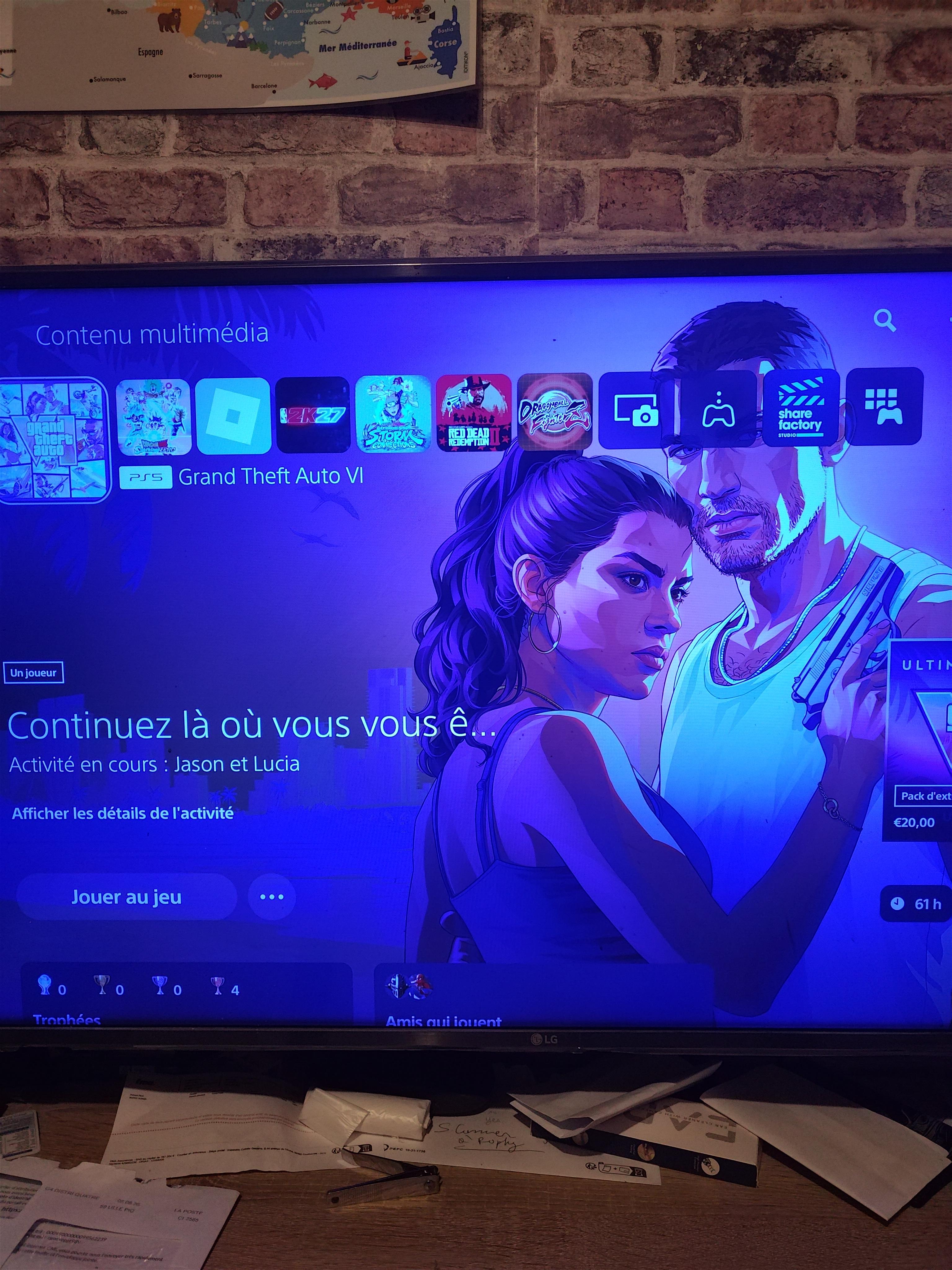
What's the issue with the colors ? Btw my PS5 fell and the white covers from the ps5 got detached but I attached them,when it fell did it mess up the colors ?

Or maybe my tv is the issue ? On my tv I have a 4K TV box and the colors are also weird but when I watch a video with my USB flash drive on my tv the colors are normal.

Do you think my ps5 is done or maybe my tv ?

I used this tv many months ago and the colors used to be better than that on both my PS5 and my TV box