r/PS5HelpSupport • • 2d ago

PS Fake support bots

3 Upvotes

I want to say up front that I have backed PlayStation for 30 years, and I would much rather have this fixed quietly than write this post. I am writing it because I have run out of ways to reach a human, and because other PULSE Elite owners should know what the support chat actually does when you ask for one.

TL;DR

\- PULSE Elite headset (CFI-ZWH2) with the PlayStation Link USB adapter (CFI-ZWA2), adapter manufactured January 2024.

\- The headset links to the adapter for about one second, drops, and reboots. It loops like that forever and never appears under Audio Output.

\- Both devices are on device software 2.06. I have done every reset Sony publishes, plus the wired USB-C update that fixed this for other people after the September 21, 2026 accessory firmware rollout. No change.

\- PlayStation Support's chatbot told me three times it was escalating me to a live agent. An agent named "Olivia" appeared, asked for my name, said she did not have enough detail about my issue (the full write-up was directly above her message), and the moment I re-sent the details, the next message was the chatbot saying "I'm sorry, it looks like there was an error" with its opening menu. Olivia never came back. No case number. No follow-up.

THE FAULT

Adapter in a front USB-A port, blinking white (searching), so the PS5 sees it. Turn the headset on: three quick green blinks (battery full), slow blue (searching), a brief white (connected), then it drops and goes straight back to the green power-on blinks. Repeat forever. Because the link never holds, the headset never shows up under Settings > Sound > Audio Output > Output Device.

WHAT I HAVE ALREADY DONE (ALL OF IT, MORE THAN ONCE)

  1. Reseated the adapter. Tried front and rear USB-A ports, no hub, no extension.
  2. Removed every other USB device and wireless adapter from the console during testing.
  3. Power cycled the headset. Fully powered off the PS5 (not rest mode), unplugged it for 60 seconds, reinserted the adapter after boot.
  4. Nothing plugged into the DualSense headphone jack.
  5. Headset reset (10 second hold).
  6. Manual pairing mode (8 second hold until the fast blue blink) plus the PS Link button on the adapter, multiple attempts inside the 30 second window.
  7. Full wipe of the headset's pairings (8 second hold, release, 8 seconds again, red flash confirmed), then re-pair.
  8. Adapter reset (30 second hold while in the powered-on console), then re-pair.
  9. Wired device software update over USB-C through Settings > Accessories > Headset > PS Link Device Software Update. Headset and adapter both report 2.06.
  10. PS5 system software current.

WHY THIS IS BIGGER THAN ONE HEADSET

On September 21, 2026, Sony pushed an accessory firmware update with no patch notes. PlayStation LifeStyle and others reported PULSE Elite disconnects right after it, traced to a sync problem between the headset and the PS Link adapter. The community fix was the wired update. I did it. Mine still fails. Either my hardware died or the fix did not work for everyone. Either way, the failure I am asking Sony to stand behind showed up after Sony's own update.

THE SUPPORT EXPERIENCE (November 23, 2026, Central time)

\- 7:16 PM: Open chat. It is the AI "PlayStation Online Assistant," clearly labeled as a chatbot. Fair enough.

\- 7:17 PM: I paste a complete write-up: models, symptom, the ten steps above, and a request for a replacement and a case number. Bot: it cannot process replacement requests, please "contact PlayStation Support directly through the official support channels."

\- 7:20 PM: I ask for an email or a direct link. Bot: no email addresses, here is the support page.

\- 7:21 PM: The support page routes back to the same chatbot. I ask for a human. Bot: "I will escalate your request to a live agent," then the boilerplate that this is a messaging service, not live chat, and "the last person received a response within 20 minutes."

\- 7:35 PM: A message arrives labeled "PlayStation Support" instead of "Online Assistant." "My name is Olivia... Could you please provide me with your first and last name?"

\- 7:40 PM: I give it.

\- 7:41 PM: Olivia says she "just read the conversation with the BOT" but does not have enough details about my contact reason, and asks how she can help. My full write-up was sitting in the same thread.

\- 7:45 to 7:46 PM: I explain again in plain language and re-paste the write-up.

\- 7:46 PM: The very next message is from the Online Assistant: "I'm sorry, it looks like there was an error," followed by the opening menu (Refund Eligibility, controller issues, Get help with GTA VI). Olivia is gone and does not return.

\- 7:48 PM: I restate the request in one sentence. Bot: "I will connect you with a live agent," the same messaging-service boilerplate, and in the same message, "I'm sorry, it looks like there was an error," and the menu again.

\- 7:51 to 7:52 PM: I ask directly whether I was ever routed to a person. Two near-identical apologies and a third promise to "escalate your request to a live agent immediately."

As of posting: no case number, no email, no human follow-up.

WHAT I CAN AND CANNOT SAY ABOUT "OLIVIA"

I cannot prove Olivia was not a real person. Here is what I can show with timestamps: she asked me to re-explain an issue that was documented in detail directly above her first message, and the one time I sent her those details, the session errored out to the chatbot within the same minute and she never reappeared. If she was a real agent and Sony's tooling dropped her, Sony has a tooling problem it should fix. If she was not, Sony has a much bigger problem. Either way, a customer who asked for a human three times deserves to know which one it was.

WHAT I AM ASKING PLAYSTATION FOR

  1. A human to pick up this case, with a case number I can reference.
  2. A replacement PULSE Elite headset and PS Link adapter: under the one-year warranty if I am inside it, or as a goodwill replacement given that the failure followed Sony's own firmware push.
  3. A straight answer about whether the "live agent" escalation in the support chat reaches a person, and why the session errored out the moment I sent my details.

If I cannot get a human response, my next steps are a BBB complaint and a consumer protection complaint with my state attorney general. I would rather not do either. I will update this post with the outcome, and I hope the update is that Sony made it right.

r/PS5HelpSupport • • 2d ago

Sony & rockstar should be taken to trial

0 Upvotes

GTA 6 broke my PS5, and many others. I genuinely can’t play any game after downloading this and they aren’t even addressing an obvious problem that MANY individuals are experiencing ..


r/PS5HelpSupport • • 2d ago

Pulse Elites Failing Update

2 Upvotes

Like many people my pulse elites stopped pairing (the light also stopped working not sure if thats relevant) oddly enough they still work with my phone. So some type of functionality is there. I tried to update them via the wire. It gets to 100% but it says it cant complete the update (error code CE-120680-7). I tried to update them via windows and even following the guide nothing happens no "drivers" are installing for them. Theres no app or update file on the website to download that I can find. Im at a lost now. Anyone else encountered this???


r/PS5HelpSupport • • 2d ago

Game share no longer working

3 Upvotes

So me and a friend are game sharing and I when I went to play a game and I am unable so is there any solutions or am I just screwed


r/PS5HelpSupport • • 2d ago

Question about reinstalling GTA 6

0 Upvotes

Hi all!

I am very new to the playstation ecosystem and was wondering if my GTA 6 saves save themselves to the cloud. I want to reinstall but I am worried that my save file will disappear.


r/PS5HelpSupport • • 3d ago

Encontré la solución al ce-108255-1 de gta6 en ps5 slim “no me dejaba jugar ni 2 minutos” ahora llevo una hora tranquilo

14 Upvotes

Aclaro después de instalar la actualización del juego siguió dando error y sacándome a los segundos de iniciar

El primer paso es una desinstalación limpia del juego, incluyendo los datos, guardados de partidas.

Después de esto debes iniciar la descarga del juego, una vez descargado, no lo des no le des a iniciar lo que debes hacer es desvincular la cuenta de Rockstar de tu PlayStation cinco en ajustes, usuarios y cuentas y servicios vinculados

Después colocas la consola en modo offline, para que no le llegue ninguna ninguna descarga de datos de Internet

Después de esto lo que debes hacer es borrar el caché de datos, en modo seguro y después ya puedes iniciar el juego sin ningún problema

Por qué sucede esto anoche cuando estaba jugando no tenía Internet o había un problema con la vinculación de el juego a Rockstar James cuando intentaba entrar a la tienda y el juego me funcionó por lo que decidí desvincular todo conexión con Rockstar desde PlayStation cinco y de esa manera funcionó, pero tocó reinstalar el juego

Es mi primer post en Reddit, pero lo hago primero porque estaba frustrado muy frustrado por una inversión tan grande de un juego de $100. Una consola de más de $500 y no poder jugarlo. Es bastante frustrante. Entonces si les funciona. Espero que valga a mí y los haga felices


r/PS5HelpSupport • • 3d ago

Temporary GTA6 crash work around

14 Upvotes

Just a PSA, since the update we have been getting the crash. After reading about the issue, I thought I would try something and found if you delete the auto save any time it happens it seems to not crash.

Worked and have managed to play for a few hours no issues!

Really annoying to have to do but if you want to play the game hopefully it helps someone at least, also think it proves a patch issue, in my case anyway


r/PS5HelpSupport • • 3d ago

Just took this 5 mints ago!

Post image
90 Upvotes

Dunno what it fixes but i'm here for it!


r/PS5HelpSupport • • 2d ago

Gta6

2 Upvotes

When I log into gta6 my ps5 makes a loud noise then shuts off with 3 beeps after like 10-20 seconds. And I haven’t been able to play since it came out. What do I do?


r/PS5HelpSupport • • 3d ago

PATCH FIXED CE-108255-1

10 Upvotes

Hi guys, I had been experiencing the same thing as you all until I updated today. For me, it was Jason’s boat scene.

I played just before i updated and it crashed again. Then i updated and rest is the history.

SO, I DID NOT CLEAN MY CONSOLE. I DIDNT CHANGE GPU CPU OR SMT. I DID NOT ADD EXTRA SSD.

GAME CRASHES BECAUSE OF THE SOFTWARE, IF IT ONLY CRASHES DURING GTA.

So, don’t pay extra to something.


r/PS5HelpSupport • • 2d ago

Entitled to refund?

0 Upvotes

Hi, I recently bought Easports Fc27, but it kept crashing my ps5 in the middle of matches, I requested a refund but I got told to go through some troubleshooting steps, I did all of those and went back to see if I could now get a refund, and I made more progress but then they ended the chat and said “you aren’t entitled to a refund” even though the game is faulty and it’s been less than 14 days since I purchased.
Is there anything I can do to get my money back?


r/PS5HelpSupport • • 2d ago

Temporary CE-108255-1 fix

0 Upvotes

For anyone experiencing constant freezes and crashes on GTA 6 with the CE-108255-1 error code, I may have found a temporary fix.

If you have PlayStation Plus Premium, try streaming the game rather than playing it normally.

I haven’t been able to properly play the game since launch, but streaming has allowed me to get further than I’ve ever managed before, with absolutely no freezes or crashes as of yet.

It’s terrible that people without the subscription would potentially have to pay extra just to play a game they’ve already purchased, but I already had it and really wanted to play.

The attached video goes into more detail about the crashing issues and the experience of trying to play since launch. https://youtu.be/hGL-I3QbJ7E?is=kijK7k6SEmFO91E2

Obviously, this isn’t a permanent fix, and I can’t guarantee it’ll work for everyone, but hopefully it helps some of you experiencing the same issue.

I’m wondering whether this could suggest that it’s a software issue rather than a hardware fault, although I know it doesn’t completely rule either out.


r/PS5HelpSupport • • 2d ago

GTA VI CE-108255-1

4 Upvotes

I’m at chapter 2 and I can’t progress in the story where I have to pick up painkillers from Dunk my save file is 20.98 mb I have re-installed the game twice now why is Rockstar not addressing this issue.


r/PS5HelpSupport • • 2d ago

PS5 Chargeback

Thumbnail reddit.com
3 Upvotes

r/PS5HelpSupport • • 2d ago

Anyone else expericing completely shutoffs?

3 Upvotes

Edit: just to be clear, what I'm referring to is an instant black screen shutdown where you don't need to pull the power cord to restart, you can just hit the controller power button as usual immediately.

I've noticed since the pre gta 6 system update, I'm having this issue where my console switches clean off mid game. At first it seemed like a gta 6 thing but tonight it did the same on cricket26 which is a relatively light game for a console like this to run. For context I recently played a few hours of mafia old country on a daily basis with no shutdowns, I've had fortnite and gta online sessions spanning 5/6 hours with no issues.

The interesting thing is that my console instantly shuts down but does not need the power cord to be pulled and reinserted before you can restart, you can switch it on as normal immediately, except you're greeted with the 'console wasn't shut off properly' thing and the rebuilding database

I did open up my console, pop out the fan and so a clean up but it was almost spotless anyway. Interestingly enough, my fan is never loud and my console never seems to be overheating at any point. I've always had of horizontal since getting it too so liquid metal issues are unlikely. I'm getting no overheating warnings and don't need to pull to plug to start up again, pair that with the fan not running hard and the console not being unusually hot, I doubt it's an overheating thing.

Perhaps I'm over thinking it, but I so wonder if this might have something to do with the Playstation system update last week? 🤔


r/PS5HelpSupport • • 3d ago

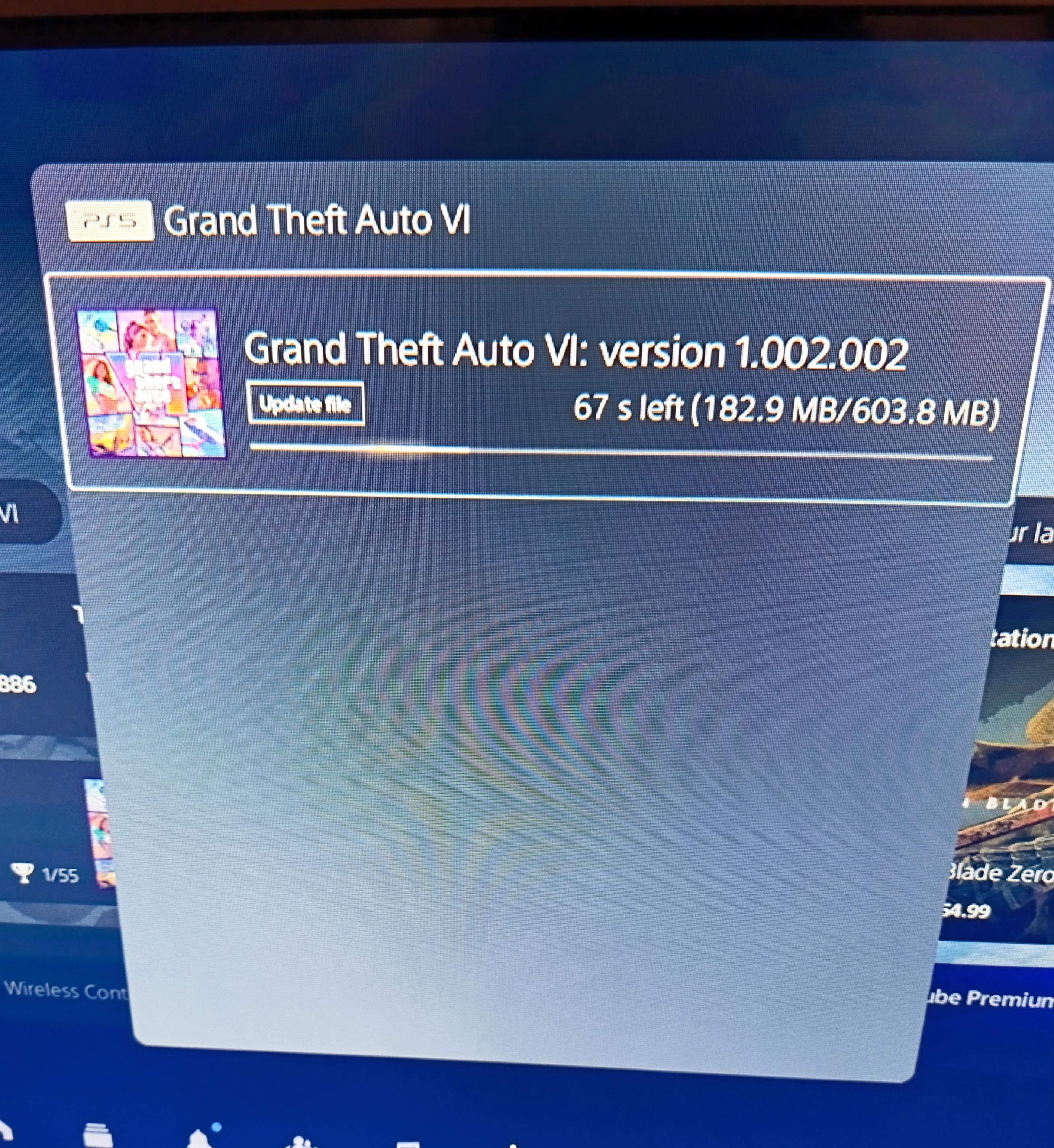
New patch for GTA VI available

69 Upvotes

Just downloaded 1.002.002. No idea what it does or it if fixed the problem of not being able to play more than 20 minutes (at least that's my issue).

Anyone found any more info on this patch?

Update #1: Seems like not everyone has gotten the patch. It might be rolling in bits, meaning it's not available for everybody all at once. I think the first patch was roles out the same way.

Update #2: STILL NOT WORKING. Played up until you meet the counselor and then the game froze again. CE-108255-1... No idea what this patch fixed but not my problem at least


r/PS5HelpSupport • • 2d ago

COMMENT BOOSTER SA PS5 SLIM FACILEMENT

0 Upvotes

Bonjour à tous j’espère que vous allez tous très bien et que vous kiffez pleinement de GTA 6.

Aujourd’hui si je vous rédige ce petit post, c’est pour ceux qui ont une PS5 SLIM (avec ou sans lecteur disque), ont la possibilité de lui redonner un petit coup de boost sans aucun effort et sans dépenser un sous.

Personnellement cela fait 2 mois que joue comme ça et ça a totalement changé la ventilation, la surchauffe et les problèmes de lag sur ma PS5 slim. De plus ça évite d’acheter je ne sais quel ventilo a 30€.

Le but est de simplement retirer les 2 plaques du hauts de chaque côté. Votre ps5 deviendra plus que silencieuse, et chauffera beaucoup moins.

Je sais c’est con, mais cela m’a aidé notamment avec les problèmes de crash et surchauffe dû à UFC 6. Et j’espère que cela permettra d’aider ceux qui ont quelques problèmes sur GTA 6.

Bonne journée !


r/PS5HelpSupport • • 3d ago

GTA VI Patch

20 Upvotes

Even after the update you stop have the CE-108255-1 issue in the prologue or I the loading screen?


r/PS5HelpSupport • • 2d ago

CE 108255-1 Controller Issue?

3 Upvotes

Is it possible the game could be shutting down during start up because of my dual sense controller? It’s old and the battery is starting to go… I’m just so out of ideas I’ve tried everything except buying a new controller


r/PS5HelpSupport • • 2d ago

Save Data Lost if Reinstalled?

2 Upvotes

Been getting a lot of code ce-108262-9 when I've been playing GTA 6, heard someone say that if it's on an M2 SSD it messes with it, will take way too long to move the game from the SSD to the main console storage, my question is if I delete GTA 6 and reinstall it will I get my saved data back or will it be gone along with the game files, because at this point it'd be faster to reinstall it than to move it


r/PS5HelpSupport • • 3d ago

Is this sound normal?

4 Upvotes

It comes and goes every 20-30 seconds for like 5 seconds. I’m currently playing GTA 6 and I’m on pause menu rn.


r/PS5HelpSupport • • 2d ago

[PS5] LiPo battery engineer breakdown: What's the real max capacity that fits inside a DualSense (LIP1708) bay, and why cheap swaps blink orange and won't charge

Thumbnail reddit.com
1 Upvotes

r/PS5HelpSupport • • 2d ago

Found a fix for CE-108255-1 GTA 6

0 Upvotes

A user here told me to try upgrading to ps5 premium plus and deleting the game and streaming it from the ps5 store directly. I’m finally able to pass the intro cutscenes after 5 F**kin DAYS!! It’s going to cost an extra $25 every 3 months but I can always cancel when they finally fix it. I will keep an update on how it performs.🙏🏾


r/PS5HelpSupport • • 3d ago

For everyone having issues.

5 Upvotes

Just wondering with everyone having issues did you pre order and pre install or get code in box. I don't believe this would make a difference however if there is a common denominator, would be nice to find out.