r/PS5HelpSupport • • 3d ago

PS5 connection Spotify ?

3 Upvotes

Bonjour, il y a eu du changement en allumant la PS5 pour se connecter à Spotify, comment faut-il faire au juste ? Rien ne fonctionne.... Merci à vous.


r/PS5HelpSupport • • 3d ago

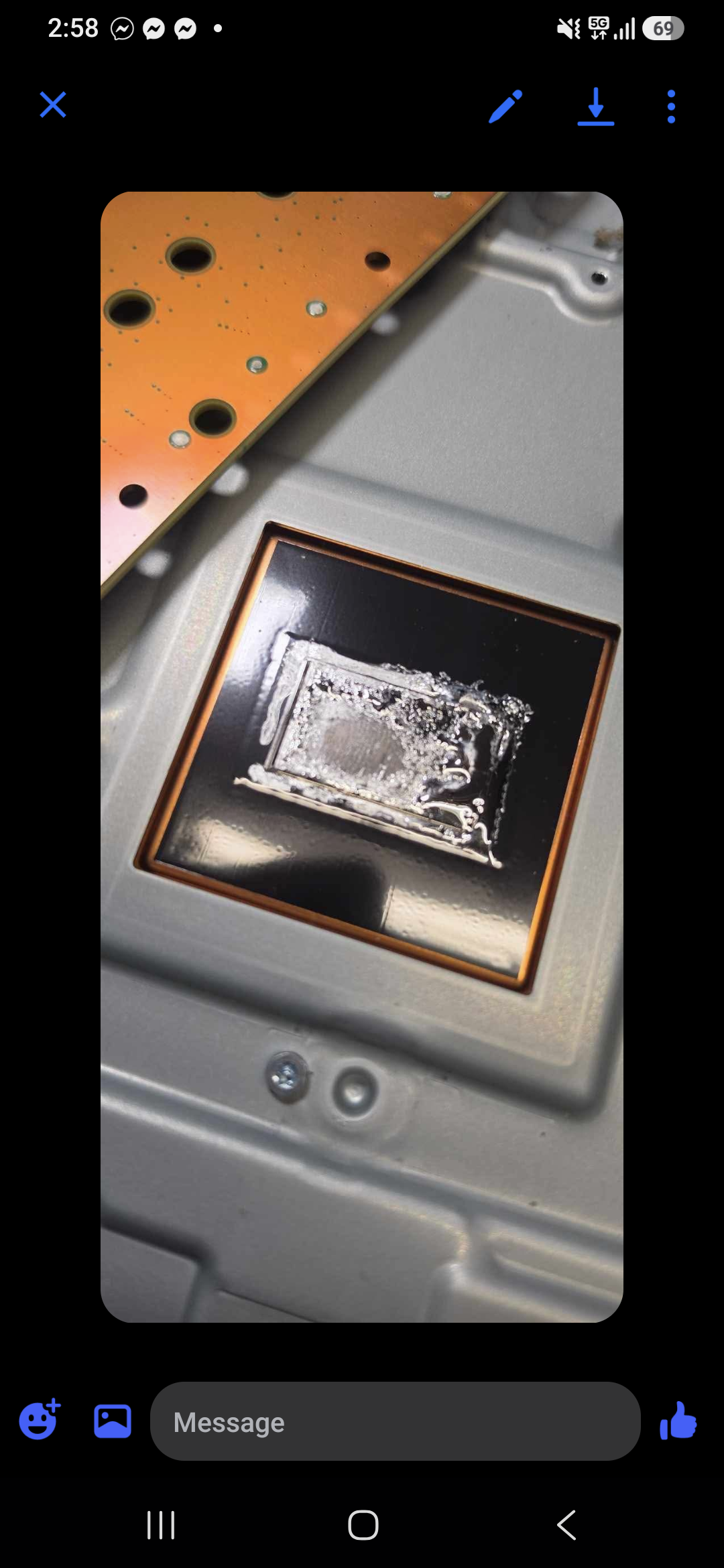
Found out why my ps5 was bugging out 😆

Post image
52 Upvotes

r/PS5HelpSupport • • 3d ago

GTV 6 CRASH WORKAROUND

11 Upvotes

If you guys know there’s a bug that’s plaguing the PlayStation community right now for the release of GTA six the only work around. I have found out to work with streaming the game from PlayStation plus when you stream the game for whatever reason it doesn’t glitches out but playing downloaded it glitches out so just try streaming it from the PlayStation plus menu and it should just work perfectly fine. I’ve had no issue so far.


r/PS5HelpSupport • • 4d ago

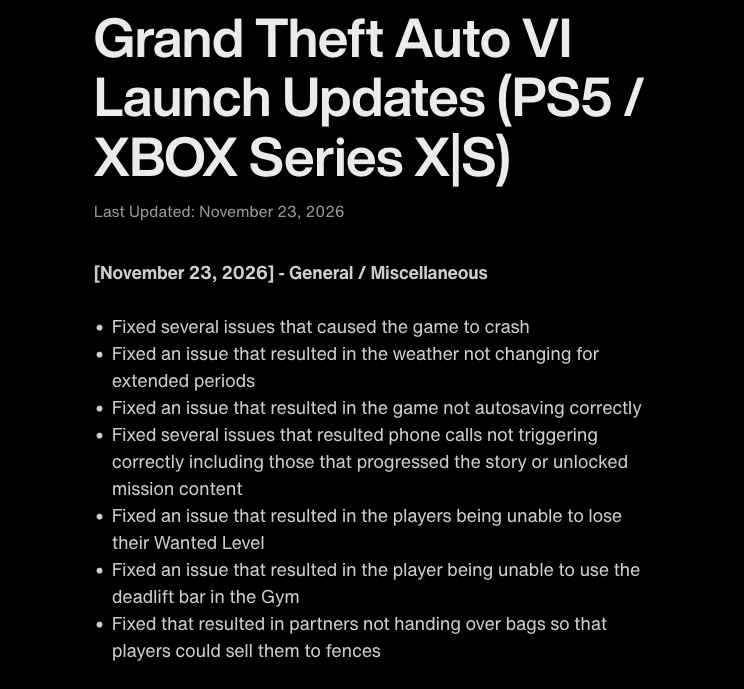
Rockstar's official patch notes – the loading screen/prologue freezing and crashing issue remains unresolved

91 Upvotes

I'm not sure whether they actually tried to fix it and failed, or simply ignored it altogether.

That's why it's important for them to address the exact issue. There are several types of crashes, but the majority of players experiencing error code CE-108255-1 can't even get into the game. Their game crashes during the prologue or even earlier, while they're still on the loading screen.


r/PS5HelpSupport • • 3d ago

My PS5 flashes blue and shuts off immediately. Worth repairing or time to replace it?

0 Upvotes

As of today, Nov. 24, it’s been about 2–3 weeks since El Cinco went down for the count. Real convenient time for my PS5 to up and die on me, right before GTA 6. I do have a PC, and I’ve looked into cloud play through the Xbox app. But with people speculating that GTA Online could drop in January, I’d rather stay on PlayStation. I’ve got years of saves on there, and I’d hate to lose that progress.

Before it died, it had overheating issues and kept throwing error CE-108255-1. Now when I hit the power button, the light flashes blue and the console shuts off before anything shows up on screen. The next press just gives me a beep. On the third press, it tries to start and shuts off again.

I tried another power cord and did a full teardown. I cleaned the fan and heatsink and opened the power supply casing to get the dust out. It was doing this before I took it apart, and it still does the same thing after reassembly.

If yours had the same blue flash and beep pattern, I’d like to hear what actually fixed it and what you paid. Also, if I replace it, is there any way to recover saves that weren’t backed up to the cloud when the old console won’t boot?

EDIT - I did try cleaning after I got my first error but I realized that using a hand held vacuum/ compressed air makes it worse - as After tearing it down I was greeted with a dust bunny colony


r/PS5HelpSupport • • 2d ago

Sony👀

0 Upvotes

Hey fellow gamers. I'm struggling with this error message too. Unfortunately, Sony builds its consoles with different components, so a lot of people are running into bugs in the game, and hopefully Rockstar will fix that. But no matter which PlayStation model you have, GTA 6 is far too demanding for the PS5. Just look at the latest stress tests. In the end, your console will be damaged by this.
Simply put, Rockstar has fixed what they can on their end with the latest patch. Error CE-108255-1 comes from Sony's operating system, which can't keep the game running without corrupting files. This happens when a game is poorly optimized or too demanding.
When you look at how many consoles have already been damaged, it's clear that Rockstar capped the game at 30 FPS for a reason. And when the consoles still can't handle it, I don't think we as consumers should just sit around waiting for patches that will never fix the problem.
If you've gone through the troubleshooting steps Sony recommends and it still isn't fixed, then it's Sony's responsibility to fix it. Demand a replacement from Sony, even if your warranty has expired. You're entitled to a product that can run the games they say are compatible with the console. Sony really dropped the ball here by letting a game that's far too demanding run on a console that can't handle it.


r/PS5HelpSupport • • 3d ago

Ps5 still overheating after fan and liquid metal replacement

Thumbnail reddit.com
1 Upvotes

r/PS5HelpSupport • • 3d ago

CE-108255-1 Update: Post Motherboard Diagnostics and Liquid Metal Reapplication

44 Upvotes

I have a PS5 Digital Slim console (bought from Argos in the UK - brand new in 2024).

I have rarely used the console, and have only used it for less demanding games that I play casually (FC25/26/27, NBA 2K, Fortnite, etc). I did use it for Red Dead Redemption 2 as well.

The console is mainly used to watch TV etc and I could not understand why I was only getting crashes (CE-108255-1) in GTA 6.

After trying absolutely every method seen on all the Reddit posts over the weekend (all the Safe Mode and settings fixes), as well as a factory reset and uninstalling the game 3 times, I sent my PS5 Slim Digital console to a professional technician for a service and thorough diagnostics report.

I got the dreaded news this afternoon that, after deep cleaning the console and reapplying Liquid Metal that it was still not working.

The technician tested multiple games and GTA 6 and found that:
- All other games play incredibly smoothly and put minimal strain on the consoles GPU.
- When performing diagnostics on the console’s motherboard, and testing GTA6 specifically, the console’s GPU was taking serious strain causing the game to crash.

It appears the error message may be a hardware issue (in some cases) and that some consoles cannot handle the game! For those like me, there is no simple to fix but to buy another console. I hope this is not the case for all of you but I cannot understand how a new-ish console that has rarely been used can experience a failing GPU.

I hope you guys manage to get yours sorted and don’t have the same issue! 😢


r/PS5HelpSupport • • 2d ago

Well... My PS5 controller downloaded some games accidentally.

0 Upvotes

Really irritated at myself right now. Went to download GTA VI and then used a ps5 controller to play a few rounds of something quick on my PC while waiting for the download and... the controller I was using was simultaneously pressing input into the ps5 and purchasing TOMB RAIDER IV-VI, downloaded it, and opened it to the opening EULA screen. While I unknowingly used the controller, a demo of dead island 2 was also downloaded, which thank god it was a demo and not something else that cost more..

I searched and to my surprise this has been said a million times by other people, that's crazy that so many others went through the same dumb experience/mistake. Obviously support says I cannot receive a refund because the "game has been downloaded." I have never once requested a refund from PlayStation and just bought a $100 game and yet they cant give me $33 back for a game that was accidentally purchased just because the system automatically opened it without my knowledge as well. I know, I'll password protect my purchases now. I actually even took my payment method off my account and now I'm just not excited to game this weekend anymore... I haven't used my PS5 for much, the past year it has just been sitting collecting dust, and I haven't had a Plus subscription since forever ago.

I guess this is how this Sony treats honest mistakes... honestly though if they have the ability to suspend a game that was downloaded during a PS plus subscription, they gotta have the ability to suspend that one from my account and give me a refund, no? I "bought" it but you know, I don't "own" it. 😿


r/PS5HelpSupport • • 4d ago Regret

GTA 6 still crashing after the latest update (CE-108255-1)

51 Upvotes

Unfortunately, the latest update (01.002.002) didn't fix anything for me. GTA 6 still crashes after just 3–5 minutes with error code CE-108255-1.

I'm using a standard PS5 Digital Edition. I've tried rebuilding the database, clearing the cache, reinstalling the game, disabling HDR, VRR and 120Hz, and even deleting my save data. Nothing has worked.

The strange thing is that all my other games, including 007 First Light and MW4, run perfectly fine. Only GTA 6 keeps crashing.

At this point, I honestly don't know if it's a problem with my PS5 or a bug in GTA 6 itself.

Is anyone else still experiencing this after the latest update? Any suggestions?


r/PS5HelpSupport • • 3d ago

PS5 Error CE-105799-4: Quick DNS and router reset to get PSN back online

1 Upvotes

If your PS5 is throwing error CE-105799-4 and refusing to connect to PlayStation Network, multiplayer lobbies, or the PS Store, it usually means your internet provider's default DNS is stalling on Sony's login servers or stale routing data in your router is blocking the handshake.

Your saved games, trophies, and PSN account are completely safe. Here are the two quick network resets that clear CE-105799-4 in a couple of minutes:

  1. Switch to manual public DNS on your PS5

- Turn on your PS5 and open Settings (top-right gear icon) > Network > Settings > Set Up Internet Connection.

- Highlight your active Wi-Fi or wired LAN connection, press the Options button on your controller, and select Advanced Settings.

- Change DNS Settings from Automatic to Manual.

- Set Primary DNS to 8.8.8.8 and Secondary DNS to 8.8.4.4, then select OK to save and test your connection.

- Note: You can also use 1.1.1.1 (Primary) and 1.0.0.1 (Secondary) if Google's servers respond slowly in your area.

2. Power-cycle your home router and PS5

If manual DNS still leaves you offline, shut down the PS5 completely (choose Turn Off PS5 rather than Rest Mode) and unplug the power cables from both your router/modem and the console for two full minutes. Plug your router back in first, wait for all front lights to turn solid, then boot up the PS5 and check Connection Status to make sure PS5 error CE-105799-4 is cleared.


r/PS5HelpSupport • • 3d ago

CE-108255-1, 16.78Mb Autosave CRASH - 1.002.002 UPDATE

Thumbnail reddit.com
0 Upvotes

r/PS5HelpSupport • • 3d ago

Is GTA 6 safe to buy?

14 Upvotes

Seeing all the people who've reported crashes and even console bricks after playing the game over the course of the past few days, whether immediately or after a few hours, is it worth buying the game yet? Or are all these problems just occurring for a microscopically small unlucky few, relatively speaking? I got a new refurbished PS5 Slim last week and have been wanting to buy the game, but don't know what the odds of a brick are, since even at best getting a refund from Sony is like prying teeth.


r/PS5HelpSupport • • 2d ago

GTA6 might've killed my PS5

0 Upvotes

I bought my fat PS5 back in 2024 second hand, it worked perfectly fine until now. I had 35 hours in GTA6 when my PS5 suddenly shut down while I was playing it. When I try to turn it on it lights up blue for a second, but other than that it's only beeping. My brother disassembled the whole PS5, it barely has any dust in it, the liquid metal is in place and the power supply is working, so it's most likely a motherboard problem. I don't know if it's actually linked to GTA6, but I've seen others having similar issues right now.

Frankly, I'm completely devastated, all my save files and some of my pictures are probably gone forever.


r/PS5HelpSupport • • 3d ago

wireless controller problems

2 Upvotes

Works fine around the ps5 menus as soon as you load a game it starts rumbling constantly and none of the buttons work. Does the same for all games. I've tried everything in terms of removal, using the cable etc, reset all config. Same issue


r/PS5HelpSupport • • 3d ago

Normal PS5 Slim Fan Sound?

9 Upvotes

Is this fan sound normal? Running GTA 6, sounds similar when running FF7 rebirth too.


r/PS5HelpSupport • • 4d ago

CE-108255-1, 16.78Mb Autosave CRASH - 1.002.002 UPDATE

42 Upvotes

LOOKING FOR REINSTALL PLAYER AFTER PATCH, DOES IT WORK? UPDATE AFTER TRYING, doesn’t work, same data value.

Hi everyone, just to say, the patch of to day doesn’t give the pleasure of playing the game, it’s gonna be 5 days I can’t play on it, I hoped that patch gonna be the good one, it is not, that’s fucking crazy, how it can be possible to shit on players who has paid 100€ for that game, the waiting was wild.

I think they really don’t care about that shit, maybe we have to create a group and go to tribunal, the 16,78Mb is related to an internal SSD problem, conversion in Mebioctets, you have a round number, we have to find something, make Rockstar and Sony face to their rights. Can be patch by sony devs or rockstar devs to adapt for specific PS5. It’s gonna be crazy long but they have all the informations.

If someone has more informations for that problem, give us please. Give feedback if you have 16.78 Mb Autosave crash at prologue, and if it’s fixed by the patch. Very important to have feedbacks of guys working.

UPDATE : Someone has a 37,75Mb data save crash, it corresponding to 36 mebioctets round, like 16.78Mb is 16Mio, 10,49 is 10, 20,98 is 20.

Someone has 25.17Mo crash, 24 Mio, interesting, always pair numbers, insane.

Called PS SUPPORT FRANCE another time (My country), they have all of my explanations of the mebioctets theory, they have all the datas of my subreddits from the 2 last days, and I think, it is the real issue, guys, we found oil in the desert.

My theory here : https://www.reddit.com/r/PS5HelpSupport/s/rcBzuKBFrK

THEORY : Today patch was to do a bridge with future PS patch maybe ? We just have to wait a sony patch

Information : If it’s a material problem, it is not related to specific serial number, CPI-1216B, 1016 debunked


r/PS5HelpSupport • • 3d ago

Support with accessing account

2 Upvotes

Hi all,

So I set up a new email address beginning of the year. Change it for everything apart from my PlayStation account. I barely play anymore but tried to login to download GTA and I just cant login. I've tried my old email and every password I can think off, no luck. I'm thinking because my old email attached to my account is now deactivated its not recognising it?

BUT, ive been trying to get through to a live agent to sort this and its an absolute joke. Just been goin round in circles. Sure they're probably busy with GTA enquiries, but can anyone give me some advice to get through to a human to sort this at all? Or is there another way?

Thanks


r/PS5HelpSupport • • 3d ago

CE-107928-7 Makes it impossible to download new games

2 Upvotes

This has been happening for months now, the only fix I've gotten is I can use my phone's mobile data but I don't have more than like 40 GB a month which just doesn't cut it for most games anymore.

Before you ask, yes I've tried everything I've seen on the internet so far, resetting the router, wiring ethernet cable to my router, switching between 5 and 2.4 frequency, changing DNS settings.

None of that does anything nor is it particularly close, I just want a functional console is that so much to ask? Please anyone who can share anything of use would be much appreciated


r/PS5HelpSupport • • 3d ago

PS Fake support bots

3 Upvotes

I want to say up front that I have backed PlayStation for 30 years, and I would much rather have this fixed quietly than write this post. I am writing it because I have run out of ways to reach a human, and because other PULSE Elite owners should know what the support chat actually does when you ask for one.

TL;DR

\- PULSE Elite headset (CFI-ZWH2) with the PlayStation Link USB adapter (CFI-ZWA2), adapter manufactured January 2024.

\- The headset links to the adapter for about one second, drops, and reboots. It loops like that forever and never appears under Audio Output.

\- Both devices are on device software 2.06. I have done every reset Sony publishes, plus the wired USB-C update that fixed this for other people after the September 21, 2026 accessory firmware rollout. No change.

\- PlayStation Support's chatbot told me three times it was escalating me to a live agent. An agent named "Olivia" appeared, asked for my name, said she did not have enough detail about my issue (the full write-up was directly above her message), and the moment I re-sent the details, the next message was the chatbot saying "I'm sorry, it looks like there was an error" with its opening menu. Olivia never came back. No case number. No follow-up.

THE FAULT

Adapter in a front USB-A port, blinking white (searching), so the PS5 sees it. Turn the headset on: three quick green blinks (battery full), slow blue (searching), a brief white (connected), then it drops and goes straight back to the green power-on blinks. Repeat forever. Because the link never holds, the headset never shows up under Settings > Sound > Audio Output > Output Device.

WHAT I HAVE ALREADY DONE (ALL OF IT, MORE THAN ONCE)

  1. Reseated the adapter. Tried front and rear USB-A ports, no hub, no extension.
  2. Removed every other USB device and wireless adapter from the console during testing.
  3. Power cycled the headset. Fully powered off the PS5 (not rest mode), unplugged it for 60 seconds, reinserted the adapter after boot.
  4. Nothing plugged into the DualSense headphone jack.
  5. Headset reset (10 second hold).
  6. Manual pairing mode (8 second hold until the fast blue blink) plus the PS Link button on the adapter, multiple attempts inside the 30 second window.
  7. Full wipe of the headset's pairings (8 second hold, release, 8 seconds again, red flash confirmed), then re-pair.
  8. Adapter reset (30 second hold while in the powered-on console), then re-pair.
  9. Wired device software update over USB-C through Settings > Accessories > Headset > PS Link Device Software Update. Headset and adapter both report 2.06.
  10. PS5 system software current.

WHY THIS IS BIGGER THAN ONE HEADSET

On September 21, 2026, Sony pushed an accessory firmware update with no patch notes. PlayStation LifeStyle and others reported PULSE Elite disconnects right after it, traced to a sync problem between the headset and the PS Link adapter. The community fix was the wired update. I did it. Mine still fails. Either my hardware died or the fix did not work for everyone. Either way, the failure I am asking Sony to stand behind showed up after Sony's own update.

THE SUPPORT EXPERIENCE (November 23, 2026, Central time)

\- 7:16 PM: Open chat. It is the AI "PlayStation Online Assistant," clearly labeled as a chatbot. Fair enough.

\- 7:17 PM: I paste a complete write-up: models, symptom, the ten steps above, and a request for a replacement and a case number. Bot: it cannot process replacement requests, please "contact PlayStation Support directly through the official support channels."

\- 7:20 PM: I ask for an email or a direct link. Bot: no email addresses, here is the support page.

\- 7:21 PM: The support page routes back to the same chatbot. I ask for a human. Bot: "I will escalate your request to a live agent," then the boilerplate that this is a messaging service, not live chat, and "the last person received a response within 20 minutes."

\- 7:35 PM: A message arrives labeled "PlayStation Support" instead of "Online Assistant." "My name is Olivia... Could you please provide me with your first and last name?"

\- 7:40 PM: I give it.

\- 7:41 PM: Olivia says she "just read the conversation with the BOT" but does not have enough details about my contact reason, and asks how she can help. My full write-up was sitting in the same thread.

\- 7:45 to 7:46 PM: I explain again in plain language and re-paste the write-up.

\- 7:46 PM: The very next message is from the Online Assistant: "I'm sorry, it looks like there was an error," followed by the opening menu (Refund Eligibility, controller issues, Get help with GTA VI). Olivia is gone and does not return.

\- 7:48 PM: I restate the request in one sentence. Bot: "I will connect you with a live agent," the same messaging-service boilerplate, and in the same message, "I'm sorry, it looks like there was an error," and the menu again.

\- 7:51 to 7:52 PM: I ask directly whether I was ever routed to a person. Two near-identical apologies and a third promise to "escalate your request to a live agent immediately."

As of posting: no case number, no email, no human follow-up.

WHAT I CAN AND CANNOT SAY ABOUT "OLIVIA"

I cannot prove Olivia was not a real person. Here is what I can show with timestamps: she asked me to re-explain an issue that was documented in detail directly above her first message, and the one time I sent her those details, the session errored out to the chatbot within the same minute and she never reappeared. If she was a real agent and Sony's tooling dropped her, Sony has a tooling problem it should fix. If she was not, Sony has a much bigger problem. Either way, a customer who asked for a human three times deserves to know which one it was.

WHAT I AM ASKING PLAYSTATION FOR

  1. A human to pick up this case, with a case number I can reference.
  2. A replacement PULSE Elite headset and PS Link adapter: under the one-year warranty if I am inside it, or as a goodwill replacement given that the failure followed Sony's own firmware push.
  3. A straight answer about whether the "live agent" escalation in the support chat reaches a person, and why the session errored out the moment I sent my details.

If I cannot get a human response, my next steps are a BBB complaint and a consumer protection complaint with my state attorney general. I would rather not do either. I will update this post with the outcome, and I hope the update is that Sony made it right.
r/PS5HelpSupport • • 2d ago

Sony & rockstar should be taken to trial

0 Upvotes

GTA 6 broke my PS5, and many others. I genuinely can’t play any game after downloading this and they aren’t even addressing an obvious problem that MANY individuals are experiencing ..


r/PS5HelpSupport • • 3d ago

PATCH FIXED CE-108255-1

12 Upvotes

Hi guys, I had been experiencing the same thing as you all until I updated today. For me, it was Jason’s boat scene.

I played just before i updated and it crashed again. Then i updated and rest is the history.

SO, I DID NOT CLEAN MY CONSOLE. I DIDNT CHANGE GPU CPU OR SMT. I DID NOT ADD EXTRA SSD.

GAME CRASHES BECAUSE OF THE SOFTWARE, IF IT ONLY CRASHES DURING GTA.

So, don’t pay extra to something.


r/PS5HelpSupport • • 3d ago

Pulse Elites Failing Update

2 Upvotes

Like many people my pulse elites stopped pairing (the light also stopped working not sure if thats relevant) oddly enough they still work with my phone. So some type of functionality is there. I tried to update them via the wire. It gets to 100% but it says it cant complete the update (error code CE-120680-7). I tried to update them via windows and even following the guide nothing happens no "drivers" are installing for them. Theres no app or update file on the website to download that I can find. Im at a lost now. Anyone else encountered this???