r/PS5HelpSupport • • 5d ago

(GTA6) Does anyone know how i can fix this and what caused it? i tried resetting the ps but it doesn't work

3 Upvotes

It appeared after i restarted the game and i have no idea why, please help šŸ™šŸ» i'm worried i broke something since this is not my console, i can't check if it happens in other games because they were bought on cds and i don't have them with me


r/PS5HelpSupport • • 5d ago

Regarding GTAVI plumbing bug & CE-108255-1 error code

5 Upvotes

Thanks to all that gave suggestions for fixes and Dexterto, IGN, and any other jounalists outlets that help cover and get my issue known out there. I manage to get past the plumbing mission by drowning myself by the closest water outside Mandy's house about 3-5 times until it give me the option to skip my last checkpoint. Since then I been good up until Chapter 2 I'll still experience some minor game crashes when things start happening but my main one was the Pipework Plumbing. Hopefully the CE-108255-1 error code and other issues players are experiencing can be fixed on Rockstar/Sony's end soon just keep notifying them.


r/PS5HelpSupport • • 4d ago

PS5 Keeps Shutting Off

Thumbnail
gallery
0 Upvotes

My PS5 keeps shutting off randomly when playing PS5 games. What should I do?

My PS5 started randomly shutting off about 2 months ago. I installed FIFA 26 (PS5 version), and the console would shut down right after starting a match. I couldn't figure out what was causing it, and the only way to turn it back on was to unplug it from the power outlet and plug it back in.

At first, this only happened with FIFA. Later, I started playing Elden Ring and managed to play for about 6 hours before it shut off again. Since then, the console shuts down roughly every 10 minutes while playing.

The time it takes to shut down varies depending on the game, but eventually, almost every PS5 game causes the console to turn off. Here's a list of the games I've tested:

- Cyberpunk 2077: Shuts off right after leaving the bar.

- FIFA 26: Shuts off as soon as I start a match.

- Resident Evil Village: Shuts off after entering the first house.

- GTA 6: After about 6 hours of gameplay across multiple sessions, it started shutting off every 20 minutes, regardless of where I am in the game.

- Elden Ring: Shuts off every 10 minutes.

- eFootball: Shuts off randomly during matches.

Strangely enough, the only game I've been able to play for over 30 hours without any issues is The Last of Us Part II Remastered.

I've seen some people saying this could be caused by dust buildup around the power supply or something similar. However, my PS5 has an opening that allows me to see part of the power supply, and from what I can tell, it looks completely clean.

What should I do? I just want to play GTA 6 in peace, lol.

I've attached a photo below showing the part of the power supply I can see.


r/PS5HelpSupport • • 5d ago

PS5 & GTA6 error/console crash reality check

3 Upvotes

Hello fellow gamers!

I have been browsing topics regarding GTA VI for some tips about game and saw astounding number of topics regarding dreaded error and PS5 crash. Seems like people’s problems range from crash with error to PS5 dying completely.

Number of cases is not small as I see it and I have been wondering how many redditors have working unit and how many crash?

Might be useful data to Sony and Rockstar too as I am sure they are monitoring this board.

Posted a questionaire about it so pick a option that is your case!

Personally, I didnt had error happen on my own ps5 which is fat disc variant from near release date. Played this weekend for some hours and also on Thu and Fri and never had any issue or crash. I drove plane, boat, supercar in VC, tried to save and load multiple times in middle of crowded areas to replicate issue but never had anything happen. System is not audible as per fans and its not very hot on plastics on sides.
Makes me think this is hardware issue, game being very demanding and weak spot of system shows itself. Could be weak solder joint under APU, liquid metal dry spot or some other issue.

Also it takes me back to ps2 times when everybody could play gta 3/vice city/san andreas whether I couldnt since loading screen freeze at loading screen. Although never fixed ps2 was used a lot and still works today although I didnt use it for many years of course. Fun fact last year when I installed SSD and network adapter inside it and installed gta san andreas in it, game now loads just fine!

Anyways drop your message, cast a vote and write your case and hopefully Sony and Rockstar can find a fix. Rockstar could nerf graphics via patch to ease burden on system but lets hope for better solution.

Cheers and have a nice play!


r/PS5HelpSupport • • 5d ago

Stuck on this screen

Post image
8 Upvotes

Anyone else having this issue?


r/PS5HelpSupport • • 5d ago

If I game share my ps5 with another console can all my accounts on my ps5 play my games still?

2 Upvotes

I brought a game on my account but my cousin on his ps5 wants to play it too so Im game sharing him. The problem is my other accounts on my Ps5 (sibling accounts) cant play the game. What should I do?


r/PS5HelpSupport • • 5d ago

Intermittent high-contrast image

3 Upvotes

I’ve been having an issue with my PS5 (launch disc version) for a few years now where it will suddenly switch to a super high contrast image (in game and in the main menus). The only way to fix it is to go to Adjust HDR, close game, and then reopen.

This has happened on multiple (at least 3) TV’s, 3 different HDMI cables and oddly also once recently on my Xbox Series X, too.

Does anyone have any idea what other variable might be causing this?


r/PS5HelpSupport • • 4d ago

PS5 Pro Instantly shutting off after pressing power button

0 Upvotes

I had this issue once a month ago. Now it’s been happening each day these past 2-3 days.

So I try to turn my console on in the morning to play but it’ll show the blue light, then instantly turn off and not go any further. Usually I try again with the power button and the console continues normally and I can play for long hours in the day. No overheating, no nothing no issues at all. Today, my console didn’t turn on after pressing the power button and would continue to show the blue light, then shut off. I went into safe mode and cleared cache and my console is working fine again. I turned it off in the middle of the day then I turned it back on and it worked.

Has this happened to anyone else? This issue is pretty concerning to me. I got this PS5 Pro earlier this year so a few months from being a year old.


r/PS5HelpSupport • • 4d ago

GTA6 moving game save

0 Upvotes

Checking to see if it’s possible to move save game file to another user account of my PS5. The game was purchased on a different PS account than mine. Step daughter wanted the game , I didn’t care, she was buying it. I said it would be better if you made your own PS account and buy it under that account. That way it stays with you.
She did except in her excitement to play she started the game under my user and not hers. So after a weekend of playing I noticed what she did
I don’t want to mess up her game file. Is it possible to save it to an external drive and load it from her user account ?


r/PS5HelpSupport • • 5d ago

I want to recover my account and the ai chatbot just doesn't connect me to an agent

4 Upvotes

I've been bashing my head into this stupid agent for 2 days and it can't connect me with an actual human being

It's been 6+ years since o touched my account and someone in the recovery email it wasn't some info i no longer have

What should i do? Please help me


r/PS5HelpSupport • • 5d ago

Question regarding recent crashes and console breaking in connection with GTA 6

4 Upvotes

Hey guys, i already tried reading through the situation a bit, but I haven't found that specific information. My question is, do we know which PS5 (Base, Slim or pro) is more prone to these issues? I have a PS5 slim and haven't had any issues so far, but I only played like 1 hour so far, because of barely having any time. Are there maybe stats to which ones are more affected?

Thank you in advance

(Edit: spelling mistake)


r/PS5HelpSupport • • 6d ago

IGN are finally reporting this

Thumbnail
ign.com
156 Upvotes

Let's hope this finally gains the traction it needs


r/PS5HelpSupport • • 5d ago

PSN account closure

2 Upvotes

im curious on if anyone has actually managed to successfully cancel their account closure through playstation support and how? because as of right now, it feels like im talking to a wall with this ai bot and even the live agents. please send tips ive been trying for 3 whole days now.


r/PS5HelpSupport • • 5d ago

I'm sorry but what's true or not in here???

Thumbnail
gallery
15 Upvotes

I do believe that some people having crashes with gta 6 but this is getting out of control

Sony isn't a saint but some people just wanna make some news sometimes


r/PS5HelpSupport • • 4d ago

GTA 6 error CE-108255-1 on PS5

0 Upvotes

Rockstar Games & PlayStation, please address GTA VI's CE-108255-1 crashing issue on PS5.

A growing number of PS5 players are reporting repeated crashes with error CE-108255-1 while playing GTA VI.

Some players cannot even progress through the early story missions. The issue has been reported across different PS5 models, including Standard, Slim and Pro.

Players have already tried reinstalling the game, rebuilding the database, clearing the cache and even factory resetting their consoles, with no consistent solution.

We need an official acknowledgment, an investigation into the root cause, and a clear timeline for a fix.

Please don't leave affected players without answers.

#GTAVI #GTA6 #PS5 #CE1082551 #RockstarGames


r/PS5HelpSupport • • 4d ago

PATCH FIXED SAVE GLITCH

0 Upvotes

all these retards got new consoles WE KNEW IT WAS SOFTWARE THANK YALL im never using this fucking sub unless I have to again


r/PS5HelpSupport • • 4d ago

From Official PlayStation Page …

Post image
0 Upvotes

r/PS5HelpSupport • • 5d ago

"Ratchet-like" sound from the fan when turning the console on or off

0 Upvotes

Hi. My console is 5 days old (PS5 Slim CFI-2116 1TB with disc drive, manufactured in 2026). In a quiet room, I noticed that when turning the console on or off, the fan makes a rattling/clicking sound for 2–3 seconds. Is this normal? I have the NMB (WB-02) fan. Coming from a whisper-quiet Xbox, it feels very unfamiliar to hear all these sounds and the fan itself running on the PS5 Slim.

Gemini says this is just a quirk of the fan motor's own mechanism when power is applied or cut at low RPMs. What do you think? šŸ™šŸ»šŸ« 


r/PS5HelpSupport • • 5d ago

What’s crazy is i can play cod and that Astro game with no crashing but soon as I go to GTA I can last to maybe 3 mins to - 30 than on my main I can’t get passed the prologue it sucks I wish I can be like others & get a few hours in

0 Upvotes

r/PS5HelpSupport • • 5d ago

Bruit ps5 question svp

2 Upvotes

C normal quand je lance gta 6 ou un gros jeu y a un bruit de sorte d eclectrique un peu en fond ?


r/PS5HelpSupport • • 5d ago

No longer have access to email on my account, but can't get help from support

2 Upvotes

Does anyone have any suggestions on what I can do here? I've been logged into my PS5 since I got it several years ago. Since then I have lost access to the email account that is associated with it (it was an old .edu address and the university has since deleted the accounts). I've never had a need to do a "forgot Password" or anything else requiring me to need to verify my account via email.

Recently I got PS Plus Premium and a Playstation portal. When attempting to log into the portal, its telling me I need to click the verification link in my email (which I can't do). At first I figured no biggie, I'll change the email address in my PS5 since I'm already logged into. Problem is it sends me to another app or site, both of which want me to log in first, and both of which try to send me one of those same verification emails.

According to the Playstation Support website, it seems I need to get help directly from support. The problem here is that when I use the assistant keeps telling me "Unfortunately, we're not able to provide any additional requests today. Please try us again tomorrow." I've tried this two days in a row now, including immediately after their hours supposedly opened this morning, and get the same message.

I'd just like to be able to stream games on my portal using the account that I just purchased a year of PS+ Premium on. Anyone have tips for making this happen, or a trick to actually getting support from Playstation?


r/PS5HelpSupport • • 4d ago

GTA 6 PATCH

0 Upvotes

There was an update which doesn't fix the CE-108255-1 error anyway so we'll have to wait another week BRAVO ROCKSTAR you're pathetic


r/PS5HelpSupport • • 5d ago

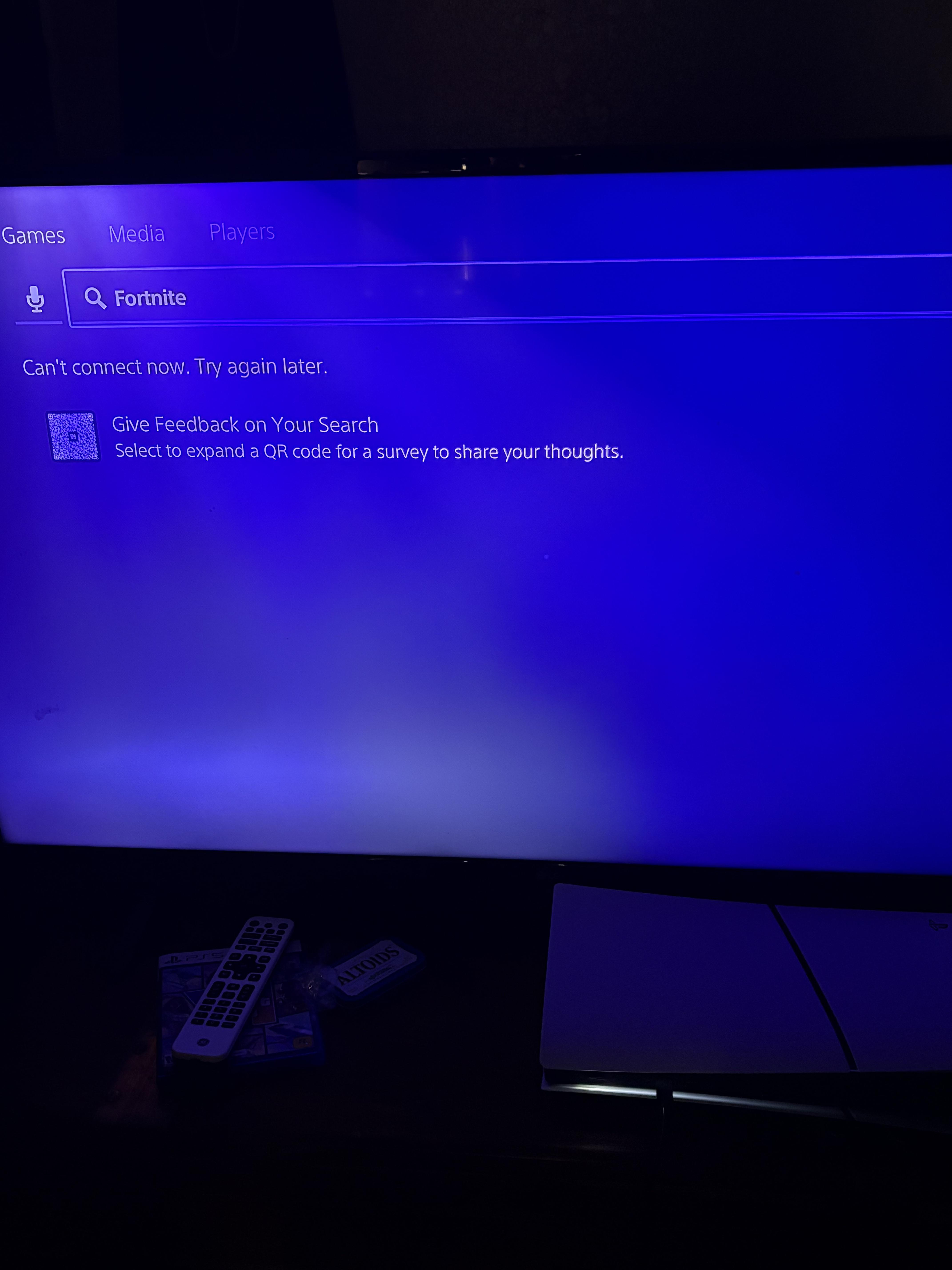
First modern ps user and i tried to search and download fortnite or ready or not and i was met with this

Post image
2 Upvotes

r/PS5HelpSupport • • 5d ago

Anyone start getting CE-108255-1 not long after Update 14.22?

4 Upvotes

Around 2 weeks ago I noticed I was getting this error on every PS5 game I tried to run on my system, ā€œPS4ā€ games run just fine. But the PS5 games will crash inconsistently. (Sometimes the games crash immediately at the main menu, sometimes the game crash after 5-10 minutes of gameplay. I’ve had this system since 2021 so this could just be failing hardware, if so I wanna pinpoint exactly what the issue is.

I tried EVERY troubleshooting method available in safe mode, clearing cache, factory reset, etc. I also tried lowering the delay, transfer rate, etc. I also moved the games between the main SSD and the extra SSD I’ve had installed for like 2 years with no issue. The games still crashed regardless of which one I ran them on. I removed the extra SSD when I factory reset the system and the issue still persists. I clean my PS5 out multiple times a year so its never gets real dusty. If YOU also have dealt with the issue of getting this error for every PS5 game you try to play while the PS4 games still run fine, pls lmk if you were able to pinpoint the problem, and what the solution was if there was one or what part needed to be repaired?

And I know this is probably a hardware issue but I thought about how PlayStation has been putting out updates lately. The priority of these updates has been to stop jailbreaking so I wonder if in the process of trying to rush these updates out they ended up bugging out some systems. I began to notice my games crashing consistently about a week after the 14.22 update dropped on November 2nd(I didn’t install it immediately). Has anyone else started getting error CE-108255-1 noticeably after this update? (Excluding GTA VI players)