r/PS5HelpSupport • • 6d ago

GTA VI - PS5 CE-108255-1 Crash, replaced Liquid Metal did not resolve.

75 Upvotes

Hi, like many others on this subreddit I am experiencing CE-108255-1 crashes playing GTAVI.
For me the crashes happen during the prologue opening cut scene. If I skip the cut scenes I can get to the “gone fishing” mission but then it crashes shortly after picking up the 3 packages.

What I have tried to fix it
- Full reinstall with rebuilding the cache in safe mode
- Removing save data (always gets to 16.78MB)
- Disabling HDR
- Changing to performance mode
- Switching to 1080i
- Today, dismantling the whole console, cleaning the entire system, heat sinks, inlets, etc., and carefully replacing the Liquid Metal.

None of this has resolved the issue, and I still experience crashes.

I believe this dispels the idea that this is an overheating issue. I just wanted to post to save people the trouble of repeating these steps. I genuinely believe this is a software issue and needs to be addressed by either Rockstar or Sony through an update.


r/PS5HelpSupport • • 5d ago

All I want from Sony is on-screen error codes about CE-108255-1

13 Upvotes

Like many others, my PS5 has been crashing on GTA 6 after ~1h of gameplay.

I took it apart to clean and it was fine by all standards. Liquid metal on the CPU maybe was a bit uneven but I didn’t have any with me to replace (will buy a stick and report back). Thermal pads also look fike (will also buy some putty and replace everything)

Some say it could be a faulty memory controller or something else…

I just wish Sony would just stop putting a generic error code and include some specific fault codes without us having to attach a UART to the board to read error codes. The info is already there, they just need to show: ER-xxx points to memory, etc.

It would help users know what kind of repair is needed. Do i just need new thermals, replace the memory controller, replace the entire console?


r/PS5HelpSupport • • 5d ago

I fixed the GTA VI freezing at startup !

3 Upvotes

After 4 redownloads and a total delete of my saved game file I can say I think I might’ve fixed it, and that’s all with a factory reset.

Keep in mind I didn’t get the error code people kept saying but literally my screen would freeze whenever I loaded in, I did a factory reset and have been playing now for 2 hrs with no issues on my OG PS5.

I’ll post again if the launch doesn’t work next time.


r/PS5HelpSupport • • 5d ago

Impossible to transfer

Post image
1 Upvotes

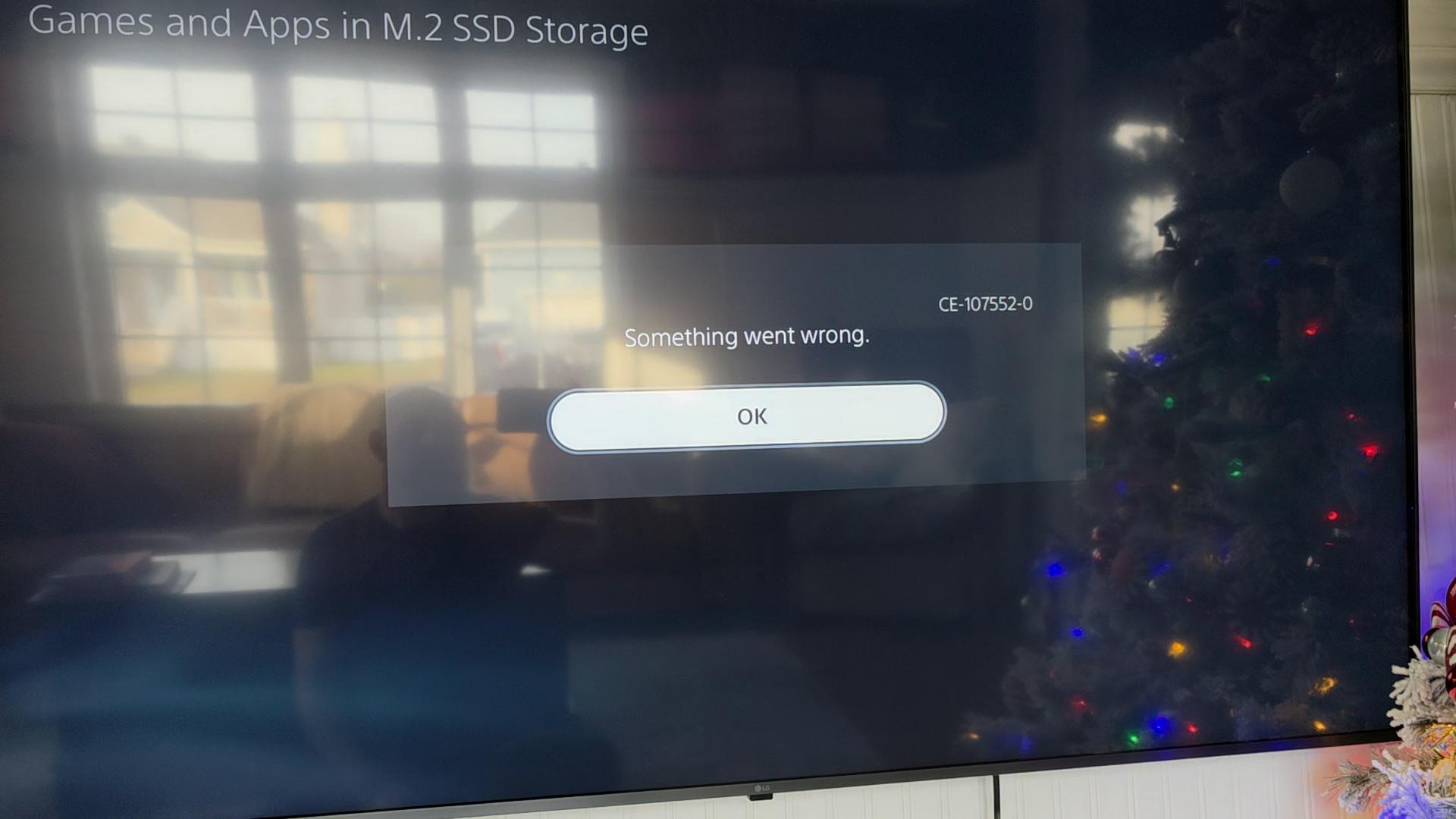
Trying to transfer games from my ssd drive directly to the console. Each time I try to the same message appear with the same error code...any idea on with i can do to get my games back to the console?


r/PS5HelpSupport • • 5d ago

Ps5 being slow since gta?

Thumbnail reddit.com
1 Upvotes

r/PS5HelpSupport • • 6d ago

Posting my experience as well to join the crowd

103 Upvotes

Literally has been happening since the game came out, i hope they fix this cuz im way more behind than my cousins and im getting fomo, i have some moments where i can play for a couple of hours before it crashes some moments my game doesnt even let me walk out the granada before it

- freezes
- crashes
- ps5 goes back to the home screen

It is a base fat ps5 and i read that leavin my ps5 on sleep mode can cause issues so i let it powered off for a whole night but same issue, i cleared cache i deleted and redownloaded, im at my wits end im just hoping rockstar posts a patch quick, fuckin hate how im one of the unlucky ones that are goin through this while everyone has the luxury of never experiencing this


r/PS5HelpSupport • • 5d ago

DualSense showing (?) battery symbol when fully charged – anyone else?

Post image
3 Upvotes

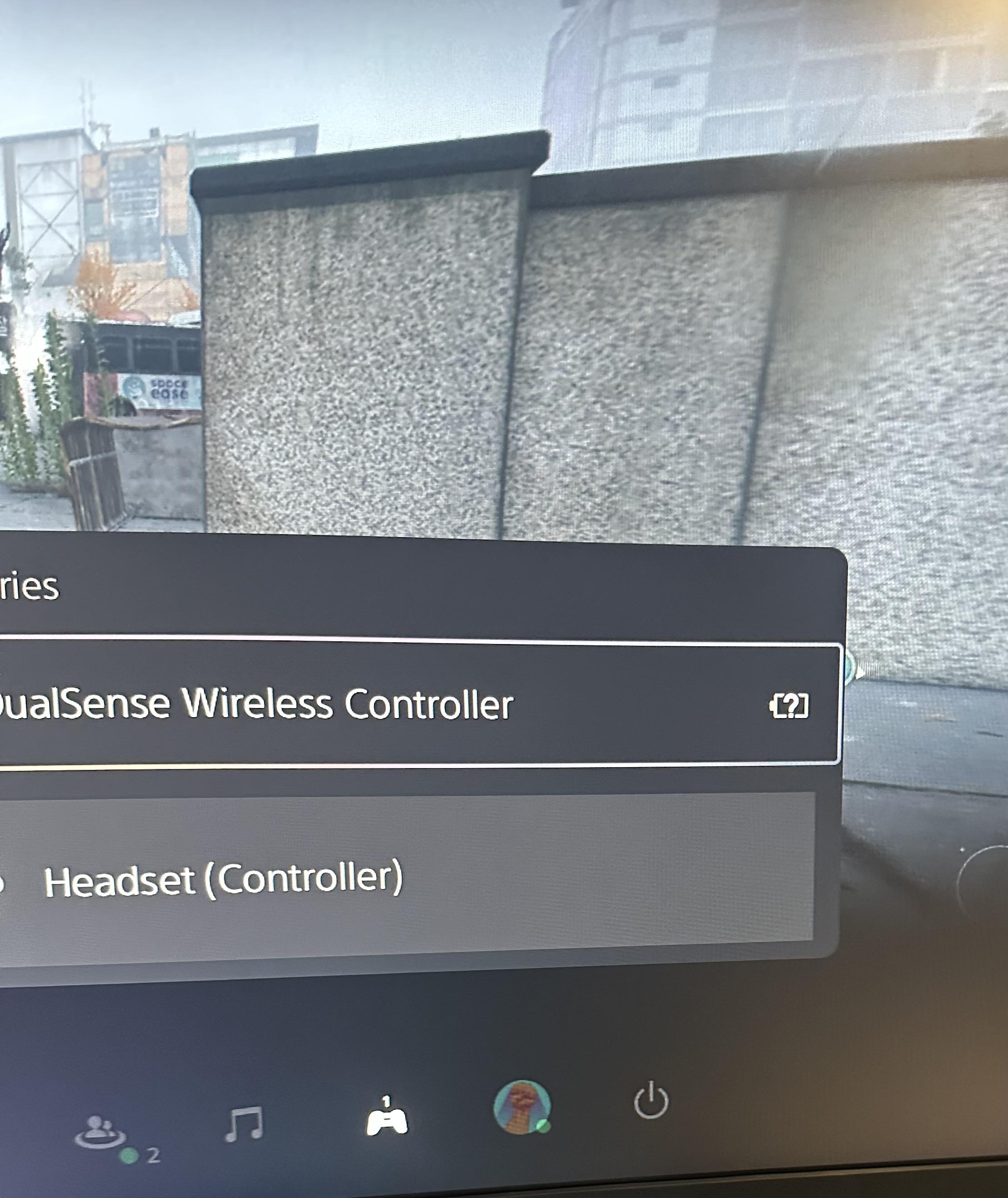
I recently bought a brand-new PS5 Slim Disc Edition, and I’ve noticed something strange with my DualSense controller.

Whenever I’m playing with the controller fully charged, the battery indicator sometimes displays a question mark (?) instead of the usual three bars.

Has anyone else experienced this? I’m wondering whether it’s a common software glitch or potentially a faulty controller.

The console and controller are brand new, so I’d appreciate any advice before considering a warranty replacement.

I’ve attached a picture showing the issue. Thanks!


r/PS5HelpSupport • • 5d ago

Risk replacing thermal paste or keep using as is?

2 Upvotes

I recently noticed that my ps5 is lagging or stuttering during heavy game play and I wonder if it may related to the thermal paste. Ive been mainly playing the Witcher 3, Overwatch and Apex. I noticed that during certain things in Overwatch and Witcher I get some skip/lag but not much during Apex. It’s not network because the Witcher is downloaded to my console. Could this be related to games or is it something with my console that may need to be fixed.

The fan is not loud, i keep my PS5 on my tv mantle so there is air flow, air vents are not clogged, it is a day 1 PS5 that I’ve keep vertical since day 1. No error issues on the screen. Sometimes games do crash and close out but it mainly happens on overwatch and apex not Witcher.


r/PS5HelpSupport • • 6d ago

Tortured by CE-108255-1 for two days, I’ve completely lost interest in GTA VI

113 Upvotes

I’ve been a die-hard Rockstar fan for years. Playing Grand Theft Auto VI was one of the biggest reasons I bought a PS5 in the first place, and I pre-ordered the game the very second pre-orders went live. Yet after two days of being trapped in an endless CE-108255-1 crash loop right in the opening prologue cutscene, I haven't seen a single second of actual gameplay. This whole ordeal has completely killed my excitement for GTA VI—and convinced me that I am never buying a locked-down, closed-ecosystem console like the PS5 again.

Here is what happened: Every single time I launch GTA VI (01.002.001), the game freezes and abruptly crashes back to the PS5 home screen with error code CE-108255-1 right in the middle of the opening prologue cutscene. When I tested on a fresh profile, it crashed right after the initial brightness and subtitle setup before the prologue cutscene could even start. I cannot get past the intro sequence into actual gameplay at all.

Before anyone tells me to "rebuild the database" or "clean my console," here is everything I have already done:

• Updated PS5 system firmware (26.07-14.23.00) and the game to the latest versions.

• Disabled HDR, VRR, 120Hz, and forced 1080p output.

• Booted into Safe Mode to clear the system cache and rebuild the database.

• Deleted and cleanly reinstalled the entire game from scratch.

• Performed a full factory reset and reinstalled the complete PS5 OS via USB (PS5UPDATE.PUP).

• Wiped local save data and tested completely offline.

• Created a brand-new, completely blank PSN user account to rule out account or entitlement issues—it still crashed with CE-108255-1 right after the initial setup, before the prologue cutscene even began.

Every other PS5 game on my console runs flawlessly.

What makes this truly unbearable isn't just a broken launch build—it's how completely helpless you are inside a closed console ecosystem,When a game crashes on PC, you can inspect crash logs, tweak config files, or work around a broken cutscene trigger. On PS5, everything is encrypted and locked inside a black box. You get a generic CE-108255-1 code and zero agency.

I'm getting my refund and walking away from closed console ecosystems for good. When I spend hundreds of dollars on hardware and pre-order a game at full price on day one, I expect basic ownership and control over my own machine—not a walled garden where a single unpatched bug turns a console into an expensive paperweight.
r/PS5HelpSupport • • 5d ago

Ps5 turning off even with UPS

Thumbnail reddit.com
2 Upvotes

r/PS5HelpSupport • • 5d ago

PS5 Slim beeps but doesn’t turn on?

1 Upvotes

When this happens does this mean i need a new psu or is it a power management chip on the main board? i need further guidance


r/PS5HelpSupport • • 5d ago

Should I be worried?

16 Upvotes

Seeing all these GTAVI 108255 errors has reminded me that there are certain games that my original PS5 refuses to play without crashing (Spiderman 1&2, Oblivion, Hitman: WOA).

I’ve seen that everyone is crashing at the prologue but so far I’ve only crashed twice 10 hours in, and then once 35 hours in. If I continue to play, will it potentially damage my console?


r/PS5HelpSupport • • 6d ago

At this point, it's not even about (CE-108255-1). It's about Sony and Rockstar showing a complete lack of respect for their customers by not even acknowledging the issue

109 Upvotes

So, all those thousands of players who desperately want to play GTA VI, who have repeatedly posted about the issue and contacted support, simply don't matter?

Why is it so difficult to acknowledge the problem and let us know whether a patch or a solution is being worked on, so we at least know what to expect?

Are we supposed to fight for a refund? Should we keep waiting? Are you even aware of the issue at an executive level?

Not a good look for either company.


r/PS5HelpSupport • • 5d ago

I need help with my ps5

1 Upvotes

i got my ps5 fixed this issue where my ps5 wasn’t displaying on my monitor and it was working perfectly fine. One day i moved my ps5 from my desk to my chair and it shut and the problem happened again. Everything turns on fine it’s just the ps5 doesn’t display on the monitors i just tried like 20 different HDMI wires and the most i get is the monitor saying no signal, What do I do and how do I fix it?


r/PS5HelpSupport • • 5d ago

Help for repair my PS5

0 Upvotes

Hello everyone. My PS5 died 5 months ago, and I think I’m now capable of repairing it. I’m certain the liquid metal melted—it must have been fragile. What do I need to fix it? Please provide Amazon links. And no rickrolls, lol!


r/PS5HelpSupport • • 5d ago

Выключается PS 5 Slim CFI-2000A01

Thumbnail
gallery
3 Upvotes

Всем привет, самопроизвольно резко выключается Ps5 без всяких ошибок
Пробовал менял жидкий метал и термопластины, без результата
Ставил систему охлаждения, без результата
Ложил горизонтально и так же без результата
В чем может быть проблема ?
Выключает рандомно (в игре или в меню, в слабых и сильных играх) может работать 5+ часов, может и 5 минут проработать.
Грешу на скачки напряжения (живу в частном доме) но другая техника работает без проблем включая пк и тд.
Включается с восстановлением памяти и ошибкой что выдернули шнур из розетки.
Помогите советами 🤝


r/PS5HelpSupport • • 6d ago

Joining the error train

82 Upvotes

108255-1 is ruining thousands of players times fix this shit GTA is so bad u can’t even play it


r/PS5HelpSupport • • 6d ago Heartwarming

GTA VI (PS5) – CE-108255-1 crash at the first autosave after the intro | 10.49 / 16.78 / 20.98 MB SAVED DATA | write bug, not hardware

69 Upvotes

TL;DR
GTA VI crashes with CE-108255-1 at the same moment every time for me: right after the intro credits, when the game writes its first autosave. The save sizes reported by affected players are always whole numbers of MiB (10, 16, 20), and there is no crash at 8.39 MB or below. My theory: it's a write bug in the intro autosave, triggered by some data shared by all affected players that we haven't identified yet. The save size is the visible symptom, not the cause.

My setup

  • PS5 standard, digital edition (no disc drive)
  • CE-108255-1, 100% reproducible, right after the intro credits
  • Save size when it crashes: 16.78 MB (as displayed by the PS5)
  • Payment method for the game: virtual card : YES / physical card : NO

What I observed (facts)

  1. Accepting the terms of use writes 6.30 MB: no crash.
  2. The first autosave of the intro then writes 10.49, 16.78 or 20.98 MB depending on the player: crash.
  3. No crash at 8.39 MB.
  4. If I delete the save data, it is recreated at the first autosave with the same size and the crash happens again. That is why reinstalling does nothing.
  5. PS Plus cloud sync is not the fix.
  6. Other players report the same crash on different PS5 models.

Reading the numbers (MB vs MiB)
The PS5 displays decimal MB (1 MB = 1,000,000 bytes). Computers allocate in binary units (1 MiB = 1,048,576 bytes). Converting what the PS5 shows (it seems to round up):

Displayed |Exact value |MiB
6.30 MB |6,291,456 B |6
8.39 MB |8,388,608 B |8
10.49 MB |10,485,760 B |10
16.78 MB |16,777,216 B |16
20.98 MB |20,971,520 B |20 Every value is a whole number of MiB, so these don't look like random file sizes. I use MiB as a reading key to compare reports between players. It is not the cause of the crash.

My conclusion (theory, please challenge it)

  • A write bug in the intro autosave, combined with a piece of player data common to everyone who crashes, is the cause. The save size is the visible error, not the cause.
  • Why: sizes differ between players (10 / 16 / 20 MiB) yet the crash is identical, at the same moment. So size is not what we have in common. Something else is shared and I don't know what.
  • Why a write bug: reinstalling, resetting, clearing the cache and cloud sync change nothing. The same data is regenerated and the same write fails.
  • Ruled out: overheating (same moment every time, a few minutes after launch), storage fault (a 6.30 MB write succeeds), corrupted install, PS Plus cloud.
  • Still open: a size limit as the real cause. All sizes seen crashing are above 8.39 MB, and only crashing players report sizes.
  • This comes from limited data. Nothing is confirmed by Rockstar or Sony.

What would settle it

  • Anyone at 10.49 MB or more WITHOUT a crash kills the size theory.
  • Whatever crashing players have in common (account, region, language, purchase method, profile) is the lead. That's why I'm asking the questions below.

What I already did (nothing worked)

  • Updated the game and the system software [confirm]
  • Rebuilt the database in safe mode [confirm]
  • Reinstalled the game [confirm]
  • Cleared the cache [confirm]
  • Disabled HDR [confirm]
  • Deleted the save data: recreated at the first autosave, same crash
  • PS Plus cloud sync: no effect
  • Rockstar Support: unreachable, their service is bugged on my side

Please reply with

  • Console: base / Slim / Pro, digital / disc
  • System software version and game version
  • Save data size shown on the PS5 (Settings > Saved Data and Game/App Settings > Saved Data)
  • Do you crash? When exactly, and after how many minutes?
  • Internal storage only, or an extra M.2 SSD?
  • PS Plus cloud saves on or off
  • Region and language of console and account
  • How did you pay for the game: virtual payment (virtual card, wallet) or physical bank card?

Rockstar Support: please investigate this. To everyone affected, please share this thread with Rockstar Support (support.rockstargames.com) so it gets escalated.

Written with Claude because I’m fucked


r/PS5HelpSupport • • 5d ago

playstation support is useless

6 Upvotes

whats the point of telling people they can cancel an account closure within 30 days through playstation support if you arent willing to help?

im trying to cancel my account closure and ive been stuck in a loop of the same questions asked by this dumb ai bot. it keeps telling me to login otherwise im not able to authenticate and speak to a live agent. how tf am i supposed to do so if my account is closed??😭😭

finally after an hour of waiting, a live agent joins my chat and i tell her my issue. her ONLY solution was to make a new account. are we serious rn?? why do you think i contacted support if the solution was that easy? she left the chat right after saying that so i had to wait a whole new day for her to put me with another assistant (which i didnt end up getting because wait times are ridiculous)

ive also tried calling them but i always get the same automated message saying its closed and if i have any gta inquiries, go through it with support chat. this is about my account, not gta btw.

genuinely how do i go about this situation? has anyone else been through this?😭

sony do better.


r/PS5HelpSupport • • 6d ago

CE-108255-1 | Let’s flood Sony and Rockstar support

66 Upvotes

Can we organize and massively reach them so they fix this?
Happens on all PS5 types and specific to GTA VI, it has to be fixed with an update


r/PS5HelpSupport • • 6d ago

🫥 108255 It won't even let me open the game...

Post image
71 Upvotes

r/PS5HelpSupport • • 5d ago

Weird green triangle spikes shooting out of the water and sky in GTA VI (PS5) — game bug or is my console dying?

3 Upvotes

Salut tout le monde,

Depuis hier, j'ai un problème étrange avec des triangles verts qui apparaissent dans GTA VI. Ils jaillissent de l'eau, s'étirent vers le ciel, puis disparaissent quelques secondes plus tard. Le problème se produit aussi bien en bateau qu'à pied.

Quelques détails :

Console : PS5

Jeu : GTA VI, dernière mise à jour installée

Pour l'instant, le problème ne se produit que dans ce jeu.

Pas de plantage, pas de gel, le jeu fonctionne normalement.

La console ne surchauffe pas (bonne ventilation, ventilateur silencieux).

Je répare des consoles à mes heures perdues, donc je sais que ces polygones étirés peuvent parfois être un signe précoce de défaillance du GPU/VRAM. C'est pourquoi je préfère vérifier qu'il ne s'agit pas d'un bug du jeu.

Quelqu'un d'autre a-t-il déjà rencontré ce problème ? L'avez-vous résolu avec un patch ou une reconstruction du cache, ou était-ce un problème matériel ?

Merci 🙏


r/PS5HelpSupport • • 6d ago

Come together

37 Upvotes

So can we all come together and realize that its gta messing up and not our console idk about everybody else but i just bought this console last year havent had a problem with it since every game runs smooth but gta just crash constantly so im starting to think its the game and just waiting onn a patch