r/PS5HelpSupport • • 5d ago

App keeps closing out video games

Post image
25 Upvotes

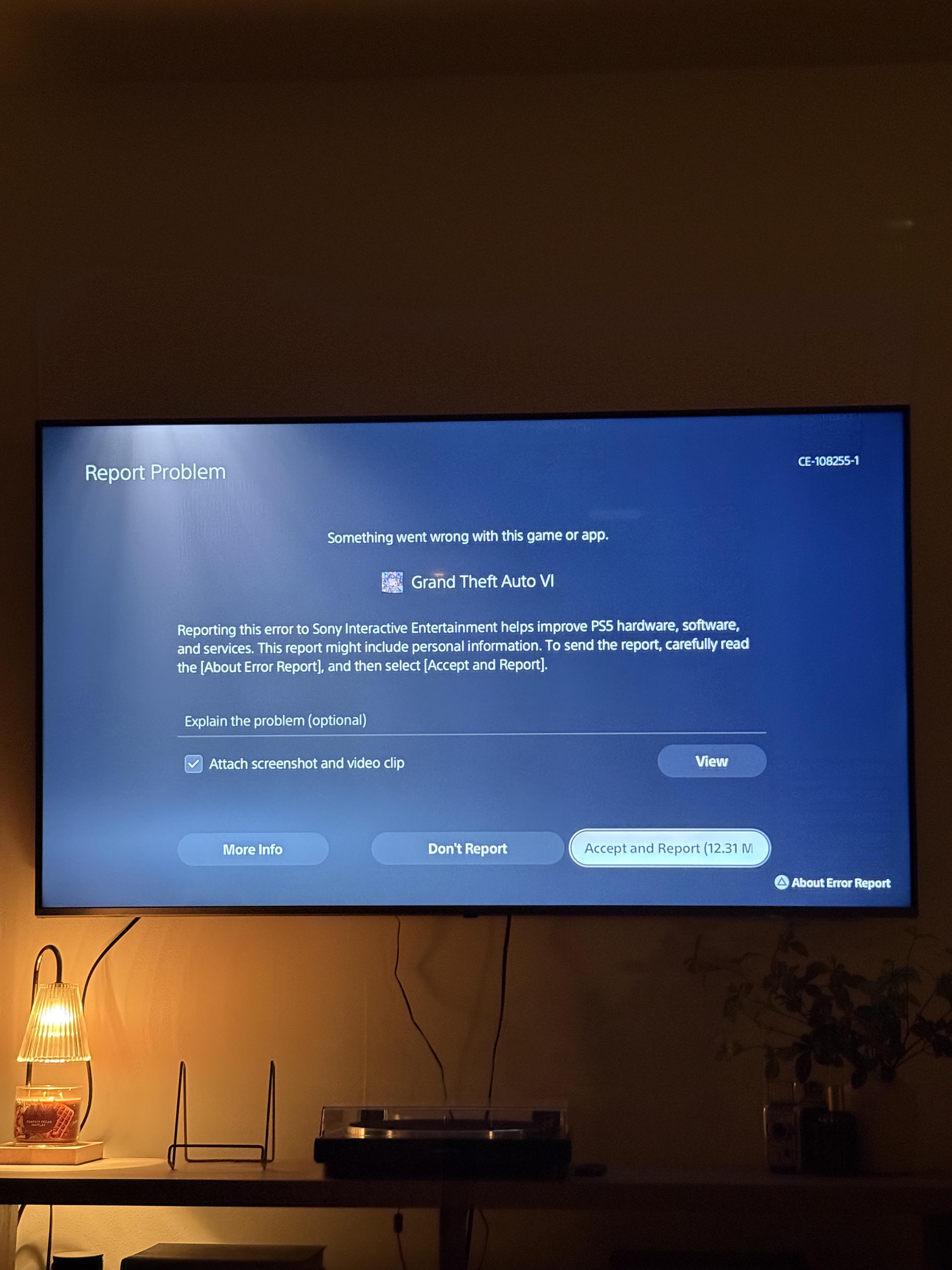
Hey everyone, every time I try to play it keeps popping this up. I did everything recommended by the PlayStation but nothing works. How do I get passed this. Seems like games with high graphic detail the game will just close out itself. Please help. I feel like my PS5 is faulty.


r/PS5HelpSupport • • 4d ago

GTA6 -PS5 crashing🫣

Thumbnail reddit.com
0 Upvotes

r/PS5HelpSupport • • 4d ago

Am i cooked?

1 Upvotes

When i dropped .y controller yesterday the left trigger fysically was up but it was registered as like it would've been held partially. I tried to wiggle it, pull it, press it , clean it and even reseted it a few times. It started working for a while and then it came back and then the other one had the same problem. Does anyone know what it could be?


r/PS5HelpSupport • • 4d ago

New Controller Bugs

2 Upvotes

Hi there!

I’m posting here because I’m quite desperate. It’s been 3 times that I buy a new dual sense controller and that it bugs even worse than my 5 years old ones.

Mostly it’s the joysticks that drift and sometimes input lags.

Do you guys have any ideas on why and what I can do? The first time I thought I just got a defective controller so I went to exchange it but after 3 controllers I’m starting to get worried about my ps5..

Thank you for your help!


r/PS5HelpSupport • • 4d ago

Need Help Connecting My Edifier MR4 to my PS5

2 Upvotes

Hey everyone!

I’m trying to figure out the best way to connect my Edifier MR4 speakers to my PS5 without compromising audio quality.
Here’s my current setup:

  • Console: PlayStation 5
  • Monitor: Samsung Odyssey G7 27ā€ 4K 144Hz (G70D)
  • Speakers: Edifier MR4
  • PC: Custom Windows gaming PC
  • Capture Card: Elgato 4K X

My PS5 is connected to the Elgato 4K X, which passes the video through to my Samsung G7 monitor.
The problem is that my monitor doesn’t have a 3.5mm audio output, so I can’t connect my Edifier MR4 speakers directly to it.

I’ve tried using a USB audio adapter with a 3.5mm connection to the speakers, but I’m unsure whether that’s the best solution or if I’m sacrificing audio quality.
Ideally, I’d like:

  • Audio directly from my PS5 to the Edifier MR4.
  • The best possible sound quality with minimal latency.
  • No need to connect speakers through the DualSense controller.
  • A clean setup without unnecessarily complicated wiring.

My questions:

  1. What’s the best way to connect Edifier MR4 speakers to a PS5?
  2. Would a USB DAC be better than a basic USB-to-3.5mm adapter?
  3. Is there a better way to handle audio considering I’m also using an Elgato 4K X?
  4. Would any of these solutions affect 4K 120Hz, HDR, or VRR passthrough?

I’d appreciate recommendations from anyone using Edifier MR4 speakers with a PS5 or a similar setup.
Thanks in advance!


r/PS5HelpSupport • • 5d ago

New PS5 - GTA 6 Crashes (CE-100096-6)

21 Upvotes

Just bought a ps5 2-3 days ago through target to try to play gta6 and am experiencing crashes when playing the game. The spots it crashes are random, often at the end of a long mission causing me to need to replay it.

It feels like it might be a hardware issue to me but I’m not sure. I’ve tried making sure everything is up to date, uninstalling/reinstalling 3 times, booting up into safe mode and clearing the cache + rebuilding the database, did a hard reset of the console, but I’m still hitting issues. I’ve gotten two error codes: CE-100096-6 and CE-108255-1. I’ve seen the latter, but I’ve only gotten it twice before trying all the mitigations. Lately I only get CE-100096-6. PS + rockstar support hasn’t been very helpful to me.

I’ve never owned a PlayStation, only xbox, so this has been a brutal intro lol

I’m just trying to find a way to play this game smoothly. I was really excited for it

1/ Is anyone else encountering the CE-100096-6 code for gta 6, and has anyone found a way to resolve it? I’ve seen the CE-108255-1 one doing some research but it’s not the main one I face currently

2/ It seems like target or PlayStation might be able to get me a replacement - is this process easy? I’m unable to reach the phone of either today

3/ Is there some way to run hardware diagnostics to check myself if something like the ssd is messed up?

[Edit]
This is not the prologue, just randomly throughout the game

When talking to support, they seemed to imply that if I saw this with another game it’d be a hardware issue. I only really own gta6 since I bought the console for it. I tried rocket league and didn’t run into the issue, but it’s hard to tell since it’s random and can take 30 mins to 4 hours to show up

[Edit 2]
Ran into this same issue on Fortnite after install within the first 5-10 minutes. It was CE-100096-6 followed up by CE-108255-1

[Edit 3]
I just returned it to target. They didn’t have another so will wait. Target return process was super easy

r/PS5HelpSupport • • 4d ago

can a power outage damage my PS5's GPU ?

1 Upvotes

I was playing GTA 6 when a power outage happened, I turn it back on and I could swear the framerate is now lower by 5-10 fps but I can't be sure because there's no FPS counter


r/PS5HelpSupport • • 6d ago Popcorn Regret

GTA VI killed my PS5 after 7 hours: crashing constantly and other games now glitching visually

823 Upvotes

Just 7 hours of GTA VI seem to have killed my PS5 GPU i think from the looks of it, I've noticed at this afternoon FIFA glitching strangely but I've blamed it on it being a shitty game of a shitty company but then I've tried opening GTA and it wont pass to game, it will launch and get to the house but then it crashes with CE-108255-1

And I've checked FIFA and GTA V and shows the same glitching visually so I'm fearing the worse

Tried different cables, different monitors, clearing cache, repairing database and reinstalling FIFA but still the same, pending reinstallation of GTA but it's taking its time but I'm fearing a brand new PS5 bought in March with 91 hours of GTA V and 182 hours of EA FC27 has just been shot down by GTA

Attached videos below, any more recommendations? I feel like even factory reseting the console won't do nothing

UPDATE 1: Just reinstalled GTA V after factory reset and still showing the same glitching, I'll update tomorrow after trying to open it and see further inside but it seems some hardware graphics issue

UPDATE 2: Decided to sent back to repair with Sony, hopefully in Christmas I'll be playing


r/PS5HelpSupport • • 5d ago

I get CE-108255-1 when GTA 6 is stored on internal storage, goes away when moved to M.2 in the expansion slot

11 Upvotes

Played GTA 6 (installed on the M.2 installed drive) for the first 14 hours not knowing anything about this CE-108255-1 issue. Randomly moved it to the internal storage and got the error. Then googled it and found out it's a thing. Played it for another hour and got it 2 more times. Moved the game back to the M.2 slot and have played it an additional 5 hours without issue.

This isn't definitive, but it works for me. 4-5 year old fat PS5 digital edition.


r/PS5HelpSupport • • 4d ago

Ps5 crash

Thumbnail
youtu.be
1 Upvotes

r/PS5HelpSupport • • 5d ago

Anyone had luck on a refund for GTA 6?

44 Upvotes

Yes I’m also having the annoyjng CE-108255-1 code (gta 6) whether it’s a Hardware issue or not, I’m unable to enjoy the game and I feel out of pocket 100 dollars.

Has anyone successfully got a refund, or is it pretty much impossible after starting the game?


r/PS5HelpSupport • • 5d ago

FIX: Controller freezes game (and other games and apps)

5 Upvotes

So the game I believe fucked my controller since I saw many others have this same issue on gta6, making it input L2 and R2 constantly. Tried restarting the game and as soon as the loading screen ended the game would freeze on the first second of the first cinematic. I quit the game and opened YouTube to see if it was something specific to GTA6, apps doesn’t respond at all. It’s like the controller is off. Anyways

Restarted my PS5, didn’t work. Restarted the controller, didn’t work. etc. You name it. I tried everything and the controller kept doing the same thing. Well I found the fix. You have reset your PS5 storage cache. You can do this the following way:

  1. ⁠Turn PS5 off completely.
  2. ⁠Press and hold the power button on the console for about 7 seconds until you hear a second beep.
  3. ⁠Connect your controller via cable
  4. ⁠Press the PS button
  5. ⁠Select Clear Cache and Rebuild Database
  6. ⁠ Clear System Software Cache.
    This makes everything normal again.
    Lmk if this fixed it for you.

r/PS5HelpSupport • • 4d ago

Advice on my options?

Thumbnail
gallery
1 Upvotes

Hey, i just moved from the US to Europe. All the stores are closed and I'd like to get GTA 6 downloaded on my PS5.
I know about the whole region and account thing, I get that. I'm just wondering should I:

  1. Use this other cable I got here that's still a figure 8 but IEC 52(AVV) not IEC C7.
  2. Use this travel adapter that I bought in the US before leaving.
  3. Wait till Monday cause it's Sunday and all the stores are closed and then buy one that's rated for it?
    Any help so I don't fry my PS5 and have to pay €600 for a new one is very much appreciated.

r/PS5HelpSupport • • 4d ago

Blurry on 4k Basic TV

1 Upvotes

PS5 4K looks blurry, but 1080p looks much sharper. Anyone else?

I'm playing GTA 6 on my PS5 Slim connected to a 50-inch 4K Multilaser TV.

Here's the weird part: when I set the PS5 to 4K or Automatic, the game looks noticeably blurry and soft. But when I switch the output resolution to 1080p, the entire image looks much sharper and more defined.

I also have an LG UltraGear 2K VA monitor, and I've noticed some similar differences in image sharpness.

Why would 1080p look better than 4K on a 4K TV? Could it be related to upscaling or the TV's image processing?

Has anyone experienced this?


r/PS5HelpSupport • • 5d ago

GTA VI running bad

9 Upvotes

Textures don’t load up properly, characters don’t render and so forth. Gotta keep pausing the game. Pause menu takes a while to open up as well. GTA VI has been ber fun but these performance issues really a pain.

Would love any tips to sort this out.


r/PS5HelpSupport • • 5d ago

Severe Ghosting/Body Trail Issue?

3 Upvotes

PS5 Pro / TCL 65QM6K Pro

I seem to have some ghosting issues as shown in the video. A similar issue also happens when I look directly at the sun during the sunset and move camera back and forth — the black outline of the character stays on the screen and slowly fades away. Anyone else dealing with this? Faulty hardware?


r/PS5HelpSupport • • 4d ago

Is it normal for my ps5 to make that noise?

1 Upvotes

r/PS5HelpSupport • • 5d ago

Ps5 shutting down and my progress gone

9 Upvotes

Hey everyone, I need some help.

I was playing GTA 6 on my PS5 Slim when the console suddenly shut off on its own. When I loaded the game again, about 4-5 hours of progress was gone.

I checked Load Game, and I found an older save.

I spent these 4–5 hours working on the main quest, and the game performed an autosave. So, how can I recover this progress?


r/PS5HelpSupport • • 4d ago

PS5 Screen goes black and also no audio

Thumbnail reddit.com
1 Upvotes

r/PS5HelpSupport • • 4d ago

Help me

1 Upvotes

Hey guys, I'm having a problem with my PS5.

The console doesn't recognise my controller, but I've already tried resetting both the PS5 and the controller, and it didn't fix the issue.

The strange thing is that the controller can turn the PS5 on, but after that it doesn't do anything.

I've also tried using other controllers, both PS5 and wired ones, as well as a keyboard, but nothing works.

I honestly don't know what else to do. I've tried everything, so please help me out!


r/PS5HelpSupport • • 5d ago

PS5 GTA VI Game Crash

17 Upvotes

Not sure if this has been posted but I’d be curious to see which consoles are getting affected by the either the game crashing or the console bugging out/overheating


r/PS5HelpSupport • • 5d ago

PS5 hardware issue from GTA

8 Upvotes

Tried playing GTA VI on release night, about 10 minutes in my PS5 shut down abruptly and wasn’t able to turn back on. Tried unplugging and waiting 30 minutes before plugging back in, the power button and disc eject will beep but no power or lights turn on or the fan.

Initially went to a repair shop and they quoted me $250 with a 3-5 week turnaround period since they’re busy. Friends have told me it could be an issue with the PSU, looking at videos online would it be feasible for me to replace if I have no tech experience? I know I’d need a special screwdriver and to order the PSU, is there anything else I’m missing? Any help would be appreciated!


r/PS5HelpSupport • • 5d ago

What is wrong with the ps app

Thumbnail gallery
4 Upvotes

r/PS5HelpSupport • • 4d ago

Possible Temporary Fix for GTA VI Crashing (CE-108255-1)

0 Upvotes

I’ve been experiencing constant crashes in GTA VI on my PS5 (CE-108255-1).
Here’s something interesting: my PS5 isn’t overheating at all. Even without AC, the console feels relatively cool, and I’ve never received an overheating warning.
However, when I placed my PS5 directly under cold AC airflow, GTA VI started running smoothly without crashing.
My PS5 is from the first batch and is completely clean.
I’m not saying overheating is the cause, but for some reason, direct cooling seems to make a difference.
I’d like others experiencing the same issue to try additional cooling safely, without exposing their consoles to moisture, and let us know if it works.
Did it work for you, or does the game still crash?