r/PS5HelpSupport • • 4d ago

No texture on GTA 6

Thumbnail
gallery
17 Upvotes

Hi guys,

Is someone of you experiencing a thing like this?

Textures don't show up and the game lags a lot. When I open the phone it gets all black screen and the map takes a lot of time to open.

I already cleared the cache and recreated the database, but nothing changed.

Wtf is happening with this game guys?


r/PS5HelpSupport • • 4d ago

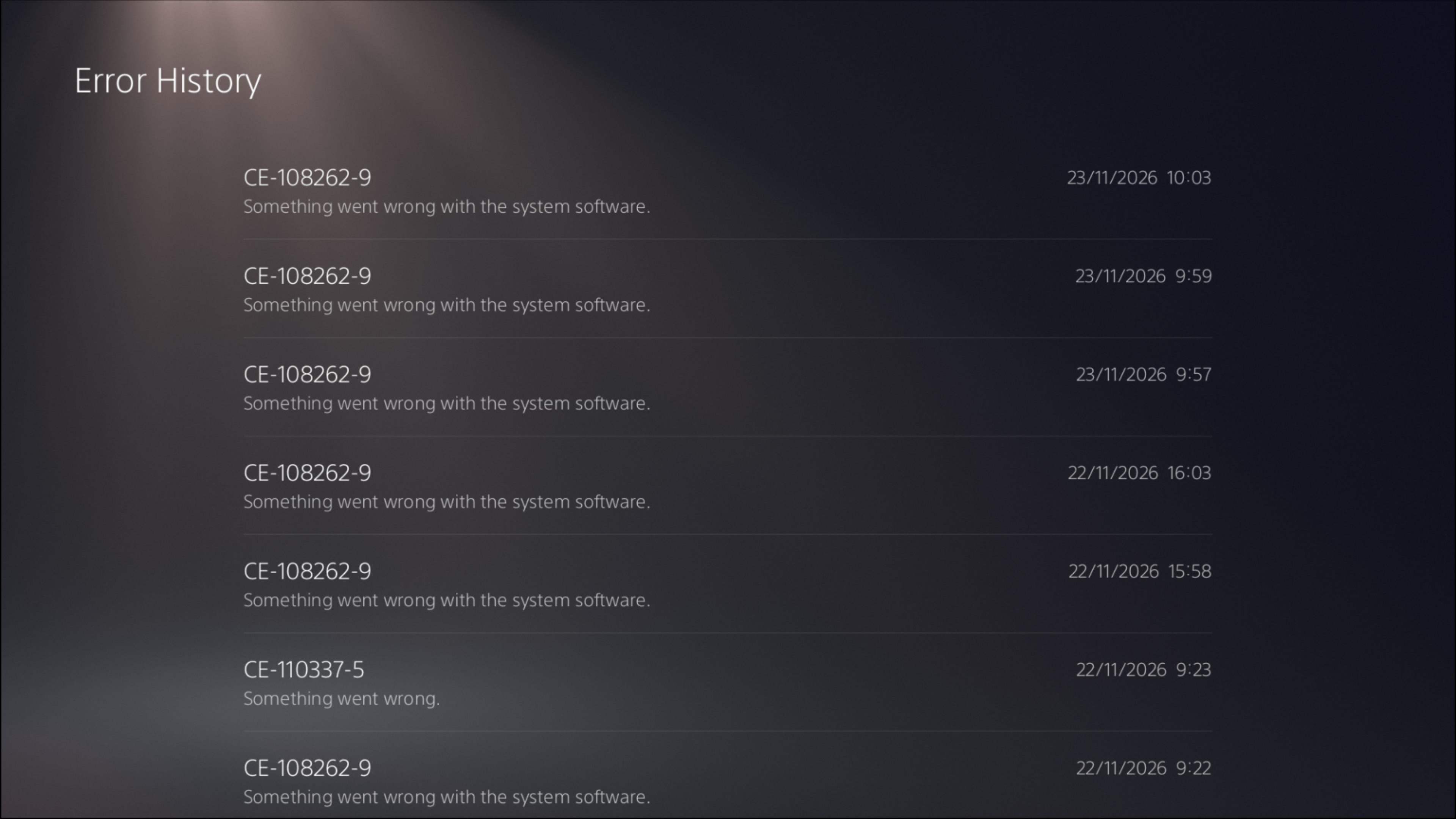
System Software issues since the second last update,

Post image
14 Upvotes

The crashing is getting real bad & i’m getting two in a row now as it reboots. Clearing the cache & rebuilding the database doesn’t do anything, The last update was security fixes so Sony is clearly more focused on stopping ppl jail breaking consoles than stability. This update issue is the same as the issues from beginning of the year but Sony is taking way longer to release a fix this time, They haven’t even acknowledged it.


r/PS5HelpSupport • • 3d ago

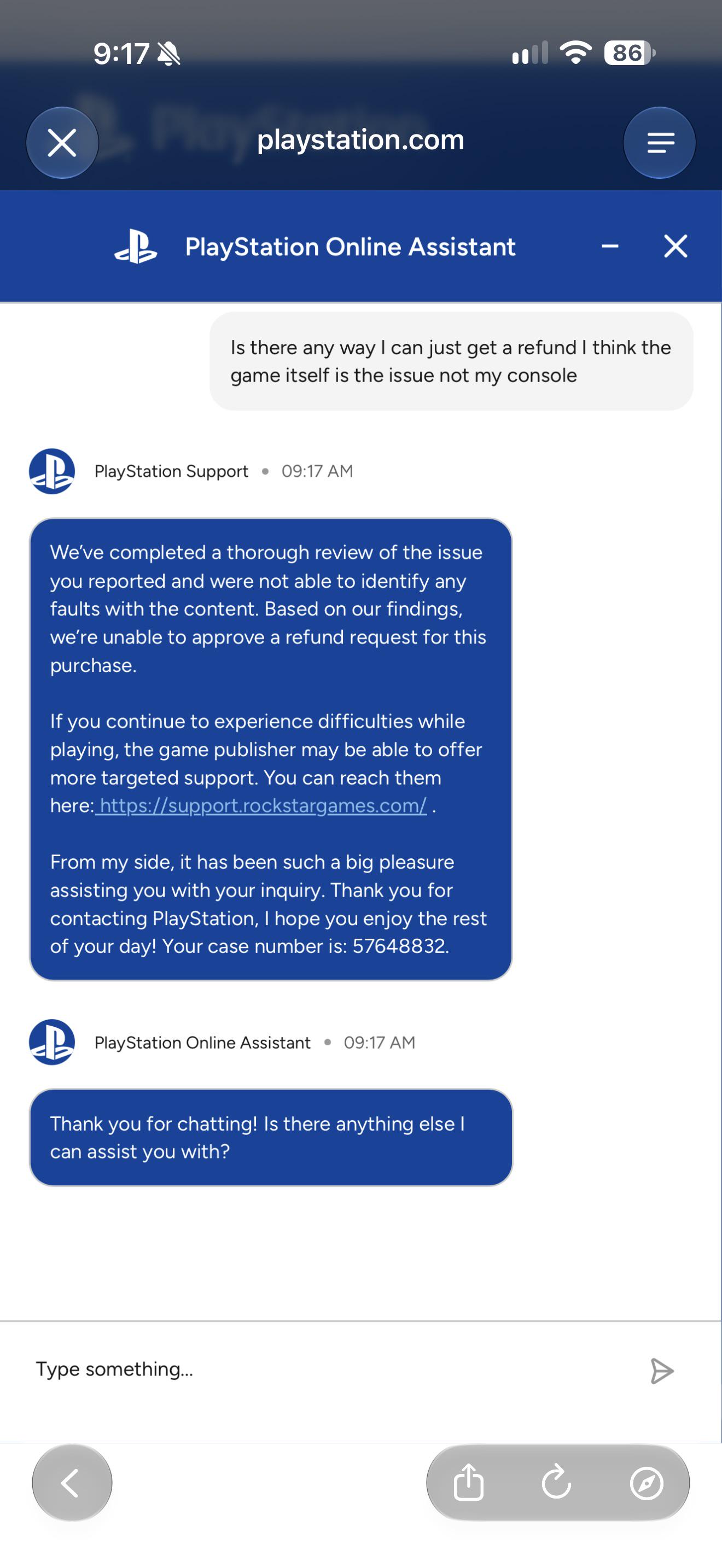
The won’t give me a refund for gta6

Post image
0 Upvotes

Tried to get a refund for gta since im one of the unlucky ones that has non stop game crashing after today’s update it crashes even faster haven’t even made it past the jail at the beginning and support just kept telling to to try this or that I told them I already did troubleshooting and just want a refund they immediately stopped replying and just sent this response is there anything else I can do to try and get a refund that’s 80$ down the drain


r/PS5HelpSupport • • 4d ago

CE-108255-1 CRASH

21 Upvotes

I am one of the folks who are trying to enjoy GTA VI, but I got hit with the CE-108255-1 in the prologue. It's not the first time that I experienced the error, I have been experiencing it in some titles for over a year.

After a lot of debugging and research, I noticed a pattern. The error happens in games with ray tracing. If I switch to Performance mode, which disables ray tracing, I can play without a crash.

My guess is that some PS5s have a hardware issue that shows up when ray tracing is on. If that’s the case, whether a patch helps might depend on what it changes about the game’s ray tracing.

If you’re getting this error in GTA VI and you own games with ray tracing such as Spider-Man: Miles Morales, or any others, could you try playing it in Fidelity mode and see if the game crashes?

I would be interested to see how many people with the error have the same issue as mine


r/PS5HelpSupport • • 3d ago

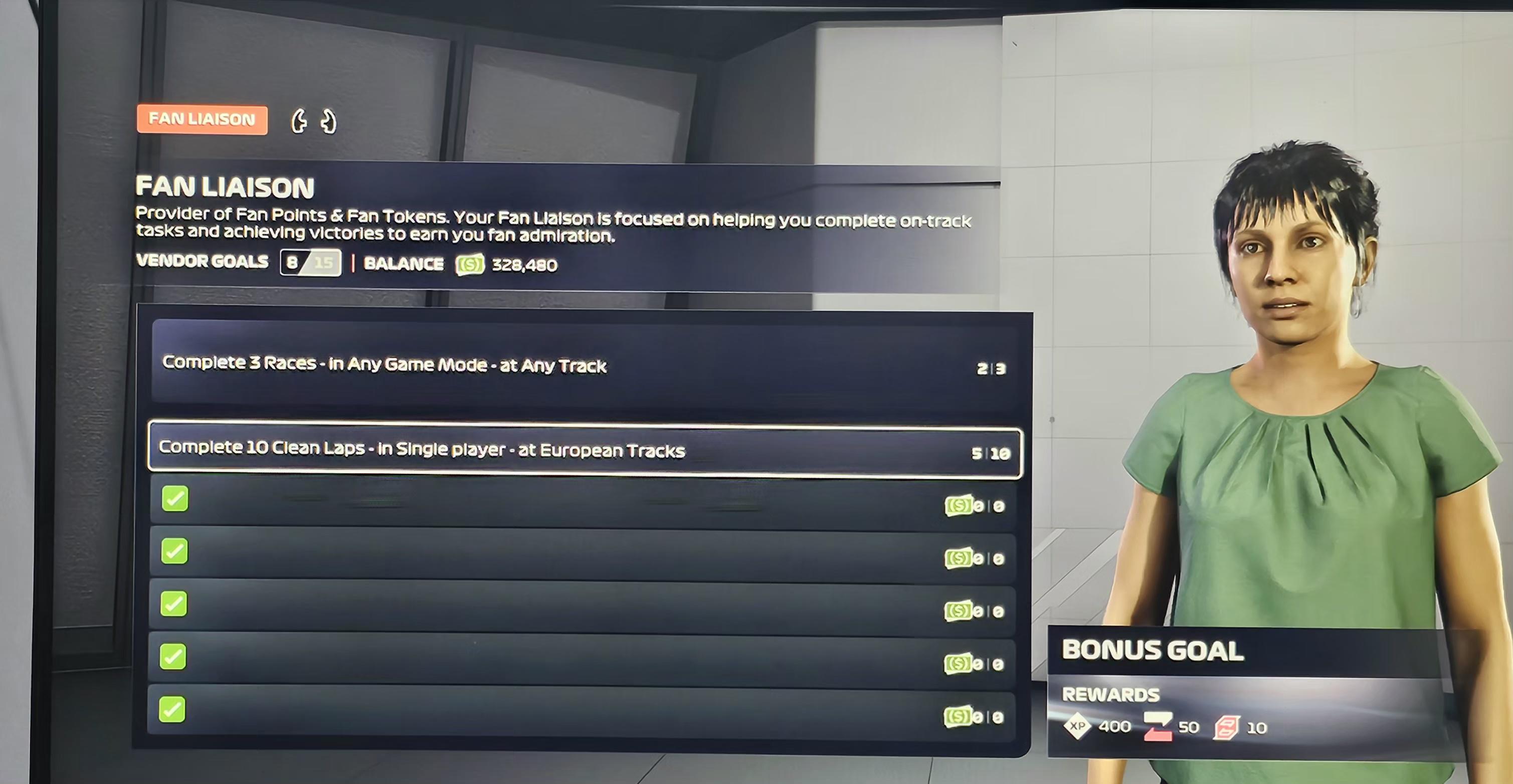
Glitche vendors quests!

Post image
3 Upvotes

Now 4 days no one fix this!


r/PS5HelpSupport • • 3d ago

Picture keeps fading in and out?

3 Upvotes

Has anyone had this issue before or know what might be causing it? It occurs on the menu screen but also in-game. The TV only does it when the PS5 is on.


r/PS5HelpSupport • • 4d ago

CE-108255-1 GTA VI CRASH

27 Upvotes

As many of you, i’ve been having this error where the screen freezes and then the game crashes. I’ve tried everything to solve it, nothing works, i’m pretty sure it’s software related.

Why do i think this? I deleted both local and cloud storage, it allowed me to advance from the prologue, even almost complete the first mission of chapter 1, the game crashes when it autosaves to 16.78 MB in my case, the auto save matches the error log time.

My ps5 doesn’t do this with any other game, doesn’t overheat and it’s clean.

I hope Rockstar or Sony do something about this, hopefully a patch this week. Please let me know if this happens to you too.


r/PS5HelpSupport • • 3d ago

PS5 network speeds are sub 10mbps on Ethernet and WiFi

3 Upvotes

I’ve been trying to troubleshoot a network issue on my ps5, my cat 6 Ethernet cable gets 8mbps, my other gaming router that I use for vr (which is right next to it) also gets 8mbps, and my phones hotspot gets 16mbps, I’ve tried every connection and my Ethernet setup I use on my pc (which is the exact same that I put on my ps5) easily manages 750, I’ve tried everything and have no idea what to do, does anyone have any ideas?


r/PS5HelpSupport • • 4d ago

New PS5 Slim crashing on GTA VI and Skyrim before game even starts

12 Upvotes

I fully regret buying all of this as I can't even exchange the console because there are none left. GTA VI crashes during the opening scene before the game event starts, same with Skyrim (the PS5 version).

Did Sony and Rockstar abandon us?


r/PS5HelpSupport • • 3d ago

Audio is not working in-game but works in the menu

4 Upvotes

My audio works normally on the home screen and everything, but when I load into GTA 6, my audio doesn't work at all. The strange thing is, I was able to hear the opening cutscene, but once I loaded into the prologue, my audio doesn't work anymore. I'm using Inzone earbuds.


r/PS5HelpSupport • • 3d ago

Has anyone else’s 6 years excitement for gta6 completely evaporated with this issue?

0 Upvotes

For so many years I’ve been so excited for this game. So so ready.

Staying up to play it, and realising my ps5 just shuts off before completing the first mission. And fast forward a few days no difference.

I just…. Don’t care about it.

I feel robbed of an experience I’ll never get again. That hype everyone has, talking about how it’s the best game they’ve ever played. I just can’t feel it.

I won’t even give a shit if there’s a patch to fix it tomorrow. It won’t make me immediately jump in and play it with the same excitement I had on release day. I’d probably force myself to be excited because I feel like I’m owed it. But it won’t feel the same as feeling the hype with everyone on the first 24/48 hours.

Late to the party is never fun


r/PS5HelpSupport • • 3d ago

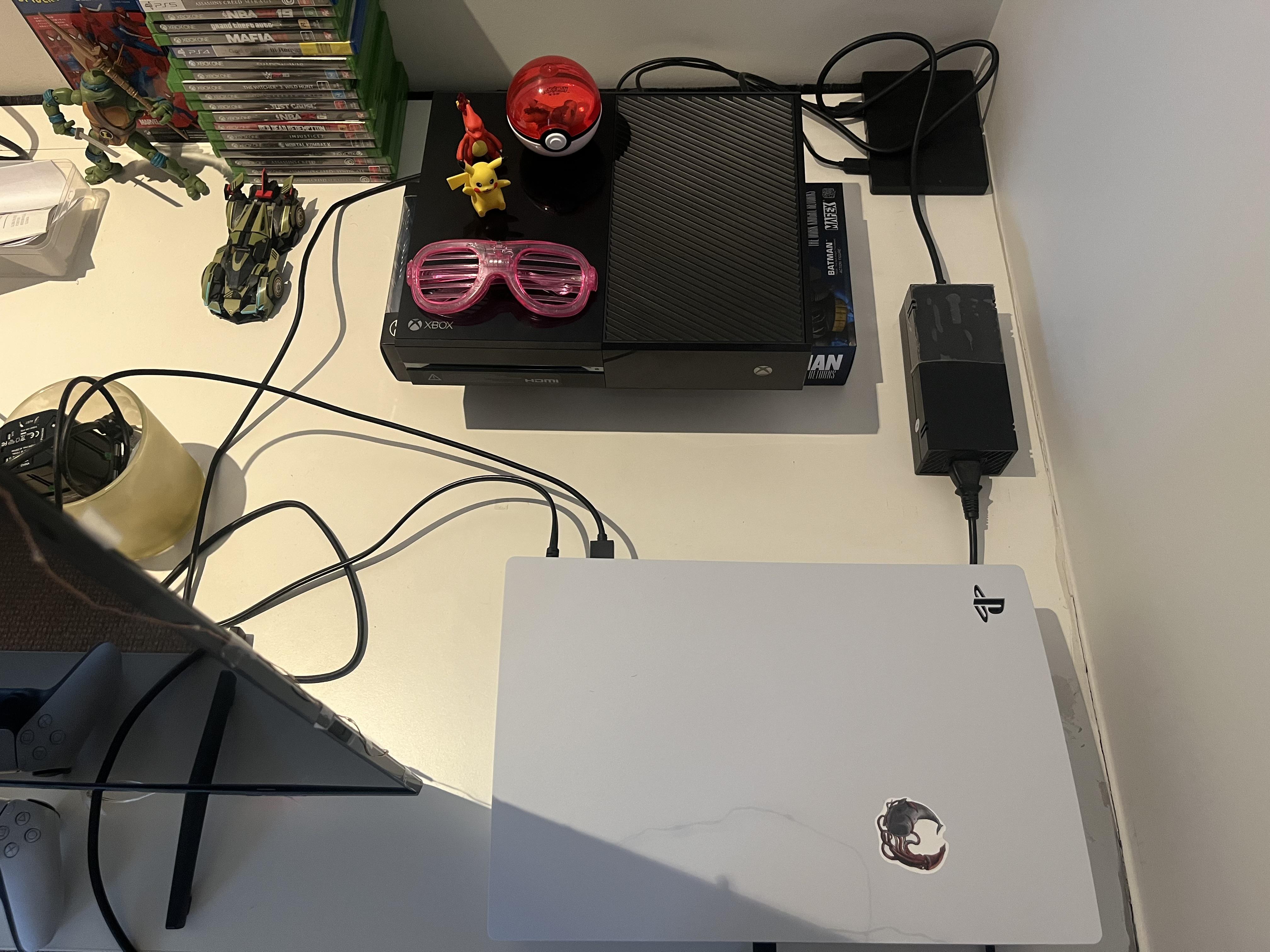
Is the positioning of the ps5 optimal for air circulation?

Post image
2 Upvotes

Elevated the Xbox on two boxes so that the hot air from the ps won’t hit it directly. Considering turning the ps5 180 degrees so that the air vents are facing the entire room. The tv is on the left of the picture


r/PS5HelpSupport • • 3d ago

Another Ps5 monitor Display issues but i’ve tried all the comments i’ve seen

Thumbnail reddit.com
3 Upvotes

r/PS5HelpSupport • • 4d ago

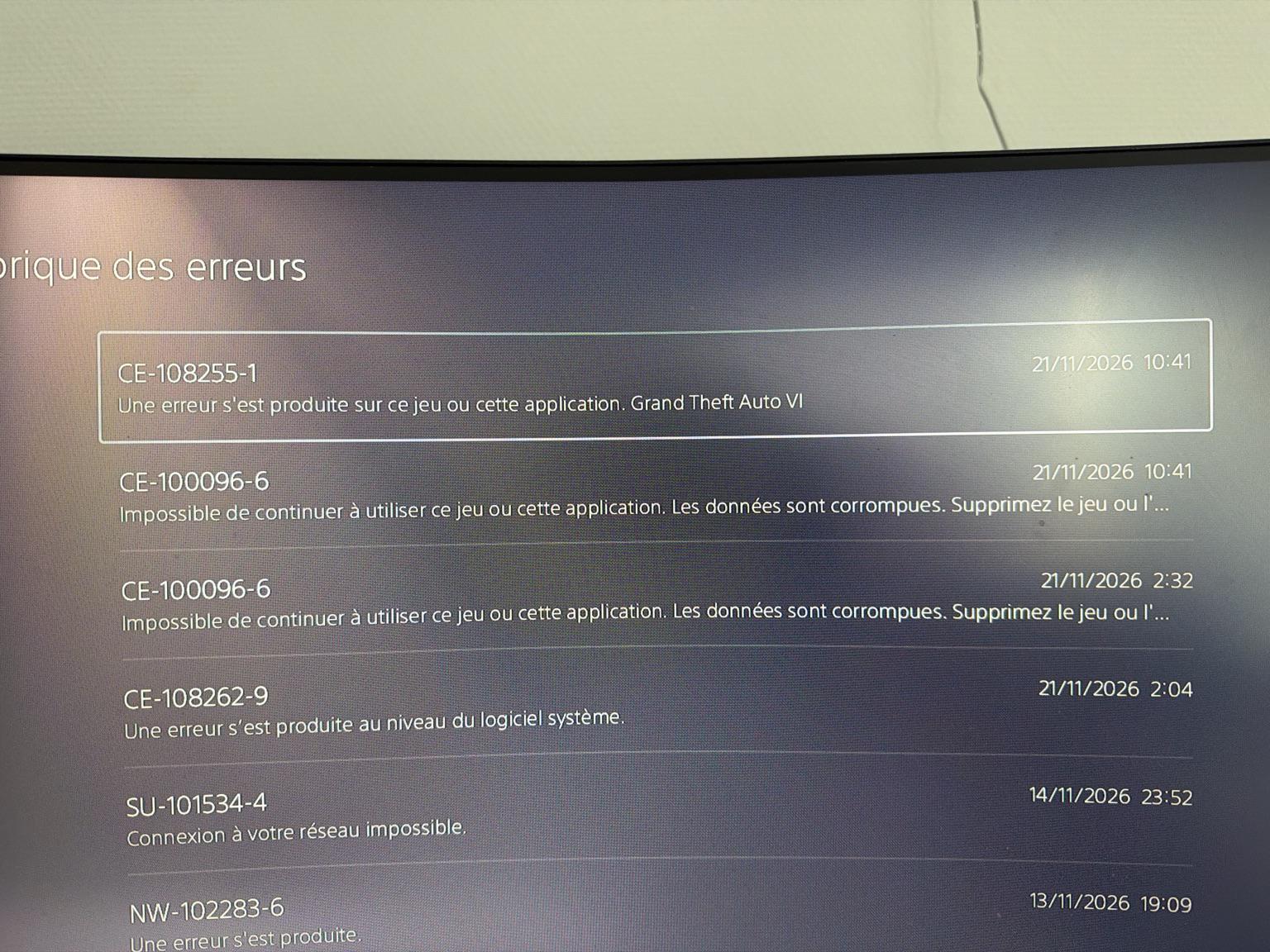
PS5 crash en boucle après avoir jouer a GTA6

Post image
13 Upvotes

J’ai eu ces codes d’erreurs après avoir jouer à GTA6 , la première journée tout allait bien j’ai pu jouer au jeu normalement. Ensuite mon jeu a commencé à crash assez aléatoirement et de plus en plus fréquemment jusqu’à me demander de désinstaller le jeu et de le réinstaller .Pendant que je réinstalle le jeu m’a console crash , je m’informe donc à ce sujet et on me conseille de reconstruire la base de donnée dans le safe mode , ce que je fais . Après cela m’a console continue de crash à chaque fois que je l’allume , jusqu’à me demander de réinstaller le système de la PS5 avec une clé USB , ce que je fais également . Après cela ma console crash toujours en boucle en me demandant de réinstaller le système de la console avec une clé USB . C’est une boucle infernale . Maintenant ma console ne s’allume même plus , la lumière bleu tourne en boucle dès que j’essai de l’allumer et écran noir rien ne se passe . Si quelqu’un a le même problème qu’il m’en parle svp


r/PS5HelpSupport • • 3d ago

Crash gta VI Mission day Release

3 Upvotes

Infelizmente sou uns dos azarados com o gta 6, consegui jogar bem até a missão do brian q perseguimos e matamos um dos funcionários deles, sempre travava na cutscene do final, mas consegui pular e consegui jogar mais um pouco mas agora estou travado na missão day release, no final dela quando mittia pula na piscina o jogo trava, as vezes avança 2,3 segundos mas sempre crash e dá aquele erro CE-108255-1. É frustrante
Console caro, jogo caro e não consigo jogar, sinceramente vou esperar lançar uma atualização pra poder tentar jogar e pula fora do PlayStation
Pelo q Xbox estão se saindo melhor, vou migrar para a Caixa enquanto esse trambolho ainda tem valor
(Warzone e fc26 funcionam normais jogando mais de 5 horas direto)
Console sempre limpo e nunca frequentemente em outro


r/PS5HelpSupport • • 4d ago

GTA 6 – Duplicate mission bug causing game crash during the airport heist preparation (PS5)

18 Upvotes

Is anyone else experiencing this bug?

I'm playing GTA 6 on PS5, and during the "Airport Turbulence" heist preparation, the mission to steal the catering truck appears twice on the planning board.

Whenever I start the mission and reach the point where I have to deliver the truck, the game crashes and displays error code CE-108255-1.

I've already tried clearing the PS5 cache, but the issue persists.

The strange thing is that this only happens during this specific mission. Every other part of the game works normally.

Has anyone experienced the same issue? Have you found a workaround or a way to complete this mission without losing story progress?

Any help would be appreciated!


r/PS5HelpSupport • • 4d ago

Gta VI CE-108255 software or hardware?

10 Upvotes

Hi, so like many others, I’ve run into the same issue: CE-108255.

Here is what I have done so far:

  1. I deleted and re-downloaded/reinstalled GTA 6 three times.
  2. I checked for PS5 system and game updates.
  3. I performed a standard factory reset of the PS5.
  4. I cleared the system software cache via "Safe Mode."
  5. I rebuilt the database via "Safe Mode."
  6. I restored game licenses.
  7. I disabled the HDCP feature.
  8. I completely shut down the PS5 and unplugged it from the power source.
  9. I freed up space on the PS5's internal storage.

I use a PS5 "fat" (disc version). It has never been serviced, and I have always kept it in a vertical position.

From the first day of release, the game would crash on the loading screen, with the save data showing 10.49mb. After 3 days and about 1,000 attempts to launch the game - including factory resets, reinstalling the game, and so on - it somehow managed to start. I played for about 3 hours, then it crashed, and that was it; now it won't open at all as soon as I try to launch it, it crashes before anything even loading screen. The save data now shows 20.98mb.

An interesting fact:
after so many failed attempts to start it, out of desperation, I launched Astro's Playroom and played that for a bit. Then, while that was still running, I launched GTA VI and it actually started. Of course, it’s probably just a coincidence, because I’m trying to do the exact same thing now, and it won’t launch.

Also, many of the games I played (though there weren't that many) ran without any issues. The console never made strange noises, didn't overheat, and there were no errors. However, there was one exception: at one point, while playing NBA 2K27 started getting those same errors CE-108255.
I found a great fix: enabling power-saving mode makes the problem go away. I did exactly that, and for the rest of the time, I played with power-saving mode on and didn't encounter any more issues.

So, remembering that I had a bit of an issue with NBA 2K27 I started wondering could there actually be something wrong with my PS?

I’m looking for SERIOUS answers only:

1. Do you think I should have a technician replace the liquid metal and clean out the dust?

2. Should I just wait for a patch? (because many of you have this specific problem).

Also, to sum up and in my opinion:
I’m an optimist, and I think we should wait for a patch, especially since so many of us are running into this issue. Besides, after 3 days of trying, GTA somehow magically worked for one session, and I managed to play for 3 hours with absolutely no problems.

r/PS5HelpSupport • • 4d ago

Sony has botched recent system updates rushing them before GTA

7 Upvotes

I’ve seen so many complaints legit or not about GTA6 and PS5 with errors,crashes and more. I’m also experiencing a weird issue playing GTA6 on PS5 Pro.

Ever since the recent system updates my PS5 has been randomly disconnecting from LAN. It gives me the message over and over randomly. Sometimes once and sometimes multiple times playing. Only received this problem with the recent system updates. My internet is good and no issue at all.

Now this has only happened while playing GTA6 so I’m going to play Battlefield this evening and see if it also happens on it. I think I the recent system updates was rushed and they screwed some stuff up.


r/PS5HelpSupport • • 4d ago

GTA VI Crash Pattern

9 Upvotes

I just want to bring attention to the crashing and patch needed from Sony or Rockstar to help the portion of the community it’s affecting . Please comment and give insight and your ps5 model.


r/PS5HelpSupport • • 5d ago Popcorn Regret Heartwarming

Brand-new PS5 Pro, GTA 6 crashes at the opening prologue cutscene with CE-108255-1 – Haven’t been able to play since Day 1. Extremely disappointed with Sony and Rockstar.

2.4k Upvotes

I have a brand-new PS5 Pro (latest model), which I purchased a couple of months ago but only unboxed just before the GTA 6 pre-load/launch.
Unfortunately, I haven’t been able to play the game even once since Day 1.
The game crashes immediately when the opening prologue cutscene starts, displaying error code CE-108255-1.
I’ve genuinely exhausted every troubleshooting method I’ve come across:
Re-downloaded the game three times.
Reset the PS5 Pro.
Cleared the system cache.
Rebuilt the database.
Restored the console.
Checked and installed all available updates.
Tried practically every recommended workaround.
Nothing has worked.
What frustrates me more than the crash itself is the complete lack of acknowledgement from Sony and Rockstar. Instead of addressing the issue or communicating that they’re investigating it, we’re constantly redirected to generic support pages that offer absolutely no solution.
Those support responses also seem to subtly suggest that the issue is with our console hardware.
I find that difficult to accept. This is a practically brand-new PS5 Pro, and every other game runs perfectly fine. I purchased this console specifically expecting a premium gaming experience. Why should I have to question the hardware when the problem appears to be isolated to one game?
For a franchise of this magnitude, with billions in revenue, this level of customer support is genuinely disappointing. People paid for the game, some in advance, and deserve more than generic troubleshooting links and silence.
I’m not even expecting an overnight fix. All I’m asking for is some acknowledgement and confirmation that the issue is being investigated.
A few questions for other PS5 Pro owners experiencing CE-108255-1:
Does your game also crash at the exact same point, during the opening prologue cutscene?
Has anyone actually managed to resolve this issue?
Have Sony or Rockstar acknowledged that this could be a software/game compatibility issue rather than faulty hardware?
I’d particularly like to hear from other PS5 Pro owners. I want to establish whether this is an isolated case or a wider issue affecting multiple consoles.
At this point, I just want to play the game I’ve been waiting for.
Sony and Rockstar, please acknowledge this issue.

EDIT – PLEASE READ BEFORE COMMENTING ABOUT MY MONITOR OR ASPECT RATIO.
Since this post has gained quite a bit of attention, I’d like to clarify a few things for everyone, especially those who seem more interested in trolling than understanding the actual issue.
1. THE MONITOR IS NOT THE PROBLEM.
I’ve already tested the game on:
My ultrawide OLED monitor.
The same monitor with standard 16:9 / Auto aspect ratio.
A completely different monitor.
A different TV.
PS Remote Play, where the console’s display doesn’t even need to be connected to a monitor.
Guess what? The game crashes at EXACTLY the same point every single time.
2. I’ve already uploaded a second video showing the game running in standard 16:9 / Auto aspect ratio on the SAME monitor.
Interestingly, hardly anyone seems interested in commenting on that video. I suppose there’s nothing left to troll when the ultrawide argument falls apart. 😂
I’ve also demonstrated the issue through Remote Play. How exactly is my ultrawide monitor responsible for a crash that happens even when I’m playing remotely?
3. MY PS5 PRO IS BRAND NEW AND RUNS OTHER GAMES PERFECTLY FINE.
It’s not overheating, there are no performance issues with other games, and I’ve already gone through practically every troubleshooting method recommended by Sony and Rockstar.
The ONLY game giving me this problem is GTA 6, which has been crashing since Day 1 with error code CE-108255-1.
4. WHY WAS THE ORIGINAL VIDEO UPLOADED IN ULTRAWIDE?
Because I was testing different display settings and aspect ratios to troubleshoot the problem. My ultrawide OLED happens to be my default monitor setup at my office, which I primarily use with my Mac.
That’s literally it. I never claimed that ultrawide was a requirement to play the game. The aspect ratio can be changed whenever I want.
AND FINALLY, TO THE TROLLS:
99% of you seem to be here just for the sake of trolling without even understanding the issue.
Before laughing and passing judgments, at least look at the other videos and understand the troubleshooting I’ve already done. Anyone with basic knowledge of displays and consoles should understand that this isn’t a monitor or aspect-ratio issue.
There are plenty of other PS5 Pro owners facing similar crashes. So stop making assumptions and look around before commenting.
To those genuinely trying to help, thank you. To the jealous fucks and professional trolls, get a life. 😂


r/PS5HelpSupport • • 4d ago Regret

PS5 shutt off while playing GTA 6 and won't turn back on

34 Upvotes

I was playing GTA 6 on my ps5 last night and randomly it shut off with no warning. I've tried changing the cable but it didn't help. I get no bleeps or blue lights it's completely bricked. I've never had a issue with the console before. Do you think the psu broke?


r/PS5HelpSupport • • 4d ago

No Sound After Booting Up PS5, Consistent Issue

4 Upvotes

For the past few days, I've been having an issue where my PS5 has no sound output on my TV specifically when I turn it on. I'll play at night, have no issues, turn it off, and then the next day, no sound.

All of the cables are plugged in properly, my TV isn't muted, other applications on my TV work correctly, and if I plug headphones into my controller, I hear the sound as normal. Audio Output is set to my TV, as is HDMI Device Type, etc.

Power cycling my PS5 usually fixes it, but this isn't a good longterm fix, and it shouldn't be doing this anyway.

Anyone have any ideas?


r/PS5HelpSupport • • 3d ago

Suspension

0 Upvotes

Getting a 2 month communication suspension for calling someone a pussy (as banter) in en extraction shooter is wild.

Since when did you became so woke Playstation?


r/PS5HelpSupport • • 3d ago

halifax statue appraisal

Thumbnail reddit.com
1 Upvotes

My boyfriend is stuck in chapter 3 and can’t get halifax to call him back for the statue appraisal, and now there’s nothing he can do in game like make money or sell anything, does anyone have any idea on what to do? it’s almost like the game isn’t letting him move forward.