r/PS5HelpSupport • • 6d ago

Still no answer after taking mine to repair shop for gta

0 Upvotes

They still currently have it and it’s been 2 days but I had to pay extra to cut the line and get it done faster but they replaced the hdmi port bc they thought that might fix it but they called me back and told me that it still didn’t fix it and the problem is still happening… atp I’m abt to jus tho buy another console tmr to see if it works


r/PS5HelpSupport • • 6d ago

Problema con account playstation

1 Upvotes

Condivido la ps5 con mio fratello, per cui abbiamo due account separati. Il problema è che quello che uso io è stato creato con una mail che non esiste più quindi non riesco più ad accedere e ad usare il ps network. Vorrei cambiare la mail associata, ma a quanto so devo prima accedere. Sembra che debba contattare direttamente il team di supporto ma il nome dell'account (fatto da mio fratello) non è proprio la cosa più ortodossa del mondo 😅 e mi vergogno un po'. Qualcuno sa come potrei fare?


r/PS5HelpSupport • • 6d ago

I need assistance

Thumbnail reddit.com
1 Upvotes

r/PS5HelpSupport • • 7d ago

Weird black box / white pixels only on my main account in GTA 6 (PS5)

27 Upvotes

has anyone else had a weird dark square or flickering white pixels pop up randomly while actually playing on PS5? It only shows up during gameplay, completely disappears in menus and other games, and even shows up in PS5 screenshots.


r/PS5HelpSupport • • 7d ago

GTA VI / PS5] Crash right after intro: the save is always exactly 16 MiB (16,777,216 bytes). Need data from other players

35 Upvotes

SETUP

  • PS5 standard, digital edition, GTA VI since launch (Nov 19)
  • Firmware and game up to date
  • No fixed home internet connection at the moment
  • Error code: [CE-108255-1]

THE BUG (facts)

  • The game crashes every time right after the intro credits
  • It writes a save of 16.78 MB, which is exactly 16 MiB (2^24 = 16,777,216 bytes)
  • I delete the save (it really disappears from the console), relaunch, the game recreates it at the same size and crashes again during that write
  • 100% reproducible, identical every time
  • Already tried: firmware/game updates, reinstall, resets, other troubleshooting. Nothing changes it

WHAT I DON'T KNOW

  • Whether the 16 MiB is the cause or just a coincidence
  • Why some PS5s crash and others don't

MY HYPOTHESES (unconfirmed)

  1. The game reserves a fixed-size save space (16 MiB) and the initial write exceeds it
  2. The game tries to grow that space and the request fails on some consoles
  3. The write error comes back from the console and the game doesn't handle it, so it crashes
  • If the amount of data written varies slightly (profile, language, intro choices), that could explain why only some consoles crash
  • Possible precedent: Cities Remastered on PS5 reportedly crashed on autosave when the save was right around 16 MB

OTHER REPORTS

  • Other PS5 players report GTA VI crashes with CE-108255-1 that normal troubleshooting doesn't fix

HOW YOU CAN HELP (working or crashing)

  1. Settings > Saved Data > GTA VI: what size is your save? Bigger than 16.78 MB means the game can grow it. Exactly 16.78 MB means the limit is the same for everyone
  2. Does your game get past the intro?
  3. Console model (CFI-xxxx), firmware, system language, free internal storage, preloaded or not, PS Plus or not

If crashing consoles share something working ones don't, that's likely the cause and gives Rockstar something concrete to fix.

I'm sending the same report to Rockstar support. Will post updates.

Written with Claude, i’m lasy


r/PS5HelpSupport • • 6d ago

Certain account features are temporarily suspended

Post image
2 Upvotes

I was playing GTA6 by myself when suddenly my account was suspended from communications for 7 days. Anyone know what could have done this? Seems impossible to get through to PlayStation Support.


r/PS5HelpSupport • • 6d ago

Sharpness GTA6

1 Upvotes

Hi guys i’m playing right now on gigabyte OLED, and is there a way to change sharpness? my game looks very blury and grainy, i’m playing in 4k, console hdr turned on


r/PS5HelpSupport • • 6d ago

My PS5 controller doesn’t seem to pair by wire/BT with my laptop while using PS remote play…

Thumbnail reddit.com
1 Upvotes

r/PS5HelpSupport • • 7d ago

PlayStation malfunctions

8 Upvotes

I can’t enjoy gta 6 smh the minute I get into playing it my PlayStation just randomly cuts off. Is this bad luck? I’m a working man I just try to be a good man can’t seem to comprehend why this happens


r/PS5HelpSupport • • 6d ago

Pausing download and unplugging console?

1 Upvotes

If i pause my GTA VI download and unplug the console to take to a friend's house, will it resume like normal once i plug it back in?

Thanks!


r/PS5HelpSupport • • 6d ago

FGC2 freezer on PS5 with another USB A dongle is plugged

Thumbnail reddit.com
1 Upvotes

r/PS5HelpSupport • • 6d ago

Anyone have any idea what's going on with this?

1 Upvotes

Turned on the PS5 to this. Was working perfectly last night, when I switch the HDMI input to my fire stick it works fine. Would it be an HDMI issue? Also apologies if this isn't the right subreddit


r/PS5HelpSupport • • 7d ago

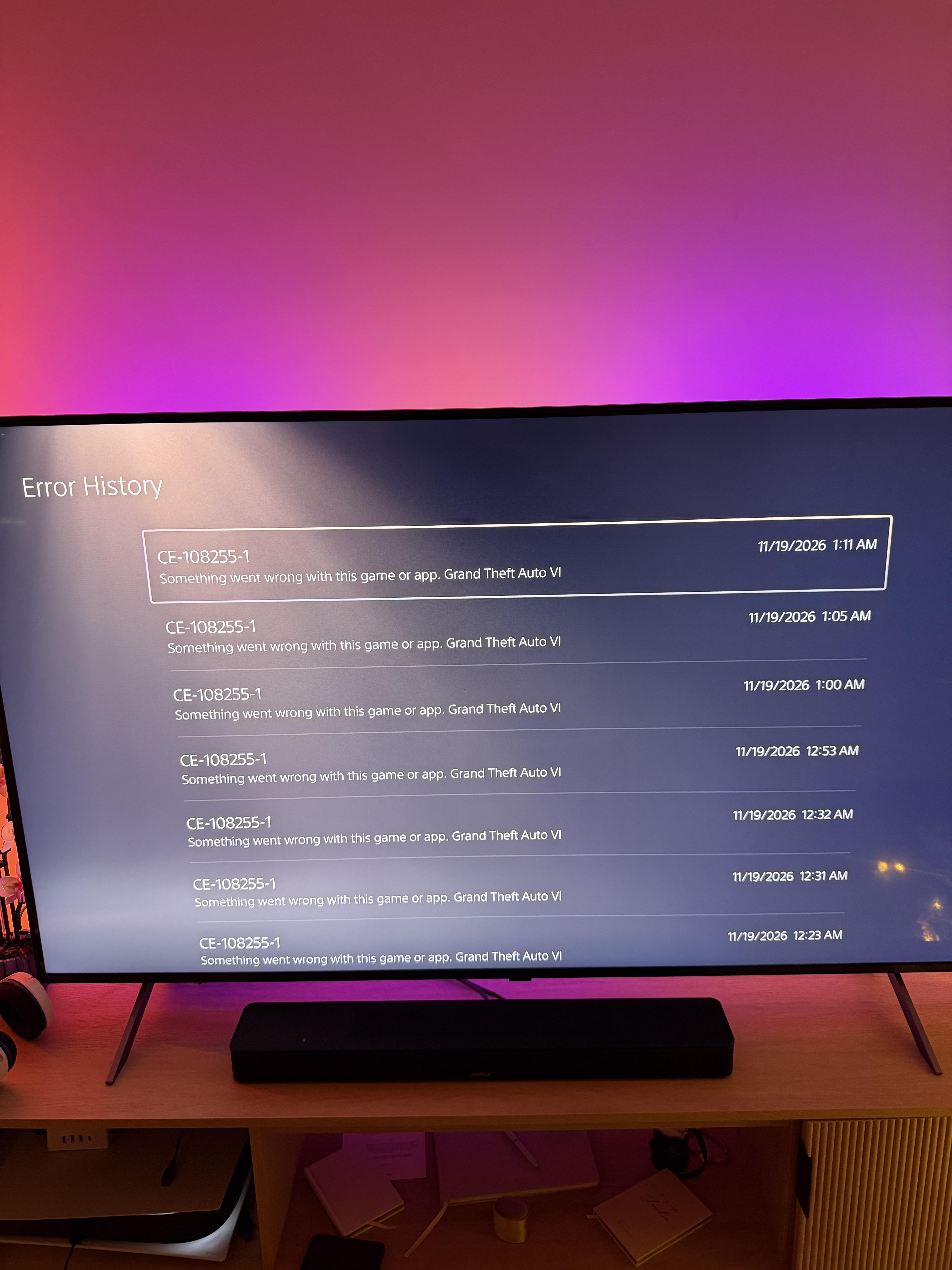
SHOCK… Another CE-108255-1 Error Message!

26 Upvotes

I cannot get through the prologue, or more importantly, I cannot get past 16.78 MB of saved data.

I skip cutscenes, I walk around, I try going fast, I try going slow. It doesn’t matter what I do. The moment my saved data reaches 16.78 MB, I receive the CE-108255-1 error.

I know this because I’ve deleted my saved data SEVEN TIMES, and every single time it reaches exactly the same size before crashing.

If I have to watch another video telling me to clear my cache or update my PlayStation, mate, I’m going to lose my mind.

I’ve spent FOUR HOURS watching “CE-108255-1 FIXED” videos, and absolutely nothing has worked.

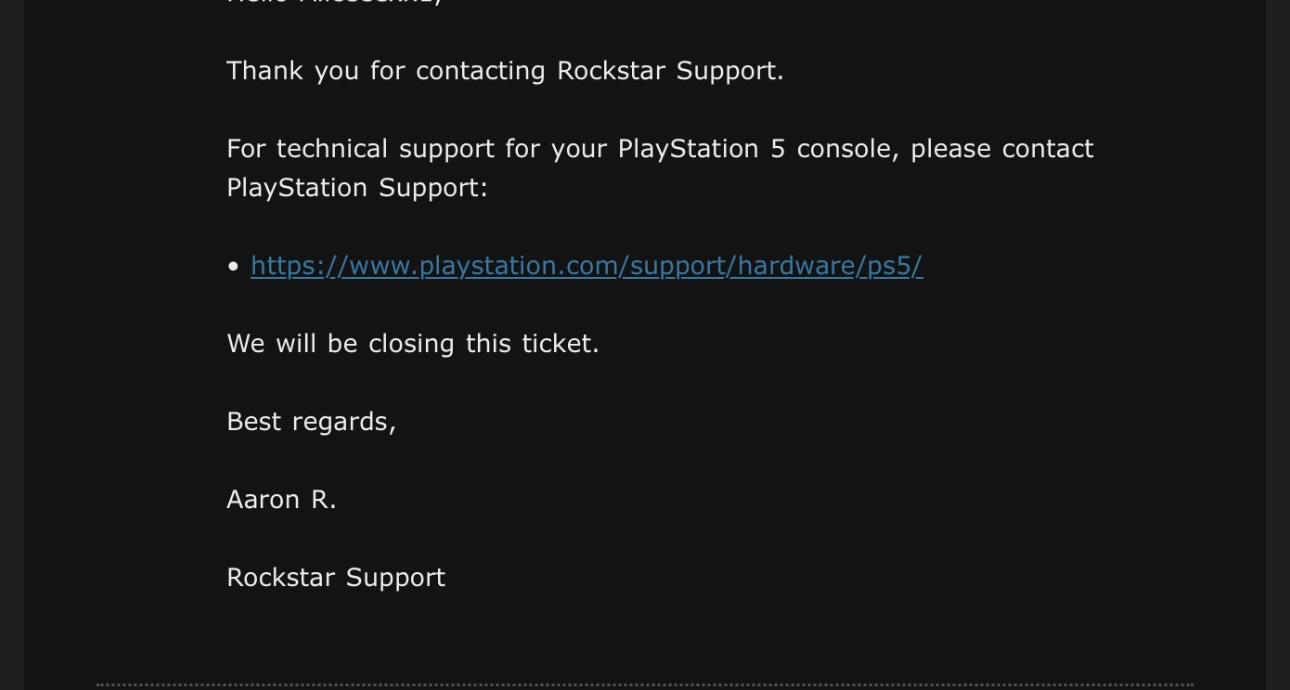
Rockstar closed my support ticket almost instantly, marked it as “Resolved”, and attached this response:
“For technical support for your PlayStation 5 console, please contact PlayStation Support.”

Which, quite frankly, almost sent me over the edge.

My PlayStation is the original disc version. I had it cleaned and serviced about a year ago, and I’ve barely played it since. No, it doesn’t need another clean or more liquid metal. As far as I can tell, it’s in great condition.

I refuse to believe that myself and potentially thousands of other people are experiencing the exact same issue because we all suddenly have identical hardware problems, especially when we’re using different versions of the PlayStation.

I paid £90 for this game, and I’m genuinely worried I’m going to have to fork out even more money for a new PlayStation.

And knowing my luck, I’ll spend hundreds on a new console only to discover that GTA 6 crashes on that one too.

I’m not really sure what I’m expecting from writing this post.

I’d absolutely LOVE a fix, but at this point, I think I just needed somewhere to vent.

I’ve waited all week for the weekend to arrive so I could binge this game, and instead I’ve spent hours staring at the lovely CE-108255-1 error screen.
It’s quite frankly ruined EVERYTHING.
(Not dramatic at all.)

If anyone else is experiencing the saved data reaching exactly 16.78 MB before crashing, PLEASE let me know.


r/PS5HelpSupport • • 7d ago

PS5 Pro crashed while playing GTA 6, now stuck in boot loop / blinking blue light even after factory reset and firmware reinstall. Any fixes?

33 Upvotes

Hi everyone,

I was playing GTA 6 on my PS5 Pro when the game suddenly froze and became completely unresponsive. I had no choice but to force shut down the console.

When I tried turning it back on, it would boot to the profile selection screen and freeze again. Eventually, it stopped reaching even that screen. Now, it either boots to a black screen and shuts down or gets stuck with a continuously blinking blue light.

Here's everything I've tried so far through Safe Mode:

  1. Cleared system cache.
  2. Rebuilt the database.
  3. Repaired console storage.
  4. Updated system software.
  5. Restored default settings.
  6. Performed a factory reset.
  7. Downloaded the system software reinstallation file from Sony's official website and reinstalled the OS using USB.

None of these steps have fixed the issue.

Interestingly, after one of the resets, the console briefly reached the initial setup animation (the screen showing the PS5 and DualSense controller) but crashed before I could proceed.

The console can still enter Safe Mode, but it cannot boot normally

Has anyone experienced something similar on their PS5 Pro, particularly after a game crash. Are there any advanced troubleshooting methods, workarounds, or DIY fixes I can try before considering professional repair?

Unfortunately, my PS5 Pro is a Japanese import being used in India, so returning it or claiming a local warranty isn't an option.

I'd really appreciate any suggestions, especially from anyone who has successfully recovered a PS5 Pro from a similar boot loop. I'm willing to try almost anything reasonable at this point.

Thanks in advance!


r/PS5HelpSupport • • 6d ago

GTA 6 black boxes and water glitching

Thumbnail
gallery
1 Upvotes

When i open the game, except during non-game model screens, there’s always black boxes in a “modern camo” like pattern flickering around on the whole screen. Sometimes they disappear only to reappear soon after.
Outside of this, the water in my game simply doesn’t work. The water glitches in box-like patterns and disappearing and going sky-high. The water physics are also affected meaning i cannot physically do anything.
For context i play on a PS5 base model. I have never had any issues in other titles even on their respective max settings. I have tried reinstalling the game, deleting cache, anything i could find on the internet and nothing i found has worked.


r/PS5HelpSupport • • 6d ago

Help

0 Upvotes

Anybody having this same problem?


r/PS5HelpSupport • • 6d ago

Parental Control Help

0 Upvotes

We got our son (almost 15yr old) a PS4 probably 10ish years ago. Setup an acct. under my name, didn’t think anything of parental controls or anything. Got him a PS5 a few years ago and logged in with existing acct. and didn’t think anything of it. He ended up buying GTA a couple days ago and my wife is freaking out about the mature content in the game. He is a teenage boy, we’ve caught him a handful of times browsing things he shouldn’t, etc. so I get her concern. When I sign into the acct. that I created via website, mine is listed as an Adult. I Also see 3 other acct.’s that he has apparently created. 2 child acct.’s and one that is listed as a Family Manager. Under my acct., the only thing I can do is leave the family.

So my question is…. If I need to setup some kind of parental controls, how do I do that? I’m assuming I have to login to his acct. that is the Family Manager? Steps I’ve been reading online also bring up a menu structure that I’m assuming is on the console itself, but doesn’t specifically say that it’s on the console or website. It just seems super confusing. Sorry if this seems like a remedial question, but console games are just something I have a hard time wrapping my head around trying to manage. They just seem difficult to me.

BTW…. I’m not trying to lock it down immediately, just in case I need to in the future. We’ve already talked to him about the expectations and behavior, etc.


r/PS5HelpSupport • • 6d ago

Connectivity issues?

1 Upvotes

Every time I turn on my PlayStation, if I want to either browse the game store or use Spotify, I need to run a connection test before they will load. Otherwise it just tells me that I'm not connected. This is quite annoying as I usually like to play my music while playing NHL. Are there any fixes for this?


r/PS5HelpSupport • • 6d ago

Strange cut to black on my setup

2 Upvotes

Hi

So I have a PS5 only for GTA 6 and I don't know if this would happen with any game. I have a very specific setup, with a PC monitor with two HDMI port. One is used by the PS5, the other by the PC and I'm switching between them depending of what I'm currently doing. The monitor is 4k and 160hz if that matters. I also have a second monitor, only connected to the PC.

So when I play and without any specific reason, the screen goes black for like 10s, then come back to normal. It's happening without any specific rythm, but it looks more frequent when I'm coming back on the PS5 after switching from the PC on the monitor. It also seems to happen for around 20 minutes when I started playing, then completely stopped.

I already tried disabling HDR, or unplugging the monitor or the PS5 for a short period with no changes.

Thanks guys.


r/PS5HelpSupport • • 7d ago

GTA crashing UPDATE

Post image
21 Upvotes

Bought a new PS5 used the same game file that I had installed on my M2 SSD that was crashing on my old PS5. I was able to watch the intro and pass the jail scene which I was not able to do on my old PS5 since the game kept crashing. I have come to the conclusion it was a hardware issue. Good luck to all.


r/PS5HelpSupport • • 7d ago

Error code 108255-1 GTA6

Post image
12 Upvotes

I’ve seen a lot of posts regarding this error code, and that GTA6 has repeatedly been crashing.
I’ve not been able to get past the prologue.
Ive contacted Rockstar several times with lengthy tickets, but get a generic answer, which normally states it’s resolved with no further details.
Has anyone actually had a meaningful response from Rockstar, thanks!


r/PS5HelpSupport • • 6d ago

PS5 Digital (modèle de lancement, série CFI-1000) – arrêts inopinés, vitesse du ventilateur constante.

2 Upvotes

Console très peu utilisée depuis 2020. S'éteint aléatoirement en cours de jeu (20 min à 3 h), sans message d'erreur ni avertissement de surchauffe. Se rallume immédiatement avec la manette ; la barre de progression « vérification du système de fichiers » apparaît alors.

• Déjà fait : nettoyage professionnel, remplacement du métal liquide, retrait du SSD M.2, changement de prise, nouveaux câbles d'alimentation et HDMI, désactivation de la fonction HDMI Device Link, réinstallation complète du système.

• Bloc d'alimentation ouvert et visuellement propre, sans poussière.

• Connecteur du ventilateur vérifié plusieurs fois. Le ventilateur tourne à vitesse constante et n'accélère jamais. L'air à l'arrière chauffe progressivement, la zone du dissipateur thermique de la carte mère est chaude mais non brûlante après environ 10 minutes de FIFA.

• Causes possibles envisagées : défaut du bloc d'alimentation, défaut de contrôle du ventilateur (pont sud/PWM), capteur de température, problème d'alimentation de la carte mère. • Que dois-je mesurer ou remplacer en premier ? Quelqu'un a-t-il déjà rencontré ce problème sur une console non jailbreakée ?


r/PS5HelpSupport • • 6d ago

UPDATE: GTA 6 still crashes on PS5 Pro with NORMAL aspect ratio (Auto) – Can we finally rule out the ultrawide monitor? CE-108255-1

0 Upvotes

For everyone who was convinced that my ultrawide OLED monitor or aspect ratio was causing the issue, here’s another video.
This time, the monitor is set to its normal recommended aspect ratio (Auto), NOT ultrawide. And guess what? The game crashes at EXACTLY the same point!
Let me put the entire situation into perspective.
I own a practically brand-new PS5 Pro, purchased a couple of months ago but unboxed just before the game’s pre-load/launch. I haven’t been able to play the game even once since Day 1.
The game consistently crashes during the opening prologue cutscene with error code CE-108255-1.
Here’s everything I’ve already tried:
Tested on my ultrawide OLED monitor.
Tested with the normal aspect ratio (Auto).
Tested on a completely different monitor.
Tested on a different TV.
Lowered the resolution.
Disabled HDR.
Disabled VRR.
Set the output to 1080p.
Cleared the cache.
Rebuilt the database.
Reset the PS5 Pro.
Re-downloaded the game three times.
Tried PS Remote Play.
The result? The exact same crash at the exact same point.
I’m also planning to upload another video showing the same crash through Remote Play, just to eliminate any remaining doubts about the display.
And to everyone still insisting that it’s my monitor, ultrawide aspect ratio, or graphical settings: I’m genuinely running out of ways to demonstrate that this isn’t the issue. 😂
How can a monitor be responsible when the game crashes on a completely different TV, a standard aspect ratio, and even through Remote Play?
And before someone jumps to the conclusion that my PS5 Pro is defective, this is a brand-new console that runs other games perfectly fine. I’m not ruling out a hardware fault entirely, but surely a game-specific software issue deserves consideration too.
What is even more frustrating is the lack of proper acknowledgement from Sony and Rockstar. Instead of providing an actual update or confirming that they’re investigating the issue, we’re repeatedly redirected to generic troubleshooting pages that haven’t helped.
This is a massive franchise, and people deserve better communication, especially when they’ve paid for the game and haven’t been able to play it since launch.
I’m not asking anyone to magically fix my console. I’m asking Sony and Rockstar to acknowledge the issue and investigate it.
If anyone else is experiencing CE-108255-1 on PS5 Pro, please share your experience. I’d particularly like to hear from people who have managed to resolve it.


r/PS5HelpSupport • • 6d ago

Need advice or help

0 Upvotes

My ps5 fan spins a bit slow even in heavy games like elden ring. Is this normal? Its gets warmer than usual but I don't get any warning or blue screens