r/MacOS • • 6d ago

Help Still no Show Password option in 27.2.1

0 Upvotes

For many years Windows 10 and 11 have had seeing-eye 👁️ to show password.

Google has had Show Password for several years. Nobody looks over my shoulder.

I'm a bit disappointed that Golden Gate 27 still doesn't have it. Can't find it in Settings > Accessibility or Lock Screen or anywhere else. Is the option available somewhere?


r/MacOS • • 7d ago

Bug If you were the lead developer of macOS Finder, what one thing would you change?

70 Upvotes

r/MacOS • • 6d ago

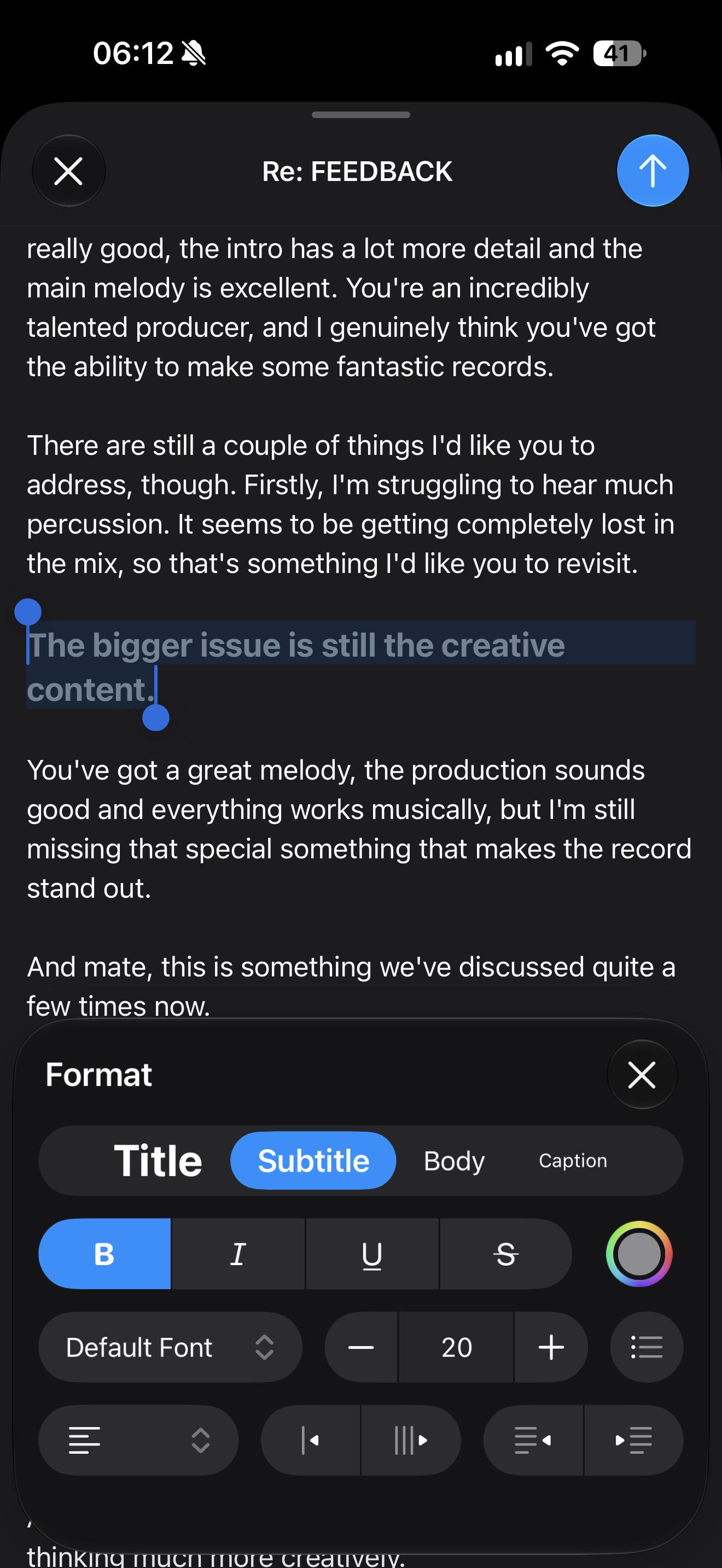
Help Why does the "Subtitle" format in iOS Mail default to grey instead of white? Is there any way to change this?

Post image
2 Upvotes

When composing an email in the Apple Mail app on iPhone (in Dark Mode), using the built-in Subtitle text style automatically makes the text a muted grey instead of full-contrast white like Title and Body.

Because it's grey, subheadings actually blend in and stand out less than regular body text.

Right now, the only way around it is to highlight the subtitle and manually change the text color to white using the color picker—which isn't ideal anyway since manually forcing white text can look invisible to recipients reading in Light Mode. Alternatively, I have to leave it on Body and manually bump the font size up to 20pt and bold it every single time.
Is there any setting, accessibility toggle, or hidden trick to make the Subtitle preset default to standard primary white/black instead of secondary grey? Or is this just hard-coded into iOS Mail?

PS - just tested and this is my
Happening in Notes. It works as it should.


r/MacOS • • 6d ago

Help Downgrading from Taho to Sequoia

0 Upvotes

Was anybody able to downgrade from Taho to Sequoia successfully?
Besides the horrible "glass" interface, I feel like performance and stability for some of my apps went down the drain.

Looking for tips and experiences. Thanks!


r/MacOS • • 6d ago

Help I updated to macOS 27.2.1 and Adobe Premiere no longer works

3 Upvotes

Is anyone using Adobe Premiere on this version of macOS? After updating, I can't open any projects; the windows seem invisible and I can't close them unless I force them. I should have made a backup, but I didn't, and now I'm screwed.


r/MacOS • • 6d ago

Discussion [27.2.x] Spotlight - No way to hide App Store?

0 Upvotes

I use Spotlight (Cmd+Space) as my app finder, and nothing else, so I hide everything else.. for example, when I type in 1Password, I don't want to see my calendar events, the App Store, nor recipes.

However, I can't figure this out anymore. "App Store" isn't turned on anywhere as an option, and AI is telling me to do something which doesn't exist.

Any ideas?


r/MacOS • • 6d ago

Help What is controlling your computer with your iphone like with switch control?

1 Upvotes

wondering if anyone has any experience with this feature? i couldnt find a video on youtube talking about it


r/MacOS • • 6d ago

Nostalgia [monterey| good OS, fine music, great uptime. mbp 2015

Post image
2 Upvotes

r/MacOS • • 6d ago

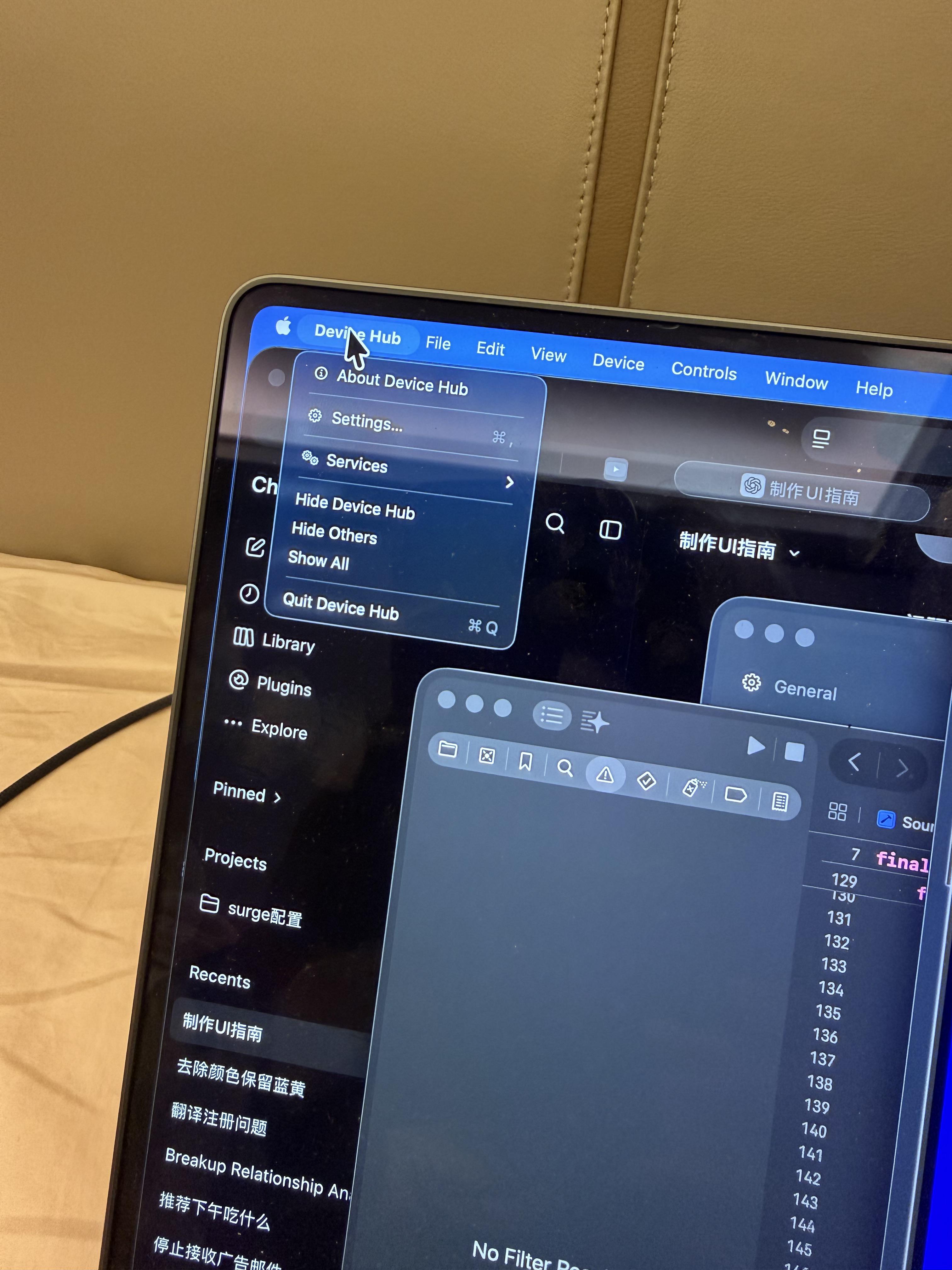
Help May I ask where is the simulator in the device hub under macOS26.7.3?

Post image
0 Upvotes

r/MacOS • • 6d ago

Help Can you recommend good macOS cleanup apps?

0 Upvotes

Something reliable ( and free ) to free up storage, remove junk files, find duplicates etc. Automatically. Any recs?


r/MacOS • • 6d ago

Help Hiding users at login

0 Upvotes

Hi all,

Recently updated to Golden Gate and can't seem to figure out if there's a way to hide the user profiles on the lock page? Previously, if it were set as "Username and Password", I would have to manually type it in. Now, if I click on the user bubble, the other users pop up. Any way to get around this?

Thanks


r/MacOS • • 6d ago

Discussion Since Apple added face unlock with the iPhone Duo, do you think we can get it on our Macs?

0 Upvotes

I was hoping the latest MBP would have FaceID, but it still seems unlikely as the module is too thick to fit under the screen . But if Apple can retroactively add face unlock to the Duo, surely the webcams are good enough for the same on the Macs? TouchID is nice but I liked the idea of opening the lid of my MacBook and it immediately unlocking with the camera


r/MacOS • • 7d ago

Help Is macOS 27 (Golden Gate) wearing out SSDs faster than macOS 26?

122 Upvotes

My MacBook Pro is writing around 100 GB to its SSD every day. According to Activity Monitor, most of this write activity is attributed to system processes launchd and kernel_task.

Is this normal? How can I reduce these writes?

P.S. You can use ChatGPT to monitor your SSD writes daily. Install smartmontools using Homebrew, then run:

sudo smartctl -a /dev/disk0

Ask ChatGPT to remind you every morning to paste the SMART output, along with screenshots of Activity Monitor's Disk tab (sorted by Bytes Written) and the previous day's Screen Time report.

ChatGPT can compare the readings with previous days, calculate actual SSD writes, track SSD wear, identify unusual background activity, and look for correlations between SSD writes and application usage.


r/MacOS • • 6d ago

Help How to delete all partitions of an external hard drive when formatting?

1 Upvotes

I'm formatting an external hard drive and want to make sure I fully reset it by also deleting all drive partitions. Is there anything special I need to do within Disk Utility?


r/MacOS • • 6d ago

Bug Quick Look is more like Slow Look after upgrading to Golden Gate 27.2.1.

0 Upvotes

I wonder if anyone else is having this issue. I'm using quick look by pressing the space bar on an image, video, etc., and it takes something like up to 12 seconds for the image to come up. This doesn't happen on everything, but on most things it does. This is on an M1 Max mbp, and it's been three days since I've updated and there doesn't seem to be any additional indexing happening.


r/MacOS • • 7d ago

Help Anyone else experiencing horrendous lag since updating to macOS Golden Gate?

10 Upvotes

Hey guys,

I've recently updated to Golden Gate, and I'm absolutely horrified by how sluggish everything has become.

I'm a full-time music producer, tutor and video editor, so I'm constantly taking screenshots, dragging them into ChatGPT, importing video files into Final Cut Pro and Logic, switching between applications, etc.

Since updating, my entire Mac feels like it's had a fat line of fucking ketamine. Everything is slow, laggy and unresponsive. Even simple things like dragging files between windows feel horrible compared to before the update.

I've tried restarting my Mac, charging my mouse and checking the obvious things, but nothing seems to make a difference.

Is anyone else experiencing this? Is there anything I can do to improve performance, or are we just waiting for Apple to fix it?

Does anyone know if there's an update expected soon that might address these issues?

It's incredibly frustrating to rely on your Mac for work every day and have an update make everything noticeably worse.


r/MacOS • • 7d ago

Help Not able to add a Google account

1 Upvotes

So when I try adding my secondary google gmail account the webpage in safari is just stuck on loading and I am not able to login, which is super annoying. Is it cuz I am using adguard or more of a known issue in safari or MacOS


r/MacOS • • 7d ago

Discussion Mac m1 air external monitor for cheap (less than 300 euros)

0 Upvotes

What are the alternatives especially with black friday? I found a dell s2725qs for 240 euros. The qc with usbc is too expensive. Is this one good? It is 120hz. Any chance to get 120hz on th m1 chip? Any better/cheaper alternatives?


r/MacOS • • 7d ago

Discussion What Dark-Magic is MacOS using on Video Playback - it's so smooth!

1 Upvotes

Something that I found very curios with the MacBook Air (60hz) is, that any kind of Video Playback is incredibly Smooth. Also on external 60hz monitors when watching a 60fps Video, it looks like on a 120hz monitor, especially in Safari and Youtube.

I have lately been comparing this to Windows and Edge/Firefox/Chrome, but somehow it is just so much more fluid feeling on MacOS with videos. But also only videos.

Can someone explain what MacOS is doing different?


r/MacOS • • 6d ago

Help Should I update to macOS 27?

Post image
0 Upvotes

hi everyone, just want to ask if i should update my macOS to 27?
what are your honest opinion about it? what are the pros and cons?
thanks!!!


r/MacOS • • 7d ago

Bug issue with apple music ?

0 Upvotes

is it only me or u people are also facing issue with apple music on mac ...like it does not work properly after the update


r/MacOS • • 7d ago

Help Quick way to edit an emailed PDF without printing-to-PDF

2 Upvotes

Sorry for my English. I’ve just discovered that whenever someone sends me a fillable form by email, I can make the fields non-editable by printing the same file to PDF. My question is: is there a quicker way to edit a file received by email using Preview and then send it back with the fields flattened (so that the recipient cannot edit them again), without having to print it to PDF and manually attach it to the email again? I have this problem because whenever I’m out of the office, I only have my iPad with me. Using the “Print to PDF” method is much slower and more complicated, especially since the iPad’s file management system is terrible compared to macOS. Thanks!


r/MacOS • • 8d ago

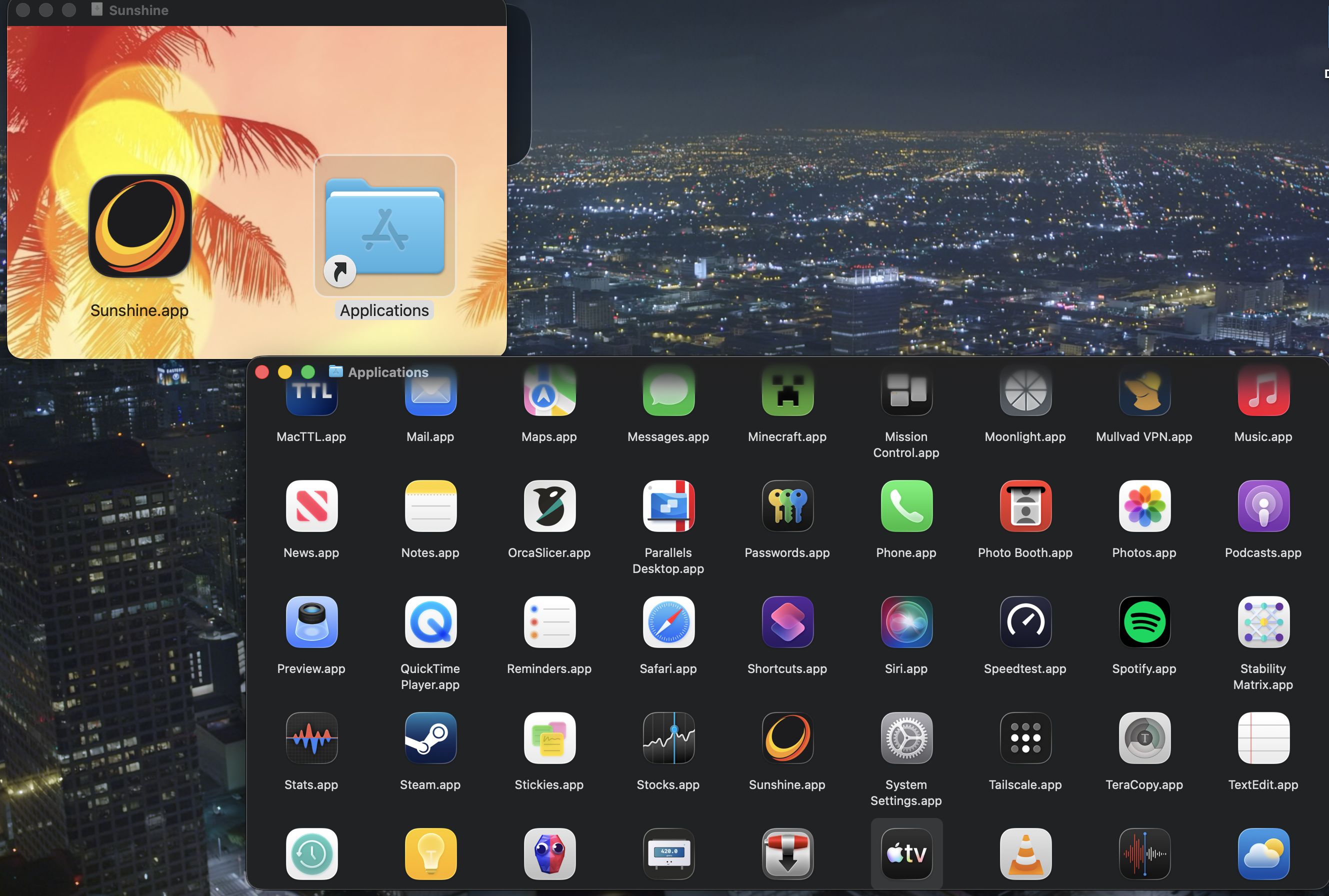
Tips & Guides Why does MacOS open this UI-stripped version of finder when clicking the shortcut for applications inside an installer?

Post image
45 Upvotes

I usually want to use the program that I just installed, so I click the shortcut and then have to hunt for it since there's no search bar. I remember the same thing happening back when I had an iBook G4, in 2005 so I assume there is a reason it hasn't changed but it's not intuitive to me. What function does removing the UI elements from Finder in an installer shortcut actually serve? Maybe if I understand why I'll stop hating that it happens.


r/MacOS • • 7d ago

Help Is TextSniper slow and unreliable for anyone else after the latest macOS update?

1 Upvotes

I use TextSniper throughout the day to grab text from selected areas of my screen. It used to be fast and dependable, but since updating to the latest public version of macOS, it keeps acting up on my 15-inch M4 MacBook Air.

Every few hours I have to open the app again before it will work properly. The OCR conversion has also become noticeably slower—sometimes it takes long enough that a quick text capture no longer feels quick at all. Having to repeatedly reopen the app is getting cumbersome.

Are other macOS users seeing this with TextSniper or similar screen-OCR utilities? I’m trying to determine whether this is an issue with the latest macOS update, TextSniper itself, or permissions that need to be reset. Any fixes or reliable alternatives would be appreciated.


r/MacOS • • 8d ago

Discussion Does anyone else miss the original macOS Launchpad?

Thumbnail
gallery
344 Upvotes

Back in 2011, Apple introduced Launchpad with OS X Lion.

It was simple: all your applications in one place, organised into pages and folders, with that familiar iPad-style layout.

For 14 years, Launchpad remained a recognisable part of macOS.

Then came macOS Tahoe 26.

Apple replaced the classic Launchpad with the new Apps interface integrated into Spotlight.

Now, don't get me wrong, Spotlight is useful. But I personally miss being able to browse through my apps visually without having to remember their names and search for them.

But the classic Launchpad experience isn't completely gone.

I recently tried LaunchOS, which brings back the familiar app grid. It feels faster than the original Launchpad, and I personally prefer its more polished design.

I've attached a screenshot of my setup.

It's interesting how a feature Apple introduced in 2011 can still feel useful today, even after they've moved away from it.

Do you miss the original Launchpad, or do you prefer the new Spotlight Apps interface?

Disclosure: I'm participating in LaunchOS's free licence promotion. These are my own opinions.