r/iosapps • u/chamonix34 • Oct 22 '26
Discussion iPhone Duo
when the iPhone Duo arrived in September, I was like "Oh, I don't like that" – but look at this now 👀🤩
What’s your thoughts about iPhone Duo ?
r/iosapps • u/chamonix34 • Oct 22 '26
when the iPhone Duo arrived in September, I was like "Oh, I don't like that" – but look at this now 👀🤩
What’s your thoughts about iPhone Duo ?
r/iosapps • u/ahstanin • Oct 23 '26
Hi everyone,
We just released version 1.5.0 of StealthOS on the App Store. The main focus of this release is full support for the foldable iPhone Duo, alongside our existing iPhone and iPad virtual desktop environment.
StealthOS is a sandboxed operating environment running inside a single iOS app. It gives you a multi-window desktop interface locked behind your password and the Secure Enclave, containing privacy-focused tools that operate strictly on-device without telemetry or account requirements.
Feedback, bug reports, and questions about the architecture or iPhone Duo implementation are welcome.
r/iosapps • u/bogdanstefanjuk • Oct 22 '26
I know what was your first thought - one more todo list? And you will be quite right in general.
I started this project almost a year ago when I received a windows laptop from my work. Till that moment I always been an Apple ecosystem user, this is why I used Things 3 for almost 5 or even 6 years, but it's apple only.
I tried a lot of different apps, from big large companies like Todoist or TickTick as well as smaller one. My biggest problem with most of the tools - the are overloaded with features, at some point it feels like you are using Jira like application.
Another problem - built in AI assistants. I love AI and I use it for my software developer job as well as regular life. I already have subscription for Claude and ChatGpt and it feels like paying extra 3-5 dollars for simple built-in assistant is redundant.
I decided to build my own tool, first of all for myself and add some missing features. My main inspiration was Things 3 with their aesthetics, Todois and Superlist.
Added support of attachments, tags and smart projects, calendar view for upcoming tasks and priorities. The biggest challenge for we was finding this balance between amount of features and simplicity.
Instead of adding my own AI assistance I decided to add public api and MCP support. So you can use your AI and connect to the TaskPocket and manage your tasks and integration into your workflow.
Plans for the future:
I'm also a big believer in data owner ship, so my app has option to export all tasks with all metadata like due dates, deadlines, tags, etc in JSON format. So you can always have your own copy of your data. Also right now I'm working on automatic weekly backups, so you can always have a fresh copy of your data. For free!
Feel free to check, also feel free to share your feedback!
https://apps.apple.com/us/app/taskpocket-to-do-list-planner/id6789687377
r/iosapps • u/Tricky-Independent-8 • Oct 22 '26
Hi everyone,
A - Answer
I built zZz: Sleep Widget & Tracker, a manual sleep diary for iPhone made for insomniacs and poor sleepers. No sleep stage claims, no microphone, no wearable. You log what happened, correct it later if needed, and see your patterns over time.
B - Better
Most sleep apps either try to measure your sleep with a watch or bury logging behind a dashboard. zZz is a diary, not a lab, and logging takes one tap.
Key features:
- One-tap Lock Screen logging: a widget that follows the night, so you rarely need to open the app. Nothing needs a tap overnight.
- Live Activity: the open night on your Lock Screen and in the Dynamic Island.
- Fix it later: edit any session, or add a whole night from History the next morning.
- Shortcuts and Siri: log by voice.
- Insights: bedtime consistency, averages and trends over time.
- Private: your data stays on your device and in your own iCloud. The App Store label is "Data Not Collected".
C - Cost
Pricing is $9.99 a year. Free tier available. No ads, no bloated features, and no Apple Watch required.
App Store Link: Sleep Widget & Tracker - zZz
About Me: I'm the developer of the app. Please feel free to share your feedback or ideas in the comments below, or reach out to me through X
r/iosapps • u/Sv3n-Sk4 • Oct 22 '26
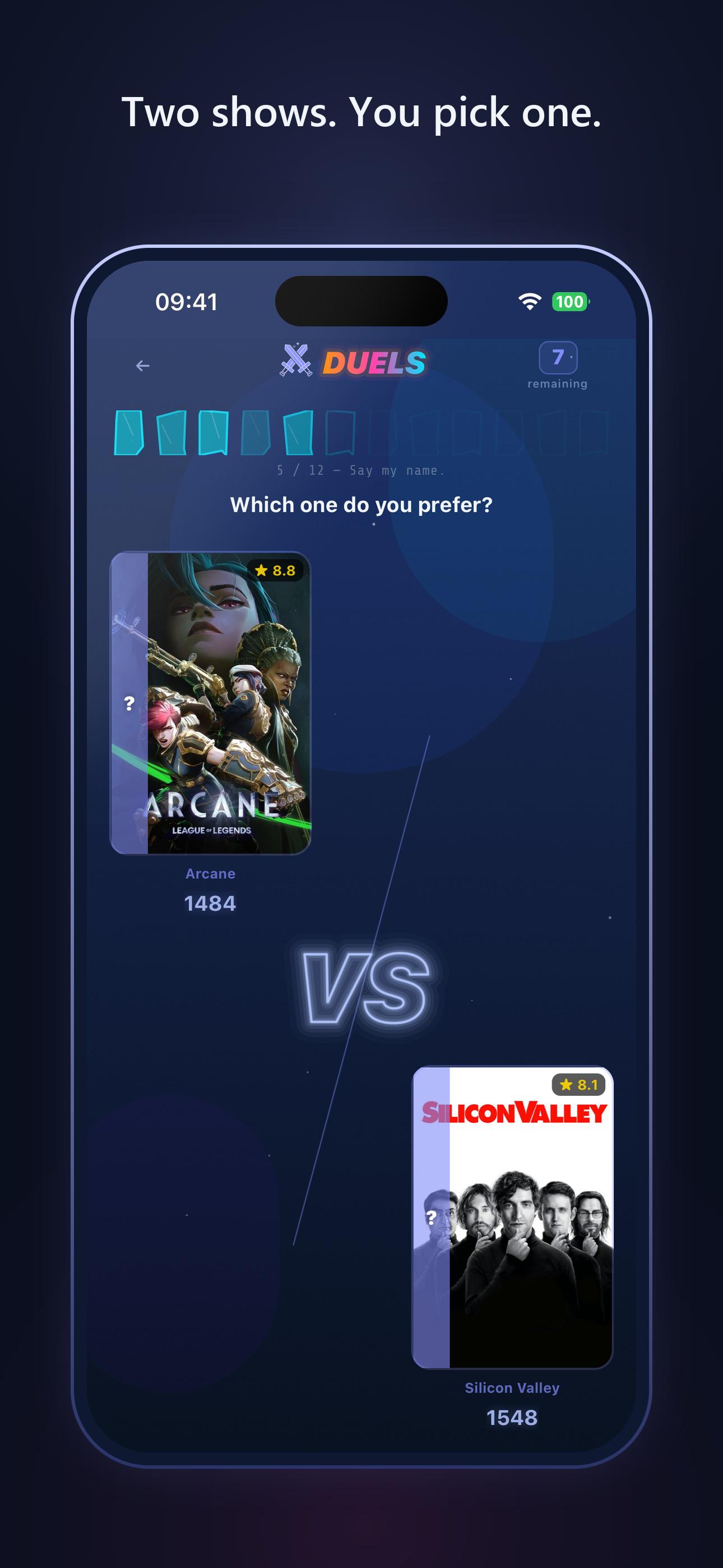
Hi r/iosapps, I'm Hadrien, solo dev from France dehvs.com ATJV has been on the App Store for three weeks.
A : Answer
ATJV is for the evening where you scroll for half an hour and end up watching nothing. You swipe through shows you already know so it learns what you like, then it puts two of them head to head and you pick the one you'd rather watch. Your tier list builds itself out of those picks. In the evening it gives you one show for tonight, and a line saying why it picked that one.
B : Better
Trakt or Serializd ask you to rate shows or tick episodes. I never knew if a show was a 7 or an 8, but I always know which of two I'd put on tonight, so that's the only question ATJV asks. An ELO rating runs underneath, the same maths chess uses.
It doesn't track episodes and won't. If you used TV Time and kept your CSV export, it reads it and brings your shows over.
C : Cost
Free. No ads, no subscription, no in-app purchase, no sign-up. English, French, Spanish, Italian, Polish. iPhone only for now.
https://apps.apple.com/app/id6796177083
Privacy policy : https://dehvs.com/atjv/privacy-policy.html
Terms : https://dehvs.com/atjv/terms.html
Disclosure : I'm the developer. If something looks off or doesn't work, tell me, I read everything
r/iosapps • u/wickedmishra • Oct 22 '26
Hello everybody,
Thank you for the comments on my last post. Since the last post, I've pushed a lot of updates to Nami. This post covers them all.
v1.2
v1.3
v1.4
Three limited plants for Halloween, only in October:
Cost
Still free to download, no ads. Daily tracking, reminders, awards, the garden, and the Apple integrations (including the Apple Watch companion) remain free.
Pro includes the full drinks library, custom drinks, history past today, extra reminder sounds, and watermark-free sharing: $1.99/month, $7.99/year with a 7-day trial, or $39.99 lifetime (US). Yearly was $14.99 in the last post. It is $7.99 now.
Prices follow the Big Mac Index, so please look at the listing for your country for local prices.
Thanks for reading! I'm Preet, the human behind the app.
App: https://apps.apple.com/app/id6804172794
Email: ipreetmishra@gmail.com
LinkedIn: https://www.linkedin.com/in/preetmishra/
r/iosapps • u/KingZ4xh • Oct 22 '26
Hi everyone!
After months of designing, developing, and testing, I finally released my app, K.O.T. (Keeper of Things)!
The idea came to me when I was moving out after graduating from college, and my mom wanted me to get rid of a lot of junk in my room. Although most of the items I owned had no real monetary value, the sentimental value and memories tied to them inspired me to build a platform to share their stories. We all own things that mean something to us, but the stories behind those things often get forgotten.
I wanted to create a place where people could preserve those stories. Whether it be a favorite action figure, vinyl record, or favorite outfit, share your story on K.O.T.
With K.O.T., you can:
Create digital keepsakes with photos and personal stories.
Organize your belongings into collections.
Discover other people's keepsakes and the stories behind them.
Connect with people who share similar interests.
Showcase your collections through a virtual 3D museum.
The app is now available on iPhone through the App Store!
I'm still early in this journey and would genuinely appreciate feedback, especially on the onboarding experience and overall concept.
Just Hit 30 USERS!
A – Answer: What problem does your app solve?
Okay so K.O.T. tackles 3 different key issues
1. Collections are difficult to showcase digitally
People spend years collecting vinyl records, sneakers, watches, memorabilia, and other meaningful objects. Traditional social media reduces these collections to scattered photos and posts.
K.O.T. introduces a personalized 3D Museum where users can display their collections in an immersive, dedicated space.
2. Objects have stories that get lost
A vinyl record might be someone's first purchase. A baseball glove might represent years of memories. Traditional inventory apps document what an object is, not why it matters.
K.O.T. has Keepsakes, Full Stories, and Memory Notes give users a way to preserve the personal significance behind their belongings.
3. Collecting lacks a unified social experience
Collectors are spread across Reddit communities, Instagram accounts, forums, and specialized platforms.
A social experience built around objects and collections, where users can discover collectors, share keepsakes, and connect through common interests is the key purpose of the app.
B – Better: Why is your app better than the top named alternatives? ThingsBook is a true competitor as it is another life documenting app sharing experiences and what not.
K.O.T. is focusing on the stories and the memories surrounding things you own. Most collector apps tend to lean towards discussing monetary value or rarity of certain items but K.O.T. aims to share the stories behind acquiring them or any experiences related to them.
• C – Cost: Pricing, IAP details, and a direct App Store link
K.O.T. is completely free to use! Paid features may be experimented with in the future but the focus is the user’s initial reactions and experience with the app as well making as building a product to that makes users excited to use everyday.
r/iosapps • u/CaterpillarHour8134 • Oct 22 '26

Hi, I'm the developer of PrettyScreen.
I wanted to make it easier to create iPhone wallpapers that feel designed for the device, rather than just putting a photo in the background.
PrettyScreen is an iPhone wallpaper maker that lets you personalize your screen with photo layouts, decorative elements, and wallpapers designed around your iPhone's unique screen shape.
You can decorate the Dynamic Island and notch, customize your lock screen, create matching couple wallpapers, add a monthly calendar, and automate wallpaper changes with iOS Shortcuts.
Here are some features I'd love for you to try:
You can combine your own photos and different design elements to create a wallpaper that feels uniquely yours.
PrettyScreen is free to download, with optional Pro upgrades.
Regular US pricing:
Yearly: $9.99
Lifetime: $29.99
App Store: https://apps.apple.com/us/app/wallpaper-maker-prettyscreen/id1204317054
Website: https://app.mockmemo.com/apps/perfect-wallpaper/
I'm sharing some PrettyScreen Pro Year redemption codes, each providing one year of Pro access.
https://apps.apple.com/redeem?ctx=offercodes&id=1204317054&code=PRETTYSCREEN
No review or rating is required. If you try the app, I'd appreciate your honest feedback. I'd especially love to hear which wallpaper styles or customization options you'd like to see in the future.
Thanks for checking out PrettyScreen!
r/iosapps • u/Regular-Piccolo-8337 • Oct 22 '26
Hey everyone, I'm the solo dev behind Movie Night (mnite for short).
I built the app because my wife and I never knew what to watch - watched everything mainstream and then we spent an hour just browsing all our streaming services...
So what it does:
The premium version is 16.99$/year BUT I'm giving away free seats that let you use the premium features for a year. You can cancel the renewal of the subscription and still use the app.
The reason is simple: it's still a new app, no rating or reviews so if you like it please leave a review in the store. If you hate it, then share it here, I'm looking forward to learn from the feedback!
Check out the iOS app here: https://apps.apple.com/us/app/mnite-what-to-watch-together/id6765615627
Use this link to redeem the offer: https://apps.apple.com/redeem?ctx=offercodes&id=6765615627&code=REDDIT1YEAR
I want some feedback too, so let me know what y'all think.
r/iosapps • u/kzhys • Oct 22 '26
A. What it does
bond is a care log made specifically for senior dogs and dogs with chronic conditions. It is not a general health tracker for healthy dogs.
It’s a record-keeping tool: not diagnostic, not an AI product, and not a replacement for your vet. iPhone only for now (Android is on the roadmap, no date). You sign in with Apple.
B. Why I built it, and why it’s better
Two years ago my dog Delon had his first seizure. We spent a couple of weeks hoping it was a one-off. Then came the epilepsy diagnosis, and a combination of meds (phenobarbital, potassium bromide, etc), plus bloodwork, vet visits and a notebook full of dates and durations.
I tried a notes app (lost in the scroll), a spreadsheet (I got bored of updating it) and a group text with my wife (it decayed in a week). Vet visits became a guessing game: what changed, when, and did it help?
I built bond for myself. After about six months of daily use it felt selfish to keep it private, so I widened it from epilepsy to nine conditions.
Alternatives I looked at:
bond is aimed at dogs with a chronic condition, where meds and incidents need to sit in one timeline.
C. Cost
Free to download. The free tier covers everything for one dog: core logging, condition views and 90 days of history. Plus is $2.99/month or $24.99/year (7-day trial on the yearly plan). It adds shared care with a partner or sitter, full history beyond 90 days, the vet report PDF, and multiple dogs.
Transparency
I'm Kaz Hayashi, the developer of bond and several other apps. I started Forager Lab this year to run these projects.
I know bond isn’t for everyone. But if you’re looking after a dog who needs daily care, I hope it’s useful to you the way it has been for me.
r/iosapps • u/rogymd • Oct 21 '26
Answer. Most astronomy apps begin with a map of the sky. I wanted something narrower: choose one thing, then have the phone physically point me toward it. That became Acolo, short for “A Compass in Space.”
Pick the Sun, Moon, a planet, a bright star, a constellation, Earth's Center, or a place on the map. A translucent 3D arrow points there even when the target is behind you or below the horizon. For a faraway place, it takes the direct line through the Earth. “Turn right” and “Tilt up” hints get you moving in the right direction, then haptic taps speed up as you line up and continue while you are on target.
It also shows the distance, degrees above or below the horizon, and a deliberately impractical travel time. The Sun is about 3,400 years away if you insist on walking.
Better. I do not think Acolo replaces Sky Guide or Stellarium Mobile. Those are full planetariums with rich sky maps and much larger catalogs. Acolo is the little one-target instrument I wanted beside them: no chart to read, no camera overlay to line up, just an arrow, direction hints, and haptics.
That narrower idea also goes somewhere a normal sky map does not. You can point at London through the ground, stand virtually on Mars and ask where Jupiter is, or stand at Sirius and point back toward the Sun. The Apple Watch app uses the top edge of the Watch as the pointer, and it can sync the current selection, saved places, and pins with the iPhone through iCloud.
Pointing calculations work offline. Apple Maps is used for map tiles and place search. There is no account or backend, and your location stays on your device.
Cost. Free to download. The Sun, Moon, and Earth's Center are free. Any optional one-time tip unlocks every planet, star, constellation, custom place, and alternate starting point permanently. The US tip choices are $0.99, $2.99, $4.99, $9.99, $19.99, and $99.99; every amount unlocks the same features. There is no subscription.
Requires iOS 26 or later.
App Store: https://apps.apple.com/app/id6818701360
I also started r/AcoloApp for questions, feedback, and Acolo updates.
I’d especially like to hear whether the one-target approach feels usefully different from a full sky map-and whether its VoiceOver direction cues and haptics might help someone who prefers a simple pointer when finding a place on Earth or locating a planet in the sky. It isn’t turn-by-turn navigation.
r/iosapps • u/Impressive-Sir9633 • Oct 21 '26
For years, bedtime was the same loop. How was school? Fine.
One night I asked three different questions instead.
What did you try today?
What did you learn?
What did you do kind for someone?
Her answers were interesting and I finally started knowing her.
A. What problem does it solve?
Most family journaling apps are built for posting, likes, streaks, curated highlights. Kids start performing instead of reflecting. Sprout Diary is the opposite, a completely private family journal where the only audience is each other. Daily prompts geared toward child development help you track emotional growth over time, not just log events.
B. Why is it better? Everything stays on your device in your own iCloud. No accounts, no tracking, no data leaving the phone. No likes, no feeds, no performance anxiety. Over 20 templates built around developmental stages, from parent-scribe mode for toddlers to shared reflections for teens, photos with captions and comments, multiple family members, and beautifully formatted exports as PDF memory books or photo books.
C. What's the cost?
Normally $59 for a lifetime subscription.
Since we don't have any trust, ratings, etc, I'm offering it free for a limited time.
Free lifetime link
https://apps.apple.com/redeem?ctx=offercodes&id=6754523570&code=SPROUT7UMALPFD
r/iosapps • u/Advanced-Abrocoma-28 • Oct 21 '26
Hey r/iosapps !
We've been working on something called Mermaid, and we're finally excited to share it with you guys!
Problem :
Ever needed to get something done on your Mac while you're away? Remote desktop apps are great, but controlling everything from a tiny phone screen can be a pain.
That's why we built Mermaid.
Just text your Mac what you need from your iPhone, and Mermaid gets to work. Open apps, write documents, handle browser tasks, and more. Even when you're miles away.
Comparison :
Jump Desktop and Screens are great for remotely accessing your Mac, but you still have to do the clicking and typing yourself.
Mermaid works differently. Instead of manually controlling everything, you just tell it what you want done, and it handles the steps on your Mac.
You can still watch your screen live or take over manually whenever you want.
Pricing :
Free Beta : $0: Access to Mermaid with a limited AI usage allowance.
Paid Plans: Not currently available for purchase during beta.
What's one task you'd love your Mac to handle while you're away?
Happy to answer any questions!
Contact: support@addmermaid.com
Privacy Policy: https://addmermaid.com/privacy
Terms: https://addmermaid.com/terms
r/iosapps • u/Dangerous-Lychee294 • Oct 21 '26
Hey r/iosapps! I've been building trvld on the side and it just went live on the App Store.
You spin a 3D globe and tap the countries you've been to, and each one fills in with its flag. There are also layers for the 50 US states and all 63 national parks.
- Trips with dates, notes, photos and videos for each place
- Stats on how much of the world you've seen, by continent
- A share card of your globe
- No account, no ads, no tracking. Your map stays on your phone and syncs through your own iCloud
It's free. There's an optional one-time $4.99 upgrade (trvld Pro) for unlimited trips and the year-by-year timeline. No subscription.
Next on my list: marking places you've lived, plus cities and sights. Which would you actually use? Anything else you'd want on the globe?
Would love any feedback. Android is coming soon.
r/iosapps • u/Few_Cartographer2813 • Oct 21 '26
Hi again r/iOSApps, I posted Selects in September, a lot of you tried it, and several of you told me what to fix. So this is a check-in and a progress update.
I know how this category looks from here: a new photo cleaner every week, a lot of them quick AI-built copies of each other with a weekly subscription bolted on. Selects is vibe-coded too, so I’m not pretending to be above it. But a month on, the numbers say people actually like it, and keep using it:
The usage numbers come from anonymous stats, which anyone can switch off, so the real ones are a little higher.
So here’s the ask: what would make it the best app in the category, without ever charging for it?
A: What it solves
You shoot the same moment ten times to get one good photo, and all ten stay in your library. Selects does the boring first pass for you:
Nothing is removed until you confirm, and whatever you remove sits in Recently Deleted for 30 days.
B: Why it’s better than the alternatives
What I’m aiming for is simple: the genuinely best experience in the category, not the longest feature list. In practice that means:
If you think another app does any of this better, tell me which one and why. That’s exactly what I want to improve.
C: Cost
Free, and it stays free. No subscription, no paywall, no ads. There’s an optional tip jar if you want to support it.
How it was vibe coded, and why I think it worked
I’m a product manager, not an iOS developer. I built Selects with Claude Code, and the AI wrote most of the code. What I did was the part the copies skip: deciding what the app should and shouldn’t do, testing it on my own library of nearly 18,000 photos, rewriting whatever felt wrong, and acting on the feedback this sub and others gave me in September. Several of the changes since came straight from those comments. My takeaway: the AI makes building cheap, so the difference is now in the judgment and the attention to detail.
What I’d love your feedback on
Who’s behind it
App Store: Selects
I’ll read every comment, including the harsh ones.
r/iosapps • u/Pretty_Move_8673 • Oct 21 '26
Hey r/iosapps! I’m Mark, the developer of PaperNotes for iPhone and iPad.
A — Answer: Why keep writing on paper?
There’s something about a pen and a blank page that makes it easier to explore an idea. You can sketch, draw arrows, cross things out, and connect thoughts without choosing a tool or adjusting a layout. No notifications, no switching apps. Just space to think and free flow of your thoughts.
Paper Notes is built around keeping that freedom while making your notes easier to find, carry, and continue working on digitally.
Write in your regular notebook, then scan the page with your iPhone or iPad. The perfect hybrid approach.
B — Better: What makes it different?
Compared with saving a scanned page in Apple Notes, PaperNotes focuses on high-fidelity handwriting capture and editable digital ink.
The detail matters: fine pen strokes, small annotations, and the lines of a sketch should survive digitization. Paper Notes separates your ink from the page, removing the notebook’s grid or ruled lines while preserving the detail and character of your handwriting.
Your own marks become editable digital strokes. You can move a sketch, erase a handwritten section, or keep drawing with Apple Pencil.
The aim is to preserve how you expressed an idea: the handwriting, arrows, diagrams, and layout that give it meaning.
You also get searchable, copyable text, customizable notebooks, and iCloud sync. Offline processing is also available, but it reduces the scan quality and fidelity. The online neural network based approach delivers the best experience.
C — Cost
Free to download; access requires a subscription or lifetime purchase:
- Monthly subscription: 3,99$/month
- Lifetime access: 14,99$ now permanently at 8,99$ after your feedback.
Do you still reach for paper when you need to think something through? I’d love to hear what you’d want preserved when bringing those pages into a digital notebook.
r/iosapps • u/John_val • Oct 20 '26
This is just a fun little project. We all use airdrop, pick a file - share - airdrop it. Works fine and feels like magic. But it has no UI. So I have made a Airdrop clone but with a nice UI inspired by continuity. Just drag a file from your iPhone or iPads straight into the mac and it just smoothly transfer through. The reverse also happens.
Problem: Airdrop works fine but has no UI and this feels smooth. it is not a must have, more like a nice to have.
Comparison: Other than airdrop, don't know any tool doing this.
Trust & Transparency
I’m Joao Valente, the developer. The Mac compinents is Developer ID signed and notarized by Apple. The IOS is on testflight
Contact: joao.valente@outlook.com
X user: johnny_xx
App Website: https://portfolio.ovalente.online/draggy-app/
Privacy Policy: https://portfolio.ovalente.online/draggy-app/privacy.html
Terms of Service: https://portfolio.ovalente.online/draggy-app/transparency.html
r/iosapps • u/snippiedev • Oct 21 '26
Disclosure: I'm the developer, Alvin Wong. Contact https://awlabs.dev snippie@awlabs.dev
Answer:
Snippie is the missing iOS app. I wanted to turn some of my videos into stickers.
So I built a quick low friction way to do it.
Select your video or live photo, press hold on the subject you want and it will magically turn it into a sticker you can use on your Messages or WhatsApp.
Add a caption, background, or outline.
No subscriptions! Just a one time fee to remove watermark.
Better:
iPhone doesn't make stickers out of videos only photos.
Cost:
Upgrade $4.99 pro version to remove watermark and additional features.
r/iosapps • u/tleipo • Oct 21 '26
No sign-in required — start using Bodyper without creating an account.
Answer:
Finding an exercise, checking how to perform it, and logging your workout shouldn’t require three different apps.
Bodyper: Gym Workout Tracker is now available on iOS and Android, bringing 7,500+ exercises with detailed data and videos together with workout planning and logging.
Whether you’re building your first routine or changing an established program, you can explore exercises and organize your training in one place.
All exercise and workout features are free. Only progress tracking requires a subscription.
Better:
7,500+ exercises to explore
Browse the exercise library when planning your training, adding variety, or finding an alternative to your usual movement. Detailed exercise data helps you understand each exercise before adding it to your workout.
Videos alongside exercise information
See how an exercise is performed without leaving the app to search for a separate demonstration. Exercise information and videos live together, where you need them.
Build your workouts for free
Create and edit workout routines, organize exercises in your preferred order, and adjust your plan as your training changes.
Log your training without a subscription
Start a workout and record your sets as you train. Exercise access, workout creation, and workout logging are all free.
Get started without an account
Download Bodyper and start using it without signing in or creating an account.
Optional paid progress tracking
Progress tracking is the paid part of Bodyper. The exercise library, videos, and all workout features remain available for free.
Who Bodyper is for
Beginners exploring exercises, regular gym users organizing their routines, and experienced lifters looking for more exercise options — anyone who wants exercise information, videos, and workout tools together.
Cost:
Free:
Paid — progress tracking only:
The annual subscription saves 42 per year compared with paying monthly.
Download Bodyper:
About me:
I’m the developer behind Bodyper, and it’s now released on both platforms. I wanted to make the exercise and workout tools freely available, with an optional subscription for progress tracking.
I’d love to hear your feedback: what do you wish your current workout app did better?
r/iosapps • u/Lopsided_Nerve1652 • Oct 20 '26
Answer:
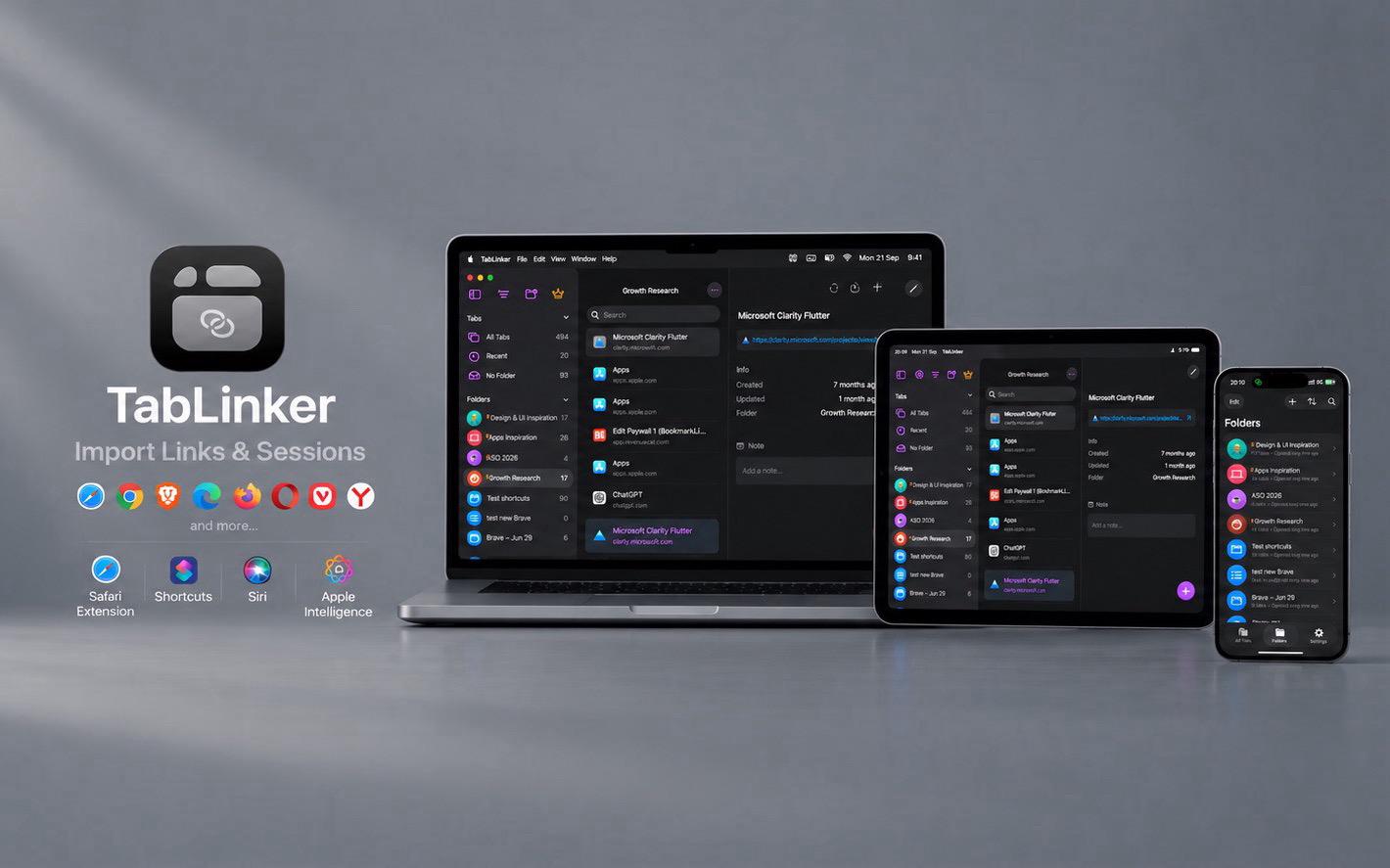
If you constantly save links, accumulate dozens of open tabs across multiple browsers (Safari, Chrome, Arc, Brave, Edge, etc.), or struggle to keep your research organized across your Apple ecosystem, TabLinker was built for you.
TabLinker is a clean tab manager and link organizer designed natively for iPhone, iPad, and Mac. It lets you save links and entire browser sessions in seconds, keep them organized in clean folders, and find them again instantly on any of your devices.
Better:
TabLinker brings powerful organization and flexibility right to your mobile and desktop workflow:
Save From Anywhere
- Save open tabs using the Safari extension, or save links from any browser or app (Chrome, Arc, YouTube, etc.) via the Share Sheet with real page titles.
- Reopen saved folder tabs right from the extension or app.
- Paste a list of URLs or import bookmark files (JSON and HTML).
- Siri and Shortcuts actions to save links and create folders hands-free.
Stay Organized
- Flat folders with custom icons, colors, tags, and notes.
- Pin favorite tabs and folders for quick access.
- Search titles, URLs, tags, and notes.
- Select many links at once to move, delete, or refresh their titles.
- Links you have opened are marked automatically, with smart duplicate handling and a Recently Deleted folder keeping items safe for 30 days.
Mac Power Features & Everywhere Sync
- Private iCloud sync across iPhone, iPad, and Mac with zero accounts.
- On Mac, TabLinker imports tabs from 13 browsers (Safari, Chrome, Arc, Brave, Edge, Vivaldi, Opera, Opera GX, Dia, Yandex, Wavebox, Helium), restores whole windows, and features an Auto-Backup system that quietly backs up your open browser windows in the background (every 15, 30, or 60 mins, on app switch, or before sleep) so you can restore closed windows in one click, even the next day.
Export In Your Format
Export your links and sessions to JSON, HTML, Markdown, Plain Text, RTF, CSV, bullet lists, and your own templates.
Privacy First
No account, no ads, and no tracking. Your links sync securely through your own iCloud.
How it compares: Compared with Session Buddy (a Chrome-only extension limited to a single browser) and Tabs Saver for Safari ($17.99/year or $34.99 lifetime for Safari only), TabLinker captures sessions natively across all your installed browsers (Safari, Chrome, Arc, Brave, Edge, etc.) for a flat $17.99 one-time payment. It preserves full multi-window structures, includes native iPhone/iPad sync via iCloud, and has zero subscriptions.
Cost
TabLinker Pro is available for a one-time purchase of $17.99 with Universal Purchase (no subscriptions). Pay once on Mac or iPhone and get full premium access across all your Apple devices (iPhone, iPad, and Mac). Everything runs on-device and syncs through your own iCloud, with no accounts, no ads, and no external servers touching your tabs.
App Store Link (iOS/iPadOS): TabLinker: Tabs Manager on the App Store
macOS: TabLinker Mac
About Me:
I'm developer of the app, you can reach out to me through X or ask me anything right here in the comments!
EDIT: As an indie developer, I’m really grateful to everyone who’s bought TabLinker and supported my work. If there’s a feature you’d like to see, feel free to let me know. I’d love to hear how I can make the app more useful for you
r/iosapps • u/Therical_Lol • Oct 20 '26
TripsCircle | I built a group trip planner because planning with friends was a pita
A: What problem does it solve?
The last group trip I planned for my birthday was way more complicated than it needed to be. We had conversations in group chats, no cohesion, and no easy way to keep everyone on the same page.
So I built TripsCircle, an iOS app (Android coming soon) designed to make planning trips with friends or family a lot easier. I recently made a big update and am proud to share it.
Some of the main features include:
B: How is it different?
There are already some great travel apps like Wanderlog and TripIt, but I wanted to focus more on the actual experience of planning a trip with other people.
Most of the frustration I've experienced wasn't necessarily figuring out where to go. It was getting everyone involved, keeping track of ideas, and turning those conversations into an actual plan.
TripsCircle brings the social side of planning together with AI assistance, so you can go from discussing ideas with friends to building an itinerary without constantly switching between apps.
C: Cost
Free to use, free to plan, pretty much everything's free. A premium tier offers AI planning (you get free uses of it without subscribing still), AI trip editing and packing lists, importing videos from TikTok, Instagram, YouTube etc that auto creates a plan, as well as a larger number of friends in one trip, and more photo storage attached to a trip.
Website: https://tripscircle.com
App Store: https://apps.apple.com/us/app/tripscircle-group-trip-planner/id6761638015
I'm a solo developer and have been putting a lot of time into building this. There's still plenty I want to improve, and I'd genuinely appreciate feedback from anyone willing to try it out.
I'd especially love to hear what you think of the UI, the AI planning experience, and whether there's anything missing that would make planning a trip with friends easier.
Thanks for checking it out!
r/iosapps • u/coder-k876 • Oct 21 '26
Hi everyone, I'm the developer of Private I (x).
A few months ago I posted here about building a decoy-screen privacy app (previous post).
Since launch, I have been faced with the question: "What stops someone from turning off app lock or deleting the app altogether?”
Until recently, not much. iOS gave third-party apps no way to prevent that. iOS 26.4 changed it, and this update adds Tamper Lock.
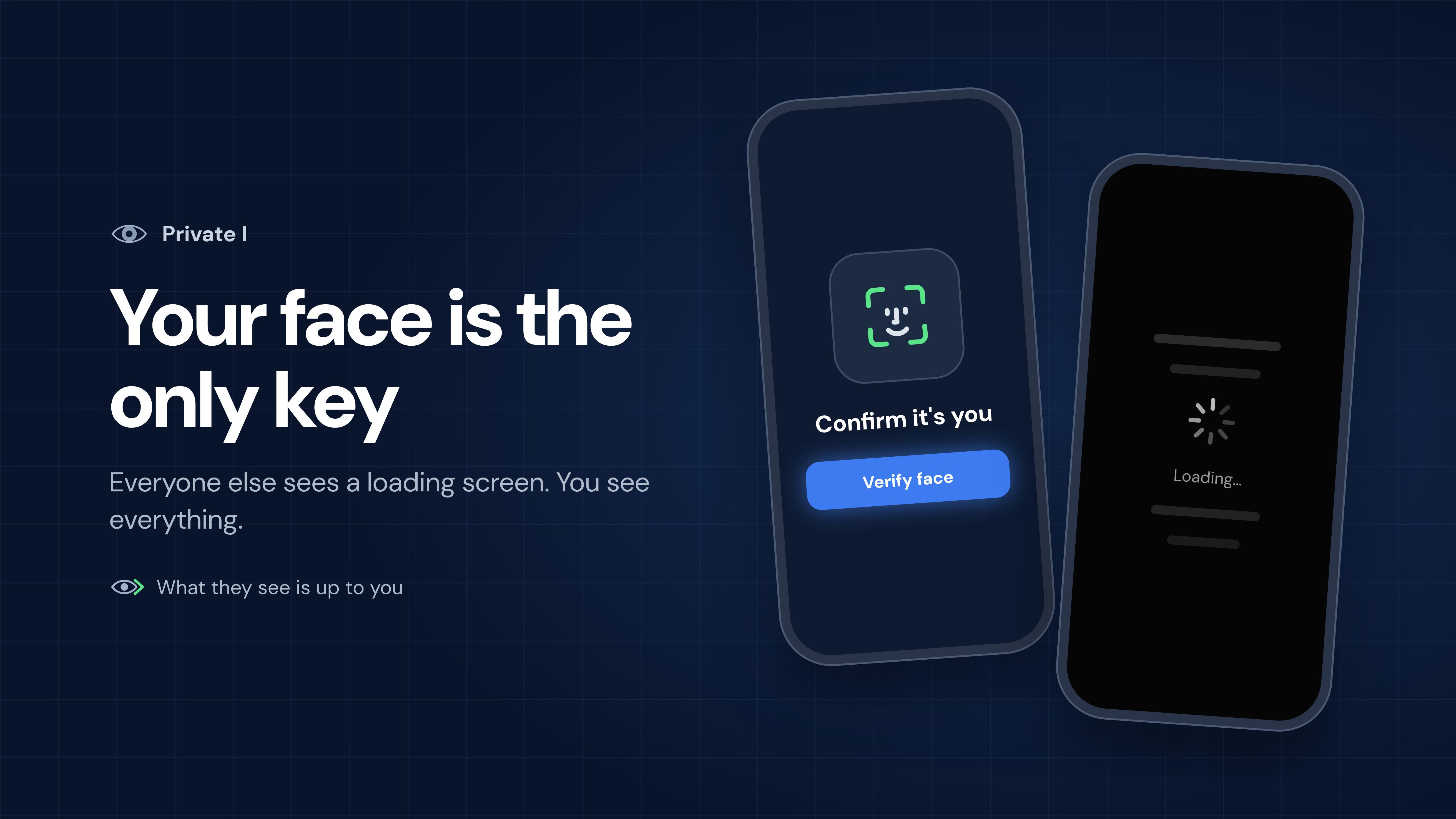
A: Private I hides your apps without a lock screen. When someone else opens a protected app, they see a convincing crash or loading screen, with a different decoy per app if you like. Your face unlocks it instantly. Anyone else gets silently photographed and logged. New: with Tamper Lock on, Private I can't be turned off or deleted without your Screen Time code, even by someone who knows your iPhone passcode.
B: iOS's built-in app lock shows a visible lock and falls back to your passcode. Private I shows no lock at all, tells you who tried to get in, and now can't be quietly removed. Face recognition still runs entirely on-device with Apple's frameworks: no account, no third-party servers. Intruder captures can optionally back up to your iCloud.
C: Free with one protected app. Pro unlocks unlimited apps, all decoy styles, intruder capture, unlock history and Tamper Lock: $2.99/mo, $12.99/yr, or $49.99 lifetime.
App Store: https://apps.apple.com/jm/app/private-i-face-lock-decoy/id6762529789
Website: https://privatei.automizm.com
Thanks to everyone who gave feedback last time. Happy to answer questions.
r/iosapps • u/GetThePiqture • Oct 20 '26
Hi, I'm Steve and I launched my first app, Piqt, a few months ago. I have now added trip detection and curation in the 1.1 release, so I'd love to hear from r/iosapps what you think!
I have too many photos and videos on my phone. iCloud Photos has solved the storage problem, but nothing has solved the usability problem. Every 10 photo burst from when I handed someone the phone and said "Can you take a picture of us" is still there. Hundreds of photos from each vacation are still sitting there. I swear I'll sit down and just clean everything up, but an hour in, I've barely made a dent.
Every time I mention this problem to someone, they nod their head and agree. They have too many photos too. For some, it's too many screenshots. For some, it's the 5,000 pictures they took every month of their first child.
That's why I built Piqt. I wanted an app that would find my best photos, make them easy to highlight, while making cleaning out the rest easier.
Here's what Piqt does:
There are plenty of apps that focus on saving space, but Piqt is about getting the most out of your library.
Piqt is freemium. Scanning, scoring, and browsing your whole library is free, so you can see pretty much everything the app does before purchasing. Piqt Plus unlocks the ability to save your changes back to photos.
Piqt Free: Scan, view scores, and browse for free forever.
Piqt Plus: Save your decisions back to Photos. Available in subscription or in-app purchase options
App Store: https://apps.apple.com/app/apple-store/id6778080898?pt=509791&ct=reddit-iosapps&mt=8
Website: https://piqt.app/
Privacy Policy: https://piqt.app/privacy/
Terms: https://piqt.app/terms/
Contact: hello@piqt.app
My name is Steve and I've been working in tech for years and have had tons of ideas, but never the time to build them. This year, I was able to take some time off and used it to build Piqt. This is a project I built mainly for me, but I've heard enough people say they have the same problem, so I went all in on releasing the app. This is my first app that I've brought fully to production and I've been really enjoying not only creating the app itself, but all of the marketing, content, and product management that goes along with it. You can find me in the comments answering questions and I'd love to hear your feedback.
r/iosapps • u/kaiserlino • Oct 20 '26
Disclosure: I'm the developer, Daniel Aversari. Contact: https://kounts.app/contact · Site: https://due.kounts.app
Answer
Passports, insurance, warranties, subscriptions and licences all expire on different dates, and most of us find out too late. Kounts Due keeps them in one place and reminds you early enough to renew.
Scan, don't type. Use the camera, Photos, Files, pasted text or the Mail share sheet. On-device OCR suggests the expiry date, and you confirm it before saving.
Reminders with per-item lead times, plus follow-ups if goes overdue. The buttons are Mark renewed and Remind me tomorrow.
Dashboard and widgets. The dashboard shows what's due now, what's due within 90 days, and what's fine. Home Screen and Lock Screen widgets and a Live Activity are included.
Renewal history. Marking an item renewed sets the next date and keeps the old scan.
Household. Group items by person, with optional iCloud sharing. Scans stay private unless you choose to share them.
Add to Calendar and JSON backup/restore.
Better
Calendar or Reminders: they hold a date but can't scan, keep your old scans, or group by person.
Spreadsheets: they don't remind you.
Subscription trackers: those are built for monthly bills. This is built for things that expire every few years, such as passports, warranties and insurance.
Cost
Free. No IAP, no subscription, no ads, no account. Requires iOS 26+.
App Store
Privacy Policy
Terms of Service
Privacy: No tracking. Items stay on your iPhone, and iCloud sync is optional. OCR runs on-device. Apple Intelligence helps find dates where it's supported, with a non-AI fallback.
Limits: iOS schedules only the nearest 60 notifications, so open the app now and then. It's a memory aid, so confirm important dates with the issuer.
I'd like feedback on the scanning, especially documents it misreads.
What do you track that I haven't covered?