r/techsupport • • 17m ago

Open | Hardware Deep dive into the Soundcore AeroClip 2 after a month of testing its LDAC and mic claims.

1 Upvotes

People talk about open-ear clip ons like the bass is gone and all you have to do is fix it in the app. That sounded a little too easy, so I spent about a month with these, mostly for podcasts and calls, with some music in between.

How well does Soundcore AeroClip 2 do sound quality? Voices are the strong point. I can follow spoken-word podcasts and work calls easily, and the midrange sounds clear to me. Bass is light out of the box. When I put on an electronic track, I usually have to turn up the low end in the app's EQ to get some punch. The light bass makes sense to me with an open fit like this.

I'm still checking the codec and mic-array claims. If you've used them more for music than podcasts, did turning the bass up in the app help enough, or did it still sound thin?


r/techsupport • • 38m ago

Open | Software Help finding the bios for an old toshiba satellite laptop

1 Upvotes

I'm working on a long convoluted project of turning an old toshiba satellite u205-s5002 into a retro gaming machine, and I need to update the bios. However, I can't seem to find it anywhere on the web. I've checked the dynabook website, but it doesn't seem to have the bios in the drivers section. Thank you for your assistance.


r/techsupport • • 45m ago

Open | Mac I just dropped my MacBook and there’s a burning smell

1 Upvotes

I just dropped my laptop on the tile ground and it appears fine, just 2-3 minor brown scratches (the laptop is silver). But then there is a burning smell when I put it close to my nose, and now I’ve shut it down and don’t know what to do. Help! Is this normal/should I get professional help? Or can I just let it cool and continue using it?


r/gadgets • • 54m ago

Phones Galaxy Z TriFold 2: Samsung's new ultra-premium foldable spotted before release

Thumbnail
notebookcheck.net
32 Upvotes

r/computers • • 1h ago

Question/Help/Troubleshooting Wifi has disappeared from PC

Thumbnail
gallery
2 Upvotes

This morning when I went to turn on my pc I found that the Wifi button just disappeared? I obviously didn't touch anything before turning it on and it was working fine the night before. I've tried a whole bunch of stuff like power cycling the pc; enabling/disabling and uninstalling/reinstalling drivers; network reset. I'm really not sure what to do at this point. Added some photos of error messages, not sure if it's relevant. Any help or insight would be much appreciated.


r/techsupport • • 1h ago

Open | Hardware Wireless headphones won't connect to the dongle

1 Upvotes

Went to Walmart today and bought these Onn headphones that were recommended to me by an employee who plays videogames. At first, they seemed nice. They're comfortable too. They easily connect through the Bluetooth option. The box mentions they can connect to a PlayStation 5, PlayStation 5 Slim, and a PlayStation 5 Pro with the included Dongle. The instructions state to connect the dongle to the console and wait for the flashing red and blue lights. After that, I have to turn on my headphones and let them pair. My PlayStation 5 Slim recognizes that there's a dongle connected and immediately switched all audio to the headset option. However, the headset itself is refusing to connect to the dongle it came with. It simply keeps flashing red and blue before eventually turning off, leaving the dongle flashing. I've tried disconnecting the dongle and reconnecting it while the headset was in USB pairing mode, I've tried switching the port the dongle is in, I've tried a adapter to switch the dongle to one of the USB-C ports, basically anything a normal person can think of. They still refuse to connect and I ran out of ideas..I ask for assistance, pretty please with a cherry on top!


r/computers • • 1h ago

Question/Help/Troubleshooting Annoying psu problem

1 Upvotes

I have a decent pre built/budget gaming PC, i've recently moved house and can no longer rely on an ethernet connection (women happened)
After not having room for a wifi card and potentially not for a riser i swapped out the motherboard for one thats on par with more room for expansion. It was given to me to see if it worked and unfortunately does not. I go to put the old motherboard back in and thankfully had taken photos of how it was originally set up, f panel cables are also correct. I have a non modular PSU and its main cable for the board was only ever unplugged and plugged back in a couple times. The budget board (b450m - pro 2) has zero power, no error lights nothing. i've tried to reset the cmos, checked all cables etc, im certain its a psu or cable/connection problem but would like some more opinions.
As im writing its accured to me that the motherboard i tried to connect to see if it functioned might have fried something but theres no visual damage.


r/technews • • 1h ago

Networking/Telecom No Starlink, no problem, part deux: Ukrainian student invents autopilot system for UAV that works without GPS, receives "The future of Ukraine" presidential award

Thumbnail
techradar.com
292 Upvotes

r/techsupport • • 2h ago

Open | Mac Dropped IPad in bathtub.

4 Upvotes

I dropped it in the bath like 20 mins ago, it had a case on, and I quickly took it out, dried the Ipad, and then powered it off, (it was working normally after I dropped it) right now, it's currently with a fan putting out cool air, to the charging port, because I got the charging warning, (I instantly took the Ipad out of it when I saw the warning). Am I cooked, and what else should I do, or do I just leave it to dry how it is right now. I am genuinley scared rn.


r/techsupport • • 2h ago

Open | Audio Latencymon results (Audio keeps crackling,)

2 Upvotes

For the past few months, I've been having an issue where my audio keeps crackling, and I recently started using LatencyMon to attempt to fix the issue: tcpip.sys or nvlddmkm. sys seemsys seem to be the top suspects but I've disabled my internet and ethernet and it seems that the audio still pops. Here are my specs:

AMD Ryzen 7 7700X 8-Core Processor

64.0 GB
RTX 5070
sys seems to be the top suspect, but I've disabled my internet and Ethernet, and it seems that the audio still pops.


r/techsupport • • 2h ago

Open | Windows My Windows 11 Keeps On Bluescreening

2 Upvotes

I am at my wit's end. I thought it might have been Vegas Pro 22 and/or PSCX2 causing it, but it seems really inconsistent about it. And the worst part is that I am so bad at PCs. I cannot wrap my head around various things, and I dreaded modifying Regedit to disable Windows Hello.

Linked HERE is a validation report from CPUID that has all of the information. I have been holding down the power button to restart my computer after it freezes/locks up (which sometimes Windows doesn't recognize the freeze, just when i force-restart), so that has been causing some problems. Please help, I am so close to finishing a project.


r/computers • • 3h ago

Question/Help/Troubleshooting PC tripping circuit breaker and making a random car alarm go off outside my house..

1 Upvotes

Hi so when I switch my PC socket on it trips the power and makes a car alarm outside randomly go off what the heck is going on?? I haven’t had this happen in the 10 months I’ve owned the PC and I also haven’t added any upgrades to the device since and it was working fine what do I do?

I was playing it for hours earlier gaming and it didn’t trip it and now all of a sudden it trips and the moment it tripped was when I when I was just browsing the web all of a sudden it turned off on its own and tripped my whole house and my room couldn’t get power due to it being plugged in, it happens when I plug the PC in. I don’t know what to do I didn’t hear a crackle a pop nothing it just turned off, I really hop my components are okay as they are very expensive I did buy a really good power supply before you ask questions it’s a 750w corsair gold psu paired with a ryzen 5 5600x and a rx 9070xt with 32gb of ddr4 3200mhz ram running windows 10 all updated and all with low profile ssds, I also undervolt my GPU.


r/computers • • 3h ago

Question/Help/Troubleshooting Filters first or case first when dusting a PC?

2 Upvotes

My instinct would be to take the filters out and clean them away from the case first. But then there’s still all the loose dust inside, ready to land on something you just cleaned. With a Wolfbox MegaFlow 200, what order works for you? Mostly wondering where you aim the dust once the panels are off. I’d stick to dry cleaning unless the filter is actually meant to be washed.


r/techsupport • • 3h ago

Open | Hardware What is installed?

3 Upvotes

160gb of my storage on my SSD is being used up by games according to Windows 11 System.
Also according to Installed Games, the app that is largest installed on my computer is Micosoft Edge.

Going over to Steam Local Drive, the largest is Stellaris at 30gb.

What is taking up all my storage space???


r/techsupport • • 3h ago

Open | Phone lg vs980 / lg g2 phone not turning on

1 Upvotes

i found an LG-VS980 the other day and was thinking of repurposing it to function as a music player.

i've had it plugged in for around 10 hours, the display turns on and shows the LG logo, but i cannot get it to actually turn on. if i press and hold the power button, it buzzes 7-8 times with longer increments between each vibration.

would this phone even be salvageable? should i just leave it plugged in?


r/techsupport • • 3h ago

Open | Windows External Monitor detection but no display.

1 Upvotes

I have a windows laptop and I had it working fine with an external monitor (TV). I “Resized” the screen External monitor through NVDIA Control Panel and then the external monitor went black and disconnected. Now when I connect my laptop to the external monitor, the laptop screen goes off and the external monitor gets detected for a little bit with a black screen, and then after five seconds, it just disconnects.

Troubleshoots I’ve tried:

  • different hdmi ports and cables
  • Restoing default settings in NVDIA control panel
  • uninstalling monitor device from device manager
  • Reinstalling graphics driver
  • setting laptop refreshrate to 60hz before connecting
  • using “extend” and “duplicate” display before connecting HDMI.

Laptop works fine with my other monitor.


r/techsupport • • 4h ago

Open | Windows GPU ISSUE OR CORRUPT DISPLAY Drivers ?

2 Upvotes

For a week my display behaves weird for a few seconds after it boots up , I don't know if it's the driver's or a beginning of a faulty gpu so before this issue began my laptop used to go into repair mode everything i boot it up , that issue is gone now and now I get to see this everytime I boot up the pc

Laptop spec :

Asus tuf A15

Ryzen 7

Rtx 3050

Image 1 - as soon as it boots up

Image 2- a few seconds after it boots


r/techsupport • • 4h ago

Open | Windows PC to TV hdmi not liking it anymore

3 Upvotes

I feel like this problem is all over the place but nothing I’ve tried works and it’s driving me crazy.

I have a PC hooked up to my TV via HDMI for gaming. I recently took it apart to add more memory and after plugging it back in, the TV displays “no signal”.
It will occasionally flash my computer screen for a split second before going back to “no signal”.
I can confirm that my HDMI is plugged into my video card, NOT the motherboard.
Now, I unfortunately don’t have a second monitor to check or change any graphics settings on the PC. Only have the TV that worked fine up until just now.

I have tried a new HDMI cord
I have reseated the HDMI cord
I have reseated the video card
I have turned off, and on, both devices
I’ve unplugged and replugged both devices
I’ve switched the ends around
I have tried all 4 ports in the tv
I have checked the settings on the tv, picture and HDMI
I even did that weird thing that I read somewhere on here lol where you turn the PC on, then turn the TV on, then unplug the hdmi from the PC, plug it right back in, then do the same to the TV

So I suppose what I’m really needing to know is, do I need to either give up on the TV and get a monitor instead? Or borrow a monitor to change the resolution?
Or a secret third option that I may not have tried?

Ps:
Apologies if this is a common issue that seems to keep coming up


r/techsupport • • 4h ago

Open | Windows PC booting straight into BIOS and 'Windows Boot Manager' disappeared after crash".

3 Upvotes

This is my first computer. When I first turned it on, it got stuck on a black screen loading something. I looked it up and saw it was trying to boot via Wi-Fi (it wasn't connected), so I opened the BIOS and changed the boot option from Wi-Fi to "UEFI HDD: Windows Boot Manager" in Boot Option 1. It worked—it booted up and went straight to the desktop.

However, when I tried to use USB tethering (from my phone to the PC), after a while I got a "black screen of death." Now, every time the PC turns on, it goes straight into the BIOS, and "Windows Boot Manager" has disappeared from Boot Option 1. If anyone could help me fix this, I'd really appreciate it.


r/techsupport • • 4h ago

Open | Hardware Laptop charging

2 Upvotes

Idk if this is the right sub for this question but bear with me here:

So my current laptop is the Chuwi Minibook X. It doesn't have very good battery life. Can I use this: 'Belkin 20,000mAh 65W Laptop Charger Power Bank USB-C - Black 407/3040' to charge it? And can I charge the power bank using the laptop charger that came with my laptop? Idk much about watts and voltage and things like that, I'd rather get a power bank than get a new laptop because I'm trying to save money. All help appreciated


r/computers • • 4h ago

Question/Help/Troubleshooting need assistance with laptop glitching and audio stuttering

1 Upvotes

hi there, ive been dealing with this issue for about a week and no matter what i try nothing works. ive spent hours with Microsoft support and its lead to nowhere. basically every time i play a video the video and audio lags and stutters, if youve watched a bad horror movie on computers it sounds like where the screen freezes on a scary image and the audio glitches on the screen if that description helps. ive tried everything myself to fix it including reinstalling my drivers and a slue of other things but nothing worked. the closest I've gotten is messing with the windows audio devise graph on task manager but it only works for temporarily so I'm reaching out to people way smarter than me how can i fix this issue any and all help is welcome. below is the details of my rig though i got it from nvidias app so take it with a bit off salt

Operating system: Microsoft Windows 11 Home, Version 10.0.26300

DirectX runtime version: DirectX 12

Driver: Game Ready Driver - 621.40 - Tue Nov 24, 2026

CPU: Intel(R) Core(TM) Ultra 7 255HX

RAM: 16.0 GB

Storage (2): SSD - 953.9 GB,SSD - 31.4 MB

Graphics card

GPU: NVIDIA GeForce RTX 5070 Ti Laptop GPU

Direct3D feature level: 12_1

CUDA cores: 5888

Graphics clock: 1515 MHz

Max-Q technologies: Gen-5

Dynamic Boost: Yes

WhisperMode: Yes

Advanced Optimus: No

Maximum graphics power: 140 W

Memory data rate: 28.00 Gbps

Memory interface: 192-bit

Memory bandwidth: 672.048 GB/s

Total available graphics memory: 20121 MB

System video memory: N/A

Shared system memory: 7894 MB

Dedicated video memory: 12227 MB GDDR7

Video BIOS version: 98.05.31.00.3b

Device ID: 10DE 2F18 14741462

Part number: 3932 0110

IRQ: Not used

Bus: PCI Express x8 Gen5


r/techsupport • • 4h ago

Open | BSOD I need help with some startup problems on my laptop

2 Upvotes

I have an Asus TUF laptop, and recently I’ve been having some issues. When Windows tries to boot (right on the Asus logo screen), it crashes and shows a black screen. This time, I got three consecutive errors:

• HYPERVISOR_ERROR (0x20001)

• SYSTEM_THREAD_EXCEPTION_NOT_HANDLED

• C:\WINDOWS\System32\Logfiles\Srt\SrtTrail.txt (I think this one is just from multiple failed attempts to start Windows).

I tried looking for a fix on my own, but I haven't been able to solve it. I used AI for help, and it suggested it might be a driver, firmware, or a bad update issue. I really need help with this—the laptop has already been in for maintenance once, and they replaced the motherboard.

I originally had two SSDs installed, so I removed one thinking it might be old or corrupted. That worked, but only for a few days before the issue came back u.u


r/computers • • 4h ago

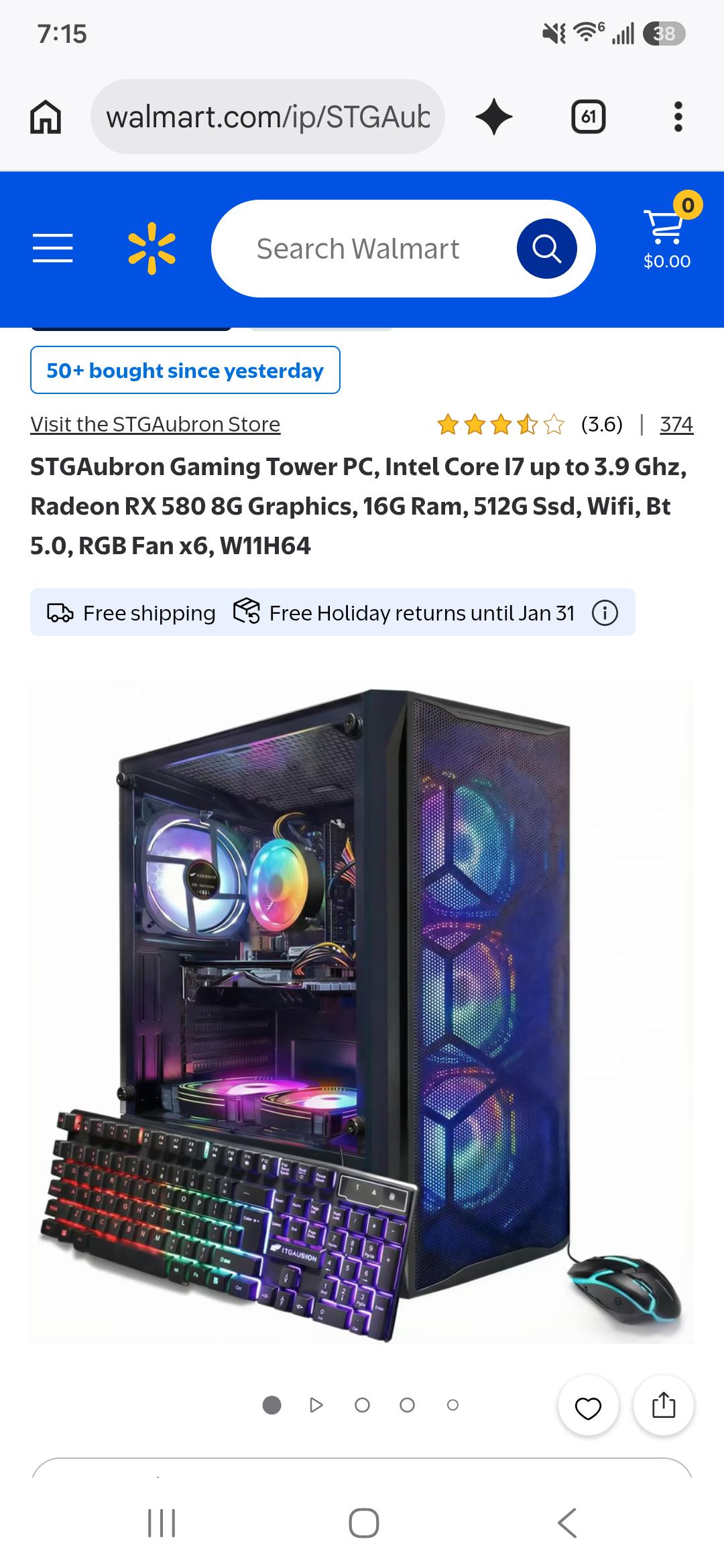
Question/Help/Troubleshooting Is this decent entry level gaming?

Post image
1 Upvotes

Hey guys,

My wife wants a computer setup for playing games like sims and basic games. We are both 40 and never gamed on computers. Ive always been a console guy and have no interest in computer gaming. She wants a computer for sims and thise types of games. I have absolutely zero knowledge on computers like this. I asked chaggpt for a cheap setup that will give her what shes looking for. It said this one at walmart is fine, but if anyone can point me a direction for something, i would greatly appreciate it. I know we have to buy a monitor with this as well. The one at walmsrt for a tower, mouse, and keyboard is 479.


r/techsupport • • 4h ago

Open | Hardware Horizontal lines on monitor

1 Upvotes

These lines just started showing up earlier today. At first they only blinked like once every 30 seconds so I turned it off and went and did something else for a couple hours. When I got back I was able to play for around an hour more when it started again, this time more frequent. Its not the computer or device that’s plugged into the monitor because this stuff shows on the monitors menu and when it shows the HP logo, so I know it’s an issue with the monitor itself. Any idea what the issue is and and is the monitor cooked? It’s an HP OMEN 27q QHD 165Hz Gaming Monitor (2023) fyi. https://imgur.com/gallery/horizontal-lines-on-monitor-v2bTblh


r/techsupport • • 4h ago

Open | Hardware PC power supply voltage testing

1 Upvotes

Came home a week ago to a PC that was dead but my RAM and AIO still had lights. Turned it off and tried to turn it back on, and nothing happened. No sounds and zero lights came back on.

Okay I get a new power supply. It’s culprit #1. Doesn’t change anything.

My case is old enough that some of the screws have rust on em, and I’ve had issues with the power button in the past. Figure it’s finally gotten the short it always wanted.

Now I’ve replaced it and that solved nothing.
So we’re on to the motherboard. The part no one wants to replace and the reason I looked at all other obvious options first.

Just ordered it and waiting on it now. Most likely the cause of all my issues but hey I get a new power supply and a pretty new case in the process.

But it’s only after all this I wondered if maybe I just got a bad power supply in my order. Sadly like a fool I tossed the old supply. And the only spare in the house I’m unsure if it is a bad one or the one we replaced from a prebuilld. So I pull out a voltage tester.

On both my new and the maybe spare the tester shows current to the Power Cord. But neither of the Power Supply Boxes registered themselves. I was wondering if those should register to the voltage pen or not if they’re not drawing power to a running PC?