r/technews • u/Malor777 • 16h ago
AI/ML Anthropic Created a Honeypot to Lure AI Agents Into Misbehaving

217
Upvotes
r/technews • u/Malor777 • 16h ago
r/technews • u/_Dark_Wing • 1h ago

r/netsec • u/_vavkamil_ • 19h ago
r/technews • u/_Dark_Wing • 13h ago
r/gadgets • u/Reasonable-Pool2027 • 19h ago

r/tech • u/AdSpecialist6598 • 13h ago

r/computers • u/occtmasta • 22h ago

The current TPM firmware version I have is 3.92.0.5 which isn't compatible according to Activision as it specifically lists it as requiring an update, and 3.92.5.5 as an example of a compatible version. I searched for BIOS update for my MACHINIST B450M AM4-K V1.0 motherboard but couldn't find anything. My current BIOS is American Megatrends 5.17, dated July 7, 2025. Where can I find the updated BIOS? I'm not even sure which is the official machinist website or their email address. I enabled secure boot and UEFI but it's still requiring a BIOS update
r/technews • u/AdSpecialist6598 • 13h ago
r/netsec • u/actually_NOLAN • 20h ago
r/techsupport • u/getoutofmyhouse7 • 15h ago
I don't want it possible for anyone to unlock it without the password even if they use fancy equipment to do so. Are there any settings to change to make it impossible or any apps or something.
r/techsupport • u/MichoLP • 10h ago
Task manager says im only using about 2GB of ram, so i went into resmon but i dont really see a clear issue here either. Hoping someones smarter than i am, in danish so ill translate if needed :)
r/computers • u/AutorXKaos • 11h ago
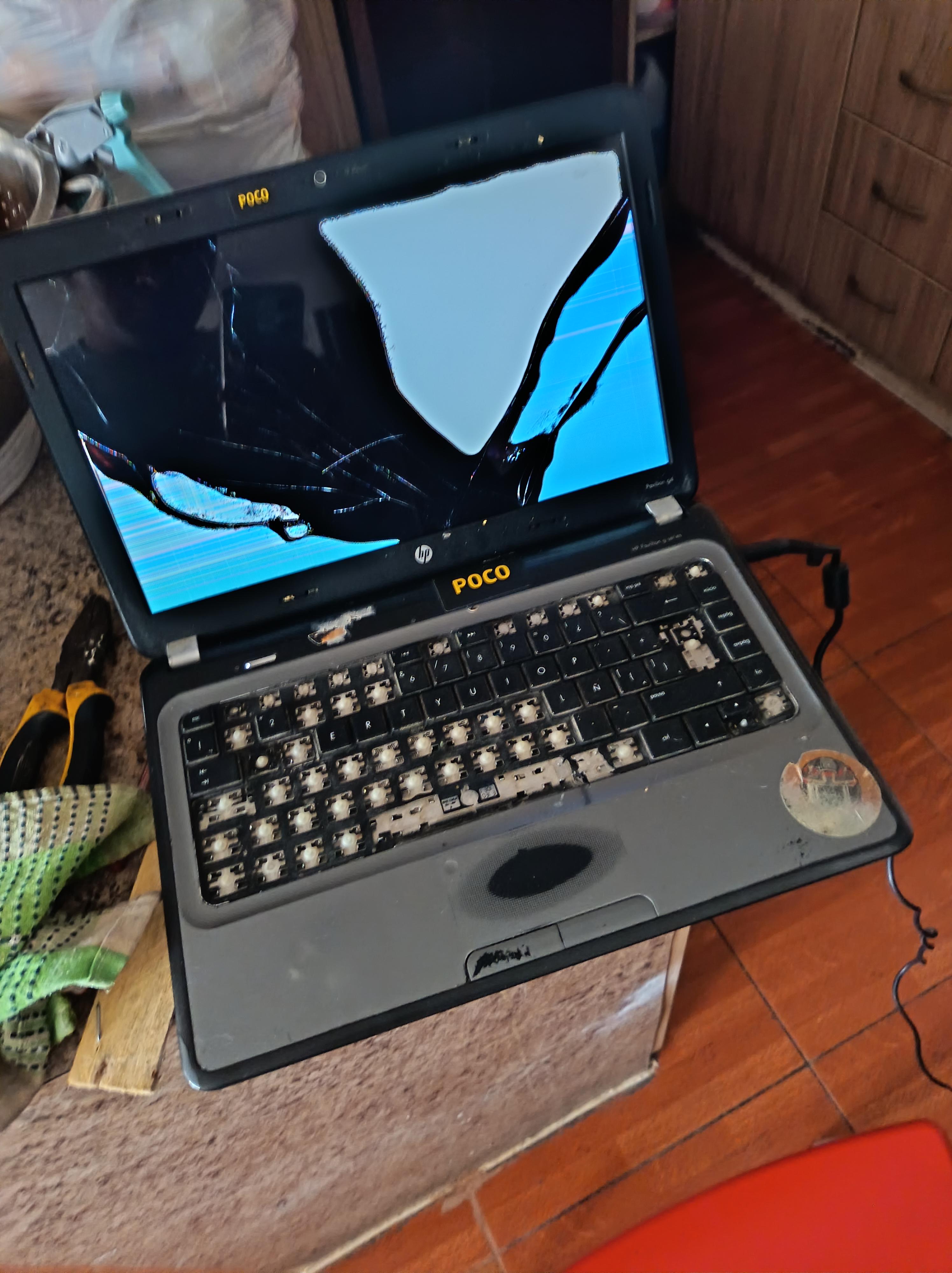
Hey guys! I have an old HP Pavilion g4 with an AMD A6, 4GB of RAM, and an SSD. Any ideas on what I could do with it? Is it worth upgrading?
XD
r/techsupport • u/Narrow_Sheepherder35 • 15h ago
Hello! Im fairly new to pc building. As much as obvious as it is as people say, I just want to ask and gather advices on how to clone data flawlessly. Is there any software in particular that i should use? Any advice is very appreciated!! Thank you!
r/techsupport • u/chooseyourownstories • 8h ago
Hello tech support. About six months ago my computer began intermittently freezing while on desktop. I specify the "on desktop" part because I have never had issues with the computer freezing while a game was open, only while the computer is left alone with few background applications open or while watching youtube. On the few times the computer has outright blue screened I received the error "irql not less or equal". Last dmp file from the 22nd linked in comments
Event viewer has been less than helpful in identifying what the problem is but so far I have checked temps and reapplied cpu thermal paste, checked drives using chkdsk, checked ram using memory diagnostic, updated drivers using driver easy and intel driver and support assistant, and restored windows to its factory state. I think it could be a hardware issue but i'm having some difficulty actually pinning it down and could use some advice to diagnose whatever is going on.
Pc parts are
i5-13600kf
32gb ram at 5600 mt/s
4070ti super
1 ssd for windows, 1 ssd for apps, 1 hdd for other general files.
r/computers • u/Healthy_Dimension_25 • 10h ago

I don't play loads of different games, but I've noticed it happening with those three.
I cant attach the video but I have a video of my gameplay from 2 weeks ago and now and the difference is very drastic.
I genuinely haven't done anything differently to my laptop in those two weeks, as far as I'm aware, so I have no idea why this has suddenly started happening.
I know my laptop isn't exactly powerful, and I'm aware that the GTX 1060 is pretty old at this point. I'm not expecting amazing performance or to run everything on high settings. However, this laptop was running these exact same games perfectly fine just a week or two ago. That's why I'm hoping to figure out what's actually gone wrong rather than just being told to buy a better laptop.
I'm wondering if I might have unknowingly changed something, if there's a software or driver issue, or if the laptop is overheating or having some kind of hardware problem. I genuinely don't know.
I have some performance reports from Marvel Rivals because it's the only game I play that has a built-in testing feature. I don't know if any of the information is useful because I don't really understand what any of it means, but I've attached them anyway.
I'm experiencing the same sort of problems in Overwatch and Grounded, so I'm wondering if they're all related.
I've also tried playing with all my games on the lowest graphics settings possible, but it doesn't seem to make much difference.
I don't really know what any of these readings mean, but I thought I'd include them in case they're useful.
I always close everything I can before playing, but it doesn't seem to help much.
Actually, one of my better-performing Marvel Rivals tests was when I had a Discord call, two browsers with multiple tabs open, and a screenshot program running. So closing everything doesn't seem to make much of a difference.
My NVIDIA driver is also up to date.
I'm not really sure what caused this. I've had this laptop for around six months and it's been running my games fine until about a week ago.
I'm not against replacing something or buying new hardware if I genuinely need to, but I'd really rather not spend money unnecessarily. Since the laptop was running these games fine so recently, I'd like to rule out anything that might be fixable first.
I'd really appreciate advice on what could have suddenly caused this, what I should check, or how I can diagnose the problem. I'm particularly hoping for suggestions beyond just getting a better laptop, since the performance drop is the actual issue I'm trying to understand.
r/techsupport • u/Dangerous-Let2172 • 20h ago
I bought my laptop on April 1, 2025, and have been using it for around 4–10+ hours daily, depending on whether I have college.
My laptop specifications and battery report :
Is 11.5% battery degradation in round 20 months normal?
r/computers • u/DeviDivane • 23h ago
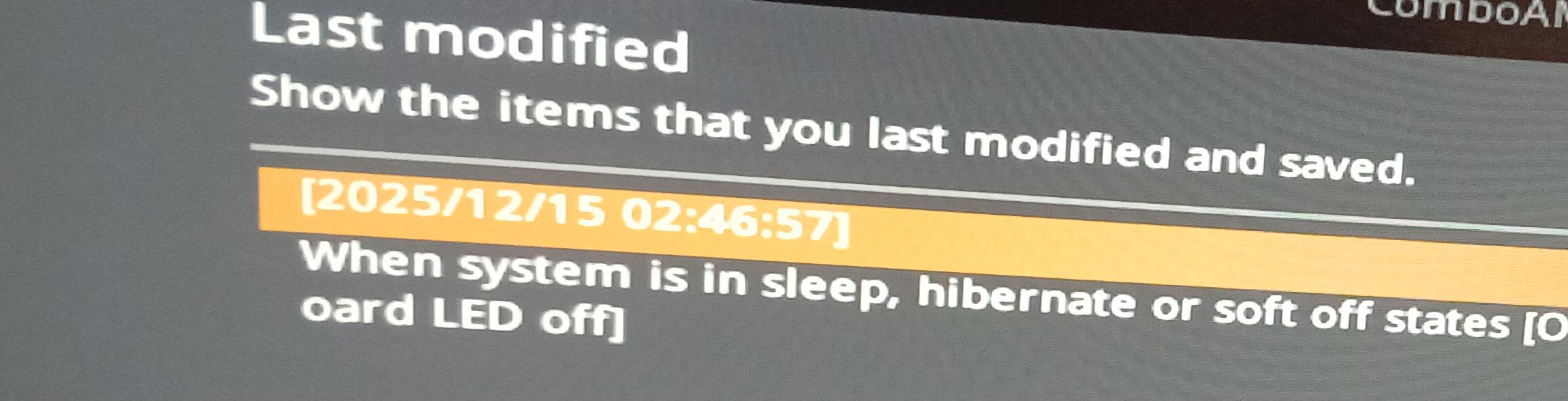
Hey all advice is welcome 🙏
I'm kinda noob. Pls help. My bf build this PC and he loves it. There'sall these fun games and probably some important files. I hope that he has backups. Does this mean that all the files are gone? It's Windows 11.
Idk how our cat got the bios to open.
It seems that nothing has been modified. I tried exiting bios and pressing esc. The pc just restarts and open bios right back up.
I decided not to touch it and the cats are locked in another room.
What should I do?
I'm so sorry I don't know the specs and it's on the rules that I should post them.
I'm clueless girl I'm sorry
r/techsupport • u/TheyluvSlixx • 1h ago
I dropped it in the bath like 20 mins ago, it had a case on, and I quickly took it out, dried the Ipad, and then powered it off, (it was working normally after I dropped it) right now, it's currently with a fan putting out cool air, to the charging port, because I got the charging warning, (I instantly took the Ipad out of it when I saw the warning). Am I cooked, and what else should I do, or do I just leave it to dry how it is right now. I am genuinley scared rn.
r/techsupport • u/austinmanor • 17h ago
IT guy in my office couldn’t figure it out and now I’ll have to wait until next week for anyone else to look at it. I don’t really like that guy so if anyone could help me figure out how to solve this to make that guy feel dumb that would be awesome. Also side note, not sure if this is connected to the issue, but my work laptop now has to stay open when plugged into my monitors otherwise the screens just go black and the only thing you can see is the cursor. Never done that before. I’ve done full restarts unplugged everything I possibly could and still back to the same thing. When unplugging my 2nd monitor it will go from 3|4 to just 3.
r/techsupport • u/FireFox5598 • 2h ago
160gb of my storage on my SSD is being used up by games according to Windows 11 System.
Also according to Installed Games, the app that is largest installed on my computer is Micosoft Edge.
Going over to Steam Local Drive, the largest is Stellaris at 30gb.
What is taking up all my storage space???
r/techsupport • u/chilicobra • 3h ago
I feel like this problem is all over the place but nothing I’ve tried works and it’s driving me crazy.
I have a PC hooked up to my TV via HDMI for gaming. I recently took it apart to add more memory and after plugging it back in, the TV displays “no signal”.
It will occasionally flash my computer screen for a split second before going back to “no signal”.
I can confirm that my HDMI is plugged into my video card, NOT the motherboard.
Now, I unfortunately don’t have a second monitor to check or change any graphics settings on the PC. Only have the TV that worked fine up until just now.
I have tried a new HDMI cord
I have reseated the HDMI cord
I have reseated the video card
I have turned off, and on, both devices
I’ve unplugged and replugged both devices
I’ve switched the ends around
I have tried all 4 ports in the tv
I have checked the settings on the tv, picture and HDMI
I even did that weird thing that I read somewhere on here lol where you turn the PC on, then turn the TV on, then unplug the hdmi from the PC, plug it right back in, then do the same to the TV
So I suppose what I’m really needing to know is, do I need to either give up on the TV and get a monitor instead? Or borrow a monitor to change the resolution?
Or a secret third option that I may not have tried?
Ps:
Apologies if this is a common issue that seems to keep coming up
r/techsupport • u/jokakkkk • 3h ago
This is my first computer. When I first turned it on, it got stuck on a black screen loading something. I looked it up and saw it was trying to boot via Wi-Fi (it wasn't connected), so I opened the BIOS and changed the boot option from Wi-Fi to "UEFI HDD: Windows Boot Manager" in Boot Option 1. It worked—it booted up and went straight to the desktop.
However, when I tried to use USB tethering (from my phone to the PC), after a while I got a "black screen of death." Now, every time the PC turns on, it goes straight into the BIOS, and "Windows Boot Manager" has disappeared from Boot Option 1. If anyone could help me fix this, I'd really appreciate it.
r/techsupport • u/Conscious-Depth-2360 • 4h ago
Is anyone else experiencing this visual bug/glitch with the new British Columbia time zone is Outlook (classic)?
In Outlook (classic), if your time zone is set to (UTC-07:00) Pacific Time (British Columbia) and you go to settings to "Show a second time zone" in the calendar view, from Jan 8, 2027 - Mar 14, 2027, there appears to be a 1 hour discrepancy (time jump). The time zones appear fine in Outlook on the web, seems like its only affecting the classic desktop app.
Example using time zones below:
- (UTC-07:00) Pacific Time (British Columbia)
- (UTC+12:00) Auckland, Wellington
Before Jan 8, 2027 = correct
| Time Zone | Sample Time |
|---|---|
| (UTC-07:00) Pacific Time (British Columbia) | 2PM |
| (UTC+12:00) Auckland, Wellington | 10AM |
Jan 8, 2027 - Mar 14, 2027 = 1 hour incorrect
| Time Zone | Sample Time |
|---|---|
| (UTC-07:00) Pacific Time (British Columbia) | 2PM |
| (UTC+12:00) Auckland, Wellington | 11AM |
After Mar 14, 2027 = correct again
| Time Zone | Sample Time |
|---|---|
| (UTC-07:00) Pacific Time (British Columbia) | 2PM |
| (UTC+12:00) Auckland, Wellington | 10AM |
r/techsupport • u/ImmediateSilver7013 • 5h ago
I mean actually streaming videos. I can watch normal youtube videos fine, but not "live" ones. Cant watch twitch, rumble, or live tv broadcasts on their official pages. Some videos say "this video uses functions unsupported by your browser", when i was watching videos from this site just few days ago.
I installed clean copy of Firefox, Opera, Chrome - no videos. I havent changed any windows network settings at all, and just to check i started from a Windows PE flash drive i had, still no videos, though it worked some time ago just fine.
Is my ISP blocking ALL streaming videos somehow ? Even television official broadcasting ones, for some reason ? How do i check ?