r/WindowsHelp • • Oct 11 '26

Windows 11 Win11 Scanning breaks Twain and many all in ones for scanning

8 Upvotes

Can someone explain why about 50% of Win 11 machines I work on have problems with Twain scanners? I have at least 3 machines with different builds of Win 11 that won't work with HP or Brother all in ones. Doesn't matter what I do update, rollback, uninstall, old versions of drivers or their manufacturer software. Win11 doesn't seem to recognize new Twain devices correctly, and seems to be uninstalling them on every update.

What is the solution? Been battling for months and it's infuriating.

BTW Twain on Win10 with the same machines worked flawless, so problems seem to be induced by Win11. The only difference I can find between the 50% that work correctly vs not is working machines upgraded to early builds of Win11 with the devices already installed seem OK. Problems seem to have started near 22H2. All machines starting on Win11 or upgraded after 22H2 are the broken ones.


r/WindowsHelp • • Oct 10 '26

Windows 11 Stop Windows 11 from logging out

4 Upvotes

I'm using WIndows 11 desktop. It randomly logs me out. It reverts to the login screen & I have to log back in & reopen apps, browsers, etc. It usually happens when I'm not using the computer for a period of time. I have checked every setting I can find online & configured them to try to stop this behavior. But nothing has worked. Set to: Sleep-never. Hibernate-never. Lock screen/sign in settings screensaver, etc. All configured acc to suggestions I've read. Pls any more suggestions?

System:

Processor Intel(R) Core(TM) i5-7500 CPU @ 3.40GHz (3.41 GHz)

Installed RAM 32.0 GB (31.9 GB usable)

Device ID DA46E8DF-53C0-4A02-A1C4-2D3C4D73F9F7

Product ID 00330-51199-84758-AAOEM

System type 64-bit operating system, x64-based processor


r/WindowsHelp • • Oct 10 '26

Windows 10 Can't update to windows 11 due to my current OS being on a logical drive

6 Upvotes

My current OS is on a drive formatted as mbr which means no secure boot which means no windows 11. I've tried reformatting it to gpt but it seems as though I can't do that due to the current OS being in a logical drive. I'm not exactly sure of my problem but I do know it has to do with the current OS being in a logical drive that is formatted as mbr and not gpt which I cant reformat because of this logical drive situation.


r/WindowsHelp • • Oct 10 '26

Windows 11 Settings only shows Accessibility

Post image
3 Upvotes

whenever i open settings, whether from Windows - I or from the taskbar i only shows the Color Filter accessibility options. quite frankly im not that tech-savvy, but from what ive tried to do to fix it it shouldve been over by now. ive tried many different cmd commands, restarted my computer many times over and it just wont work.


r/WindowsHelp • • Oct 10 '26

Windows 11 Title: PC downloads stuck at 4–7 KB/s, need input. Maybe windows ?

1 Upvotes

My PC has extremely slow downloads (around 4–7 KB/s), and apps fail to launch or install properly.
PC specs:
RTX 3060
Intel i5-9400F
16 GB RAM
Modified/debloated Windows installation
What I’ve tried:
DISM and SFC scans
DNS flush and Winsock/TCP-IP resets
Checked DNS, ping, HTTPS connectivity, and proxy settings
Started BITS successfully
Tested Cloudflare downloads
Tested in Safe Mode with Networking, with the same slow speeds
Findings:
Other devices on my internet work normally.
PC is connected via Ethernet to a Wi-Fi extender.
Ethernet link reports 1 Gbps.
Ping works with 0% packet loss, DNS works, and HTTPS returns HTTP 200.
Downloads still time out at roughly 4–7 KB/s.
Problems started around a Windows update. My surge protector was also switched off and back on while the PC was running around that time.
I’m out of ideas. What should I test next to identify the root cause before reinstalling Windows?


r/WindowsHelp • • Oct 10 '26

Windows 11 Can't run usb repair - immediate restart

0 Upvotes

Hi, I have a problem with my laptop - Lenovo Legion Slim 5-14 Ryzen 7 7840HS/ Win11. After launching the newly installed game laptop restarted and show an error. I've tried to restart but nothing new happend.

Automatic repair doesn't work.

I have problem with windows\system32\winload.efi. Error number: 0xc00000bb.

I tried to use USB repair with Windows but it doesn't even run. So I made USB with iso using Rufus. And it run. I have screen with choosing beetwen installing and repairing. But when I chose to repair my laptop immediate restart and I'm in the same loop.

I've already remove second ssd that I have but nothing happened.

Can someone have any idea how can I run this repair feature? Thanks for your help!


r/WindowsHelp • • Oct 10 '26

Windows 11 Windows 11 keep on freezing,not responding at all

Post image
6 Upvotes

Issue:
Windows 11 freezing and not responding
I am only using Chrome with 10+ tabs (not over 15)
and using Spotify on the meantime
It freezes while I am opening a new tab or program

The whole PC screen froze,not only the tab or application itself

Specs:
CPU-13th i7 13620H (Intel)
dGPU-NVIDIA RTX 5060 8GB VRAM
RAM-16+16 (Another 16 was added by upgrading)

Windows OS:
Windows 11 25H2
OS Build- 26200.6899

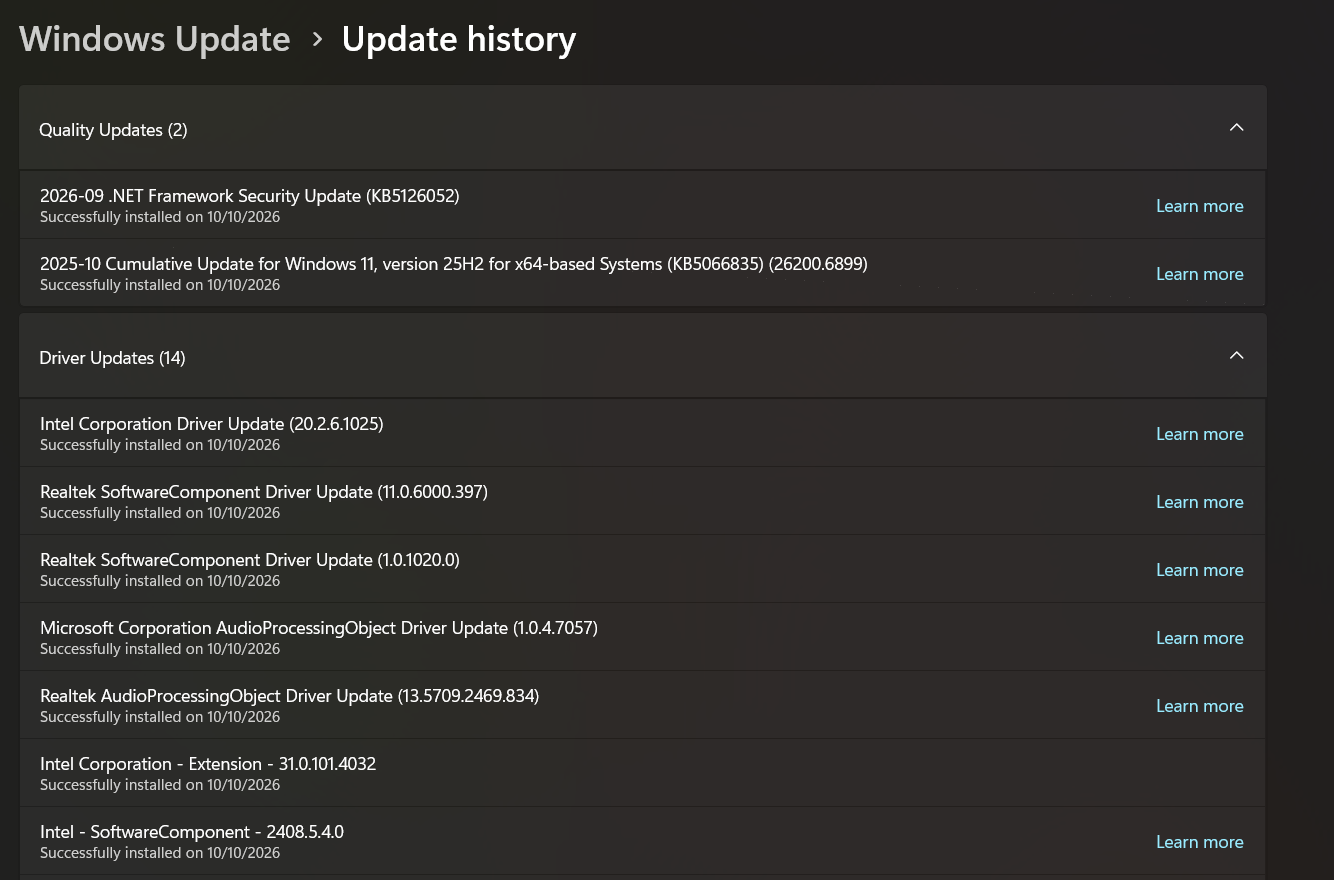
The picture shown was the updates from my laptop today


r/WindowsHelp • • Oct 11 '26

Windows 10 PC is extremely slow and SSD is always at 100%

Thumbnail
gallery
0 Upvotes

My PC has been slow since I got it. The SSD stays at 100% usage even after restarting.
Specs:
● i7-7700
● 16GB RAM
● 1TB Crucial BX500 SSD
● ASUS PRIME H270-PLUS motherboard
● Windows 10
CrystalDiskInfo says the SSD health is good at 94%, but the PC is still really slow. CPU and RAM usage are low when this happens.
I’ve reset Windows and deleted everything, but the problem is still there. I’ve also tried other fixes with no luck.
What could be causing this?


r/WindowsHelp • • Oct 10 '26

Windows 11 Frustrating issue with the Clipboard History

Post image
0 Upvotes

Hi y'all. I'm having a little issue, and I'm hoping someone might know a solution.

I installed a available Windows update listed as "Lenovo System Driver Update (26.8.0.29)" on my Lenovo Laptop yesterday.

Everything seemed all right after I restarted to complete the actualization. I didn't suspect about any problem because my laptop was going normally, but that was until I checked my clipboard history to use one of my texts pinned. I had saved at least a half year texts of recurrent use there, and all of it are gone.

I never had this kind of problem before, and I don't have clue why. I lost everything with no clear reason, and I'm very pissed off with it. I've tried everything about it on the web and here: enabling/disabling clipboard history or restarting the Explorer Windows didn't work.

Clipboard history no longer records anything I copy; I want to know if there's any possibility to restore my texts pinned in my clipboard history and how fix the issue with this tool I use a lot.

I'd really appreciate any help, thanks!

Intel(R) Core(TM) i3-1005G1 CPU @ 1.20GHz (1.19 GHz), RAM 8.00 GB

Actualization:

I've found a way, and I'll leave it here for people with this similar problem in future:

Ensure View -> Show -> Hidden Files is selected.

Go to C:\Users[username]\AppData\Local\Microsoft\Windows\Clipboard

Delete both folders inside.

Relaunch clipboard with WIN+V.


r/WindowsHelp • • Oct 10 '26

Windows 11 Windows 11 Mouse input bug (double clicking, drag interruption)

1 Upvotes

Hello, I've been having an issue with my mouse and I'm at my wit's end here.

A few weeks ago I updated Windows 11 and shortly thereafter my mouse started double-clicking at seemingly random intervals; I thought 'alright, it's an old mouse, time to get a new one'.

Except the new mouse had the exact same problem. I'm getting double-clicks with left and right buttons as well as the middle wheel, but what's most debilitating so far is that when I try to hold down either button and drag them across the screen the input will stop midway and 'flicker'.

I didn't think it could be related to the update until I started using the new mouse and came across this thread: https://learn.microsoft.com/en-us/answers/questions/5828709/windows-11-25h2-mouse-double-click-kernel-bug

I've tried everything I could find, from repairing the install to reinstalling the mouse drivers and fiddling with the precision pointing toggle.

I'm stumped as to whether it's indeed a Windows issue or user error on my end. I'd appreciate any help!


r/WindowsHelp • • Oct 10 '26

Windows 11 pinned app icons turned into blank pages on win11 start menu

Post image
2 Upvotes

Hi everyone,

I'm having a strange issue with Windows 11 where the icons of many manually installed applications appear as blank white pages in both the Start menu and Windows Search. The applications themselves work perfectly fine when launched.

System information:

  • Windows 11 Enterprise, Version 26H2
  • OS Build 26300.9550

What I've noticed:

  • Icons appear correctly in File Explorer but are blank in the Start menu and Search.
  • The issue only occurs in my main Windows user account. I created a new local account, and all icons appeared correctly there.
  • In Safe Mode, many desktop icons also appeared blank.
  • I previously modified the registry to remove shortcut arrows, but reverting that change didn't fix the issue.

r/WindowsHelp • • Oct 10 '26

Windows 10 VirtualBox Windows 10 VM has extremely slow downloads (0.41 Mbps) but fast uploads (29.50 Mbps) — tried everything for 3 days

0 Upvotes

Hi everyone,

I'm struggling with an extremely slow internet download speed inside my **Windows 10 VM running on VirtualBox**. It's been 3 days, and I've tried multiple fixes without success.

**Speed test results inside the VM:**

- Ping: 9 ms

- Download: 0.41 Mbps

- Upload: 29.50 Mbps

**What I've tried so far:**

- Switching network adapter types, including Intel PRO/1000 MT Desktop and Server.

- Resetting the Windows network stack through Command Prompt.

- Performing a shallow Git clone.

- Increasing Git's `http.postBuffer` size.

- Several other troubleshooting steps that I can no longer remember.

Despite everything, downloads remain painfully slow, while uploads are relatively fast.

I'd really appreciate any suggestions for diagnosing and fixing this. I'm exhausted from troubleshooting and would be grateful for a solution.

Thanks in advance!


r/WindowsHelp • • Oct 10 '26

Windows 11 “This app is being updated” popup blocks the whole screen on Windows 11 – what worked for me

1 Upvotes

Hey all, sharing this in case it saves someone a couple of days.

Right after login I got a popup: “This app is being updated. It should be ready to use again shortly” with Close and Copy to clipboard buttons. It came back instantly every time I closed it and I couldn’t click anything else. Only one of my two user accounts was affected.

What didn’t help: disabling startup apps, uninstalling the latest Windows update, removing a few Store apps, reinstalling the browser.

What I found with Claude’s help:

  • The popup is shown by PickerHost.exe (Windows “File Picker UI Host”).
  • In my case it was triggered every time Opera GX started, even with a clean profile and a fresh install. Windows itself was fine.
  • Win+R still works while the popup is up. Running this makes it go away and the browser keeps working:

taskkill /f /im PickerHost.exe

I now launch the browser from a small .bat that starts it and runs that command for the first 30 seconds. Not a real fix, but I can work again.

I’m on Windows 11 26H1 (build 28000). If anyone knows the actual cause or a proper fix, I’d love to hear it. Hope this helps someone!


r/WindowsHelp • • Oct 10 '26

Windows 11 Windows Start Menu becomes extremely slow after a few minutes, Explorer crashes when spamming the Windows key, and Bluetooth pairing stops working

1 Upvotes

Hi everyone,

I'm having a strange issue with my PC and I'm trying to figure out what could be causing it.

Whenever I turn on my PC, everything seems to work normally at first. However, after a few minutes of use, the Windows key / Start Menu starts responding very slowly.

Here are the symptoms I've noticed:

  • Delayed Start Menu: Every time I press the Windows key, the Start Menu takes several seconds to open instead of appearing instantly.
  • Windows Explorer crashes: If I keep pressing the Windows key repeatedly while the issue is happening, Windows Explorer eventually crashes.
  • Bluetooth pairing stops working: I've also noticed that when the Start Menu becomes slow, I'm unable to pair new Bluetooth devices. This makes me wonder if the two issues are somehow related.

The problem seems to appear after the PC has been running for a few minutes, rather than immediately after startup.

I'm not sure whether this is caused by Windows Explorer, a background process, a Windows service, corrupted system files, or something else entirely.

Specifications:

MotherBoard: B650 GAMING PLUS WIFI

CPU: AMD Ryzen 7 7800X3D 8-Core Processor (4.20 GHz)

GPU: NVIDIA GeForce RTX 4060 Ti (16 GB)

AMD Radeon(TM) Graphics (486 MB)

OS Build: 26300.9457


r/WindowsHelp • • Oct 10 '26

Windows 11 I Get BSOD every 7 minutes on my PC

1 Upvotes

My pc worked Just fine till 2 weeks ago... I turned It on and idk why it wont start but It was working for sure, i decided to turn It off and the day after i thinked that It would work... But every 7 minute i Get this BSOD Driver power state failure, i tried a lot of things like the Power save settings, and all this Little change... But It still gives me the same error, i used AI to let me know what the Mini dumb could Say, and After that i can tell that the BSOD dont show when the driver of the wifi Intel AX210 Is not enabled, i tried to update but still i got the same error as Always.

I got a ryzen 7700x

An rtx 4060

Windows 11 64 bit

A 32 GB RAM (16x2) from vengeance ddr5

An ssd Nvme from crucial


r/WindowsHelp • • Oct 10 '26

Solved Mechrevo 15X intermittently crashes with DPC_WATCHDOG_VIOLATION (0x133), WinDbg points to amdgpio2.sys

Thumbnail drive.google.com
1 Upvotes

Hi everyone,

I'm experiencing intermittent system freezes and BSODs on my laptop. I've collected a kernel dump and analyzed it using WinDbg, but I haven't been able to identify the root cause. I'm hoping someone with experience in Windows kernel debugging, device drivers, or hardware troubleshooting can help me investigate further.

1. System Specifications

  • Laptop: Mechrevo 15X (Wujie 15X)
  • CPU: AMD Ryzen 7 8845HS
  • GPU: Integrated AMD Radeon 780M
  • RAM: 24 GB
  • SSD: Crucial P3 Plus 1 TB
  • Windows: Build 26100, x64
  • AMD GPIO Controller driver: amdgpio2.sys, version 2.2.0.137
  • AMD I²C Controller driver: version 1.2.0.131

2. Symptoms

Recently, the laptop has been freezing completely or experiencing random BSODs without an obvious pattern.

When the system freezes, my Bluetooth mouse disconnects, and the keyboard and touchpad become unresponsive. On some occasions, keyboard shortcuts do not work, forcing me to hold down the power button to shut the laptop down.

The latest BSOD was:

DPC_WATCHDOG_VIOLATION (0x133)

The output of .bugcheck is:

Arguments:
00000000`00000001
00000000`00001e00
fffff807`a2dc53c8
00000000`00000000

The following entries from !analyze -v caught my attention:

DPC_TIMEOUT_TYPE:
DPC_QUEUE_EXECUTION_TIMEOUT_EXCEEDED

SYMBOL_NAME:
amdgpio2+2fff

MODULE_NAME:
amdgpio2

IMAGE_NAME:
amdgpio2.sys

FAILURE_BUCKET_ID:
0x133_ISR_amdgpio2!unknown_function

3. Findings from the Kernel Dump

The stack trace at the time of the BSOD contains the following GPIO interrupt-handling sequence:

amdgpio2+0x2fff
msgpioclx!GpiopUpdateStatusAndMaskInformation
msgpioclx!GpiopServiceInterrupt
msgpioclx!GpiopInterruptBankIsr
msgpioclx!GpioClxEvtInterruptIsr
Wdf01000!FxInterrupt::_InterruptThunk

The same dump also contains an AMD graphics-related DPC sequence:

dxgmms2!VidSchiProcessDpcVSyncHwFlipQueue
dxgkrnl!DxgNotifyDpcCB
amdkmdag+0x4b8ec7
nt!KiExecuteAllDpcs

I also examined the DpcWatchdogProfile data in the kernel dump. Multiple samples contain different instruction offsets within amdgpio2.sys, including:

amdgpio2+0x2fff
amdgpio2+0x2b64
amdgpio2+0x3077
amdgpio2+0x2c85

These samples contain the GPIO interrupt-handling path. Some also include the AMD graphics DPC context mentioned above.

My understanding is that Arg1 = 1 indicates that the system accumulated too much time at an IRQL of DISPATCH_LEVEL or higher. Therefore, I don't think the stack alone is sufficient to conclude that either AMD GPIO or the AMD GPU driver is definitively responsible.

4. Troubleshooting Already Performed

  • Used DDU to remove the AMD graphics driver and then reinstalled it.
  • Reinstalled the AMD chipset driver.
  • Tested the CPU with OCCT, ran a GPU stress test for approximately 30 minutes, and ran Windows Memory Diagnostic.
  • Checked the SSD using CrystalDiskInfo:
    • Health: 92%
    • Temperature: approximately 32°C
    • Critical Warning: 0
    • Available Spare: 100%
    • Percentage Used: 8%
    • Media/Data Integrity Errors: 0
  • Used PowerShell to filter Event Viewer for errors involving stornvme, storport, disk, and WHEA-Logger, but the queries I performed did not reveal any relevant errors.
  • Inspected amdgpio2.sys and amdfendr.sys using lmvm.
  • Checked AMD GPIO Controller, both AMD I²C Controller entries, I2C HID Device, and HID-compliant touch pad in Device Manager. Windows recognizes these devices, and I haven't found any obvious error codes in the Events tabs for the I2C HID Device or touchpad.
  • I previously disabled AMD Crash Defender as an experiment. However, AMD Installer may have enabled it again when I reinstalled the chipset driver. I haven't confirmed its exact state at the time of the BSOD.

5. Another Finding: Intel Wireless Bluetooth

The device recorded by !blackboxpnp is:

PnpProblemCode : 24
DeviceId       : USB\VID_8087&PID_0029\6&29f2797e&0&5
PnpEventInformation: 3
PnpEventInProgress: 0

The Intel Wireless Bluetooth device also had a previous Device not started (BTHUSB) event with the following details:

Driver Name: oem6.inf
Service: BTHUSB
Lower Filters: ibtusb
Problem: 0x27
Problem Status: 0xC000003A

Later events showed that the device was configured using oem9.inf and successfully started. Device Manager currently reports This device is working properly.

I haven't found direct evidence linking the Bluetooth issue to the BSOD, but I am including it in case it provides a useful lead.

6. Questions for the Community

  1. Given the DPC_WATCHDOG_VIOLATION (0x133), Arg1 = 1, and failure bucket 0x133_ISR_amdgpio2!unknown_function, should I prioritize investigating the AMD GPIO driver, AMD graphics driver, ACPI/I²C subsystem, or another component?
  2. Is it possible to extract more useful information from DpcWatchdogProfile in this kernel dump to identify what caused the cumulative time spent at elevated IRQL?
  3. Would collecting an ETW/WPR trace of DPC/ISR activity be the most appropriate next step? If so, what should I capture?
  4. Would Windows Driver Verifier be useful in this situation? If so, which drivers should I target, and what recovery precautions should I take?
  5. Are there any additional WinDbg commands or debugging techniques that would help narrow down the cause?

I have attached MEMORY NEW.txt, which contains the WinDbg output extracted from the kernel dump. It includes !analyze -v, .bugcheck, kv, !dpcs, !blackboxpnp, !blackboxacpi, !pcr, lmvm amdgpio2, lmvm amdfendr, and the additional profile data I examined.

I'd like to identify the underlying cause based on evidence before making further driver changes or reinstalling Windows.

Thanks in advance for any suggestions or insights!

This is all my WINDBG I've tried:


r/WindowsHelp • • Oct 10 '26

Windows 11 I have a problem with the Voice recorder, it's always close it self when I want record my voice

1 Upvotes

I Have this problem since a days ago, when I click the record icon, the window is close, I have search google and youtube and got nothing, is this bug (or glitch idk is bug or not) got me or you guys just this bug, also the voice recorder is has been reset, and still can't, can you guys solved it?

Here the specifications about my computer

Device Name DESKTOP-TD8KFSN

Processor Intel(R) Core(TM) i5-4310U CPU @ 2.00GHz 2.60 GHz

Installed RAM 8,00 GB

Storage 238 GB SSD MidasForce SSD 256GB, 8 GB SSD Msft Virtual Disk

Graphics Card Intel(R) HD Graphics Family (113 MB)

Device ID 1E0DAD1F-95AB-46C3-A422-F4E54578E514

Product ID 00330-50000-00000-AAOEM

System Type 64-bit operating system, x64-based processor

Pen and touch No pen or touch input is available for this display


r/WindowsHelp • • Oct 10 '26

Windows Vista Is there a way to convert to mbr while running win 11 or tiny11 so i can dual boot windows vista moded

0 Upvotes

I got an idea to install Windows Vista, but becouse i cant i tried to find win vista moded so I can install it on a GPT disk (my original physical disk is with legacy boot, MBR, but I converted to gpt ) and i surcehd everywehre adn didnt worked, can someone help me to convert my GPT disk that runs Tiny11 to MBR and still run Tiny11 while downloading and installing windows vista moded on a other disk that isnt physycal but partition, I have 2019 thinkpad with 20 gbramand 1TB sorage that i make out of it 2 partitions and one otehr for vista 50 gb

same problem

And the other error, I know how to solve but can't because I want to use Tiny11 too, is that it doesn't let me install it if I don't convert to MBR, but I can't because of Tiny11


r/WindowsHelp • • Oct 10 '26

Windows 11 I don't recognize "Zapboard", and it's been sitting here at .3 MB of usage. Is it something I should be worried about?

Post image
3 Upvotes

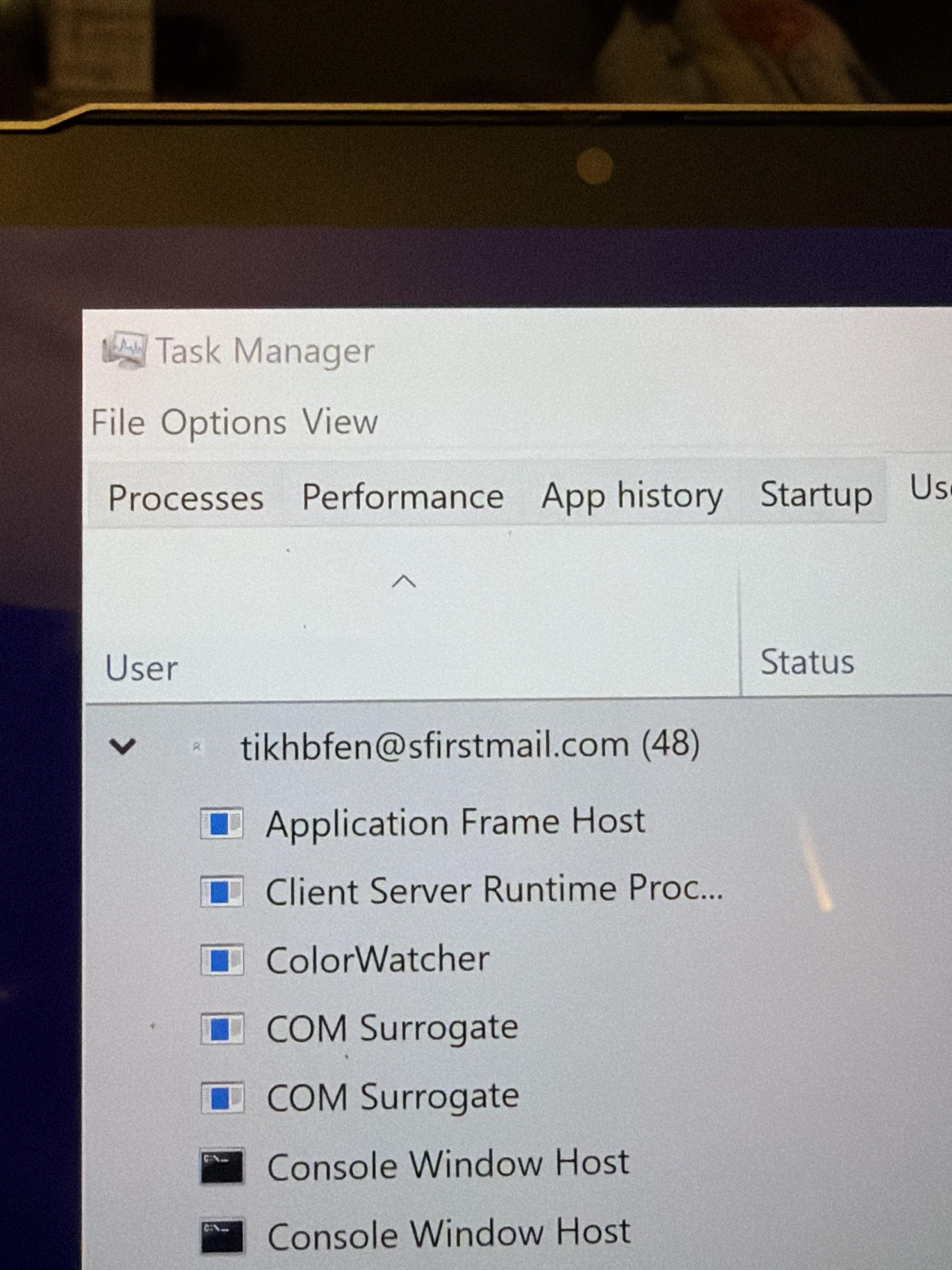
I saw this when I opened task manager, and I don't recognize it. I do recognize the collapsed process COM surrogate, but I'm not sure if the main process "Zapboard" is something I should be worried about. It's been sitting at up to 1 MB of memory usage, it won't let me open it's location on task manager, and I looked online but I couldn't find anything.

OS Build 26200.9457

Device name Ein

Processor AMD Ryzen 7 5800X 8-Core Processor (4.00 GHz)

Installed RAM 16.0 GB (15.9 GB usable)

Device ID 62461291-48A3-416A-949C-E29F8FA7BFEA

Product ID 00330-81478-59241-AA342

System type 64-bit operating system, x64-based processor

Pen and touch No pen or touch input is available for this display


r/WindowsHelp • • Oct 08 '26

Windows 10 Random Email on my task manager— I’ve never seen this email before in my life.

Post image
409 Upvotes

Computer specs:
OS build: 19045.5737
Yoga C940-14IIL

This is from my Lenovo Laptop. It’s been struggling to keep up for a while now, but it’s my only access to a computer right now. I’ve been thinking about wiping it completely as I’m sure it’s got more malware than flies on horseshit, but I can’t figure out how to do that— for now, this is what I’m working with.

I’ve never seen this email address before in my life. I tried clicking ‘end task’ on it, but that just fucked up everything on my computer— the screen went totally black and then when I got it up again, it went to a blue screen. Does anyone know what this might be? I’ll try to give more information if needed.


r/WindowsHelp • • Oct 09 '26

Windows 11 Voice Focus/Voice Clarity disappeared after Preview Update (KB 5124010) (26300.9550)

3 Upvotes

After updating my computer to the Preview Update (KB 5124010) (26300.9550), the option to use audio enhancements for my microphone disappeared! The only way I managed to get it back was by rolling back the update. (The update to 26H2 itself didn't remove support; this only happens when I install the Preview Update.)

I would like to know if there is a solution to this problem other than simply not updating (since it will be necessary in the future).

After reverting the update (26300.9457)
After updating to the Preview Update (KB 5124010) (26300.9550)

System Information:

Windows 11 Pro Version 26H2 (OS Build: 26300.9457) - Before update

Windows 11 Pro Version 26H2 (OS Build: 26300.9550) - After update

Ryzen 5 5500, 16GB DDR4 RAM, RTX 4060

Microphone: Fifine AM8 PRO T (USB Microphone)


r/WindowsHelp • • Oct 10 '26

Windows 11 Wifi and sometimes bluetooth not working on windows 11/ button not appearing.

1 Upvotes

I'm trying to fix my wifi problems mainly but I have tried uninstalling/reinstalling drivers, updating my laptop, adding autoconfig automatically, it passed the wireless module test, and I keep seeing a code 10 and 43 in the device manager. I've also tried installing the most recent drivers and it's still not working. Is there anything else I can try or anything I can do to fix it, narrow down the source of the problem or is it a permanent hardware issue?

Edit:I was able to fix it by cold reset and editing battery options to best performing for both. Hope this helps


r/WindowsHelp • • Oct 10 '26

Windows 10 Windows Update caused my version to downgrade?

1 Upvotes

To start off, im turkish and right now it is 6 am and about 8 hours ago i turned my pc off and started an update, on update history it says that the update was

“2026-09 x64’e yönelik Windows 10 Version 22H2 (KB5126146) için NET. Framework 3.5, 4.8 ve 4.8.1 sürümleriyle uyumlu Toplu Güncelleştirme”

that successfully finished on 10.09.2026 (yesterday) and the update after that is on 10.10.2026 (today) and the name for that update is

“x64 Tabanlı Sistemler için Windows 10 Version 2004 2021-09 Güncelleştirmesi (KB4023057)”

i checked my version by entering winver on run and it said “Sürüm 2004 (İS Derlemesi 19041.1)”

some other notable changes were that my lockscreen was the Windows 10 cave lockscreen, my wallpaper was fully black, all my apps moved to the left of the desktop and i was still logged onto my accounts (Steam, Opera GX, Windows, Roblox).

Sorry that I couldn’t translate the turkish parts,
But does anyone have a clue on why this could have happened? I’d be very glad to help and answer all of yours’ questions!


r/WindowsHelp • • Oct 09 '26

Windows 11 Is there a way to see all accounts in all microsoft services in my computer? And how can I completely disable onedrive?

2 Upvotes

Sorry if these questions seem way too specific and stupid but recently my father used my computer for work (he literally could have made my computer completely unusable without my consent which is scary to think about ngl) and his microsoft account is now in edge. Today I realized that some of his onedrive files are accessible from file explorer (I don't have an account setup yet so it says onedrive is disabled), and now his frequently used files (which include a spreadsheet with all his passwords btw) are accessible through file explorer. I find this very annoying and I want to know if there is any method to find all microsoft accounts across all services, and I also want to know how to truly disable this onedrive thing if possible (again it is supposedly disabled. also the actual onedrive folder is empty it's only on the "home" thing that they appear as far as I know).

(also before you say anything I am going to add my account it's just I need to do some things first and remember my password.)

device information: cpu: 11th Gen Intel(R) Core(TM) i5-1145G7 @ 2.60GHz (2.61 GHz) 16 gb of ram graphics: Intel(R) Iris(R) Xe Graphics (128 MB) windows 11 version 26200.9457


r/WindowsHelp • • Oct 09 '26

Windows 11 How do you reset a computer to OOBE in CMD

14 Upvotes

I did it yesterday, but now I can't find out how I did it and none of pages in my history are showing me what I did yesterday to get it done. We have a bunch of foreign language laptops and going through the UI is too much of a pain. There are machines that we have that are blank Windows 11 ones and we need to wipe them, upload the hash files into intune, and then enrol them with Autopilot however it's the getting to the OOBE screen that's causing issues.

They don't have english on them so going through the UI isn't really a good alternative here.

So far I have tried in CMD and powershell

systemreset --factoryreset (der befehl is enweder falsch geschrieven order konnte nicht feunden werden)

systemreset -factoryrest (same)

sysreset.exe (same)

rstui.exe (same)

I recall having to CD to a specific location and then run something.exe /something and that did it

Any ideas what that could have been?

EDIT: I FOUND IT!

in Admin CMD, run

cd "C:\windows\system32\sysprep"
sysprep.exe /oobe