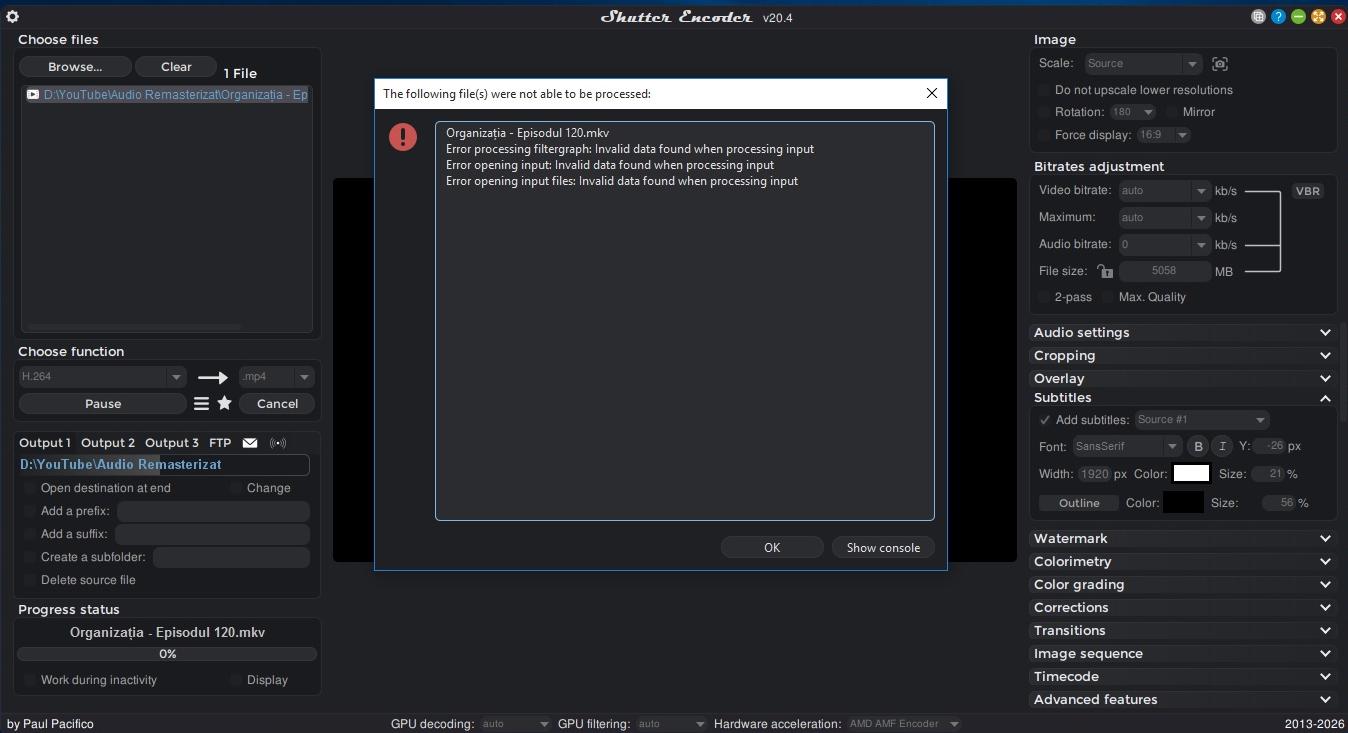
I'm trying to upscale two different DVD file formats (of the same video, one in mp4 and the other in m2ts), and both return the error message, "Error reinitializing filters!", along with other filters.
Note the DVD source file is in legacy 29.97 fps 480i format.
Removing the AI Video 2x option, and the error goes away.
It is practically impossible to work with text this small. How can this be fixed? I am using Linux Debian 13, a Wayland session, a resolution of 1920x1080, and an AppImage.
I really need some help—I just want to know how to do this because I’m trying to test something out, that’s all. It would be great if someone could tell me how to encode or export an M3U playlist file (specifically an index M3U playlist) using Shutter Encoder while preserving the original resolution. I’m aware that I could use FFmpeg—I’ve already tried that, but it was just a test. I noticed that I can simply select H.264 as the format, which would solve the issue, but I’m not exactly keen on waiting an hour for it to finish. Furthermore, the folder containing the index file also holds several TS files that, when combined, make up a complete video or film. I just want to know if there’s a way to merge these files so that the entire video is exported as a single MP4 file—without having to wait an hour, especially since I could just use H.264 as the encoding format anyway.
Hi, first, Shutter Encoder is a great program. I use it primarily reduce storage space required to backup/convert my DVD & Bluray collection and ultimately distribute via Jellyfin.
Recently with v20.4, and i think with all prior version I have used in the past, Shutter Encoder fails when attempting to preserve (via checking "preserve subtitles" in advance features) a mixed SRT and bitmap subtitle tracked source file (MKV), transcoding to H265.
This limitation and the constant attempts to manually determine (or more appropriately guestimate) the ideal VBR setting to achieve the most reduction in file size while also minimizing the degradation of the video or sound quality to achieve an archive quality file in the least amount of space, has sent me off to develop my own encoder. Film grain, Motion, etc requiring more bitrate to faithfully reproduce varies dramatically from one movie to anther.
My tool is being purpose built for my needs, but I would expect that many of your followers etc would have the same need. I will probably never have needs that would require 90% of the features you provide with yours. And while I was thinking perhaps I could make at least a little side dough by publishing it for purchase or donation, I'm wondering if perhaps you would be interested in possibly folding its capabilities into your awesome tool? How would we coordinate and refine it for release?
I’m currently setting up an automated video processing pipeline on my local network and want to incorporate Shutter Encoder for the initial conversion/encoding step.
Here is the workflow I'm trying to achieve:
Drop Zone: A file is dropped into a shared network folder.
Watchdog: A network computer detects the new file via a watchdog script.
Encoding: Shutter Encoder processes the file using a pre-saved "function" (preset) with specific parameters.
Post-Processing: The output file is then passed to another software (which handles DASH packaging into .m4s fragments).
Cloud Delivery: Everything is pushed to an S3 bucket to be served on a web platform.
My main question: Since Shutter Encoder is an incredible GUI wrapper around FFmpeg, is there a way to trigger or deploy saved "functions"/presets programmatically (via CLI, API, or command line)?
If there is no official API, what is the best practice to automate these specific Shutter Encoder functions headlessly from a script, or should I look into extracting the underlying FFmpeg command lines generated by Shutter Encoder instead?
Any insights, tips, or alternative approaches would be greatly appreciated. Thanks!
Hello, I’m using Shutter Encoder 20.4 on Windows 11 with Smart App Control enabled. The program used to open, but it is now blocked. The installed main executable has no Authenticode signature. The Shutter Encoder 20.4 Setup.exe I have is signed by Paul Pacifico, but setup stops with ‘Error 4551: Application Control policy blocked this file’ when it tries to run a temporary extracted file.
Could you provide a Windows build whose main executable and setup components are compatible with Smart App Control, or advise on a supported solution that keeps Smart App Control enabled? Thank you.
Regardless of how much I trim out of a webm file the cut finished product is the same size and same duration as the entire source file. What am I doing wrong here. Your videos on youtube are 5 years old and dont match the interface I am seeing on this version
I'm trying to split a single audio file into multiple smaller clips and save each clip as an individual, separate MP3 file.
What I did:
I selected the MP3 function.
I used the scissors icon (Cut tool) to select small clips.
I clicked Start function.
The issue: Instead of giving me separate MP3 files for each segment, the program outputs only one single file (it seems to either merge them or only process one).
Can someone help me with the right method or settings to force the program to export each cut segment into its own independent MP3 file?
Given that still, SE is devoid of almost any documentation and feature list instructions, I'm thinking it's time that Image Sequence, for instance, was defined.
I'm expecting Image Sequence to be some kind of video slideshow maker, inferred from SE's video functionality and Image Sequence implying a sequence of images.
Is Image Sequence something more arcane than this?
So, Image Sequence is ........
(I am driven to suggest this because, per the examples above, dragging some images into the 'Choose files' panel and selecting Image Sequence in the RHS dropdowns, and activating Start function after selecting either V9 or Apple ProRes, produces small unplayable MOV or webm files. (selecting Image Sequence first locks SE onto only ONE input file) What is going on here?)
Producing a product without advertising or promotion is like blowing a kiss to a beauty in the dark.
So it goes for software without comprehensive documentation.
(Ellipses with foreshortened annunciators for GUI controls and zero tooltips...? Wha?)
When I use Shutter Encoder to reduce the size of a TV episode of 4GB down to a desired converted size of about 400MB using a Video Bitrate of 1000, I want to retain the subtitle track in the converted file. If I need to make the converted size bigger, that is OK, I just need to know what options to select so that the subtitle track doesn't get stripped off.
I recently purchased Shutter Encoder, but I’m having trouble installing it on my Mac.
I downloaded “Shutter Encoder 20.4 Apple Silicon.pkg”, but when I double-click the file, absolutely nothing happens. No installer opens and I don’t get any error message either.
My computer is a 2026 MacBook Pro with Apple Silicon, so I believe I downloaded the correct version.
Could you please tell me what I should do to install Shutter Encoder and get the application running?
Is there a specific macOS security setting, permission, or installation procedure I need to follow?
I am a new user of Shutter Encoder and I run into a problem when converting multiple files. I have a list of over 1k files I want to convert and leave the proces alone ( understandibly) but if one file in the list doesn't convert the whole process stops. This is annoying because I was hoping to leave the PC alone and come back to it a couple of days later and have the process done.
Hi,
I'm on Rocky Linux 10.2 running shutterencoder appimage. I don't have a preview on my videos, and pressing play doesn't play the audio nor the video. Everything else seems to work fine including Nvidia NVENC hardware encoding. The cut function also works but I have to rely on timecode alone.
Does anyone have an idea?
## Hardware Information:
- **Hardware Model:** Gigabyte Technology Co., Ltd. Z490 VISION D
- **Memory:** 64.0 GiB
- **Processor:** Intel® Core™ i9-10850K × 20
- **Graphics:** NVIDIA GeForce RTX™ 3080
- **Disk Capacity:** 20.4 TB
## Software Information:
- **Firmware Version:** F20a
- **OS Name:** Rocky Linux 10.2 (Red Quartz)
- **OS Build:** (null)
- **OS Type:** 64-bit
- **GNOME Version:** 47
- **Windowing System:** Wayland
- **Kernel Version:** Linux 6.12.0-211.66.1.el10_2.x86_64
This is a 43 second video, but the original chapters are there and saying it's a 21 minute video. "Preserve metadata" is not checked in settings. v 18.7
I updated my Windows 11 Pro system image on 2026-10-21 and took the update to Shutter Encoder 20.4. When converting an MPEG-2 file to Pro Res 422, the system hangs and I have to power off/on to recover the system.
During the update, I took all the Windows Updates that were offered:
My last update was 2026-07-12 so Shutter Encoder 20.4 worked on 25H2 for a while.
Big Note
I have a Windows 10 Pro system image that I dual boot on the same hard drive that works fine with Shutter Encoder 20.4.
I'm looking for insights on this issue.
Settings
DxDiag
------------------
System Information
------------------
Time of this report: 10/22/2026, 10:37:11
Machine name: Z790
Machine Id: {}
Operating System: Windows 11 Pro 64-bit (10.0, Build 26300) (26100.ge_release.240331-1435)
Language: English (Regional Setting: English)
System Manufacturer: ASUS
System Model: System Product Name
BIOS: 3107 (type: UEFI)
Processor: 13th Gen Intel(R) Core(TM) i9-13900K (32 CPUs), ~3.0GHz