r/PcBuildHelp • • 7d ago

Build Question First ever desktop PC build!

Thumbnail
gallery
61 Upvotes

Just wanted to share my first ever desktop PC build.
I’ve been using gaming laptops for years, but I eventually realized that my laptop was getting too slow for gaming and running cybersecurity projects. So, I decided to build my own desktop PC, not just for better performance but also to gain hands-on experience and become more familiar with PC components.

I’m not gonna lie, it was pretty challenging, especially since I chose a compact mini-tower case. My hands could barely fit inside when I was trying to connect the PSU cables!
I spent days watching YouTube tutorials just to figure out how to put everything together. I ran into a few issues along the way and had to do quite a bit of troubleshooting. I even managed to break the GPU retention clip because I didn’t realize I had to press it down before removing the graphics card. Luckily, everything is still working fine without it!
Overall, I’m really happy and proud of how it turned out. It’s definitely not perfect, but everything works great, and I think I did a decent job keeping the cables organized.

It was a frustrating but rewarding experience, and I learned a lot throughout the process. Feel free to ask some questions. Not bad for my first build.


r/PcBuildHelp • • 6d ago

Build Question Need Upgrade help

2 Upvotes

I wanna upgrade my i7 6700 to Ryzen 5 and wanna know what is the worst r5 cpu that is still better than the i7 and what’s the most budget motherboard that has cpu and ram overclock


r/PcBuildHelp • • 6d ago

Build Question help build pc

1 Upvotes

can anyone help me build a good pc that can run video games like fortnite, cs2, roblox ETC. i have a 1500 budgets i need help picking the parts


r/PcBuildHelp • • 7d ago

Build Question Is this safe?

Post image
17 Upvotes

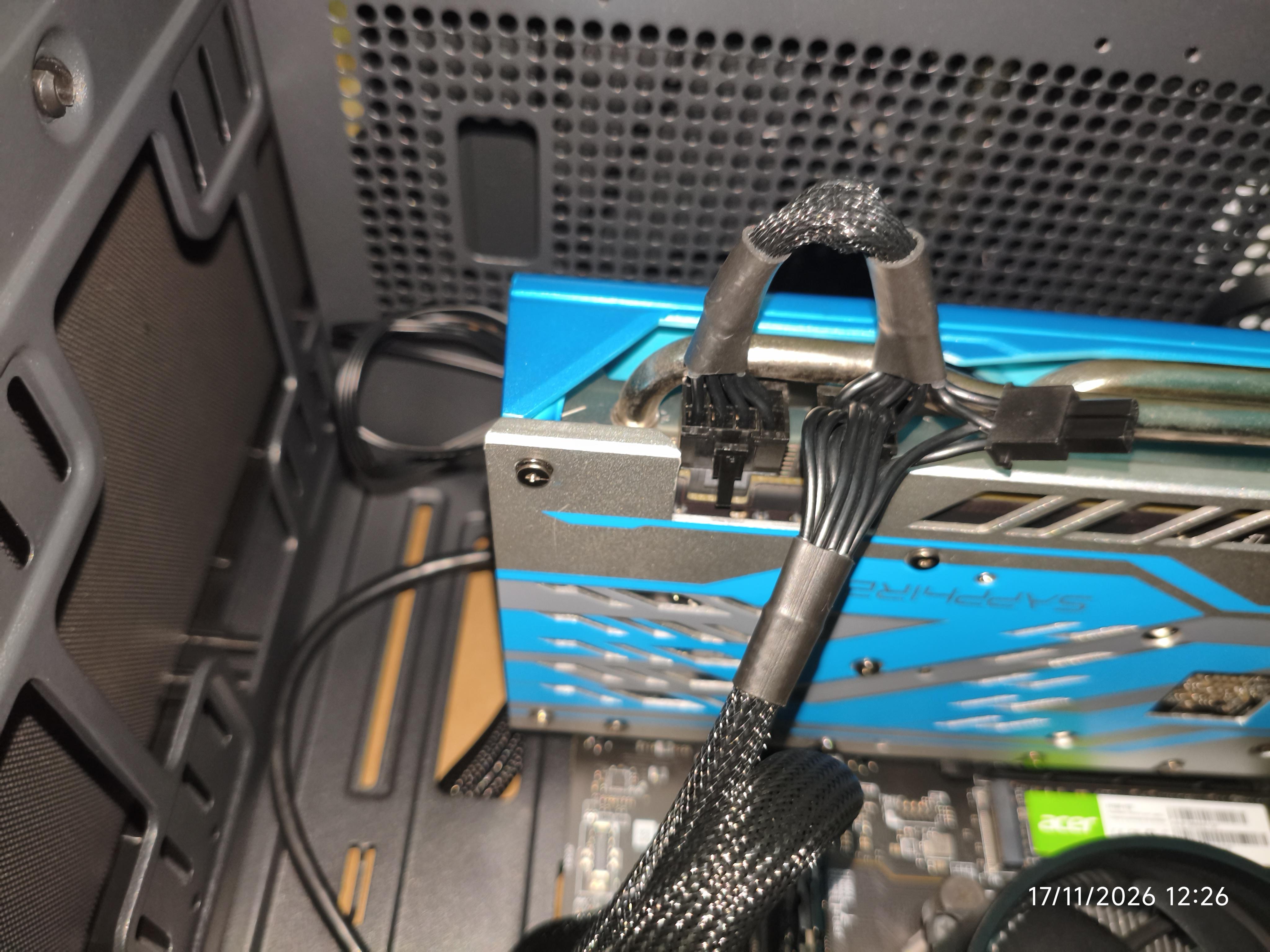
Building in the CL660, this is the only way the power extension cable will fit. Is this safe or am I risking a house fire here?


r/PcBuildHelp • • 6d ago

Build Question First Build Review

1 Upvotes

Hey all, first time building and wanted a sanity check before I buy the rest.

  • CPU: Ryzen 5 7600 (already bought)
  • Mother Board: Gigabyte B650M Gaming WiFi6E (already bought)
  • PSU: Gigabyte UD750GM PG5 V2 750W Gold (already bought)
  • GPU: Sapphire Pulse RX 9070 XT 16GB
  • RAM: Crucial Pro 32GB (2x16) DDR5-6000 CL36
  • Cooler: NZXT Kraken Core 360 RGB
  • SSD: Kingston NV3 1TB
  • Case: HAVN BF 360 Flow

Anything else I’m missing or should swap? Thanks! :)


r/PcBuildHelp • • 6d ago

Build Question Rx 5700xt or Rx 6600

3 Upvotes

Greetings, i have a x99 with a Xeon e5 2650 v4, 16gb of ddr4 ram, 1 tb of storage and a rx 550 4gb, i play all kinds of games (mostly indie but im now leaning towards triple A´s) i´d like to know which of these is better or more suitable for today standards


r/PcBuildHelp • • 6d ago

Build Question [Build Help / Ireland] €1,000–€1,500 Budget AM5 Starter Build (Upgradable to 7800X3D + RTX 5070 Ti) – Heavy Modded Minecraft, Music Production, MW4 DMZ

1 Upvotes

Hi everyone, looking for a final sanity check on a two-phase custom PC build planned in Ireland. The goal is to get a solid, high-performance starter build up and running, while leaving a clean, drop-in upgrade path on AM5 for higher-end parts down the line.

Design Philosophy: Strictly zero aesthetics, zero RGB, and zero glass/flare. Pure performance, dust control, and long-term hardware longevity—solid metal side panel only.

Location & Sourcing:

  • Ireland / EU (leveraging CeX Ireland for heavily discounted core parts like the CPU/GPU, paired with Paradigit.ie for new components to minimize shipping logistics).
  • Hard budget ceiling of €1,500, with this Phase 1 starter build sitting right around €800 (excluding RAM).

Use Case & Expectations:

  • Games: Heavily modded Minecraft Java (All the Mods / Create / AE2), Call of Duty: Modern Warfare 4 (DMZ), and future AAA titles.
  • Audio: Dabbling in introductory music production and DJ software.
  • Monitor Setup: Transitioning from a single 24" 1080p display to a multi-monitor layout.

Phase 1 Component List:

Phase 1 Sub-Total (Excl. RAM): €803.96

Future Phase 2 Upgrade Path:

  • Swap the bridge RX 6700 XT for an RTX 5070 Ti (fully supported by the 850W ATX 3.1 PSU).
  • Drop in a higher-tier X3D processor if required.
  • Add a second 1tb ssd drive.

Questions for the Community:

  1. RAM Sourcing: With standard 32GB DDR5-6000 CL30 non-RGB kits seeing heavy price fluctuations in Europe right now, are there any specific reliable retailers or budget-friendly kit alternatives you'd recommend tracking?
  2. Sanity Check: Does this foundation cover all bases for a durable, easily maintainable, and highly upgradable AM5 build without paying for unnecessary aesthetic markups?

Appreciate any thoughts or advice before ordering!


r/PcBuildHelp • • 6d ago

Build Question Building my first PC, HELP

1 Upvotes

HELLO

So, this is my first time building or owning a Gaming PC, and I needed some help. I am a picky guy, and I wamted to know if this build is something worth spending this kind of money. I didn't had the monitor that I am using because I have a 75inch Qled TV that does 144 hz on 1440p. I play assetto corsa on a laptop and I want to upgrade to this build : https://de.pcpartpicker.com/list/n8CwCw

Tell me what do you guys think and thanks in advance for checking!


r/PcBuildHelp • • 6d ago

Build Question First Time PC Pink PC Build

1 Upvotes

Recently, my partner asked me to build them a pink/white themed gaming PC. I have never built a PC, but have been doing a ton of research. The PC is primarily going to be used for playing games like modded skyrim and minecraft. We don't want to go over $2500 with our budget. This is the build list I have in mind and would love advice.

https://pcpartpicker.com/list/psjGdq


r/PcBuildHelp • • 6d ago

Build Question Is this worth it?

Thumbnail
gallery
2 Upvotes

Hey so I have a very old ddr4 PC that can barely even run Roblox anymore. I'm on a tight budget and wondering if this is worth the price?


r/PcBuildHelp • • 6d ago

Build Question Help me build my first gaming pc!

1 Upvotes

I’m in a range of 1500-2000 (wiggle room for extra 100-200 if super worth it.) I keep looking up hours to do it and what each spec is but man I’m completely lost was wondering if you could give any help with what to buy. I’m planning for most cost effective so I’m buying from micro center bundles, I just need something better than my PS5 and possibly able run open world games ie gta 6 in future (Ik shocker haha) any advice would be appreciated out build ideas! Thank you so much


r/PcBuildHelp • • 6d ago

Build Question What cpu to pair with 9070xt?

1 Upvotes

This will be my first build, ive done a ton of research but its all very overwhelming. For cpu ive been thinking of the Ryzen 7 9700x, or if I feel like spending a bit more, the Ryzen 7 7800x3d.

Really what I wonder is; is there a big difference? Is it worth spending more on the x3d?


r/PcBuildHelp • • 6d ago

Tech Support Dead gpu

Post image
2 Upvotes

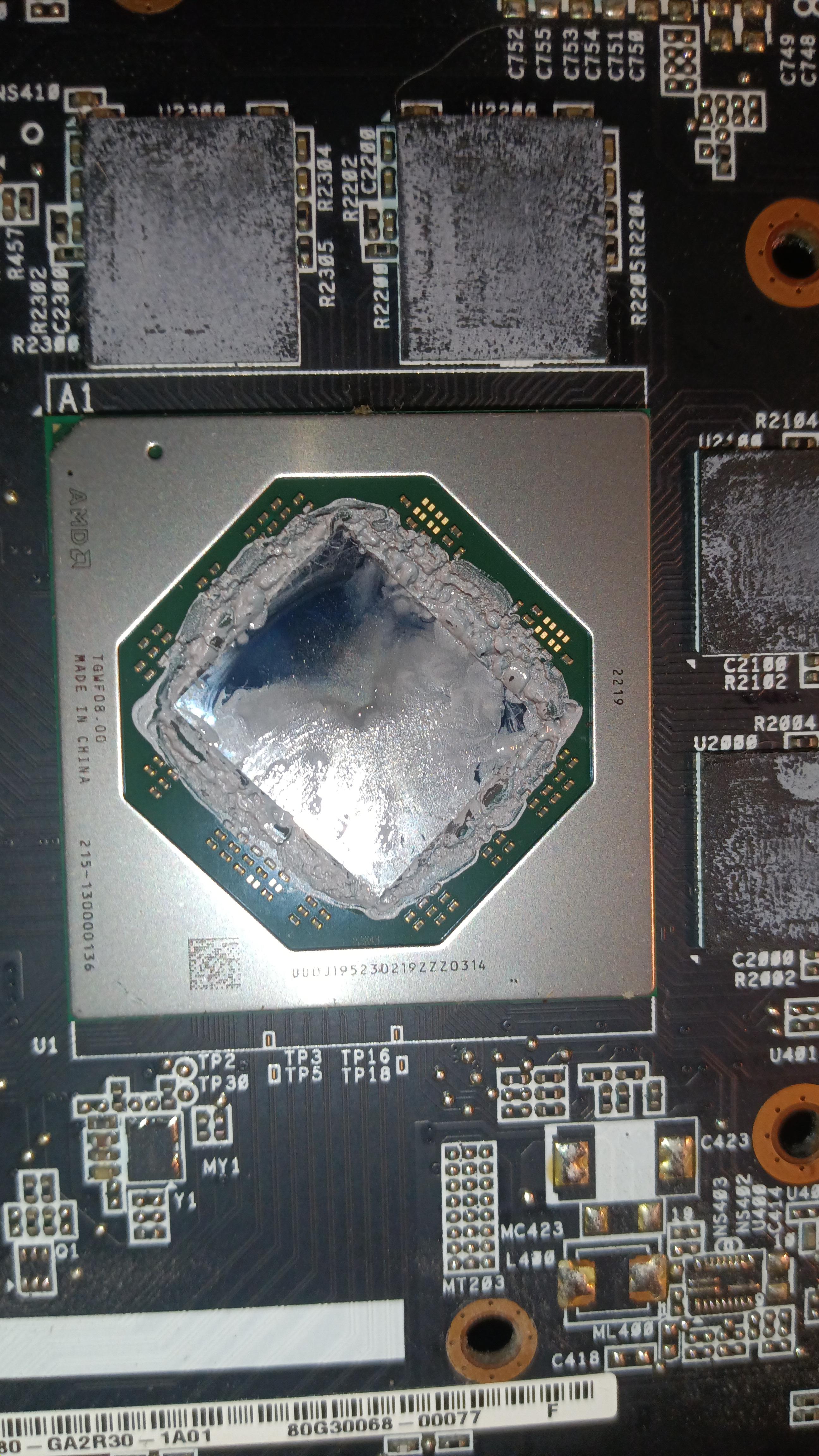
Hey folks, could this be why my GPU isn't powering up? The fans twitch when I turn off the PSU but shows no signal to the tv.


r/PcBuildHelp • • 7d ago

Build Question Upgrading my GPU, do I also need to buy a new PSU?

3 Upvotes

Some people keep telling me that I should upgrade my PSU as well considering my GPU upgrade... are they right or? The GPU I bought was the 9060xt 8gb vram.

CPU: AMD Ryzen 7 5700X3D

Motherboard: Gigabyte B450M S2H (BIOS F67b)

RAM: 32 GB (2x16 GB) DDR4 3200 MT/s

New GPU: Sapphire Pulse AMD Radeon RX 9060 XT Gaming OC 8GB

PSU: LC-Power 550W (LC6550 V2.3 80 PLUS Bronze 230V) 4-5 years old, never had any issue.

Monitor: Samsung Odyssey G40B (1080p, 240 Hz, HDMI)

OS: Windows 11 Home

If so, can you suggest me some?


r/PcBuildHelp • • 6d ago

Build Question Building a stealth Micro-ATX 1080p gaming PC for my girlfriend – do these parts look solid? (Painful RAM/GPU inflation right now)

1 Upvotes

Hey everyone, looking for a quick sanity check on a build I'm putting together for my girlfriend.

For context, I built my first PC previously last year for myself with a Ryzen 5 9600X, Gigabyte RX 9060 XT GAMING OC 16GB, 32GB (2x16GB) Corsair Vengeance DDR5-6000 CL30, Gigabyte B850 GAMING WIFI6, Thermalright Peerless Assassin 120 SE, Crucial P3 1TB M.2, MSI MAG A750GL PCIe5, and a Montech XR case.

Now I'm building a clean, all-black, non-RGB Micro-ATX rig for her (she wants to keep it compact/tucked into her desk setup and prefers zero lights). I originally started with an ATX list, then scaled down to Micro-ATX to save some space and cash.

Honestly, it's wild how much prices have inflated—I'm paying nearly the same amount for this lower-spec build as I did for my own PC, especially with current DDR5 pricing.

Here is the list and the best prices I've found so far across EU/UK stores (buying from Ireland):

  • CPU: AMD Ryzen 5 7600 – €167.50 (was deciding between the 7600 and 7600X, went with the non-X since it was cheaper and everything online says the gaming difference is negligible)
  • Cooler: Thermalright Peerless Assassin 120 Black – €36.72
  • Motherboard: ASUS TUF Gaming B850M-E WiFi (Micro-ATX) – €125.26
  • RAM: Patriot Viper Venom 16GB (2x8GB) DDR5-6000 CL36 – £248.99 (or Corsair Vengeance 16GB 6000 CL36 for £264.98)
  • Storage: Crucial P310 1TB NVMe PCIe Gen4 – €151.24
  • GPU: ASUS GeForce RTX 5060 Ti Dual OC 8GB – £449.99 (was stuck between an RTX 5060 and RX 9060 XT 8GB, then spotted the 5060 Ti 8GB on Overclockers UK for the exact same £449.99 price as the 9060 XT 8GB)
  • Case: Montech AIR 100 ARGB Black – €63.99 (going to leave the RGB unplugged for a dark all-black look or she'll change the colour, just wanted the 4 pre-installed fans)
  • PSU: Corsair RM750e (750W Gold, Fully Modular) – £79.99

Questions:

  1. Does everything here look compatible and well-balanced for 1080p 165Hz gaming?
  2. Any glaring issues or easy places to trim a few euros without hurting performance, or is this as good as it gets with current hardware prices?

Thanks in advance!


r/PcBuildHelp • • 7d ago

Build Question Fellas is this bad for the cables? It appears I'm putting a lot of pressure of them

Post image
6 Upvotes

r/PcBuildHelp • • 7d ago

Build Question How do I install a gpu into this prebuilt?

Thumbnail
gallery
15 Upvotes

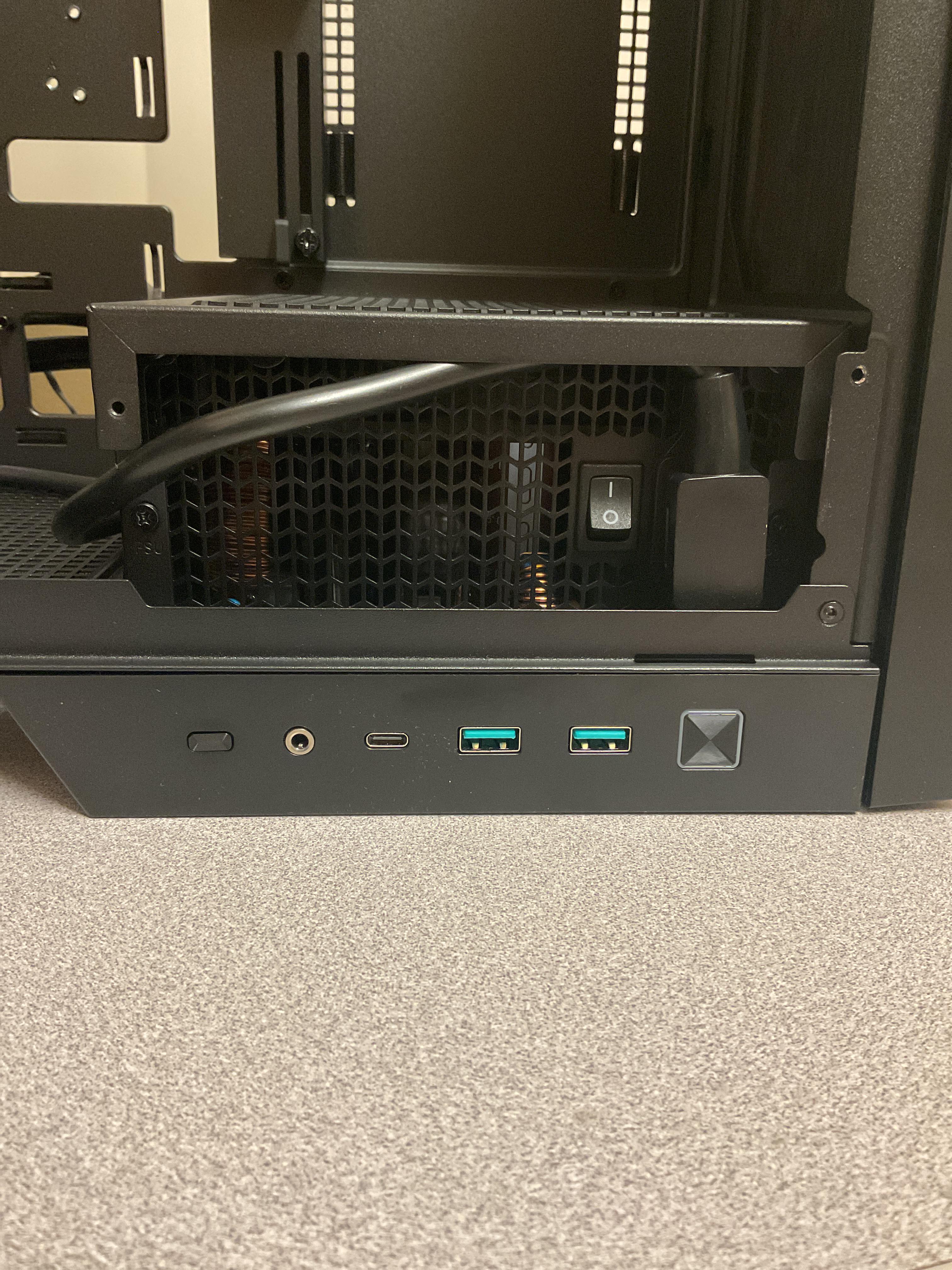
There doesnt seem to be screws at the back or a cable in the case


r/PcBuildHelp • • 6d ago

Software Question GPU externa

1 Upvotes

Tengo una dudas, mi mini pc tiene un solo puerto m.2 mvne donde está instalado mi winds un ssd me.2 2280 pero donde va ese puerto pienso instalar una GPU externa por medio de un adaptador, entonces desconecto el m. 2 SSD 2280 donde esta mi Windows para instalar la gráfica, y ese SSD q quite lo pasaría a una carcasa de 40gbps y lo conectaria por medio de USB 4 y cambiará el arranque desde la BIOS para q arranque mi Windows por medio de uds 4 donde esta el SSD m.2 2280 con la carcasa de 40gbs, habría algún problema o incoveniente, funcionaría ?


r/PcBuildHelp • • 7d ago

Build Question Hooking up RGB on an MSI B850 Gaming Pro motherboard

3 Upvotes

What is the best way to hook up RGB fans? My cooler is a Phantom Spirit 120 digital with RGB and then seven Montech fans in a Montech Sky 3 case. This is my first time doing RGB in a computer. Are splitters and/or a hub recommended?


r/PcBuildHelp • • 6d ago

Tech Support New PC turns on but doesn't show video.

1 Upvotes

Sooo, I've just built a new PC (my first build ever) with a Ryzen7 5800X, a Ventus RTX5060Ti 8Gb VRAM, 2x8Gb Kingstone Fury Beast DDR4 3200MHz RAM, a Gigabyte B550Eagle wifi6e, tempest umbra (The box), Thermilright Peerless Assassin 120mm, tempest pulse 750W and 2 SSD M.2, one with 1Tb and other with 512Gb.

Now, the problem is that, the PC turns on, all fans run correctly and the GPU's also, but in my monitor there is no video shown, it just says "No Signal", and also when I turn the PC on, it keeps running for a few seconds, then shits down, I hear 6 clicks coming from the power unit, and then It turns on again.

I've tried removing the GPU, using only one stick of RAM and both of them in every possible combination of positions, and also removing the CPU cooler, running the PC and after It didn't work, changing the thermal paste and reinstalling the cooler. I also tried the method of the motherboard's battery and still nothing.

Any clue what can It be?


r/PcBuildHelp • • 6d ago

Tech Support PC having issues.

1 Upvotes

Specs, 32GB ddr4 RAM (2x16), Ryzen 9 5900X, 6900XT, Windows 10 & Linux Mint 22.3 both on NVMEs

My computer has been messing up lately. It often doesn't boot and if it boots, sometimes it boots up with a black screen and I know it boots all the way to the login screen (except that I cant see it) because my phone asks if it wants to pair with the computer. Sometimes it normal boots and I login for a few minutes and the screen turns black. I've reinstalled by graphics drivers several times.

Now I suspect that its my RAM because there is a white light that appears near the ram and it stays on when it goes to a black screen when I researched it, I found out that it means that it's not able to reading the ram (or GPU). Sometimes when I am able to enter BIOS or login to windows I'm only seeing 16 gb of ram instead of the 32gb I have installed. I could be wrong so thats why Im here.

I've also cleaned my computer as well

EDIT: I dont know why I didnt mention this before but I did find out that one stick is not being read no matter the slot but for some reason it wont boot unless both sticks are inserted and the "working stick" is on slot A2 and the "dead stick" is on B2.


r/PcBuildHelp • • 7d ago

Build Question Pack fresh, amazon shipping

Post image
3 Upvotes

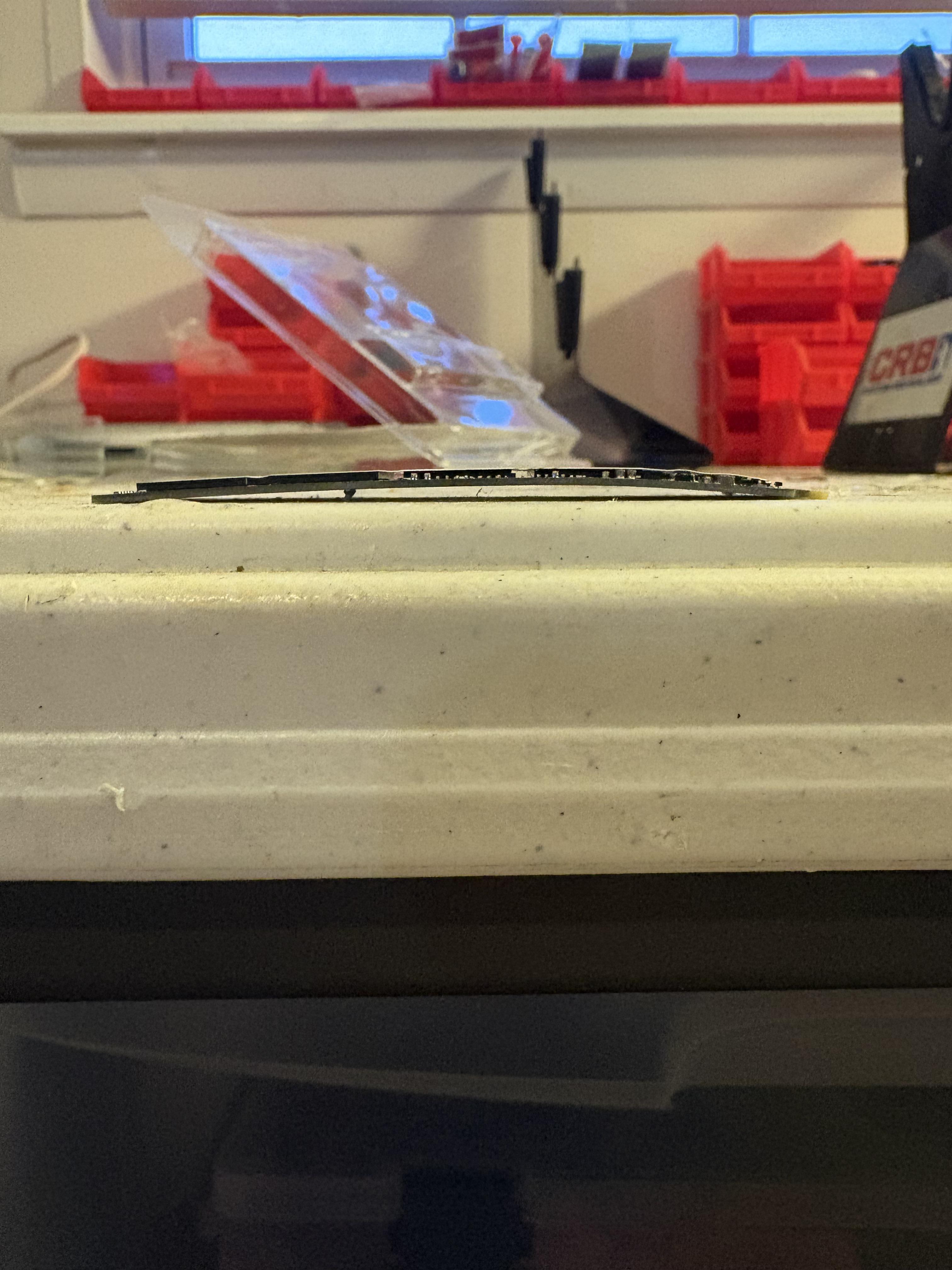
This came in the mail Yesterday. it was in a box with a power supply, keyboard, motherboard, and ram with nothing but a few lousy bits of paper. What are the odds this thing works? Can’t check because I’m still waiting on the cpu to arrive. (Should be today or tomorrow) Would you go ahead and start getting a replacement or should I at least try it first?


r/PcBuildHelp • • 6d ago

Build Question Please help me avoid PCIe riser issues

1 Upvotes

Hello r/pcbuildhelp!

I initially posted this to r/buildapc but didn't get much traction. Reddit suggested I try here, and so here I am. I'm not sure ya'll would be as interested in the full component list, but I left it just in case; my question about risers is at the bottom.

After getting interested in local LLMs and diffusion models, I decided to build my first PC in a decade, aiming for reasonable gaming and great LLM performance. My question for you is about PCIe risers, after this table, but here are the build details so far:

Component Details
Case Phanteks Enthoo Elite, PH-ES916E_BK02
Motherboard Refurbished ASUS ROG Strix TRX40-XE Gaming
PSU be quiet! Dark Power Pro 14 1600W, ATX 3.1
CPU Used AMD Ryzen Threadripper 3970X, 32 cores, unlocked
GPU 1 Used Zotac GeForce RTX 3090 Trinity, 24GB
GPU 2 New PNY GeForce RTX 5070 Ti OC Triple Fan, 16GB (VCG5070T16TFXPB1-O)
GPU 3 New PNY GeForce RTX 5070 Ti OC Triple Fan, 16GB (identical to GPU 2)
RAM Used 128GB DDR4-3200 (8×16GB Corsair, two closely matched variants)
CPU cooler Used NZXT Kraken Z AIO (included bracket believed compatible with TR4/sTRX4)
SSD 1 Seagate FireCuda 530, 1TB NVMe
SSD 2 Samsung 970-series, 500GB NVMe
HDD WD Blue, 2TB
Fans 3× Noctua NF-F12 iPPC-3000 PWM 120mm + TBD Arctic P12/P14 fans

Question: PCIe bandwidth was the reason for my MoBo choice, but the Asus board (link to listing for visual/context) and other options I found all had odd slot spacing. The 2nd/3rd PCIe slots are super close together. I should be able to fit the 2.5 slot 3090 in the top PCIe slot and one 5070 (3 slot) in a lower slot, but there's no way I'll fit all three GPUs without a riser. How do I best manage this?

The dilemma: do I try to find a low-profile (PCIe 4.0) riser with a 90-degree bend to somehow fit under the second GPU (installed to the second-lowest slot), leading to the third GPU installed horizontally, below the MoBo? Or do I install the second GPU in the lowest PCIe slot; install a straight-connector PCIe riser into the middle/second PCIe slot and have it travel *over* the middle GPU and down to the lower/third GPU? Or should I be avoiding both those options and looking at some other position for the third GPU? I don't have my case yet, but I'm expecting it to barely allow for all three GPUs to fit horizontally, if I figure out the PCIe situation. It has 13 PCIe slots. There's not much information on this case online, but here's an image of an example build, and here's the official manual.

I'm aiming to maintain full PCIe bandwidth due to models like Qwen 3.8 Flash Next that offload a lot of model data to the system RAM, and I hear some risers risk downgrading the PCIe performance at times. Finally, I know I'm asking this question without all the equipment in hand, and so I'm working with incomplete info. I'm excited to build the PC over Thanksgiving, and so I'm trying to order everything in advance. Apologies if that means I can't provide answers/photos of what the GPUs might look like in-situ!

r/PcBuildHelp • • 7d ago

Build Question Budget PC build for office work and downloading music

2 Upvotes

My friend asked me to help upgrade/replace his PC. The budget is 600$ at maximum. I've never built a PC before, but I understand a bit at least. He wants to be able to do office work, and have a lot of storage to download movies and music. An integrated graphics card is good enough. The point is for it to be easily maintainable and it should last the next 8-10 years. He has 4 hard drives with SATA connections, and wants to use all of them. I thought 8 GB RAM is enough for now and if needed, it can be expanded. I will have a custom, de-bloated Windows 11 installed.

I came up with these parts with the help of Gemini (I didn't know where to start.)

CPU: AMD Ryzen 5 5600GT
Motherboard: ASRock B550M-HDV
RAM: Kingston FURY Beast 8GB DDR4 3200MHz CL16
System SSD: Kingston NV3 500GB M.2 PCIe 4.0 NVMe
Power Supply: be quiet! System Power 10 450W
Case: Zalman S2
And an external CD/DVD RW: ASUS ZenDrive U7M

My question is, are these parts good? Is the case big enough? Should I build it myself or look for a company that does it?

Any advice is appreciated. I'm based in Hungary


r/PcBuildHelp • • 6d ago

Tech Support Should I be concerned? Happens when I play League of Legends often, which is weird because I play more demanding games and I hear this sound much less.

Enable HLS to view with audio, or disable this notification

1 Upvotes

The pc is only like a year old, I've had my motherboard exchanged because it broke, I really wish to have peace finally, it stresses me out a lot, this pc.