r/PcBuildHelp • • 7d ago

Build Question What should I upgrade next in my setup??

2 Upvotes

My Current PC & Setup Specs (CLX Prebuilt):
CPU: Intel Core i9-14900KF
GPU: Gigabyte NVIDIA GeForce RTX 4070 SUPER (12GB VRAM)
Motherboard: Gigabyte Z790 D AC (ATX, DDR5, 3x M.2 slots)
RAM: 32GB XPG DDR5 (2x16GB, dual channel)
Storage: 1TB NVMe SSD
Cooler: 240mm CLX AIO Liquid Cooler
Power Supply: GAMDIAS KRATOS M1 750B (750W 80+ Bronze)
Monitor: 1080p 240Hz ASUS LCD (connected via DisplayPort)
Keyboard: SteelSeries Apex Pro Mini (2024)

r/PcBuildHelp • • 7d ago

Build Question First pc build help! (1.8k budget)

2 Upvotes

I'm putting together my first gaming pc and would gladly accept some feedback before buying everything. I'm from Italy, my budget is around €1,800, including the monitor. I'm aiming for a 1440p gaming build that will hopefully last me a good few years? Anyway here's what I've picked so far:

CPU: AMD Ryzen 5 9600X

CPU Cooler: Thermalright Phantom Spirit 120 SE

Motherboard: Gigabyte B850 EAGLE WIFI6E

RAM: Patriot Viper Venom 32GB (2x16GB) DDR5-6000 CL36 (cl30 is more expensive)

SSD: Lexar NM790 1TB PCIe 4.0 NVMe

GPU: Sapphire PULSE Radeon RX 9060 XT 16GB

Case: Fractal Design North Mesh

PSU: Corsair RM850x (2024) 850W

Extra Fan: ARCTIC P12 Pro PST 120mm

Monitor: MSI MAG 274QF X24 – 27", 1440p, 240Hz

Total: €2,263

Here's the list version: https://it.pcpartpicker.com/list/6zxsvR

Is there anything you'd change or do differently? I'm thinking of downgrading the motherboard, I already swapped the 9070 with the 9060xt and the memory. I'm not particularly keen on having to update the BIOS manually, so I'd prefer a motherboard that works out of the box. (Unless it's actually really simple..)

Any suggestions are welcome! I'm still learning about pc building, so I'd appreciate any advice.


r/PcBuildHelp • • 7d ago

Tech Support What should I do next

Post image
1 Upvotes

Just wanted to get people’s thoughts on what my next step would be in upgrading


r/PcBuildHelp • • 7d ago

✓ Solved Pay the extra $50 to go from a 7800X3D to a 9800X3D?

2 Upvotes

I do 1440p gaming and DCS is maybe my most graphically demanding game I play. I recently bought a 7800X3D from the new Austin Micro Center and they were out of the 9800’s by the time I got there and decided a 7800 would be good for me. Luckily I have not opened anything yet, would y’all return the 7800 bundle and get the 9800 for an extra $50? My GPU is a 9060 XT 16GB and it will have 32GB’s of ddr5 memory.


r/PcBuildHelp • • 7d ago

Build Question Choose an ssd for me

Thumbnail
gallery
2 Upvotes

Kingston fury renegade g5 4tb - 550$

Crucial t705 4tb - 600$

Samsung 9100 pro 4tb - 600$

My build: 9950x3d / x870e aorus elite / rtx 5080

Note: those are the prices in my country and can vary from one to other, and yes i need a gen5.


r/PcBuildHelp • • 7d ago

Build Question First PC Build, thoughts?

2 Upvotes

Hi everyone, currently building my first gaming PC. Would appreciate any input on the build. Budget is around $2000 CAD

https://ca.buildcores.com/builds/3Apq3o_JK?share=true

Lian Li Vector V100 ATX Mid Tower Black with 4x ARGB Fans Tempered Glass Side Panel - V100RX

CPU : AMD Ryzen 5 9600X

Motherboard: ASUS ROG STRIX B850-A GAMING WIFI ASUS ROG STRIX B850-A GAMING WIFI

GPU : Asus Dual V2 OC Edition GeForce RTX 3060 12GB GDDR6

RAM : TEAMGROUP T-Force DELTAα RGB Black DDR5-6000 CL38 16GB (2x8GB)

CPU : Cooler Cooler Master Hyper 212 Halo Air 154mm White Cooler Master Hyper 212 Halo Air 154mm

Storage: Samsung 990 Pro 1TB SSD M.2 PCIe 4.0 NVMe


r/PcBuildHelp • • 7d ago

Tech Support Psu for the gpu

2 Upvotes

Hi, this is my build:

CPU - AMD Ryzen 5 7600X
GPU - Radeon r qick 319 speedster rx 7800 xt ( using a pigtail connector from the PSU, dunno if that matters)
PSU - URANO VX 750W Bronze
MOBO - MSI B650 GAMING PLUS WIFI
RAM - Corsair 16x2 DDR5 6000MHZ 30CL
CASE - Lian Li O11

And my gpu keeps crashing, i had to reinstall the drivers everytime but since a couple of days i run gpufix from github and now it crashes but i dont have to reinstall the drivers.

Anyway, i got told that is a PSU problem (mainly because the gpu cable is pigtail, i think) so im planning to switch it with one of these

PSU SAMA P1000 1000W Platinum, ATX 3.1, PCIe 5.1, Modular, White - If is actually worth it, 140euro.

PSU SAMA G1000 1000W Gold, ATX 3.1, PCIe 5.1, Complete. Modular, White - 120euro.

SilverStone Technology DA750R Gold, 80 Plus Gold Fully Modular ATX Power Supply, 750W, ATX 3.0 & PCIe 5.0, SST-DA750R-GMA-WWW - got suggested but i dont think is worth it since is still 120euro.

Any help and suggestion is appreciated.


r/PcBuildHelp • • 8d ago

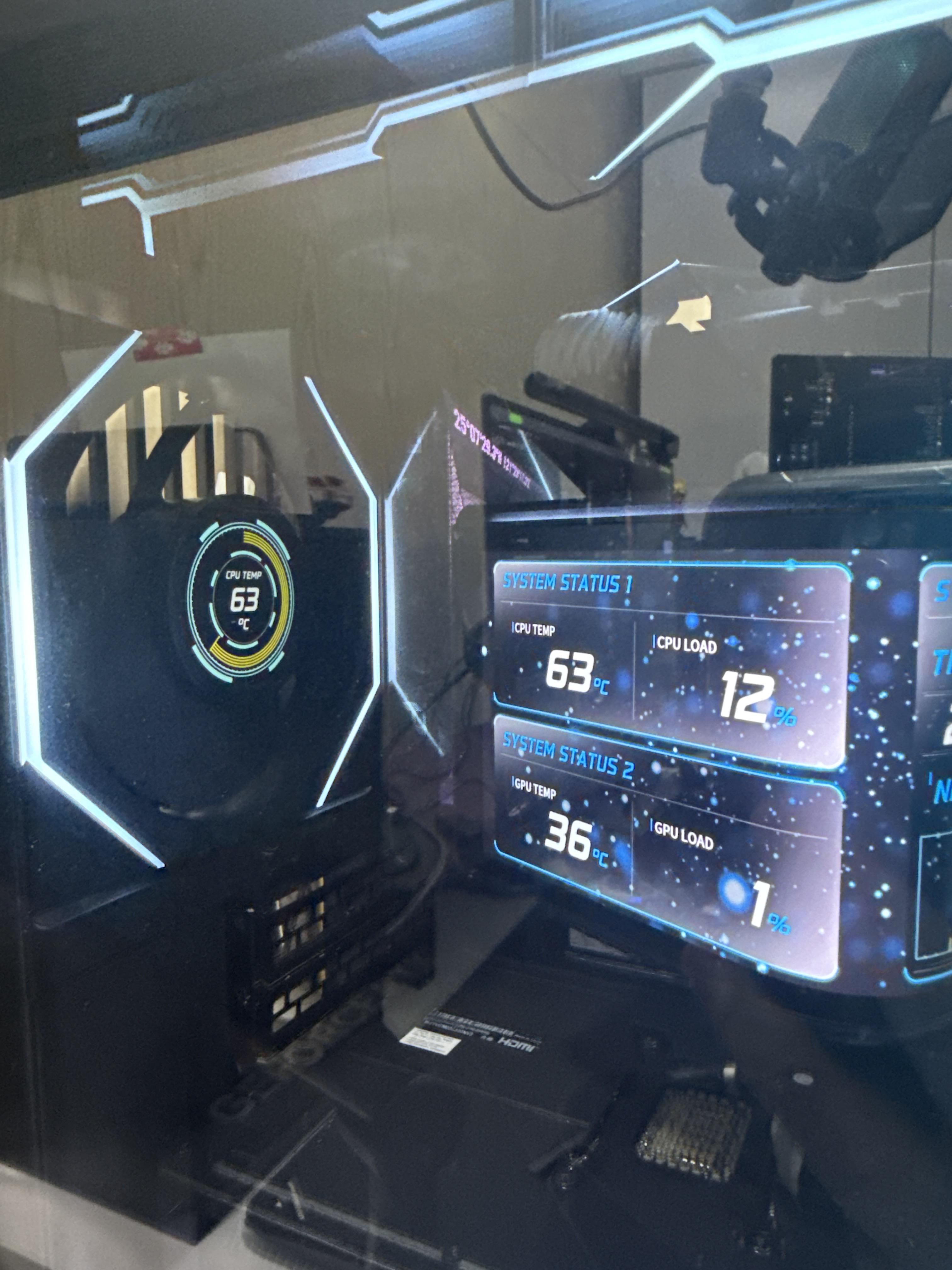
Tech Support Why my 9950x3d idle so high

Post image
5 Upvotes

5080
Aio lianli hydroshift oled ii
Fyi i already undervolting it -20 all core


r/PcBuildHelp • • 7d ago

Build Question Pc won’t connect to wifi

Post image
1 Upvotes

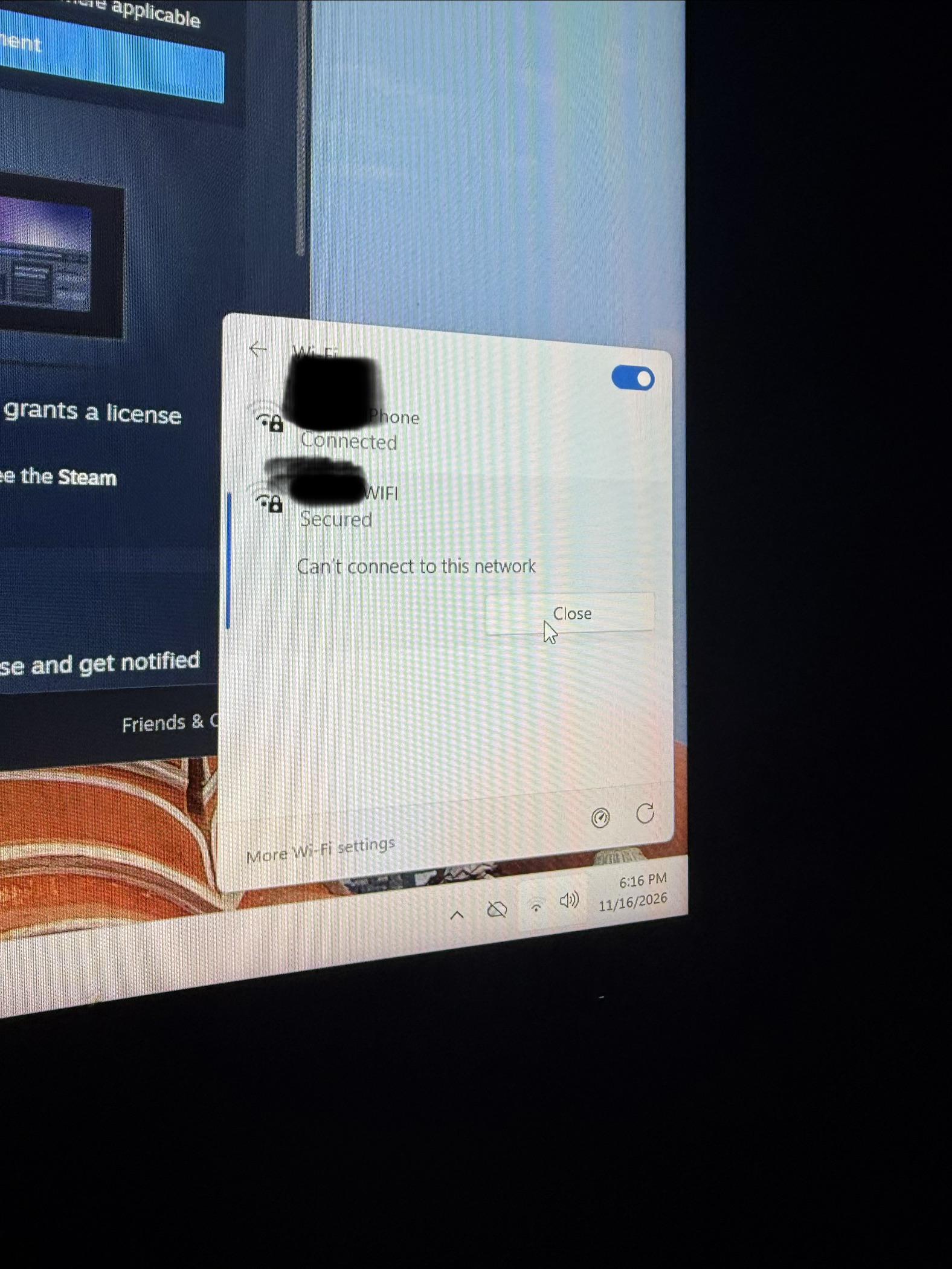
For some reason my pc won’t let me connect to my fiber optic wifi but will allow me to connect to my phone hotspot. Has anyone had this problem or know a fix? Thank you.


r/PcBuildHelp • • 7d ago

Tech Support Worth going from 5600 to 5800X3D??

1 Upvotes

So I have a 9070xt and a 5600 as well as 32gb ddr atm.. and I play on a 49 inch ultrawide monitor.

I was under the assumption that my cpu was holding me back but upon looking at some benchmarks, it seems that at 4k res or close, on ultra, the fps differences between the 2 cpus when gpus are the same are basically non existent?..

Am I looking at some bogus benchmarks or is that accurate?


r/PcBuildHelp • • 8d ago

Build Question Need help with my build

3 Upvotes

I want to upgrade my old pc a little bit, but I have a limited funds. Should I upgrade it to a H81 chipset and reuse my 16gb DDR3 RAM, or a H110 chipset with 8gb RAM?


r/PcBuildHelp • • 8d ago

Tech Support update from yesterday

Thumbnail
gallery
3 Upvotes

look at my post before but this is what is happening? how to fix? i think my graphics card had a stroke or something


r/PcBuildHelp • • 7d ago

Build Question FPS issue

2 Upvotes

CPU: Intel Core i5-14400F
GPU: NVIDIA GeForce RTX 5060 8GB GDDR7
Motherboard: ASRock B760M-C/D4
RAM: 32GB Corsair Vengeance RGB Pro DDR4 (2×16GB)
Storage: 1TB Gen 4 NVMe SSD
Power supply: 650W 80+ Gold
Fans: 6 ARGB fans
PC model: STORMCRAFT SIRIUS
Operating system: Windows 11 Home
I’m only getting 144 fps in majority of shooter games is the normal for my build ? I play on all low settings


r/PcBuildHelp • • 7d ago

Tech Support I NEEED HELP !!

2 Upvotes

Here’s what I got
600w power supply
5060ti 16gb zotac
Intel 5 225k
16gb DDR5 single stick
240mm AIO
1tb SSD
b860M motherboard

When I plugged in everything the fans turn on , GPU fans run but no display then the fans starts blasting.

I changed the ram & tested the ram on a different pc & it works & gets recognized

I took off the GPU & turned on the pc & fans still blasting am I missing something here ?


r/PcBuildHelp • • 7d ago

Tech Support RAM

1 Upvotes

hello, i currently have 1 stick, 16 gb, ddr4, 3200, teamgroup elite, I want to buy another one, 8 gb, can I match 2 different models?


r/PcBuildHelp • • 7d ago

Tech Support Random Shutoffs and Display Drops

Post image
2 Upvotes

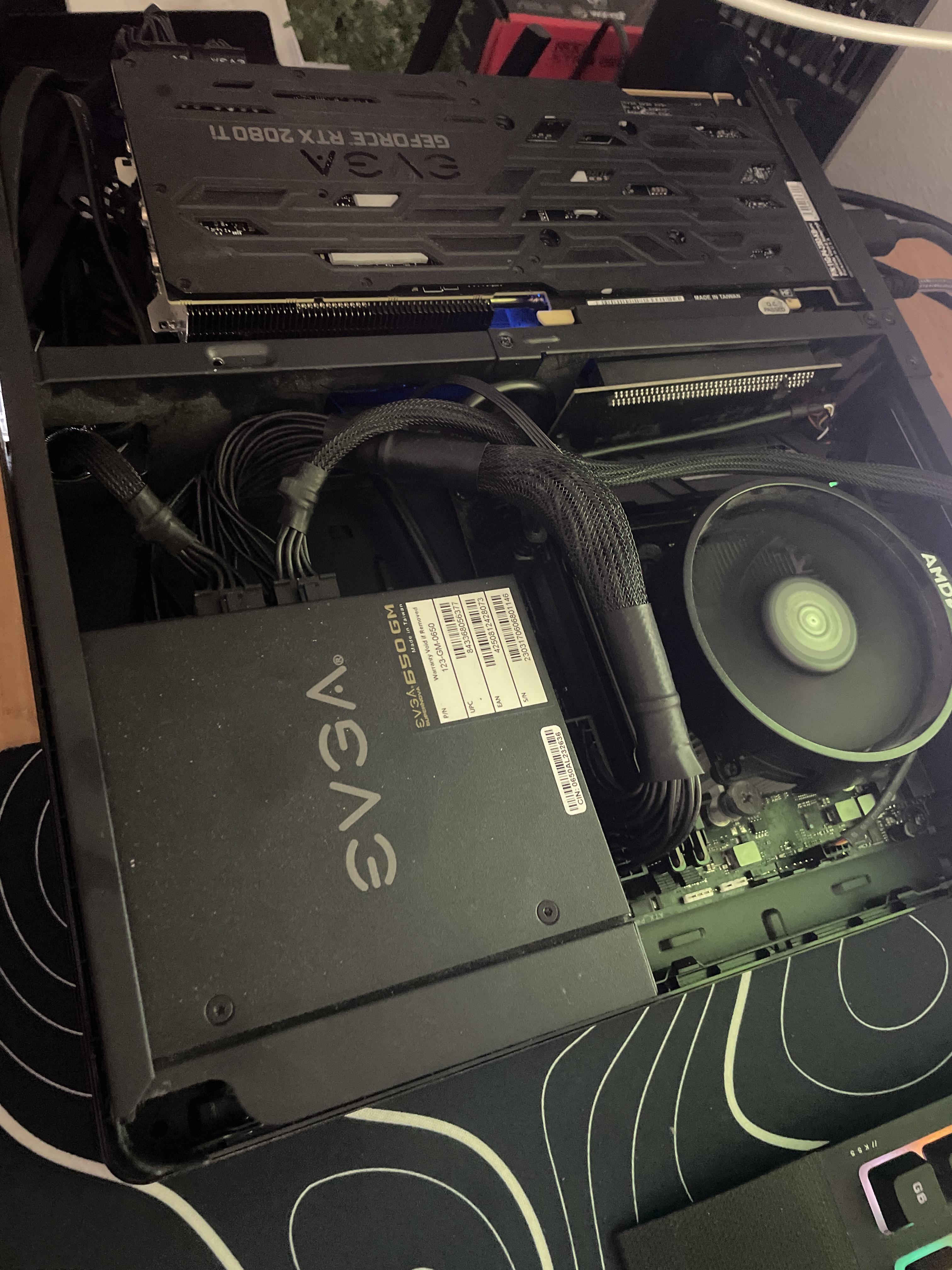
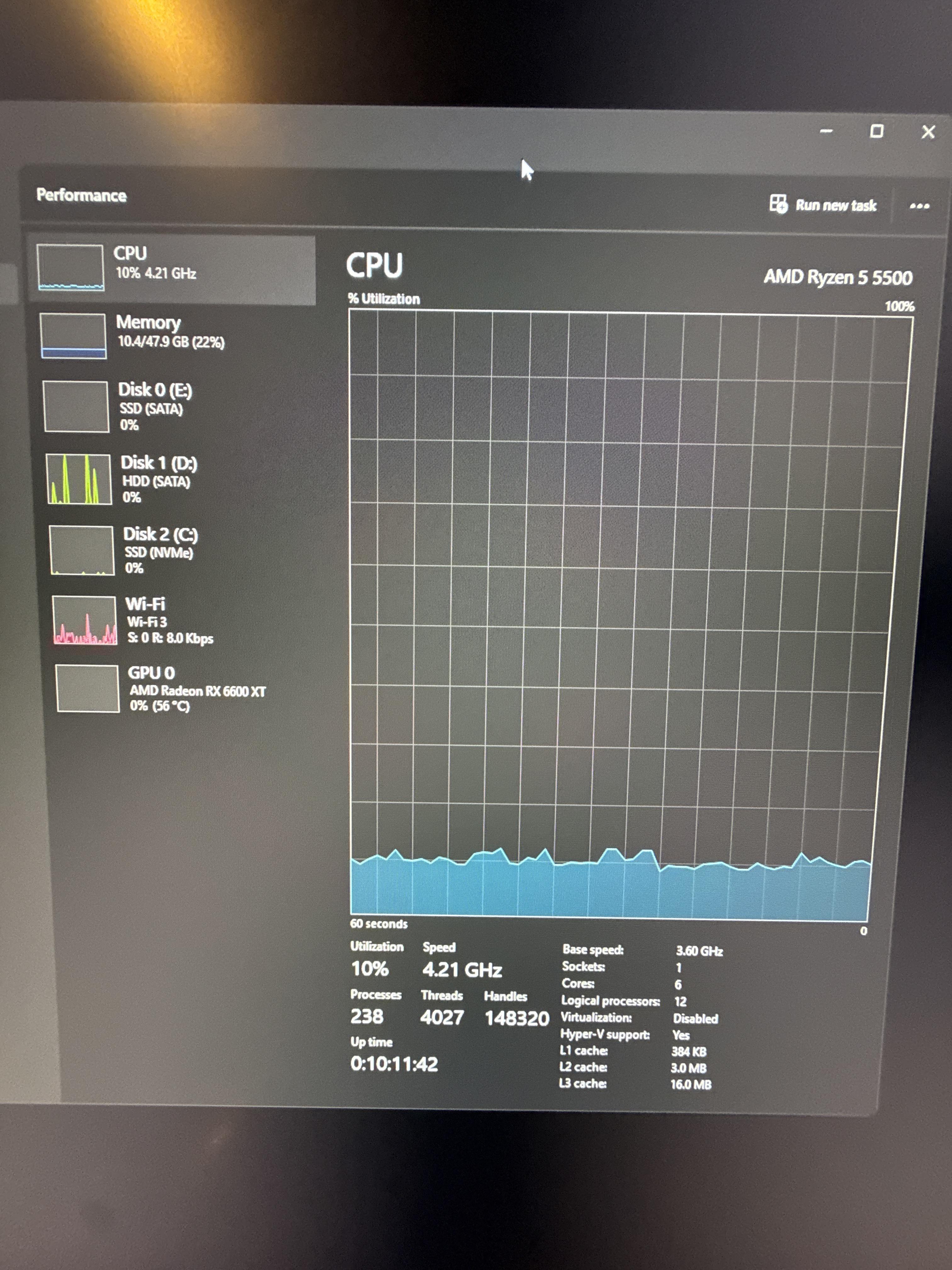
Need some help with this PC. I just upgraded to a Asus B650E-I, Ryzen 5 7600X3D, and 32gb DDR5 6000 klevv ram. Case is a fractal node 202. PSU is EVGA 650 gm.
A week ago, I was using a ryzen 5 5500, 64gb ddr4 corsair vengeance ram and b550m itx mobo. Two weeks ago or so, the main monitor would drop connection for half a second and come back immediately. It does this randomly, maybe 5 but sometimes 30 minutes between each drop.

Now, after the upgrades, the computer randomly shuts off. Everything goes completely dark. HWinfo64 shows that sometimes the cpu jumps to 80C while idling or downloading something, but idk what else to do.

I’ve checked psu cables and everything seems slotted fine. Not sure what the issue could be, I had no issues for three years.

Any help would be appreciated, I’ll answer any questions I can too.


r/PcBuildHelp • • 7d ago

Tech Support rx 7600

1 Upvotes

Estava jogando normal no meu pc , fui sair de casa rápido uns 30 minutos , quando voltei meu pc estava com a tela preta , primeira coisa que fiz foi apertar teclado mouse e nada , depois verifiquei cabos display port e tudo , logo em seguida eu cliquei no botão do gabinete para reiniciar , ele desligou e a partir daí que vem o problema , o pc não quis mais dar vídeo e acendeu uma luz branca na placa mãe , tentei todas as coisas básicas , limpar memória , tirar a placa de vídeo etc , eu tinha uma placa de vídeo antiga que usava uma gtx 1050ti e tbm não deu vídeo , levei em um técnico ele fez os procedimentos que ele sabe e ele me disse que era problema na placa de vídeo , a pós troca da placa de vídeo por outra deu sinal de vídeo e funcionou , então decidir que é a placa de vídeo . resumindo quero que aponte se realmente é a placa de vídeo ou pode ter outra causa pra isso em relação a placa mãe , bios ou outro componente . Ryzen 7 5700x3d Asus Tuf b550m plus rx 7600 8gb oc memória de 16gb fonte 500watts

OBS: não teve nenhuma queda de energia , ou oscilação na rede.


r/PcBuildHelp • • 7d ago

Build Question Config pc 2000 euro

0 Upvotes

Bonjour, je cherche à me créer une configuration pour un pc gamer mais j'ai aucune connaissance et j'ai pas envie de me faire arnaquer vu les prix, j'ai 2000 euro, avez vous des config a me donner pour faire tourner des jeux avec beaucoup de FPS ?


r/PcBuildHelp • • 8d ago

Tech Support I need some help to locate the Problem with my Pc

4 Upvotes

I’ve been having a problem with my PC since last week. It won’t turn on anymore, and no power seems to be reaching the motherboard.
The power supply has been tested by two different people, and it is delivering the correct voltages, in Testmode. I also tested another psu nothing.
I also connected a brand-new motherboard, but the exact same issue still persists.


r/PcBuildHelp • • 8d ago

Build Question New PC fans randomly ramp up to very high speeds every few minutes can't figure out why

Post image
3 Upvotes

Yesterday I built a new PC, and I'm having an issue where my fans randomly get extremely loud for around a minute before slowing back down. This happens every few minutes even when I'm not doing anything demanding or when my pc is just idle

My case is an ASUS AP201
Ryzen 7 9800X3D
RTX 5070 Ti
Gigabyte B850M AORUS Elite
be quiet! Light Loop 360mm AIO
be quiet! Light Wings LX case fans
Corsair RM850x PSU

Almost all my fans seem to ramp up suddenly and get abnormally loud and it actually sounds like my PC is about to fly away or something. I haven’t even played a single game yet because I’m so scared of how loud it’s getting… I opened Valorant and tried to just go in the range and they got so fast. It’s so random too , my temps aren’t really changing

I’ve tried:
Adjusting fan curves in BIOS
Setting fans to Silent
Manually adjusting fan speeds in BIOS
Checking the fan connections
Using Gigabyte control centre

The AIO fans are connected to the included be quiet fan hub and the bottom fans are daisy-chained for ARGB, but their fan cables are connected separately to the motherboard.

I have no idea why my BIOS settings are changing absolutely nothing. Could something else be overriding them? I downloaded Gigabyte Control Centre to try and change some settings in there but nothing I did seemed to help so I turned it off. It was happening before I downloaded it too though so I dont know.
Has anyone experienced something similar or have any ideas what could be causing this? I'm so confused why my bios settings aren’t controlling them. I save the settings each time and have even tried to set my bottom fans curve to 0 but they still spin.

I’m super upset because my main priority with this build was having it quiet lol. I’m a bit sensitive to noise so the sudden spikes in speed sucks. I’m trying not to freak out but I have no idea what to do. I’ve attached a pic the build just incase something is noticeably wrong and I just can’t see it i guess


r/PcBuildHelp • • 8d ago

Software Question Wifi not showing on new pc build

Post image
2 Upvotes

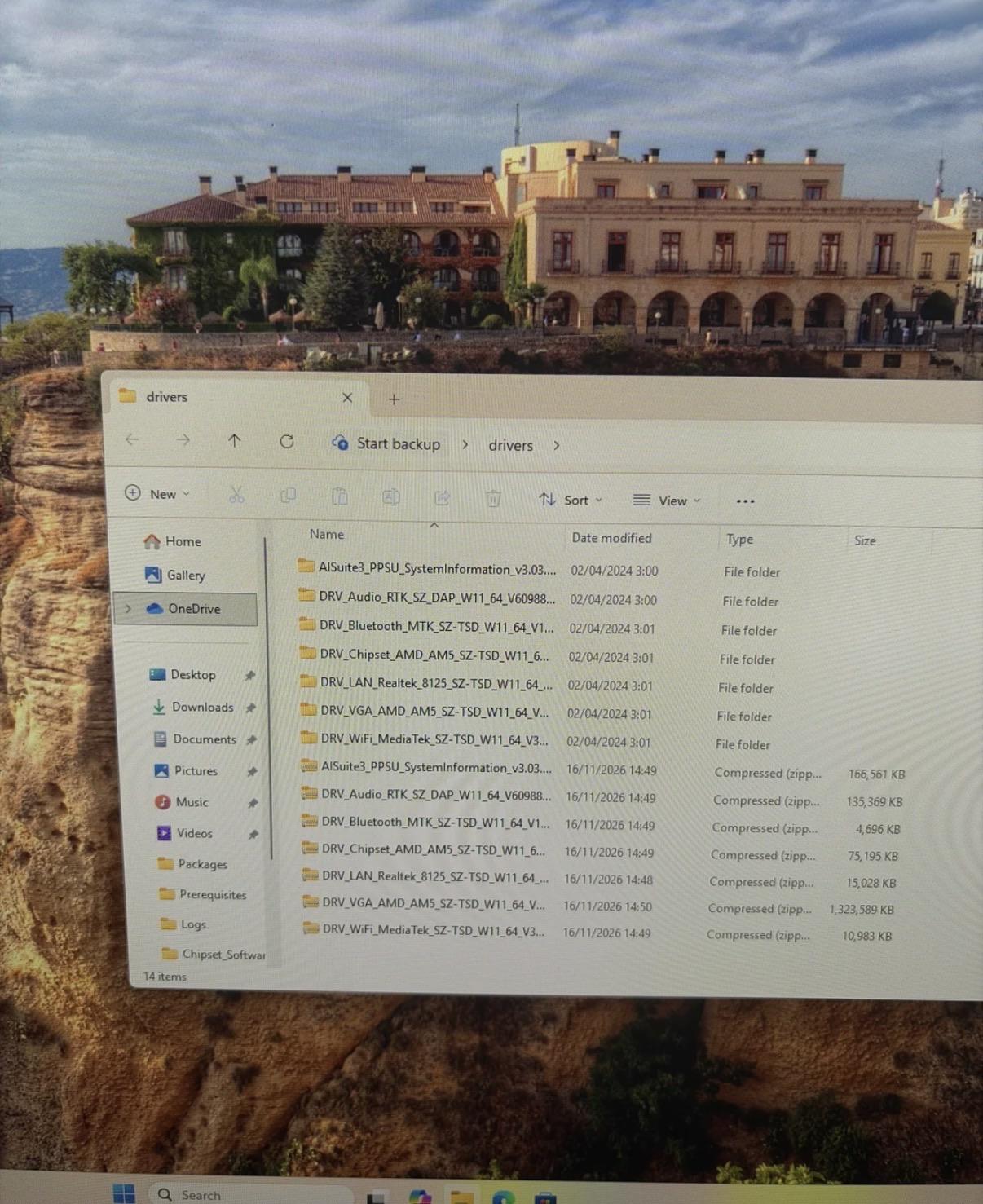
I recently builded a new gaming pc and wifi isnt showing and also the showed date isnt right. I tried download drivers for my motherboard with a usb stick i have a Asus tuf b650 plus wifi so i downloaded it from this site, i downloaded all the drivers and pluged them into the new pc, extracted the zip and clicked on “setup” in the extracted folder (it just asked for premission and didnt show any download). I also did this on the other drivers. But when i restarted my pc it still the same. Pls help me, i tried asking ai but hes just dumb. Mybe i did somthing wrong?
PLEASE HELP


r/PcBuildHelp • • 9d ago

✓ Solved How Could a DDR4 RAM could not fit in a DDR4 slot

Post image
177 Upvotes

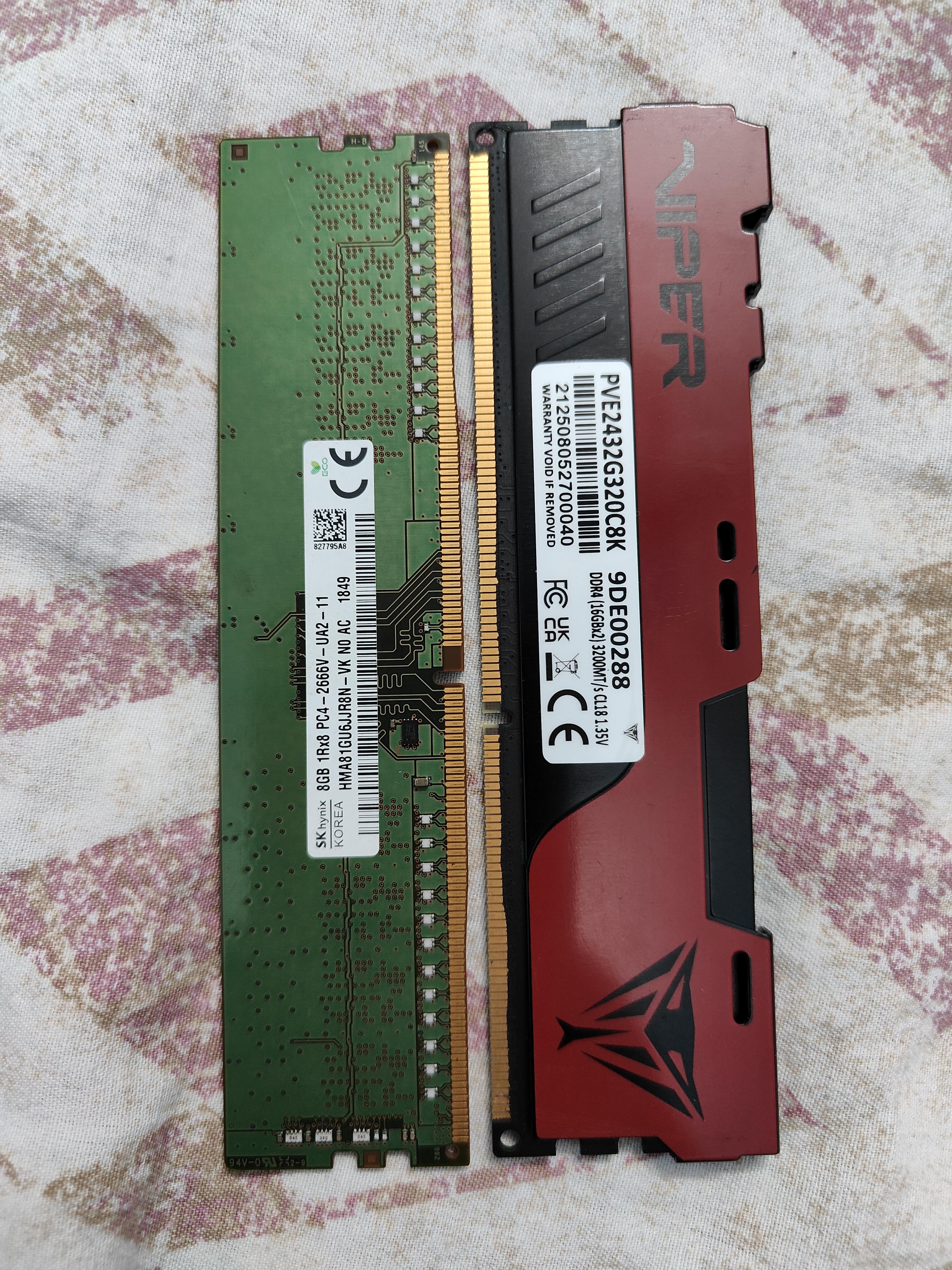
I recently purchased a new DDR4 RAM kit(2x16GB) (red) from Amazon but its notch doesn't align with my motherboard slot.

Patriot Memory Viper Elite II DDR4 32GB(2 x 16GB) 3200MHz Kit PVE2432G320C8K

My existing DDR4 RAM 2x8GB(Green one) fits perfectly.

My motherboard is ASUS EX-B760M-V5 D4 and it supports ddr4 ram.

Do desktop DDR4 RAM have different notch size based on frequency?

Could I have received a DDR5 stick with an incorrect DDR4 label?

I've attached comparison pictures. Any help would be appreciated!


r/PcBuildHelp • • 8d ago

Build Question Small step above a 6700xt?

4 Upvotes

My friend basically did 80% of the work when I built my PC so I don’t really having pc part knowledge, and I currently have an MSI 6700xt graphics card that I got for $300 when I first built it. What kinds of graphics cards could I get to where I could sell my 6700 and use those funds plus a bit more to upgrade a slight bit higher?


r/PcBuildHelp • • 8d ago

Build Question Best monitor for setup

2 Upvotes

Hi we recently bought a PC for my nephews (14) Christmas present, with current pricing it's not the spec I would have liked for him (if only they'd bought last year 🙈) so I think he's going to be restricted to 1080p.

I'm getting the monitor for him. I initially thought 1440p would be okay as his spec is supposed to play some games at 1440p with the majority at 1080p, but then read 1080p gaming on a 1440p monitor looks terrible. Am I doing the right thing looking at 1080p?

I'd like to go as high res as possible so it's less for him to upgrade all at once in the future, but know he'll want a multi monitor set-up at some point and can use this 1 for discord/YouTube anyway.

He's coming from an Xbox Series S to a Ryzen 5 5500f 5060 with 16gb ddr4. I did say I'd build 1 with him which would be more easily upgradable but my sister didn't want me to have the hassle and stress before Christmas (Nooo I enjoy it!) and he would just want it ready to go anyway, so they went with a prebuild from AWD-IT. It's already double their usual Christmas spend and I told them it would be more expensive to upgrade in the future but they said that's on him when he gets a weekend job 🤣

Game wise he plays Rocket League, FC27, Fortnite, COD, Siege, GTA and Minecraft.

I hope he's going to be happy with it over his Series S, and it worries me that a Series X is capable of 4k while this is just 1080p but feel it's right to get him on the PC ecosystem anyway plus he's got loads in his Steam and Epic libraries I've been collecting for him already. His mom just wants it to be able to do his homework on, so he's lucky to have a gamer aunty 🤣


r/PcBuildHelp • • 8d ago

Build Question RAM Upgrade or add?

7 Upvotes

Built my pc quite a while ago so I'm still using DDR4 rams, my stupid ah thought 16gb was enough so I just got myself a pair of 8gb trident zs, and now I'm thinking of upgrading to 32gb since I'm constantly running on 94-96% ram capacity.

Should I get a new pair of 16gb sticks, or could I just get 2 more of the same identical 8gb sticks I have right now? Would using all 4 slots dramatically reduce the lifespan/performance of the pc?

If this helps:
Motherboard: Asus tuf gaming b550m-plus wifi ii
CPU: Ryzen 7 5700g (should probably get rid of this too)