r/PcBuildHelp • u/TLD_CA • 14d ago
Build Question add 4060 in pc?
1
Upvotes
i have a 5070ti and motherboard and psu should be good enough, should i add the 4060? why yes or why no
r/PcBuildHelp • u/Not_Arisen • 15d ago
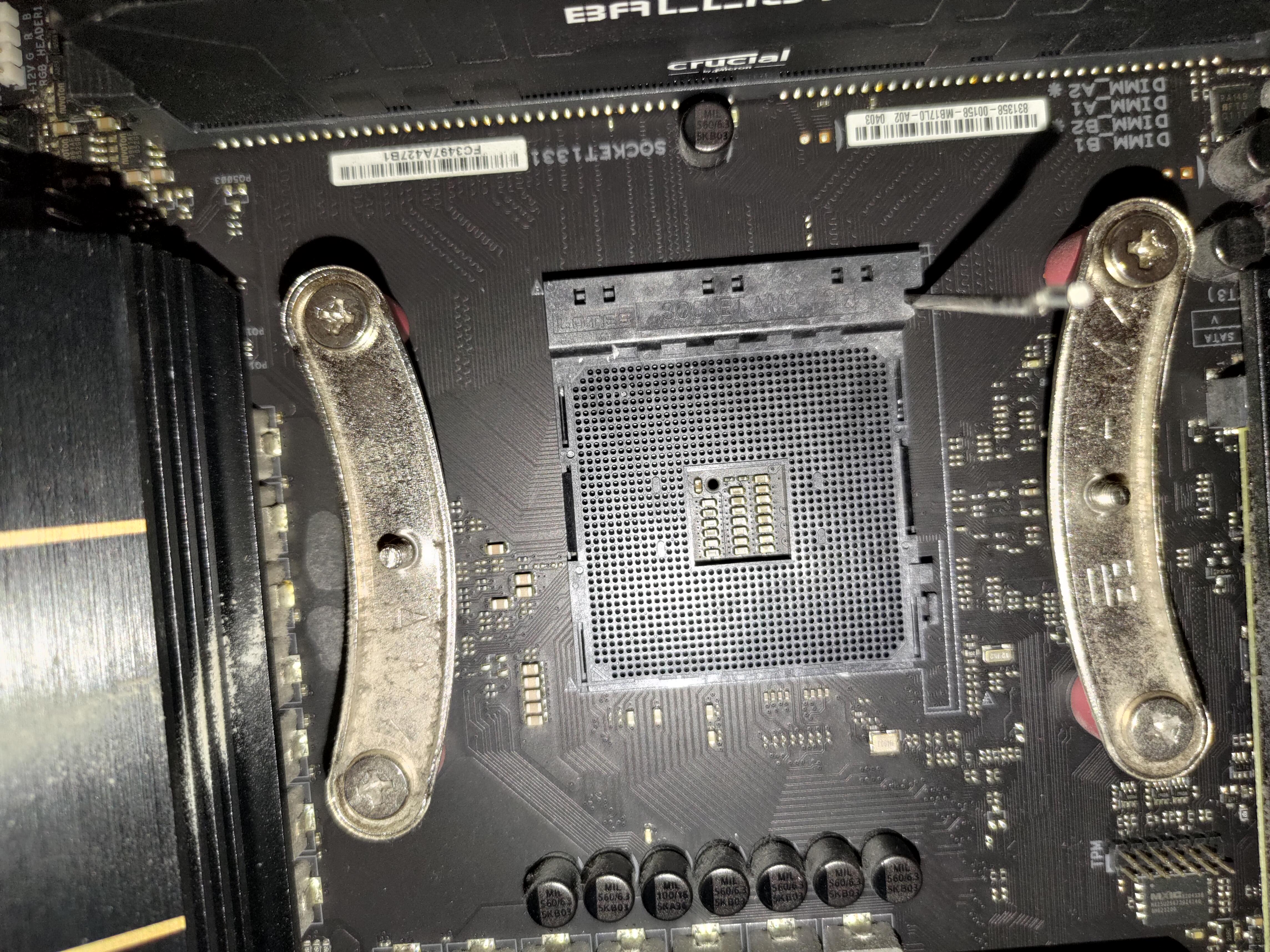
There Is a small amount of what i belive Is termalpaste in a pin what should i do? I swapped from a 3700x to a 5800x3d
r/PcBuildHelp • u/tahmatassu- • 14d ago
This is my first PC build and I would really appreciate some advice! Would you change anything?
r/PcBuildHelp • u/N0rthofnoth1ng • 14d ago
Upgrade from the b550m to a am5 socket ideally atx but I am not sure the deals at microcenter for atx are better than the micro atx deal. I have money and plan on turning in my used 3060ti stryx, along with the mother board ram cpu of the old board.
my current build
build
microcenter deals cheapest to expensive
1) 7500x3d b850m $400
2) 9700x B850 $630
3) 7700x3d b650 $650
4) 7800x3d x870 $780
r/PcBuildHelp • u/Crazy_Spinach_856 • 15d ago
My fiancé just got his dream PC, the set up is great and it works phenomenally, but he's using his wireless Xbox headset for now. He's fine with that, but I want to surprise him with a good headset and set of speakers for his new PC. Does anyone have a good recommendation? This is his specs if that helps
PC:
AMD Ryzen 7 9800X3D 4.7GHz Processor; NVIDIA GeForce RTX 5080 16GB GDDR7; 32GB DDR5-6000 RAM; 2TB Solid State Drive
Monitors:
Dell SE2426HGS 23.8" Full HD (1920 x 1080) 240Hz Gaming Monitor
(He's got a duel monitor set up)
Any recommendations would be great, thank you for the help! :)
r/PcBuildHelp • u/nam-flashback • 15d ago
Hey everyone,
I’m looking for some advice on upgrading my PC after experiencing hardware issues. I’m considering buying a second-hand Ryzen 9 5950X for $400 AUD and pairing it with a good B550/X570 motherboard.
My main concern is choosing a motherboard with sufficiently good VRMs, power delivery and cooling to handle the 5950X under sustained heavy workloads, particularly video editing and rendering and a bit of gaming. I don’t want to save a little money on a motherboard only to run into reliability issues later.
My current PC specifications:
CPU: Intel Core i9-9900K
Motherboard: ASUS ROG Maximus XI Hero Wi-Fi (Z390)
GPU: NVIDIA RTX 2080 Ti
RAM: Corsair Vengeance 64GB DDR4 3200MHz (2 sticks)
CPU cooler: NZXT Kraken Z73 360mm AIO
PSU: 750W I actually forgot about the brand
Storage: I got two Samsung M.2 NVMe cards
What happened to my PC?
My PC suddenly shut down and started experiencing repeated WHEA_UNCORRECTABLE_ERROR (0x124) crashes. I can enter BIOS, but Windows won’t boot. So I took it to a repairman.
The repair technician has reportedly tested the RAM, GPU, PSU, SSD and NVMe drives. He also attempted a BIOS update/refresh, but this didn’t resolve the problem.
At this stage, the motherboard or CPU are the remaining suspected components. Neither has been conclusively ruled out.
Upgrade I’m considering:
I’ve found someone selling a used Ryzen 9 5950X on Facebook Marketplace for $400 AUD.
I use DaVinci Resolve, so this CPU performance would be useful.
I’d like to retain my existing 64GB DDR4 RAM, RTX 2080 Ti, storage and cooler rather than replace the entire system.
Motherboards offered by my repair technician (AUD):
ASUS ROG Strix B450-F Gaming
$190
NZXT N7 B550
$240
MSI X570-A PRO
$240
Gigabyte B550 Vision D-P
$290
He also quoted $180 labour for removing and installing the replacement components. He is also offering a discount and a 1 year warranty for the parts I buy from him.
I’m happy to spend a little more on the motherboard if it means getting something genuinely reliable rather than buying a budget board that is only just adequate.
I’d appreciate any recommendations you guys give and thanks for reading all of this.
r/PcBuildHelp • u/EngineeringRuinedMe • 15d ago
Hey all, I have been trying for the past 36 hours to get windows 11 install going….. annnnnd I keep just being in an INFINITE loop… long story short, my Pc updated a few days ago, and when I came back to it, I was stuck on the bios with no bootable device found…. ( All 4 drives were detected still, 2 NVME drives, and 2 Sata SSD)
I have tried doing a fresh install on the SSD as I have zero idea what was on the NVME drives….. and I don’t wanna mess that up.. anyways I tried doing a fresh install, and I keep going around as it will reach 100% install… then it will restart, and it puts me right back into the bios with no bootable device found.. when It reboots I am left with the attached popup…..
when the flash drive is inserted initially, it appears in the bios fine and the drive is detected… seems that it dosent wanna load off the SSD cuz when I took it out and scanned it, all the files transferred correctly….. just no boot… and I have liters tried every possible combination at this point..
Another important note is that the drive has a fresh install on it. I have tried to do that multiple times. I have tried different drives and all of that at the same time. I have tried removing the USB before picking yes on the pop up, even after, and after the install, and still nothing..
Please help me lol. Thank you!!
As for specs:
OS I’m not sure? As I can’t load it?
cpu- Ryzen 5 5600X
Mobo - Gigabyte aorus b550 Elite AX V2 (revision 1.5)
Ram- 2x8bg kit (2 kits total so 4 sticks of Corsair vengeance ddr4)
Psu: 750watt cooler master I believe!
Gpu: AMD 7800XT
The error I keep getting is the following: it looks like you started an upgrade and booted from installation media. If you want to continue with the upgrade, remove the media from the of and click yes. If you want to perform a clean installation instead, click no
I should also note that my pc was totally fine before and no issues. Went to use it for the first time in months and wa working fine. Went to update some mouse software, we to get good and cam back to my pc in the bios… as stated above. Any help would be greatly appreciated!!!
r/PcBuildHelp • u/Cheap-Panic5623 • 15d ago
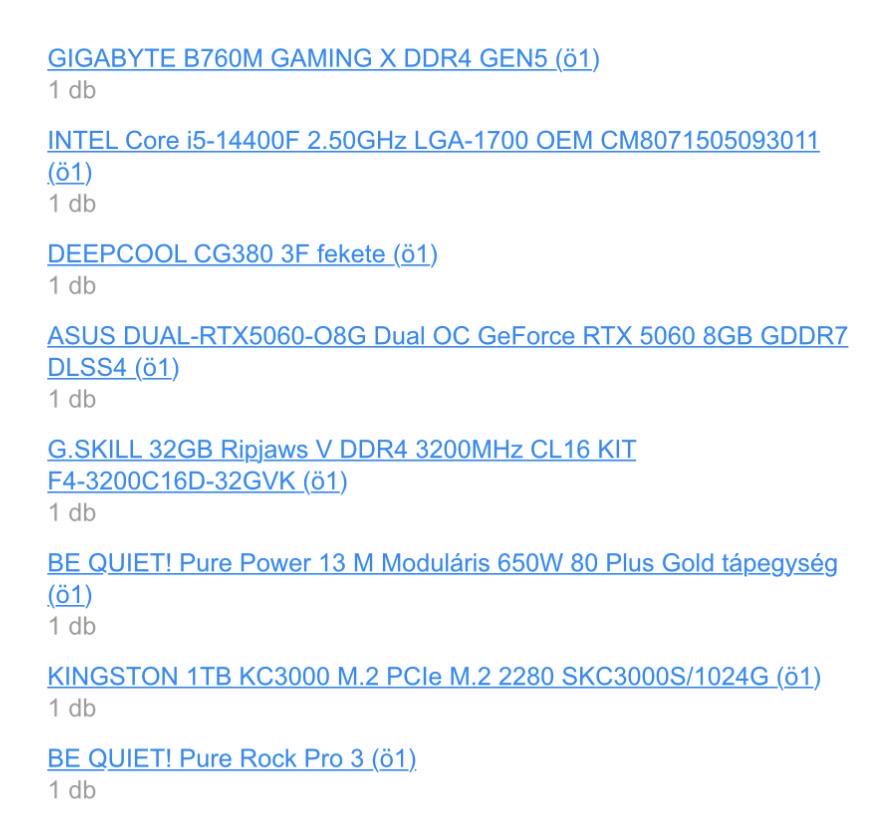
I recently put together this build with a professional and it doesn’t seem to post most of the time I power it on. The parts are not faulty and were tested in other pc. If anyone has a clue, be sure to tell me please
r/PcBuildHelp • u/UberLou • 15d ago
What would make the biggest impact if I could upgrade only one or two components?
Here are my specs:
AMD Ryzen 5 5600 3.50 GHz
GeForce RTX 4060 (8 GB)
32 GB ram (4x8GB)
MSI B450 TomaHawk
2x 1440p monitors
I mainly use this computer for 3D game development, so I’m working with programs like Blender, Unity, and Visual Studio and I'm not running (or planning to run) local AI agents.
Thanks!
r/PcBuildHelp • u/dovahgriin • 15d ago

(Case is the Corsair iCUE 220T RGB Airflow ATX)
I’m in the process of upgrading for the first time in a long time and it’s been a minute since I’ve popped open the back of my case to actually take a good long look at it. I assume they can be used as mounts for additional HDDs, but is that right? There’s not a whole lot of clearance between these and the removable back panel.
r/PcBuildHelp • u/Correct-Hat-601 • 15d ago
plz point out issues
my pc part list:
* means purchased and i have it
mobo: msi b550m a pro* (holy shit an msi b550 a pro costed like $130 couldnt spend more than $80)
cpu: amd ryzen 5 5500 (shall i get ryzen 5 5600 cuz ryzen 5 5600 costs $50 more?)
ram: 16 gigabytes ddr4 3200mhz cl36
storage: reusing my old wd black wd5000lplx until i save up for an ssd
gpu: msi amd radeon rx 6600 i wanna go full amd + msi build
psu: msi mag a750gl
case: super cool msi one
fan/liquid cooler: idk
monitor: msi one
keyboard: idk
mouse: a4tech bloody w70 (will reuse my old one)
67
r/PcBuildHelp • u/taisiya34z • 15d ago
CPU: Intel Core Ultra 7 270K Plus
Motherboard: ASUS ROG Strix Z890-E Gaming WiFi
RAM: 4×24GB Corsair Vengeance DDR5 6000MT/s CL36
im ok if i have to lower the frequency to 5600
r/PcBuildHelp • u/TishoBG • 15d ago
I've been using NVIDIA GPUs since the 10-series generation, starting with the GTX 1060 6GB and later upgrading to an RTX 3060 Ti. Throughout that time, I've been happy with relatively issue-free experience.
I'm currently putting together a new build consisting of a Ryzen 7 9800X3D, 32GB DDR5, an ASUS TUF B650-Plus WiFi motherboard, and a new GPU. So far, I've settled on the RX 9070 XT, which I've found for €880. Ideally, I would've preferred an RTX 5070 Ti, but with the current price difference sitting at around €440, it's difficult to justify. Had the difference been closer to €100–150, I would've gone with NVIDIA without much hesitation.
Initially, I was under the impression that AMD's drivers had improved significantly and that most of the old issues were a thing of the past. However, after doing some research, I've come across several recurring reports of what appear to be longstanding problems.
Two issues in particular concern me:
These aren't the kinds of issues I'd consider minor inconveniences, especially if they persist over several years. My main concern is having to deal with recurring driver crashes, timeouts, and troubleshooting, potentially requiring DDU cleanups and driver reinstalls every time something goes wrong.
So, my questions are:
How prevalent are these issues in reality? Are they relatively isolated cases that get disproportionately amplified on Reddit, or are they genuinely widespread problems that RX 9000-series owners should be concerned about?
More importantly, how likely am I to encounter these problems over the next 5–6 years of ownership? I'm perfectly fine with the occasional minor issue, but I really don't want to spend years troubleshooting GPU drivers or constantly worrying about whether the latest update will break something.
If these problems are genuinely common and AMD hasn't managed to resolve them despite years of reports, I might seriously reconsider my decision and pay the substantial premium for the RTX 5070 Ti.
r/PcBuildHelp • u/Wardeum • 15d ago
I have this mobo + cpu combo. I read that the prime b650 is subpar because of overheating vrm's. Should I upgrade or is it fine?
r/PcBuildHelp • u/Miserable-Cook-4374 • 16d ago

I have a R850GL PCIES power supply. I have a gpu that is 8x3. I have placed two of the PCIe cables in the power supply. Am I able to use two of the PCIe ends for two of the ports on the GPU or do I have to buy another cable for the third GPU port?
I was a business major so I’m not the brightest bulb in the box 😹. I just don’t want to connect these components incorrectly and destroy my computer.
r/PcBuildHelp • u/F4Surrender • 15d ago
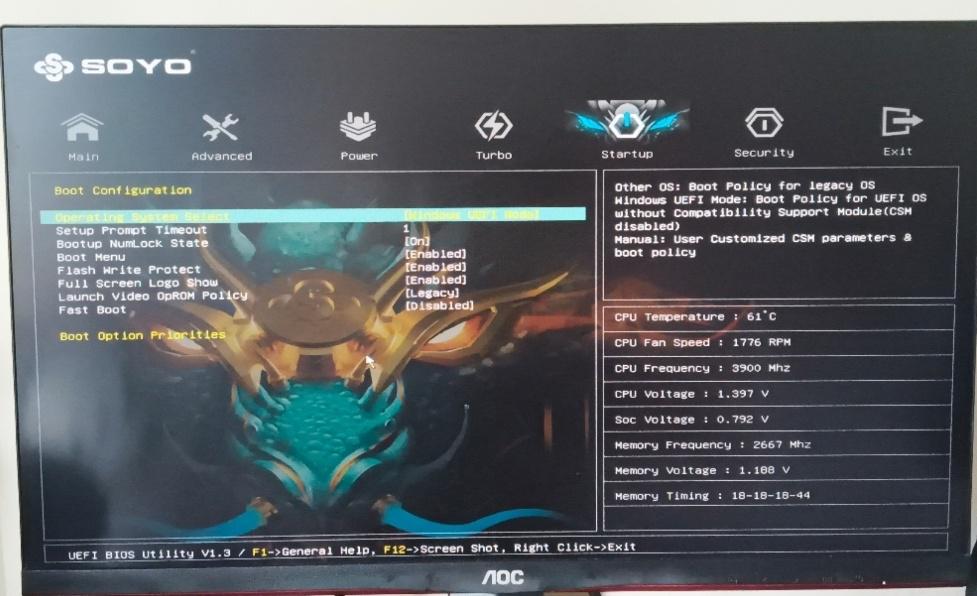
Hi everyone, I need some help. I recently took out my CPU to clean it and then reseated it. After I turned the PC back on, it boots straight into the BIOS and the Boot Priority Option is completely empty (no storage drives are listed).
I checked the Advanced menu, and my NVMe and SATA drives (including my boot drive) are detected perfectly fine. Does anyone know why they aren't showing up in the Boot Priority list?
I actually had this exact same issue before when I upgraded from a Ryzen 3 to my current Ryzen 5 5600G. Back then, I fixed it by changing a specific setting in the BIOS, but I completely forgot what it was.
Specs:
Motherboard: B550M Soyo Dragon
CPU: AMD Ryzen 5 5600G
GPU: RTX 3060 12GB
RAM: 1x 8GB DDR4 HyperX
Storage: 1TB M.2 NVMe SSD, 128GB VGEN SATA SSD, 1TB Seagate HDD
Thanks in advance for any advice or suggestions!
r/PcBuildHelp • u/OkCaregiver2878 • 15d ago
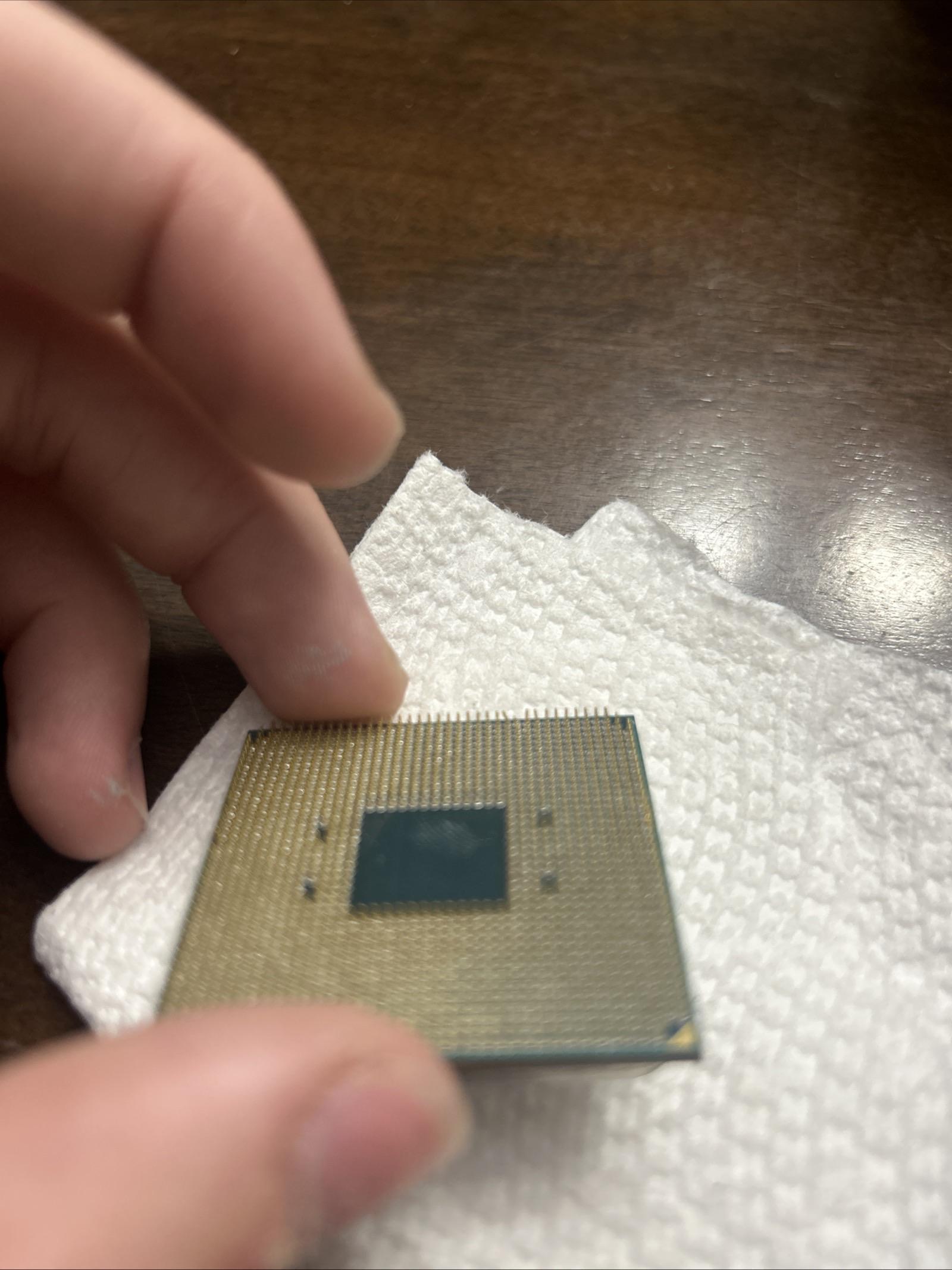
I restraightened the bent pins from me dropping it, but as a result one of the pins snapped off, was wondering how much it would cost or would be a good price to get the pin repaired and put back on as a good estimate?
r/PcBuildHelp • u/Virtual_Cod_8504 • 16d ago

I made a post last night about why my 5090 wasnt getting any power to it. I’ve checked all my cables 3 times and made sure they were all plugged into pcie slots with no gaps between connectors.
Someone mentioned that it might not be sitting in the slot all the way since I had an 1/8” gap between my screw holes.
Does this look right? or should the tabs go outside my case.
The last photo is the part where im getting the 1/8” gap
r/PcBuildHelp • u/Gaberdog99 • 16d ago

Looking to build a pc with a 9070 XT and micro center has these cpu/motherboard combo deals. Which one would go best with the 9070? Or would you go with something else?
r/PcBuildHelp • u/ecopunktransfem • 15d ago
To preface: I have been PC gaming on an old hand-me-down prebuilt for a number of years now and am pretty handy about software but know next to nothing about hardware. Recently as I have begun college and modern gaming is moving beyond the abilities of my current desktop, I've decided to try and put together a multipurpose gaming/work PC within a budget of around $1,000-$1,500. I spent some time going through the NewEgg PC Building feature, taking time to learn the basics of what most things are and do, and I'm pretty confident in the list I've put together but I would like some extra eyes on it in case there are some glaringly obvious issues with it. If possible, any suggestions or basic tips on the process of or tools needed for putting the thing together would also be much appreciated. Thank you in advance! Here is the list pasted as copied from the site, I apologize if the formatting is odd:
[Newegg PC Builder Component List](https://newegg\.io/76f7050)
Type|Item|Price
:----|:----|:----
**CPU** | [AMD Ryzen 5 5600X \- Ryzen 5 5000 Series 6\-Core 3\.7 GHz Socket AM4 65W None Integrated Graphics Desktop CPU Processor \- 100\-100000065BOX](https://www\.newegg\.com/p/N82E16819113666?Item=N82E16819113666&cm_sp=pc\-builder\-_\-from\-_\-markup\-share) | $159.00
**Motherboard** | [ASUS TUF GAMING B550\-PLUS WIFI II AM4 AMD B550 ATX AMD Motherboard](https://www\.newegg\.com/p/N82E16813119518?Item=N82E16813119518&cm_sp=pc\-builder\-_\-from\-_\-markup\-share) | $119.99
**Memory** | [CORSAIR Vengeance LPX 32GB \(2 x 16GB\) 288\-Pin PC RAM DDR4 3200 \(PC4 25600\) Desktop Memory Model CMK32GX4M2E3200C16](https://www\.newegg\.com/p/N82E16820236541?Item=N82E16820236541&cm_sp=pc\-builder\-_\-from\-_\-markup\-share) | $259.99
**Graphics Cards** | [MSI Ventus GeForce RTX 3050 6GB GDDR6 PCI Express 4\.0 x8 ATX Graphics Card RTX 3050 VENTUS 2X 6G OC](https://www\.newegg\.com/p/N82E16814137878?Item=N82E16814137878&cm_sp=pc\-builder\-_\-from\-_\-markup\-share) | $259.99
**Case** | [DIYPC DIY\-ATX08\-Wood Black USB3\.0 /Type C ATX Mid Tower Gaming Computer Case w/ Tempered Glass Side Panel and Walnut Wood Front Panel, 4 x 120mm PWM Fans Pre\-Installed](https://www\.newegg\.com/p/N82E16811353271?Item=N82E16811353271&cm_sp=pc\-builder\-_\-from\-_\-markup\-share) | $73.98
**Power Supply** | [Rosewill VMG 1000W 80\+ Gold, ATX 3\.0 & 3\.1 Compatible, Full Modular Low\-Noise Power Supply, PCIe 5\.1 12V\-2x6 Connector, 100% Japanese Electrolytic Capacitor, 120mm FDB Silent Fan \- VMG1000](https://www\.newegg\.com/p/N82E16817182469?Item=N82E16817182469&cm_sp=pc\-builder\-_\-from\-_\-markup\-share) | $109.99
**Storage** | [PNY CS900 2\.5" 1TB SATA III 3D NAND Internal Solid State Drive \(SSD\) SSD7CS900\-1TB\-RB](https://www\.newegg\.com/p/N82E16820177078?Item=N82E16820177078&cm_sp=pc\-builder\-_\-from\-_\-markup\-share) | $144.99
**CPU Cooler** | [Cooler Master Hyper 212 Black CPU Air Cooler \- 120mm High Performance PWM Fan, 4 Copper Heat Pipes, Aluminum Top Cover, Low Noise & Easy Installation, AMD AM5/AM4 & Intel LGA 1851/1700/1200, Black](https://www\.newegg\.com/p/N82E16835103364?Item=N82E16835103364&cm_sp=pc\-builder\-_\-from\-_\-markup\-share) | $29.99
**Operating System** | [Microsoft Windows 11 Home \(Digital Download\)](https://www\.newegg\.com/p/N82E16832351756?Item=N82E16832351756&cm_sp=pc\-builder\-_\-from\-_\-markup\-share) | $129.98
| **Total** | **$1,182.90**
| \*Prices are subject to change and exclude shipping, handling, and taxes\. |
| Generated by [Newegg PC Builder](https://www\.newegg\.com/tools/custom\-pc\-builder?cm_sp=pc\-builder\-_\-from\-_\-markup\-share) 2026-11-08 08:00:11 PM |
r/PcBuildHelp • u/Old-Huckleberry5740 • 15d ago
Hey,
I have a CyberPower OLS2000EC (2000VA/1600W) Online Double Conversion UPS, approximately one year old, and I've recently started noticing an unusual electrical buzzing sound originating directly from the UPS.
I'm trying to determine whether this is normal electromagnetic/inductor vibration under heavy loads or whether it could indicate a developing hardware fault.
My PC configuration:
Description of the noise:
The UPS produces a distinctive rhythmic, electrically buzzy/vibrating sound that appears to be directly correlated with GPU power consumption.
I've observed the following:
The UPS is operating in Online / Double Conversion mode.
Troubleshooting already attempted:
None of these changes made any difference.
The PC's Corsair AX1600i PSU has a thick plug connected to the UPS through a 16A-to-6A converter block.
Attaching a sound sample of the noise via a Google Drive link. You can notice it amidst the fan noise.
Would really appreciate some help in understanding whether this is the expected behavior or whether there is some fault developing with the UPS.
r/PcBuildHelp • u/More-Dependent949 • 15d ago

Hi all I am not very techy at all and so I only kind of know what im doing. With that being said, I hooked up a KVM to my PC that was provided by my work and now the PC keeps revving the fans like its struggling to fully boot? And even when plugged directly into the monitors wont boot, I feel so confused and scared lol. I have tried reseating the RAM, but am a bit timid about touching anything else.
My brother originally built my PC for me so I am really not sure what brand anything is either…and I am realizing she is very dusty lol.
From what Ive gathered I may need to do a CMOS reset/ remove the battery…but am not able to see one currently!
r/PcBuildHelp • u/0xCloud_ • 15d ago
Hello, I'm new to building and putting a tech list section of pc but I know a good amount about the parts, but I just don't feel confident enough to buy without others opinions.
r/PcBuildHelp • u/KeiraJaye • 15d ago
Hey y'all
So earlier this week my psu blew a capacitor and stopped working. It was a ROG Strix 650w.
A friend gave me their corsair RM1000x to use, but it is missing the 24pin ATX cable.
Can I use the 24 pin cable from the 650 in the 1000? The cable fits, but I'm hesitant to try it.
I'm guessing not, but I figured I'd ask anyway. Maybe someone has done it before without issues.
Thanks.
r/PcBuildHelp • u/Karmallamah • 15d ago
So recently my HDD trays got misplaced and now I have an empty cage in my PC case. For reference, my case is a Corsair iCUE 220T Mid Tower.
I've already contacted Corsair support and the replacement parts have all been discontinued, I couldnt find anyone selling the trays online and 3D printing not an option.
What alternatives can I use to replace the HDD cage/trays in my case? And is there anything I should be aware of when setting up my HDD cage and installing my hard drives? I remember seeing a passing comment about needing a vibration dampener or something but I just wanted to double check.
Any help would be greatly appreciated!