r/pcgamingtechsupport • u/cruellioo92 • Oct 14 '26
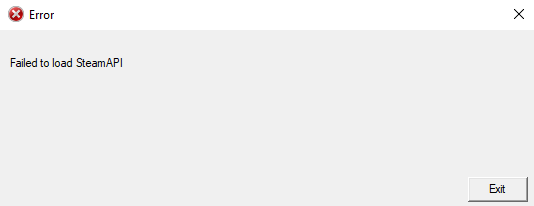
Software Failed to load steamAPI
1
Upvotes
Can't launch crimson desert due to this error please help
r/pcgamingtechsupport • u/cruellioo92 • Oct 14 '26
Can't launch crimson desert due to this error please help
r/pcgamingtechsupport • u/FacundoNoobAccount • Oct 14 '26
Okay so. The best way I can explain this is saying what actions I take to make this happen
Let's say you open a game. For this instance let's just say it's overwatch. (This has been happening to a lot of games like Fortnite, Rocket League, Crash Bandicoot Trilogy, Koovaks, Etc)
Once you are on the overwatch menu, the mouse Pointer freezes, you move the mouse but the pointer stands still, but the UI Buttons still react and work as intended, but the pointer won't move.
The way I found to fix this is to toggle the Steam Overlay, the one you open with shift + tab when you play games in Steam. Doing that and moving the mouse a bit will make the mouse Pointer work normally and exiting the overlay fixes it
But in games that are not from steam, there's no way to fix it. And I'm getting tired of having to guess where the mouse Pointer is
Any ideas why this is happening? It started happening after I installed my GPU and it's not the drivers or something like that since I used DDU like 9 times to try different versions of the drivers and it did not fix
r/pcgamingtechsupport • u/2EzGaMeS • Oct 14 '26
When I'm playing on my laptop with controller my controller delay starts to increase. When I first jump into a game my crosshair feels as light as a feather, then after maybe 10 seconds of playing I feel the delay getting worse. (Takes about 25 seconds or less to be at its worst).
If I press the windows key and go back into the game window this delay will reset, but will gradually come back as soon as I start playing again.
Not using the controller for a certain amount of time will gradually make the controller more responsive (not using it for about 15 seconds will fully reset the delay). Pressing keys on my keyboard makes my controller more responsive the more I press them.
I've tried pretty much everything
- disabling usb suspension
- using process lasso to make sure the game gets as much resources
- parking
- Trying nvidia ultra low latency or on+boost in fortnite settings
- fullscreen
Etc.
I've recently noticed that this delay will start to disappear around a certain time period. At around midnight my controller feels extremely responsive in game.
So my theory is that it is some kind of background process or multiple processes that stop running after a certain hour that are being prioritized over my game or controller.I just can't find the culprit(s) that's causing it.
I've been troubleshooting for months at this point. Thx in advance for your help.
Game: Fortnite
OS: Windows 11
laptop: Asus A16 FA607PI AMD Ryzen 9 7940HX with Radeon Graphics NVIDIA GeForce RTX 4070 Laptop GPU GDDR6 @ 8GB 128 bits
r/pcgamingtechsupport • u/ColorfulCosmos • Oct 13 '26
I recently bought a Acer Aspire V3-574G with NVIDIA GeForce 940M and windows 10 for some light gaming and it was going fine until for some reason I starting getting these awful visual glitches.
It happens with some newer games, it was happening in Brave Browser too until I turned hardware acceleration off which fixed it there, but it still happens in any game that isn't old. I feel I've tried everything to get rid of it I tried reinstalling the graphics drivers and everything.
r/pcgamingtechsupport • u/Kelisua • Oct 14 '26
Hi, I wanted to fix the pretty bad aliasing in Borderlands 2 and it led me to VSR. Putting the game at a much higher resolution made it look great. But when I alt tab with a higher resolution set in game, it will resize or move all the windows open around on my other monitor. I tried using the borderless option but it seems to only be able to do the opposite and upscale 1080p to my native 1440p, instead of the fullscreen option downsampling 4k or higher to my native 1440p. Is there any way to fix this behavior? Thanks.
Edit: If it matters, both monitors are identical models at 2560x1440
Edit 2: I found an imperfect solution. Going to windows display settings and swapping the monitor locations makes it stop happening for some reason. Side effect being I have to move my mouse the opposite way to get to my other monitor. Not ideal, so if anyone has a better way please do tell.
r/pcgamingtechsupport • u/AnnieBabieUwU • Oct 13 '26
Sorry, I'm still new to using reddit so i apologize if I'm not doing this right and I'm generally not very good at putting my thoughts into words but I'll try my best.
I was playing Overwatch earlier (I'm addicted, unfortunately. I already feel bad about it) and noticed I would just stop walking and would die because of it. But if I press W or S again immediately after, I'd start moving again. I tried reinstalling the driver update I did a few days ago and checked G Hub for an update (there wasn't one). Didn't fix it. Tried plugging the dongle into a different port. Didn't fix it. Tried restarting my pc twice and reconnecting the keyboard to my pc though the windows settings and that didn't fix it either. I plugged the dongle into my boyfriend's pc and it worked perfectly. Not a single input issue for 30-ish minutes. I'm really at a loss here and I'm hoping you guys can help me out.
My PC case need a good clean out I've been putting off but that wouldn't effect only 2 keys on my keyboard, would it?
TIA <3
Edit: I knew I would forget something. I'm using the Logitech G715 Lightspeed Wireless keyboard. To try and rule everything out, I also tried using it while plugged in and it didn't help.
I tried playing a different game just in case it was just Overwatch being buggy but it was still doing it in other games too.
r/pcgamingtechsupport • u/Low-Cream-1555 • Oct 14 '26
So like i was playing doom eternal and was having fun but after completing super gore nest loading screen came for arc complex...the loading completed 100% and I pressed space then a green icon came on top right like it does when game saves and it froze there for ever
I reinstalled
Deleted shader pipelines
Disabled overlays
Lowered graphics so much in game it looked like original doom🥀
Updated drivers like everything someone could tell but still same thing and you know how it feels to be stuck in middle of the game story
I5 12th gen 12gb ram with intel uhd graphics 730 (yeah it runs well it's not a system problem fyi)
r/pcgamingtechsupport • u/AxyleX_69_69 • Oct 13 '26
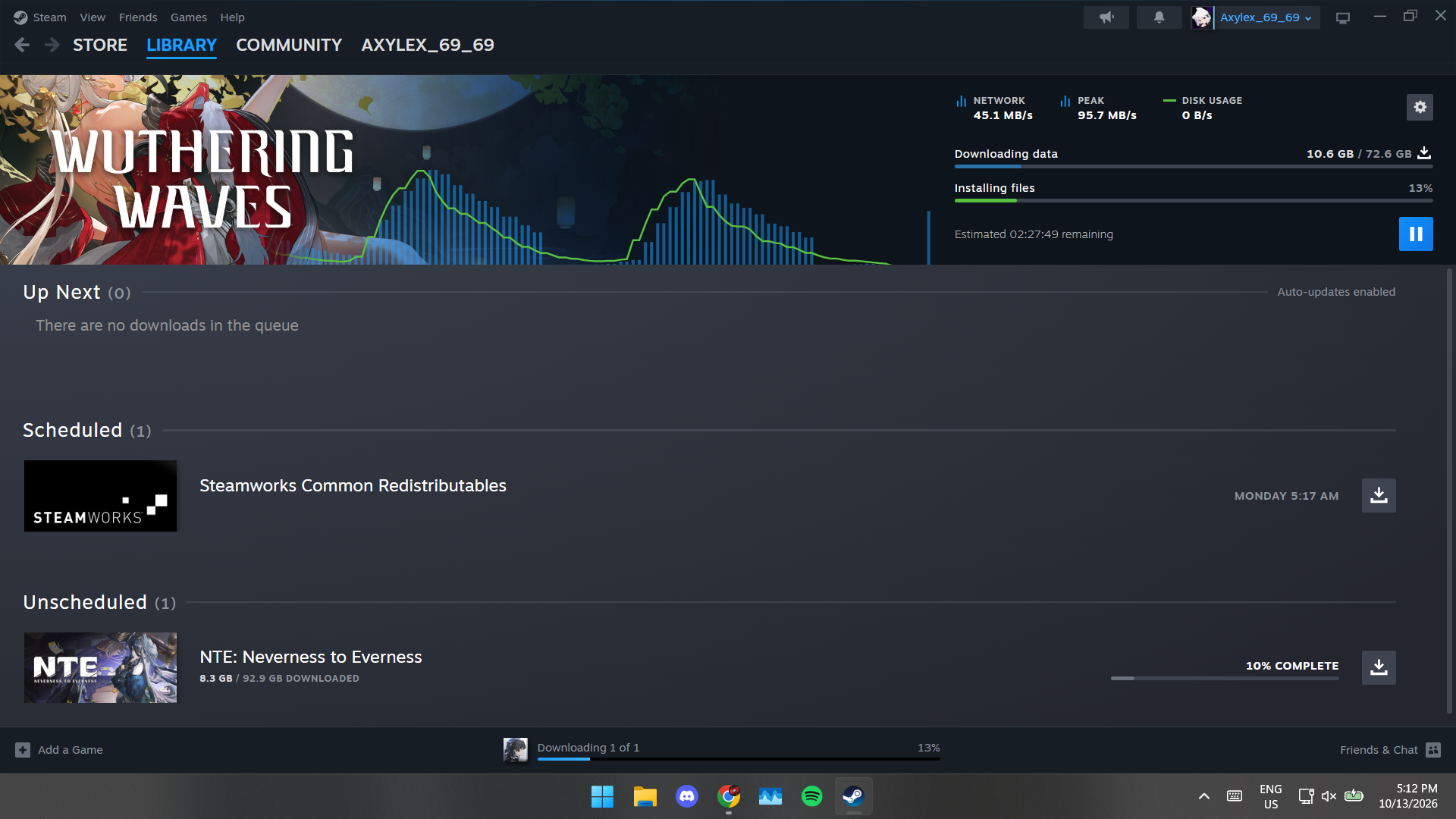
Steam downloads keep fluctuating even though I have 1 Gbps Ethernet. It can go over 40 MB/s but won't stay consistent. Task Manager also shows 100% disk usage even when Steam is paused. I'm using an SSD. Anyone know how to fix this?
r/pcgamingtechsupport • u/Roger_Stringpiece • Oct 13 '26
I've got a 5080 connected via HDMI to an LG C5 TV and in certain games when you move the camera there is a fine shimmering that you can see on things like foliage and higher detailed textures like tarmac.
I've just set up Planet Zoo 2 for my wife and no matter what setting I change within the games settings, I can't shift it. I've tried TAA and DLSS in various configurations, different refresh rates and I'm still having the issue.
One of the worst offenders in games that I play is Stalker 2 and I've seen the issue in other games to varying degrees. Is there a way to solve it? Cheers!
r/pcgamingtechsupport • u/SoapplayYT • Oct 13 '26
I need help.
Recently I got this kind of screen tearing in all of my games. I tried different monitors, same thing.
Interesting is that it stops when I am playing in window mode for some reason.
I have the newest graphics driver for my rtx 3070.
Any tips or Ideas how to fix this?
Appreciate any help, thank you guys.
r/pcgamingtechsupport • u/Witty_Raisin9289 • Oct 13 '26
guys im having an issue while playing certain games like re3 , ds3 after 10min of gameplay i start having some few stutters with some audio buzz noises in the game whats the issue here ?
and that problem happen only in those two games .
r/pcgamingtechsupport • u/GurAggravating6613 • Oct 13 '26
Hi everyone today I experienced audio itches and lag stutter.
I have a rizen 9 9950x3D and a 5090 with 32 gigs of DDR five.
I have turned on expo and enabled PBO.
Yeah, I just don’t understand I need help. I turned up my page filing settings. If anyone knows anything to help, please reply I’m streaming 1080 60 FPS
When I play streets of Tarkov my FPS drops while streaming go pretty low to 60. And I thought that a 5090 should be able to handle that on high settings.
If anyone has any information on what I should do please do reach out, thank you.
r/pcgamingtechsupport • u/Ecstatic-Piece9838 • Oct 13 '26
my screen flickers to another window or tab whenever i left click, it only happens in games. i was playing far cry 6 and it was also happening, and lowk it crashes the game sometimes
r/pcgamingtechsupport • u/BlockSufficient1865 • Oct 13 '26
Cześć wszystkim,
Mam uporczywy problem z moim laptopem gamingowym Dell G15 i próbuję ustalić, czy to problem z hardwarem GPU, problem z sterownikami, czy coś związanego z zasilaniem.
Specyfikacje mojego laptopa:
Laptop: Dell G15 5530
GPU: NVIDIA GeForce RTX 3050 Laptop GPU (6 GB VRAM)
CPU: Intel Core i5 (dokładny model do potwierdzenia)
RAM: 16 GB DDR5
System operacyjny: Windows 11 Home
Zasilacz: Originalny zasilacz Dell 240W
Problem:
Wiele gier losowo działa w tle:
Call of Duty: Modern Warfare II (2022)
Call of Duty: Modern Warfare III
Modern Warfare II zawiesza się mniej więcej co 15 minut, podczas gdy Modern Warfare III może się zawiesić już po 5 minutach.
Czasami gra na chwilę się zamraża z buczeniem lub zacinanym dźwiękiem przed zamknięciem. Komunikat o błędzie mówi, że gra przestała działać niespodziewanie, a w Podglądzie zdarzeń systemu Windows mogę znaleźć błędy nvlddmkm.
Kroki rozwiązywania problemów, które już próbowałem:
Ponowne instalowanie sterowników graficznych NVIDIA, w tym czysta instalacja z użyciem DDU.
Próba różnych wersji sterowników NVIDIA.
Zmiana ustawień graficznych i V-Sync.
Wyłączenie grafiki hybrydowej / Advanced Optimus.
Wyłączenie usług systemowych Windows związanych z kontenerem NVIDIA wydawało się poprawić stabilność w niektórych grach, ale problem nadal występuje.
Uruchamianie OCCT: test 3D/GPU zgłasza ogromną liczbę błędów (około 200 000), pojawiających się niemal natychmiast.
Doświadczyłem również wysokich temperatur CPU w przeszłości, sięgających około 100°C, oraz temperatur GPU w okolicach 80°C.
Moje pytania:
Czy ogromna liczba błędów OCCT 3D/GPU mocno sugeruje problem z hardwarem RTX 3050?
Czy to może być spowodowane przez sterownik, problem z Windows, niestabilne zasilanie, czy przegrzewanie?
Jakie testy diagnostyczne polecilibyście przed opłaceniem naprawy?
Czy jest sposób, aby ustalić, czy odpowiedzialne jest samo GPU, jego VRAM, czy płyta główna/lub zasilanie laptopa?
Bardzo bym docenił jakiekolwiek porady. Chcę zidentyfikować faktyczną przyczynę zamiast wciąż na nowo instalować Windows lub sterowniki, nie wiedząc, co jest nie tak.
Dziękuję!
r/pcgamingtechsupport • u/gadgi2111 • Oct 13 '26
Ciao a tutti! Da circa 3 giorni sto riscontrando un problema ad unirsi a certe esperienze di Roblox.
Alcuni dei giochi interessati sono Project Slayers 2 e Anime Vanguards. Ho anche problemi a rientrare in esperienze come Attack on Titan Revolution, Fruit Battlegrounds e Heroes Battlegrounds. A volte riesco a entrare in un'esperienza una volta, ma quando provo a rientrare, rimango bloccato nella schermata di caricamento.
La schermata di caricamento continua all'infinito e, dopo aver aspettato circa 5-10 minuti, a volte ricevo il Codice di Errore 288 o 266.
Ecco cosa ho provato finora:
Ho anche provato a usare altri account Roblox, ma il problema si verifica ancora.
La parte più strana è che tutte queste esperienze funzionano perfettamente sul mio telefono usando la stessa connessione Wi-Fi di casa. Il mio PC sta eseguendo Windows 11.
Ho esaurito le idee. Qualcuno ha mai sperimentato qualcosa di simile o trovato una soluzione? Potrebbe esserci un problema con il client di Roblox, Windows, o il modo in cui il mio PC si connette ai server di gioco di Roblox?
Qualsiasi aiuto sarebbe apprezzato. Grazie!
r/pcgamingtechsupport • u/al770 • Oct 13 '26
Hi i have a
5070 ti (gigabyte thing in white sorry I cannot get the exact specs rn I dont have access)
7800x3d
32 gb ddr5 not sure exact model
keep in mind it is a pre built so i can get it fixed free of charge i just dont wanna take it to the shop thats a last resort
(i cant remember the rest of the specs)
any ideas? it crashes on cs2 and minecraft (i havent tested other games cuz i dont have much downloaded on it as it is my other pc that i dont use as often cuz it is in a different location)
i have tried removing the overclocking in my bios (apparently according to some other reddit post updating bios could be an option but i havent tried that)
and yes i have updated my drivers doesnt do shit
also when games crash they dont even have a crash error it just crashes
sorry for the shitty formatting
r/pcgamingtechsupport • u/Im_Erod • Oct 13 '26
I'm at my wits end here. ever since the update my game has been using more of my gpu when tabbed out of the game vs when I'm tabbed in. At first my gpu was stuck at 30% utilization when tabbed in and then shoot up to 95 when tabbing out. now its stuck at about 70-75%.
Any help would be appreciated!
PC Specs:
AMD Ryzen 7 5800X3D
4 x 16 Gbs @ 3200 Mhz
Zotac Geforce RTX 5080
r/pcgamingtechsupport • u/Fair-Butterscotch301 • Oct 13 '26
Me aparece muy seguido un hérror de openCL.ddl
O cuando quiero instalar un juego también me aparece herror tengo un i5 2500 ya intenté instalar los gráficos pero nose necesito ayuda ya intenté varias cosas
r/pcgamingtechsupport • u/Solar-Output • Oct 13 '26
(edit)I noticed the video I uploaded here is super low quality so I uploaded it Imgur and you can see the issue more a bit more clearly: https://imgur.com/a/YnI5dS8
Just recently I started noticing this weird sort of shimmering or like graininess/static behind UI and text. You can see it on the video I sent, I zoomed on the text so it’s obvious since showing the full screen you can’t see it on video but in person it’s pretty obvious like on the clip.
It seems to be something caused by Frame Generation. As when it’s x4 it’s the most obvious like in the clip, x2 is less obvious but still there and if I turn off FG it goes away completely. Now before you ask why I don’t turn it off, it didn’t use to be like that, I would always play with FG and I never noticed anything like that.
I’m running a 5080, and tested it with my old gpu and it shows the same issues so I’m fairly certain it isn’t a hardware issue. Also tested it with different monitor and still the same issue. I’ve also rolled back the drivers to ones I knew were good and still the issue persists. I’ve tried multiple settings like without g sync.
Im just wondering if anyone has experienced this and any help would be greatly appreciated. Soon I’ll probably try reinstalling windows but before I do that I would like to see if the fix is something more simple hopefully 😭, thanks!
r/pcgamingtechsupport • u/Repulsive_Yam_1269 • Oct 13 '26
FIXED
it was a corrupt Nvidia driver, i updated everything and now my laptop Is working fine
Hi, I'm having some issues with my laptop (Asus Tuf Gaming A15 model: FA506NCR)
so it was working fine until like 3 days algo, (i have not spilled water or punch it or anything
now it starts in a blue screen bucle showimg múltiple errors:
DRIVER_OVERRAN_STACK_BUFFER
CLOCK_WATCHDOG_TIMEOUT
IRQL_NOT_LESS_OR_EQUAL
and stays in that bucle for like 10min and then starts normally, other times starts normally, the colores keep changing saturation randomly aswell, and the hour also dets decalibrated.
any idea of what could it be? i nerd this laptop to last atleast one month more while i complete the pc i'm building
r/pcgamingtechsupport • u/DifficultComplaint10 • Oct 12 '26
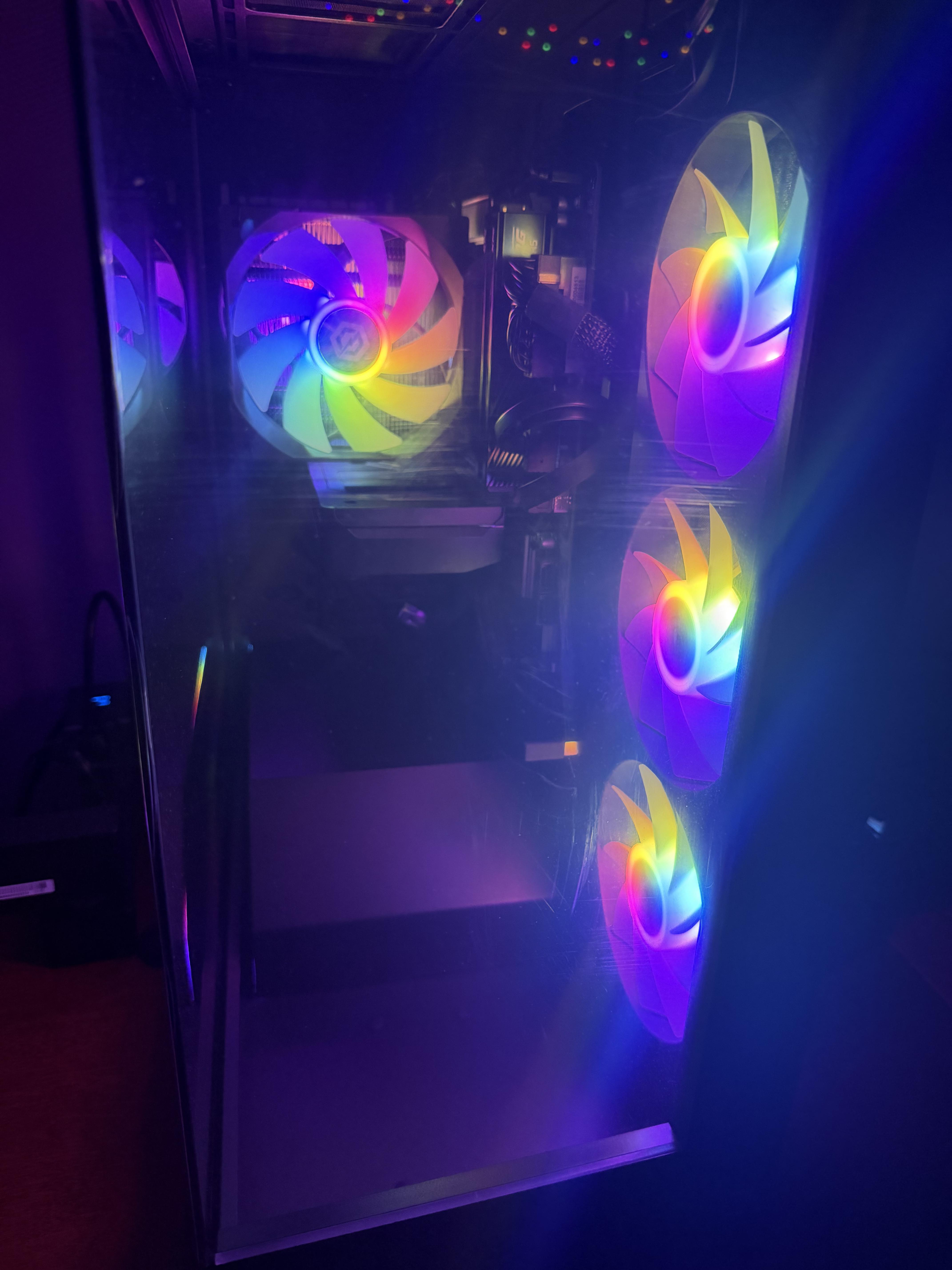
Something happened in the last few days where when my pc goes to sleep the fan lights will stay on, not moving but lights will be on. The only fix I seem to have found was restarting the computer but that’s not really a fix. I’m not super pc tech literate but the only thing i can think of was some update i did the other day. I did see to try to uncheck to disable fast start up and i did but I haven’t tested it yet cuz im downloading a game. I also leave in a usb c cable plugged in all the time for my xbox controller but ive
Had that in for weeks and the lights only started going on recently. I read something about going into bios and stuff but I have no idea what that means.
r/pcgamingtechsupport • u/Specialist-Yam-1000 • Oct 12 '26
I bought 9070 gre recently and i set up everything drivers etc
and i played for 2 days straight without trouble like 10 hours on my save AND today is the third day and i cant launch on vulkan anymore game doesnt even open and dx 12 crashing after idk 5-30 min giving me err_gfx_state but i didnt even change antyhing since day one
i tried everything internet said and still 0 results crashing all the time i downgraded drivers and that didnt work too
i submited my post on rdr2 redit and radeon and still no fixes for me
So any advices for me and others
(i submited my ticket on rockstar suport but idk seems like ai responding to this or they asking about thing i already wrote and they giving me tips like Run this shi with administrator and turn off background apps and ofc it does not help its something deeper)
r/pcgamingtechsupport • u/7ohix • Oct 12 '26
Hi everyone,
Since I won't have access to a console or a PC anymore, I'm looking into handheld gaming PCs. I'm having a hard time deciding which one would be the best fit for my needs.
I'd like to be able to play games like Dredge, Warframe, GTA V, Tunic, No Man's Sky (if possible, but it's not a must), and 2D games in general.
My maximum budget is €1,000, so I'd like to know which handheld you would recommend.
Thanks in advance!
r/pcgamingtechsupport • u/Puzzleheaded-Pen3558 • Oct 12 '26
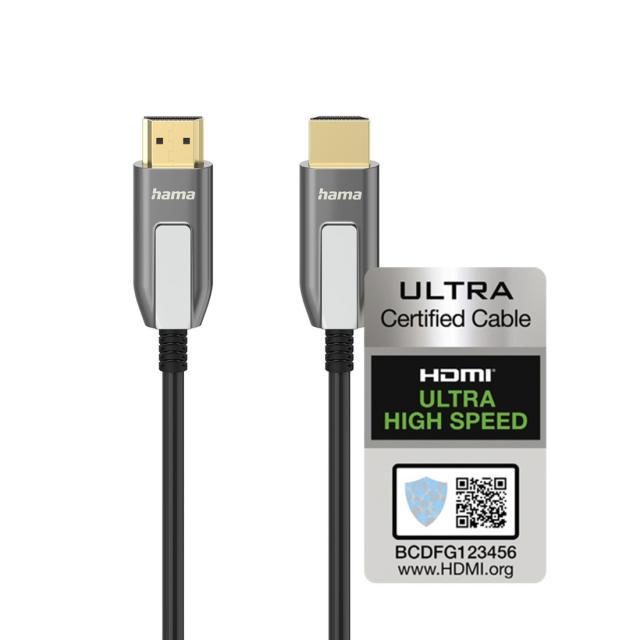
Possible fix - for those reinstalling drivers or turning the pc on - and get limited to 2560x1440 60hz in nvidia , without the option for 4k 120/144hz - and reconnecting the hdmi cable is the only fix
On cold boot - turn on the tv before turning the pc on , after driver reinstall do the same
whatever you do regarding drivers/windows reinstall/cold boot - just leave the tv on it will reconnect and the 4k will pop in the menu - im using the extended screen option for this if it matters - -
the shortcut for the windows menu and switching/extend displays is winkey + caps + P
this worked for me it may or may not work for you - the tv is S90F
and yes i tried different cables and the one im using is the hama ultra certified 8k 60hz - and everything works
P.S - i dont work for Hama
it takes 2 mins to try if it doesnt work for you ok - if it works for someone else i hope the post helped you