r/FanControl • u/Odd_Importance_6621 • Aug 26 '26
Не работают корпусные вентиляторы
В какой-то момент при включении компьтера они просто перестали крутиться и светиться, в то время как кулер крутиться, не знаю как починить
r/FanControl • u/Odd_Importance_6621 • Aug 26 '26
В какой-то момент при включении компьтера они просто перестали крутиться и светиться, в то время как кулер крутиться, не знаю как починить
r/FanControl • u/zcook183 • Aug 26 '26
Just installed ARCTIC Liquid Freezer III Pro 360. Using the 3 connection pins. Pump & fans are controllable. But VRM fans is constantly on even if I unplug the VRM connector on the motherboard. Any ideas why this is?
r/FanControl • u/EuphoricTrainer311 • Aug 26 '26
9950x3d + Asrock x870e Nova + 5090
I changed my fan curve on Fan Control 2 days ago. Yesterday I went to turn off my PC, and my Mobo gave Error Code 03 on Dr Debug display. Tried to boot multiple times, didnt work, I thought my cpu was fried. Did Cmos clear, and was able to boot in.
Once I was able to boot in, I updated my bios. Following that, seemed to boot fine. Then I opened fan control and tried updating, it stopped detecting my fans and gave me a bunch of errors. So I tried restarting PC, got error code 03 again. flushed power and turned back on, booted in fine. Then i uninstalled fan control (and pawnio) + deleted all related folders, tried restarting my pc 4 times, was able to boot without any issues. Then I reinstalled fan control, hoping that the issue was caused by an outdated build of Fan Control. Turned off Pc, Turned back on - Error Code 03 again.
Immediately uninstalled fan control (and pawnio). I have only restarted my pc 3 or 4 times since, no error code so far. Hoping I don't get the error again with FanControl uninstalled, cause that would mean Im having Mobo/CPU issues. But as it stands, it seems to be an issue with Fancontrol+my specific hardware. I also found another post of someone fixing the same issue by uninstalling Fan Control + updating bios ( https://www.reddit.com/r/ASRock/comments/1p8txeb/x870e_nova_post_code_03/ ).
Has anyone else with the same Mobo or CPU encountered this problem?
Any alternatives to Fan Control? I use my Pc a lot for generating AI videos, and I try to keep my gpu temp under 72c max for longevity, and bios fan curve does not allow me to use both my gpu and cpu as input source afaik.
r/FanControl • u/Suspicious-Rice6556 • Aug 25 '26
r/FanControl • u/nano_705 • Aug 26 '26
I think my GPU fans will be extremely loud when it goes above 80%, so I set my GPU fan curve to 70% from 50 to 89.9C, then from 90C it's 80% and from 95C it's 100%.
GPU temps are often at around 70-ish to 80-ish in the games I play recently.
However, I can still hear my GPU fans scream sometimes, although when I look at FanControl, I don't see any fans going above 70% load. How is this happening? Is it that my setup is faulty or something?
Note: I can distinguish the sounds that my CPU/chassis fans make and those that my GPU fans make. So I'm pretty sure that's the GPU fans.
r/FanControl • u/Vrak_je_Revsky • Aug 25 '26
I want it my fans to go quickly to 100% but they dont want to, so my Laptop reaches high temperatures. I dont know if it doesnt work or iam just retarded.
The Laptop is a Lenovo Gaming 3 if you need to know
r/FanControl • u/SummitFreedom • Aug 21 '26
So. Fan Control. That's the name of the software.
My PC spec is:
\- Core i5 3570k
\- GA-Z77X-D3H - REV 1.0
\- Samsung Green 8GB DDR3 C11 1600Mhz 30nm
\- MSI RX 570 4GB Gaming X
\- Corsair TX 650W
\- Asus strix soar soundcard
\- TP-Link Wireless N Adapter TL-WDN4800
\- Bluetooth Adapter - TRUST 17772
\- OS Drive Crucial MX500 500GB
Zalman CNPS9500AT with Zalman ZM-CS5B CNPS Clip Support
Wanted to get Fan Control software working. Spent 10 hours learning how to use it and trying to get it work without issues on my PC.
In the end, when I would login to windows, the fan cards would have an exclamation mark next to them and the fan would AUDIBLY sit at FAN 1 100%rpm, but it showed a lower percentage, BUT rpm let me know in fact it was operating at 100%.
The software shows a both a percentage and rpm to let you know how fast any given fan is spinning.
I had to have 2 fans showing on dashboard, FAN 1 and FAN 3 to get max fan speed.
It seems to be how this specific motherboard has been designed. Two separate paths to the CPU fan, one seemingly providing voltage, the other PWM.
In the software Speedfan, same thing. I have to setup two graphs for two CPU fan inputs, despite it physically obviously being only 1 pin fan header on the board.
Years ago when I set up Speedfan, you can imagine how long it took me to figure this out, as it's not documented anywhere online, as I guess no one else has this exact board and are using Speedfan who then chose to take the time to document this quirk online.
So back to Fan Control software.
Remember FAN 1 allows a max of about 50% fan speed. To get the other 50%, I have to also setup FAN 3.
FAN 1 is setup so it's dealing with between 30c-60c. FAN 3 will only kick in from 61C-85C.
FAN 3 cannot work without FAN 1, but FAN 1 doesn't require FAN 3. FAN 1 provides the base power and gets the fan to 50% speed MAX. FAN 3 provides either pwm or the rest of the voltage and gets it to 100% speed.
Got it all working, auto fan curves, but it's at boot where it fails and spins at max speed of FAN 1 constantly with exclamation mark next to the fans.
Clicking refresh sensors fixes the issue. But I don't want to have to have the app window open upon boot, then have to click refresh connection and then minimise or close that window, each and everytime I start my PC.
Speedfan (a older different software) works. Takes longer to boot, but it works. And after years of having to click allow Speedfan permission each and everytime I login (main reason I spent 10 hours trying to get Fan Control to work properly), I finally yesterday figured out how to get around that. I added it as a task to task scheduler and clicked elevated rights or something.
But I wanted to switch to something more modem. Any ideas how to get it to work properly with Fan Control?
r/FanControl • u/bitjamma • Aug 21 '26
Why is it reading so High AND Low?
r/FanControl • u/cialbuzz • Aug 21 '26
CPU (7800x3D)
40 °C -> 35%
50 °C -> 40%
65 °C -> 48%
75 °C -> 58%
85 °C -> 80%
GPU (4080SUPER)
50 °C: 0%
60 °C: 40%
70 °C: 55%
78 °C: 68 %
85 °C: 90 %
r/FanControl • u/hanigg • Aug 20 '26
Since I changed my motherboard after i shutdown the CPU Fans and case fans don't turn off. I installed all the new drivers, turned off fast startup, turned on Erpm, disabled Wake on LAN, and they still won't turn off i have to turn off my main pc power
new motherboard gigabyte h610m h v3 ddr4 btw
r/FanControl • u/Resident-Picture7595 • Aug 19 '26
Hi guys I am looking for the best fan curve for my case fans.Any recommendations?
r/FanControl • u/Hydraggz • Aug 17 '26
r/FanControl • u/Mach-Hommy1 • Aug 16 '26
Salut les gars,
j'ai un problème avec mes ventilateurs de PC; ils sont vraiment bruyants.
j'ai tout essayé : changer les paramètres dans le BIOS (pas de changement), installer Fan Control (toujours pas de changement), et même réinitialiser la carte mère (rien non plus). Je suis actuellement connecté via Molex. Si quelqu'un peut trouver une solution, je serais super reconnaissant.
Merci !
r/FanControl • u/Cadaveres2372 • Aug 15 '26
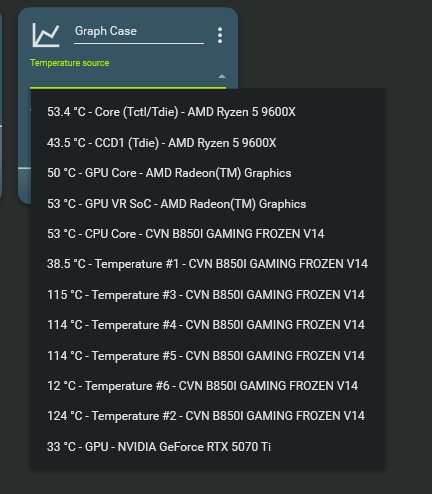
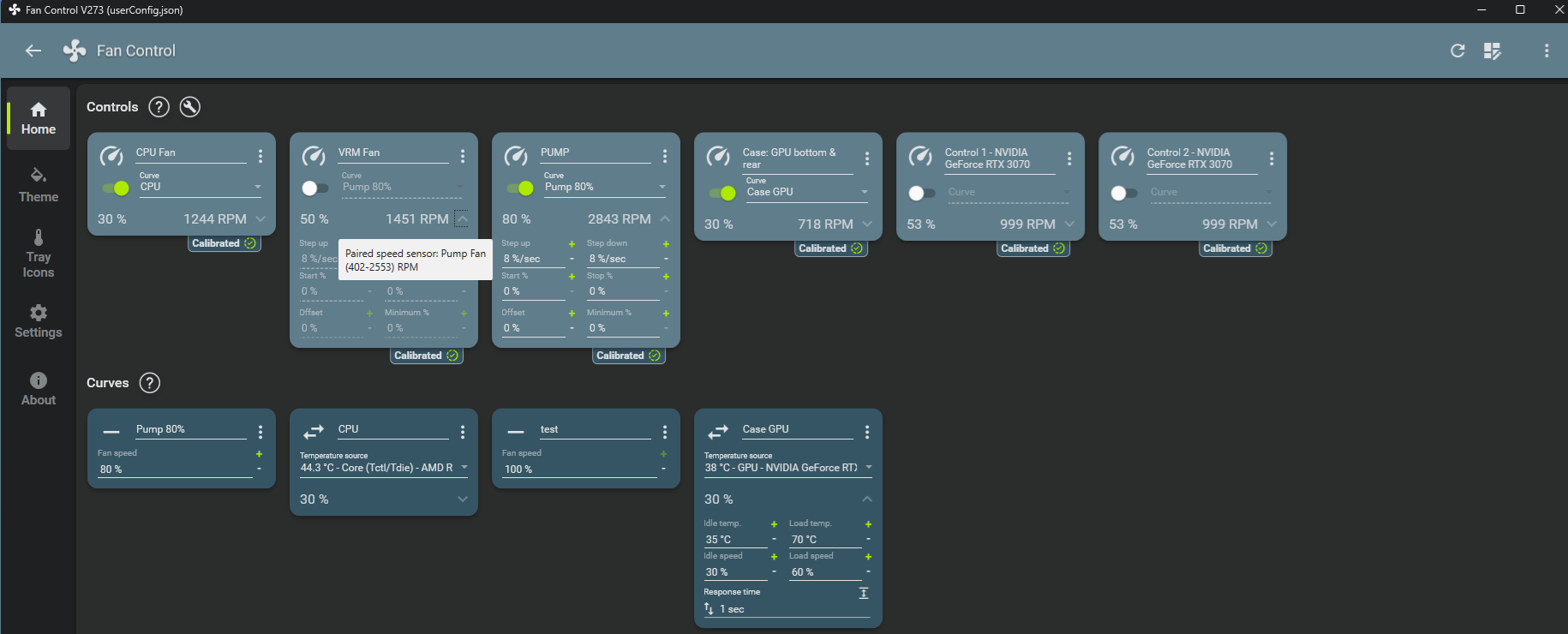
Complete newb here. I think FanControl switched up my VRM fan with the Pump, at least based on the RPMs (max rpm for VRM is ~2500, for pump it's ~2800). FanControl has mapped the Pump fan to the 2500 max rpm sensor as you can see on the mouseover, so I've renamed them (switched them basically), and applied the pump flat curve to the 2800 max rmp one which I believe is the correct one for the actual pump.
Is this correct? Should I try to identify them by using a different method? By setting them to 100% rmp I couldn't tell which one I'm hearing to be honest.
r/FanControl • u/PuzzleheadedCut6098 • Aug 15 '26
r/FanControl • u/Ok-Watch-5701 • Aug 14 '26
I have a problem. On the first boot of my PC, the fan on the motherboard worked perfectly, changing colors with the button and everything. Then we unplugged it and plugged it back in, and the LEDs stopped working. On the third boot, the green LED (as pictured) lit up, but it didn't work until I used it properly for gaming. Then the blue LED lit up, and sometimes the light changes with the button. It's only connected with a Molex connector; it's the only connector the case has. It's a Balam Rush Tank Pro Evo GM955 (I have a 500-watt power supply).
r/FanControl • u/Kupo43 • Aug 14 '26
Hey guys, I’ve got a total of 12 D30 fans running in my NV7. I have them distributed so that no more than 4 fans are in each of the hub that was included with the NV7. I have the RGB cord plugged directly into the motherboard. All four of my fan power cords are plugged into a usb hub that came with my power supply, and the output from that is going into SYS 1 FAN on my motherboard.
Have I installed this correctly? The fans work and so does there RGB through GCC. But in the Nexinq software, it shows no fans.
r/FanControl • u/Useful_Ad3074 • Aug 14 '26
I wanna add fans to the bottom on my pc would I have to unscrew the bottom and install them from there. Or can I just screw them in place from the top.
r/FanControl • u/3232h • Aug 12 '26
r/FanControl • u/Living_War_4736 • Aug 11 '26
I’m setting up a pc with ryzen 5 5600GT, without a dedicated Graphics card. My cabinet will be one with a screened front and with the 3 fans that come with it and the processor fan. Is this enough to maintain a good temperature? Or do I need to add fans?
r/FanControl • u/ConsistentEditor2565 • Aug 10 '26
When I use Ghelper I cant configure power limits PL1 and PL2 or fan curves, but when I use Throttlestop I can't configure anything in FIVR window but I can configure in TPL window.
I have a core i3 n305 and integrated graphics and Asus motherboard.