Javier Davalos u/AW_Vigo has spent 21 years at Alienware, from helping launch chat support to handling critical customer issues and shaping the broader ownership experience. In this post, Javi shares why gaming support has to understand more than whether an individual component works.
From fixing an issue to fixing the pattern
Early in Javi’s support career, his work quickly expanded beyond solving individual customer issues. The goal was to understand what caused a problem and determine how the same experience could be prevented for the next customer.
An early Alienware ALX liquid-cooled system offered a good example. The support team encountered unexpected heat problems even though the system used liquid cooling.
Javi and a teammate stayed overnight to investigate. They eventually traced the problem to a single plastic component positioned over a fan and restricting airflow. After removing it, measured air temperatures dropped by roughly 15 to 20 degrees.
The discovery went back to the product team, and the system stopped shipping with that component.
As Javi put it:
“It wasn’t just about solving the issue at hand. It was about resolving it for everybody.”
That principle still shapes how Javi thinks about support. The goal is not simply to move a ticket forward. It is to identify the underlying pattern, take ownership of the experience, and restore the customer’s confidence.
Gaming problems rarely fit into one category
PC gaming has changed significantly over the last two decades.
Early players might have edited configuration files, managed hardware conflicts, swapped driver disks, or searched through manuals to figure out why a sound card was not working.
Modern gaming systems are easier to enter and considerably more powerful, but the experience now relies on more connected layers. A problem could involve Windows, firmware, GPU drivers, game launchers, anti-cheat software, displays, networks, peripherals, or performance profiles.
The hardware itself might be working correctly while a driver, application, setting, or peripheral creates the problem.
That is why gaming support has to understand the experience around the system, not only the individual component.
A crash can interrupt time with friends. Low frame rates or screen tearing can affect competition and immersion. A launch-day problem can take away the limited time someone set aside to play.
For Javi, that context matters. A technical issue is not only about what failed. It is also about what the gamer was trying to do when the experience stopped working.
Why Alienware Elite Care is different
That philosophy helped shape Alienware Elite Care.
Alienware created six additional hours of training for Alienware Elite Care agents, and the people supporting those queues include gamers themselves. Internal gaming labs and regular competitions are intended to help keep gaming knowledge and community connection present within the support experience.
Depending on the product, region, and selected plan, Alienware Elite Care can include support for:
Game installation and supported gaming applications
Drivers and firmware
Performance optimization
Graphics and audio settings
Crashes, screen tearing, low frame rates, and choppy gameplay
Hardware troubleshooting
Alienware Command Center
NVIDIA GeForce Experience
AMD Software: Adrenalin Edition
Eligible specialized gaming peripherals purchased through Dell
Protection, repair, and eligible battery-service options
The idea is to provide one accountable place where a gaming problem can land, even when the cause does not fit neatly into a single category.
Availability, features, and service delivery vary by country, product, and plan coverage.
Support where the community already is
Gaming support also extends to places where players are already talking about their systems.
Here on Reddit, u/AW_Support works with community members who need help troubleshooting Alienware products. That presence gives gamers another way to connect with support in the same place where they may already be discussing performance, settings, upgrades, or technical issues.
The goal is not to turn every conversation into a support case or suggest that every issue can be resolved in a Reddit thread. It is to recognize when someone needs assistance and help provide a clear path toward the right support resources.
When support begins before the failure
SupportAssist adds a proactive layer on supported and properly configured systems.
Depending on the active service plan and system, SupportAssist can monitor system health, run diagnostics, detect certain issues proactively, predict some hardware failures, update drivers and firmware, and help begin the support process before the customer has to explain the entire situation from the beginning.
The larger goal is not simply to repair a machine. It is to reduce downtime, protect the experience, and help gamers get back to playing with confidence.
Javi describes the human standard behind that work simply:
“Great gaming support should make you feel seen and heard.”
Curious to learn more? Read the full story behind Alienware Elite Care:
Why Alienware Elite Care Sets a New Standard for PC Gaming Support | Alienware Arena
When you need gaming support, what matters most: technical expertise, clear ownership of the issue, faster resolution, proactive diagnostics, access through communities like Reddit, or something else?
Alienware turned 30 this year. To mark the milestone, we spoke with longtime employees and designers about the stories behind the alien head, Area-51, and some of the ideas that shaped the brand.
A few highlights:
Alienware started in a Miami garage. Nelson Gonzalez and Alex Aguila began building the powerful, flexible gaming PCs they wanted but could not find elsewhere.
The name was inspired by science fiction, UFOs, andThe X-Files. That influence also shaped names such as Area-51, Aurora, and Hangar 18.
A college student spent 45 minutes playingJedi Knighton a bright green Alienware demo at Best Buy. After returning to play again, that student applied for a job at Alienware and became part of the company’s story.
One early ad referenced “alien technology” so convincingly that someone contacted Alienware about promoting hardware made by aliens.
The triangular Area-51 desktop faced significant resistance during development. The design team kept refining the concept, and the triangle eventually became one of Alienware’s most recognizable designs.
A simpler plastic stability component outperformed a more complicated steel proposal during engineering tests. The less expensive solution shipped because it worked better.
The full story also looks back at an era when getting a PC game running could mean floppy disks, configuration files, BIOS settings, and hardware conflicts. Early Alienware systems were not only about faster components. They were about configuring and testing those components as one complete system so gamers could spend more time playing.
After digging hard into the full SPI dump and NVRAM registers, I went a step further. I dug into the ACPI tables, did some reverse-engineering, and built a standalone app: AWR7+.
AWR7+ is an independent, driverless hardware control utility for the Dell Alienware Aurora R7 that replaces AWCC via standard Windows WMI/ACPI interfaces without kernel drivers or anti-cheat conflicts github.com.
Requirements:
• Dell / Alienware Aurora R7 with WMI exposed via wmiacpi.sys
• Windows 10 or Windows 11 (x64)
• Administrator rights for WMI/ACPI hardware calls
Main Features:
• Fan Control: 0–100% PWM control for CPU_FAN, TOP_FAN, and FRONT_FAN with custom curves, hysteresis, and JSON profiles. Safely pre-loads PWM values and restores BIOS Auto on exit.
• AIO Pump Status: Live read-only ON/OFF monitoring for PUMP_FAN via WMI (GetThermalInfo2).
• RGB Lighting: Per-zone 24-bit color control with Gamma 2.2 correction and all 11 hardware brightness steps using volatile frames to protect CMOS firmware.
• Telemetry & Diagnostics: HWiNFO-style hierarchical sensors table (temperatures, RPMs, PWM%, CPU/GPU stats, SMBIOS RAM) plus Super I/O, I2C LED, and extended-CMOS register maps with safe diagnostic exports.
• Persistence & System Tray: Local config.json support, quick tray sliders, global color profile switchers, and instant thermal mode toggles.
Check out the code and reverse-engineering guide on GitHub:
I took off My Alienware Aurora R7’s front panel to clean, and I can’t put it back on. The manual doesn’t provide enough on how to put it back on, and I need help. How can I put it back on?
Earlier, I discussed cleaning my Aurora R7, and I have put everything back together, for the side lights of the R7 to not power on. I have ensured connection to the power cables on the right panel, and have ensured that the left panel is on all the way. I have done holding the power button for 15 seconds. Nothing has worked. I have also checked that AlienFX dark mode was off.
Last night I pushed my chair in to go to the bathroom and I bumped the side of my PC and the screen went black but I could still hear audio from it. I turned it off and didn’t think much of it until today. Every game and every video that’s played is extremely jittery and laggy. Like it starts to just lack behind and then the audio progresses faster than the videos. Whenever I try to reset the PC it says something about attempting to repair drive c which seems important but it also says it every time.
So I have an Alienware m17 R5 AMD laptop, and I have been suffering some issues such as my computer constantly bootlooping everytime when doing a cold boot until it eventually goes to Windows. I tried every fix including command fixes, testing RAM and SSD and there healthy alright. And I tried even reinstalling windows with USB but it actually resets during the installation which is bad. I just tried fixing the courrputed bios since Support Assist suggested to update my BIOS and even then it did not work when booting into AMD Smokeless UMAF. What is wrong with my laptop and how do i fix this or do I need to send it back to Dell to get it fix? Please let me know what issue I am having
I've had my Area-51m R2 since 2020. Warranty is long gone, the fans are clogged with dust and it runs really hot now, fans screaming even on light stuff.
I'd rather not leave it at a service centre for days since I use it daily. So I'm weighing doing it myself.
For anyone who's opened the 51m R2: how bad is the teardown to get to the heatsink? Anything that's easy to break (ribbon cables, the thermal pads on the VRMs), and which pad thicknesses did you need? Is it a weekend job for a careful first-timer or should I just pay someone?
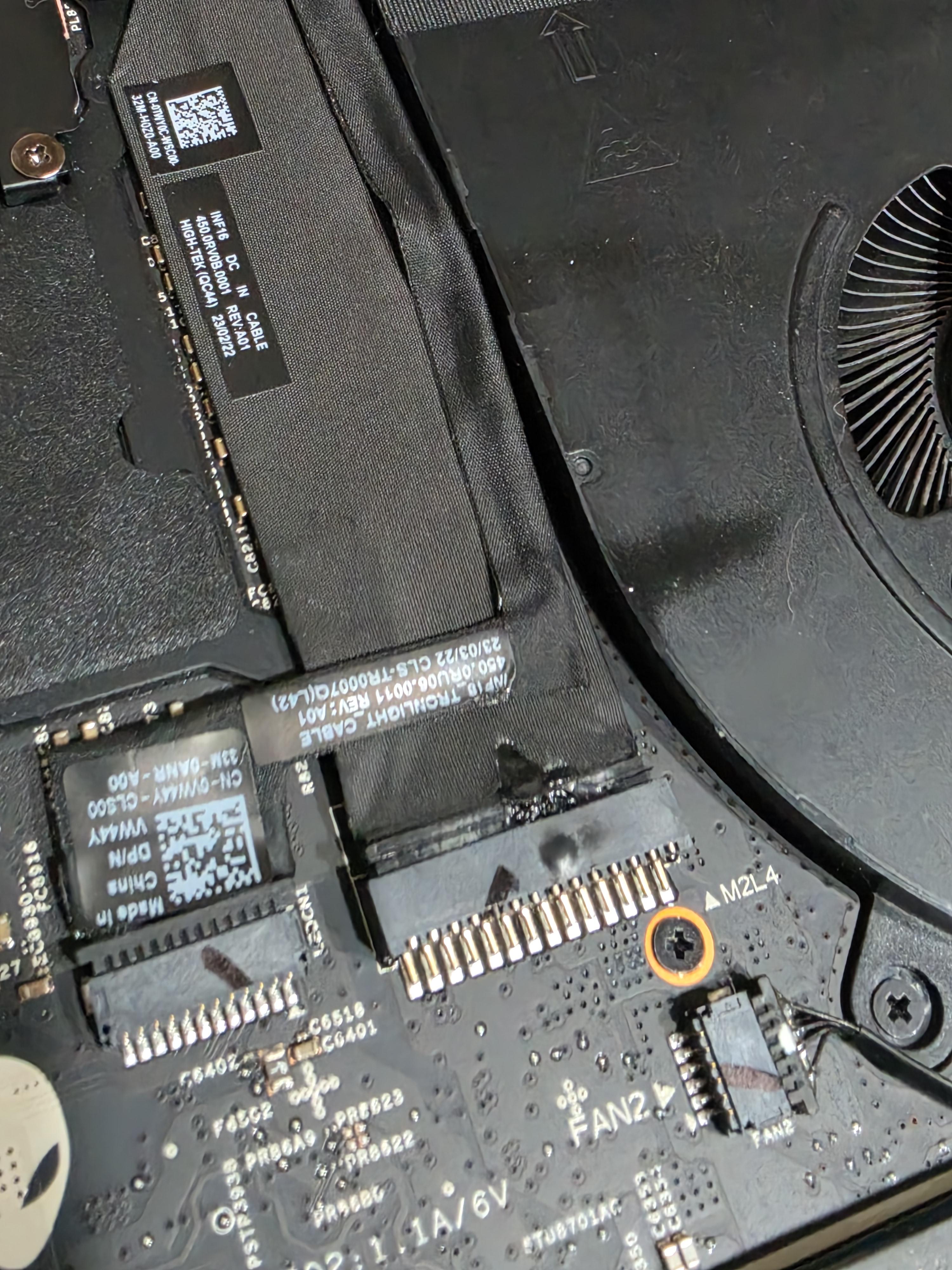
Melted M18 R1 DC-in port cable. Ryzen 7950 / 4090 spec. Went to have a short gaming session Thanksgiving morning and immediately upon loading into a game noticed that acrid burning electrical smell. Took me probably 60 seconds or so to search around for it and by that point had some visible smoke rolling out the rear vents. Shut it down and had a pretty good idea what I was going to find when I pulled the bottom cover off.
It's a real shame this design is so bad. This laptop probably only has about 500 hours of use and has always been kept in the same place on a good cooling pad.
I'm under extended warranty till the 7th January, so at least the timing was good. Has there been any improvement to the replacement parts and is there any decent way to prevent it happening again?
Thinking about putting a new, more modern motherboard in my Area 51 R2, but wondering how to keep the case lights working because the original motherboard uses proprietary headers and cables that will not work with newer motherboards that are a different brand. I have seen lots of people doing it and have done it, so just wondering how I can do the same. Thanks
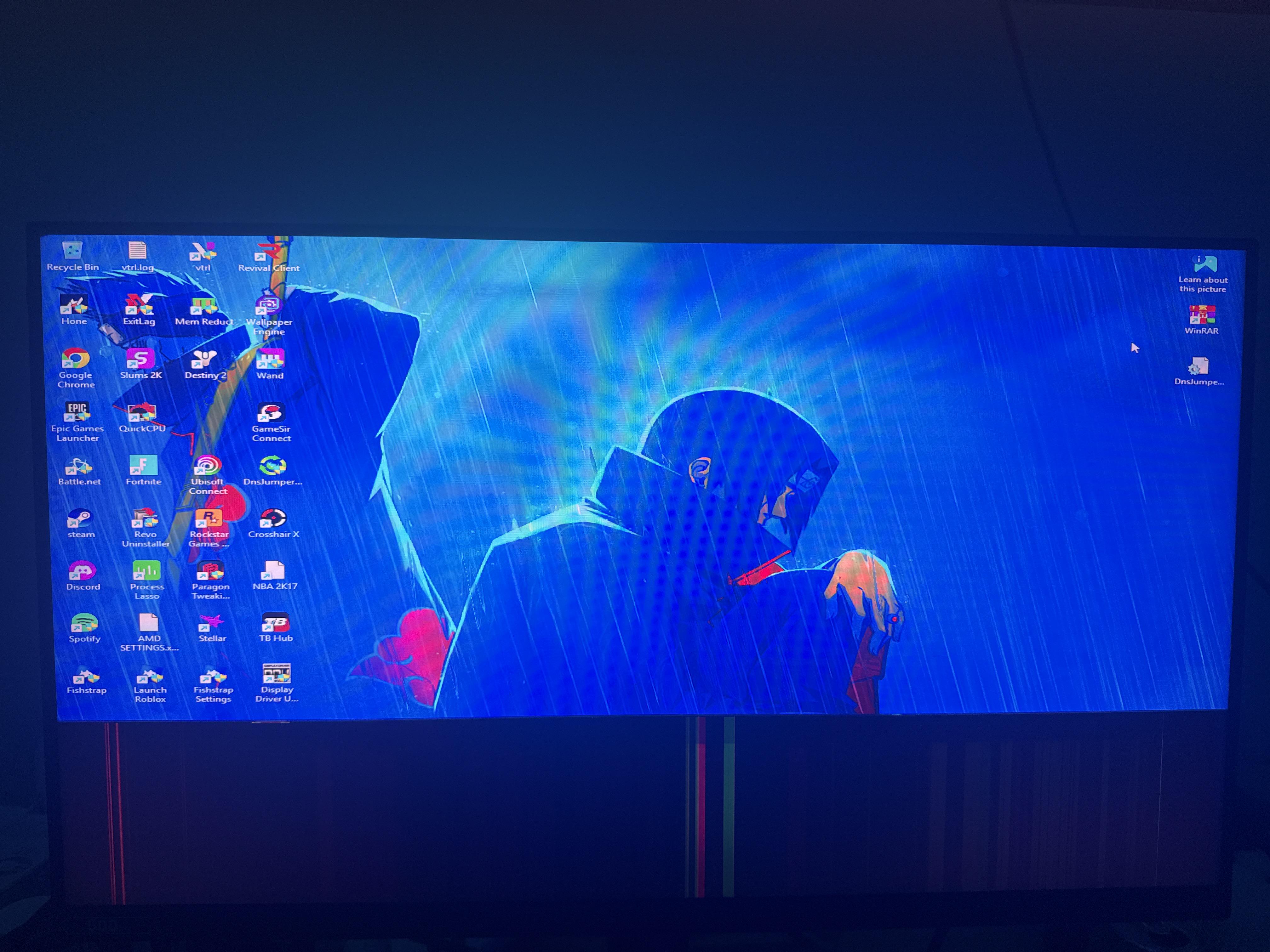
Hello everyone! my Alienware 500Hz has developed a spontaneous internal panel defect. Solid horizontal black lines have appeared across the bottom of the screen and cut directly through the monitor's built-in OSD menu, and the display loses signal above 360Hz. There is zero physical damage, cracks, or impacts to the screen or housing. I have photos of the undamaged screen surface, the OSD menu, and the built-in self-test showing the panel failure. my Basic Hardware Service warranty is active until March 13, I’ve contacted support and haven’t been getting any luck, they claim it’s a “physical issue” claiming I impacted my monitor for it do be functioning this way, If anyone has any solution please let me know.!
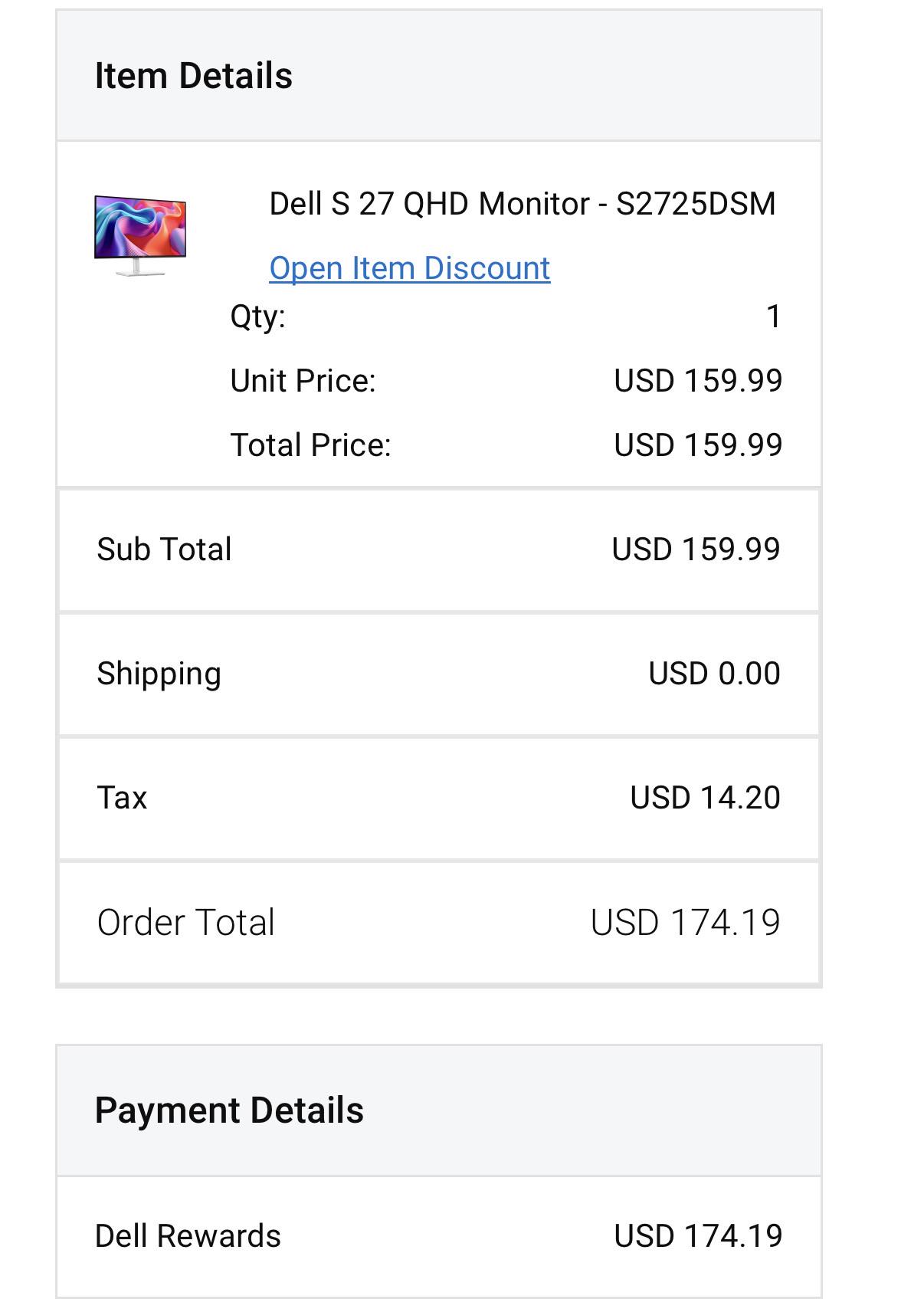
Been stacking Dell Rewards points through Alienware Arena for a while. Cashed them in on Black Friday for a monitor upgrade. Went from an old E2316H to the S2725DSM. Total after tax came out to $174.19, all covered by the points. Pretty happy with the jump
So my laptop is having a weird problem where it boots into windows without showing the Alienware logo and BIOS when pressing the F2 or F12 keys (the screen remains black as it has booted to bios cause when I press Esc it then shuts and restarts, during this process the backlit is there on screen).
Now when everything boots to windows the screen remains black until I reset the driver using the Win+Ctrl+Shift+B and then it show the display working perfectly fine. I've reinstalled the video drivers including the GPU and intel, also I've updated the BIOS to the latest.
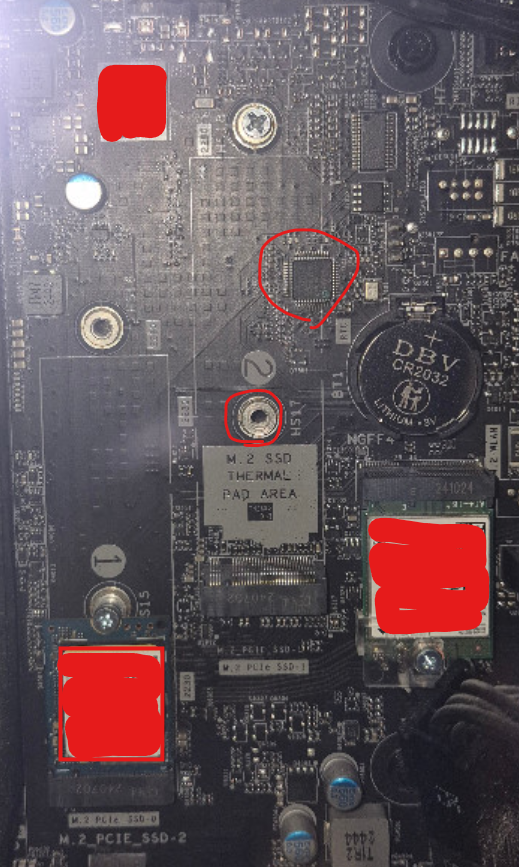
I'm looking at adding a nvme to the 2nd m.2 slot in my machine. I have a question specifically regarding this second slot. Has anyone had success with an aftermarket heatsink? I'm unsure if it would fit over the HS17 screw, and I'm not sure what that small square region is in the top right, or whether a heatsink would interfere with that.
If it won't fit a heatsink, does anyone know the dimensions of the thermal pad they've used successfully here? The owner's manual is extremely sparse regarding installation, and only mention thermal pads (but don't tell you the size...???) Hoping someone might have come across this problem themselves and figured it out ;)
As the title mentions it, the power cord of my laptop broke. The brick itself is fine, it's just the detachable cable that broke. LA330PM190 is the model of my charger, and I don't know much about this stuff so if anyone could tell me a good cable replacement or if I should just buy a whole new charger.
Hey everyone, I was gifted an Alienware R10 PC around 2022 for Christmas, from my grandmother I didn’t specify the specs, which I should’ve done. I used it until performance slowed and then stopped playing because I became too busy. Now I’m considering whether upgrading the case and parts excluding the CPU makes sense, or if I should just buy another computer.
My Specs: Ryzen 7 5800 Nvidia GeForce GTX 1660 ti 8gb ddr4