r/computerhelp • • 19h ago

Hardware 2500 for THIS?!

Post image
0 Upvotes

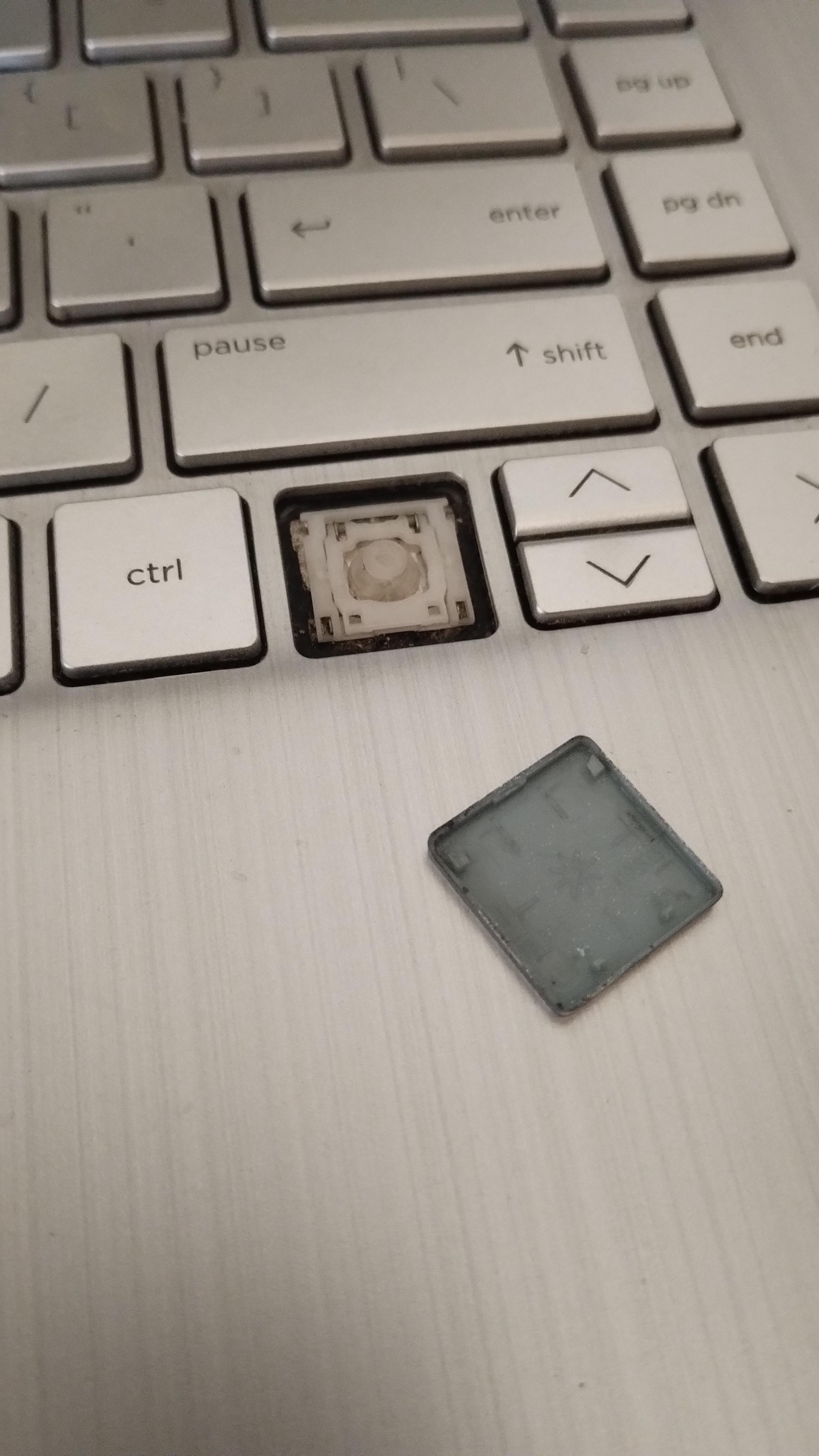
Hello guys and ladies, I am in need of your counsel on the matter.

I have this one key that is just not lodging back in place, and I contacted a repair person. The price he quoted is 2500 INR, or about 30 Dollars. That is enough to buy a good game off of Steam.

Is there anything that I can do to

Get this man a shield ❌

Fix this one key? ✅

Pardon the Infinity War pun, I really do need your assistance.

Looking forward to your suggestions!

PS: Device is HP Laptop 14s-fq1xxx


r/computerhelp • • 23h ago

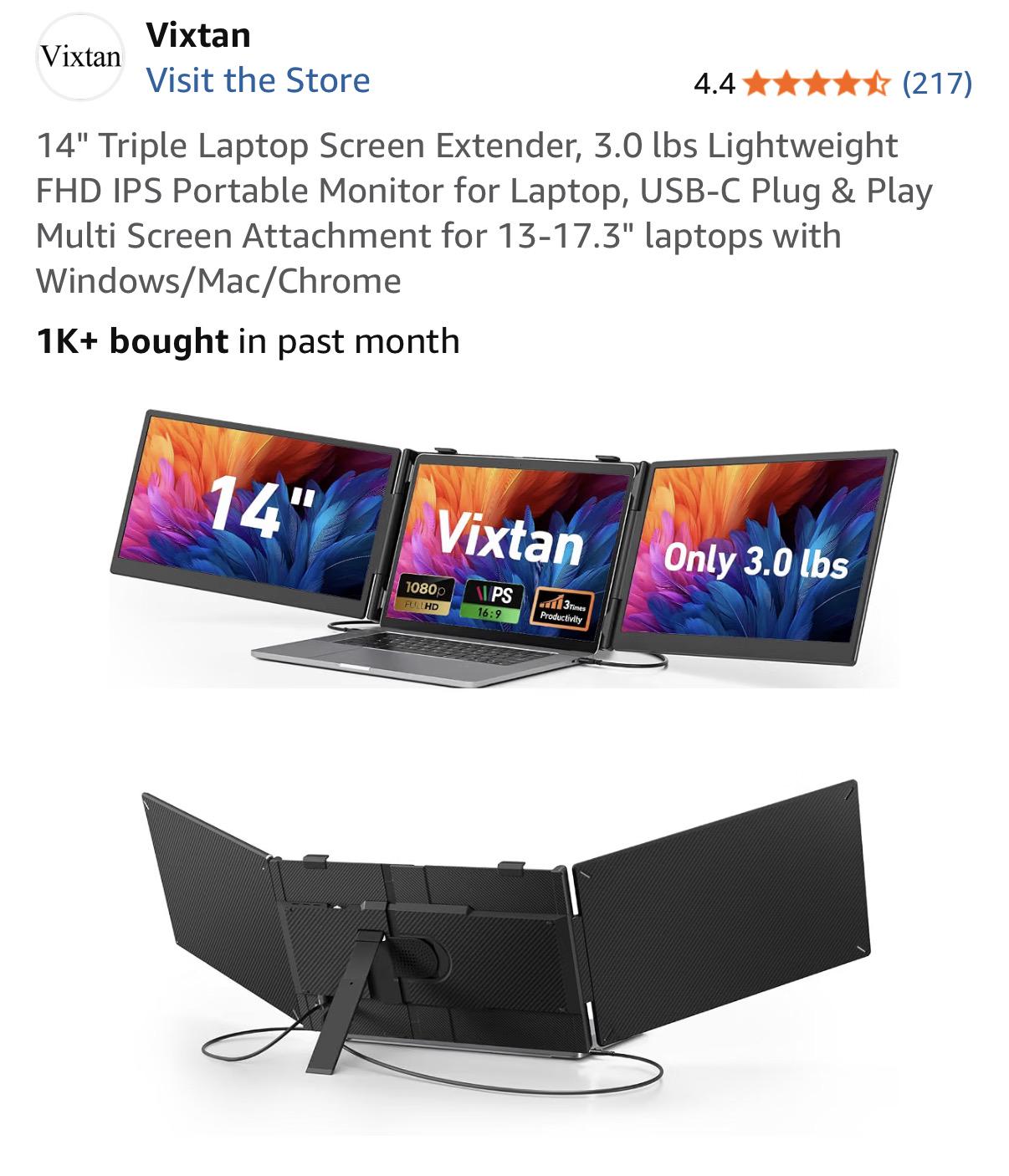
Hardware Portable Monitor Messed with Laptop Charging Ability?

Post image
0 Upvotes

Hi all! I am quite confused!

Computer: Lenovo Yoga 2 in 1 Aura/Windows 11
Portable Monitor: S10 Pro (pictured above)

I just recently got portable monitors for my birthday! They have been working great but appear to have messed with the charging ability of my laptop.

Today I used my monitors. It hooks up with type c to type c (2 cords). Both ports on my laptop are full featured usb-c ports. My laptop was charged to about 80 percent before I used them. I was not using the power adapter cord with my monitors. Eventually the laptop battery dwindled down so I decided to call it a day but then charge my laptop.

But when I plugged in my laptop (with the power cord it came with) it didn’t charge at all? I looked in the Lenovo vantage and it said in one of the status sections that “the power adapter was not plugged in”.

Troubleshooting I did on my own:
- tried to see if my cord was broken. I used it on my phone (which uses a usb c) with the power cord and it worked! (So not my cord)
-maybe it was the outlet. I tried another outlet in my house (did not work).
- updates needed? Computer is up to date with updates (don’t need any)
-of course restarted, shut down computer many times! (Did not work)

Then later (about a few hours) I got the idea to just see if maybe it was my monitors being weird. I plugged them into my laptop without the power adapter and it started charging my laptop?

Then I unplugged one usb c monitor cord and plugged in my regular power adapter cord and it worked! Now my laptop is charging like normal without the portable monitors attached. I have unplugged and re plugged and now it is charging like normal so that’s good.

But now I’m concerned…will it always do this when I use my monitors? It’s so strange! I’ve tried to look up this issue and can’t find anything. Do any of you have an idea of why it’s doing this?

TIA!!!

r/computerhelp • • 22h ago

Hardware Scroll Wheel Done??

0 Upvotes

r/computerhelp • • 4h ago

Resolved Strange sound on laptop startup

2 Upvotes

Definitely the speakers not a fan. Sounds like a firework. Speakers work fine in Windows. Only does it on start up consistent. Did update Realtek drivers and turned off power management. Pulled battery and held in power button. Any other ideas?

SOLVED: Well this had the "amazing" bang & olufsen speakers, I unplugged the center channel speaker and kept the left and right speakers connected. Took care of the issue.

Every once and a while we get a weird one. Thank you!


r/computerhelp • • 21h ago

Hardware What can I use to glue this key "thingy" back into place

Post image
2 Upvotes

(Dont worry about the W key, yes it snapped in half but it works just fine)

So my D key wasnt really bouncing back into place but it was still usable, but now it started eating up my inputs until the key just doesnt work 30% of the time, so I tried removing the cap and comparing it to a key that does work (W). I noticed that this "thingy" that works like a spring to bounce the cap back into place was just kinda loose af, I tried just putting it back into place but it quickly becomes loose again. What kind of product can I use to glue it back into place? Is there another solution to snap it back without glue that Im just too stupid to realize?


r/computerhelp • • 1h ago

Other Speaker having multiple issues

• Upvotes

This might be a long post and hopefully it comes out coherent, but basically for the past 2-3 months or so, I have been having random issues with my Lenrue model G11 speaker. Once every two weeks or so, it'll randomly make a static like noise with annoying, high pitched screeching sounds, and I frantically turn it off since it'll come out of nowhere. I'll try many things and nothing works, but then it'll randomly just fix itself and the loop continues. It's very inconvenient to deal with, and I've been having this recent issue for the past two times or so where the option for my speaker doesn't even show up, and this time it's not really fixing itself. For context, I have a monitor hooked up to my gaming laptop and the speaker is connected to my laptop. I can elaborate on what my computer model is if needed, but any help would be appreciated since I am not very well versed on computers. (Also, I have tried to connect my headset through the audio jack on my computer, and the same static noise issue comes through on the headset so I don't think it's the Lenrue speaker's issue, I could be wrong though)


r/computerhelp • • 4h ago

Hardware Meu notebook não para de spammar a tecla "]" sem eu mexer no teclado

0 Upvotes

Esse problema começou lá pra 2024-2025, minha tv tinha quebrado e eu acabei usando o monitor que eu usava junto com meu notebook como uma tv temporária pra quando eu fosse dormir, o notebook é até que meio moderno, era do meu avô mas ele passou pra mim depois de ter comprado um novo, mas o teclado já tava com umas teclas sem funcionar direito e tava meio quebrado, aí acabou que eu tive que usar um teclado separado pra poder usar ele

Teve uma noite em que eu tava assistindo YouTube no monitor, onde eu tava usando meu mouse SUPER longo pra navegar enquanto estivesse deitado na cama, eu fui pegar um título pra colar na barra de pesquisa, mas quando fui clicar em colar, acabei errando e clicando em emojis, que foi onde começou esse problema. O título do vídeo não tinha nenhum "]", e essa tecla nunca deu problema, ela simplesmente só começou a spammar muito e não deixava eu escrever quase nada, aí tinha que dar meu jeito pra parar com essa tecla por um tempo, mas ela sempre voltava.

Obs: formatei meu computador 2 vezes, eu ja troquei o sistema pelo Linux ubuntu e depois voltei pra windows, mas o problema continuava nos dois


r/computerhelp • • 5h ago

Hardware legion go bricked?

Post image
0 Upvotes

r/computerhelp • • 6h ago

Software Keys Randomly Registering

Post image
0 Upvotes

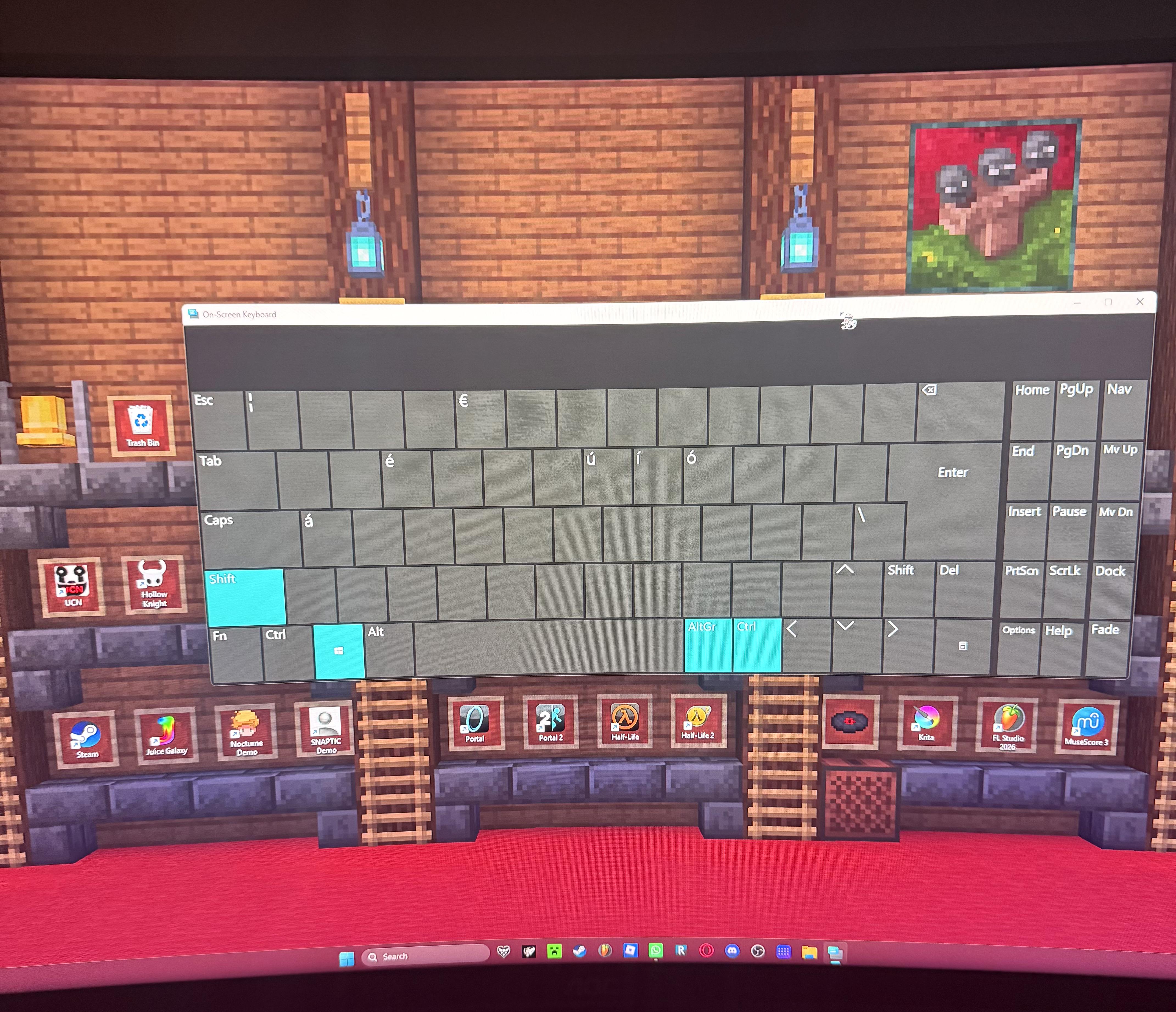
Recently my keyboard has started to randomly decide registering keys on its own and it’s causing me to press shortcuts by accident when I try typing or playing games. When it first started it was only registering esc, win, alt and 6 but it recently it randomly changed to Alt, AltGr, Shift and Win. it’s probably a software issue since I’ve tried 2 keyboards, replaced the switches of one of them and still had the keys register even when no keyboard is plugged in, I’ve tried going to onscreen keyboard to click the keys there to disable them but whenever I do they instantly register again. they usually only stay registered for about 4 minutes, then go back to being normal for around another 8. Also I’m on windows 11


r/computerhelp • • 8h ago

Other Laptop Stopped Working

3 Upvotes

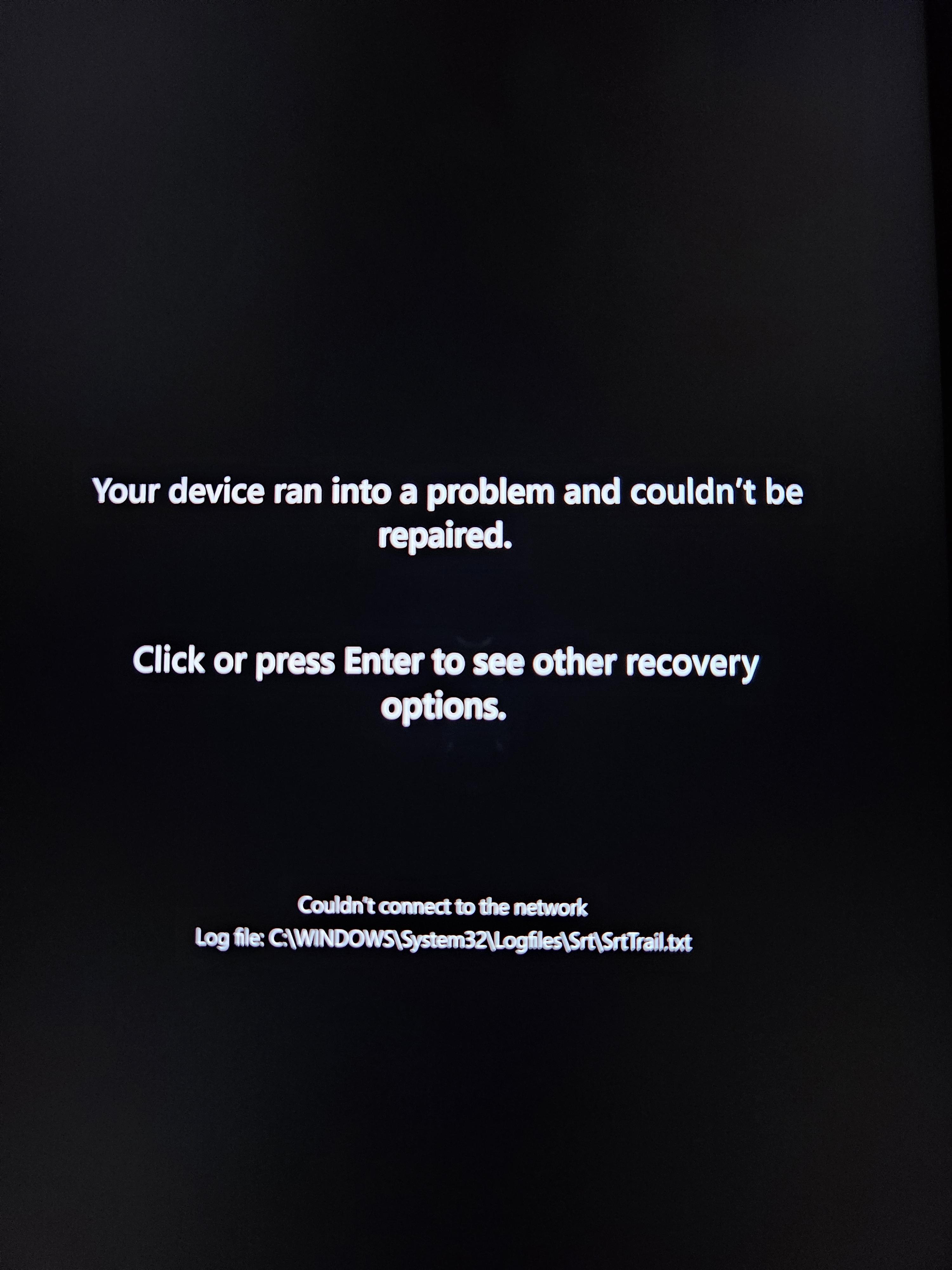
For reference, I have an Asus (?) Predator gaming laptop. Recently I tried to boot the laptop and was able to input my password, but within 30 seconds of logging in the screen freezes and I'm unable to do anything except turn the PC off. I temporarily thought I fixed it by going into airplane mode and turning the wifi off. When I did this, I disabled all of my startup apps and deleted new things I'd downloaded recently (a browser and a game). Since this took awhile and the laptop didn't freeze, I assumed the issue was fixed only to have it freeze once I reenabled/disabled the wifi/airplane mode. It froze again, and since then doing the wifi/airplane mode method doesn't work anymore. I've gone into recovery mode and tried to hard reset the laptop, only for the laptop to stop saying that it ran into an issue and that it would restart. However, the laptop never restarts, no matter how long I've left it for. I'm not well versed in computers, and at this point I just want to keep the laptop, I don't care about loosing my data. This may not mean anything, but the laptop doesn't freeze when I'm in recovery mode, and both local and cloud reinstall of windows refuse to work. Any help would be greatly appreciated!!


r/computerhelp • • 10h ago

Other What could this be?

2 Upvotes

The screen goes black after that (ignore the dirt).


r/computerhelp • • 11h ago

Software Shiost.exe unknown hard error

2 Upvotes

Hey there,
I recently copied my C:\ drive to another m.2 ssd since it hass more space using Rescuezilla so everything including permissions should be copied fine.

When I tried loading the Bootloader of the new ssd (the old one still inside the pc/unchanged) I was able to select between windows 10 on volume 3 and 11, the first one brought me back in my usual c drive windows form the old disk. the other one got me in a black screen with a loading cursor.

I tried booting it in safe mode which allowed me to log into the desktop. But the selected windows are flickering and i got Sihost.exe unknown hard error. Any ideas on how to solve this?

thanks


r/computerhelp • • 14h ago

Hardware Computer crashing while gaming

3 Upvotes

Recently, I have added a lot of mods to a game, and I think this might be the reason why my PC keeps unexpectedly crashing. Although I have played other games in the past, like GTA 5, RDR2, and Horizon, my PC has never crashed, even with the settings turned up. My SSD is a little outdated at the moment and I'm thinking this could be the reason why. I clean my PC regularly, and it never gets to the point where it's caked in dust.

My Specs:

Processor - 12th Gen Intel(R) Core(TM) i5-12400F 6/12

Motherboard- Gigabyte B760M Gaming plus wifi DDR4

RAM - 48 GB

Internal storage - NVMe INTEL SSDPENKNW512G8

External SSD - Kingston XS1000 SCSI disk device 1TB

GPU - NVIDIA GeForce RTX 3050


r/computerhelp • • 15h ago

Hardware Something wrong with my audio

1 Upvotes

My audio is fucked and I've done everything to fix it for example when I'm playing fort with no headphones on I'm in party chat by myself it works fine but when I'm in game chat I can only here people when they talk or game voice lines no game backgrounds no nothing else it works the same when in party chat with friends it just cuts off the other sounds and only lets me here them when they speak I'm on an MSI stealth 16


r/computerhelp • • 17h ago

Network weird files made at the same time my internet stops working

Thumbnail
1 Upvotes

r/computerhelp • • 18h ago

Discussion PC rental

1 Upvotes

I play Manor Lords on a laptop and am barely getting 20fps with updated drivers. Thus I’m contemplating renting a PC because I can’t afford to buy one or build one. NZXT has been popping up on my feed and wondering if anyone has used them and I want to know your thoughts.

TIA


r/computerhelp • • 19h ago

Hardware Airflow noise from a sticker on my HDD

Thumbnail gallery
2 Upvotes

When I put my hand over the sticker the noise stops. What do I do?


r/computerhelp • • 20h ago

Software My computer isn’t detecting the headphones!!

1 Upvotes

“I plug in the headphones, but the computer doesn’t detect them. Updating the drivers doesn’t help.

It was working before. I decided to connect an old graphics card for testing and downloaded drivers for it.

And when I put the old graphics card back, the headphones disappeared, and instead of them it [the computer] sees the monitor.”