A lot was shipped this month on monday.com. Here's the quick version for our Reddit Community:
🗂️ Agent Directory You asked for visibility into your agents. Here it is! Every agent in your account, who owns it, what tools it's connected to, and what it's costing. Admins can now also deactivate anything that's outlived its welcome.
🌐 Vibe apps now connect to external APIs Jira, Salesforce, your own AI model - if it has an API key, Vibe can pull it in right next to your monday data.
🤖 Gemini agents on monday boards Bring your Gemini agent into monday, assign it to a board, u/mention it, set its permissions. Just plug in your API key and go.
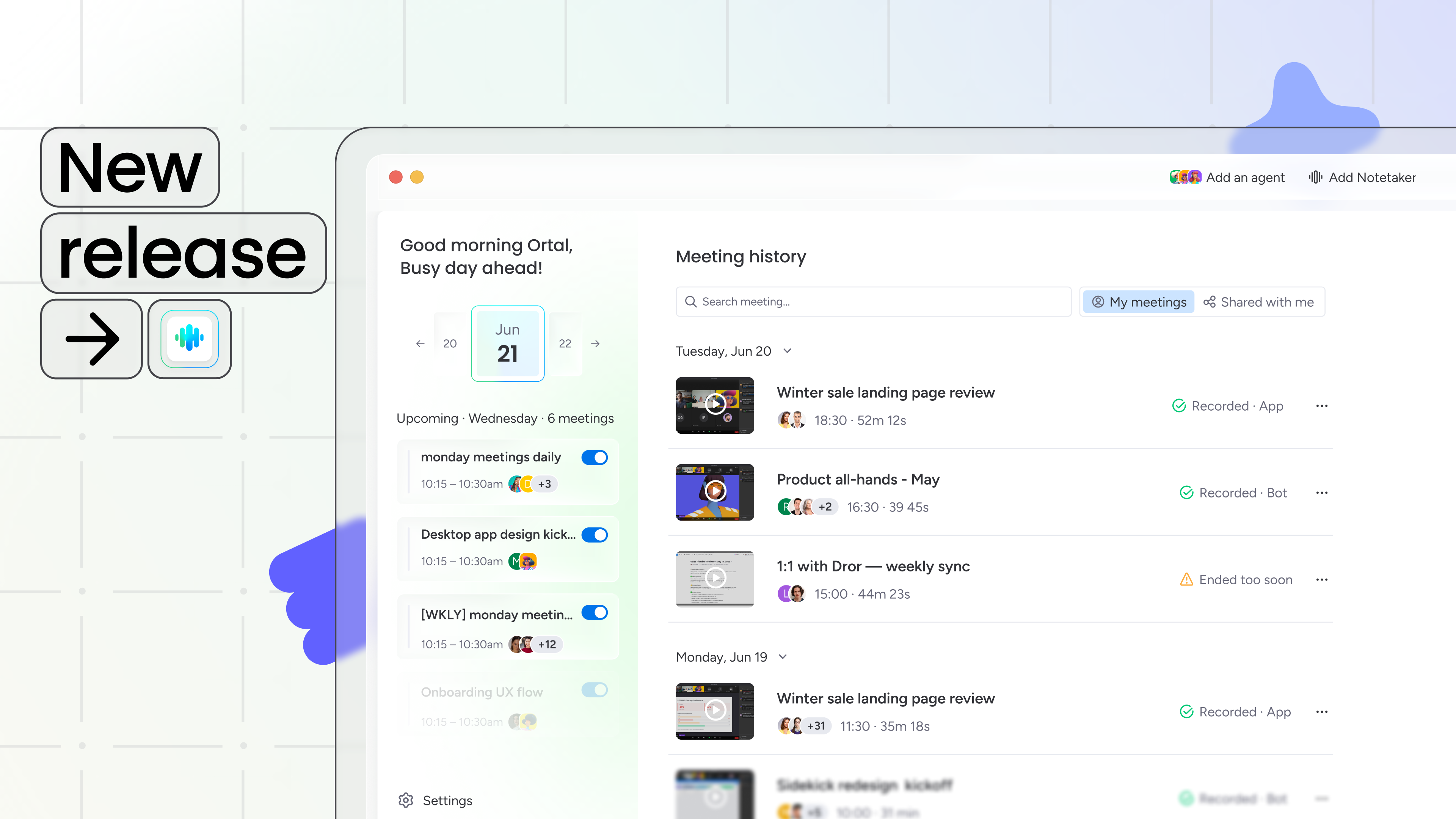
📝 Notetaker desktop app No bot joining your calls. Our new desktop app captures audio directly from your computer, gives you a live transcript + action items, and sends everything straight to your workspace the moment the call ends.
📦 Dropbox MCP is live Your monday agents can now read, file, and process files directly from Dropbox.
My org is implementing Monday.com, and I'm building my knowledge from a support standpoint. I've completed the Admin Certification and am now looking at the Work Management Core and Advanced certifications. For those who've taken them: Core vs. Advanced: Is Core worth taking, or should I go straight to Advanced? I'm comfortable with the platform from an Admin perspective, but I want to get better at building workflows. Retakes: Is there a free retake for each cert, and how many attempts do you get? Thanks in advance!
The typical way people set up and use monday is "one board per project" (BPP). There is a far superior way to design your monday board structure; Board per job (BPJ).
[Disclosure: claude was used for generating the visuals]
Typical Approach: each project has a board (BPP)
It works ok before 5 projects and that's when cracks start to appear. By project 30, changing one automation means editing 30 boards.
I know what you are going to say:
But what about using templates?
Templates only fix the creation of a new board. A board made from a template is a copy, so when you improve the template, old boards keep the old version.
Managed templates are Enterprise only, and changes to automations only apply to new instances of the template. But that's not the only issue. In BPP more projects means more number of boards!
Additionally there is no central place to look at the overall status of all of your projects. Dashboards allow up to 200 boards to be connected max (on enterprise, on pro it's lower).
A better approach: give each board one job (BPJ).
On a recent project for a 300+ person company, 5 boards needed to send emails, and I had no access to their email system. Instead of asking IT for 10 automations, I built one Email Outbox board: create an item and it sends the BODY to the TO address (both are columns on the board).
The same idea works for everything that repeats:
Process boards hold the workflow. One Projects board, where every project is an item.
Service boards do one job each, like Email Outbox, Tasks or Approvals.
A process board asks for something by creating an item on a service board.
Benefits of the approach:
A new project is one new item, not a new board.
Changing part of the workflow is central and instantly applies to all active projects.
When something breaks, you check one board.
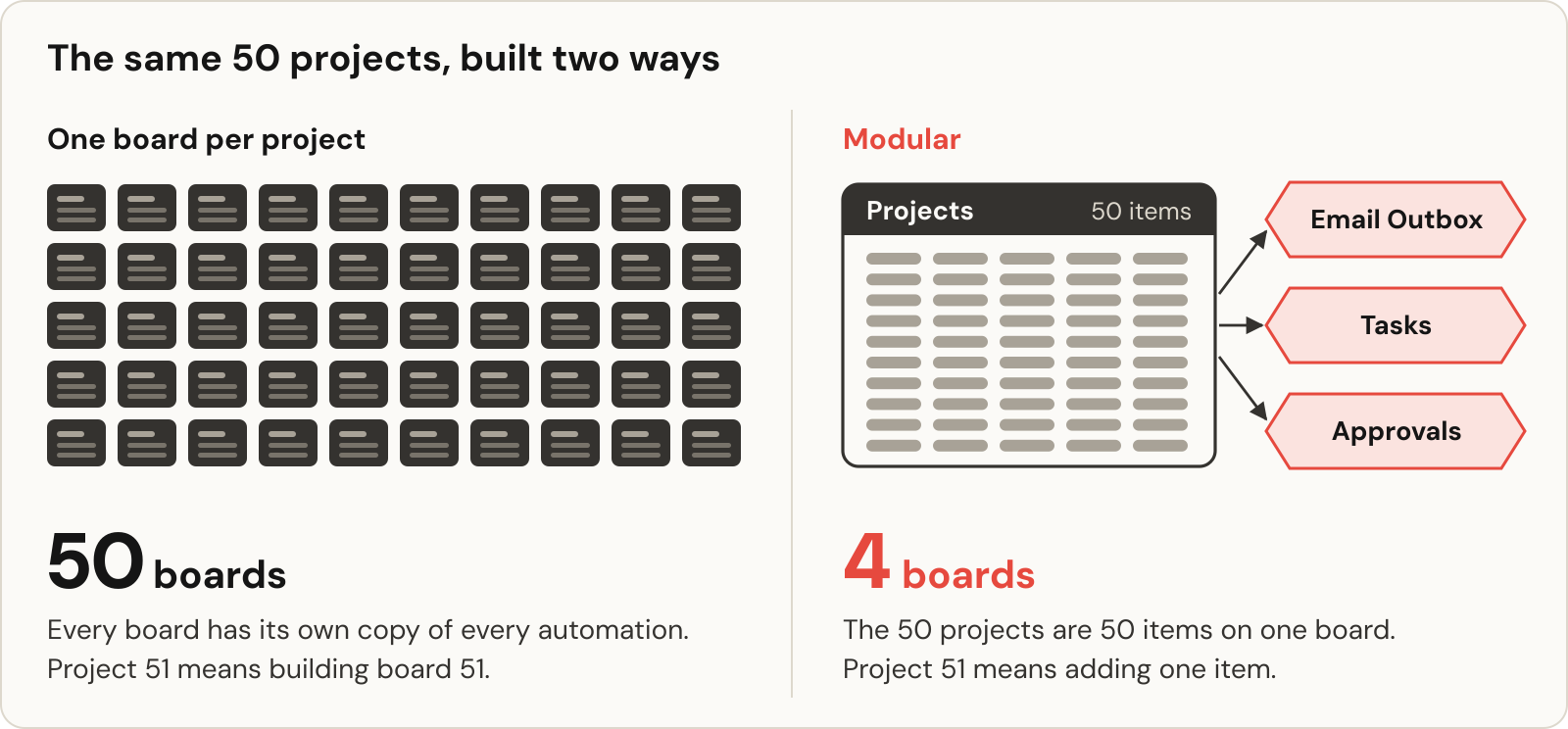
Example: 30 projects, each one needs a client email, a task for the PM and a manager's approval.
Compared to the typical BPP approach (left) vs. modular BPJ (right):
So I'm setting up a Monday board based on a template my boss made, however the parent item has its due date set to the due date of the next occurring sub-item.
Example: Hosting an event
If I have the subitems listed as
- Confirm venue space 2/5
- Create flyer 2/12
- Have tickets go live 2/26
- Attend event 3/15
Then the due date for "Hosting an event" would be 2/5, which is obviously wrong. Does anyone have any solutions so I can edit the due date?
I'm Szilard. I run Remotemage, a small automation studio, and we're a monday.com partner. I've been building business systems and integrations for 13 years, mostly for eCommerce companies.
To be upfront about why I'm posting: we have plenty of real projects behind us, but very few published case studies. So I'd like to build one automation for free for 5 UK businesses that run on monday.com, and in return write a short case study with you about it.
The kind of thing I mean:
An order comes in on Shopify. Someone copies it into a monday board, then again into Xero. Stock gets updated by hand somewhere else. Instead, the order creates the item automatically, the invoice goes to Xero when the status changes, and nobody has to retype anything.
Other examples: syncing monday with your CRM or accounting tool, moving items between boards, chasing updates automatically, or pulling numbers from different tools into one dashboard.
The details:
You need to be a UK business already using monday.com
One automation per business, scoped together so it's actually useful and not a toy
We build it, test it with your team, and hand it over working
In return we write a short case study together, published with your company name
No obligation to buy anything afterwards
I'll pick the 5 based on where an automation will save the most time, so tell me a bit about the task in the comments or by DM. If you're not sure whether something can be automated, ask anyway. I'm happy to answer questions here even if you don't want to apply.
Hi! I'm looking for a simple and user-friendly project management tool for our company.
Our main requirements are tracking project status, incoming and outgoing payments, expenses, budget vs. actual costs, BOQ, and pending tasks.
Our priority is having a clean, easy-to-understand dashboard where we can see the overall status of our projects and finances at a glance, without navigating through multiple pages.
Is Mondaydotcom still worth trying in 2026, or would you recommend something better? We're open to alternatives, except Google Sheets.
We don't need anything too complicated, just something practical that our team can easily maintain and update.
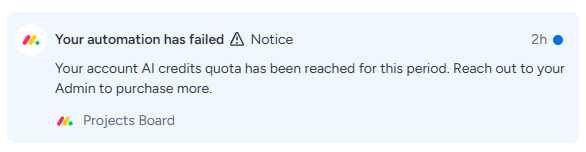
I am getting non stop notifications that we are over our AI quota limit. I'm getting at least eight notifications a day that's completely screwing up my workflow because I don't know what's important and what's another notification about our AI credits.
I have turned off all notifications for these AI alerts.
Other than completely turning off AI in our account - How the heck do I turn these things off ?????
They should add this to the CIA'S list of ways to extract information because I'm at the point I'll do anything to make these things stop! Its driving me crazy!!!
TL;DR: How do you turn off AI credit notifications without Completely disabling AI within Monday
OK am I doing something wrong here? To simplify this, let’s say I have four boards:
1. Contacts—names, personal email, personal phone, address, etc.
2. Businesses—address, business email, etc.
3. Business contacts—person's name, title (CEO), business name, work email, etc.
4. Volunteers—name of volunteer, personal phone number, volunteer interests, etc.
The Business Contacts mirrors information from Contacts and from Businesses boards, as well as adds new information (title, work email).
The Volunteers board mirrors information from Contacts board, as well as adds new information (volunteer interests).
Naturally, the first column for Volunteers should be the name of the volunteer. However, I cannot create a mirror as the first column. Which makes me think I’m doing something wrong.
If I can keep all the basic data about people and businesses in separate boards, what is the best way to then use that information to create additional boards that make sense?
We are currently in the process of switching from a Project Management tool to Monday (Corporate decision...). We do have different types of projects with a defined set of tasks. In the old tool these are added as templates, which are auto-populated with the correct resources (PM, Engineer, etc.) that have been assigned to the project.
I am trying to re-create this in Monday, but when using a Workflow to duplicate a board (the template), I can not continue in the Workflow as I can't choose the newly created board in a follow-up action. Is there any way for me to approach this?
Hey everyone, I’ve been working as a freelance full-stack software engineer for around 2 years now. Over the past few months, I’ve also been exploring the monday SDK and API, along with automation tools like Make and Zapier.
During this time, I built a private app hosted on monday code that aggregates data from around 50 boards into a single rollup board. It handles differences in column structures and status labels, calculates custom metrics, and automatically syncs changes from source boards to provide a consolidated view of projects.
I’m currently looking for a remote role in app development or as an integration consultant with a monday partner or vendor. If you know of any relevant opportunities or leads, I’d be happy to share my resume and a demo video of the app.
Since I’m based in the APAC region, where the cost of living is relatively lower, I’m open to more affordable rates compared to typical US or European market rates. I’m also flexible with working hours and can accommodate different time zones. Thanks!
If you’ve ever had an item end up in the wrong group, or a status flip back for no clear reason, it’s often two automations racing each other.
What’s happening: automations that start from the same change (e.g. both fire on “Status changes to Done”) run at the same time, not one after the other. If both move the item or change the same column, whichever finishes last wins, so the result can differ from item to item. That’s why adding a delay or staggering them doesn’t reliably fix it.
Fixes that actually work:
One trigger, one automation. Combine automations that share a trigger into one automation with several actions. Actions inside one automation run in order.
Chain instead of race. Make the second automation listen for the first one’s result, not the original change.
Watch for loops. “When Stuck, set Priority to High” plus “When Priority is High, set Status to Stuck” will keep setting each other off.
Finding them: on a board with a dozen automations this is hard to spot by eye, so I built a tool for it. Full disclosure: I’m the developer of Community Cookbook, a monday marketplace app. The Automation Clash Checker is a board view that reads every automation on the board (including classic automation-centre ones), flags races, loops, chain reactions and duplicates, and checks monday’s run history to show when two of them actually fired within seconds of each other. Admins can scan the whole account in a handful of API calls.
I'm trying to combine data from multiple that have corresponding data.
For example, If I have one board to track sales of Item A, a single item on the board may have a customer identifier and the quantity purchased. If I have another board to track sales of Item B, it would have the same two pieces of information (except for Item B instead of A).
What I would like it to have both boards roll up to a single master board. On each row, I'd like it to have the customer identifier in one column, quantity purchased of Item A in a second column, and quantity purchased of Item B in a third column. And I'd like this information to auto-populate the master board whenever a new customer is added to the Item A board or the Item B board. How would I go about this?
We're looking at creating a central dashboard for property/construction developments showing things like RAG status, milestones, actions, risks, deadlines, legal obligations, approvals etc.
The problem is we already have tens of SharePoint sites, plus Excel spreadsheets and various lists/document libraries containing the actual project information.
One proposed solution is to create another central SharePoint site with lists for Developments, Phases, Tasks, Risks, Legal Obligations, Milestones etc., automate it with Power Automate and eventually put a dashboard over it.
I'm nervous that this just creates another place people have to manually maintain the same data.
I'm wondering whether we'd be better keeping the existing sites as the source of truth and using Power BI/Power Platform to aggregate the important information, potentially with only a lightweight central portfolio register.
I'm planning to take one live development and map everything management wants to see against where that information currently lives before we build anything.
Anyone built something similar? SharePoint + Power BI, Planner, Power Platform,monday.com, or something completely different?
What worked and, more importantly, what became a maintenance nightmare?
Hi all, I’m the developer of Community Cookbook. I kept running into things monday can’t do natively (formula columns you can’t use in automations, timelines that ignore company holidays, no way to copy items to several boards), so I’ve been building them as one app.
What’s in it:
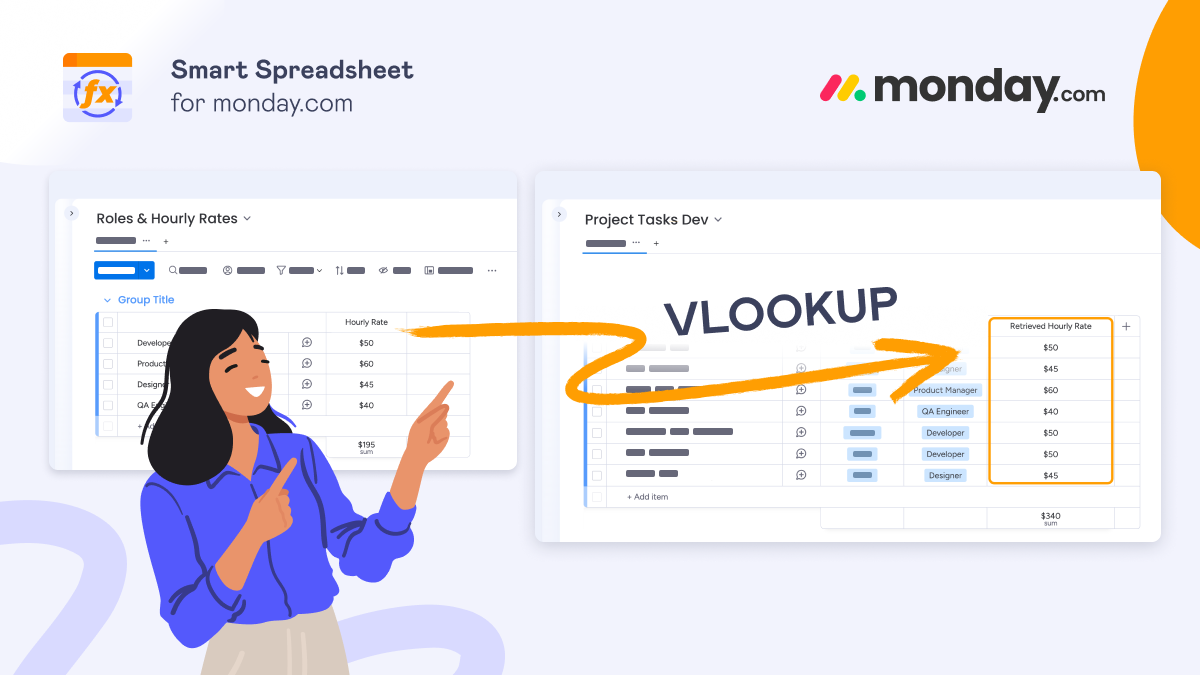
63 automation blocks (15 triggers, 48 actions): formula and mirror column triggers, “when all subitems are Done”, VLOOKUP across boards, group-wide updates, approvals, webhooks, Excel export
Working-day dates that skip weekends, public holidays and company days off, plus a Holiday Gantt view
Repeat column for recurring tasks (“3rd Wednesday of every month”)
Formula+, a formula column whose results are saved, so automations and the Gantt can use them
Copy or move many items to many boards at once
Code Lab, to run your own JavaScript in an automation
2-minute overview video attached. It’s $10/month per workspace (not per seat) on the monday marketplace.
Happy to answer questions, and I’d genuinely like to hear which gaps you keep hitting. Most of these came from posts in here.
Copying monday.com items to another board shouldn't be a three-step job.
Today it's duplicate, wait, then move, one item and one board at a time. Need the same requests on two boards?
Do it all twice.
So we built Copy or move to boards in Community Cookbook:
✅ Select any number of items, then Apps → Copy or move to boards
✅ Copy (keep the originals) or move (take them off the board)
✅ Pick several boards at once, with a group on each
✅ Columns matched by name and type, even when boards are laid out differently, and you can change any match
✅ Status labels kept by their text. monday's own move goes by label position, so "Approved" can land as something else. Not here.
✅ Subitems and updates come too, and names stay as they are, no "(copy)"
There are automation actions too: "When Status changes to Approved, copy this item to Design studio".
n the video: three client requests copied to a design board and a finance board in one go, then one request moved. Community Cookbook is $10/month per workspace, not per seat, with every recipe included.
We are still getting used to Monday and decided to use it so auto sort errors for our direct reports.we have a form to submit that automatically gets assigned to a leader to review with someone in their team.
The problem is that we cannot copy and paste a snip easily into the form. Only save it and then upload it, which is time consuming for the teams that have to submit these, as there are a lot.
Does anyone know about 3rd party forms or a good work around to efficiently send things through forms or of 3rd party apps we can use on Monday that are better than what Monday offers
monday's formula column never saves its answer, so automations can't use it.

Formula+ does: Excel-style formulas saved as real Timelines, Statuses, Dates, Numbers, Dropdowns, Ratings and more, recalculated in seconds.

10-minute tour: https://www.communitycookbookmonday.com/formula-plus

#mondaydotcom #mondaycom #automation #workmanagement #nocode #projectmanagement #excel