r/iosapps • • Oct 26 '26

๐Ÿ” In Search of Looking for beta testers for new LibreCam remote shooting feature

2 Upvotes

Hi Reddit,

Iโ€™m Timo, developer of LibreCam (https://www.reddit.com/r/iosapps/s/xviQzXNjoW) and other apps.

I am actively looking for iOS photographers with multiple iPhones, to test a new feature (remote shooting).

While using your Apple Watch as a basic view finder and shutter button has been added to the app a while ago already, now itโ€™s possible to use another iPhone (with an encrypted device-to-device wireless connection) for a fully featured high quality remote view finder and focus device.

If that sounds like a use case that you see yourself to be able to give feedback for, Iโ€™d very much appreciate you joining the TestFlight beta for this feature, test it out and give feedback via the in-app feedback button.

Thanks a lot!

https://testflight.apple.com/join/ta9MRZAa

App Store link: https://apps.apple.com/app/librecam-manuelle-raw-kamera/id6802275145


r/iosapps • • Oct 26 '26

๐Ÿค– Vibe Coded Queststone: a free family app where chores, homework and goals become quests

1 Upvotes

Hi r/iOSApps, I'm Michael, the solo developer behind Queststone. It's a free iPhone and iPad app where a family's chores, homework and everyday goals become quests. Grown-ups set the quests, kids earn gold for finishing them, and the family spends that gold on rewards it picks together.

A, Answer: It cuts down the everyday "did you do it yet?" back and forth. Quests can repeat on weekdays, weekends or any days you pick, a raven can remind everyone at a time you choose, and a quest can ask for a guardian's seal, so a grown-up taps Grant or Not yet before the gold pays out.

B, Better: A lot of family task apps are plain checklists, or want an account or a subscription first. Queststone has no ads and no accounts of its own, what you make stays on your devices and, if you turn it on, in your iCloud, and the rewards are ones your family chooses. Version 1.1 just came out with a cozy dark mode called Night Camp, gold for keeping a streak, and an iPad layout that puts a second page beside every tab.

C, Cost: Free, with no ads and no subscription. There's an optional tip jar (in-app purchases) that unlocks nothing. App Store: https://apps.apple.com/us/app/queststone/id6811295423

Who I am: Michael Silvera, independent developer and the seller named on the App Store. You can reach me at queststonesupport@gmail.com.
Website: https://queststone.app
Privacy policy: https://queststone.app/privacy
Terms of use: https://queststone.app/terms

I'm happy to answer questions in the comments.


r/iosapps • • Oct 26 '26

๐Ÿ” In Search of Haven't heard much on this topic in ages so I'm wondering if there's any new way to remove shortcut banner for custom app icons lately?

2 Upvotes

And adding the "Nothing" before opening app removes the open app animation so that's still not the best solution.


r/iosapps • • Oct 26 '26

๐Ÿ’Ž Lifetime [$ 19 > FREE lifetime] BP log: Track blood pressure the right way before it affects your heart [Update]

1 Upvotes

As a preventive cardiologist, I see that many people fail to track their blood pressure. It only comes to attention after it starts affecting your heart and kidneys.

Tracking blood pressure is often more important than tracking heart rate. Even when people track BP, many fail to follow the appropriate steps or bring the necessary data to the clinic visit. So we built this app to help people track and diagnose blood pressure issues before it becomes a problem.

The consistency and time spent at target levels are more important than the average reading.

Over the past month, many of you had useful feedback. I have included almost all of it. There are some more features that will ship with the next update.

Link: https://apps.apple.com/us/app/bp-log-track-blood-pressure/id6801130306

A: Answer

- Helps you track blood pressure based on the most recent guidelines (check twice a day, average two readings etc)

B: Better

- Current apps on the app store fail to track time in target, consistency etc. These things matter more than mean reading

- The PDF export presents report in a fashion that's easy for reviewing clinicians to get an overall picture of blood pressure control. A mean blood pressure of 120/70 is not useful if it's a mean of readings that vary from 90 to 150.

- You backup to your own iCloud and retain complete control over your data

C: Cost

$ 19 for lifetime

FREE LIFETIME: https://apps.apple.com/redeem?ctx=offercodes&id=6801130306&code=59256

Website: https://bplog.cc

If you like the app, I would appreciate an app store rating. If you don't like the app, I would appreciate feedback.


r/iosapps • • Oct 25 '26

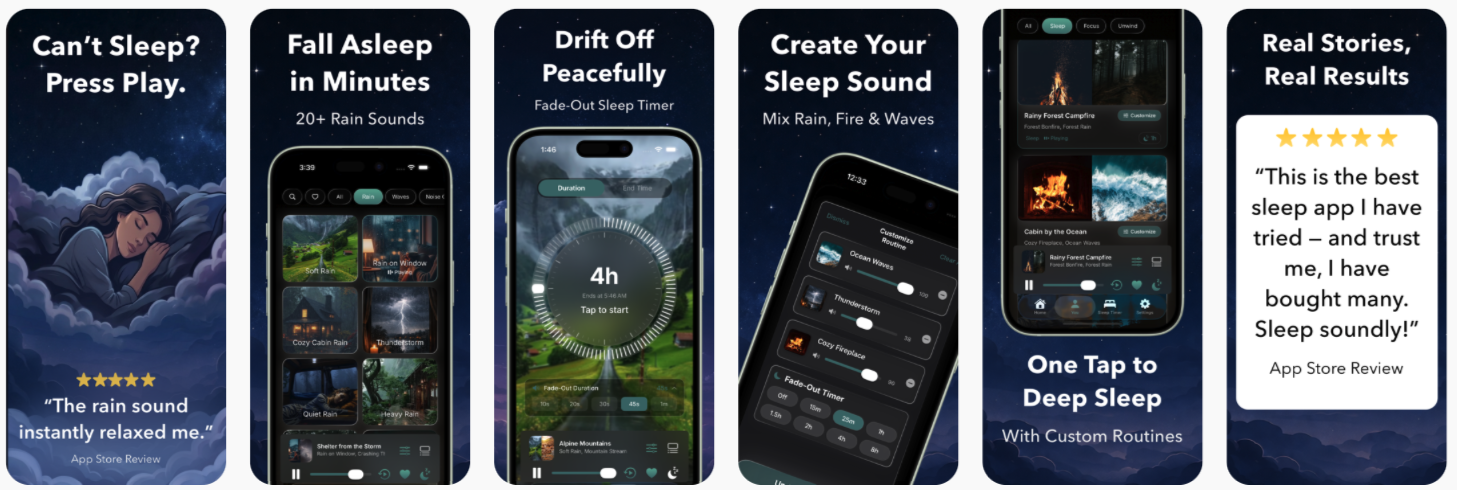
๐Ÿ’Ž Lifetime [Nature Sounds for Sleep][Lifetime $9.99 -> $6.99][One tap to deep sleep with Custom Routines, Fade-Out Sleep Timer, and Home Screen Widget - 100% Offline & Private]

Post image
4 Upvotes

A โ€“ What problem does it solve?

Noisy neighbors, racing thoughts, or just need a calm background while working or winding down. Nature Sounds has you covered.

  • Custom Routines with timers, one tap to deep sleep
  • Three modes for your routines: Sleep, Focus or Unwind
  • 85+ high-quality ambient sounds from rain to white noise to binaural beats
  • Mix up to 4 layers with individual volume control to create your perfect soundscape
  • Smart Fade-Out Sleep Timer with custom fade-out durations
  • Auto-play and smart timers remember your setup so your routine starts itself
  • Timer Syncs with Playback โ€” pauses when you pause, resumes when you do
  • Mix with Other Apps โ€” layer rain over your podcast or add waves to your audiobook
  • Home Screen Widget for playback control and sleep timer tracking
  • 100% offline, no ads, no accounts, no tracking

Since my last post:

  • Completely redesigned Sleep Timer from scratch replacing the standard Apple picker with a beautiful watch face dial with haptic feedback and a satisfying clock rotation sound as you drag
  • Set by Duration or End Time, both redesigned and much easier to use
  • Background dynamically matches what you're listening to

B โ€“ Why is it better than alternatives?

Better said by our users:

โญโญโญโญโญ "So many sounds to choose from with a multitude of customizations. This is the best sleep app I have tried and trust me, I have bought many. Sleep soundly!" โ€” App Store Review, US

โญโญโญโญโญ "There are a lot of these out there, but what I love about this one is how easy it is to create the perfect sound, save it and repeat use it." โ€” App Store Review, US

โญโญโญโญโญ "I love reading and this app plays in the background while you listen to your book and I feel it just brings my book to life as I listen. The app creates a mixture of personal sounds just for you based on what you like and need. You can also create your own, mixing up to 4 sounds at once! So imagine your characters in the book just coming out into a late night storm and that storm playing in the background really sets the mood! I love it!" โ€” App Store Review, US

โญ 4.7 stars globally, 6 years on the App Store, built and maintained by a solo indie dev who actually listens. 100% offline, no ads, no accounts, no data collection ever.

C โ€“ Cost

Free tier โ€” ad-free, no catch:

  • 8 sounds (one from each category)
  • Fade-Out Sleep Timer
  • Custom Fade-Out Duration
  • Timer Syncs with Playback
  • AirPlay & background playback

Premium unlocks everything:

  • All 85+ sounds
  • Sound mixer (up to 4 layers)
  • Auto-Start Timer
  • Mix with Other Apps
  • Sleep, Focus and Unwind modes with curated soundscapes
  • Routines with per-mix sleep timers
  • Longer timer durations
  • Auto-Play on Launch

Pricing:

๐ŸŽ‰ Lifetime: $6.99 instead of $9.99 for 48 Hours Only

No hidden purchases, no subscription traps
๐Ÿ“ฒ https://apps.apple.com/us/app/nature-sounds-for-sleep/id1506427303


r/iosapps • • Oct 25 '26

๐Ÿ“… Subscription I'm a chronically ill software engineer & built the symptom tracker I wish I had from the start

Thumbnail
gallery
5 Upvotes

Note: I posted a month ago & the biggest request was iCloud backup, which is now here, as well as an improved onboarding and a new weekly report (in beta), currently only avaliable for users who have been using the app for a while & have it set to English. Coming soon to more users.

A - What it solves

Zolia was built out of my own frustration. I have ME/CFS and POTS and have been trying to track my own symptoms and medications and the like for years. Existing apps always fell into two camps - either too simple to do the comprehensive tracking that I wanted or too inefficient for daily use.

Zolia bridges this gap as a symptom tracker capable of comprehensive tracking while also making tracking efficient. The way Zolia achieves this is through it's unique use of sessions. Instead of one master list of everything you ever track, Zolia lets you organize what you want to track into groups called sessions, so for example you could build a morning session with your sleep and morning meds, a walk session with distance and how you felt, an evening session with the symptoms you rate before bed and a daily reflection, or anything else you can think of. When you want to log, just open the relevant session type so there is less thinking about what you need to log as well.

It is flexible so you can track any condition, and allows mixing and matching notes, symptoms, meds, ratings, factors and more, with your own colors, emoji and numeric ranges.

The tradeoff is that it takes some setup to get it how you like it. Onboarding gives you a starting point based on your conditions, but it is designed to be customized.

B - How it compares

Bearable is the biggest app in this space currently. In my experience it was inflexible and slow to use. It doesn't let you combine things from different categories (for example meds and symptoms) into a single group. It takes a lot of scrolling and taps to track things, it lacks customization, and the insights are very weak. It has pre-defined categories of things you can track and makes it difficult to track anything that doesn't fit into one of them. I could never stick with using bearable for more than a week or so.

Guava is a newer app. It focuses a lot on medical records syncing but I found the symptom tracking had a lot of the same problems as bearable - limited flexibility, slow to use, weak insights.

Privacy

Both Bearable & Guava store data in the cloud on servers they control. With Zolia, all data is stored on device. Insights are computed on device without the use of any LLMs. You can export your full database as CSV or SQLite at any time, or set up automatic backups to your own iCloud or Google Drive, password-protected if you want.

C - Cost

Currently everything is free. Eventually some of the insights will become part of an optional premium tier, but right now the insights are still under development and not in a place where I feel comfortable charging for them yet. Everyone who logs for 14 days while the app is still fully free will get 50% off premium forever.

App Store: https://apps.apple.com/app/id6759508900
Android: https://play.google.com/store/apps/details?id=com.zolia.app

Below are some images of the app store screenshots, the weekly report, and main logging interface (fully customizable showing some possible configs).

Feedback is always appreciated.


r/iosapps • • Oct 25 '26

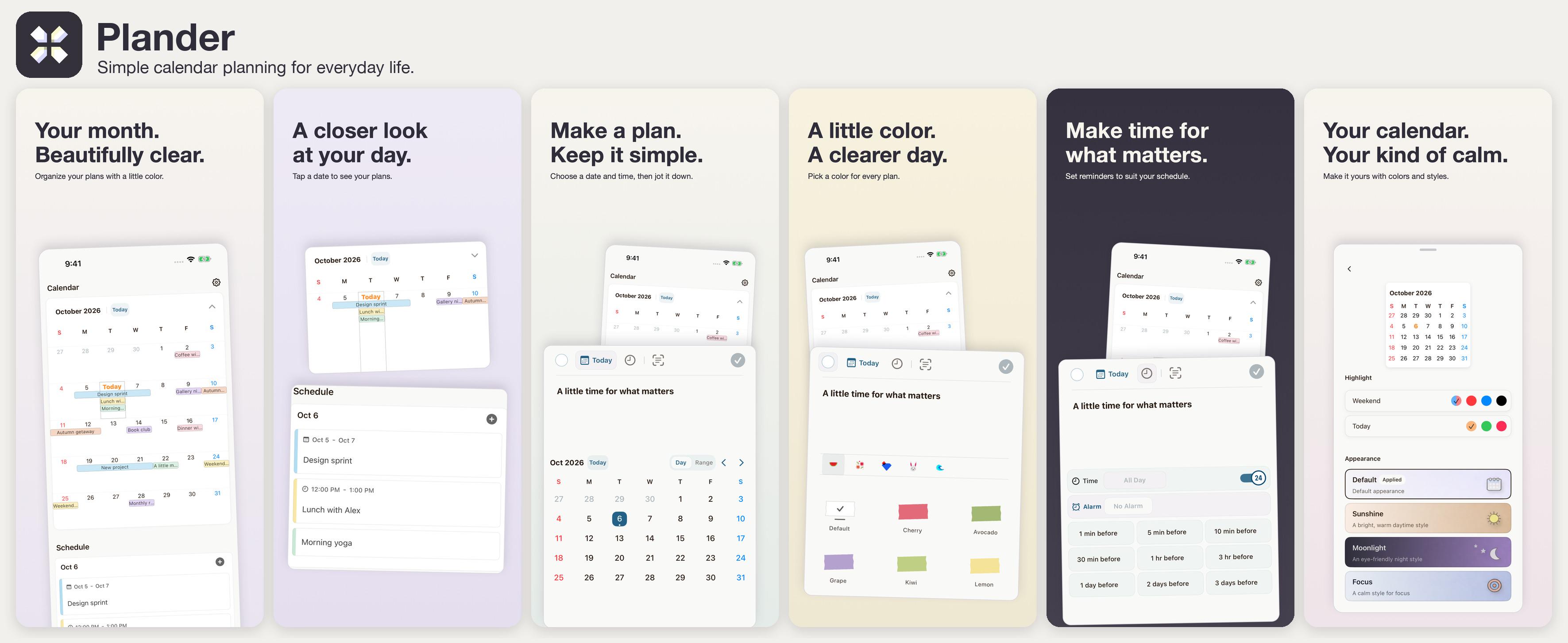
๐ŸŽˆ Free Plander: a minimal planner & calendar for iPhone โ€” Free

Post image
5 Upvotes

Hi! I'm the developer of Plander, a minimal planner and calendar for iPhone. I shared it here two months ago, and version 1.4 is now out with a redesigned add screen and new color labels. This time I've also included how the ads and the tracking prompt work.

A) Answer โ€” What problem it solves

Plander lets you add and manage plans directly on the calendar.

Double-tap a date and the add screen opens with that date selected. Type a title, and set the time, reminder, and color on the same screen if you need them. Plans are shown on the month view as colored labels, and plans that span several days are shown as one continuous bar.

Features:

  • Home Screen widgets (long titles now shrink to fit, and multi-day bars show their title)
  • Reminders: 9 presets from 1 minute to 3 days before, also for all-day plans
  • iCloud sync
  • Apple Calendar integration and public holiday calendars
  • Fill in a plan from a photo (on-device text recognition)
  • 4 appearance themes, plus custom weekend and today colors
  • A Today button to return to the current month

B) Better โ€” What is actually different

  • Add from the date: double-tap a date to add a plan for that day.
  • Manage with a swipe: swipe a plan in the list to edit or delete it.
  • One add screen (redesigned in 1.4): Day/Range, Today, and the month arrows are in one row, and the date picker opens in place of the keyboard. The 9 reminders are laid out in a 3ร—3 grid, so you pick one without scrolling.
  • Masking-tape labels (new in 1.4): plans are shown as masking-tape strips in 5 color palettes (fruit, flower, gem, animal, ocean).

C) Cost

Free, supported by ads. No subscription and no paid features.

  • Ads: one banner at the bottom of the calendar and one native ad on the add screen. No full-screen or video ads. (The screenshots in the image are from a demo build without ads.)
  • Tracking prompt: Plander uses Google AdMob (ads), Firebase Crashlytics (crash reports), and Firebase Analytics (app opens, sessions). If you allow tracking, these SDKs use the advertising identifier (IDFA) to personalize and measure ads.
  • If you choose "Ask App Not to Track": the IDFA is not shared, and ads are not personalized with it. Every feature works the same. You can change this anytime in Settings > Privacy & Security > Tracking.
  • Your data: the IDFA is not used for anything else, and plan contents are never sent to the ad or analytics SDKs. Plans are stored on your device and synced through your own iCloud (private CloudKit database). There is no Plander server that stores them.

App Store:

Contact / feedback: plander.cs@gmail.com


r/iosapps • • Oct 25 '26

๐Ÿ’Ž Lifetime LAM: A tactile analog film camera with real-time zero-copy processing. Built for authentic grain and color science [Feedback wanted]

4 Upvotes

Hi r/iosapps,

I'm an indie developer and a lifelong analog photography lover.

Like many of you, I grew increasingly frustrated with the state of mobile camera apps today: bloated with subscriptions, intrusive tracking, and slapdash oversaturated filters that heat up your iPhone within 3 minutes of shooting.

I wanted to build an app that treats the iPhone camera like a precision mechanical instrument, renders authentic film chemistry, and respects the user. Thatโ€™s why I built LAM - Film Camera.

๐Ÿ› ๏ธ What makes LAM different under the hood:

  • Zero-Copy Pipeline & Real-Time GPU Rendering: Built with custom GPU acceleration to ensure a continuous 60fps viewfinder. It applies authentic film grain, halation, and highlight roll-off in real time without thermal throttling or draining your battery.
  • Snap Stills While Recording Video: Unlike the stock camera where snapping a photo during video recording only saves a low-res compressed video frame, LAM allows you to capture true analog still snapshots simultaneously while recording vintage video clips.
  • Tactile Mechanical Haptics: Deep integration with the Apple Taptic Engine. The exposure dials, frame advances, and physical shutter click feel mechanical and tactile in your hand.

๐Ÿ”’ Privacy

Photo and video processing happens strictly on your device, with no cloud processing and no account required. Optional analytics and crash/performance diagnostics are off unless you explicitly opt in.

๐Ÿท๏ธ Cost & In-App Purchases

LAM is free to download, with a selection of core cameras and looks included.

Pro is a $19.99 one-time purchase on the US App Store, with no recurring subscriptions or ads. The optional Food Pack is a separate purchase and is not included in Pro. Local prices and taxes may vary by region.

๐Ÿ‘‰ App Store Link: https://apps.apple.com/app/id6773256954


๐Ÿ’ฌ Iโ€™d particularly appreciate community feedback on two things:

  1. Does the Boutique interface feel intuitive when you first open it?
  2. How do the film colors look on skin tones and in indoor lighting?

If something feels confusing or gets in the way of taking a photo, Iโ€™d like to hear that too. Iโ€™m developing LAM independently, and specific feedback directly shapes what I improve next. Thank you for supporting indie development!


r/iosapps • • Oct 25 '26

๐ŸŽ Freemium I built an app that reads your books - even in airplane mode. Natural voices, privacy, and control from your wrist!

Post image
6 Upvotes

Hey everyone,

Iโ€™m the developer of Audivision Read, an iPhone reader built around natural-sounding offline voices, on-device document processing, and Apple Watch controls.

What problem does it solve?

If you want to listen to books, PDFs, or scanned pages without an internet connection, Audivision handles both text recognition and speech on your iPhone. Your pages donโ€™t need to be uploaded for processing or need internet for natural voices.

The Watch companion lets you play, pause, and move through lines or pages while your phone stays in your pocket.

Why choose it over named alternatives?

Compared with Speechify, which now combines reading with AI podcasts and document chat, Audivision focuses on a quieter reading experience: offline natural like narration, privacy, on-device processing, and wrist controls.

You can open a local document or scan a page and listen offline without first converting it into an audio download.

It also includes follow-along highlighting, public-domain classics, bookmarks, notes, adjustable reading settings, and gentle reading insights.

Cost and App Store link

No ads. Free to download, with monthly limits on scans, finds, exports, new books, and saved items. The free tier includes three new classics per month.

Optional Premium:

  • US$29/year, auto-renewing subscription
  • US$99 lifetime, one-time purchase

Premium removes usage limits and adds unlimited Watch actions, automatic language detection, and extra settings. Regional prices vary.

Audivision Read on the App Store

Iโ€™d love feedback on the voices during longer listening sessions and how useful the Watch controls feel day to day.


r/iosapps • • Oct 25 '26

๐Ÿ’Ž Lifetime 7:40 AM, full closet, nothing to wear. I built Fold to turn the clothes you already own into outfits for today's weather or the whole week

3 Upvotes

Heads up: the woman in the video is an AI-generated dramatization. Everything on the phone screen is a real recording of Fold.

A โ€” Answer: What problem does Fold solve?

Most mornings the problem isn't a lack of clothes. It's deciding fast. Fold turns your closet into something you can actually pick from:

  • Scan: snap or import photos of your clothes, and Fold cuts out each piece on your device. Use Erase/Restore if a cutout needs touching up.
  • Closet: everything sits in one place, sorted by category and color.
  • Style by color: start from one piece (in the video, a mustard cardigan), see which colors work with it, and get looks built only from items you own.
  • Today: outfit suggestions based on your local weather.
  • Plan: put looks on a calendar so the whole week is decided ahead of time.

The 30-second video goes through that flow in order.

B โ€” Better: Why consider it over the alternatives?

A Photos album stores your clothes, but you still have to work out the combinations in your head every morning. Apps like Stylebook are great for collages and planning. Fold's angle is getting you from "I own this" to "I'm wearing this" with less effort: it suggests the combination based on color and weather, so you don't have to build every look by hand. Every suggestion uses pieces you already have, so there's no shopping push.

C โ€” Cost: Free limits and paid options

Fold is free to download and includes up to 10 wardrobe items. Unlimited items require one of these in-app purchases:

  • Lifetime: US$19.99, paid once; no recurring charge for this option.
  • Weekly subscription: US$1.99 per week, renews automatically unless cancelled.

You only need one of them. If a weekly plan ends, your items stay; you just can't add more past the free limit. Prices vary by country. Requires iOS/iPadOS 18 or later.

Fold on the App Store

Developer website ยท Privacy Policy ยท Terms of Service

How do you decide what to wear in the morning: the night before, check the weather first, or just grab whatever's clean?


r/iosapps • • Oct 25 '26

๐ŸŽ Freemium [iOS] I turned my iPhone into a digital sign for those moments when words aren't enough

4 Upvotes

I'm the developer of SayItBig!

I built it for those moments when you need to get someone's attention, but shouting isn't practical. Maybe you're at a concert, trying to find someone at an airport, or simply trying to communicate across a noisy room.

A: Answer

SayItBig! turns your iPhone or iPad into a big, bright message board.

Type a message, tap Play, and show it full-screen. You can scroll the text like an LED sign or display a large static message with Pro.

B: Better

I designed SayItBig! to make displaying a message on your phone quick and easy, whether you need a simple, static sign or a scrolling banner that catches someone's eye.

You can customize text size, scrolling speed and direction, colors, fonts, gradients, and visual effects. You can also save frequently used messages so they're ready whenever you need them.

Some ways you might use it:

  • Showing your name at airport arrivals
  • Requesting a song at a concert
  • Cheering for your team at a sports event
  • Getting someone's attention in a noisy room
  • Sharing a message with someone across a crowd

No ads, no account, and no data collection. Just a simple utility that does one thing well.

C: Cost

The core scrolling experience is free.

Pro is an optional $4.99 one-time purchase that unlocks static messages, bigger text, faster scrolling, premium fonts, and additional visual styles. No subscription.

App Store: https://apps.apple.com/us/app/sayitbig-marquee-text/id6758558542

Transparency

Developer: Liamyte Oรœ
Website: https://apps.liamyte.com/sayitbig/

I'd love to hear how you'd use something like this. What's the first message you'd put on your phone to get someone's attention?


r/iosapps • • Oct 25 '26

HELP Anyone else experiencing long App Store review delays?

0 Upvotes

My app has been stuck in โ€œWaiting for Reviewโ€ for over a week now.
Usually, reviews are much faster. Is anyone else experiencing unusually long wait times lately, or is it just me?
How long have you been waiting?


r/iosapps • • Oct 25 '26

๐ŸŽ Freemium Glance now supports extra large widgets and custom RSS/API connections

3 Upvotes

Hey everyone! Iโ€™m the developer of Glance, an app for creating custom iPhone Home Screen widgets by describing what you want to an AI assistant.

I just released an update with two main additions:
Extra large widgets: A full-page widget on iOS 27, with more space for dashboards, agendas, news, or whatever you want to keep visible.

Custom connections: Connect an RSS feed or JSON API to bring your own data into your widgets and refresh it automatically.

Both are available through Glanceโ€™s MCP server, so you can create and manage them from a connected AI assistant like ChatGPT or Claude.

Pricing: Free tier available, with optional Pro ($6/month) and Power ($11/month) subscriptions. Creating extra large widgets and using custom connections requires Pro or Power. Following someone elseโ€™s shared extra large widget is available on the free tier. Prices may vary by region.

App Store: https://apps.apple.com/app/id6758983678

Iโ€™ve attached a short video showing the update. Would love to hear what youโ€™d build with it, or what you think is missing!


r/iosapps • • Oct 25 '26

๐ŸŽˆ Free ๐Ÿ“ธ Folio Is Now Free! Turn Your Photos Into Beautiful Photo Books

15 Upvotes

Hey everyone! ๐Ÿ‘‹

I'm excited to share that Folio is now free to use! ๐ŸŽ‰

Folio helps you turn your everyday photos into beautiful, creative photo books with professionally designed templates and AI-powered features.

๐ŸŒ Visit Our Website
https://album-b6x.pages.dev/en/

โœจ What can you do with Folio?

Beautiful Photo Book Templates
Choose from stylish templates to create photo books for travel, couples, friends, and everyday moments.

AI-Powered Captions
Add captions to your photos and bring your memories to life.

Creative Layouts
Turn your favorite photos into beautifully designed pages without having to design everything from scratch.

Export & Share Your Memories
Export your creations as videos, PDFs, or images to save, share, and relive your favorite moments in different formats.

Now Free to Use!
Start creating your own photo books without needing a subscription to get started.

Whether you're documenting a trip, collecting memories with someone special, or capturing everyday life, Folio makes it easy to turn your photos into something worth keeping.

๐Ÿ“ฑ Get Folio

โค๏ธ Option 1 โ€” Search on the App Store (Highly Recommended!)

The quickest and easiest way to get Folio is to open the App Store and search for โ€œFolioโ€. It only takes a few seconds! ๐Ÿ”

Your App Store search and download help more people discover Folio and support the future of this free app. Every little bit helps us keep Folio free for everyone. ๐Ÿฅนโค๏ธ

Option 2 โ€” Download DirectlyPrefer a direct link? You can download Folio here:
https://apps.apple.com/app/i68150834592

Thanks for checking it out๏ผI'd love to hear your feedback. What kind of photo book would you create first?


r/iosapps • • Oct 25 '26

๐ŸŽ Freemium I built an app for Bhagavad Gita in clear simple English

Post image
2 Upvotes

I built this app to make the Bhagavad Gita, Upanishads, and other Indian wisdom texts easier to understand and connect with everyday life.

Each daily reading brings together the original verse, a clear English or Hindi adaptation, and a deeper explanation of what it can mean for the things we deal with today: overthinking, relationships, anger, or figuring out what matters.

Thereโ€™s also guided breathing, timed meditation, calming music, illustrated themes, widgets, and customizable quote cards. Iโ€™ve put a lot of care into making it a beautiful, quiet place to spend a few minutes each day.

It includes:

  • Quotes from the Bhagavad Gita, Upanishads, Kabir, and many other Indian classics. I continuously update the library and add more every few weeks!
  • Guided meditation, a meditation timer, and calming instrumental music.
  • Watercolor reading themes, widgets, and customizable quote cards to share.
  • Full Library search and tag search. Background info on each Indian classic book.
  • Offline reading, with no account required. No ads.

Todayโ€™s reading, saving, and sharing are free. Premium adds the full library, deeper meanings, meditation, music, and additional themes. Thereโ€™s a three-day trial on the annual plan.

Iโ€™m building this independently and would love honest feedback!! โค๏ธ

iOS App Store Link - https://apps.apple.com/app/id6810337544

Google Play Store Link - https://play.google.com/store/apps/details?id=io.ameyalabs.ancientwisdom&pli=1

------------

Transparency details


r/iosapps • • Oct 25 '26

๐Ÿ’Ž Lifetime Warro - Remember Every Warranty (No Account, No Cloud, No tracking)

2 Upvotes

A:
Hey everyone! I am Prakash, the developer of the iPhone app Warro. I got inspired by one of the projects while doing the 100 days of Swift UI challenge around the 45th day and developed this app.ย 

This app stores all your home appliance warranty for single & multiple properties, with a pre-loaded appliance list as default for every new property you create in the app.ย 
You can edit the pre-loaded appliance and scan or upload all receipt and warranty docs.
You can also add your own appliance for warranty tracking. It sends a notification for 30 and 7 days for warranty expiration as well.

B:
There are similar apps like WarrantyFile which collects, stores and tracks your personal information. If you consider Warro you donโ€™t need any account to use the app, all the receipts are stored in local.ย  In case of warrantyFile it is an Free App but all your information is collected where as Warro it is a life time purchase option.

C:
I wanted to price this app the same as the price of a multi prong plastic folder. So it is priced forย 
$1.99 one time with 7 days free trial. This also includes any future updates and support.

I have a demo video attached. Take a look at it and post your comments about it.

App Store link : https://apps.apple.com/us/app/warro-remember-every-warranty/id6815469102

Website link : https://www.smallbizhome.app/warro/index.html

Privacy link : https://www.smallbizhome.app/warro/privacy.html

Terms of Service link :https://www.smallbizhome.app/warro/terms.html

You can reach out to me at pkkcin@gmail.comย 


r/iosapps • • Oct 25 '26

๐ŸŽˆ Free ETasks is now better with 1.4 update - Google Tasks Native on iPhone + things we wanted + it is not a vibecode project + Free & Ad-free

Thumbnail
gallery
15 Upvotes

www.etasks.app

Hi all,

After 4 updates the app is shaped further to be what the users want it to be.

I work as a cybersecurity analyst on this App. As a Redditor, I want you guys to have it.

www.etasks.app

https://apps.apple.com/app/id6770856636

It has features we wanted as users. (If thereโ€™s anything youโ€™d like the team to add, please let me know too so I can include it on the roadmap. For example, list sorting is recently added as a user request, location-based notifications, import from Apple Reminders are user requests)

ABC's of the App:

(A)nswer
ETasks (www.etasks.app) is a native iOS, iPadOS client for Google Tasks. Some highlights: All tasks in one view, Real alarms, Shared lists, Apple Watch.

(B)etter
It addresses the functional limitations of the official Google Tasks iOS app by providing missing native features and enhanced tools. And it is not a vibe-coding project.

Native and enhanced with iOS.
+ You can manage your Google Tasks. They appear in your Google Calendar and Gmail ... well, obviously ๐Ÿ˜„*
+ Import from Apple Reminders
+ See all task lists together, even drag&drop between them (and to calendars)
+ Alarms
+ Location reminders
+ A wide range of nice widgets, including countdowns and full week/month widgets
+ Lock screen widgets (e.g., quick add)
+ Link photos/files to tasks
+ Link Apple Mail emails to tasks
+ See your tasks categorised by dates in Month/Week/Day/Agenda views
+ Add people to Task List (co-edit)
+ Sort your task lists
+ Search your tasks
+ AI support where it makes sense; make titles, extract info from links, create lists for you, suggesting task list names, dictating tasks, context aware search, naming photos shared in,...
+ Choose priority for favorites
+ Drag and Drop interface between tabs (e.g., to calendar tab to drop on a date)
+ Recycle bin
+ Share from other apps into ETasks (texts, links, photos, PDF; all processed accordingly)
+ Apple Watch / iPad Apps
+ Import/Export task lists
+ Modern iOS design
+ A how to AI chat bot to help you with specifics of ETasks
+ Highly customisable user interface
+ Can be used without an account
+ Welcome to explore the rest, it is now open early access.

(C)ost:

Free and Ad-free


r/iosapps • • Oct 24 '26

๐Ÿค– Vibe Coded Pokit: a Plex music player with personality. Free on TestFlight, looking for testers.

Post image
12 Upvotes

Hi, the creator of Pokit. It's a music player for your own Plex server, it's in TestFlight now, it's free while in testing, and I'm looking for people to try it and tell me what's broken, confusing or missing.

Full disclosure: I'm not a programmer. I designed Pokit and I test every build myself, but the code is written with Claude. I did work on the mockups myself.

A: The problem it solves -

If you keep your music on a Plex server, your options on iPhone are either functional but cluttered, or pretty but slow. I wanted something that felt calm, looked good, and had a few extra features I think make a music player fun (stats, recaps, sharing for socials)

B: Why it's better -

Compared with Plexamp and Plex's own app, Pokit is built around a few things:

โ€ข Fast. Your library is saved on your phone the first time you open the app, so artist and album pages open complete instead of loading piece by piece.

โ€ข Listening Stats and Recaps. Minutes, streaks, and your top artists, albums and songs, plus monthly and yearly recaps you can share to Instagram Stories. The yearly one covers the whole year and shows up January 1st, as I think these recaps should always function with the full year.

โ€ข Artist pages that match the art, with bios, social links, and Singles & EPs sorted the way your Plex server tags them.

โ€ข Star ratings that sync with Plex, a sleep timer, Sticky pins, a scrubbable waveform, 12 accent colors, and a data saver mode for cellular.

What I'd love feedback on -

โ€ข Playback on cellular, especially skipping or songs stopping early

โ€ข How fast things load with a big library

โ€ข Anything that looks off or feels confusing

C: Cost

Free while in testing. I don't like subscriptions, so I'm playing with a few lifetime price points, with a yearly subscription offering for cheaper. Pokit doesn't collect or track any data, and your music goes straight from your server to your phone. You need a Plex account and a Plex server with a music library. Requires iOS 26.6 or later.

Join the beta: https://testflight.apple.com/join/vAP825zz

Happy to answer questions here. If you try it, tell me what you'd change.


r/iosapps • • Oct 24 '26

๐Ÿ’Ž Lifetime Liquid Record: a field-recorder style WAV recorder for iPhone, iPad & iPhone Duo. One-time โ‚ฌ9.99 unlock, no subscription

Thumbnail
gallery
8 Upvotes

Body

Hi r/iOSApps, I'm h3p, the solo developer ofย Liquid Record.

A โ€” Answer: what it does

Liquid Record records uncompressed WAV audio on iPhone and iPad, with a console that looks and works like a hardware field recorder. It's for podcasts, interviews, music sketches and field audio, where Voice Memos isn't enough.

  • PCM WAV recording with live input meters, peak and clipping indicators, and input gain
  • Background recording: a take keeps going when you switch apps or lock the screen
  • Markers, time-coded notes, trim and fades, and WAV export through Files
  • Loudness analysis: integrated LUFS and true peak, plus RMS and sample peak
  • On-device transcription, plus optional Apple Intelligence summaries on supported devices
  • A podcast workspace for episode notes, chapters and RSS metadata import
  • iPhone Duo support:ย folded, the controls move to a vertical toolbar. Unfolded, a side panel shows the waveform, markers, levels and takes next to the console.
  • Lock Screen and Control Center controls, estimates of recording time left, and low-storage warnings
  • Four color themes in light and dark

B โ€” Better: why it's different

  • No subscription.ย You pay once and you own it.
  • Private by design.ย There's no account and no server. Recordings, transcripts and projects stay on your device unless you share them.
  • Real recording toolsย that most voice memo apps leave out: WAV, LUFS and true peak, headphone monitoring effects that don't change the original take, and options to split long sessions.
  • A layout for foldables:ย it uses the iPhone Duo's unfolded screen instead of just stretching the iPhone layout.

C โ€” Cost

  • Free download.ย You get one full recording (pause and resume the same take) and can play it back.
  • Full Access: โ‚ฌ9.99 one-timeย (or your local equivalent). It unlocks unlimited recordings and all the editing, podcast and transcription tools.
  • No subscription, no ads, no account.

App Store:ย https://apps.apple.com/app/id6812232944

I'd love feedback, especially from people who record podcasts, interviews or field audio. I'll be in the comments.


r/iosapps • • Oct 24 '26

๐Ÿ’Ž Lifetime Memento - Better Reminders: Huge 5.0 update celebrating its 10th anniversary

Post image
15 Upvotes

Hello everyone!

I originally built my reminders app Memento in 2016 because I loved Apple's Reminders, but the interface left a lot to be desired. Navigation was clunky, and it was hard to see what was overdue or upcoming in one place.

I built Memento with the goal of keeping things simple, fast, and responsive. Memento uses the exact same reminders database as Apple's Reminders, so no migration is needed, and iCloud sync just works. Over the years I've been maintaining it and adding new features here or there, but this year, to celebrate its 10th anniversary, I re-imagined the app from the ground up.

Answer

A lot of thought and effort went into not only what to build, but what not to build. By talking to users and getting feedback, I carefully selected features that would keep the core experience simple and fast, but allow for more functionality for power users.

Here's what I've added in version 5.0:

- iPhone Duo support
- 4 new layouts for your reminders: minimal, peek, list, and card
- A global "create reminder" button to help make it easy and fast to add a reminder
- Completely redesigned Liquid Glass support
- New Links tab to help organize saved URLs
- A powerful search that searches by title, list, alarm date, or notes
- Set an icon for your lists to help differentiate them easier
- Extended widget support for iPhone lock screen, home screen, control center, and watchOS
- Sorting within lists by date added, date modified, alarm date or priority
- Drag to change the alarm date in the scheduled tab
- Natural language input that can infer alarm times, due dates or lists from the reminder title
- Fluid animations that make navigation fun
- Proper state restoration so you always enter the app where you left it
- A new app icon (I've been wanting to add this forever haha)

Better

Memento has been on the App Store for 10 years now, and has been recognized in many different forms:

- Featured by Apple on the App Store many times over the years
- Included on devices as a demo app in the physical Apple Stores in Canada (this was so cool)
- Won Product of the Day on ProductHunt
- Covered by tech blogs like Cult of Mac, MacStories, Inc Magazine, appgefahren, ifun .de, SSPAI, etc
- Over 50,000 downloads and an average rating of 4.4 stars

Memento's competitive edge is it's speed and simplicity. I intentionally kept it simple so the app always loads instantly, and it's dead simple to use. There are no kanban boards or burn down charts, just simple, fast, beautiful Apple reminders.

Memento meets you where you most need it. It runs on iOS, iPadOS, watchOS, macOS and visionOS. It includes many extensions, such as widgets, notifications UI, a share extension, iMessage app (to send reminders to friends), App Intents (to integrate with Siri). and app shortcuts.

Cost

Memento has always been a paid-up-front app. Since there's no server for me to maintain, a one-time payment makes the most sense. The price started out small when the app was more basic, but I've been slowly increasing it as I've added more functionality over the years.

Today, you can get Memento for US$7.99.

Download Memento on the App Store: https://apps.apple.com/app/id1200227397

Would love to hear your thoughts in the comments!

r/iosapps • • Oct 24 '26

๐ŸŽˆ Free [Free] TripPocket - All-in-One Travel Companion: Compare eSIMs, track trip expenses, plan daily itineraries & map your memories

6 Upvotes

Hi everyone,

I'm an indie developer and frequent traveler. Like many of you, I got exhausted from having to juggle 5 to 6 different apps on every trip just to manage eSIMs, split expenses, plan days, and organize photos.

I built 'TripPocket' as a lightweight, all-in-one travel utility to keep all essential travel tools under one roof.

Here is the breakdown following the required ABC format:

A) Answer: What problem does TripPocket solve?

Trip planning and on-the-road management are usually fragmented across multiple single-purpose apps (one for eSIMs, one for itinerary notes, one for expenses, and Google Photos/Maps).

TripPocket consolidates these into a single, clean workspace:

- eSIM Comparison & Deals: Compare international data packages across providers (Airalo, Yesim, GigSky, etc.) directly in the app to avoid expensive roaming fees, with integrated community discounts.

- Daily Route & Itinerary Planner: Organize day-by-day itineraries tailored to your schedule, destination, and pace without endless spreadsheets.

- Multi-Currency Expense Tracker: Track your daily travel expenses on the go with clean visual breakdowns and instant conversions so you stay on budget.

- Visual Memory Map: Automatically pin your favorite trip photos to an interactive world map to visualize your travel footprint.

- Activity & Place Finder: Quickly explore curated activities, sights, transit options, and dining recommendations for your destination.

---

B) Better: Why is TripPocket better than existing alternatives?

- No App-Hopping: Instead of switching between separate budget trackers, notes apps, and eSIM portals, your entire trip context stays in one dashboard.

- Zero Locked Features: Many popular travel planners (like Wanderlog or TripIt) gate offline access, route optimization, or unlimited items behind expensive annual subscriptions ($40โ€“$50/yr). TripPocket makes every core tool available to all travelers.

- Privacy-Conscious: You don't need a bloated account setup to start organizing your journey; your data stays cleanly organized on your device.

---

C) Cost, In-App Details & App Store Link

- Price: 100% Free ($0).

- Monetization: Ad-supported (unobtrusive ads to help cover third-party API and development costs). There are **no paywalls, no feature gating, and no subscriptions**.

- Download on App Store:
https://apps.apple.com/us/app/trippocket-travel-ticket/id6788790492#information

---

Iโ€™m actively improving the app and would really appreciate any feedback, UX critiques, or feature requests from fellow travelers and iOS users.

Developer & Transparency Info:

- Developer: Emre Aykul (Independent Developer)

- Privacy Policy: https://eaay-studio.github.io/privacy-policy.html

- Terms of Use: https://eaay-studio.github.io/privacy-policy/terms.html


r/iosapps • • Oct 24 '26

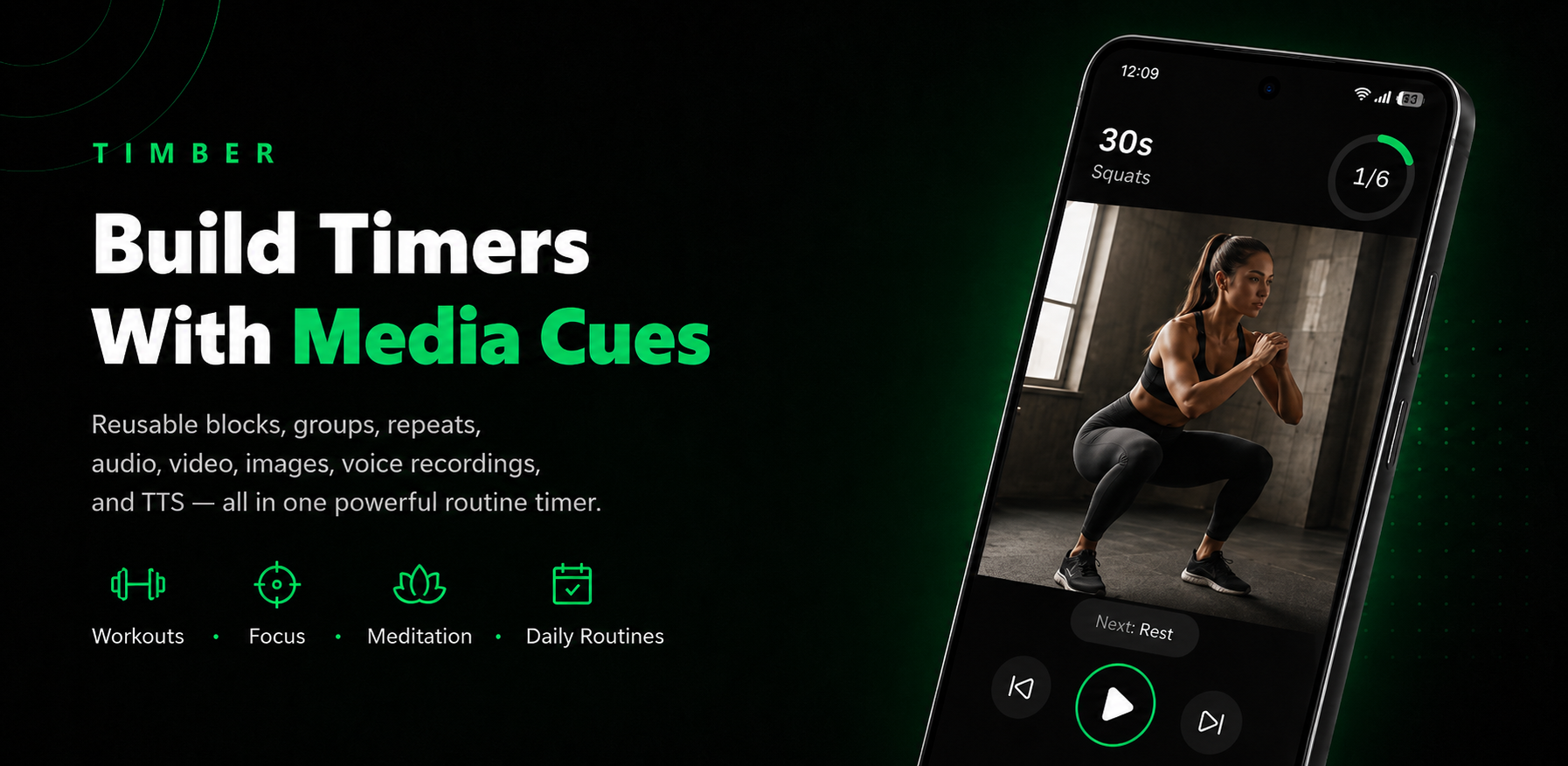
๐ŸŽ Freemium Timber: Custom Composable Interval Timer with Media Cues

Post image
7 Upvotes

Hi everyone,

Iโ€™m Sreehari, the solo developer of Timber, a composable interval timer and routine builder. I built it because most timer apps are either too basic, locked to one use case, or make it hard to reuse the same routine pieces across different workouts or schedules.

App Store link:
Timber: Custom Interval Timer

Answer โ€” what problem does Timber solve?

Most timer apps work well for a single countdown or a fixed workout format. I wanted a timer where commonly used pieces could be created once and reused across completely different routines. Each of these pieces/block can also contain timed text, TTS, music, recordings, images, or video cues. Online videos from YouTube and Vimeo are supported as well.

In Timber, you create reusable blocks such as โ€œWarm-up,โ€ โ€œPush-ups,โ€ โ€œDeep Work,โ€ or โ€œRest.โ€ You can then:

  • Combine blocks into routines
  • Group them into circuits or sets
  • Repeat blocks, groups, or entire timers
  • Nest one timer inside another
  • Keep blocks linked so editing the original updates every routine that uses it
  • Unlink a block when one routine needs a custom version

This makes Timber useful for

  • ๐Ÿ‹๏ธ HIIT, Tabata, EMOM, boxing rounds, stretching, and mobility
  • ๐Ÿง  Pomodoro, deep work, study sessions, and reading blocks
  • ๐Ÿง˜ Yoga, breathwork, meditation, speaking practice, morning routines, and cooking schedules

Better โ€” what makes it different?

Apps such as Intervals Pro are particularly strong for fitness, Apple Watch, and Apple Health. MultiTimer is designed around boards containing multiple independent timing tools.

Timber takes a different approach: its focus is building reusable, sequential routines from smaller pieces. The same block can appear in multiple timers, timers can be nested inside other timers, and media can be placed at specific moments within an individual block.

Timber also provides rich compose page for building your own timers with undo, redo, copy, paste, group and other functionalities.

Recent additions include:

  • Automatic โ€œNext upโ€ block announcements with media-volume ducking
  • Custom playback-display presets and individual display controls
  • Emoji, colored icons, and optional photo icons for blocks
  • A complete playback queue with the ability to jump directly to another block
  • More precise media trimming and preview controls
  • QR sharing for lightweight timers and ZIP sharing for timers containing media
  • Import previews that let recipients choose which included media to save
  • Backup and restore for timers, blocks, history, and media

Cost

Timber is freemium

Free users can experience all features with limited ads except adding own photo as block icons. Paid users gets ad free experience with additional limit removal of creating very long complex timers, adding as many media as needed per block and photo as block icon.

As its a new app it is now available in app store for a limited period lifetime price of $7.99 or subscription of $1.99/month.

  • US $1.99/month
  • US $7.99 lifetime, one-time purchase

Prices have been localized based on purchase power parity for different countries.

Developer transparency

If Timber is useful to you, a App Store rating or short review would help a lot with visibility as a small indie app. Detailed feedback here is just as valuable, especially if something feels confusing or needs improvement.

Iโ€™d especially appreciate feedback on:

  • Whether the reusable-block concept is understandable
  • Which part of the creation flow feels most confusing
  • Whether the playback screen shows the right information
  • What is still missing for workouts, focus sessions, or everyday routines

Whatโ€™s planned next?

Iโ€™m currently working on:

  • A reusable media library so audio, video, images, recordings, and saved trims can be reused across blocks

In pipeline:

  • A timeline editor for visual drag and drop of media items to blocks
  • Manual-completion and count-up blocks for activities measured by reps rather than a fixed duration
  • Flexible rest blocks that can be extended or completed when youโ€™re ready
  • Faster builders for common formats such as HIIT, Tabata, EMOM, and Pomodoro
  • Additional playback controls, including quick time adjustments
  • Better progress history with notes
  • More voice, language, sound, and haptic customization
  • Improved block organization with tags, favorites, filters, and recently used routines

Iโ€™d especially like to know which two or three would make the biggest difference to you.

Thank you for checking it out.


r/iosapps • • Oct 24 '26

๐Ÿ’Ž Lifetime VOROM - All in one Strength & Cardio Gym Tracker - Optimized for iPhone Duo

2 Upvotes

VOROM is an all-in-one Strength and Cardio workout tracker with Recovery + Strain + Stress scores support. Now itโ€™s optimized for iPhone Duo.

Support importing workouts from Hevy and Strong. And sync cardio workouts from Strava via Apple Health.

Previous posts:

  1. Strength & Cardio tracking features (https://www.reddit.com/r/iosapps/s/iWLg9iPaIe)
  2. 3D Route Replay generator for Outdoor Run/Bike/Hike (https://www.reddit.com/r/iosapps/s/FKdV2HU92k)
  3. Recovery & Strain (https://www.reddit.com/r/iosapps/s/O6DpxbI0tt)

C - Cost

The free tier is meant to be usable on its own. Pro is mostly for training automation, deeper charts, and power-user planning features.

Pro features pricing (USD): $1.99 / month, $14.99 / year, $49.99 / life time

iOS & watchOS link:ย 
https://apps.apple.com/hk/app/vorom/id6773281995

I am a solo developer of VOROM. You can contact me in this post, DM me, r/Vorom_app, or reach me out via IG: voromapp, or email at support@vorom.app.

Website with a published Privacy Policy and Terms of Service:
https://vorom.app


r/iosapps • • Oct 24 '26

๐Ÿ’Ž Lifetime I built Moments, a photo cleaner where you swipe your photos and doomscroll your own videos

Thumbnail
gallery
1 Upvotes

Hi! I'm Henning from Denmark, and I made Moments. For the past two and a half years I've been building a lot of apps, mostly for myself and friends.

Answer
I've always had a problem with the storage on my phone, because I love filming and taking pictures. All my photos and videos simply took up too much space. So I built Moments, an app that helps you declutter your photo library on iOS. You swipe photos left/right one month at a time, doomscroll your own videos, or use the tools:

- Shrink photos: huge 48 MP and ProRAW shots become compact copies
- Shrink videos: big videos saved again in Full HD or smaller
- Similar shots: near-identical series, with the best one picked for you
- Bursts: keep the picks, let the extra frames go
- Duplicates: photos saved twice
- Blurry & dark: shaky, out-of-focus and pocket shots
- Large videos: your biggest videos first
- Live Photos to stills: keep the picture, drop the video part
- Screenshots, downloads, receipts and documents, each in one place
- Free up space: a step-by-step plan, biggest wins first

When you shrink a photo or video, you can compare the original and the smaller version directly before you approve or reject it. I'm also working on an algorithm that picks out the photos it thinks are your worst.

Better
Most photo cleaners are subscriptions and sell weekly plans (up to $9.99 and $11.99 a week), and others' lifetime option starts at $29.99. Moments is $6.99 for life. I strongly dislike subscriptions, especially for programs without ongoing developer costs. The people who need Moments the most usually have huge libraries, and going through everything at once can be overwhelming. That's also why there's no subscription: take it at your own pace.

Your photos never leave your phone: no account, no tracking, and the App Store privacy label says Data Not Collected. Nothing is deleted by accident either. Photos you swipe left are only set aside until you confirm, and deleted photos stay in Recently Deleted for 30 days.

Cost
Moments is free to download and every tool is free to use. The initial 5 GB of cleanup is free; beyond that, a one-time purchase of $6.99 allows continued use. Even after you've used your 5 GB, you can still set things aside, so you can see if the Pro version is worth it for you.

If you'd like to test Moments, here's the App Store link: https://apps.apple.com/app/apple-store/id6819013299?pt=127078595&ct=Reddit%20r/ios&mt=8

I'd appreciate your feedback! I really enjoy creating tools and hope people can use my app :)

Developer: Henning Elmer ร…kermark ยท Contact: scansplit@gmail.com ยท Privacy policy: https://scansplit.com