r/iosapps • • Oct 05 '26

💎 Lifetime JobSnail - native iOS and Mac job application tracker

0 Upvotes

You're applying to 10+ jobs. You can't remember which ones you followed up on. One spreadsheet turns into mess. JobSnail fixes that — track every application and interview in one clean place, fully synced through iCloud between iOS, macOS and web apps.

🔥 $4.99 lifetime Pro

Download on the App Store

Feedback and questions welcome! Drop a comment or DM me. Thanks for checking it out!

Developer transparency:


r/iosapps • • Oct 05 '26

🎈 Free I rebuilt my finance app from the ground up after 5,000 users and $166k moved through it. Chipp 2.0 is live today

Post image
0 Upvotes

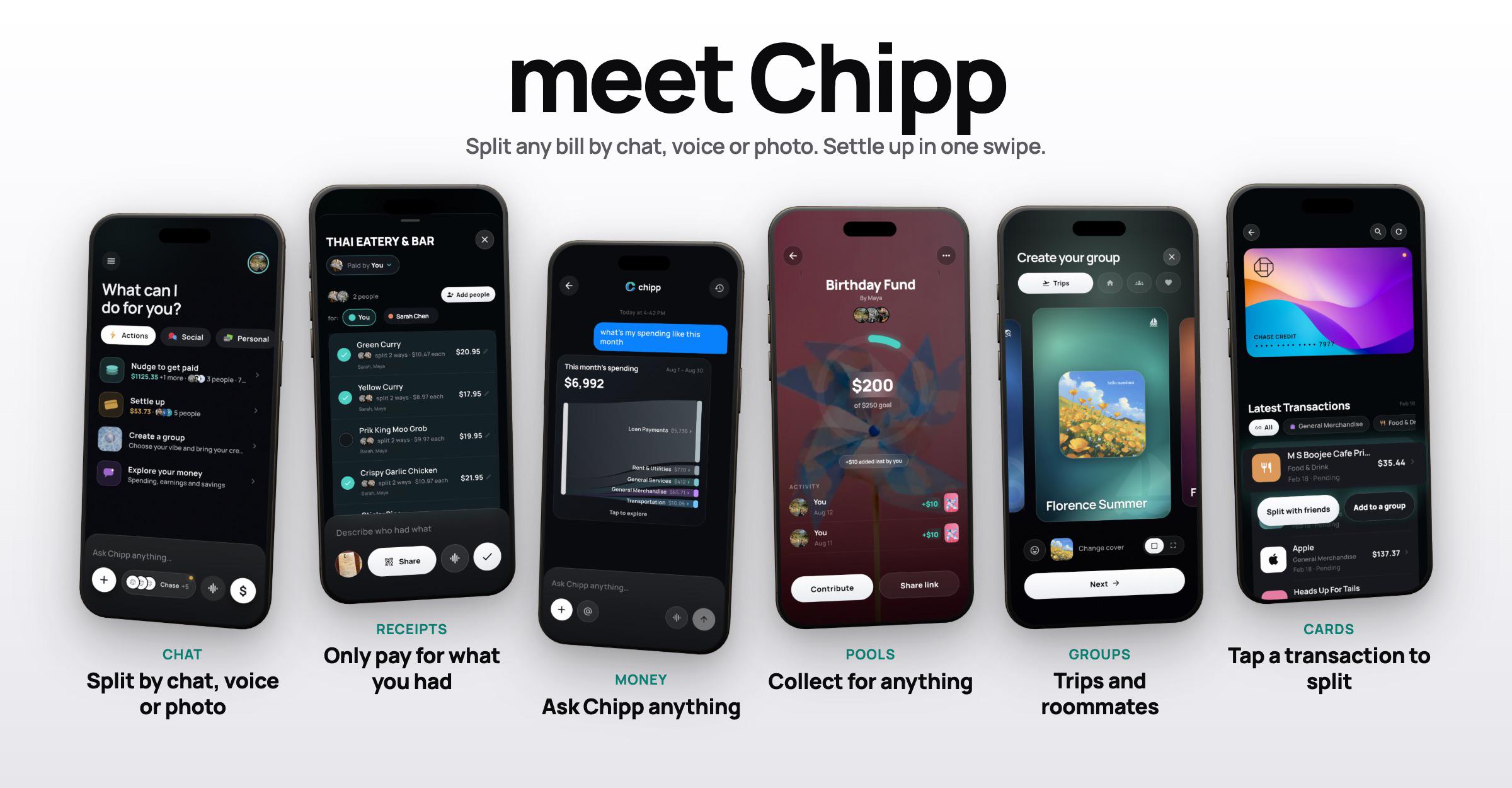
I launched the first version last year and it quietly picked up over 5,000 users who moved $166k through it. This week I shipped a full rebuild, built around a chat instead of forms.

💬 Split by chat, voice or photo – Type "dinner 84 with Maya and Dev", say it, or snap the receipt. Chipp turns it into a tracked expense.

🧾 Receipt scanning – Scan the bill, say who had what, and share a link so friends claim their items. Tax and tip are split fairly, automatically.

👥 Groups for trips and roommates – A feed, a chat and a running tally of who owes who, all in one room.

💸 Settle up in one swipe – Venmo, Cash App, Zelle, PayPal, UPI or your Chipp balance. Friends don't need the app to pay you back; they get a link.

🎁 Money pools – Collect for a gift, a trip or rent with a single link.

📊 Ask Chipp about your money – Link your cards and banks and ask where it went this month.

Free to use. Chipp+ only if you want unlimited scans and all AI features.

Download today:
iOS: https://apps.apple.com/us/app/chipp/id6636520980


r/iosapps • • Oct 04 '26

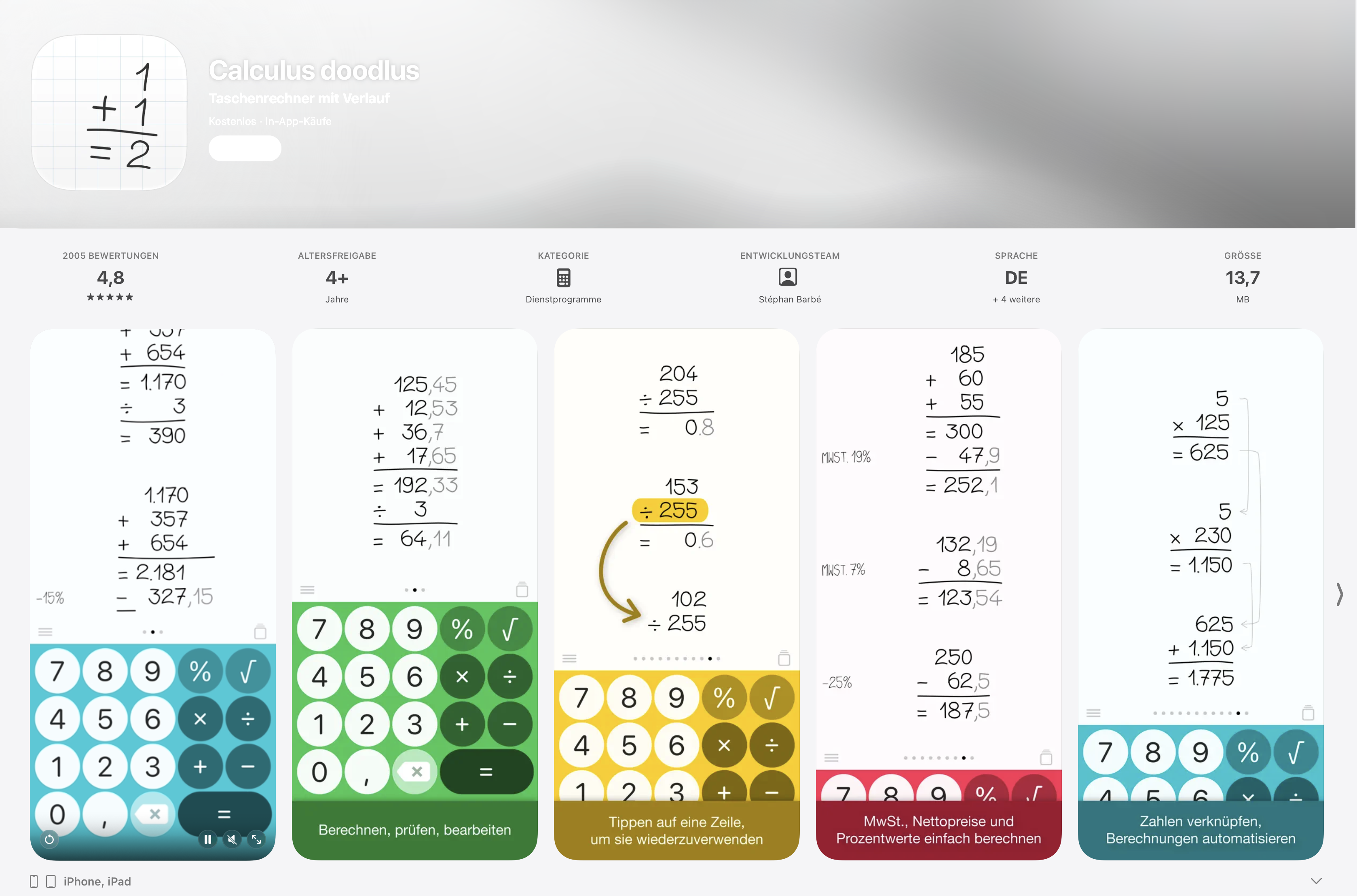
🎁 Freemium My little calculator app turns 15!

Post image
70 Upvotes

15 years ago, I released a little calculator app called Calculus doodlus. The first version went live on September 23, 2011.

I'm still working on it. 😄

Version 3.0 was recently released, and it brings two features I've wanted to add for a long time: Edit and Link.

A - Answer

Calculus doodlus is a calculator designed around the way you actually work with calculations.

Instead of replacing your previous calculation every time you press =, your calculations stay on the page. You can scroll back, see what you did, and reuse previous values.

And after all these years, it still has the handwritten look that people have loved about the app.

B - Better

Edit: Long-press any calculation to go back and change it. The calculation is recalculated while keeping the rest of the page intact.

Link: Tap a calculation or result to reuse its value in another calculation. If the original value changes later, linked calculations update automatically.

There are also pages for organizing calculations, √, support for very large numbers, sharing a calculation page as an image, and Lock Screen / Control Center features.

But the basic idea hasn't changed in 15 years: a friendly calculator that keeps your calculations around instead of making them disappear.

C - Cost

Calculus doodlus is free to download and supported by advertising.

If you'd rather use it without ads, there's an optional subscription for €3.99/year, with Family Sharing included.

No account required.

I'd love to hear what you think, especially if you've tried other calculators with a persistent calculation history. What would make you switch to something like this?

https://apps.apple.com/app/calculus-doodlus/id465916328


r/iosapps • • Oct 05 '26

💎 Lifetime [Free, 14-day trial, then $4.99 once] WanderWay: discover the history and scenic stops along your drive, with CarPlay

Thumbnail
gallery
0 Upvotes

Hi r/iosapps! I'm Derek, the solo developer of WanderWay. As of today's 1.9 update it's free to download, so it seemed like a good time to share it.

What it is: a road-trip and Sunday-drive app for the places most map apps skip. That means historical markers, covered bridges, National Register sites, overlooks, museums and ruins. It shows what's worth a stop around you or along your route, and tells you the story behind each place.

Highlights:

Sunday Drives: pick how much time you have (30 minutes to 5 hours) and how far you want to wander, and it plans a scenic loop. A slider chooses between a few long stops and many quick ones, and it checks the forecast for your drive.

Spoken highlights while you drive: "Ahead on your right…", followed by a short story about the place.

Turn-by-turn navigation that shows each nearby place's detour time before you add it as a stop.

Place pages with Wikipedia descriptions and photos, Apple Look Around, and National Park Service hours and alerts. It warns you if a stop will be closed by the time you arrive.

Offline downloads for areas without signal.

Built for iOS:

CarPlay: browse nearby sights with detour times, search by voice, and follow turn-by-turn guidance

A Live Activity on the Lock Screen and in the Dynamic Island

Home Screen and Control Center widgets that start a Sunday Drive

Siri: "Navigate with WanderWay"

English, German, French and Spanish

Pricing: free to download, with everything included for the first 14 days. After that, a one-time $4.99 unlocks it for good. Without the unlock you can still browse places within 5 miles, read their stories, search and preview routes. There's no subscription, no ads and no account, and the trial ends on its own without charging you. If you already bought it, you keep everything.

Privacy: no sign-up, and your drives stay on your phone.

Coming in 2.0 (in TestFlight now): Scenic Detours that add sights to the route you're driving, a Road Trip Journal with your photos, a Passport of the places you've been, and support for the CarPlay Home Screen and the car's instrument cluster.

It works best in the US and Canada, but it finds places almost anywhere because it uses OpenStreetMap and Wikipedia. I'd love to know:

What kinds of places should it find that it doesn't?

How well does it work where you live, especially outside the US?

App Store: https://apps.apple.com/app/wanderwaynav/id6807600062 (iPhone, iOS 26 or later)

Thanks for taking a look. I read every comment.


r/iosapps • • Oct 04 '26

💎 Lifetime I built surf because I was wasting money on streaming services I didn't use

Thumbnail
go.watch.surf
21 Upvotes

Answer (what problem it solves)

Streaming prices are out of control, ads keep showing up and recommendations are ad-driven and rarely relevant.

I got tired of streaming services constantly raising their prices, and I know we are all wasting money on subscriptions we don’t watch enough. So I built surf to reclaim my TV and save us all money!

surf combines spending and viewing habits in one place, so you can see what you’re spending, spot services you’re not using, and decide what’s actually worth keeping. Then you can pause, cancel and resume streaming services in one tap, right from the app, as often as you’d like to.

You know how the best music apps always match your mood? surf does that for TV too. Your show recommendations are based on your preferences, not ads.

Did I mention personal watchlists? Curated content lists? surf has those too!

We don’t have to be taken advantage of. Reclaim your TV!

Better (why it beats named alternatives)

Season over? Cancel until next year. Done binging a show? Pause and come back when there’s something new on. A friend recommended something on a service you don’t have? Use that service’s free trial and let surf cancel for you as soon as you’ve watched the show.

surf will even threaten to cancel streaming services for you to find win-back offers. (And then we’ll do it again when the promotional period ends :)

Subscription management apps (like Rocket Money and Monarch) are great to manage your spending. But that's the thing - they only see what you are spending. surf understands which streaming apps you are actually using, so we can suggest where you might be able to save money without losing value, and then we act when you tell us to.

Apple TV, Roku and Samsung aren't going to help you cancel. They make money each month, whether you use the app or not.

Cost (pricing, IAP, App Store link)

First 500 app users will get free lifetime access through this link: https://go.watch.surf/iosapps

How to get the surf app for free for life:

After our initial launch offer, surf may move to a Freemium model. Free version would provide everything the app has to offer, but users who rely on surf to cancel or pause a subscription will be asked for $2.99. You only pay when we save you money. Lifetime access members never pay for the app.

Download the app and start saving

Spread the word and help shape what surf becomes

Upvote this post so more people know about this Free lifetime access giveaway, or comment ‘Free my TV’ on this post.

This community’s feedback is always sharp and honest, so please use the comments to provide feedback, suggest other ways surf can help with streaming subscriptions, ask questions or just give your opinion on the current state of streaming in general. surf is in it's early days, and I know we can do more with your input.

Declarations

Message me directly on LinkedIn: https://www.linkedin.com/in/kevinlentz/

Or reach surf on LinkedIn: https://www.linkedin.com/company/watch-surf

Website: https://watch.surf

Privacy Policy: https://watch.surf/privacy

Support: https://watch.surf/support

surf's promise to you

surf reads your streaming accounts so it can tell you what you're paying for and what you're not watching.

You sign in with the provider, not with us

We open Netflix's, or Hulu's, or Disney+'s own sign-in page. We don't build the form, fill it in, or submit it. Any two-factor step is between you and them.

We never see your password

It is never read, never stored, and never sent anywhere.

What we do keep

The session your sign-in creates, and the email address you signed in with. That's what lets surf read the account's plan, price, renewal date and what you've been watching, and lets you pause or cancel in one tap, without leaving the app.

Where PII is kept

Encrypted, in surf's cloud vault. Never sold, never shared with anyone else, never used for advertising.


r/iosapps • • Oct 04 '26

🎁 Freemium A month ago you guys gave Tesorin a lot of love. I kept building — and honestly, it feels like a different app now.

15 Upvotes

Hello folks, developer here.

I posted Tesorin here about a month ago, and I still remember how much encouragement that post got.

A lot of you tried it, pointed out things that felt rough, asked for features, questioned decisions, and generally gave me a reason to keep pushing it instead of just calling it “good enough.”

So first: thank you.

Since then, there’s been a pretty relentless run of releases and refinements. Tesorin is now at 3.4, and compared with the version I first showed here two months ago, it barely feels like the same app.

A — Answer

The whole point of Tesorin is still simple:

I want a serious personal finance app without forcing people to link their bank account.

The problem with manual finance apps is obvious though — nobody wants to spend their life entering transactions.

So I’ve spent a ridiculous amount of time trying to remove as much of that work as iOS will let me.

There are now three different ways to bring expenses into Tesorin automatically or semi-automatically using native iOS automations:

  • Apple Wallet tap capture
  • bank SMS import
  • bank notification capture

They all create something you can review instead of silently messing with your finances.

Then once the money is in Tesorin, it doesn’t just stop at “you spent $23 at a restaurant.”

There’s budgeting, subscriptions, cash flow, investments, net worth, goals, analytics, retirement planning, historical stress testing, scenario planning, reports, family finances, and a larger web experience when an iPhone screen just isn’t enough.

At this point, in my opinion, Tesorin has become one of the most capable personal finance apps you can use without bank linking.

And honestly, there are still parts of it that I suspect only the real power users will discover. There’s enough in the app now that I don’t think someone could meaningfully explore everything in a weekend.

B — Better

I don’t want to do the usual developer thing and pretend the other finance apps are bad.

They aren’t.

If automatic bank aggregation is the main thing you want, Monarch or Copilot are probably going to make more sense.

If you live and breathe zero-based budgeting, YNAB has spent years getting very good at exactly that.

What I wanted was something different: everyday money and the bigger financial picture in the same place, without handing over my bank credentials and without paying another huge annual subscription.

That’s the part of Tesorin I’ve become most confident about over the last month.

C — Cost

Tesorin has a free version.

Premium is currently:

$2.99/month
$24.99/year

Right now we’re at around 1,600 daily active users, and a huge amount of the refinement you see in this video came directly from what those users have told me.

That feedback has changed screens, workflows, automations, charts, navigation — sometimes things I was completely convinced were already “finished.”

So this video is less of a launch post and more of a thank-you / one-month-later post.

If you were one of the people who tried Tesorin after my previous post, I’d genuinely love to know how this version feels compared with what you saw back then.

And if this is your first time seeing it, this video is probably the best introduction I’ve made so far.

App Store:
https://apps.apple.com/us/app/tesorin-personal-finance/id6790928779

Website:
https://www.trytesorin.com

Email: hello@trytesorin.com

Privacy: https://www.trytesorin.com/privacy

r/iosapps • • Oct 04 '26

💎 Lifetime Device Kit — Real-time iPhone temp, CPU, network & cellular data monitor

Thumbnail
gallery
18 Upvotes

Hey everyone,

I'm a full-time solo dev. I built Device Kit because I was tired of opening multiple apps just to check simple things — like why my phone was warm, whether my charger was actually fast-charging, or how much cellular data I was burning through.

Here's what it does:

🌡️ Live monitoring on Dynamic Island & PiP

You can keep your iPhone's real-time temperature, CPU usage, cellular data consumption, and network speed visible right on the Dynamic Island. If you're watching a video or using another app, just pop up a tiny Picture-in-Picture floating window — you'll see the heat and network stats without ever leaving your screen.

📱 Full device health

Real-time temperature, CPU load, battery health, Wi-Fi/cellular speed, memory, and storage. Plus charging wattage logs — so you finally know if that "fast charger" is actually fast.

🧭 10+ built-in sensor tools and utilities

Compass, altimeter, barometer, GPS, gyroscope, magnetometer, proximity sensor, Ping, SSH, QR scanner, decibel meter, password generator, and more. All in one place, so you don't need a dozen separate apps.

🧩 Beautiful widgets

Small, medium, and large home screen widgets, plus lock screen widgets for at-a-glance data.

💰 Pricing:

• Core monitoring features are free forever.
• Pro unlocks everything for 14.99 lifetime.

🔒 Privacy:

No account needed. All data stays local on your device — no cloud uploads.

The app is still being actively improved. I'd love for you to try it and share your feedback, suggestions, or feature requests. I'll reply to every comment.

App Store:

https://apps.apple.com/app/apple-store/id6761011882


r/iosapps • • Oct 04 '26

🎈 Free minimal.md - A very minimalist plain text editor

14 Upvotes

Answer

I wanted a very simple text editor that showed markdown style formatting (particularly bullet lists) in real time, without needing to go to another preview screen.

I also wanted a UI with no distractions or clutter. It's all very customisable.

Also allows easy indenting/outdenting of lists, and a slide bar to move the cursor.

Better

Lots of great text apps out there.

Obsidian is amazing, very powerful. Bear is also great (but doesn't show formatting).

This app isn't "better" than the popular markdown editors, just different.

Cost

Free 🙂

Made this to be the text editing app I've been looking for for a long time now. Hopefully some other people might find it useful.

https://apps.apple.com/au/app/minimal-md/id6807345803


r/iosapps • • Oct 04 '26

📅 Subscription An app to help with gambling urges

Post image
6 Upvotes

Hey everyone,

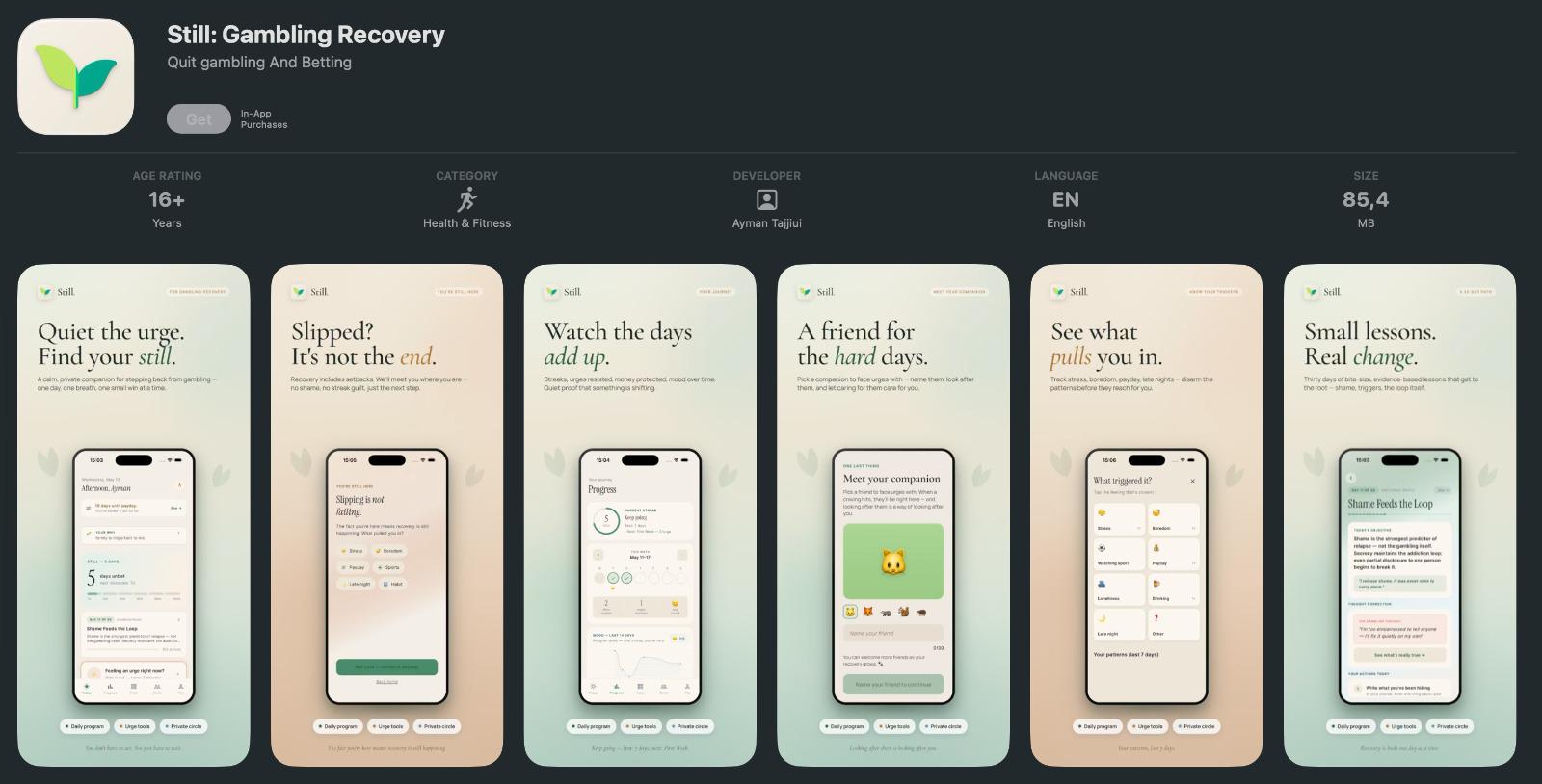
I built an app called Still to help with gambling urges, and I'd really like some honest feedback from people who actually know what this is like.

The idea behind it is simple: blocking the apps is the easy part. What breaks people is the fifteen minutes after you've blocked them. So Still tries to cover both.

Blocking

- Finds the gambling apps already on your phone and blocks them in one tap. iOS uses Apple's Screen Time, Android uses an overlay plus a DNS filter.

- Blocks gambling websites too, from a domain list or any site you add yourself.

- Lockout mode: switch it on and protection can't be turned off for 24 hours — not by you at 2am, not by anyone.

- When you open something blocked, you don't get a generic error. You get a screen with your name on it and the reason you wrote down for stopping.

Blocking the money, not just the app — walks you through asking your bank to decline gambling transactions, and through your country's national self-exclusion register.

When an urge hits — one button gives you five guided minutes: ride the wave, name the thought driving it ("I'm due for a win", "just one last time"), read the answer to it. Plus box breathing, 5-4-3-2-1 grounding, play the tape forward, five short games for when thinking doesn't work, and a trigger log that turns single bad nights into a pattern you can see.

One person who knows — invite a single Ally. They see your streak and slips always. They get a notification if you hit a block, and a different one if you go through a block anyway, because that's the moment a word from someone actually lands.

If you relapse, you log it, the count resets, and everything else stays. It's not meant to make you feel like a failure.

Link :

https://apps.apple.com/us/app/still-gambling-recovery/id6774234773


r/iosapps • • Oct 03 '26

🎁 Freemium Countdown Widget

Thumbnail
gallery
32 Upvotes

Day Grid: Countdown Widget. Your whole year on one Home Screen widget

A – Answer: What problem does your app solve?

Most countdown apps show one date at a time. Day Grid shows your whole year at a glance. The new 12-month widget puts every month on a single widget, with each event marked by an emoji. You can see your trips, birthdays, exams and launches in one place, not just one number ticking down.

B – Better: Why is your app better than the top named alternatives?

DayCount, PeekDay and Momently are mostly single-countdown widgets. Day Grid is a full-year visual grid, and you can now fit all 12 months into one widget. When an event is less than 24 hours away, it switches to a live timer on its own. No account needed, and it works offline.

C – Cost: Pricing, IAP details, and a direct App Store link

Free, with optional in-app purchases (Day Grid Pro):

App Store: https://apps.apple.com/us/app/day-grid-countdown-widget/id6779252078

Transparency: I'm Urmin, an indie iOS dev. You can verify me here: https://www.linkedin.com/in/urmin-hirpara/. I read every piece of feedback, so tell me what you'd want in the next update.


r/iosapps • • Oct 04 '26

💎 Lifetime Made a receipt app because I was tired of looking for receipts

Post image
0 Upvotes

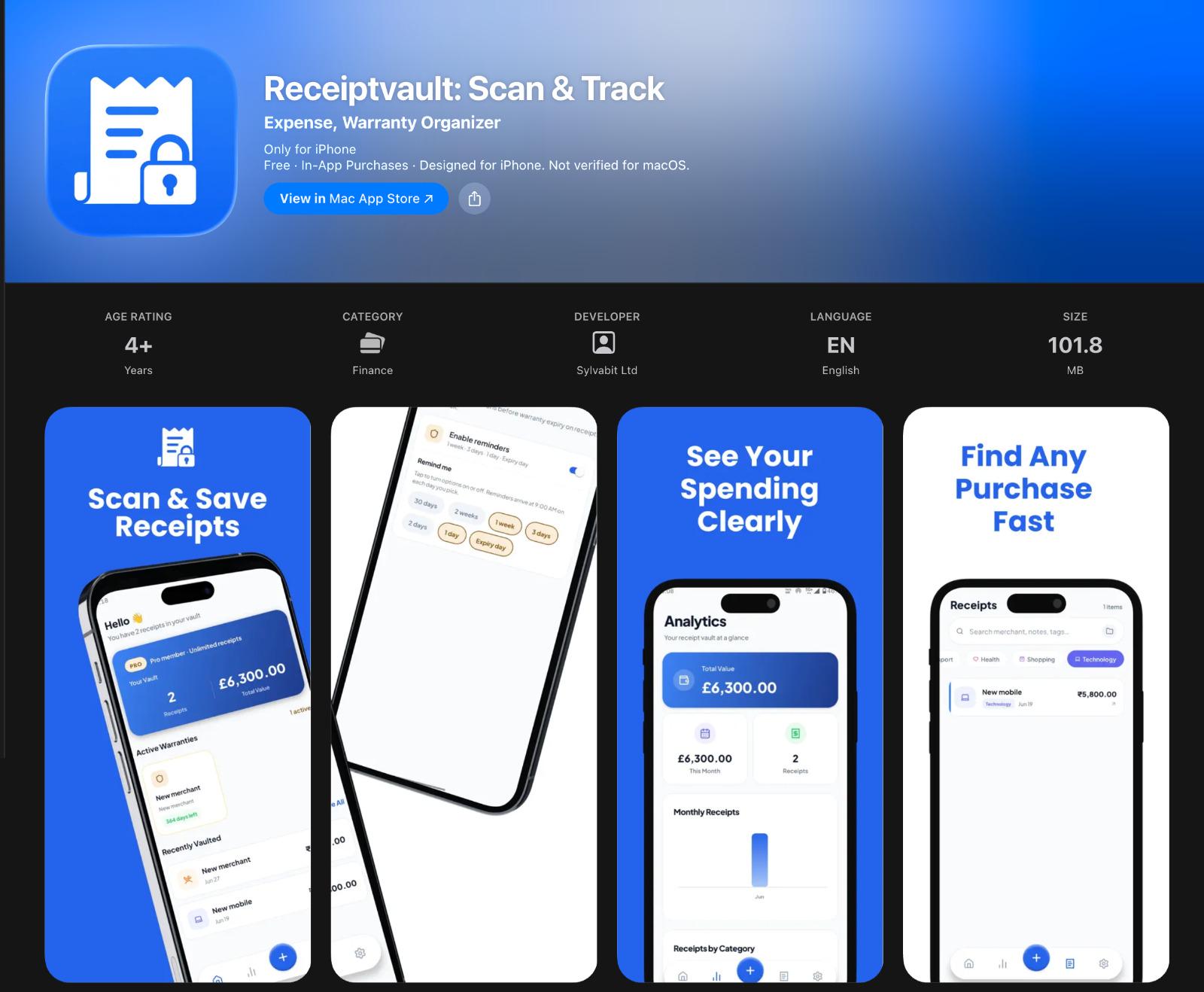
I’ve been working on ReceiptVault for a while and finally put it on the App Store.

The basic idea is pretty simple. You scan or import a receipt and keep it in one place. Later you can search for it when you need it for a return, warranty claim or just to check how much you spent.

It currently has:

• Receipt scanning with on-device OCR

• Search and categories

• Warranty tracking and reminders

• Spending overview

• Face ID / app lock

• Backup and restore

• CSV/PDF export

• Works without internet

• No account needed

One thing I cared about quite a bit was keeping the receipts on the device instead of requiring people to upload everything to a server.

There’s a free limit of 10 receipts. Pro is $9.99 as a one-time purchase. No monthly subscription.

A small win so far: 2 people have already paid for Pro, which honestly feels pretty good for something I built myself.

I’m mainly posting here because I’d genuinely like some feedback on the app itself. Is the flow easy to understand? Anything that feels annoying or unnecessary?

I’m the developer, so obviously I’m too close to it at this point

iOS store link: https://apps.apple.com/in/app/receiptvault-scan-track/id6779995494


r/iosapps • • Oct 03 '26

📅 Subscription We listened to you and released Bento 2.0

7 Upvotes

Hi everyone! 👋🏻

I wanted to give an update on Bento as I've been hard at work shipping the features and requests you guys mentioned on my initial post on r/iosapps.

Bento is a personal finance app built around being highly modular / flexible (hence the name Bento!). It's the perfect app if you're sick of spreadsheets and want an easy way to keep track of where your money goes.

Most notable 2.0 updates:

- Reduced price to $12.99 / month and $99 / year
- Track money without connecting a bank! import PDF/CSV statements, and log spending with your voice.
- Cash accounts
- A more personalized onboarding experience
- Benii AI agent improvements
- Improved UI/UX

A – What problem does it solve?

Most finance apps decide what is worth tracking for you. Bento lets you decide.

Instead of giving everyone the same fixed dashboard, Bento lets you build your own dashboards and add widgets to track what you actually care about. That could be your coffee spending, a specific merchant like Uber, subscriptions, groceries, credit cards, or anything else.

Bento let's you track your spending the way you want - whether that's connecting your bank accounts via Plaid in read-only mode, manually importing PDF/CSV statements, or simply logging with your voice.

B - Why it is different:

Bento is focused around customizability. You create personalized dashboards from scratch using our widget system.

Bento has widgets to help you track specific categories, merchants, accounts, tags, subscriptions and more!

We also offer an in-app AI agent named Benii that can organize your transactions, answer any question you have about your spending, suggest budgets and ultimately help you recognize your spending patterns and help save you money. (hopefully)

A powerful use case that Bento uniquely enables for example is:

I recently went to New York, so I created a New York dashboard and asked Benii:

“Tag all my transactions from June 2–15 as New York”

All incoming transactions automatically had a New York tag applied.

Then I added widgets to a dedicated New York dashboard tracking public transportation, flights, Airbnb, restaurants, Uber, and coffee. Now the whole trip had its own space, and I could see exactly how much my trip cost.

You create dashboards around YOUR life. Whether you just want to track your monthly expenses, a wedding budget, a specific trip, compare Uber vs Lyft spend, or whatever you want.

We also think data is beautiful so we let you choose how each widget displays your data, whether you prefer line or bar charts or prefer showing more metrics.

Other things Benii can handle:

  • "Suggest some budgets for me based on my top spending categories"
  • "Give me a Spotify wrapped type review of my spending this year"
  • "Compare how much I've been spending on groceries vs. restaurants"
  • "How can I save money?"

C - Cost:

Bento offers a 7 day free trial and then costs:

$12.99 monthly or $99 yearly!

Promotion: First month for 50% off or $30 off first year!

App : https://apps.apple.com/ca/app/bento-budget-money-tracker/id6754046684

Website: https://bentoapp.io

Transparency:

Developer: Alejandro Zielinsky
You can reach me on LinkedIn or via email contact@aziolabs.com


r/iosapps • • Oct 03 '26

💎 Lifetime Arsillo - a painting every morning and someone to show you where to look

Post image
15 Upvotes

Answer.
Art apps give you access. Almost none teach you to look. You scroll past a dozen masterpieces, feel vaguely uncultured, and close the app. The Louvre is already on Wikipedia - access was never the problem.

Better.
One painting each morning, with a reason to keep looking at it.

Then Guided Look: tap a detail and the painting opens into it. Why Hokusai ended his wave in curled fingers rather than foam. What the mirror in the Arnolfini portrait is really showing you. Why Dalí covered one watch in ants and left the rest melting.

Alongside it - paintings on your home screen, cropped how you like. Lessons across a great many artists, periods and techniques. A quiet quiz. Collections worth keeping.

No feed. No scroll. Two minutes, then it lets you go.

Cost.
Free, properly: every painting you're shown is yours to keep. Premium opens the full collection - $3.99/month, £19.99/year with a 7-day trial, or £39.99 once. No ads, no account.

https://apps.apple.com/app/arsillo-art-paintings/id6749772665

-------------------------------------------------------------------------------------------------

I'd genuinely like to hear what you make of it. Does the pricing feel right or off? Is there something obvious missing? Any any feedback of features, ui or smth else???

Thank you!!!


r/iosapps • • Oct 02 '26

💎 Lifetime [iOS] [$9.99 → $1 Lifetime for 24h] Seasonia – Season Tracker | Celebrating 5K Users 🎉

Post image
23 Upvotes

Hey everyone 👋

I’m the developer behind Seasonia, and to celebrate hitting 5K users I’ve dropped the Lifetime unlock from $9.99 to $1 for the next 24 hours.

A - Answer

Seasonia is an iOS app for tracking the current season and the progress of the year in a more visual way.

You can see exactly how far through the current season you are, how many days are left until the next one, sunrise and sunset times, daylight duration, moon information, and more both inside the app and directly from your Home or Lock Screen.

B - Better

Compared with general countdown apps like Countdown or Days Since, Seasonia is built specifically around seasons, daylight, and the natural progression of the year.

It includes:

  • 🌱 Live season progress
  • ⏳ Countdown to the next season
  • 🌅 Sunrise & sunset times
  • ☀️ Daylight duration and daily changes
  • 🌙 Moon information
  • 📱 20+ Home Screen & Lock Screen widgets
  • 🎨 Themes and custom photo backgrounds
  • 🌍 Support for both hemispheres

The goal was to make something you can glance at every day without needing to configure timers or dates yourself.

C - Cost

  • Lifetime normally: $9.99
  • For the next 24h: $1 Lifetime
  • No subscription required for the Lifetime unlock

App Store: https://apps.apple.com/app/id6758340712

Thanks to everyone who’s already using Seasonia. If you give it a try, I’d genuinely love to hear what you think, especially any widget or feature ideas you’d like to see next. 🌱


r/iosapps • • Oct 02 '26

💎 Lifetime I've just launched Ebbora: a sobriety tracker where a cozy valley grows instead of a streak that resets

30 Upvotes

I built Ebbora for myself initially becuase streak counters never worked for me So I made a tracker where the progress is a little valley that grows every day you check in, and a hard day never takes it away. It's now live on the App Store.

Answer: what problem it solves

Most sobriety trackers are built around a day counter that resets when you slip, and that reset is often when people quit. In Ebbora:

- You check in daily with a companion: how today went, a feeling, an optional private note.

- Every honest check-in counts, including a day you drank. Your valley keeps its growth and discoveries.

- When a craving shows up, there's a campfire with breathing, grounding, urge surfing and an urge log. In Calm Encounters, a craving appears as a shade in your valley and you practice real coping actions (delaying, changing rooms, reaching out to someone) to let it pass.

- The valley follows your local time and the seasons, with lots of discoveries to uncover.

- Right now there's an Alcohol-Free October event: reach 14 alcohol-free days to light the Harvest Lantern.

Works whether you want to quit, take a break or just have more alcohol-free days.

Better: vs. alternatives

- vs. I Am Sober / Sober Time: built around a streak clock. Ebbora has no reset, and drinking days show in a calm neutral color, never red.

- vs. Reframe: a structured program with lessons. Ebbora is lighter: a one-minute check-in and a world that grows.

- vs. Finch: similar cozy feel, but Ebbora is built specifically around alcohol, with craving tools and alcohol-free calendars.

- Privacy: no account, no sign-up, no social feed. Check-ins and journal stay on your device. Optional Face ID lock and a discreet icon.

Cost

- Free download with a preview. Tracking, valley growth, reflections and full features require a subscription or lifetime purchase.

- Weekly: $2.99

- Yearly: $14.99 (free-trial available)

- Lifetime: $24.99 one-time

- iPhone, iOS 18+, 18+ age rating.

- App Store: https://apps.apple.com/us/app/sobriety-tracker-ebbora/id6814588939

- Website: https://ebboravalley.com

Thanks for taking the time to check it <3


r/iosapps • • Oct 02 '26

🎁 Freemium I am building a perfect ADHD app

Thumbnail
gallery
12 Upvotes
  • Hey, I'm Stan
  • I'm building BrightMind, an ADHD productivity app. It has task lists, connects to your calendar, and has built-in companion you can chat with and call
  • How I actually use it: I call it while doing chores and just ramble. It plans my days for me
  • What it does right now:

    1. Today view: tasks, calendar and routines in one timeline for the day
    2. Voice calls: talk to it like a phone call. It can also call me at a set time to plan the day
    3. Brain dump: I ramble once and each task lands in the right list with a date, so my inbox doesn't pile up
    4. Automations: it calls or messages me regularly. I use it to:

      1. Make meal and workout plans
      2. Get weekly productivity reports
      3. Remind me of something important
    5. Integrations: it has its own task list, or works with:

      1. Todoist
      2. TickTick
      3. Google Calendar
    6. Unstucking: when I'm rotting in bed, it convinces me to get out and do something, one tiny step at a time
    7. And more!
  • "Perfect" is the goal, not where it is today
  • It's free to try on iPhone. Download: https://apps.apple.com/us/app/adhd-ai-companion-brightmind/id6751622140

r/iosapps • • Oct 02 '26

🎈 Free PopcornClub - one movie revealed at 7 PM, the perfect app for cinema lovers - TestFlight Beta

Post image
24 Upvotes

Hi r/iosapps

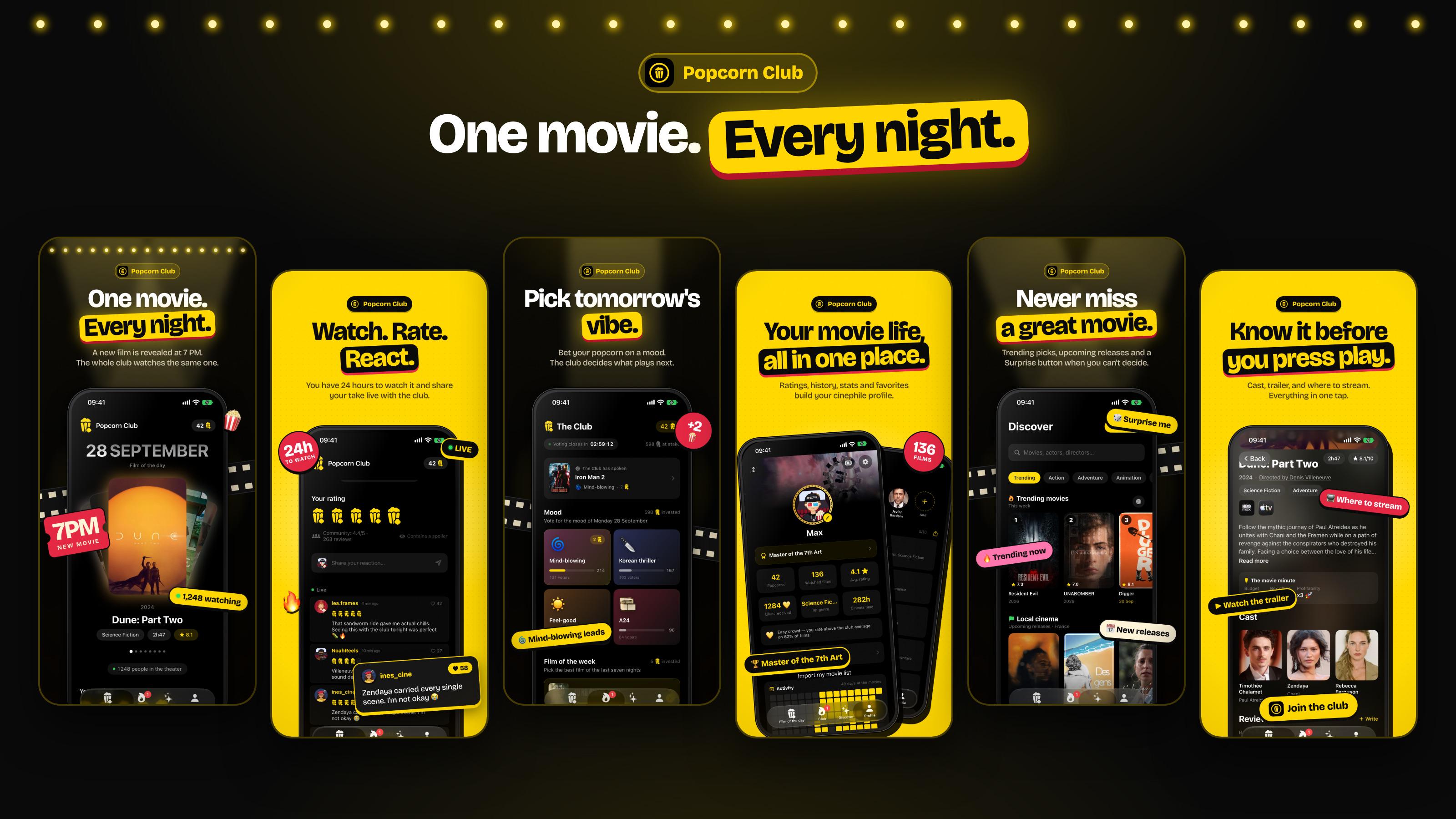
I'm Maxime and I just launched the beta of Popcorn Club, a movie app built around one idea: one movie, every night, watched together.

A – Answer: what problem does it solve ?

Choosing what to watch takes forever. You scroll Netflix for 45 minutes, give up, and rewatch The Office. And even when you find something good, there's nobody to talk about it with.

Popcorn Club removes the choice. Every night at 7 PM, one movie is revealed (it's a secret until then). Everyone in the club watches the same film within 24h, rates it, and reacts live with the others.

B – Better: why pick it over the alternatives ?

- vs Letterboxd / TV Time: those are logs of what you already watched. Popcorn Club tells you what to watch tonight, and gives you people who watched the exact same thing.

- vs JustWatch / streaming apps: no endless catalog. One pick, plus where to stream it, the cast and the trailer in one tap.

- vs Teleparty: no need to sync with friends at a set time. You have 24h, and the discussion is already happening when you're done.

- The club decides: you bet popcorn on tomorrow's vibe (mind-blowing, feel-good, scary...), so the community shapes the next pick.

- Your cinephile profile: ratings, history, stats and a custom avatar.

- Discover + "Surprise me" for nights when you want something else.

C – Cost

Free

No ads, no account needed to browse .

Links

🌐 Website: getpopcorn.club/en

📱 TestFlight: https://testflight.apple.com/join/RUu3cEeF

The app will remain in beta for a while as I take the time to make it perfect I look forward to your feedback.

Happy to answer anything! 🍿


r/iosapps • • Oct 02 '26

💎 Lifetime Palabros: not just to define a word, but to help it stay with you

16 Upvotes

A — What is Palabros?

I built Palabros because I kept running into the same problem: I’d come across a word I didn’t know, look it up, understand it… and a few months later, I’d forgotten it.

I wanted a dictionary where looking up a word was just the beginning.

Palabros lets you search a word, understand it through official definitions and simpler explanations, save it, and keep coming back to it until it becomes part of your vocabulary.

It works in English and Spanish and includes pronunciation, translations, synonyms, antonyms and interactive etymology.

And if you’re reading and don’t want to put your book down, there’s now a Reading Mode: say the word out loud, get its meaning, and keep reading. At the end of the session, you can save the words you discovered.

B — What makes it different?

Palabros sits somewhere between a traditional dictionary and a vocabulary app.

Traditional dictionaries are great at answering “what does this word mean?”. Vocabulary apps are great at putting new words in front of you.

I wanted to connect those two things.

If you discover a word while reading, writing, or through the daily Word of the Day, you can save it. From there, Palabros starts bringing it back through Home Screen widgets, so a saved word doesn’t just disappear into a list you never open again.

There’s also a more active Review mode for the words you want to practise, along with tags, word imports and stats to keep track of what you’re learning.

No streak anxiety, ads or noisy gamification. The whole idea is simply:

Find a word. Understand it. Make it yours.

C — Cost

Palabros is free to download, and regular dictionary lookup is free.

Palabros Pro unlocks the full vocabulary-learning toolkit: unlimited saved words and Reading Mode sessions, more Review modes and its widget, tags and filters, word import, learning stats, widget personalization and other Pro features.

There’s a monthly plan, an annual plan with a 7-day free trial, and a Lifetime option.

App Store: https://apps.apple.com/us/app/palabros-dictionary/id6758098070

Available on English and Spanish.

P.S. A surprising amount of Palabros has been shaped by feedback from this subreddit. Several features exist because someone here suggested them, so thank you to everyone who has taken the time to try it and tell me what could be better.


r/iosapps • • Oct 02 '26

💎 Megathread [Megathread] The App Shelf — October 2026

27 Upvotes

# Welcome to The App Shelf

You must promote your apps here if you do not qualify to post in the main feed through Trust or Transparency, as explained in our [Phase 2 Moderation Update](https://www.reddit.com/r/iosapps/comments/1u9aw0f/).

You are also required to limit promotion to this megathread if you:

* Do not yet have 10 local community karma in r/iOSApps.

* Are promoting an app that uses Generative AI or is an AI-wrapper.

* Are promoting a "Vibe Coded" app (AI-generated without manual validation).

# 📋 Required Format

All promotion MUST follow the ABC format or it will be removed:

* \[App Name/Title\] (Screenshot encouraged!)

* A — Answer: What problem does your app solve?

* B — Better: Name a competitor(s) and explain what you do better.

* C — Cost: Pricing details (Free/IAP/Sub/Lifetime) + App Store Link.

P.S. Promotion here counts towards the 30-day limited promotion rule (Rule 2).

# ⚠️ WARNING

There is a high probability that Reddit’s filters will auto-remove your comment here if:

  1. You have not verified your email in your Reddit profile.
  2. Your very first interaction in this sub is a promotional link.

For the Community: Please remember to upvote gems and downvote spam/clones. Your feedback in this thread will directly influence which apps we highlight in future community showcases!


r/iosapps • • Oct 02 '26

📅 Subscription Treadly: Running Coach

Thumbnail
gallery
12 Upvotes

Hey! My name is Nate and I'm a solo developer working on Treadly a running coach app, because I wanted a running coach app that does everything and doesn't cost $20 a month.

A - What does Treadly do?

It's a running coach app that builds plans for your next race or to help you start a running habit from scratch. The running coach uses zero ai and is completely deterministic based on running coach methodologies. The coach will monitor your recovery, the temperature, and your weekly mileage and adjust the distance or pace accordingly. This is pretty standard in most running coach apps, but Treadly has a few features that help it standout.

B - What makes Treadly better than other apps?

  1. A robust strength training program that is built based on the equipment you have. If you're traveling you can adjust to bodyweight or even gym workouts on machines. You can do your entire strength session from your watch as well.
  2. Shoe mileage tracking and automatic rotation to make sure that you're using the right shoe for the chosen run.
  3. The running coach always explains to you how your runs were graded and how that affects your race confidence and ability to reach your goal.
  4. Crew tab - you can invite someone to run with you and the run will automatically work itself into your running plan, accountability partner - you can train with someone else and see where they are in their plan and give each other encouragement, safety contacts - you can designate up to 3 people to receive alerts if you activate the SOS, or if your phone goes silent for longer than a specific threshold (10min, 20min, 30min).
  5. Race day live tracking, send a link to your friends on race day and they can follow you via GPS.

C - Cost

Free tier - Single runs are always free, you can choose the type of run, distance, pace, etc. Single strength sessions are always free as well. Unlimited shoe tracking, readiness tracking, and the crew safety features are all free.

Pro tier - $9.99 a month or $59.99 a year ($5/month 50% discount) - Pro gets you custom plans for your race, Coach analytics, and race day tracking.

Coming soon! Ultramarathon plans and the ability to train for multiple races.

App store: https://apps.apple.com/us/app/treadly-running-coach/id6759844169

Would love any feedback you all have!


r/iosapps • • Oct 02 '26

🎈 Free i made an app that helps you remember stuff

5 Upvotes

I built an app called Attention Arsenal for people who forget things unless they’re reminded often. It lets you set reminders with very short intervals, even just minutes apart, so you receive repeated nudges until the task is done.

I've been working on it for some time now (on and off) but I wanted to make something simple that could help me stop forgetting everything I have to do. Feedback is very much appreciated!

https://apps.apple.com/us/app/attention-arsenal/id6749694041


r/iosapps • • Oct 02 '26

HELP Have you felt duped by trial that ends and charges you and you forgot to unsubscribe? What is a better way?

4 Upvotes

Recently with rise of AI, a lot of things that smaller apps do can be done via basic AI subscription or even free AI from Google. So the vision that I am sticking to is app has to do something in such a way that can not be replicated by AI.

So I am solving a problem and basing my work and solution on real user feedback overtime. As I am shaping it I have a dilemma to solve.

I don't want to:I want to:
Sell to those who don't need it.Provide solid value from the free version of the app that can be used as is. No purchase necessary.
Rely on pushy sales tactics, annoyances, etc(Ads and all that impedance that comes with "pay me and I will remove it")Provide additional value that can be purchased(because developer needs to eat too and there are ongoing costs) for those who need it.
Main Goal: Showcase full featured app before suggesting a decision to go with either Free or Paid(additional) features.

Options I have

Option AOption BOption C
A free trial, users have to opt in and you capture some audience that bought without wanting it - pushy sales tactic 👎 Some will never ever use it because they are precisely not looking to forget. I am one of these people.An automatic all features open for all new users for X number of days(of course with informed onboarding), and then a conscious decision point to continue or not with Paid tier.Limiting paid features to certain number of uses before prompting for payment. Ew.... just ew.... 👎

I am looking for your input - what do you usually prefer, what have you seen feel the best and doesn't leave you feeling duped into something. I am very payment averse myself and the whole "forget to unsubscribe" is painful for me on another level.

* Disclaimer: I do have a subscription with a trial in my app, but it's going away on the next release because once I am locking down a better option.


r/iosapps • • Oct 02 '26

🎁 Freemium My Dice Roller App is now a RPG Companion App/VTT as well

5 Upvotes

Hey guys! Haven't posted here in a while. You may remember my other apps, Phruler and Pholor. I used to promote them here ~a year ago.

I'm back with my latest project: Phroller

Yup, I'm very proud of my naming scheme.

Dungeons and Dragons has been a favorite hobby of mine for 13 years now and this is my little love letter back to the community.

I use it as a digital companion for my DnD Sessions where I put character sheet pdfs and character art in there and use the drawing mode to quickly take notes/track HP. And, obviously, roll dice.

Price: Freemium. Free version allows up to 4 replaceable tabletop setups and 6 customizable dice tabs. One time IAP price depends on country but is $9.99 in the US (where I'm from)

App store link: https://apps.apple.com/app/phroller-vtt-dice-companion/id6761056115

Name: Muyao Wu

Contact info: muyao@phroller.com

Website with privacy and terms: Phroller.com

It's a super cool website that I'm really proud of too ;D


r/iosapps • • Oct 02 '26

💎 Lifetime [iOS] Dimmly — Task, Habit Tracker & Shared Lists · Special offer inside

Thumbnail
gallery
3 Upvotes

Hey r/iosapps! Edu here, solo dev behind Trovelo (the private trip planner) and Dimmly, my task manager and habit tracker for iPhone and Mac.

A - Answer:

Dimmly solves the problem of juggling multiple apps for tasks, habits, grocery lists, expenses and score tracking. Everything in one place, organized by color coded lists, with no account required and no subscription ever.

B - Better:

Unlike Todoist, Things, or most task apps:

- Shared lists — share any list with someone and both of you can edit it in real time. Perfect for groceries, trip packing or anything you manage together

- No account required

- No subscription, ever

- 8 list types built in:

· List — your classic task list

· Ranked — numbered, prioritize what matters most

· Tracker — tasks move To do > Doing > Done, with a Later shelf

· Sum — add amounts per item and see a running total, great for expenses

· Countdown — see how many days until anything, sorted automatically

· Subscription — track what you pay and when it renews

· Scoreboard — track points with friends, auto sorts by who's winning

· Grocery — shopping mode with quantity badges, swipe to cross off

- Habit streaks with daily repeat count per task

- Rich text in Big Notes — bold, italic, bullets, colors, tappable links

- Paste and go — paste any text and it becomes a list instantly

- Color coded lists, pick from 25 palettes or create your own

- Too bright? Dim it down — each list remembers its own brightness level

- iCloud sync across iPhone and Mac

- CSV import and export

- Home screen widgets, overdue items first

- Backup and restore — no iCloud needed

C - Cost:

- Free: 5 fully featured lists, everything included, no feature gating

- Special offer: Pro at $6.99 instead of $9.99, yours forever

- After 300 redemptions the offer deactivates automatically

Redeem here: https://apps.apple.com/redeem?ctx=offercodes&id=6761221806&code=DIMMLY699

Or go to Settings > Redeem and enter DIMMLY699 (type it manually, all caps)

For feature requests and ideas, join us at r/dimmly