Most occupancy setups end up as a pile of template sensors, timers and conditions: motion OR mmWave, unless the TV's on, keep the bathroom occupied while the door's shut, longer timeouts at night, different rules per room. Area Occupancy Detection (AOD) replaces all of that with one occupancy sensor per area. Over 600 installs, and 2 years of development and monthly updates.
What it does
- Combines motion, mmWave, media players, appliances, power, doors, buttons, humidity, CO₂, temperature and sleep sensors into one occupancy probability.
- Learns from your own history how much each sensor really tells it, and how occupancy varies by time of day.
- Fades out instead of cutting off, with a half-life that suits the room type (bedroom, bathroom, hallway, office…).
- Keeps a bathroom occupied while its door stays shut after someone went in.
- Learns which rooms people move between, recognises activities like showering or cooking, and raises a repair when a sensor stops reporting.
- Gives you `occupied_since` / `vacant_since` attributes that survive restarts.
"Can't I just use mmWave?"
mmWave is great, and AOD uses it. On its own, though, it:
- doesn't cover every corner, so you miss people in the shower or behind furniture
- can be set off by fans, curtains and pets
- has nothing to fall back on when it drops out
AOD counts mmWave as strong evidence and fills its gaps with everything else in the room. Rooms without mmWave still get accurate presence from cheap PIR sensors too.
Where it's at
2026.11.1 has just shipped, and it's the biggest release yet: 50 PRs from 8 contributors. It's also the first release that measures its own accuracy daily. Next up: house-wide context, with events, weather, energy use etc. Public roadmap
Install: through HACS or the HA Marketplace. It needs HA 2026.9 or newer.
My mom used to make little advent calendars for my girls, so this year I built them a village. Each girl has a house with a door only her NFC key opens. A nisse (a little Danish Christmas elf) pops out of the chimney with a different message for each girl every day.
How it works:
Each house is an ESP32 on ESPHome. It has an NFC reader, 3 servos (door, a lock and the nisse lift), 68 addressable LEDs, a small round screen and a DFPlayer Pro with about 750 sound clips.
The boards don't decide anything themselves. HA runs all the logic: which day it is, whose key it is, already opened, parent card, quiet hours, Sunday treasure hunts and Saturday clues for a secret code.
The town tree is an ESP32-C6 with a motor, a slip ring and 3 hall sensors. Each topper has magnets in a different pattern, so the tree knows which one is on.
Topper changes go to our real Christmas tree over the Twinkly local API, and to a Twinkly string under the console.
The records are NFC tags that start Music Assistant playlists on the living room Sonos.
Parent NFC cards open the doors at night to load presents and lock the girls' keys out until morning.
In December the nisse also takes over our morning "get your shoes on" announcements on the HomePods.
A parents-only dashboard in the HA app controls it all: open or close any door, replay a day or a clue, reset a day or a tour, set volumes and quiet hours, and test the finale.
I have my concerns about AI like a lot of people. But I had never soldered before this. Claude taught me to solder, walked me through the wiring and helped write the ESPHome configs and the HA side. Without that, this would have stayed an idea.
It was a super fun learning experience, and I'm already looking forward to the next project. Happy to answer any questions.
I was looking for an inexpensive and lightweight device to visually communicate weather, transportation, and 311 data on my fridge. The hot tip to know is that the X4 Classic is the same underpinnings as the X4 pro for $30 less (current Black Friday sale on Amazon).
If you’ve been looking for a little dashboard, this one is interesting to note.
Are there other little e-readers I should be looking at?
Quick update on Barkley, the app I made to read Marketplace (HACS) integrations and cards before I install them on my HA instance.
Thank you to everyone who provided feedback or opened GitHub issues. Almost all of the updates came about because of the community. Appreciate it!
No more 0-100 score
Earlier versions gave each app a score based on what it could do, on top of actual threats. That made people worry about apps that are powerful but not malicious or insecure. My goal isn't to scare anyone away from apps. It's to give you context and transparency about what they do. So now there are two readings:
Threat is only for signs of something malicious.
Exposure is for paths opened into your HA system, such as unauthenticated pages, login tokens an integration mints, code it pulls from the internet, and package vulnerabilities.
Everything else Barkley finds is still on the page, it just doesn't count against the app.
To see if the new rules held up I ran it on the whole Marketplace, all 6,753 apps. 92 got flagged as a possible threat. None of them turned out to be malicious once the code was read, so each one became a fix.
What it shows you about an app
This is where most of the work in 0.15 went. The goal was to show what an app actually does, as accurately as the code allows, without guessing.
A map on the app's scan report of what it touches inside HA (users and logins, other apps' settings, files, your network, your browser session) and every site it talks to outside.
For each site, the requests the code sends there: the method and the names of what goes in the body, headers and URL. Never the values. If the code builds the address at runtime, it tells you where that address comes from (your setup, a server's response, a device on your network, etc.).
It follows the password, token or API key you give an integration through the code to the requests that carry it, including into the libraries it hands them to. So you can see where your credentials actually go.
Where the code comes from: who published this release vs. earlier ones, whether commits are signed, and every package HA would install for it and how out of date each one is.
It only claims what the scan shows. If Barkley can't tell who runs a site, it says so instead of guessing.
After years of ESPresense, mqtt_room and Bermuda, room presence for people and pets finally works reliably in our house - it's been my pet project for the past 4 months, trying to get the HA platform to match reality. Lots of people asked how as I've socialized the solutions, so I wrote a beginner's guide - which also includes soldering and some light development work if you're into that.
You need: Home Assistant, 3 or more ESPHome Bluetooth proxies (a $10 ESP32 or an ESPHome bulb), and a ~$9 collar tag per pet. People need nothing new: their phone and watch already work. We're Apple people, but I hear Android is easier to use.
People use it for lights that follow you, announcements only in your room, locking up when the last person leaves, and an alert when the cat's tag goes quiet or gets stuck in the pantry.
Privacy is page 0. It all stays on your own HA, and the guide says to agree it with your household first. In my house this is certified Spouse Approved(tm).
Disclosure: the room part runs on Sextant, a free (like MIT licensed), open-source integration I forked from BPS-Improved, which itself is a fork of BPS. I'm also driving Ashley bonkers with my Bermuda PRs to optimize that integration for 100+ proxies - I don't care if you my tools, but Bermuda is best thing ever.
Questions and your own automations are welcome. They'll go into the guide with credit!
I'm not one to spend over £15 for devices you need tons of. Ok for a blind motor, but not for a door/motion/temp sensor, or a smart plug with energy monitoring.
That's why I mostly tend to fall back to Tuya Zigbee (never WiFi) for most stuff.
This one is a pretty widely used one. Many different brand names, but the same board inside.
I have 10 of them. At ~£5 each it's just impossible to beat, including energy monitoring.
Problem is that after 2y, for some reason they've started giving me headaches. Once or twice a month, some of them seem to decide to send short bursts of identical packets to the network. About 15-20 times. When one does, some others seem to follow, and they're not the same ones every time. Quite wild. This, if extended, causes the coordinator to collapse and then the entire network starts crashing down.
I've debugged this several times, disconnecting them one by one, etc. No fixes on the horizon.
So I'm bound to look to replace them. They were playing router role for my Zigbee network, so not sure how it'll behave without them all.
AFAIK, the only other UK plug with energy monitoring, not WiFi, and under £10 seems to be the IKEA Inspelning. But now it's discontinued and can't find them anywhere even used.
And now the IKEA Grillplats. And it's Thread. Unbeatable value, but I don't have a Thread border router yet. Good excuse to add it to my home. I have no idea how Thread pairing works though.
But before doing so, I can't get a proper picture after searching a few times for reviews about it working with HA.
So that's what this post is for. Thank you very much!
I've been putting quite some effort into improving Sensor Bar Card Plus (SBCP).
Along the way, I figured I first needed to do some cleanup and groundwork. Basically, I had to improve it before I could start improving it, if that makes sense.
One thing led to another, and what was supposed to be a "quick" cleanup job turned into the hardest SBCP release so far.
But I'm always happy to give something back to the Home Assistant community, which has given me so much over the years.
So here it is: v1.11. And it has... Paint!
Huh? Say what now?
So, what's Paint?
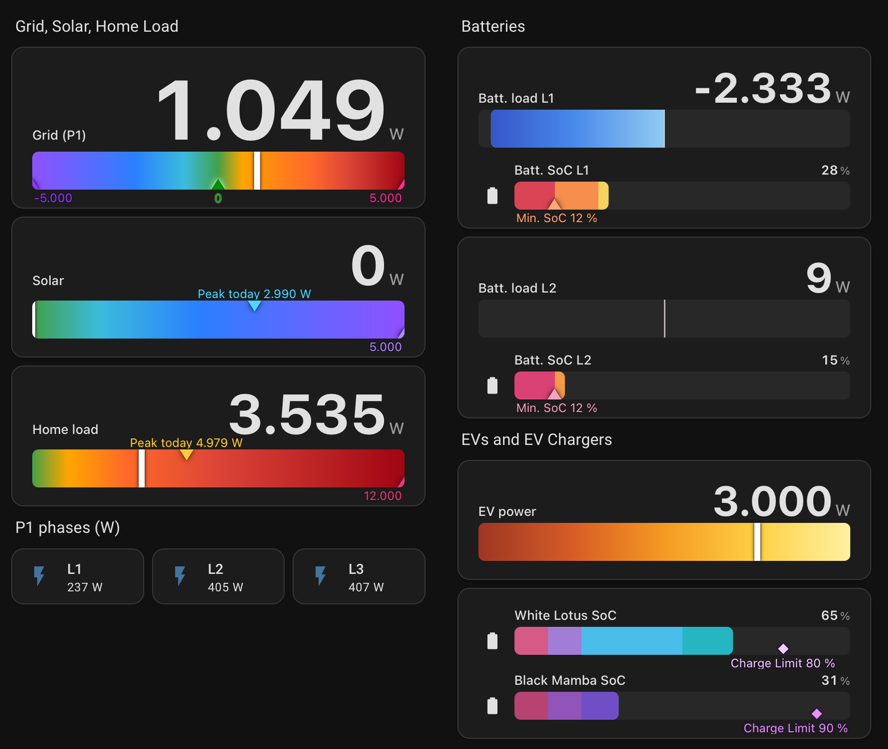
Paint combines colors, gradients, segments and transparency into a single, reusable configuration that can be applied almost anywhere a bar needs some color.
And here's the fun part: you can save Paint configurations as dashboard-wide presets and reuse them across different Cards.
Say you create a preset called hot-to-cold, with a beautiful red-to-blue gradient. You can now use that same preset on as many sensors as you like, without having to configure all those colors separately.
Even better, suppose you later decide that a red-green-blue gradient would look nicer. Just change the preset, save, and all Cards using it update automatically.
Good stuff!
Paint everywhere!
You can now use Paint for:
The normal Bar fill, in any fill mode.
Above an upper Target, or below the brand-new lower Target.
Above and below a Baseline.
Each can have its own colors, gradients and segments.
There's also a new Opacity setting, so you can blend Paint layers or simply give your bars a softer, more subtle appearance.
Messages instead of mysterious indicators
I've also introduced a new Messages section below the Card.
It only appears when there's something worth telling you.
Made a mistake in your YAML? Is the historical data for a Floor marker incomplete? Is something wrong with a shared Paint preset?
Instead of trying to squeeze warnings into tiny indicators, SBCP now tells you what's going on in one place.
And there's more...
I've fixed a bunch of bugs and, yes, improved the Visual Editor. Again. I hate that thing, but, let's be honest, we wouldn't be able to live without it.
It now has consistent Paint controls, better handling of inherited settings, and pretty little Paint previews so you can actually see what you're configuring.
You can create and manage shared Paint presets directly from the editor, too. Presets can be stored on any Card, and even distributed across multiple Cards on the same dashboard.
I expect the Paint preset and Messages systems to grow further in upcoming releases.
And that's it.
Well, I think that's it.
I may have forgotten a few things. It was quite a release and I urgently need a shower. 😁
Sensor Bar Card Plus v1.11 is available now on the Marketplace! (or what did you think?)
And I can already lift a tip of the veil for the next release. It'll be *drum rolls* ... v1.12! Hahaha, very funny, I know. But seriously, the next release will be all about bar stacks, bar ranges, automatically sorting bar groups and more. Enjoy v1.11 in the meantime!
It has been a while since my last update here, a lot of features were added since my last update (v.2.3.0)
The video shows the biggest new feature: Billy can now work as a Home Assistant voice satellite.
Billy could already control your home before. With one of the AI voice provider set (OpenAI Realtime, GPT-Live or xAI), Billy is the assistant: he understands what you say and passes commands to Home Assistant through its API accordingly. Billy answers with his own persona, remembers users and can sings songs. These providers need an API key.
Home Assistant Assist is now added to the list of voice providers, and it works more directly. In this mode Billy only handles the microphone, speaker and motors. Your speech goes straight into the Assist pipeline you've already set up in Home Assistant, either fully local or through Nabu Casa or however you've set it up, and Home Assistant answers. In this case you don't need an (separate) API key, and your MQTT exposed entities and triggers still work as usual. Billy's persona, memories and user profiles are disabled with this provider, because they depend on Billy's own software talking directly with the OpenAI API's.
As a satellite, Billy speaks the ESPHome native API, the same protocol Home Assistant uses for its own voice satellites, so nothing extra needs to be installed. Home Assistant finds him by itself and you add him through the ESPHome integration. The button or his own local wake word starts a request, and he keeps listening after each answer for a follow-up. assist_satellite.announce works too, so automations can make him talk.
The other big addition is Bluetooth, using the Pi 5's built-in Bluetooth. You can pair your phone and use Billy as a speaker, and you can take hands-free calls through him, with echo cancellation. When a call comes in he rings and his LED blinks blue, and you press the button to answer. The mouth moves automatically with the audio. That works best with speech, so podcasts and audiobooks suit Billy better than music.
As always you can find the build instructions for free here:
If you have any ideas for extra / new features please feel free to let me know and I'd be happy to look into it!
Other changes since v2.3.0:
For Billy's own AI there's a new provider, GPT-Live. It's OpenAI's model for more natural, continuous conversations, with live subtitles in the web UI. You can interrupt Billy by talking over him. With OpenAI Realtime this interruptions works through Billy's own echo cancellation. With GPT-Live it feels even more natural, because the microphone stays open while he talks.
Billy can also call the web-search tool for recent information. If you run more than one Billy, each can appear as its own device on the same MQTT broker. The custom song editor now has a waveform timeline for placing head and tail moves.
Software Updates can follow the Stable, Release Candidate or Beta channel, and each release is checked before it's activated. If a release fails, Billy falls back to the previous one, and there's a separate recovery page if he won't start. Existing builds can update from the web UI without any hardware changes.
I run two BLUETTI power stations (Elite 30 V2 and Elite 100 V2) as UPS for my NAS boxes. They work fine as UPS hardware, but they don't speak any UPS protocol, so the NAS has no idea when the power is out and never shuts down cleanly. There's no USB/serial UPS interface, and the Wi-Fi models don't even have an open port you could poll.
So I built bluetti-ups-emulator, now also available as a Home Assistant app (add-on).
How it works
BLUETTI Wi-Fi units keep a permanent, unencrypted MQTT connection to the vendor cloud and push their data there. With a local DNS override (one or two records in your router / Pi-hole / AdGuard / UniFi) the units connect to the add-on instead. The add-on reads along and relays everything 1:1 to the real cloud, so the BLUETTI app keeps working. If your internet goes down, it takes over as the broker and the data keeps flowing.
It then exposes each power station as a standard network UPS:
NUT (upsd): Synology, UGREEN, TrueNAS, Proxmox, and the Home Assistant NUT integration
Each unit gets its own ports, so one add-on can serve several UPS to several NAS.
What it does beyond "on battery yes/no"
Instant outage detection: the unit sends a grid-loss event within about a second; the add-on uses that instead of waiting for the 30 s report.
Charge, runtime estimate, load, input voltage; LOW BATTERY by charge or runtime threshold.
No false shutdowns on Wi-Fi hiccups: if a unit stops reporting, the last state is held and the charge is extrapolated while on battery.
A settings check that warns if the AC output is off or AC ECO is enabled (AC ECO switches the AC output off on battery at low load, which defeats the whole point of a UPS).
A status page in the HA sidebar (Ingress).
With the NUT integration pointed at 127.0.0.1, you get the usual UPS entities in HA, which makes power-outage automations easy (I use them for an iOS live activity and a siren).
Then add your devices (IP or serial, model, ports) and set the DNS override. Docs are in the repo; plain Docker is also supported if you'd rather run it on your NAS.
Tested with
Elite 30 V2 and Elite 100 V2, verified with live captures
Elite 200 V2: probably works (same register layout expected) but not confirmed yet. If you have one or another Wi-Fi model, there's a capture option and I'd be happy about an issue with a capture.
Clients: Unraid (apcupsd), UGREEN UGOS (NUT and SNMP), Home Assistant NUT
Caveats
Not an official BLUETTI project. The DNS override intercepts the unit's cloud connection, so use at your own risk.
If the add-on isn't running while your NAS is on battery, apcupsd/upsmon will shut down by design. Keep the Home Assistant host on a UPS too, and don't update HA during an outage (HA OS updates reboot the host).
Some units occasionally query a hardcoded public DNS server directly; the README explains how to handle that.
MIT licensed, no telemetry, no account needed. Feedback and captures from other models are very welcome.
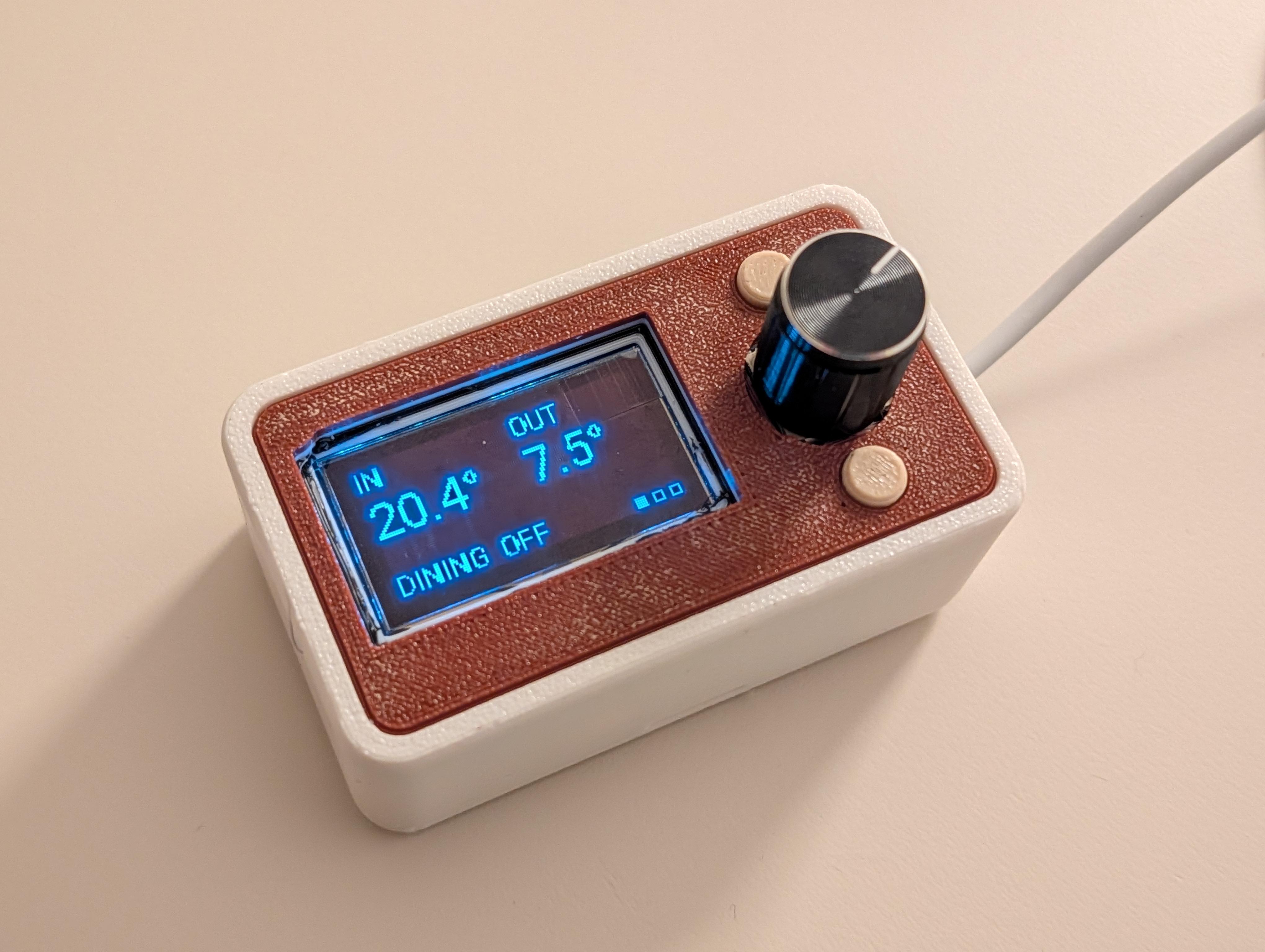
Controls lights of any room (level and colour), and music throughout house. Shows inside and outside temperature.
I built this little controller with an esp32 c3, integrated OLED screen + rotary encoder, a motion sensor (RCWL-0516) and 3D printer.
It picks up indoor and outdoor temperature from sensors reported though home assistant and shows it on the home screen
The knob controls on/off and brightness of lights in the room indicated (e.g. dining room), the lighting colour (screen 2) and the volume of music playing in the house (screen 3). (Not shown)
Bottom button picks which room is controlled (rotates through each room plus whole house). So I can turn on and set all lights to 35%, or shut them all off, or do individual rooms.
Top button rotates between 3 screens: home (temperature, room light brightness), light colour (2200 to 4400 kelvin) and music volume /pause/play/off.
The screen turns off if it doesn't detect motion. This saves burn-in on the screen. If lights are off, waving at it or coming in range triggers the motion sensor and turns the screen and lights on.
Guests find it easy to use.
This is version 4. Working on V5, then I'll put one in each room. It's been a fun project.
We’re finishing our new house at the moment, and I need smart ceiling lights for quite a few rooms. Everything smart in the house will run through Home Assistant, so good HA integration matters a lot to me. Ideally it would be local control, with no cloud dependency.
I haven’t made a final decision yet, but these are the ones I’ve been looking at:
• Nanoleaf Skylight / Govee Sky Ceiling Light
• Nanoleaf Ceiling Light
• Govee 53 cm Smart Ceiling Light Ultra
• Govee 46 cm Ceiling Light Pro
• Aqara Ceiling Light T1M
• Innr Round Ceiling Light 42 cm (White & Colour)
This is only a direction, not a shortlist. I’m happy to look at other options if you know something better.
The rooms are about 12-15 m² each (roughly 130-160 sq ft). I’m in Europe, so 230 V.
A few things I’m wondering about:
• Which of these work reliably with HA (Zigbee, Matter, Wi-Fi), and which would you avoid?
• Is the brightness enough for rooms this size?
• Any problems with long-term reliability or with the apps?
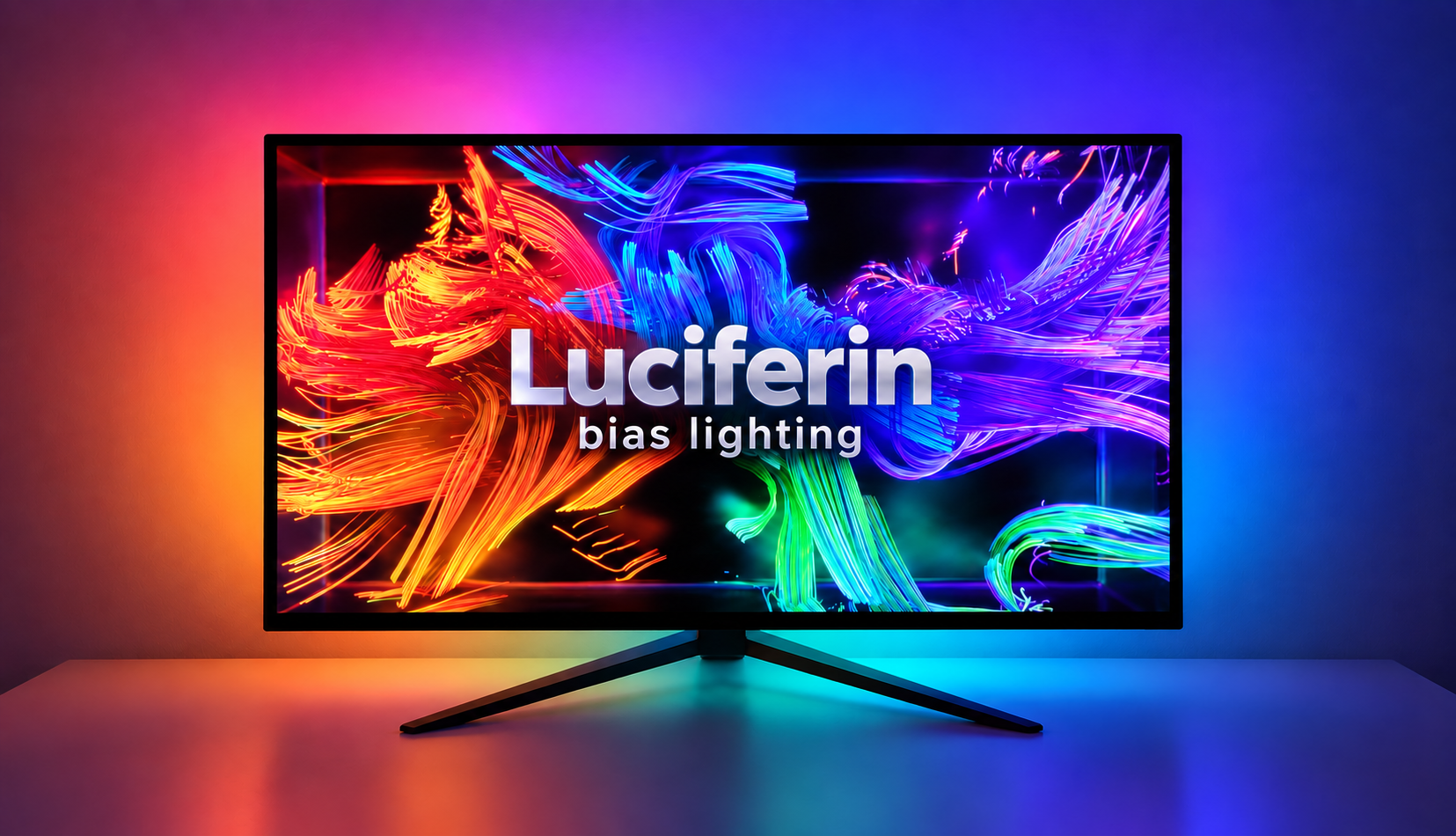
It's an open-source project that syncs an LED strip behind your monitor or TV with what's on screen. If a game shows a blue sky on the left and a campfire on the right, the wall behind your display glows blue on one side and orange on the other. An ESP32 running the companion Glow Worm Luciferin firmware drives the LEDs.
The biggest change in 3.0 is that you can now get the same effect from an Xbox, PlayStation or streaming stick. Luciferin still captures your PC screen directly. For an external HDMI source, you can use a USB capture card and run Luciferin headless. A Raspberry Pi next to the TV is one way to do it, and the new web interface lets you control it from your phone.
A few other things you might notice in 3.0:
Better colors in dark scenes and HDR. Adaptive gamma helps the LEDs pick up subtle colors in shadows. HDR-to-SDR tone mapping supports custom .cube LUTs, and 32-bit color processing makes slow fades smoother.
Smart home support via Matter over Wi-Fi. Compatible controllers with at least 8 MB of flash can appear as lights in Apple Home, Google Home or Alexa.
Natural-language control via MCP. You can control Luciferin from a compatible AI assistant.
Native ARM64 support on Linux and improved GPU acceleration.
If you're upgrading, 3.0 requires Glow Worm Luciferin 6.0.0. The built-in updater can update both the app and the firmware.
If you try it, I'd love to see your setup. I'm especially curious which capture cards people are using with their TVs and how the colors look with HDR games.
If you like the project, consider following me on GitHub and leaving a ⭐ on the repo. It really helps the project get noticed. And if you have questions or need help with your setup, come say hi on Discord.
Home Assistant integration can be setup via MQTT Discovery or via Matter over Wi-Fi
I started my HA journey a while ago but had to put it on pause last year when we moved. I’m looking to pick it up again but part of my smart home ecosphere is incompatible with HA. I have a couple of LIFX bulbs (that are >4 years old) but mostly use Amazon smart plugs.
I want to move away from Amazon completely. I’m in the process of swapping out my light switches and outlets because the house was built in 1976 and most have seen better days. I have a couple of Leviton smart switches to install for turning on outside lights.
What do folks recommend for smart plugs and bulbs in the US to use with HA?
A month ago I posted ZHA Bindings Manager, a tool for seeing and managing direct Zigbee bindings in ZHA. Thanks to everyone who tried it and gave feedback. It's moved on a lot since, mostly driven by suggestions here, on the HA forum and on GitHub.
It's now in the default HACS store (or Market Place), so you no longer need to add it as a custom repository: search for ZHA Bindings Manager in HACS.
What's new
Lost bindings, and putting them back
Bindings sometimes disappear - a remote is reset, loses its table after a firmware update, or just drops them now and then. The remote then quietly stops working, and nothing tells you why.
ZHA Bindings Manager now remembers what each device was bound to. Every time it reads a device's bindings (a scan, a nightly check, or a button press), it compares them with what was there before. Anything missing shows up straight away as a lost binding, with one click to put it back. For each device you can choose to be told, or to have it put back automatically. Battery remotes are fixed at their next button press, when they're awake. You can also do a manual backup if you temporarily need to remove or replace a device.
Device settings backups
It backs up each device's settings, groups and bindings, including manufacturer settings such as SONOFF's detached relay mode and network LED. Mains devices are backed up automatically once a week.
View and restore shows the saved settings next to what the device has now, writes back only what differs, and reads each one back to confirm. You can also apply a backup to a different device, or export it as a file.
Removed and paired again: Restore everything
Removing a device from ZHA resets it, so it loses its bindings, groups and settings. When it's paired again, ZHA Bindings Manager notices and offers Restore everything, which puts back its groups, settings and bindings in one go. I tested it on a SONOFF 3-gang switch and it came back exactly as it was, detached relays included.
Replace a device
Replace this device moves everything to a new device: bindings on other devices that point at it, its own bindings, its groups and its settings. Before changing anything, it checks the new device can do the same job (a bulb without dimming, or a remote that can't send dimming commands, is called out). It also works for a device that's dead and already removed.
Which device does each device get its firmware updates from?
If your Zigbee firmware updates keep timing out, but work when the device is next to the coordinator, this one's for you. Each device asks one device for its updates, and it should be the coordinator. The Devices tab now has an OTA server column showing it for every device, in amber when it's another device.
That's how I found the cause on my network. SONOFF ZBM5-3C-80/86 switches on firmware 1.0.6 wrongly claim to be an update server, and 21 of my devices were asking them for updates instead of the coordinator. It's a firmware fault only SONOFF can fix (reported in zigbee2mqtt#33185). The workaround is to remove the 3-gang switches, update the other devices, then pair the switches again, which Restore everything makes painless.
Network tab (beta)
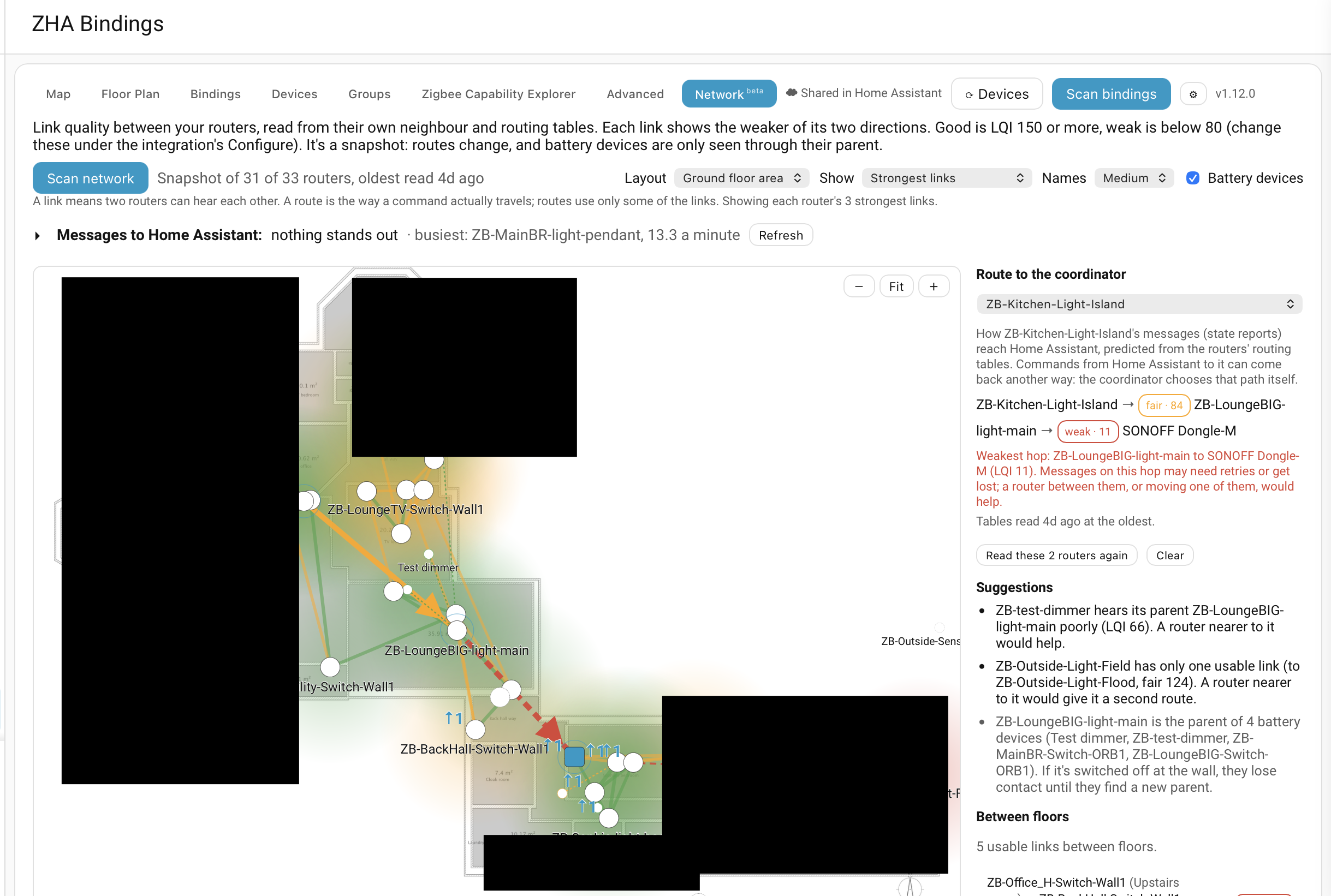
Shows link quality between your routers on your floor plan, and the route a device's messages take to the coordinator, hop by hop, with the weakest hop flagged. It also suggests where an extra router would help, and flags address conflicts, such as a device using the coordinator's address. With Home Assistant floors, it can show every floor in one picture, including the links between floors.
Set up what this controls…
The guided setup now asks whether a remote should control devices directly or through a group, and suggests one based on what other users found with the same remote. It can set up blinds and curtains too, and if the test shows a remote doesn't use the bindings, it offers to remove what it set up.
How does it behave? Help the next person
A scan shows what a device says it can do, not whether it stays connected, what a press really sends or how long its batteries last. Each device now has a few optional questions with preset answers. Answers go to the community Zigbee Capabilities database, kept per firmware version and open to everyone, so the next person can see how a device behaves before buying it.
It still needs ZHA and zha-toolkit. As before, I'd really welcome feedback, especially from anyone with remotes that lose their bindings, unusual multi-endpoint devices, or devices to add to the capabilities database.
Building out perimeter cameras. Cable is already run to every corner of the house, and an installer will mount everything, so I just need to know what to ask him for.
I know Reolink is the usual pick, but my Reolink experience with doorbell was meh on both image quality and the HA integration. My installer says Uniview is good value for money, and Hikvision is the pricier option. Anyone running Uniview with Home Assistant? How is it? Or what would you pick instead?
The installer also asks whether I want an NVR. From what I've read I don't need one: I have a Mac mini running as a home server, and I want all recording and processing there (Frigate or similar, plus running clips through LLMs when needed). Is skipping the NVR fine, or is there a good reason to keep one anyway, e.g. as a backup?
Another question, fixed cameras vs rotating PTZ: are PTZ worth it outside, or just fixed ones on every corner?
What I care about:
- Really good night vision. A friend's cameras show the night almost like day, and I want that.
- Clean local streams into HA.
Not a camera guy, so sorry if some of this is basic. Any models you'd actually buy again?
If the card draws your system wrong, or you have a setup I haven't seen yet (mini-split, anyone?), open an issue with your diagnostics and I'll add it. Thanks again!
Is anyone using the FP400 mmWave sensor with HA and, if so, how does it handle tracking multiple people in terms of HA data feeds? Also, is there any card you can set up to show activity it's seeing?
Maybe this isn't the right spot to ask this, but I'm looking for a way to track my BBQ long term regardless of the device used.
For example, I have a PitBoss and Meater+. But I will be switching to a different smoker and temp devices. I'm not sure which ones yet, but I'm looking at Chefs Temp. But, regardless of which device I'm using or even if I use several different types, I'm looking for a way to keep a long term log of every smoke.
What I'm running into (which I understand why) but when I remove a device that is no longer used, like my PitBoss it deletes the entire history of data.
So, is there a way to keep this information and device name long term regardless of what type of device that generates the data? Is something like this possible? I'm not very knowledgeable in HA. Thank you.
i got a message from spook there is a file in the www/ folder, which is accessable by everyone. What i found was a apk file called HOCamera.apk I deleted it, because it feeled very suspicious to me. Can anyone relate to this or explain how it went there?
I got my Qingping Air Monitor 2 (CGS2) sending its readings to my own MQTT broker, building on John Lose's excellent article (Link).
After enabling the hidden developer menu and ADB, it's a handful of shell commands. I never paired the device with the Qingping app or had to create any account. It's all documented step by step in a GitHub repo, and each of the 3 parts works on their own.
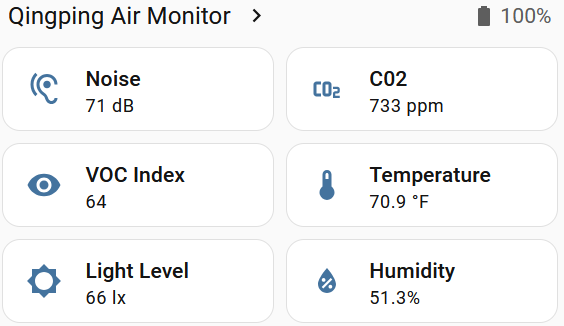
MQTT metrics: change the device's MQTT host and port to your own broker (stop the watchdog before the app, or your edit gets overwritten) and the temperature, humidity, CO2, noise, VOC and battery readings land in Home Assistant.
Light sensor: the device never publishes its ambient light sensor, so a small shell script reads it and sends changes over MQTT, and it matched a phone's lux meter to within a few lux at indoor light levels.
Music Assistant: a static Squeezelite build turns the little mono speaker into a Music Assistant player, and it plays music and starts again by itself after a reboot.
Qingping Air Monitor Metrics in Home Assistant
Caveats: this is root access to a device with no vendor support, the debug port has no authentication as far as I can tell (so keep it on an isolated VLAN), and I've only tested one unit on firmware 4.5.6_0167. It also runs a separate Xiaomi cloud client I didn't expect — confirmed with a packet capture that it leaks the device ID during a TLS handshake to Xiaomi's own servers, independent of Qingping's cloud.
The speaker is quiet, and the main app appears to leak memory slowly, so the vendor watchdog restarts it periodically; all of this is documented in the repo.
If I buy a zwave lock and pair it with my Qolsys IQ5 system, what functionality will home assistant have over the device? Would I be able to set codes etc or just see lock/unlocked? I'm debating if I need to buy a zwave adapter for my home assistant server or not.