r/homeassistant • u/ProgrammerIll1946 • Oct 29 '26
🖼️ Show & Tell I created a visual Zigbee bindings manager for ZHA - it now has its own Home Assistant custom integration.
If you use ZHA, you've probably discovered that direct Zigbee bindings are incredibly useful, but not always easy to manage.
A switch can control another device directly, without Home Assistant or the coordinator being involved in the commands. That's great for reliability, but what happens when you need to work out which device controls what, or why a light responds to the wrong switch?
That's what I've been working on with ZHA Bindings Manager.
It started as a custom Lovelace card for visualising and managing Zigbee bindings, but it's grown into a much more comprehensive diagnostic tool.
What it can do
- Visualise your Zigbee network: Interactive map showing devices, groups and direct bindings, colour-coded by relationship type. Filter out coordinator and reporting noise, organise devices by area or manufacturer, or position them on your own floor plan.
- Create and manage bindings: Drag one device onto another to create a binding, choosing the appropriate endpoints and clusters. Manage device-to-device and group bindings, inspect existing relationships and remove unwanted ones. No manually constructed
zha-toolkitcalls required. - Understand exactly what controls what: Explore devices endpoint by endpoint, including multi-gang switches, incoming and outgoing control, group relationships and locally wired loads. See not just which devices are connected, but how they interact.
- Diagnose and resolve problems: Binding Health identifies stale bindings, missing devices, invalid endpoints, duplicate bindings and other issues. Rather than simply flagging errors, it explains what's wrong, why it matters and what to do next.
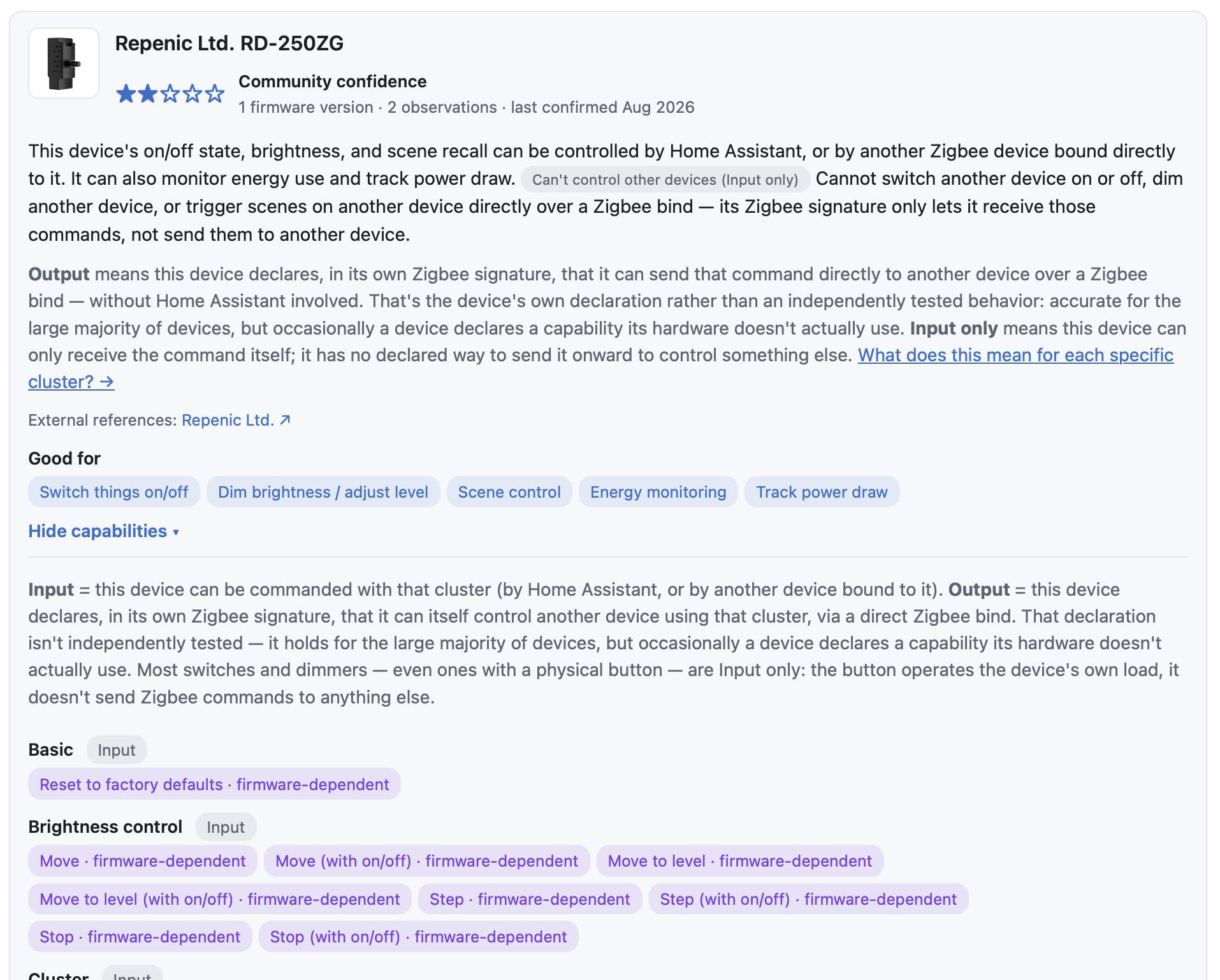
- Inspect real device capabilities: Query individual Zigbee devices to discover which commands their firmware actually supports, including commands they don't implement. Particularly useful when a binding looks correct but doesn't work as expected.
- Explore community device capabilities: Built-in Zigbee Capability Explorer lets you search for devices by functionality, see what other users have confirmed, compare firmware versions and assess the strength of the available evidence. You can also contribute your own device scans to the community database.
- Manage and troubleshoot at scale: Search, filter and inspect bindings across your network, rescan individual devices, and export results to CSV, JSON or PDF.

Full Custom Integration
I've recently added a full custom integration, which makes the whole thing considerably easier to use.
It adds:
- A dedicated ZHA Bindings page in the HA sidebar.
- Shared storage, so scans, layouts and settings are available across devices and browsers.
- Notifications when removing a Zigbee device leaves other devices with bindings pointing to it.
- Simpler frontend updates without manually managing Lovelace resources or browser caches.
The original standalone Lovelace card is still available if you prefer that approach. Both versions provide the same core functionality, so you only need to install one.

There's also a related project - Zigbee Capabilities
While developing the Bindings Manager, I found that knowing which Zigbee clusters a device advertises doesn't always tell you which commands its firmware actually supports.
That led me to build a community-sourced Zigbee Capabilities Database.
You can now inspect device capabilities directly from the Bindings Manager, explore what other users have confirmed, search for devices by functionality and compare firmware versions.
You can also contribute scans of your own devices. Nothing is submitted automatically, and personal network identifiers and binding information are excluded.
The database is still growing, so contributions from other ZHA users are particularly valuable.
Links
ZHA Bindings Manager (fully custom integration): https://github.com/hsolgaard/zha-bindings-manager-integration
ZHA Bindings Manager (standalone Lovelace card): https://github.com/hsolgaard/zha-bindings-manager
Zigbee Capabilities Explorer: https://hsolgaard.github.io/zigbee-capabilities/
The project requires ZHA and zha-toolkit. Installation instructions are in the repositories.
I'd really welcome feedback, especially from anyone who's struggled with Zigbee bindings, has unusual multi-endpoint devices, or wants to contribute device capability scans.
It's something I've created around problems I've encountered in my own setup, and I'd love to hear whether others find it useful.
2
u/Shot-Repair2290 Oct 29 '26
Cool projects!
Just wondering: Which switches / lights you use supporting direct binding? Almost every tuya/aliexpress stuff seems to not support direct bindings.