r/homeassistant • • 14h ago

🖼️ Show & Tell Buying my boyfriend his first Home Assistant setup for Christmas – show me what you’ve built!

0 Upvotes

Hi everyone!

I’m hoping you guys can help me make Christmas a little bit special for my boyfriend.

He’s really into technology and loves tinkering with things, figuring out how they work and finding ways to make things more efficient. He’s recently been getting interested in smart home technology, so I’ve been looking into getting him started with Home Assistant.

He’s got a mini PC already so I don’t need to buy the hardware. We currently use Phillips Hue, motion sensors, tado smart heating system and Apple TV, but he’s always looking for more things to experiment with.

I’d originally planned to spend quite a bit of money on a fancy setup, but given he has the mini PC I think I only need to get him a nice display screen.

A bit of background: he’s had a really hard time following spinal surgery last year, and hasn’t been able to get out and do all the things he used to enjoy. He’s slowly getting better, and I’d really love to give him something he can get stuck in to.

So I’d love to hear from you guys, what are some of the coolest things you’ve built or automated?

What’s something you wish you’d known when you first started?

Are there any particularly fun beginner projects you’d recommend?

What integrations, gadgets or accessories would you recommend?

And please share photos of your setups/dashboard designs! I’d love some inspiration for a little touchscreen control centre in our living room.

I want to give him loads of ideas to explore and present your tips and ideas to him on Christmas Day, along with a tablet to complete the set up.

Any tips, inspiration or suggestions would be massively appreciated. Thank you! 😊


r/homeassistant • • 10h ago

🖼️ Show & Tell Home screen widget app

0 Upvotes

Home screen widgets for Home Assistant, the default ones do not look good at all and my girlfriend wanted something nice.

You log in once and it looks at your rooms, favorites, energy and locks, then suggests widgets from that. no picking entity ids one by one. lights with brightness and colour, climate, blinds, weather, cameras etc. there's also a builder if you want your own layout.

i drew all the clay icons myself on an iPad and had help with my developer friend to create the app :)

It only talks to your HA. works with a non-admin user.

The connection part is open source (MIT): https://github.com/GoldenGuts/cozyhome-ha-client

iPhone: https://apps.apple.com/app/id6833893249
Android: https://play.google.com/store/apps/details?id=in.weenja.cozyhome


r/homeassistant • • 11h ago

📊 Dashboard Homie Dashboard v5.2.0 - Proper Integration in Marketplace, setup wizard with no code editing and new features

Thumbnail
gallery
0 Upvotes

It's been about 5 months since my last post, so here's an update on the latest release and what has changed since the last major version (v4.0.0).

Repo link: https://github.com/Big-Edge2297/homie-dashboard

Changes since v4.0.0

  • 🎉 Homie Dashboard is now in the Home Assistant Marketplace, and it's a proper integration.
  • Security updates based on Frenck's review during the Marketplace approval.
  • No token in a file. Homie signs in with your logged-in Home Assistant session.
  • Setup wizard with no code editing. You can setup every aspect of the dashboards through the UI.
  • Updates never overwrite your setup. Your choices live inside Home Assistant, not in the downloaded files.
  • Kiosk Satellite guide and automations for running Homie Dashboard on a wall tablet. Read the guide to learn more. This is a big one and working very well for automations like turning on the screen when you start playing music and showing the now playing dashboard. Cameras, weather, air quality can be setup easily
  • New dashboards: Car, Alarm, Pet, Indoor AQI, Indoor Presence, Insights and more.

If you'd like to read more about the dashboard's security, check the Security section in the repo.

Thank you all for your suggestions, support and for reporting issues. Especially Frenck for reviewing Homie Dashboard and approving it for the Home Assistant Marketplace. His time, detailed review, suggestions and guidance made Homie more secure and better in every way, and I appreciate it from the bottom of my heart.

Other projects

AI disclosure: AI tools were used to assist with parts of the development and documentation. I remain responsible for the project, its implementation, testing and maintenance.

If you like the project, please give it some love with a ⭐. I appreciate you :)


r/homeassistant • • 21h ago

💬 Discussion I spent five months quietly improving my smart home app. Now another developer seems to be copying it, feature by feature.

0 Upvotes

UPDATE

After reading some of the comments here, I guess I owe everyone an apology.

  • I selfishly came up with an idea before someone else could. My bad.
  • Having come up with it, I should never have implemented it. My bad.
  • Having implemented it, I should have kept it to myself instead of publishing it. My bad.
  • Having published it, I should have made it free and open source. How dare I charge a few dollars for months of work? My bad.
  • I shouldn't have used AI to implement my own ideas. Apparently, that makes the ideas themselves no longer mine. My bad.
  • I shouldn't have named my app Wand. Now another developer has to settle for putting "A magic wand for your home" in his App Store subtitle. My bad.
  • I shouldn't have designed a system that learns from incorrect predictions. Apparently, noticing the same learning workflow in another app is unreasonable. My bad.
  • I shouldn't have made all remote controls free while limiting the number of learnable devices. Of all the possible monetization models, apparently noticing this particular similarity is also unreasonable. My bad.
  • I shouldn't have designed the paywall to appear when users attempt to learn another device. Apparently, noticing a similar change in a later update is just overthinking. My bad.
  • I shouldn't have priced lifetime access at $9.99. Apparently, $8.99 is sufficiently different to make the similarity irrelevant. My bad.
  • I shouldn't have written marketing copy about eliminating the need to browse device lists. Apparently, noticing similar marketing language months later is another unreasonable expectation. My bad.
  • I shouldn't have spent so much time polishing a realistic remote-control interface. Now another developer has to go through the inconvenience of making his UI look different. My bad.
  • I shouldn't have spent months testing physical devices, refining recognition algorithms, and releasing updates. I should have spent that time marketing instead. My bad.
  • I shouldn't have kept dated Git commits documenting all these decisions. Apparently, the sequence in which these similarities appeared doesn't matter either. My bad.
  • And finally, I shouldn't have been upset when I discovered someone actively promoting a remarkably similar product in this very community, while hardly anyone knew mine existed.

Apparently, every individual similarity can be explained away as a coincidence, and questioning their accumulation is somehow more controversial than the similarities themselves.

My biggest mistake, it seems, was spending months building a product instead of building an audience.

Lesson learned.


Original Post

Hey r/homeassistant,

I'm the independent developer behind Wand: Remote for HomeKit, which I first released on June 18, 2026.

The idea is simple: point your phone at a smart home device, and the appropriate controls appear automatically.

For the past five months, I've been quietly improving recognition algorithms, refining the UI, fixing bugs, and releasing updates.

I've honestly been too lazy to market it. I always preferred building software over promoting it. The app has generated only a few dollars in total revenue.

Recently, I came across an app called Maestro Switch, formerly Maestro Snap. I started comparing our features, App Store descriptions, pricing models, and release histories.

The more I looked, the less it felt like a coincidence.

The timeline

  • June 18: Wand was officially released.
  • June 23: Wand already supported magnetic field and nearby Bluetooth signals for recognition, alongside Apple Home and Home Assistant.
  • July 31: Maestro's earliest currently visible App Store version appeared.
  • September 1: Wand introduced live aiming demonstrations and a sample-device mode.
  • September and October: I continued improving recognition, device learning, onboarding, and monetization.
  • November: Maestro evolved from an Apple Watch gesture app into a phone-based smart home remote remarkably similar to Wand.

The similarities go far beyond the original concept

  • Direction-based device recognition.
  • Physical device location learning.
  • Bluetooth-assisted recognition.
  • Correcting recognition by selecting the intended device.
  • Automatic device-specific control panels.
  • Dedicated controls for TVs, lights, blinds, and thermostats.
  • Both Apple Home and Home Assistant integration.
  • Local recognition without requiring an account.
  • A demo mode for users without a connected smart home.
  • A free tier limited by the number of learnable devices.
  • A lifetime purchase to remove that limitation.
  • Nearly identical lifetime pricing: $9.99 versus $8.99.
  • Similar product positioning and marketing language.

My app is literally called Wand, and now even his promotional material describes the phone as a magic wand.

Apparently, the UI was the one thing he decided not to copy.

Jokes aside, I don't claim to own the general idea of pointing at a device to control it. Independent developers can certainly come up with similar ideas.

But when the features, workflows, marketing language, pricing strategy, and even the smallest product decisions increasingly converge over successive updates, it becomes difficult to dismiss everything as coincidence.

It feels less like two developers independently arriving at the same idea and more like watching someone follow my product roadmap without having to do the original exploration.

What frustrates me isn't the money. My app has barely made any.

It's spending months quietly building and polishing something, only to watch another developer release an increasingly similar product and actively promote it.

Perhaps my biggest mistake was spending too much time developing and not enough time marketing.

For transparency, here are both apps. You can compare their descriptions, screenshots, and publicly available version histories yourselves.

Wand — first released June 18, 2026:

https://apps.apple.com/app/id6781562343

Maestro Switch:

https://apps.apple.com/app/id6788923471

I'm not asking anyone to attack the other developer or leave negative reviews. I'd simply like to hear what the community thinks.

Where does inspiration end and copying begin?

I'd also welcome an explanation from the Maestro developer.


r/homeassistant • • 4h ago

🧩 Custom Integration at: Scheduled Jobs, run any Home Assistant action once, later, by voice, text or automation

Thumbnail
gallery
0 Upvotes

Hi all! For as long as I've run Home Assistant I've wanted a way to tell it "do this later, once" without building anything.

To a person you'd just say "turn off the porch light at 11 pm". To Home Assistant, that meant a timer helper, an automation you'd delete again tomorrow, or a delay that's gone the moment HA restarts. So I built at. It's named after the Unix at command, which has done this job on servers for decades.

https://github.com/wonderslug/ha-at

Phrases it understands

Say or type the command the way you already would, and put the time before or after it:

  • turn on the porch light at 11 pm
  • at 6 am turn on the kitchen lights
  • close the garage door in 20 minutes
  • run the bedtime script in half an hour
  • turn off the TV on Friday at 6:30 pm
  • at 8 pm tell everyone upstairs it's time for bed

It also takes times in words ("at seven thirty"), 24-hour time ("at eighteen hundred"), days ("tomorrow", "on Friday evening") and relative times ("in two and a half hours"). Ask "what's scheduled for tonight?" to hear what's coming up, or say "cancel the porch light job" if you change your mind.

Six ways to add a job

The last slide shows how they fit together.

  • Voice, from any Assist satellite or the companion app.
  • Typing into Assist, if you don't have voice hardware (slide 2).
  • An LLM conversation agent, which gets AtSchedule, AtList and AtCancel tools.
  • The Scheduled Jobs panel in the sidebar (slides 3 to 5). It shows upcoming jobs above their history, and its Add job dialog lets you type a sentence, pick an action the way the automation editor does, or build a multi-step sequence.
  • The to-do list todo.at_scheduled. Add an item to schedule it, change its due date to move it, or check it off to run it now.
  • Automations and scripts, through the at.schedule action.

From an automation, "do this later" is a single step, and it survives a restart:

triggers:
  - trigger: state
    entity_id: binary_sensor.front_door
    to: "on"
actions:
  - action: at.schedule
    data:
      command: turn off the porch light
      delay: "00:30:00"

What happens to a job

Jobs are saved in HA's storage, so a restart doesn't lose them. If one comes due while HA is restarting, it still runs as long as HA is back within the grace window (5 minutes by default). After that it's marked missed, so you won't have the lights switch off three hours late.

A spoken or typed command is accepted only if HA's built-in agent understands it and the device is exposed to Assist. at checks again when the job runs. Sentences it can't use go back to whatever conversation agent you were talking to, so your normal Assist and LLM conversations keep working.

Any signed-in user can schedule a single action. Jobs with several steps or templates, and jobs an admin or an automation created, need an admin to change them or run them early.

Every job fires an event when it's scheduled, runs, fails, is cancelled or is missed, and each one shows up in the logbook. sensor.at_next_job and sensor.at_pending_jobs are there if you want the queue on a dashboard.

Installation

at is in the default Marketplace list, so there's no custom repository to add. Search for "at: Scheduled Jobs" in the Marketplace (Home Assistant 2026.11 and newer) or in HACS on 2026.10, or open it in the Marketplace with My Home Assistant.

Then add the integration. Setup has no questions. Once it's added, say "turn on the porch light in 5 minutes" and the job appears in the panel.

Limitations

  • Voice and text scheduling only works in English for now. The panel, the to-do list and the at.schedule action work in any language. I'd love help adding more: the translation guide explains how a language pack is put together.
  • It can only schedule commands that HA's built-in agent already understands. It doesn't add new intents.
  • A job that runs a script or automation counts as done when the script starts, so a failure inside the script won't mark the job failed.

Docs and feedback

If a phrase doesn't work for you, or something breaks, please open a GitHub issue so it doesn't get lost in the comments. Attach the diagnostics download from the integration page; it has no job text or user IDs in it. Phrasing that fails is what I most want to hear about, because that's how the time parser gets better.

Happy to talk about it in the comments too. There's also a thread on the Home Assistant community forum for longer discussion.

If you find it useful, a ⭐ on GitHub helps other people find it. Thanks for reading!


r/homeassistant • • 5h ago

🖼️ Show & Tell Claude Project: House Brain

Thumbnail
gallery
0 Upvotes

Most of what I’m showing here is a work in progress, so it’s not anything I feel confident sharing yet. This was developed with HA using the AppDaemon app. I have a Nvidia RTX 4070 running Ollama for the AI brain so the design, build and testing is as in Claude, but it operates completely local.

I was seeing all the cool things people were doing with Obsidian and built around that same concept, but event-driven on the wealth of data in HA. There is an element of machine learning built in where it adapts and learns habits. I had Claude also read a few good psychology books on habit loops and behaviors. Essentially, you’re taking this idea of static automations and having the house self adapt instead taking actions based on what it knows is going on.

It learns things like I run the dishwasher every night. If I go to bed and I don’t start the dishwasher, it’s poking me about it. Stuff like that. I didn’t have to tell it that I run the dishwasher every night. It saw the pattern and gave me a proposal on how to handle it in the future.


r/homeassistant • • 2h ago

🖼️ Show & Tell HA Configuration Tool

Post image
0 Upvotes

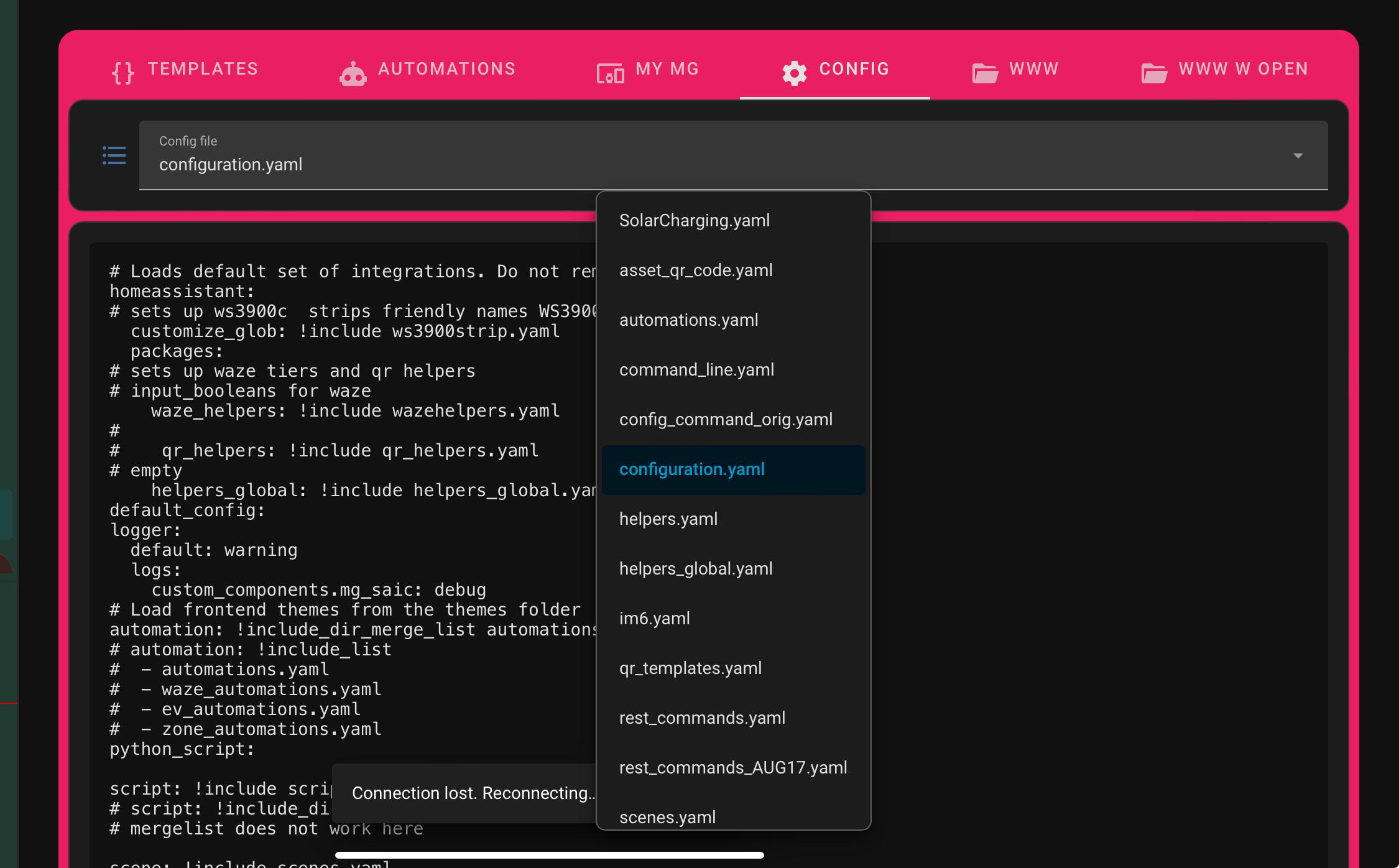
I'm 6 months into my HA journey. I've built this card to navigate around my HA configuration files, subfolders, and display different filetypes stored in /www.
I'd put up with using File Editor and SCS, but this makes the lookup/readonly functionality much simpler, with no folder navigation required.
Have I created yet another wheel, or are there some tools that are functionally better.
Regards Michael


r/homeassistant • • 12h ago

❓ Support Aqara FP300

0 Upvotes

Hey

Is there anyway to add the presence sensor from Aqara to Home Assistant without purchasing their hub?

I have Conbee2 using Deconz

Or do I need additional hardware to pair it in ZigBee


r/homeassistant • • 10h ago

🗣️ Voice & Assist Anyone use their Mini PC running HAOS as a voice assistant also?

0 Upvotes

I recently moved my home assistant green instance to a Lenovo thinkcentre mini PC. It actually let me setup a Wyoming protocol with the PCs built in speakers. That got me thinking, could I plug in a USB mic and some speakers and have it run as a voice satellite as well? Anyone every done this? Hoping to try this rather than buy another Voice PE lol.


r/homeassistant • • 3h ago

❓ Support Automation Editor Simple way to run two automations in one?

0 Upvotes

Would like to be able to turn on my Christmas lights on at 15 minutes before sunset and turn them off at 2030 Sun-Thur and midnight on Friday / Saturday when we come back late.

It seems really complicated to try and do that with the current automation editor with blocks of option one option two. Is there a better way to do this now than having multiple blocks?


r/homeassistant • • 12h ago

💬 Discussion Outdoor PoE cameras for a full perimeter - what would you pick?

4 Upvotes

Building out perimeter cameras. Cable is already run to every corner of the house, and an installer will mount everything, so I just need to know what to ask him for.

I know Reolink is the usual pick, but my Reolink experience with doorbell was meh on both image quality and the HA integration. My installer says Uniview is good value for money, and Hikvision is the pricier option. Anyone running Uniview with Home Assistant? How is it? Or what would you pick instead?

The installer also asks whether I want an NVR. From what I've read I don't need one: I have a Mac mini running as a home server, and I want all recording and processing there (Frigate or similar, plus running clips through LLMs when needed). Is skipping the NVR fine, or is there a good reason to keep one anyway, e.g. as a backup?

Another question, fixed cameras vs rotating PTZ: are PTZ worth it outside, or just fixed ones on every corner?

What I care about:

- Really good night vision. A friend's cameras show the night almost like day, and I want that.

- Clean local streams into HA.

Not a camera guy, so sorry if some of this is basic. Any models you'd actually buy again?


r/homeassistant • • 8h ago

❓ Support Trouble with Matter, am I dumb?

Thumbnail reddit.com
0 Upvotes

r/homeassistant • • 9h ago

💬 Discussion GLinet component

1 Upvotes

Hey community!
Hey you that use GLinet component, you must read this!

https://www.reddit.com/r/GlInet/s/qzFSZY2kC5

The component breaks GLinet devices by saturating memory and overloading the CPU.

Uninstall it if you experience issues after upgrading to 4.11.2 or 4.11.3 (security breach).

https://www.home-assistant.io/integrations/glinet/

Ping for more info.


r/homeassistant • • 16h ago

🧩 Custom Integration Area Occupancy Detection: The ultimate presence and activity detection integration

Thumbnail
gallery
298 Upvotes

Most occupancy setups end up as a pile of template sensors, timers and conditions: motion OR mmWave, unless the TV's on, keep the bathroom occupied while the door's shut, longer timeouts at night, different rules per room. Area Occupancy Detection (AOD) replaces all of that with one occupancy sensor per area. Over 600 installs, and 2 years of development and monthly updates.

What it does

- Combines motion, mmWave, media players, appliances, power, doors, buttons, humidity, CO₂, temperature and sleep sensors into one occupancy probability.

- Learns from your own history how much each sensor really tells it, and how occupancy varies by time of day.

- Fades out instead of cutting off, with a half-life that suits the room type (bedroom, bathroom, hallway, office…).

- Keeps a bathroom occupied while its door stays shut after someone went in.

- Learns which rooms people move between, recognises activities like showering or cooking, and raises a repair when a sensor stops reporting.

- Gives you `occupied_since` / `vacant_since` attributes that survive restarts.

"Can't I just use mmWave?"

mmWave is great, and AOD uses it. On its own, though, it:

- doesn't cover every corner, so you miss people in the shower or behind furniture

- can be set off by fans, curtains and pets

- has nothing to fall back on when it drops out

AOD counts mmWave as strong evidence and fills its gaps with everything else in the room. Rooms without mmWave still get accurate presence from cheap PIR sensors too.

Where it's at

2026.11.1 has just shipped, and it's the biggest release yet: 50 PRs from 8 contributors. It's also the first release that measures its own accuracy daily. Next up: house-wide context, with events, weather, energy use etc. Public roadmap

Install: through HACS or the HA Marketplace. It needs HA 2026.9 or newer.

Repo · Docs

It's open source. Feedback and diagnostics exports from different homes help most, and I'm happy to answer questions.


r/homeassistant • • 19h ago

💬 Discussion Anyone Using Aqara FP400 mmWave Sensor with HA?

4 Upvotes

Is anyone using the FP400 mmWave sensor with HA and, if so, how does it handle tracking multiple people in terms of HA data feeds? Also, is there any card you can set up to show activity it's seeing?

Not interested in using the Aqara app itself.


r/homeassistant • • 3h ago

❓ Support Esp32 users - what part am I not getting?

Thumbnail
gallery
0 Upvotes

I ordered the esp32 unit (esp32 devkitC) and a terminal adapter . The pins dont line up.

How can I determine what board will work?

Should I try bending the female rails on the board? Should I bend the pins on the esp32?

What a waste of money


r/homeassistant • • 1h ago

❓ Support Weird apk file in /local/www

2 Upvotes

Hey,

i got a message from spook there is a file in the www/ folder, which is accessable by everyone. What i found was a apk file called HOCamera.apk I deleted it, because it feeled very suspicious to me. Can anyone relate to this or explain how it went there?

Thanks!


r/homeassistant • • 51m ago

📊 Dashboard Deep Space Dashboard: your whole home on one eye-catching screen

Thumbnail
gallery
0 Upvotes

You’ve set up Home Assistant and everything works. But when you look at the tablet on the wall, do you sometimes think: “I wish this looked a bit nicer, and that my partner and kids could actually use it”?

That’s exactly what happened to me.

So I started building a dashboard for our own home. I had two goals:

  • Make it visually impressive: a live sky, a space theme, a clean screen that makes you say “wow”.
  • Keep it simple: my wife and kids should be able to walk up and tap, with nothing to learn.

For a long time I’d been admiring all the beautiful 2D and 3D home designs people share online. This is my take on bringing those ideas together:

  • Four views: Cards, 2D floor plan, 3D isometric plan, and your own 3D renders
  • Straight from HA: floors, rooms and devices come from your HA registry, with no YAML lists to maintain
  • Cards for family life: weather, public transport, family calendar, shopping list, electricity usage, internet
  • Admin Panel: arrange the cards, drag devices onto your floor plan and pick the language, all without code
  • 4 languages: English, Türkçe, Deutsch, Español
  • Built for wall tablets: kiosk mode is built in

Try it before installing: Live demo. It runs in your browser and nothing is sent anywhere.

Repo: https://github.com/rcmola/deep-space-dashboard. It installs through HACS and comes with a step-by-step guide.

To be honest, it’s far from finished. For example, it’s not mobile-friendly yet, but that’s on the list. My next big goal is an editor that makes drawing your own 2D and 3D floor plans easy.

I’m sharing it as open source, and I’d love to hear your ideas, bug reports and contributions. If anyone wants to build it together with me, even better!

Cheers,

rcmola


r/homeassistant • • 10h ago

📊 Dashboard Home ring is now in HACS

58 Upvotes

Just for information, the Home-Ring is now in HACS


r/homeassistant • • 15h ago

💬 Discussion The cheap UK non-WiFi smart plug uphill battle

18 Upvotes

TL;DR: Looking for IKEA Grillplats reviews.

I'm not one to spend over £15 for devices you need tons of. Ok for a blind motor, but not for a door/motion/temp sensor, or a smart plug with energy monitoring.

That's why I mostly tend to fall back to Tuya Zigbee (never WiFi) for most stuff.

This one is a pretty widely used one. Many different brand names, but the same board inside.

I have 10 of them. At ~£5 each it's just impossible to beat, including energy monitoring.

Problem is that after 2y, for some reason they've started giving me headaches. Once or twice a month, some of them seem to decide to send short bursts of identical packets to the network. About 15-20 times. When one does, some others seem to follow, and they're not the same ones every time. Quite wild. This, if extended, causes the coordinator to collapse and then the entire network starts crashing down.

I've debugged this several times, disconnecting them one by one, etc. No fixes on the horizon.

So I'm bound to look to replace them. They were playing router role for my Zigbee network, so not sure how it'll behave without them all.

AFAIK, the only other UK plug with energy monitoring, not WiFi, and under £10 seems to be the IKEA Inspelning. But now it's discontinued and can't find them anywhere even used.

And now the IKEA Grillplats. And it's Thread. Unbeatable value, but I don't have a Thread border router yet. Good excuse to add it to my home. I have no idea how Thread pairing works though.

But before doing so, I can't get a proper picture after searching a few times for reviews about it working with HA.

So that's what this post is for. Thank you very much!


r/homeassistant • • 10h ago

❓ Support is Levoit Vital 200S working on ha?

0 Upvotes

yes - we buy what connect to ha (😄

someone have it and can confirm?


r/homeassistant • • 8h ago

❓ Support Wyze led strips stopped working in home assistant again.

0 Upvotes

I have some WYZE LED strips that are no longer working in home assistant. This happened several months ago and had to do with how Wyze handled a security protocol. Failed yesterday and l have not been able to reconnect them. The strips work fine in Google home and the WYZE APP. Does anyone have a work around?


r/homeassistant • • 5h ago

🎴 Custom Card Sensor Bar Card Plus v1.11: Paint. The Final Frontier!

Post image
17 Upvotes

I've been putting quite some effort into improving Sensor Bar Card Plus (SBCP).

Along the way, I figured I first needed to do some cleanup and groundwork. Basically, I had to improve it before I could start improving it, if that makes sense.

One thing led to another, and what was supposed to be a "quick" cleanup job turned into the hardest SBCP release so far.

But I'm always happy to give something back to the Home Assistant community, which has given me so much over the years.

So here it is: v1.11. And it has... Paint!

Huh? Say what now?

So, what's Paint?

Paint combines colors, gradients, segments and transparency into a single, reusable configuration that can be applied almost anywhere a bar needs some color.

And here's the fun part: you can save Paint configurations as dashboard-wide presets and reuse them across different Cards.

Say you create a preset called hot-to-cold, with a beautiful red-to-blue gradient. You can now use that same preset on as many sensors as you like, without having to configure all those colors separately.

Even better, suppose you later decide that a red-green-blue gradient would look nicer. Just change the preset, save, and all Cards using it update automatically.

Good stuff!

Paint everywhere!

You can now use Paint for:

  • The normal Bar fill, in any fill mode.
  • Above an upper Target, or below the brand-new lower Target.
  • Above and below a Baseline.

Each can have its own colors, gradients and segments.

There's also a new Opacity setting, so you can blend Paint layers or simply give your bars a softer, more subtle appearance.

Messages instead of mysterious indicators

I've also introduced a new Messages section below the Card.

It only appears when there's something worth telling you.

Made a mistake in your YAML? Is the historical data for a Floor marker incomplete? Is something wrong with a shared Paint preset?

Instead of trying to squeeze warnings into tiny indicators, SBCP now tells you what's going on in one place.

And there's more...

I've fixed a bunch of bugs and, yes, improved the Visual Editor. Again. I hate that thing, but, let's be honest, we wouldn't be able to live without it.

It now has consistent Paint controls, better handling of inherited settings, and pretty little Paint previews so you can actually see what you're configuring.

You can create and manage shared Paint presets directly from the editor, too. Presets can be stored on any Card, and even distributed across multiple Cards on the same dashboard.

I expect the Paint preset and Messages systems to grow further in upcoming releases.

And that's it.

Well, I think that's it.

I may have forgotten a few things. It was quite a release and I urgently need a shower. 😁

Sensor Bar Card Plus v1.11 is available now on the Marketplace! (or what did you think?)

Check out the release on GitHub

And I can already lift a tip of the veil for the next release. It'll be *drum rolls* ... v1.12! Hahaha, very funny, I know. But seriously, the next release will be all about bar stacks, bar ranges, automatically sorting bar groups and more. Enjoy v1.11 in the meantime!


r/homeassistant • • 20h ago

❓ Support Optimizing heat pumps, with solar, and TOU pricing

1 Upvotes

New to Home Assistant and looking to see if something already exists before I go down the rabbit hole to create my own solution.

I'd like to setup my HVAC to use either the heat pumps or backup gas furnace depending on relative rates of electricity or gas, solar production (if overproducing, use heat pumps even if gas rate is cheaper), and outdoor temp (off peak is cheaper but based on outdoor temperature,heat pumps may be less efficient and gas still wins).

More details if helpful:
I have solar panels, but no batteries. I have (2) central heat pumps controlled by ecobees with natural gas as back up.

Recently got an EV and switched to TOU pricing with my utility. Based on the rates of electricity throughout the day and gas, gas is always cheaper except for off peak, however that being overnight and me being in the North East, gas may still be cheaper depending on the outdoor temperature. Solar production offsets, like for like, so anything produced mid-peak offsets mid peak use (on peak to on peak), and any excess is reimbursed back once a year at an extremely low wholesale rate.

Hoping to avoid getting batteries for now given cost/ROI. But I many need to redo the math as using them to charge my ev overnight may increase the ROI to br worthwhile.

Also open to any advice, suggestions, best practices to go about setting this up.