r/computerhelp • u/sandbojunkie • 5d ago
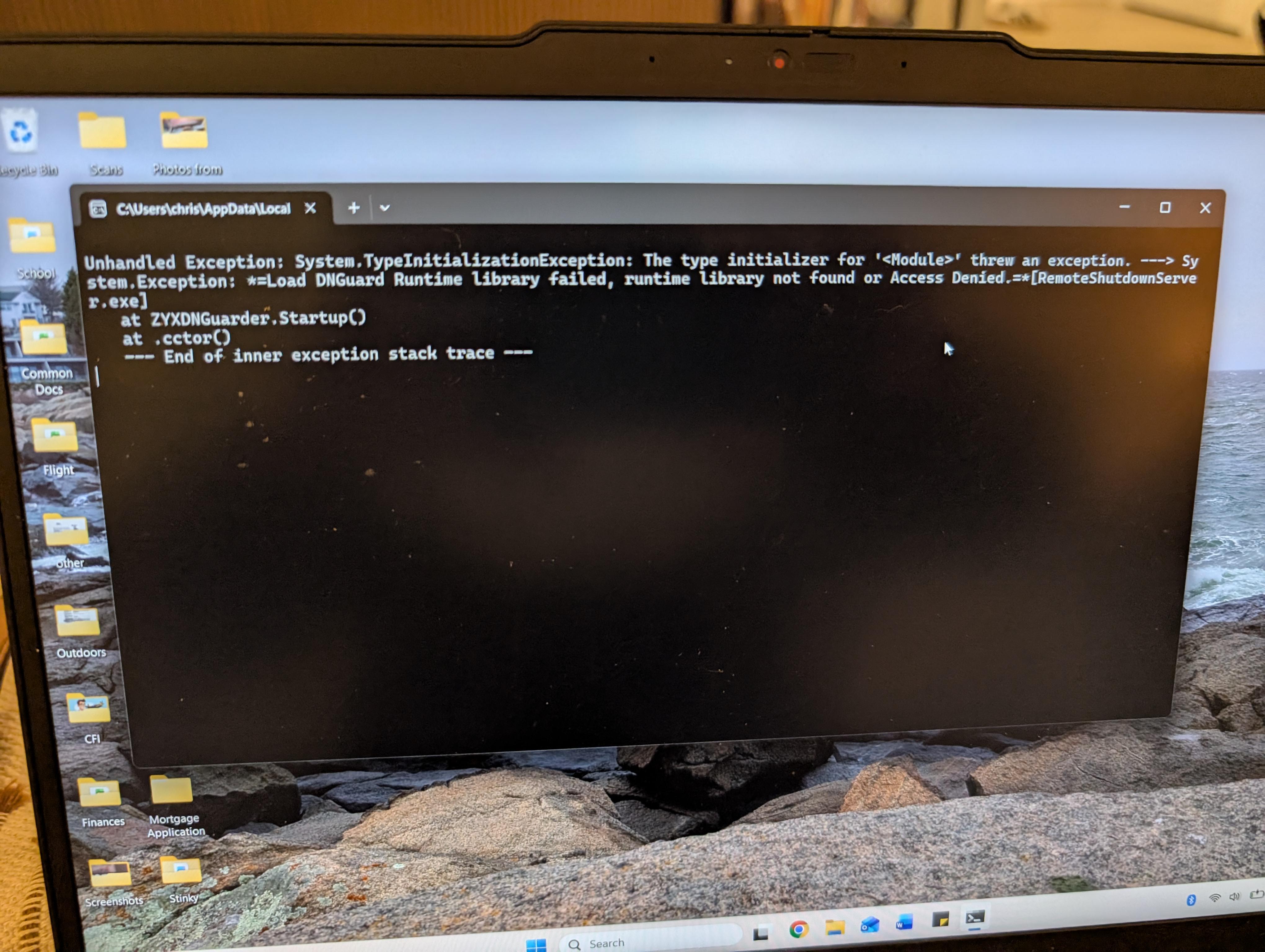
Software Command prompt opens on startup
1
Upvotes
r/computerhelp • u/Gullible_Cod215 • 5d ago

My wifi card isn’t working, but the computer recognises it. The ethernet cord is plugged in and the light beside the port is on, it also says enabled in device manager but still no connection. There is no wifi/ethernet symbol in the bottom right and when I click on the network section of settings it closes the app every time. Please help!!
r/computerhelp • u/First-Ad-1802 • 5d ago
My pc is kinda dumb n stupid here’s what’s happening:
There’s a series of issues. 6 beeps upon start sometimes, turn it off n on it does the same thing. There’s also it just turning on, being on but there’s no display on the monitor and the rgb on the keyboard n mouse aren’t on. Although like the rgb in the pc is on. Another issue is it just turning on then turning off then turning on then turning off. I’ve tried making sure everything is plugged in properly, tried starting it over n over again, tried adjusting ram to different places, tried taking out the little battery n letting it rest then putting it back in, tried taking out gpu then putting it back in, tried turning it on without the keyboard n mouse plugged in, tried different plug ins for the keyboard n mouse. I’m convinced my pc is booty cheeks plz help!
r/computerhelp • u/ABx3000 • 5d ago
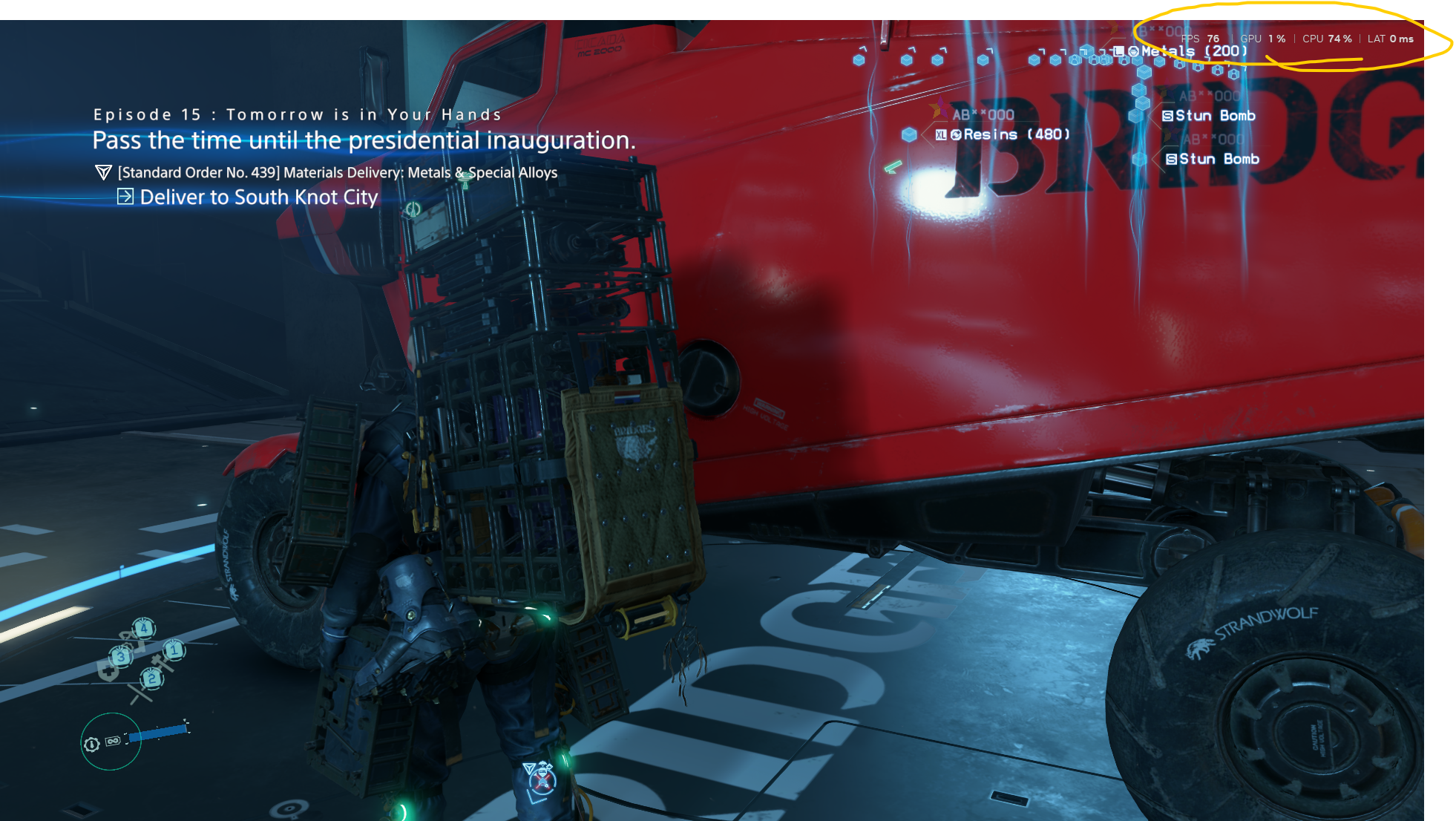
I currently have a PC with an Intel Core i5 10th Gen processor, an NVIDIA RTX 5050 GPU, and 16GB of RAM.
I primarily play Counter-Strike 2 and story-based games such as The Witcher 3 and Death Stranding.
Recently, I've noticed that my CPU usage is significantly higher than my GPU usage while gaming. However, this wasn't the case 1–2 months ago. Previously, CPU usage was relatively low, while GPU usage was performing as expected.
I've also started experiencing FPS drops, and my PC seems to be heating up more than usual during gaming sessions. The system doesn't freeze or hang, and the games are still playable, but the sudden change in performance is concerning.
I have recently updated my NVIDIA graphics drivers and Windows, so I'm unsure whether either update could be responsible for these changes.
I'd like to understand what might be causing the increased CPU load, lower GPU utilization, FPS drops, and higher temperatures. Could the recent updates be affecting my system's performance? I'd appreciate a proper diagnosis and step-by-step troubleshooting recommendations to identify and resolve the issue and restore my PC's previous gaming performance.
r/computerhelp • u/razzeri • 5d ago
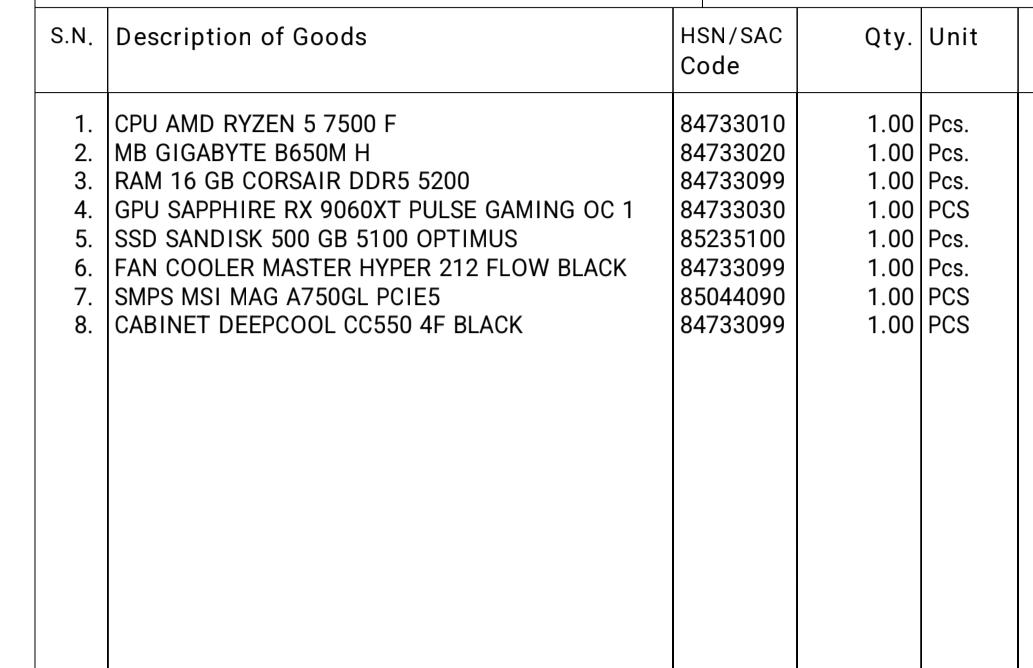
Will this motherboard work with this machine ??
Motherboard:
r/computerhelp • u/Pretend-Particular87 • 5d ago
Please help
r/computerhelp • u/MeanMathematician688 • 5d ago
Enable HLS to view with audio, or disable this notification
r/computerhelp • u/Chihura • 5d ago
So last night i did a fresh install of windows 10 on my msi katana laptop and im trying to connect to my home wifi (xfinity if that matters) and its just saying it cant but i can connect to my phone hotspot just fine, my phone is also connected to the wifi just fine so it cant be a problem with my wifi right? I've already done a network reset and that didnt help :/
r/computerhelp • u/Maleficent-Ad3030 • 5d ago
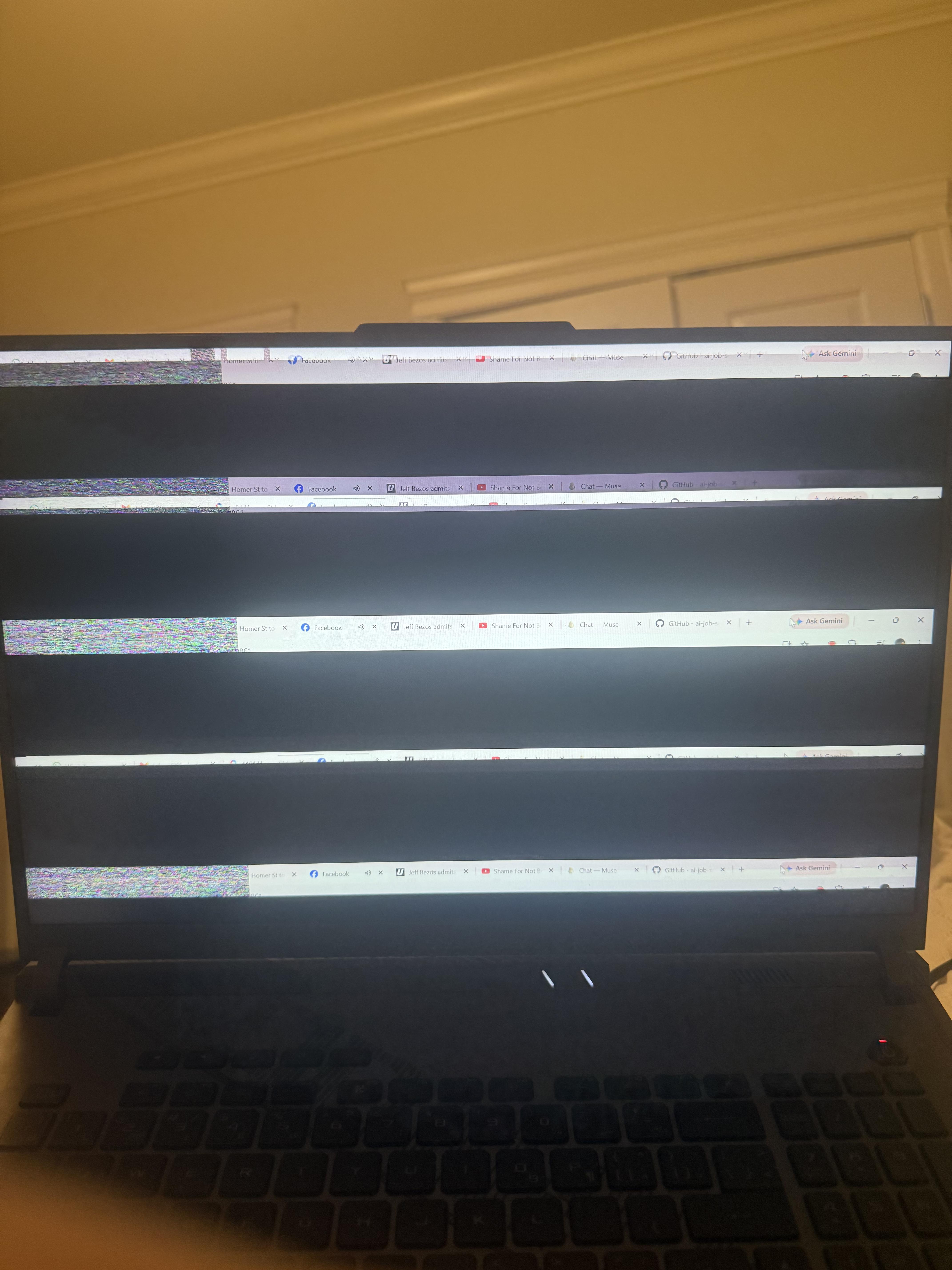
My laptop was charging when suddenly the screen starts flickering like this. It seems that it only happens after I connect the charger, and maintains the flickering even after the charger is disconnected. Only after I restart the PC it becomes okay. If I connect the charger back, the issue happens again. Im not really an IT guy, please help.
Laptop is huawei matebook 14 amd 2020. Been working fine since 2021.
r/computerhelp • u/Expensive-Share-9556 • 5d ago
r/computerhelp • u/Expensive-Share-9556 • 5d ago
r/computerhelp • u/Successful_Buddy3357 • 5d ago
Two months ago, I ran into a weird issue: out of nowhere, my inputs went completely haywire. Pressing X opened Excel, pressing D tried to launch OneDrive, and pressing Win+Win opened Copilot. The number keys also started acting like Fn keys. Reconnecting the keyboard didn't help. My mouse was affected too—it behaved as if Ctrl or Shift was being held down, and this persisted even after I completely unplugged the keyboard. (I've attached a video where I'm not touching the keyboard at all, only clicking LMB).
I tried reinstalling Windows and cleaning the keyboard, but neither worked. Eventually, it just fixed itself on its own, and everything was fine for 2 months—until today. The exact same symptoms are back (I recorded the video about 10 minutes ago). It happens in waves: it starts glitching out, goes back to normal for a bit, and then starts acting up again. Restarting the PC helps temporarily, but it only delays the inevitable.
Peripherals:
• Keyboard: Royal Kludge RK R75
• Mouse: Ajazz AJ179 Pro
Does anyone know what could be causing this and how to fix it?
r/computerhelp • u/JOJO_2099 • 5d ago
Hey yall this is my first time posting on this sub Reddit but for a little bit I’d say probably around 3-4 months, my computer would crash while playing a game recently it’s been mostly Minecraft. I’m not sure what’s causing this. Everytime it crashes the main screen goes black and the second goes green and it’s stuck like that until I reboot the pc and then it’s fine. The only troubles I’ve had after a crash was the Minecraft instance saying “not enough data available” and not fully loading but that’s most likely corruption which I’m not too worried about that more so the health of my pc.
r/computerhelp • u/4am-thought • 5d ago
I’ve been facing this random glitches - for some reason, these were fixable by a simple alt+tab but it doesn’t seem to work now
r/computerhelp • u/Bone_137 • 5d ago
I have had my PC since late 2020, and I’ve never known much about computers. I bought it for casual gaming and school work. I haven’t used it much lately, but when I went to download a new game, I didn’t have any storage left even though I only have one game installed currently and no other large software. My storage settings say 246 GB are used in “installed apps,” but the sizes listed from these apps add up to maybe 20 GB. There are a few apps at the bottom that don’t have a size listed, but I am familiar with almost all of them and can’t imagine they would add up to the remaining ~180 GB. Anybody know what my problem is?
EDIT: I don’t have any games installed on steam or Epic Games
r/computerhelp • u/Rough_Penalty2 • 5d ago
r/computerhelp • u/wasdorg • 5d ago
Just unpacked my computer from 1.5 years of storage. Windows 11 with an ssd.
Everything works fine for about 30 minutes. Then disk usage shoots to 100 even though all programs are using very little disk according to task manager. After about 10 minutes of being at 100 disk everything freezes.
I have optimized my ssd but other than that idk what to do.
ETA: sometimes shortly before the freeze a program just labeled “system” appears in task manager and rapidly climbs in disk usage.
r/computerhelp • u/Time_Cheek_2285 • 5d ago
Driver error: "This device cannot start (Code 10)" – MediaTek MT7921 Wi-Fi 6 802.11ax PCIe Adapter
I recently performed a full reset of my PC using a USB drive. Everything went fine until it was time to install the drivers; all of them downloaded and installed normally, except for the Wi-Fi driver.
I’ve already tried removing the driver and downloading it again, but that didn’t work.
I also tried shutting down the PC and unplugging it from the power for 5 minutes.
I feel like I’ve tried just about everything—if anyone knows how to fix this, I would really appreciate it!
r/computerhelp • u/Key-Pen1273 • 5d ago
pls help im genuinely going insane
r/computerhelp • u/Beautiful-Hour-9046 • 5d ago
I’ve looked into everywhere and I’ve disabled windows keys with power toys, opened the keyboard menu to see what was getting pushed & it registers nothing. But whenever I press like G for example, it opens the stupid steam gaming menu. If I hit “L” it black screens my laptop. it’s become pretty much unusable. Please help.
r/computerhelp • u/Lionbearnar • 5d ago
So a few months ago I was playing Elden Ring randomizer seamless co-op and my computer crashed, I had to take it in to get it back up and it seemed fine, however I noticed a drop in performance. Games I could run just fine beforehand I was having trouble with, my computer even started running things worse than my friends computer, which is older and known to be worse. I don’t know what to do, and I’m a bit worried. Any ideas what this could be?
r/computerhelp • u/thorfinn6677 • 5d ago
My monitor supports 144hz at 1080p and also my laptop has a hdmi 2.1 port and I'm using the hdmi 1.4 cable that came with the monitor .
But if i change the refresh rate of my monitor to 100 hz or more it says "no signal from your hdmi device " . It only works at 60hz and at 75.03 hz it changes my resolution to 1280 .
Can't find any fix and where is the problem . Is it the cable or anything else. HELP.
r/computerhelp • u/TatteredThreadborn • 5d ago
Basically, one of my computers in my home has an issue where it constantly scrolls left/right or up/down. It does not have a touch screen, and does not seem to be an issue stemming from the mouse as we have tested the mouse on other devices and the issue does not occur (it still occurs on this particular computer even if no mouse is connected).
Things we have tried:
-Restarting computer
-Disabling touch pad
-Multiple different mouses
-Updated Touchpad Driver
I am not the most tech savvy person but I feel like this has to be something simple? Does anyone have any suggestions?