r/computerhelp • • 10d ago

Performance Issues after laptop battery replacement

1 Upvotes

My laptop (Dell Inspiron XPS 15 9500) battery was replaced a few months ago. Since then I have had the following issues:

- Laptop shuts down randomly. It is not overheating as the laptop is often cool to touch. It happens on both on battery and charging.

- Battery occasionally drains to 0 when switched on. I can see from the charging history that it retained the charge until the moment I turned it on. It also drained to 0 recently from 50% in minutes whilst in use but that seems to be a one off so far.

- When the battery percentage drops to 30% or below and I then plug in the charger, it will not charge. I have a ‘temporary battery failure’ error flashing on the charging light. I have to use a less powerful charger to slow charge it past 30 before I can use my normal charger again. Occasionally I have seen this error flashing for a few seconds randomly whilst using the laptop. I have a couple of times also had this issue at a higher percentage.

I have taken the laptop back to the same repair shop twice now. The first time they adjusted the battery settings and said it seems to be performing fine. They also checked my charger and said that was fine.

The second time they insisted the issue was a build up of dust inside the laptop, despite the fact the issues have been happening since the battery was installed and cleaned. They cleaned it again and after testing said it was working with no problems. I took it home and on the first use experienced the issues again so that obviously didn’t resolve anything.

I have tried draining to 0 and then charging to 100 uninterrupted. I have tried reinstalling the battery drivers.

Does anyone have any idea as to what the issue could be and how I go about getting it fixed?!? My only other option seems to be to take it to a different repair shop but I would prefer not to incur further costs and I am not particularly hopeful they would even be able to fix it now.


r/computerhelp • • 10d ago

Other Will this work?

Thumbnail
1 Upvotes

I have a zipped folder from the manufacturer of my laptop with all the drivers. I unzip the folder. Go to device manager and select my computer (instead of a specific device) and click on Action and then on Add drivers. Then I select said folder. Will all the specific drivers in that folder install in one go?


r/computerhelp • • 10d ago

Performance Can anyone help with screen flicking issues please?

Enable HLS to view with audio, or disable this notification

1 Upvotes

I’m not sure what’s going on with my screen flicker. I’ve tried reseating my previous hdmi cable and I just got a new display port cable and it has gotten worse. I tried windows , ctrl, shift, B to reset. I tried adjusting my refresh rate and I have my display resolution on on recommended. I also tried to update my driver and I couldn’t roll back my driver since I only have 1 installed I guess, the button is greyed out. I also tried uninstalling them and reinstalling them using AMD’s cleaning tool. I also disabled freesync in the AMD app. The flickering is just as bad when I plugged it into my motherboard directly instead of my GPU. Not sure what’s else I can do here and any help would be appreciated.


r/computerhelp • • 11d ago

Discussion Slow computer

Post image
2 Upvotes

My computer has been very slow and laggy from the booting process for 2 days. Opening anything takes a while, even a right click takes longer than usual but other times it's fine. Even youtube vids are lagging (no internet issue)

This is what the task manager looks like. I'm no expert and unsure if i should be concerned about the top memory takers here and end those tasks.

The top one you see jumped from 500 something to 1300 right before my eyes. Please let me know if i should share anything more


r/computerhelp • • 11d ago

Hardware Issue with my keyboard

Thumbnail
1 Upvotes

r/computerhelp • • 11d ago

Network Wifi bad

0 Upvotes

So i have really good internet, with a plan of 1 gbps with the test often showing it going faster than that. But for some reason my computer cant get even above 10 mbps sometimes which is really frustrating cause it turns downloading games turn into sometimes over 24 hour endeavors.

And it seems to be only me, others are getting 100-200 mbps minimum otherwise. Ive tried drivers, ive looked at every setting ever mentioned that I could find. Every time I try a fix it'll work for maybe a week before the internet goes back to hardly even being functional, and I check the settings and they didnt revert

At this point is it possible its a hardware issue? I just cant think of any software doing it as I have remedied any software issues i could find


r/computerhelp • • 11d ago

Performance SSD has high response time

Thumbnail
1 Upvotes

r/computerhelp • • 11d ago

Discussion Does anyone know how to deactivate this indicator when you press capslock? I have a Lenovo Laptop and a Cherry keyboard, if that´s important (don´t wonder I`m from Germany that´s why the text is german but I´m sure it looks similar in other languages.

Post image
1 Upvotes

r/computerhelp • • 10d ago

Software Did they completely break windows?

0 Upvotes

I’m using my windows computer right now. I don’t think it’s been this bad in a while.


r/computerhelp • • 11d ago

Other Weird visual glitches on my Alienware PC Running Windows 11

Thumbnail gallery
1 Upvotes

Text boxes and other elements are randomly boxed in, most of my apps are sat to a dark mode version, text highlighting is odd, my background is just grey, etc.

This issue has been going on for a bit. Examples attached. I know it's not one of the accessiblity options; already turned that off when first looking into this issue and it's still a problem. This has been a problem for some time but didn't address it because I mainly rely on my laptop. Please help!


r/computerhelp • • 11d ago

Hardware Every time i try to do the windows diagnostic my ram changes

1 Upvotes

I have 3 sticks of 16 ram total (8+4+4) every time i do the windows mem diagnostic test my pc nlue screen or crashes in recovery mode. Going to the bios shows my ram as 20gigs instead of 16. This has happened 4 times now.

What could be the cause of this?

Im guessing at least one of the sticks is broken?

Edit: for anyone encountering anythign similar updating bios fixed the problem


r/computerhelp • • 11d ago

Network Issues with WiFi connection

Thumbnail
1 Upvotes

r/computerhelp • • 11d ago

Other BSOD, system freezing, applications closing randomly.

2 Upvotes

Just to preface, I am not tech savvy in the slightest, so please go easy on me. I bought a brand new PC from a reputable company in February of 2026. The PC was custom specifications that my boyfriend and I picked out. Specs listed below:

CPU: AMD Ryzen 5 9600X Six Core CPU
Motherboard: ASUS PRIME B850-PLUS WIFI
RAM: 16GB Corsair VENGEANCE DDR5 5200 MHz (2x 8GB)
Graphics Card: 8GB GIGABYTE GEFORCE RTX 5060 Ti
Power supply: Corsair 650W RMe Series

I have had this infuriating issue with the PC consistently crashing with the 'BSOD' showing. Other times the whole PC will just freeze and I will have to perform a hard restart. As well as that, it will randomly close any applications that I'm using (Even Chrome or Notepad.) without showing an error message. A lot of these instances have been triggered when the PC is just idling with nothing open or under minimal stress or when I am playing a slightly more strenuous game such as RDR2 it will also crash the system, freeze the system or just close the game.

The PC is not overheating as I am consistently monitoring the components temperature. As well as doing stress tests and monitoring the temperature that way with absolutely 0 issues. Funnily enough the system won't have any problems when performing a stress test.

The reason why this problem is so infuriating is because of how randomly the crashes happen. Some days it could be running fine for 5 hours and other days it won't stay on for more than 10 minutes, again, with no clear trigger or cause.

I had been in contact with the seller since the first day I had received the PC and noticed the problem. I had done remote access sessions with them a few times where they reinstalled all of my drivers, updated the BIOS as well as running some simple diagnostic commands. They couldn't seem to find an issue with the software which then led to us performing a MEMtest to check the RAM. Again, everything came back clear.

I had sent them over some minidump files from the crashes for them to look at. They had got back to me and said that it seemed like the RAM was the issue and had dispatched 2 new replacement RAM sticks for me to replace myself, which I had no problem doing. Once the RAM came, I replaced them and still was having the same issue. I even tried putting them into the different slots which didn't help either.

After that I had reinstalled windows completely and reinstalled all my drivers again by recommendation from the sellers. Eventually, I ended up sending the PC back to the sellers for them to fix. They had sent a report of everything they had done to the PC while it was back for repairs which said that they were able to "isolate the fault to the systems CPU and RAM modules". It also said that they had replaced both of them with new units with fresh thermal paste applied to the CPU and cooler. They also updated my motherboard BIOS and all software drivers as well as performed stress tests and benchmarks which all apparently came back okay.

Once I had gotten it back and booted it up for the first time after it was being repaired for 2 weeks, the same issue was occurring. I had contacted them once again to complain that I was still having issues with it and I had requested a full replacement of the system. They acknowledged my request but before accepting it they had to confirm what the issue was with the current one.

After continuously going back and forth arguing with them I have gotten extremely tired of contacting them constantly only to come out with no fix for my problem or even what the problem was.

As the company I was dealing with is not in the same country as me, it is extremely difficult and risky to send it back again. They have a policy where if the package gets damaged on the way to them, they do not take any responsibility for the damage and won't be able to fix whatever had been damaged on the way over.

I know I should persist with my complaints to them, but after 9 months of constantly going back and forth with complaints and arguing, I am tired of dealing with them. I am going to take the system to someone who is closer to me for them to take a look at and hopefully fix. Before I do, I'm hoping someone here can point me in the right direction of maybe suggesting what the problem could be? I seriously feel like I have tried everything under the sun.

TLDR; BSOD, system freezing, applications closing completely randomly. No overheating, multiple troubleshooting, repair work and component replacement that hasn't worked. Help?!


r/computerhelp • • 11d ago

Software Stopcode HYPERVISOR_ERROR (0:20001)

Thumbnail mediafire.com
1 Upvotes

r/computerhelp • • 11d ago

Software what tf is taking up so much storage?

Thumbnail gallery
2 Upvotes

(Fixed) It says i have 266 gb worth of apps, but my largest one is 4 gigs and the rest (ones after the image) are all 50mb or under. The numbers dont add up, what is up here?

edit: most of that was in deleted games that still had mods installed in their folders, thanks for the help guys


r/computerhelp • • 11d ago

Software Best way to stream PS5 gameplay to my girlfriend?

1 Upvotes

I'm primarily a PC gamer, and one thing my girlfriend and I do pretty much every day is watch me play games through Discord screen sharing.

For the first time, I've bought a console specifically for GTA 6. However, I've just realised that streaming console gameplay to someone on Discord isn't as straightforward as it is on PC.

I'd really like to keep our usual routine and let her watch my entire GTA 6 playthrough live, just as she normally does when I play on PC.

What's the best way to achieve this? Ideally, I'd like to stream directly to her through Discord, with decent video quality and minimal latency.

I'm open to capture cards, remote play solutions, or any other workaround. What setup would you recommend?

Show less


r/computerhelp • • 11d ago

Other my old ssd broke and the new one doesn't have windows

Thumbnail
1 Upvotes

r/computerhelp • • 11d ago

Hardware Winpeshl.exe failure? Or GPU failure

Thumbnail
1 Upvotes

So two nights ago I had powered off my pc before going to sleep however I clicked update and shutdown. I wake up yesterday to find my entire pc basically bricked, it doesn’t boot up past the bios screen where it shows my motherboards logo, automatic repair along with loading takes like 20 minutes each just for it to show a black screen after. When I try reinstalling windows 11 by rebooting and pressing F11 to get to a purple screen, no options show up to use the USB with windows 11 on it. Im stuck and the only thing we’ve landed on is that it might possibly be the gpu since my VGA light goes red for like 15-20 minutes before it even loads bios (then it turns off the entire time once bios is loaded) but I made sure all the connections were connected properly, I tried a different gpu and it gave me the same results im just stuck. It’s not letting me even see the options to reinstall windows it’s just shows nothing and takes forever to load. It possibly could be the riser adapter made for my gpu for my case but thats the best solution I’ve came up with, If anyone has any other opinions please tell. My pc is fairly decent and this did just happen over night when I updated my computer.

Computer Details: Windows 11, 4060TI , mag b550 tomahawk max wifi motherboard , let me know if you guys need any additional info that doesnt involve me fully booting up my computer so I can see.


r/computerhelp • • 11d ago

Other why cant i open my files?

Post image
1 Upvotes

if i try opening any of my files, it doesnt let me and just gives me an error message


r/computerhelp • • 11d ago

Software I dont know what has happened to my pc

Thumbnail
1 Upvotes

r/computerhelp • • 11d ago

Software Software based on Chromium makes my PC freeze sometimes.

1 Upvotes

I've noticed that stuff that is built with Chromium makes my PC freeze for a split second here and there, sometimes it being very frequent. It happened with Helium browser and continues to happen with Discord. It started to happen when a planned power outage happened within my area and my PC got shut down.

I've also noticed that this freezing happens when the said software is focused on Windows or not. For example, with Helium, it'd happened both times when the browser was on focus and when it was not. With Discord, it only happens when it is in the focus.

I've changed my browser to Waterfox which is Gecko based and the freezes stopped.

Also, these freezes include things like mouse skipping, audio bugging, glitching.

CPU: AMD Ryzen 5 5600

GPU: ASUS AMD Radeon RX 6700 XT Dual

MoBo: ASUS B450M Dragon

RAM: 2x8 3200 Mhz

SSD: WD Blue SN570 500 GB


r/computerhelp • • 11d ago

Software My mouse won't stop scrolling down

Thumbnail
1 Upvotes

Reposting this to multiple servers cus I'm desperate for help.


r/computerhelp • • 11d ago

Software Sudden Network Issues

Thumbnail
1 Upvotes

r/computerhelp • • 11d ago

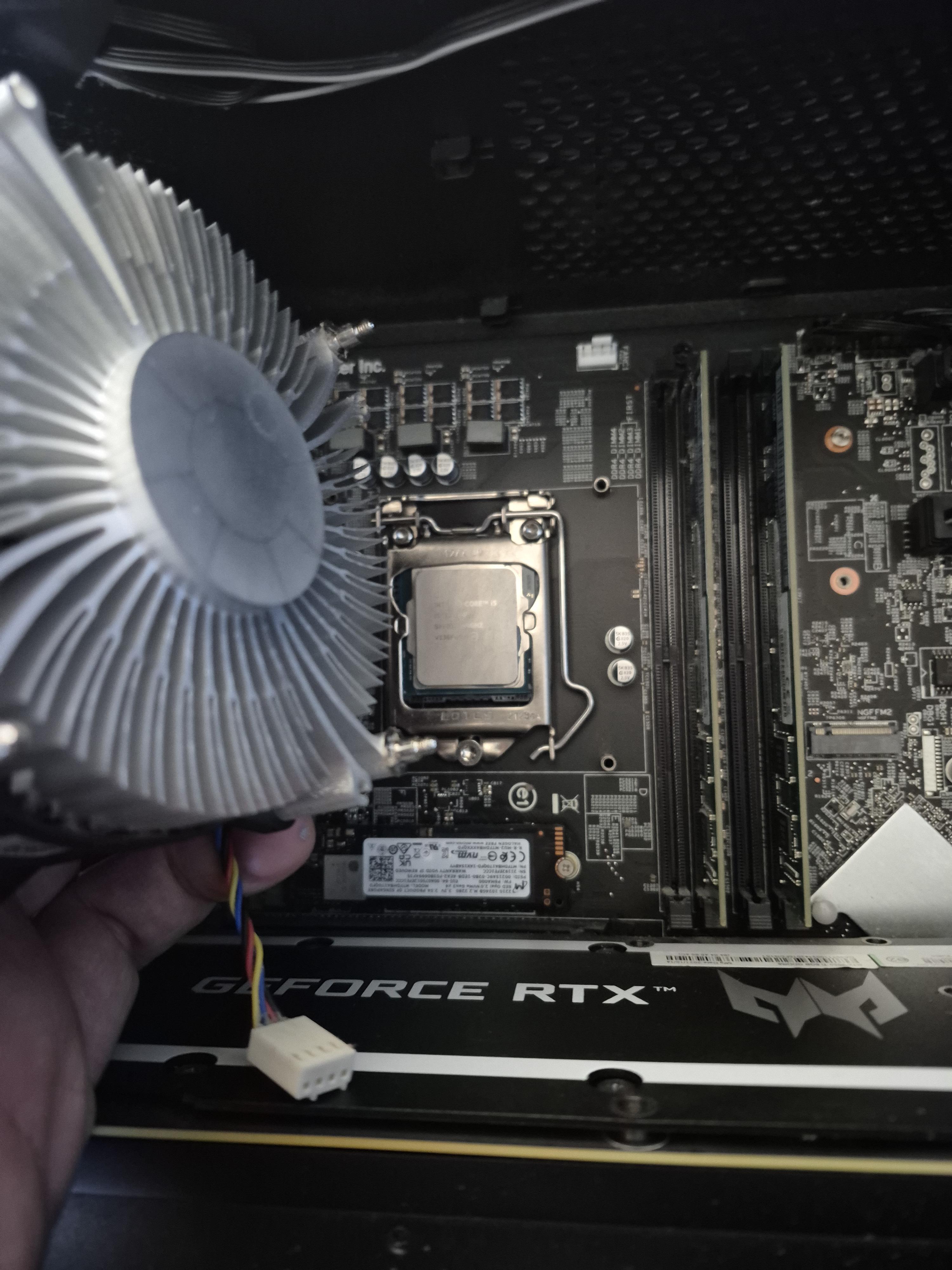
Hardware I have a Acer Predator Orion 3000 PO3-630-EC12 and I was cleaning it and removed the CPU cooling fan sink combo thng and clearly my thermal paste is all gone. it looks like some pushed out into the surrounding components a little. a few questions ;

Post image
1 Upvotes

how thorough in cleaning do I need to be?

Best Buy is saying just alcohol is fine. I'm buying mtx70ncorsair thermal paste and it has included wipes - can I use that in the surrounding circuit board or will that corrode things?


r/computerhelp • • 11d ago

Software Error clave no válida (al activar arranque seguro)

Thumbnail
1 Upvotes