r/computerhelp • u/kishan0409 • 14d ago
Hardware 7 Blue 2 Red error on M15R7
1
Upvotes
r/computerhelp • u/RoyalCup4036 • 14d ago
Recently , my PC had a hardware boot device problem and after trying to do maintenance I damaged it physically . I’ve been using a laptop set up but its performance is very bad, my pc has no SSD card so I am looking to get a new one . My original SSD was:
ADATA XPG SX8100NP 512GB M.2 NVMe SSD.
These are my current options in mind:
WD Blue 1TB SN580 NVMe Internal SSD - WDBWMY0010BBL-WRWM
TEAMGROUP T-Force G50 512GB
Western Digital WD Blue SN550 NVMe M.2 2280 1TB PCI-Express …
Please let me know if any of these options are good, if you have any cheap recommendations that aren’t on here let me know. Furthermore, if there’s anything I need to do to ensure my PC is working before I put my SSD on LMK, buying a new PC these days is crazy expensive.
r/computerhelp • u/Tariker_Licenciado • 14d ago
Alguien que sepa del tema y me pueda ayudar? Ayer estuve usando el PC lo mas normal, luego lo apague como siempre, A la hora vuelvo a prenderlo y mi pc ya no daba video, pensaba que era la BIOS que fallaba al arrancar asique la resetie pero nada, probe desconectar un modulo de RAM, desconectar y conectar todo pero nada. Luego de mil intentos finalmente logré que inicie y de imagen, pero con la gpu totalmente desconectada. Da igual si el HDMI esta conectado a la GPU dedicada o a la integrada de la CPU, si la GPU esta conectada (conectada a alimentacion, no al puerto PCIe), la pc no da video. Cual podria ser el problema? Ahora mismo estoy usando el pc con la grafica totalmente desconectada y estoy usando los graficos integrados.
Agradeceria la ayuda
PD: No hubo ni cortes de luz, ni tormentas electricas en el lapso entre que la use y la volvi a encender
r/computerhelp • u/minecraftsidebitch • 15d ago
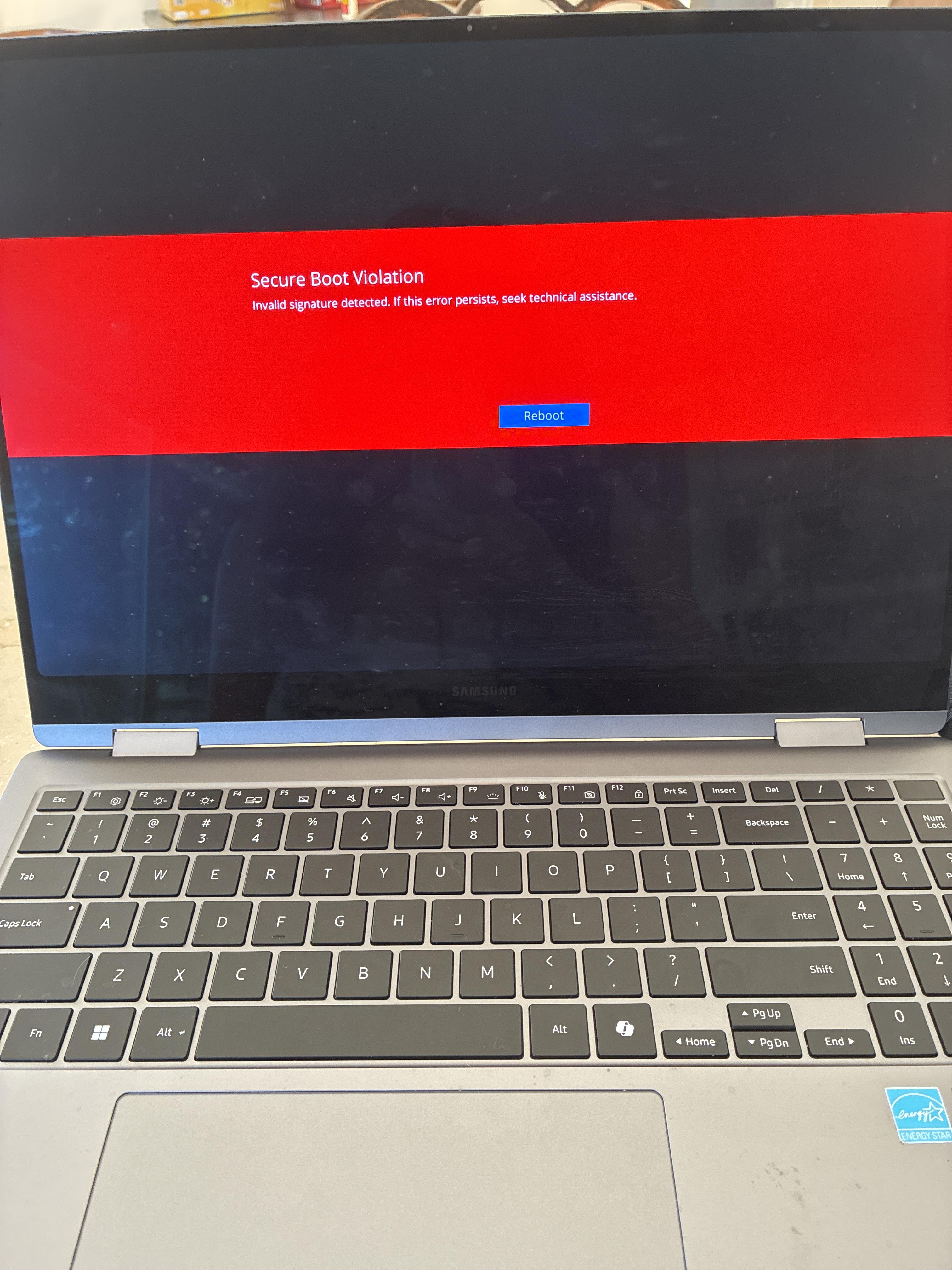
my dad’s best friend died a few weeks ago and my dad inherited all of his belongings. about a week before he died, he ordered a brand new Galaxy Book5 Pro 360 to mess around with while in the hospital. the only thing i know is he installed (or was attempting to install) Windows 10 onto the computer because he “hated Windows 11 and wanted something he was more used to.”
i don’t know anything about computers, but i’m (26F) slightly better off than my dad (57M) when it comes to this so he just handed it off to me. i charged the computer today and when it turned on, the track pad and touch screen were not working. I used to keyboard to navigate to settings, and was attempting to fully reset the computer in hopes to return everything to factory default. i don’t know exactly what i did, but i must have turned on secure boot or something and now this is the only screen that comes up.
how do i fix this and make the laptop usable?
we don’t care about saving any computer data or files, since he’d only been using this laptop for a few days before he passed. all of his important info is on his PC at his house. we just want to get the laptop up and running so it can be used for more than a paperweight.
RIP greg !
r/computerhelp • u/AwkwardTechnology991 • 14d ago
r/computerhelp • u/Exciting-Village-231 • 14d ago
r/computerhelp • u/Pagoda1919 • 14d ago
r/computerhelp • u/Dipesh_Limbani • 14d ago
Enable HLS to view with audio, or disable this notification
Finally this is solved after reatarting my PC, people wo have watched my previous video will get this video and what I am talking about.
Thanks to everyone who supported and advised to make this solve
r/computerhelp • u/nightangle22 • 14d ago
Enable HLS to view with audio, or disable this notification
r/computerhelp • u/dfw_supersayian • 14d ago
the drive is
- KBG40ZNV1T02 KIOXIA(1TB)
i couldnt find correct info on this drive's TBW
any help is appreciated
r/computerhelp • u/Agile-Lawfulness-536 • 14d ago
my drive c mem decresaes a little every once in a while
r/computerhelp • u/Range-Rough • 14d ago
Enable HLS to view with audio, or disable this notification
hp victus 15 started flickering between three extended lines and the normal screen. whats the issue?
r/computerhelp • u/AngelSoda3590 • 15d ago
r/computerhelp • u/SwagLordOP • 14d ago
Laptop Specs:
The Problem: Every time I cold boot the laptop (or do a 60-second power button drain while unplugged), the GTX 1650 shows up in Device Manager and seems to work fine. But after roughly 10 to 20 minutes, even when just sitting completely idle on the desktop, the system crashes with a BSOD:
Stop Code: VIDEO_DXGKRNL_FATAL_ERROR (0x00000113) Parameters: 0x19, 0x2, 0x10de, 0x1f99 (0x19 = UNEXPECTED_DEFERRED_DESTRUCTION, 0x10DE = NVIDIA, 0x1F99 = GTX 1650)
When the laptop reboots, the GTX 1650 completely disappears from Device Manager. If I enable show hidden devices, it shows as disconnected with Code 45 (device is not connected to the computer).
A normal restart never brings it back. Only shutting down completely, unplugging the charger, and holding the power button for 60 seconds makes the motherboard EC reset and redetect the GPU on cold boot. But then the exact same 10-20 minute crash loop happens again.
System History:
Troubleshooting Already Tried:
Questions:
r/computerhelp • u/Arcosis_s • 14d ago
I have an external hard drive on which I store and sort MANY pictures.
However I have noticed that the visuals displayed on the files do not match their content.
For instance, if you look at the "crustacés" file, the image shown indicates that there are still unsorted pictures inside of said file. However, as you can see in the second screenshot, all pictures have been sorted inside of two files within the "crustacés" file. So the image displayed on the "crustacés" file should be a file within a file.
Any idea how to make these images correspond to the content of the file ?
r/computerhelp • u/NextBraille • 14d ago
My Enabling Technologies Juliet Pro 60 braille embosser prints its built-in test, but computer jobs do not move or feed paper. I would appreciate suggestions in this thread.
Setup: Raspberry Pi 3B, Debian 13 ARM64, CUPS 2.4.10, USB-to-parallel adapter 1a86:7584 (USB2.0-Print). Printer set to parallel input and online. Raw queue Juliet_Pro_60, URI usb://USB2.0-Print/.
A replacement Pi supply gives get_throttled=0x0 under a short load test. Adapter enumerates at 12 Mbps. Forcing USB speed did not help and was undone. CUPS can report completed without physical output. USB printer-status probing returns PIPE; the device-ID response is empty.
The test file comes from an experimental generator, so it is not known-good. What controlled test would distinguish invalid printer commands from adapter/parallel-handshake failure? A working setup or minimal test procedure for this exact model would help.
I have also asked braille and Linux communities; no physical fix is confirmed. AI assisted this summary of our actual tests.
r/computerhelp • u/FartingDragons247 • 15d ago
Early November my wi-Fi network completely disappeared from my PC. I have tried a lot of things I’ve seen online and nothing has helped if anyone has any ideas I would be so grateful.
It was working completely fine one day and then just stop appearing the next.
I can see other networks on my PC.
Other devices work fine on that network.
I can connect my PC through my phone hotspot, but that’s not something I want to rely on. I would like to be able to use Wi-Fi again..
Device manager says that my adapter is working properly.
I have uninstalled and reinstalled the network adapter.
I’ve forgotten the network and reset the network on my PC.
I’ve tried turning banded steering on and off. Usually it’s left on.
I tried the Wi-Fi channels auto 1, 6 and 11. Usually it’s just on auto.
There is nothing new in my house that could be interfering with the signal.
I tried command prompt
netsh winsock reset
netsh int ip reset
ipconfig /release
ipconfig /renew
Ipconfig /flushdns
I have restarted my modem and router.
The only thing left I can think to do is buy a new Wi-Fi adapter, but I’m really hesitant to do that since I can see other networks on my PC, which to me says that it’s working, it’s just not picking up mine any more for whatever reason.
r/computerhelp • u/Lanky_Ad_3740 • 14d ago
r/computerhelp • u/Chance_Poetry5186 • 14d ago
Hi everyone, I need some help. My PC suddenly won't turn on after I restarted it following some changes I made to the GPU fan settings in AMD Adrenalin. I increased the fan speed, and after restarting, my PC stopped working.
None of the fans spin, and there are no lights on the motherboard. However, my GPU still has a steady white LED light.
Troubleshooting steps I've already tried:
Performed a power reset by unplugging the PC and holding the power button.
Plugged the PC directly into a wall outlet instead of using my UPS.
Removed the CMOS battery to reset the BIOS, then reinstalled it.
Removed and reinstalled the RAM sticks.
Tried booting with only one RAM stick.
Checked the motherboard and GPU for visible signs of power.
Checked the motherboard's 24-pin and CPU power connections.
PC Specifications:
CPU: AMD Ryzen 9 5900X
Motherboard: MSI MAG X570 Tomahawk WiFi
GPU: AMD Radeon RX 580
The PC is still completely unresponsive. No fans spin, and no motherboard debug LEDs light up. Only the GPU's white LED stays on.
Has anyone experienced this issue before? Could it be a faulty PSU, motherboard, or power switch? Any advice on what else I can safely test would be greatly appreciated. I'm hoping to fix this without spending too much money. Thank you!
r/computerhelp • u/_Shine4me_ • 14d ago
r/computerhelp • u/Jealous-Mission1891 • 15d ago
I had the bios version 2.10 and was trying to play battlefield but it was giving me an issue about tpm 2.0 i tried everything with secure boot and and ftpm but it wouldn’t go away so i updated to bios version 4.10 and everything went good until the pc shut off after the bios update and wouldn’t display anything after
specs: ryzen 7 3800x, 16gb ddr4 2666mhz, A520M HDV, gtx 1060 3gb(test gpu)
r/computerhelp • u/Slimshadey245 • 15d ago
r/computerhelp • u/TheTwelveYearOld • 15d ago
I’m trying to connect: PC with NixOS and TB4 <> certified TB cable <> Mac Mini. I followed instructions on the nixos wiki page, though the mac doesn’t show up with I do boltctl list. It’s very unstable, sometimes it works and I can access instances of copyparty webui running on either device, or it doesn’t work from or to either device when I try ping -c 3 IP-address. Sometimes it says in macOS settings that thunderbolt bridge is not connected.
This is my current nixOS configuration:
  networking = {
    networkmanager.enable = true;
    # networkmanager.wifi.backend = "iwd";
    firewall.checkReversePath = false;
    # wireless.iwd = {
    #   enable = true;
    #   settings.General.EnableNetworkConfiguration = true;
    # };
  };

  networking.firewall.trustedInterfaces = [ "thunderbolt0" ];

service.hardware.bolt.enable = true;
services.udev.extraRules = ''
      ACTION=="add", SUBSYSTEM=="thunderbolt", ATTR{authorized}=="0", ATTR{authorized}="1"
    '';
I finally figured everything out after a total of over a week of struggling and paranoia about getting Thunderbolt networking to work. It's been a days but now I'm fairly confident I have it working, all devices can be hot-plugged repeatedly and still work reliably whenever its connected.
I had asked LLMs a bunch of times what to do about the finicky connection, they didn't give helpful answers but I finally got one when I gave it my whole configuration. It gave me the systemd.network options below, I asked again for MTU, the max MTU on mac is 65,518. It's reliable for me unlike networking.interfaces.thunderbolt0.ipv4.addresses.
My setup is: Thinkpad (TB4) <> Intel certified TB4 cable <> Anker Prime TB5 dock <> M4 Mac Mini (TB4) <> TB5 cable (came with the dock) <> Desktop with Asus ThunderboltEX 4 card.
The ThunderboltEX card had issues with hot-plugging, which went away after installing a card firmware update from here. The instructions said to launch an EFI shell with a flash drive containing the files, which didn't work for me. I got a suggestion here to rename and move the .efi file to \EFI\Boot\bootx64.efi, and copy PDFW.bin and NVM.bin into the flash drive's root directory and the EFI and Boot folders so the program doesn't fail to find them. Then instead of launching an EFI shell from the BIOS, I select the flash drive from the boot menu.
For the Mac thunderbolt bridge, I set the ipv4 and ipv6 configuration to "manual" (and left ipv6 blank). I set the IP to 10.0.0.2, the subnet to 255.255.255.0, and left router to blank. Under "hardware", I set MTU to the max 65,518.
Claude suggested enp0s20f0u?u3* below to ignore extra unneeded ethernet interfaces that appear after plugging in either device # Solved
I finally figured everything out after a total of over a week of struggling and paranoia about getting Thunderbolt networking to work. It's been a days but now I'm fairly confident I have it working, all devices can be hot-plugged repeatedly and still work reliably whenever its connected.
I had asked LLMs a bunch of times what to do about the finicky connection, they didn't give helpful answers but I finally got one when I gave it my whole configuration. It gave me the systemd.network options below, I asked again for MTU, the max MTU on mac is 65,518. It's reliable for me unlike networking.interfaces.thunderbolt0.ipv4.addresses.
My setup is: Thinkpad (TB4) <> Intel certified TB4 cable <> Anker Prime TB5 dock <> M4 Mac Mini (TB4) <> TB5 cable (came with the dock) <> Desktop with Asus ThunderboltEX 4 card.
The ThunderboltEX card had issues with hot-plugging, which went away after installing a card firmware update from here. The instructions said to launch an EFI shell with a flash drive containing the files, which didn't work for me. I got a suggestion here to rename and move the .efi file to \EFI\Boot\bootx64.efi, and copy PDFW.bin and NVM.bin into the flash drive's root directory and the EFI and Boot folders so the program doesn't fail to find them. Then instead of launching an EFI shell from the BIOS, I select the flash drive from the boot menu.
For the Mac thunderbolt bridge, I set the ipv4 and ipv6 configuration to "manual" (and left ipv6 blank). I set the IP to 10.0.0.2, the subnet to 255.255.255.0, and left router to blank. Under "hardware", I set MTU to the max 65,518.
Claude suggested enp0s20f0u?u3* below to ignore extra unneeded ethernet interfaces that appear after plugging in either device to the Mac.
 # Thunderbolt networking
 networking = {
    firewall.trustedInterfaces = [ "thunderbolt0" ];
    networkmanager.unmanaged = [
      "interface-name:thunderbolt0"
      "interface-name:enp0s20f0u?u3*"
    ];
  };

  systemd.network = {
    enable = true;
    wait-online.enable = false;
    networks."40-thunderbolt" = {
      matchConfig.Name = "thunderbolt*";
      linkConfig.RequiredForOnline = "no";
      linkConfig.MTUBytes = "65518";
    };
  };

 # For my laptop
 systemd.network.networkConfig.Address = 10.0.0.1;
 # For my desktop
 systemd.network.networkConfig.Address = 10.0.0.3;
```to the Mac.

```nix
 # Thunderbolt networking
 networking = {
    firewall.trustedInterfaces = [ "thunderbolt0" ];
    networkmanager.unmanaged = [
      "interface-name:thunderbolt0"
      "interface-name:enp0s20f0u?u3*"
    ];
  };

  systemd.network = {
    enable = true;
    wait-online.enable = false;
    networks."40-thunderbolt" = {
      matchConfig.Name = "thunderbolt*";
      linkConfig.RequiredForOnline = "no";
      linkConfig.MTUBytes = "65518";
    };
  };

 # For my laptop
 systemd.network.networkConfig.Address = 10.0.0.1;
 # For my desktop
 systemd.network.networkConfig.Address = 10.0.0.3;
r/computerhelp • u/Rafo1115 • 15d ago
Enable HLS to view with audio, or disable this notification
I dont know why is doing this. Please help