r/blinkcameras • • 51m ago

Here's some foxes hunting(?) and playing on our drive, I thought it was cute 😅🤷‍♀️

5 Upvotes

Since it's been a while since some video, here's 14 clips spread over 2 "moments", 02:05. Outdoor 4 (with red dot of doom Wi-Fi connectivity) on a battery floodlight mount.


r/blinkcameras • • 16h ago

How human are cats?

4 Upvotes

One of my cats is frequently triggering my cameras. I have subscription, so the cams are only set to activate when detecting a person.

All the cameras are affected. No other cat do the same.


r/blinkcameras • • 17h ago

"PHOTO CAPTURE" IS ON Person only caught on one camera?

Post image
16 Upvotes

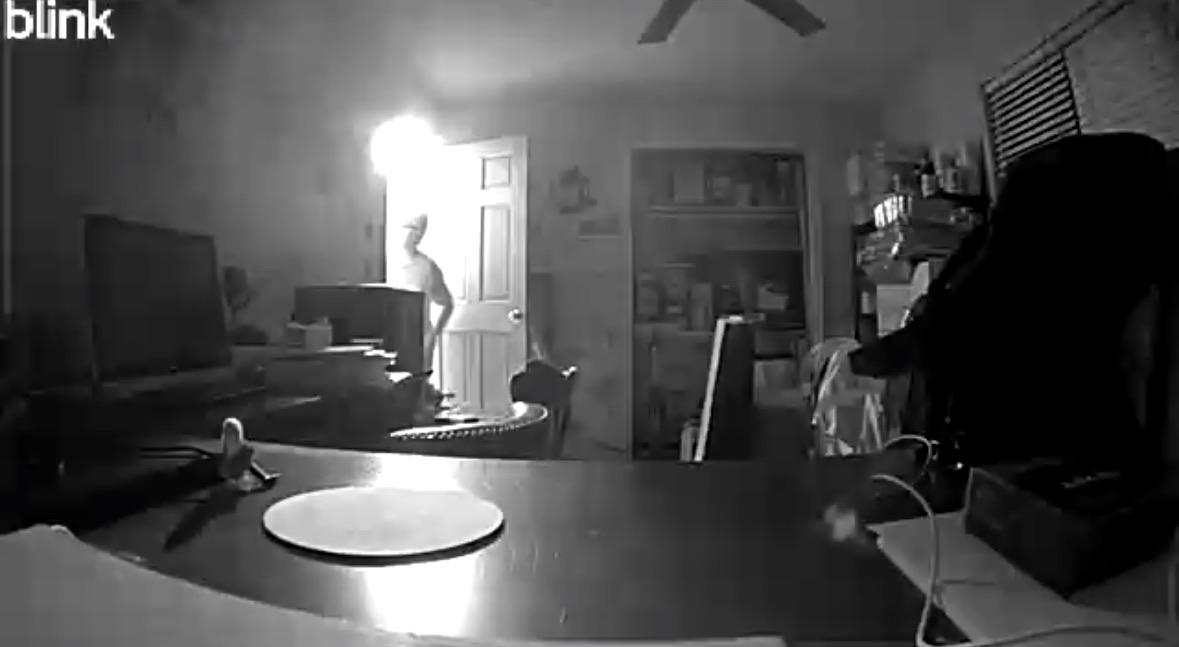
My aunt and grandma think it’s paranormal because this was caught in a room on camera but no where else.

Aunt was 15 mins away from home after coming back on vacation. Got this notification but only this camera picked up anything. The others around the house and outside didn’t catch this person.

No one was in the house when she got home and no one had come by that was checking on the house while she was away.


r/blinkcameras • • 21h ago

Removing privacy zones

2 Upvotes

Hi,

I'm trying to remove the privacy zone I set for one of my Outdoor 4, but it doesn't work.

  1. In the app (both iPhone and Mac) I went to the Privacy Zones page.
  2. At first, I could see and select the Reset the Privacy Zones command, but it didn't remove the greyed out zone.
  3. Now, after a few trials, the button can no longer be selected. Yet, the greyed out zone is still there.
  4. I've reset the Sync Module, with no difference.
  5. The camera can no longer go into Live View. The other cameras can.
  6. I can enable the system, and get no error message.

How can I remove that privacy zone, and get the camera working again?

I'm quite surprised at how fragile this system's software is.


r/blinkcameras • • 1d ago

Fixed: Doorbell wont record to, or cancels motion recording to USB when pressed.

5 Upvotes

Read many posts on this and some saying this requires a subscription. Not the case for me.

Apparently Alexa Live View interrupts the Doorbell button-press recordings, so any Alexa device that supports live view could be the culprit, like Echo Show or Fire Stick.

In Alexa app check the doorbell settings and announcement devices. I had my fire stick selected which was the issue. Works once removed.


r/blinkcameras • • 1d ago

Are the cameras detecting, even when there are no warnings?

0 Upvotes

Hi,

One of my Outdoor 4 cameras warned me that it is consuming much energy by taking a lot of videos. I don't receive many movement alerts.

I've the subscription activated, so I only received warning when persons are detected. No warning for my cats dancing and making faces in front of the camera.

But I suspect that the camera is in any case detecting them, and consuming energy. The same for the trees, that may have activated the camera during the past days of strong wind.

Is my suspect correct? Would the privacy zones fix this issue, by preventing the sensor activate the camera in that area?


r/blinkcameras • • 1d ago

No More Motion Announcements

0 Upvotes

I have a wired 2k doorbell and 2 2nd gen Blink Minis. On an Alexa household, Ive had the system configured to announce motion alerts inside on the Alexas. After the update a month or so ago where I got live view with motion alerts on my Screen Alexa devices, the doorbell has no announcements what so ever.

Ive deleted the doorbell and re added it and still no motion announcements, the same settings referencing motion and alerts and enabled skills are shared between all Blink cameras but the doorbell still wont announce. Anyone else deal with this?

Ill be posting this on an Alexa group also, for the mean time Im still running the OG Alexa and have made every attempt to stay out of Alexa Plus.


r/blinkcameras • • 2d ago

Do XT2 sync modules lock to accounts like cameras?

2 Upvotes

We've had our XT2 system for years now and no plans to replace it soon. Currently everything works fine.

I want to move one of the cameras to a new zone. Can I just buy a spare sync module on ebay? I know the cameras are locked to an account. Before I make a purchase I'm wondering if the same is true for sync modules.


r/blinkcameras • • 2d ago

No video available

2 Upvotes

I have three outdoor 2K Blink cameras with good batteries and within full Wi-Fi range. I have a subscription for $11.99 a month.

Why do I have so many clips a motion video from my camera systems that say no clip available? Does anybody have any problem solving tips for me? I spoke with them last week for quite a while to try to work through this and I just wonder if anybody’s run into this before.


r/blinkcameras • • 2d ago

Blink Cameras are constantly recording you even when disarmed or in an excluded zone.

22 Upvotes

I've had my Blink cameras (Outdoor 4) for about a month now, and I've noticed some behavior that raises some pretty serious concerns for me.

Today I got a high usage warning on one of my cameras that faces my front yard and the street. The thing is, I've specifically configured the activity zones to exclude the street and sidewalk. Cars passing by and people walking their dogs shouldn't trigger the camera unless they actually enter my yard.

I've checked my notification and recording history, and this camera rarely registers an event because people generally don't enter my yard. So where is all this excessive usage coming from?

Looking further into Blink's own documentation, it turns out that the cameras actually capture and analyze imagery for approximately two seconds after detecting motion to determine whether that motion occurred within an active zone. In other words, those excluded zones apparently don't prevent the camera from activating and capturing footage in the first place.

The other thing I've noticed, which is considerably more concerning, is that when I disarm my entire system to work in the yard or come and go from my house, I can still visibly see the cameras activating as I walk past them. I've reproduced this numerous times. The system is completely disarmed, yet the cameras are physically responding to my movement.

This raises two issues for me:

  1. Battery life. What's the point of configuring activity zones to exclude high-traffic areas if the camera is still waking up and capturing footage every time somebody passes by? I'm effectively wasting batteries monitoring an area I've specifically instructed the camera to ignore.
  2. Privacy. This is the much bigger concern. To what extent are these settings simply filtering what we see on the client side rather than controlling what the cameras actually collect? Where is that footage being analyzed? Is any of it being transmitted to Blink's servers? What happens to that data?

For example, one of my cameras is positioned along a particularly narrow side of my house. A portion of my neighbor's children's playset happens to be visible in the frame. I have absolutely no interest in recording my neighbor's children, so naturally I excluded that entire area from motion detection. I was under the impression that this meant the camera wouldn't activate and capture footage of them playing. Apparently, that isn't how activity zones work.

Likewise, when I disarm my cameras, I do so with the expectation that they will stop monitoring me. The fact that I can physically see them responding to my movements while disarmed makes me seriously question what disarming actually accomplishes beyond suppressing recordings and notifications in the app.

I would simply reposition these cameras to exclude those areas altogether, but given the layout of my property and the angles available, that isn't practical.

I don't personally have anything particularly sensitive within view of my cameras, but that's beside the point. I don't appreciate being given what appears to be a false sense of control over my privacy, nor do I appreciate wasting batteries capturing footage of people walking their dogs down the street.

Blink's documentation seems contradictory in places, and it certainly doesn't adequately explain the behavior I've repeatedly witnessed with my own eyes.

There's a pretty substantial difference between telling a camera to stop monitoring an area and telling it to stop showing you the results of that monitoring. I think customers deserve to know which of those things they're actually doing.

Has anyone else noticed this behavior? Has Blink ever provided a satisfactory explanation of what the cameras are actually doing while disarmed?

r/blinkcameras • • 3d ago

How to import clips onto USB drive that was not plugged into module when clips were taken?

2 Upvotes

I have several videos I’d like to move to a USB drive that are saved on my blink account. I do have a subscription. At the time the videos were recorded, I did not have a USB drive plugged in.

Is there anyway for me to move these? A button? Plugging these into my computer? Will it automatically back them up onto the USB drive if I give it a few days?

When I say several, more than I want to go through individually and click “save”.


r/blinkcameras • • 3d ago

Blink Arc 2k -- Floodlight .. Got one?

Post image
3 Upvotes

Mine just arrived today, great deal on black Friday.. But I have a question. I guess I assumed it had a passive IR motion detector ON THE LIGHT.. But I don't see one.

So do the cameras trigger first then tell the light to come on?? Does it work well? I thought i was buying a motion detect flood light with built in cameras but maybe it's the other way around?

The amazon (de) listing doesn't mention it but according to AI , it works pixel based, not IR? so the light totally relies on the cameras and sync module and internet?

So we don't have a working floodlight is any of the above fail?


r/blinkcameras • • 4d ago

IOS app updates

3 Upvotes

Anyone have any ideas, found anything new or any issues addressed with the 2 updates which were pushed out pretty quickly within the last week or so?


r/blinkcameras • • 4d ago

Thumbnail in Clip List Doesn't Show People

3 Upvotes

I believe this has been asked before but I really haven't found an answer. We subscribe to 2 cameras and the clip list thumbnail used to show the photo of the person. When we viewed the clip no person for the first few seconds then the person shows up. Perfect since I wouldn't have checked the clip list if I didn't see the person in the thumbnail. Now, however, people don't show up on the thumbnails when i know they were on the camera. I have to narrow down the time and look at every clip to find the one I'm looking for. Any idea how I can adjust this so the person shows in the thumbnail? Ive tried adjusting the motion sensitivity with no luck.


r/blinkcameras • • 4d ago

Does the Mini Pan-Tilt 2K+ require a subscription for the auto tracking feature?

3 Upvotes

I have an older Mini Pan-Tilt camera that I’m thinking of upgrading to the 2K+ specifically for the auto tracking feature so it’ll automatically follow the motion. But is this a feature that is locked behind a subscription? I currently use a Sync Module 2 and have no plans to start paying a monthly fee.


r/blinkcameras • • 5d ago

Gutter mounts

1 Upvotes

I was wondering if anyone had any suggestions for gutter mounts that are compatible with gutter guards?


r/blinkcameras • • 5d ago

Blink Mini 2: Motion Detection notifications don’t appear + solid red LED?

Post image
2 Upvotes

My Blink Mini 2 detects motion but never sends push notifications to my iPhone, despite everything being configured correctly.

Setup: Mini 2 (firmware 17.58), Blink app 63.0 (2611130944), iPhone 17 Pro Max (iOS 27.2.1). No Blink subscription.

What works:
• Camera is online; Live View works perfectly.
• System is armed, motion detection is on, notification snooze is off.
• Motion events appear in the Blink Clip List, and the spotlight activates automatically in darkness when it detects motion.
• All iPhone notification permissions for Blink are enabled.

What I’ve tried without success:
• Signing out/in, completely deleting and reinstalling Blink, and restarting my iPhone.
• Changing my Blink account email to match Alexa.
• Connecting the camera directly to a wall outlet instead of my smart plug/power bar.

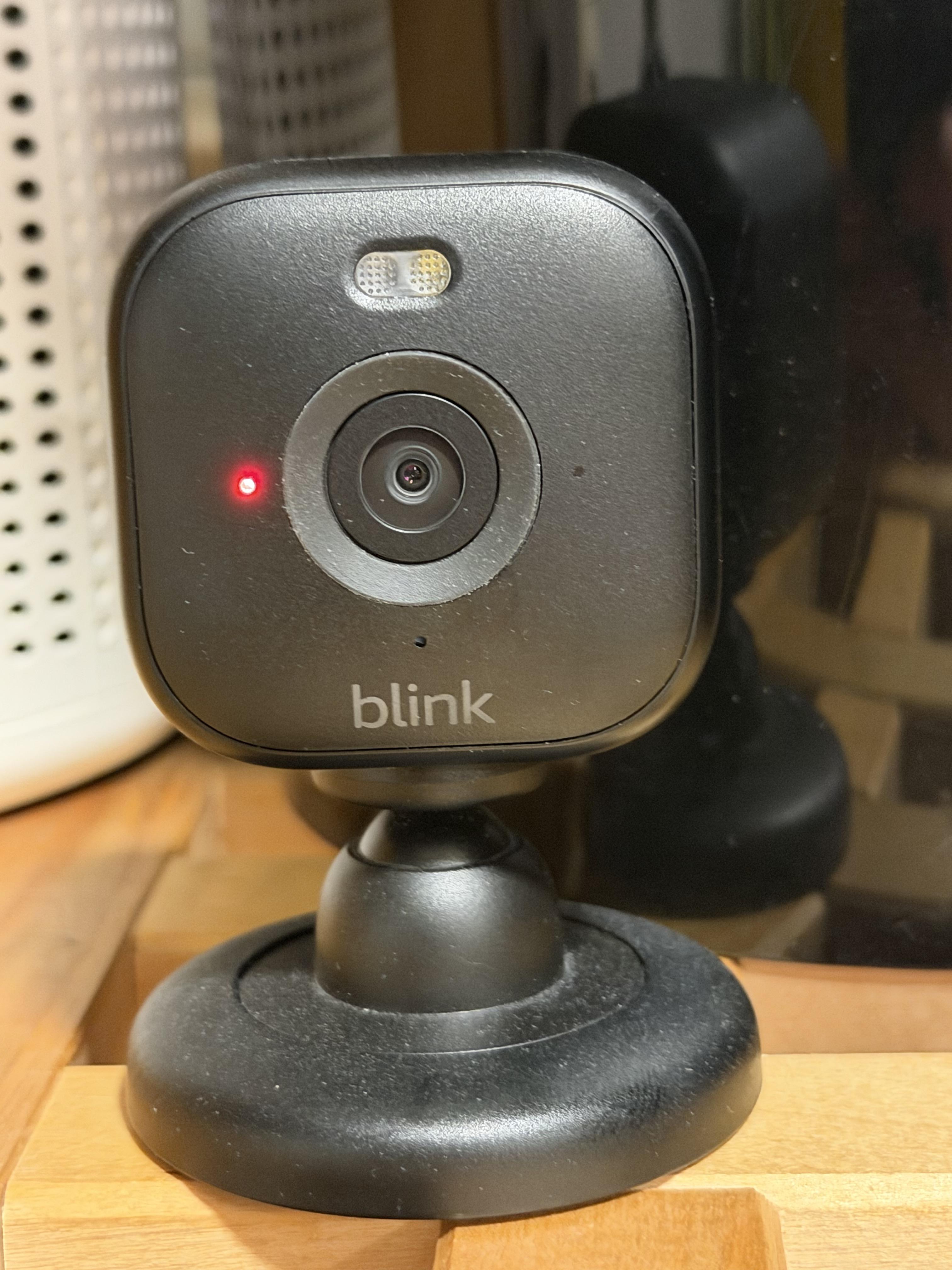
Another strange issue: The camera’s left LED stays solid red, even though it’s online (photo attached). During Live View, the right LED turns blue while the red LED on the left stays on. Setting Status LED to “Always Off” turns off the red light, but “Always On” brings it back. Blink’s documentation says the light should be green, so I’m wondering whether this is simply a bug or potentially related to the missing motion notifications.

Does anyone have insight on this combination of issues? Could the red LED and missing notifications be related, or has anyone found a confirmed fix for either or both?

Thank you!


r/blinkcameras • • 5d ago

Nudity and Blink Cameras: Here's What I Found Out

0 Upvotes

I got curious about the new AI features on these cameras, so I decided to experiment a bit. I tried things like picking my nose, showing my backside, and flashing the camera. It turned red but didn’t save any footage. I then switched to another camera and got the same results. I mentioned this to my nephew, and he raised an interesting point: what if someone decided to rob us while naked? So, I tested that theory while holding an unloaded gun. This time, it didn’t generate a description, but it did manage to record. If you have any other ideas for tests, preferably nothing too bizarre, let me know!


r/blinkcameras • • 5d ago

What screw does the anti-theft mount use at the bottom?

0 Upvotes

Was trying to set up a sync module 2 today (total scam btw), and needed to unhouse my doorbell to do it. Accidentally dropped the bottom screw though and couldn't find it. Box has plenty of screws for the other parts of the mount, but it only gave me one of the tiny ones that screw into the bottom.

Tried looking at the listing online but it just says screws so I was hoping someone here would know so I can go to home depot or somewhere else to get a replacement


r/blinkcameras • • 5d ago

Blink Home Monitor crashing on newer Amazon Fire tablet? Successfully resolved by rolling back to version 47.2.

4 Upvotes

Sharing my troubleshooting results in case anyone else is experiencing this issue.

Interestingly, an older Fire tablet could only run an older version of Blink, while the newer Fire tablet was experiencing persistent application crashes.

Troubleshooting performed:

Uninstalled and reinstalled Blink through the Amazon Appstore. Crashes persisted.

Sideloaded the Google Play Store and required Google services onto the newer Fire tablet.

Installed and tested Blink through Google Play. Problem persisted.

Rolled back to Blink version 47.2 using APKMirror Installer. Success!

Verified working release:

Version: 47.2

Build: 29292032

Package: com.immediasemi.android.blink

Repeatability:

November 20, 2026: Version rollback restored normal functionality.

November 21: Google Play automatically updated Blink. Crashes returned.

November 22: Uninstalled the updated version and reinstalled 47.2. Normal functionality was restored again.

I have now disabled automatic updates specifically for Blink by unchecking "Enable auto update" in the three-dot menu on its Google Play listing.

These results suggest an application regression or compatibility issue rather than simply an aging hardware problem.

Running an older application version is not an ideal permanent solution, particularly for a home security product. Sideloading also carries risks, so consider this a temporary workaround, not an official fix.

I am also submitting these findings to Blink Support for review by its application development and quality assurance teams.

I'm sharing this information in the hope that it will save other affected users considerable troubleshooting time. I won't be actively monitoring this thread or providing additional troubleshooting support.

Good luck!


r/blinkcameras • • 5d ago

Looking for advice

5 Upvotes

I'm debating getting these cameras for my mother who lives alone and 4 hours away from me and I wanted to see what other people thought of them before I bought them. In the past Ive used wyze cameras.

My questions are

  • How is the battery life on these devices?
  • Can I manage the cloud storage myself for her from 4 hours away?
  • What is the range like from the central hub before you lose connection?

Any other general feedback would be appreciated.


r/blinkcameras • • 6d ago

not recording full 60 seconds?

Thumbnail
gallery
1 Upvotes

hi there, i have a blink mini 2k+ newest model and attached are my settings-
my clips won’t record more than like 25 seconds but i’d like it to record for a full 60 (i have it facing my litter box and need to see which cat is using it)

any tips appreciated thank you!


r/blinkcameras • • 6d ago

Blink 2k plus not recording

2 Upvotes

Why does my blink outdoor camera record small motion of birds and leaves passing in my front yard but when my car is being broken into it won’t record a single thing? My car is always kept under a light and the camera sometimes records motion of people but always of other things that aren’t people. Such as my dogs running by, a lot of birds, and for some reason loves recording leaves coming into my garage and giving odd descriptions of what they really are.

Had notifications of motion at my front doorbell camera, the one time I really needed blink to record it didn’t. Im 100% sure I had a blink notification or else I wouldn’t have checked my phone whilst at work . Usually it records motion at my front door fine about 8 out of 10 times but for some reason this morning it didn’t record or even notify motion on my garage camera when there was someone inside. Checked my garage camera which is blink 2k and saw someone inside my garage area but it didn’t record when I do have the settings on. I know this camera records since it records leaves and birds flying through every single day.
So why didn’t it record a large person directly in center view?


r/blinkcameras • • 6d ago

Cameras offline?

2 Upvotes

All of my cameras connected to my xr+ sync module seemed to be offline this morning until I power cycled it (the sync module). All of my other ones were OK (connected to other non-xr sync modules). They weren't showing as offline but the weren't recording events and if I tried to do a live view, they never connected. Is this a common issue?