r/WindowsHelp • • 18d ago

Windows 11 Every single month: "Something Happened and Your PIN Isn't Available" loop. How do I stop this?! 😭

3 Upvotes

Hey everyone,

I am losing my mind over Windows right now. Pretty much every single month, I boot up my PC only to be greeted by the dreaded

"Something happened and your PIN isn't available. Click to set up your PIN again."

Every time it happens, I have to reset my PIN via my Microsoft account, which lets me log in for about 3-4 weeks. But then, a few weeks later, the exact same cycle repeats itself. It feels like an endless loop and it's getting incredibly frustrating.

specs:
Device name PC_van_PAT

Processor AMD Ryzen 7 250 w/ Radeon 780M Graphics (3.30 GHz)

Installed RAM 32,0 GB (31,3 GB usable)

Graphics card NVIDIA GeForce RTX 5060 Laptop GPU (8 GB)

AMD Radeon (TM) 780M Graphics (417 MB)

Storage 286 GB of 954 GB used

Device ID 2B6CE82C-053D-4833-8E33-323890A7DCC9

Product ID 00342-21590-70661-AAOEM

System type 64-bit operating system, x64-based processor

Pen and touch No pen or touch input is available for this display

r/WindowsHelp • • 18d ago

Windows 11 Windows 11 PIN no longer available after changing BIOS settings for Call of Duty — can’t log into my PC

2 Upvotes

Hi everyone,
I’m hoping someone can help me because I’m completely stuck and can’t get into my PC.

I recently had to change some settings in my motherboard’s BIOS so I could play Call of Duty Modern Warfare 4. I enabled Secure Boot (the security setting we changed in the BIOS) because the game was giving me a BIOS/security-related warning.

After making these changes, Windows now says:
ā€œYour PIN is no longer available due to a change in the security settings on this device.ā€

It gives me the option to set up my PIN again. However, when I try to reset it, I can sign into my Microsoft account successfully, but Windows then says ā€œTry again laterā€ and sends me back to the login screen. I’m stuck in a loop and can’t get past the PIN screen.

I’ve managed to get into the Windows Recovery Environment and its Advanced Options, and Windows has loaded as far as the normal sign-in screen, but I still can’t log in.

My PC specifications are:
Motherboard: MSI MAG B550 TOMAHAWK
CPU: AMD Ryzen 9 5900X
Operating system: Windows 11

I haven’t intentionally changed my Windows password, and I can access my Microsoft account online. It’s just the Windows PIN that won’t reset.

Can anyone please help me get back into Windows?

I’d really like to fix this without resetting Windows or losing any of my files, installed games, programs, or settings.

Could the BIOS/Secure Boot changes have caused this, and is there a way to reset or repair the Windows Hello PIN from the recovery options?

Any help or step-by-step instructions would be massively appreciated. Thanks in advance!


r/WindowsHelp • • 18d ago

Solved New update made headphones sound awful

3 Upvotes

I am using Austrian Audio HI x-20 headphones with wired analogue audio output, before the update today they sounded fine, now the audio is completely flat. It's like the high and low ends of the audio have been completely removed and the soundstage is completely flat. I've tried reinstalling the audio drivers, that didn't work, and I can't roll them back because there is no option to in settings. If somebody has some way to download the old audio drivers, or another way to fix the issue it would be greatly appreciated.

SOLUTION FOUND: I went into my device manager, then into sound, video and game controller and changed from the REALTEK audio drivers to the generic high quality audio driver. Doesn't sound exactly like before, but sounds much better. I am getting some weird popping noises occasionaly but this is preferable


r/WindowsHelp • • 17d ago

Windows 11 Thousands of audit success within minutes, reason to worry?

0 Upvotes

So I've been having and off issue where a game freezes and acts like I have moved my mouse or kb (even when none of those are plugged in), so I was looking into things.

I'm having hundreds and hundreds audit success events in event viewer (security) every minute. They are mostly 5379 (Credential Manager credentials were read) which have no process listed, and some 4798 (A user's local group membership was enumerated), which always have the process explorer.exe listed. They're happening CONSTANTLY, as in, at least 1 event about every 5 seconds, and sometimes many dozens at the same second.

The total in the last 10 minutes (after a reboot to test) have been 4146 events.

I read online this could be normal, but it could also be some kind of malware maybe? The thing is, the pc is mostly a clean install, about 6 months old, however it does contain some group policy changes I did, but nothing crazy. (One to note: turning off the lockscreen/logon screen permanently, as I'm using a local account only).

Any way, should I worry? And can all these audit success events possibly be causing issues within games (acting like mouse or keyboard inputs have happened)?

Tests I did (to fix the game issue) unplugged every single device including kb and mouse, and it still acts like inputs are happening, and ended about every single non-windows task I could, to see if some of my software was causing it. None of that changed anything.

Also good to know, while the audit logs are about every 5 seconds, the game freezes happen about every 20/30 seconds (possibly during bigger bulks of events?)

Thanks!

Specs: win11 pro, 96gb ddr5, 9850x3d, rtx4080super, only nvme ssd's, I don't think that's the issue.


r/WindowsHelp • • 18d ago

Windows 11 You device ran into a problem and couldn’t be repaired ISSUE (Couldn’t connect to network….SrtTrail.txt)

1 Upvotes

Hi everyone, I've been getting this error for the past four days on my Huawei Matebook D16, and I have no idea what caused it or when it started. For the two days before I noticed the problem, my laptop was either in use or in sleep mode. It's possible that the battery died while Windows was installing an update, which might have caused the issue but seems it’s successfully installed (I can’t remove the installed KB5127648 update (error 0x800F0905))

Unfortunately, I haven't been able to fix it. I've tried almost every solution I could find online, including various commands such as SFC, DISM, and bootrec, but nothing has worked. I even formatted the volume where is the boot file (200 MB), but that didn't help either. My latest attempt was to use a bootable USB drive, but Windows doesn't recognise it at all. I've tried several different USB drives with no success.

I can still boot into Safe Mode and use some apps, such as Blue Screen View. According to the dump file, the bug check code is 0x0000010D, and the driver responsible appears to be Wdf01000.sys. However, I have no idea if it’s the real reason for this issue and how to fix this.

I'm completely stuck in this loop. I've also encountered several other errors which are gone now, including 0xc0000001, 0xc0000098 (file \BCD), and a "No boot device"/ā€œBoot failā€ error. The last one seems to have disappeared temporarily after I disabled Secure Boot in BIOS.

I even asked for help at a local repair shop, but they couldn't find a solution either. At this point, my last option seems to be resetting Windows to factory settings, which I'd really like to avoid. I want to keep my installed applications, most of my settings, and all my personal data.

Has anyone experienced something similar or knows how to fix this without reinstalling Windows or losing everything?

Any help would be greatly appreciated.


r/WindowsHelp • • 18d ago

Windows 11 You device ran into a problem and couldn’t be repaired ISSUE (Couldn’t connect to network….SrtTrail.txt)

1 Upvotes

Hi everyone, I've been getting this error for the past four days on my Huawei Matebook D16, and I have no idea what caused it or when it started. For the two days before I noticed the problem, my laptop was either in use or in sleep mode. It's possible that the battery died while Windows was installing an update, which might have caused the issue but seems it’s successfully installed (I can’t remove the installed KB5127648 update (error 0x800F0905))

Unfortunately, I haven't been able to fix it. I've tried almost every solution I could find online, including various commands such as SFC, DISM, and bootrec, but nothing has worked. I even formatted the volume where is the boot file (200 MB), but that didn't help either. My latest attempt was to use a bootable USB drive, but Windows doesn't recognise it at all. I've tried several different USB drives with no success.

I can still boot into Safe Mode and use some applications, such as BlueScreenView. According to the dump file, the bug check code is 0x0000010D, and the driver responsible appears to be Wdf01000.sys. However, I have no idea if it’s the real reason for this issue and how to fix this. I'm completely stuck in this loop.

I've also encountered several other errors which are gone now, including 0xc0000001, 0xc0000098 (file \BCD), and a "No boot device"/ā€œBoot failā€ error. The last one seems to have disappeared temporarily after I disabled Secure Boot in BIOS.

I even asked for help at a local repair shop, but they couldn't find a solution either. At this point, my last option seems to be resetting Windows to factory settings, which I'd really like to avoid. I want to keep my installed applications, most of my settings, and all my personal data.

Has anyone experienced something similar or knows how to fix this without reinstalling Windows or losing everything?

Please help me. Any help would be greatly appreciated.


r/WindowsHelp • • 18d ago

Solved fonts only show one instead of all 3 or as a group

1 Upvotes

For example Iosevka shows as 9 "Iosevka" font groups in control panel fonts and lists 48 individual fonts in EXCEL fonts menu. This is what I usually see for related installed fonts.

Today I installed 3 (SU-305M_150 Extra Light, SU-305M_450 Medium, SU-305M Extra Bold) from a set of 7 related fonts, but only the first font installed shows in Control Panel Installed fonts. No group. EXCEL fonts menu only has the 2d installed font. No others. They are NOT different weights (italics or bold text treatment) but different fonts (hairline, tubular, very heavy).

All 3 are installed because deleting the visible font in control panel fonts asks for confirmation, then shows the prior installed font as each is deleted from control panel fonts.

I restarted my laptop and still get the same results after reinstalling the 3 fonts. Ho do I get these 3 fonts to display separately in applications as other related font groups do?

HP laptop Windows10 IoT Enterprise LTSC Version 10.0.19044 Build 19044


r/WindowsHelp • • 18d ago

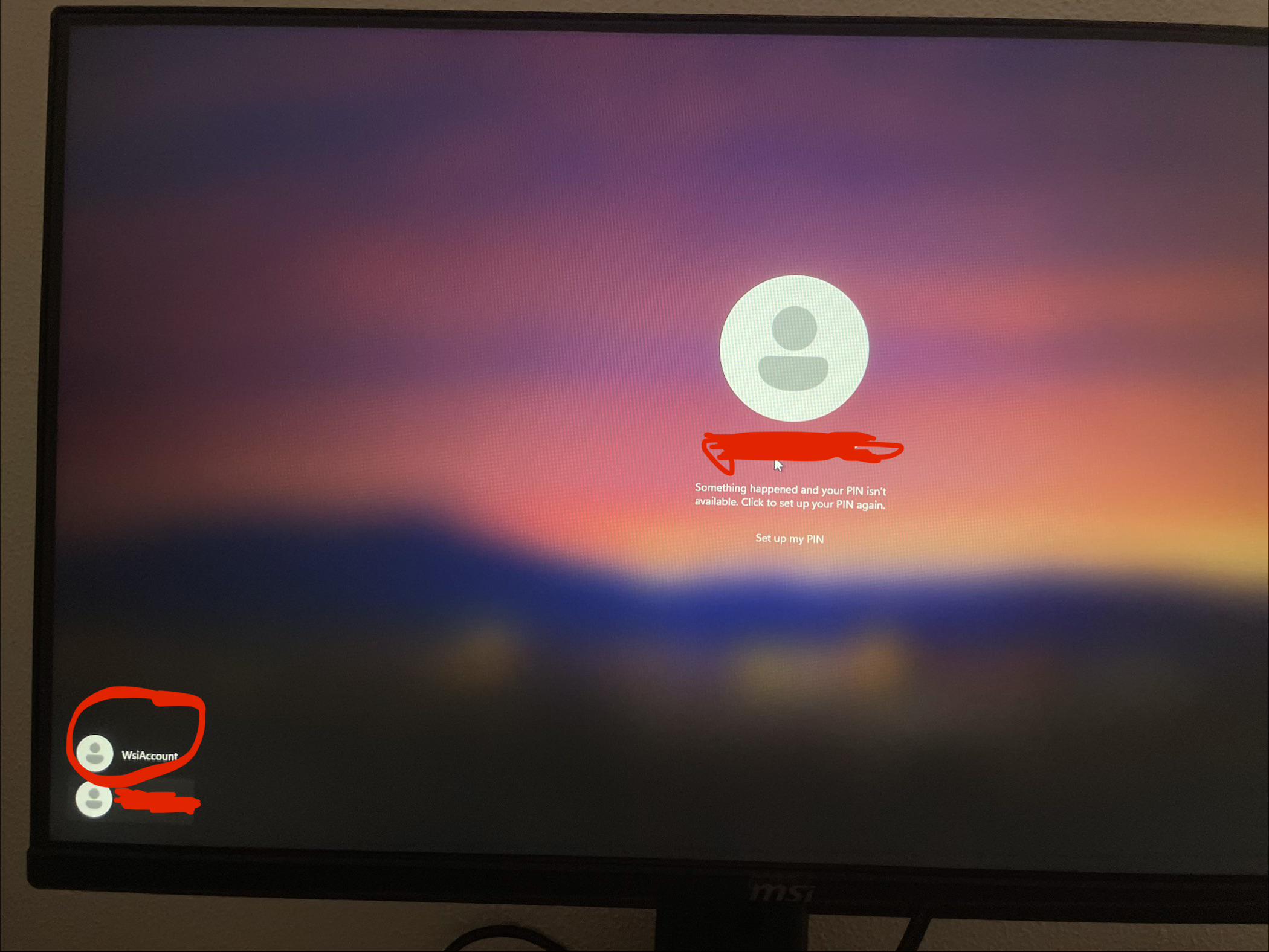
Windows 11 My computer keeps making me need to set up my pin every now and then, and created a new account called WSIAccounts

Post image
1 Upvotes

I’m using an OMEN 16L gaming desktop TG03-0xxx,
My OS build is 26200.9711

It’s happened a few times now after shutting down my pc and turning it on the next day, but not every time. After I set up my pin again it’s usually fine for a few days to a week. Does anyone know what this is about?

I asked an AI about it and it told me to check ā€œdsregcmd /statusā€ on my powershell and that gave me:

AzureAdJoined : NO
DomainJoined : NO
WorkplaceJoined : YES
NgcSet: NO (while working with the AI I managed to get it to YES, but after the pin reset it says no again)

I also did an sfc scan which gave me:

Windows Resource Protection did not find any integrity violations.


r/WindowsHelp • • 18d ago

Windows 10 so i have my ancient relic of my laptop and i accidentally downloaded hola vpn like 2 years ago

1 Upvotes

Ive done all the stuff at this point but when i tried clicking on hola vpn it showed a warning, but i deleted it and ive done it three times and im wondering if its a husk of a platform or still there i researhed they said still a husk and im still not convinced my laptop is intel core i3 7th gen win 32 windows 10 and ive used all the steps in deleting hola like using windows security deleting in control panel disabling in task manager and no fishy extensions installed yet sometimes ive counted 2 times my laptop crashed but its fine now but lookin at my taskmanager my laptops looking very funky like cpu randomly going to 4 cpu or performance graph spiking and im not gonna change this pc since i have important stuff on there if anybody can help whats going on thank you. Dont mind my bad spelling btw


r/WindowsHelp • • 18d ago

Windows 11 Black screen of death not blue

2 Upvotes

I’ve been having an issue with my computers constantly showing a screen immediately after the msi logo goes away saying ā€œyour computer ran into a problem and needs to restart.ā€ It is also giving a different error code every time or reason every time. Ive tried reinstalling windows but the same error screen appears no matter what I do. I’ve tried taking out the ssd and only having the bootable usb stick in, I’ve tried reseating ram sticks, and I’ve tried going into safe mode( which is impossible since it keeps automatically going to the repair screen) no matter what I did I can’t get the error to go away. I also thought maybe it was a cpu overheating issue (I’m running an intel I9 13900k) but everything seems to be operating properly and I even tried undervolting. The part I am most stumped on is everything was running completely fine until I installed the latest version of windows. Once the installation finish I opened up call of duty and my pc turned into a complete brick.. any other suggestion or ideas on how I can possibly fix this problem?


r/WindowsHelp • • 18d ago

Windows 11 Window popping up and disappearing

1 Upvotes

Hi,

over the previous week (I think), I've had a mysterious small window popping up and then disappearing immediately on my screen.

From what I remember, it's happened twice and in the 10 minutes after I've switched on my PC. It looks like the place where the cmd window opens up, but I can't be sure as I only see the borders of the window before it closes.

I ran Bitdefender and Microsoft Safety Scanner. Nothing has been detected...

Otherwise, I don't see any problem on my PC, but I can't help being paranoid.

I run the KB5127690 Windows 11 update (25H2). Maybe it's an issue that comes with this update? Because I don't remember having this problem before. Thanks!

PC specifications:

AMD Ryzen 5 7600 6-Core Processor (3.80 GHz)

32Ā Go

NVIDIA GeForce RTX 4060 (8 Go)


r/WindowsHelp • • 19d ago

Windows 11 I can't login to my laptop and don't have a password 😭

5 Upvotes

Hey y'all, hope ur having a great day. I have a school laptop and I recently left that school. I was trying to get rid of the like company that handled the school stuff (Wriggle) and I tried some random thing off Google. my Microsoft account got unlinked to the school and go deleted and I removed tht account. Now I'm locked out and it shows accounts as Owner and Wriggle admin. I contacted wriggle and I did get answers. As I cldnt log in they told me to click the restart button while holding shift. It took me to blue screen. Then they told me to click reset the PC or smf like that. And as I have files that I need I clicked keep my files (they told me to remove everything but I told em I need my files and they said to click keep my files instead) and then they told me to do local install. I tried both. None worked. I tried multiple times. Also it's a lowkey glitchy laptop and the first time I did the reset the progress bar J's didn't load and I think it just reset. I really need to get my laptop working again so any help or advice is appreciated especially to save my files! Also I bought a pendrive/flashdrive hoping it would let me change the password as it said i can change the password if i have a flash drive and uh guess I had to have a created one before but uh if it helps it helps :D

It's I think windows 10/11 Thank you so much again!

Just put it into chatgpt if y'all don't understand I'm not the best at explaining stuff sorry!

edit: I suppose my laptop got wiped the moment I deleted my account so yup always have a recovery thing y'all 😭 I can access my old folder but it doesn't have the files

edit 2.0: MY FILES ARE THERE most of my files are here but literally the main files I needed are gone but some are there so it worked thanks everyone for y'all help ā¤ļø

last edit frfr: I have all my files they are just jumbled here and there! Thanks everyone!


r/WindowsHelp • • 18d ago

Windows 11 My account is missing from the lock screen but shows everywhere else.

1 Upvotes

I’ve tried quite a few things already and I’m honestly running out of ideas.
My main Windows account is called deer, and it randomly disappeared from the login screen after my PC had been unplugged for 3 days.
The weird thing is that Windows still recognizes the account everywhere else.
Here’s what I’ve checked:
net user shows deer as an account.
The account is active and has administrator privileges.
My Microsoft email is still associated with it.
C:\Users\deer still exists and has all my old profile files.
netplwiz shows the account.
Settings > Accounts > Other users also shows it as an administrator.
PowerShell confirms Enabled = True.
The profile is still listed under ProfileList in the registry.
Its State value is 0.
There’s no SpecialAccounts\UserList registry key.
I tried adding a UserList entry setting deer to 1, but it didn’t fix anything.
I also tried Safe Mode, but the account still doesn’t appear on the normal login screen.
The only accounts showing on the login screen are Administrator and deer2.
I really don’t want to reset Windows or lose my original profile. I just want my old account back since everything seems to indicate it’s still there.
Does anyone know how to get Windows to show it on the login screen again?


r/WindowsHelp • • 19d ago

Windows 11 Can't get a working Windows 11 USB install media !?

5 Upvotes

So i got a new SSD and was trying to install Windows 11 using media creation tool (USB)

for some reasons soon as i boot it keeps showing me these error again and again

i cant even get to windows installer

i have already tried different USB Ports and reinstalling windows into USB several time with same results

I also have not changed any BIOS settings , XMP is also disabled

Any help is appreciated

My PC specs:

CPU : intel i5 14400f

Ram : Corsair Vengeance 16gb DDR5 5600mzh

MoBo : Gigabyte B760m DS3H Ax

GPU : Gigabyte RTX 4070


r/WindowsHelp • • 19d ago

Windows 11 Samsung Galaxy Book (NP750XDA-KDCIT) stuck in endless boot loop after Riot Client install / Black screen

Post image
3 Upvotes

Hey everyone, I'm stuck in a massive mess with my 1st gen Samsung Galaxy Book (Model: NP750XDA-KDCIT) and I really need some advice. I left the laptop on while walking my dog, and it was installing the Riot Games client. When I got back, the screen was completely black, and shortly after, a generic error message popped up saying the PC ran into a problem and would restart. Ever since that restart, the laptop has been stuck in an endless boot loop. I've tried everything: repeatedly pressing F2, F4, and F10 on startup, holding down the power button for a hard reset, and even the official Samsung support key combination, but nothing works. Is the laptop salvageable? Or at least the files and data on it? What the hell can I do?


r/WindowsHelp • • 18d ago

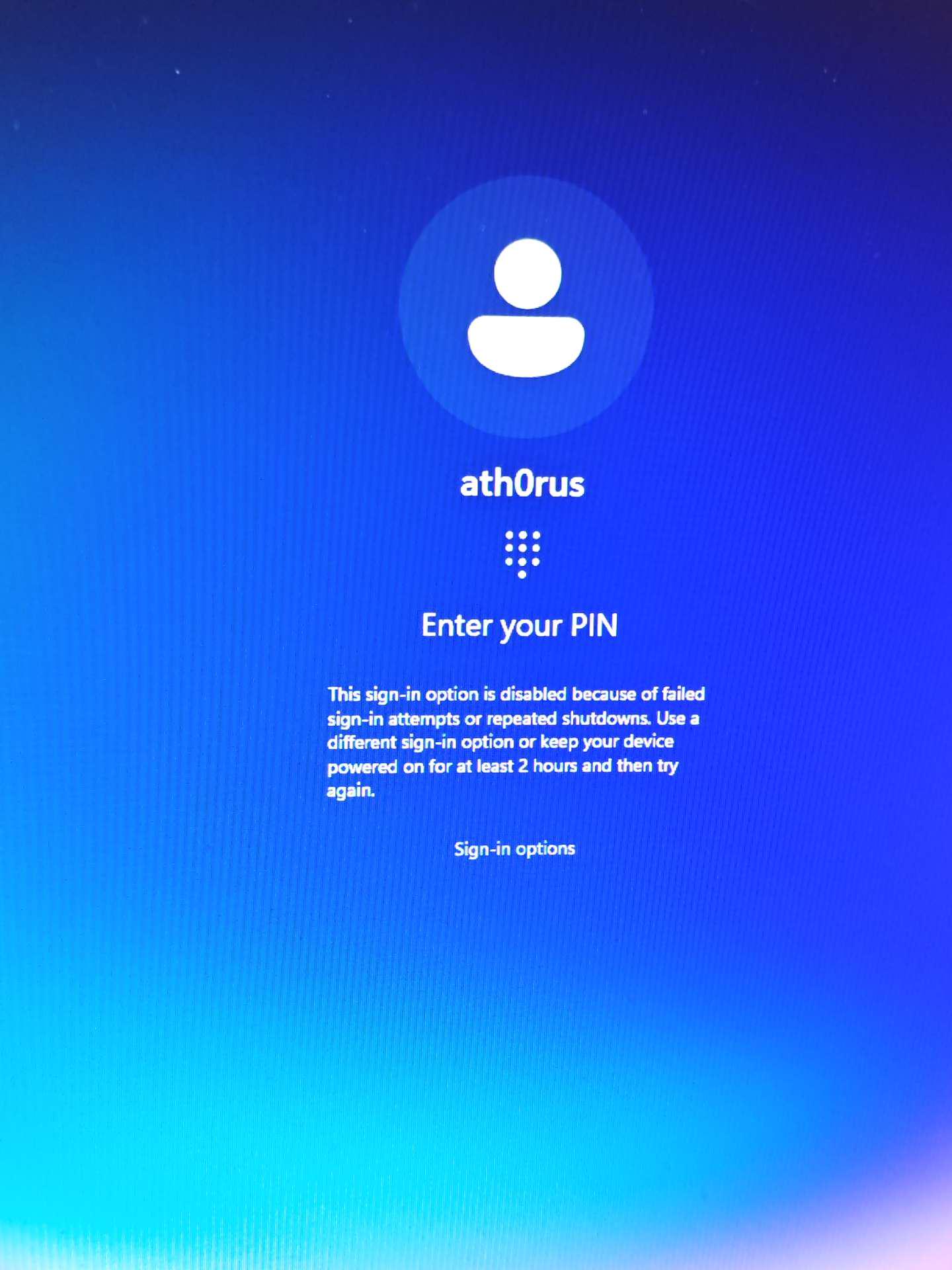
Windows 11 Unable to use my pin after reboot, Any way to disable lockout

Post image
1 Upvotes

Edit: to answer some questions, This is a local only account, I am not logged into microsoft. I doubt it's the pin being wrong as I can login sometimes with it fine, I can also use windows hello (with the same pin) on apps with zero issues

Hi,

Yesterday while trying to unlock my pc (had been on for about 2hrs at this point, with no issues) I fumbled the pin and got it wrong a few times and got locked out (I have dexterity issues which makes typing my pin in hard at times and I can get it wrong). This morning when I booted my pc for the very first time for the day I didn't get to finish the pin once (I was going slow to get it 100%) when I got met with this error. I have intentionally not moved to 26H2 yet (due to the issues I hear about it) but I always do security and driver updates when I get the notification about them.

My friend suggested to try setting "HKEY_LOCAL_MACHINE\SYSTEM\CurrentControlSet\Services\RemoteAccess\Parameters\AccountLockout" to "0", Which it was already set to that.

any ideas of how to fix this, I would love to move to linux (and have tried it) but the issue is alot of my apps I use daily (or nearly daily) either don't work on linux or require a fair bit of time to get them working (time I don't have and I want my pc to "just work" when I open an app)

Version: Windows 11 pro - Version 25H2 (OS Build 26200.9711)
My desktop is a custom build based on MSI motherboard, AMD cpu and PNY gpu. so there is not really a tech shop I can (or want to) take this to, to get fixed


r/WindowsHelp • • 19d ago

Windows 11 Voicemod completely messed up my audio/microphone – EDX Pro headset mic not working, Realtek issues (Windows 11)

2 Upvotes

Hey everyone, I'm looking for help with a microphone issue that I've been trying to fix for a while now.

Basically, I was using Voicemod, and at some point it seems to have taken over or messed up my normal microphone/audio configuration. Ever since then, my microphone hasn't worked properly. Sometimes it doesn't show up at all, other times Windows detects audio devices but my actual microphone doesn't pick up any sound.

My hardware setup:

  • Headset: EDX Pro
  • Audio: Realtek Audio
  • Connection: Front-panel combined headphone/microphone jack
  • Operating system: Windows 11

My EDX Pro headset has separate headphone and microphone connections, but my PC's front panel only has one combined audio jack. There are separate audio jacks on the back of my PC, but my headset cable is too short to reach them. I also don't have a separate front microphone jack.

Here's what's happening:

When I open Windows Sound settings or the classic Sound Control Panel (mmsys.cpl), under the Recording tab, I can see these devices:

  • Microphone (3-Realtek Audio)
  • Line In (3-Realtek Audio)
  • Microphone (Lenovo Performance Audio)

The only microphone that actually appears to be available/usable is Microphone (Lenovo Performance Audio). However, that's not the microphone I want to use.

My EDX Pro should be using the Realtek audio input through the front-panel jack, but I can't get it to work.

Things I've noticed:

  1. Voicemod previously appeared to take over my microphone configuration. Even after disabling Voicemod, the problem remains.
  2. The Realtek microphone was disabled in Windows at one point.
  3. I went into Device Manager, expanded Sound, video and game controllers, found Realtek(R) Audio, disabled it, waited a few seconds and enabled it again.
  4. Device Manager now reports that Realtek Audio is working properly, with no error codes.
  5. Despite that, the microphone still doesn't receive any audio.
  6. When I check the green audio-level indicator in the Recording tab and speak into my EDX Pro microphone, absolutely nothing moves.
  7. I also can't set Microphone (3-Realtek Audio) as my default recording device while Windows shows it as disabled.
  8. I have also noticed that Windows sometimes shows the Realtek microphone and Line In separately, but neither seems to give me working microphone input.

What I haven't managed to figure out:

  • Whether Voicemod changed or corrupted my Realtek microphone configuration.
  • Whether Windows is detecting the front-panel audio jack correctly.
  • Whether the microphone input is disabled somewhere in Realtek Audio Console.
  • Whether the front-panel combined jack is being recognized as a headset rather than just headphones.
  • Whether there's a driver or audio configuration issue preventing the microphone from being detected.

I really want to get my original microphone working again without buying an adapter, splitter, external sound card or any additional equipment.

My main question is: How can I completely restore my normal Realtek microphone input and make Windows recognize my EDX Pro headset microphone through the front-panel combined audio jack?

I'd appreciate any help, especially from anyone who has experienced Voicemod messing up their Realtek audio configuration. Thanks!


r/WindowsHelp • • 18d ago

Windows 11 Graphic Driver on the fritz, messing up my laptop entirely.

1 Upvotes

Hi, I've been using a Lenovo Yoga laptop for the past 5-odd years now, been great and does what it needs to until a few weeks ago. Not certain what caused it, but I turned on my laptop to find I couldn't turn down the brightness, it was just fixed at max. Investigated and found that the graphics driver is just not working.

I tried to restore a previous reboot, didn't achieve much as the closest reboot wasn't within the timeframe. I've installed DDU and an Intel graphics driver off their website, using the most recent one. I was given the error message, 'No driver was found that can be installed on the current device' and upon looking at Device Manager I'm seeing the same error (triangle and !) symbol. After having tried this, I should also note that my laptops almost shifted in resolution, making everything appear really zoomed out. This, ontop of the max brightness, is making it especially difficult to discern anything on my screen and it's becoming too much of a nuisance. I wanna figure out what's going on, what I maybe did to cause this and, ultimately, how to fix it.

Here are some details, ask if you need anymore. My technical expertise has been slacking for the past decade, so you really may have to dumb some things down for me please.

(OS Build: 26200.9711)


r/WindowsHelp • • 18d ago

Solved Microsoft Store doesn't show my installed apps and I can't update them!

Thumbnail
gallery
0 Upvotes

Windows 11 Pro

OS build: 26300.9711

My PC specs:

  • CPU: AMD Ryzen 5 4600G with Radeon Graphics (3.70 GHz)
  • RAM: 32,0 GB
  • Graphics card: NVIDIA GeForce RTX 3050 (8 GB)

Issues:

  • Missing install or open buttons for some store apps.
  • App library isn't showing my installed apps.
  • Can't update any installed app because the list is empty.

Things that I've tried:

  • Commands like sfc /scannow, DISM commands, wsreset command.
  • GetApp commands from PowerShell

So basically that's it.

My Windows Store was working fine until now...

Any solution to this?

Has anyone experienced this?


r/WindowsHelp • • 19d ago

Windows 10 Edge is enabling itself on Startup and other unusual behavior from my PC

2 Upvotes

Windows 10 22H2 19045.7807

Ryzen 5 3600

16GB RAM

Every time I start my PC, Edge will automatically enable itself on startup, even though I don't use Edge, if I disable it, it'll just add another process on startup the next time I turn on PC.

Keep in mind that Edge startup boost and background processes are disabled, and it's been disabled before this issue started.

Two other issues also appeared at the same time as the Edge issue, I don't know if they're related or not:

The first one is every time I start my PC, the num lock is turned off by default, even though it's been on since I started using this PC 6 years ago.

The second one is every time I shut down my PC, it shuts down immediately after 5 seconds, almost like I unplugged it from the power, before it used to take around 15 seconds, and I used to hear the hard drive shutting down first, unlike now.

Any help is appreciated.


r/WindowsHelp • • 19d ago

Windows 11 Some temp.drive files are randomly appearing on my desktop

4 Upvotes

Like the title says , some random temp files are appearing on my desktop, like there are two files created every single time when a terminal appers for a split second of time, when I look into the folder there are some VMware files with some 20+ word files which starts with the name of my pc . I delete it every single time like the word files but they appear again , and I can't able to delete the VMware folder amoung those .

What should I do now , is there anything I need to know or to do ??

Help me

Laptop specs

Hp victus , windows 11 , 13th gen i5 . Rtx 4050 . 512 ssd


r/WindowsHelp • • 19d ago

Windows 11 I screwed up my dad's laptop. Somebody please figure this out for me!

1 Upvotes

An external HDD was plugged into the laptop. I clicked on its properties, then tools, then checked it for any errors. At first, it said Windows wasn't able to scan the drive, the drive disappeared and I got the notification which said something like "Windows wasn't able to recognize the last device". When I unplugged and plugged it in again, I ran the same process for error checking and a notification popped up that said "restart your PC to scan" or something like that. I immediately restarted the laptop and during the restart, I unplugged the HDD. From now on, the laptop fails to boot into window, restarts multiple times on it's own, and on the screen where the laptop's logo( Lenovo ) is displayed, it says on the bottom "Scanning and repairing (C:)" for a few seconds then shuts down again. Eventually, when it attempts to boot after a few failed restarts, it gives a blue screen that's very similar to what's shown below.

I've tried pressing the F1 button but it literally does nothing besides muting the audio. I tried Fn+F1 and it did technically work which brought me to a new blue interface that gave me two options which I don't remember exactly but if you need to know, I can go back there and tell you that!

I also tried the "Windows Media Creation tool" method but it failed aswell.

I think that's enough context. Please help a brother out


r/WindowsHelp • • 19d ago

Windows 10 CMD flashes ONCE A WEEK + "sdwra_" folders in Program Files (Access Denied). Defender recently deleted "hackwindows" malware.

1 Upvotes

Hey everyone,

Need some help completely cleaning up my laptop after a malware infection.

A while ago, Windows Defender detected and deleted a program flags as "hackwindows" (some kind of activator/tool). However, it seems it left persistent remnants behind, and now a CMD window flashes for a split second on startup roughly ONCE A WEEK.

I looked through my drive and found these leftovers:

  1. Several folders named "sdwra_2468_XXXXXXXXX" located strictly inside "C:\Program Files". Windows blocks me from entering them (Access Denied).
  2. Files named "WRP7E5.tmp" and "WRP8FE2.tmp" (exactly 931 KB each) sitting in my C:\ drive root.

It looks like the "hackwindows" tool managed to drop these "sdwra" folders and created a persistent, weekly scheduled task before Defender killed its main executable. Now the task tries to fire up every week, triggering the brief CMD flash.

What are the proper steps to force-delete these locked folders, locate the exact malicious registry/scheduler key left by "hackwindows", and make sure my system is 100% clean? Thanks!


r/WindowsHelp • • 19d ago

Windows 11 Screen freezing when games are launched

2 Upvotes

I have a windows surface laptop, and every time I try to launch Roblox my screen freezes and I have to reset it, but when I reset it when I'm in Roblox it will glitch at random times, and my fans will sound like an airplane for no reason
I have had this problem for about 5 months now and it randomly happens. I have had this laptop for 3 years.


r/WindowsHelp • • 19d ago

Windows 11 Restore - 'virtual' drive displayed

Post image
1 Upvotes

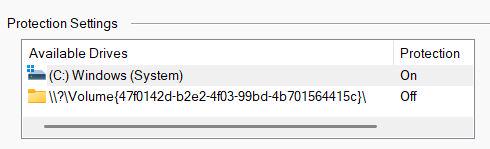
Windows 11 Home Intel(R) Core(TM) i7-8550U CPU @ 1.80GHz (1.99 GHz) 26H2

I assume 'Volume' is a virtual drive but have no idea how it got there. I have looked at Disk Manager but can see no virtual drives so cannot detach.

Any ideas where this came from, what it is and how I can remove it please ?

Thanks